After Effects New York

Just a reminder, I'll be presenting at the upcoming After Effects New York meeting Thursday, March 26. It's a free meeting and there are sure to be a few good tips and prizes... not sure about the tips though :)

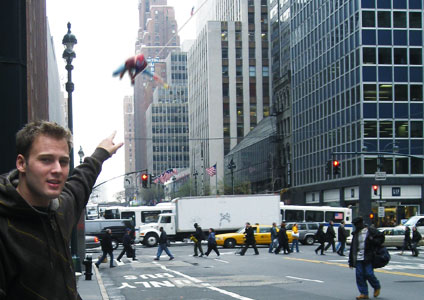
This is a picture from last years trip and this time I'm going to catch that guy and find out who he really is!

More Meeting Information

POSTED:
16 years ago
NEW TUTORIAL: Fracture Design

In this tutorial we will learn a fast method for fracturing a layer into multiple parts and distribute in 3D space. This 50 minute tutorial is also packed with all sorts of tips, tricks and a few stories too. I'll admit, I actually had a pretty good time making it :)

Watch Tutorial

As seen in these posts:
Another Test
Experimental Video

PROMOTIONAL NOTE: The music during the animation in this tutorial is a track from Pro Scores; one of the great DVD products available in our online store. Be sure to check them out and keep supporting the site. We'll keep making rockin' tutorials!

POSTED:
16 years ago
More Filming

I'm going out again today for one of the last days of shooting for Action Essentials 2. We are also planning a little short film with Sam to show off some of the impressive elements available. We will not being using any practical effects in the film but rather enhance it entirely in post with Action Essentials.

Now where's my bullet proof vest...

POSTED:
16 years ago
Action Essentials HD: Coming Soon

It has been a dangerous couple of months filming explosions and all sorts of action stock footage for the new Action Essentials 2 library. A release date will be set soon.

This collection is just FREAKING ridiculous! That's all there is to say for now.

High Resolution Poster

UPDATE: To answer a few general questions...

  • Over 90% of elements are live action shots, like explosions and blood etc.
  • 100% NEW Footage and Tutorials; NOT an upgrade or anything like that.
  • Yes there is some high speed stuff; I'll explain more later.
  • The Box is 3D rendered and just meant to be cool.
  • No cameramen died.
POSTED:
16 years ago
Consistent Color Correction

Using an adjustment layer is a great way to add color correction to all layers in a composition. But what if you have 10-20 or EVEN 23 shots that use the same color correction settings?

You could copy the adjustment layer to every composition, but what if you make changes to the color treatment throughout the project? You would have to copy the new settings again and again, plus make sure that every comp had the latest recipe.

But, what if you could use ONE layer to rule control them all?

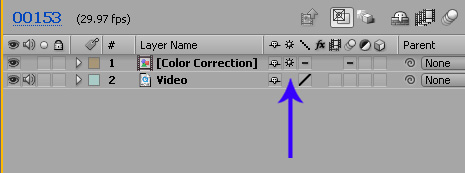
Here is a handy solution. Select your adjustment layer and pre-compose it into a NEW COMP, then inside of the current work comp, turn on the continuous rasterization switch (see image) for the new color correction comp. This will force the adjustment layer to interact with the layers below, just like before. Copy this color correction comp to your other shots for project-wide color continuity. Then when you need to change the color settings, simply open the comp and your adjustments will update in all comps.

Here is a sample project to see the setup.
Download Project

POSTED:
16 years ago