Consistent Color Correction

Using an adjustment layer is a great way to add color correction to all layers in a composition. But what if you have 10-20 or EVEN 23 shots that use the same color correction settings?

You could copy the adjustment layer to every composition, but what if you make changes to the color treatment throughout the project? You would have to copy the new settings again and again, plus make sure that every comp had the latest recipe.

But, what if you could use ONE layer to rule control them all?

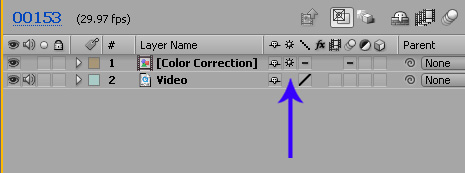
Here is a handy solution. Select your adjustment layer and pre-compose it into a NEW COMP, then inside of the current work comp, turn on the continuous rasterization switch (see image) for the new color correction comp. This will force the adjustment layer to interact with the layers below, just like before. Copy this color correction comp to your other shots for project-wide color continuity. Then when you need to change the color settings, simply open the comp and your adjustments will update in all comps.

Here is a sample project to see the setup.
Download Project

POSTED:
16 years ago
78 Comments
16 years ago
great tip!
16 years ago
I maybe missing the point, but atleast for my workflow, all my various comps/pre-comps end up being comped together into a "final master comp" which is just the one layer with everything comp'd into it. It's clean and efficent to me that way. Then you can toss the color correction over this master comp if you need an overall color correct.

My way makes one more comp, but it eliminates a layer to wonder about in the nth number of comps.
Kiwi
16 years ago
One layer to rule them all!!
Mukul
16 years ago
thnx andrew!
cool tip,you save valuable time.
David W.
16 years ago
Nice tip!
16 years ago
thx andrew...

cool tip...
Russ
16 years ago
It's little tips like this the save an enormous amount of valuable time.

Thanks.
Omar
16 years ago
ugh i like this methode, thx very much
Kai
16 years ago
oh....right.....
i knew that.
Great tip, andrew
ROb
16 years ago
Cheers! I'm just finishing off my first commercial project and then heard word of Broadcast Safe Colours!! This will be a life saver... Amazing work!!
16 years ago
Clever boy!! Thanks, Andrew!
16 years ago
Wow I wish I would have known this about 6 months ago for a project I was working on. Would have saved me quite a bit of stress. Thanks for the tip!
Jay
16 years ago
Very cool. I also experimented with placing a shape such as a feathered circle in the "Color Correction" precomp and keyframed it to cross the frame like a sun behind the clouds. Very handy to maintain continuity between shots.
bumblefidelity
16 years ago
You really are the king of the king, Andrew...
my master... my king... my true hero....
Andrew Kramer!!! I salute you...
aarrghh
Ryan
16 years ago
Ahhh...right i see what your getting at
Ryan
16 years ago
Hey, I have no idea what this is doing, can't you already do this with an adjustment layer?

Someone mind filling me in about whats different?
Johanan
16 years ago
Best tip ever!
Julian
16 years ago
Thanks! Been needing this, I've been doing it the long way, one layer to rule them all mwahahahahaha!
Haxn
16 years ago
smart...
Cor
16 years ago
tanks...you still rule
16 years ago
easy solution to big problem!!

great idea, cool stuff.
16 years ago
Nice... thanks man
Oscar
16 years ago
Thank you, good advice- looks like you have some fans here 8)
slashcr
16 years ago
El Maestro de Maestros ha hablado....
Matt
16 years ago
Amazing.. thanks again.. tutorial anytime soon? can't wait to much to handle.
16 years ago
thanks for the tip. can't wait to try it for my new movie.
Sandy
16 years ago
ur the only ONE AE-Genius
Thorsten M.
16 years ago
pretty cool
A1
16 years ago
Genius!
16 years ago
YES!
I am already using this in a project I am doing!!!!!
Thanks!
Frodo Baggins
16 years ago
Hahahah, one layer to rule them all, nice.
sam
16 years ago
u never stop rocking! do you?
16 years ago
Great Andrew!!! Thanks!
illd
16 years ago
Clever+smart.
Infaas
16 years ago
thanks for the insight AK but don't know if I'll ever use it
16 years ago
mmmh...very simple and useful advice ^^
Thanks!!
choroloco
16 years ago
great tip thx
16 years ago
thanks andrew
16 years ago
That's what I'm talking about...Andrew....we need more tricks like this on your blog not only one every week !!!
& Thanks for this one .
Andrei
16 years ago
Ha-ha! Neat idea!
nynex
16 years ago
Never thought about that thanks!
16 years ago
Oh, now I get it.

But I don't think it's a good idea to use the same values for different shots, I usually adjust them individually for each shot.
16 years ago
I'm sorry, but I don't see the point of this?
Joel Loukus
16 years ago
This is going to help, a lot.
Bilal
16 years ago
Thank You!
16 years ago
once again, thank you
Lyndon
16 years ago
once again, a very handy and straight forward tip that nails it. thank you drew
16 years ago
Great tip! Thanks man.
zuza
16 years ago
great tip!

Tnx A.K.
Clayton Light
16 years ago
Honestly, I'm not quite certain I understand. This might be an occasion for one of your quickie-style tuts.
Thanks
c
16 years ago
great tip! thanks, Andrew!
Charley
16 years ago
Good thinkin'.
AndrewYY
16 years ago
genius!
Tim
16 years ago
question: why are u the man andrew?
Patrick
16 years ago
Cool, i didnt know that, thanks a bunch..
weed
16 years ago
cool
16 years ago
Thanks for the tip. The grass always looked greener on the other side until now.
16 years ago
THanks, buddy!
I need this!
You good!
Yah!
Husse
16 years ago
Great little tip!
Pre Comps rock and so do you Andrew!
MELLE
16 years ago
nice....nice!Greetings from Germany....It's 8:46 pm here
16 years ago
It's the little things that make me happy! This is one of those priceless tips. Thanks again AK & VC....
Matt in MO.
16 years ago
duh! why didn't I think of that???
16 years ago
ok mr. dark Lord, it was bad enough you tried to rule all of middle earth with one ring, but now this?!
Jesse B.
16 years ago
Thanks Andrew, this is very useful and saves time
David W.
16 years ago
Sweeet! Thanks for the awesome tips.
16 years ago
Wasn't that clear? I allways knew it and used it quiet often... nothing exiting... old stuff
16 years ago
Good to know! Thanks for the tip.
Kael
16 years ago
I do so love these workflow tips. They always cause a "Why didn't I think of that??" smack-my-forehead feeling.
Sector13
16 years ago
lol, love the 'rule them all' part
16 years ago
Hey whens the new experimental video tutorial comin out?
Think that ones gonna be a hit personally. YOU DA MAN!!!!
BASSI3
16 years ago
yet another handy dandy trick! Thanks, this will definitely help.
16 years ago
thx Andrew!
U R the best
going to try!
David K.
16 years ago
thz for the tip Andrew.
Bobby
16 years ago
I've used this technique for several months now. Makes things a bit easier.
16 years ago
Andrew my man you never cease to amaze me.
Thanks for everything.

God Bless
JUSIDALU
16 years ago
thanks!! great advice!! I'm going to use it immediately
16 years ago
nice done is this an plugin or only an tip