So I finally watched wall-e and in the special features on the DVD menu the video had this looking 3D text transitions for different sections in the video.
AK did you do those for the DVD?
Peter
17 years ago
Andrw... it's great ! I love your tutorial styles... You're the best!
Fan from Poland.
Sanius
17 years ago
Great tut as usual!
I really love the tutorials but I never recreate the stuff myself because that's not the purpose of these tutorials...
I'm always annoyed when people use tutorials in their projects. If you're a true motion graphic designer, you can come up with something of your own. Use these tutorials as a way to learn techniques, not to copy someone esle's work in detail.
Watch the tutorials and look at HOW he does it, instead of WHAT he's creating.
NEVER browse for a tutorial based on what's being created, ALWAYS browse for how it's done.
Thanks for the awesome tutorials. My only complaint is now I have to buy 3ds Max. Are the people at Autodesk paying you??? They should be!
andy
18 years ago
why do you need a tutorial for this?
he showed you a tutorail for creating text in cinema4D. then he showed you a tutorial to track footage and import it in a 3D program.
you know already everything.
xyz.nicola
18 years ago
i would love a tutorial to create a 3d title that match a footage like the "keep clear" text in the above picture in cinema 4d. i've find that text really awsome. thanks a lot
Robert Kent
18 years ago
Do you plan to use Maya in any of your future tutorials?
sabeer
18 years ago
great tutorial. really great.
thank you very much
ilfz
18 years ago
hey kramer and the videoCo. fans -
I just wanted to follow up and show a small example of what Andrew said on the blog that if you think that "you donâ??????t want to learn about light sabers or slideshows, there is some great information in each tutorial that can be used in various creative ways" - he has a excellent point.
So I took tutorial 71 and mixed it with the beginning of tutorial 75 and basically do tutorial 71 in 3ds max. Confused yet? me too. check out the link
The steps are literally the same in blender. Terminology is a bit different. I do tracking with syntheyes ($399) and export to a python script to blender. From there you setup your scene almost exactly the same. It is more the concepts and techniques that are important. Blender is quite capable of this sort of work.
Thanks
Bobb
18 years ago
Whea did the VCP babe go to...you crashed her trying a bus his!
Stil da best man!
B
Anyone have any tips on what to do if your track slips or jitters at a few frames? I'm not to sure how to fix this and don't want to try another solve.
thanks............... beautify tutorial!!
but one thing. i think it will be nice if u spend some time to show us how ur texture were prepared from photoshop.
maybe integrating photoshop into ur tutorial will also benefit guys like us.
You are really good
Greetings from Yenagoa
Bayelsa State
Nigeria
Daniel
18 years ago
Just great,
to me that was the coolest tutorial so far.
looking forward to part 3.
yasique
18 years ago
Thank you, the truth is that it is not so easy when you perform in front of the computer. jjajaaj. Thank you
Alan
18 years ago
Just rewatched "The Movie". Anyone else notice that between cuts from medium shot to close-up of the cards that 4 of spades suddenly replaces the deuce (2) on the completed cards pile. As such Tina shouldn't need to touch that four again so why is it in his hand to be screwed up at the end????
This movie should have an imdb.com listing.
Legacy
18 years ago
Andrew - great tutorials. This last series has been awesome (as usual). I am currently tracking a couple shots for a commercial using PFTrack. I'm having a hell of a time with it because it is basically just tracking dirt. Do you know if Boujou handles that kind of stuff better than PFTrack? Cheers.
Legacy
Marco
18 years ago
Yes great great tutorial!!! but i'm mac user so i use Cinema 4D. Are you planning to convert these tuts for Cinema 4D?
Andrew, I agree with all the people in this blog, my sincere thanks, finally I can see the posibilities of after effects and translate my photoshop abilities to video. Im amazed at how you make this seem so easy, and I (and I guess, the rest of your public too) would like to see some of your profesional work, because if you can make things like this with such easy, i only guess what
can you do when you have to work for weeks in a proyect!!. I??´m sure it will inspire us, is there something in youtube or in other page where we could check??, thanks again.
It would probably be a good idea to show the use of an occlusion pass to be able to control shadow density on the ground.
Just a thought
davis master
18 years ago
Like always!!!...i feel more like a PADAWAN...Andrew "PALPATINE" Kramer, somebody notice...all the PUNISHER WAR ZONE work`s, looks like VIDEO COPILOT STUFF...(twich)
If you are not the best, definitely you are the greatest. I have combined boujou, 3DS Max, this tutorial with Reyfire and FumeFX and the result is drop dead awesome but still not as close as your work.
Greetings from Downtown L.A.
Squidfingers,
Framestore.
I would just like to apologize for not buying any of your bundles yet, but I have good reason....
I find it really difficult to understand the hordes of motion graphics "designers" on vimeo who are passing your work off as there own without even attempting to challenge the design and make it their own. Some mention your tutorials but most fail to even mention you at all.
How would you recommend I use what seem like great design enhancements while being able to make them my own?
Andrew...you are truly a GFX hall of famer in the making (you're still young...lol) no doubt ranked among the best in the world. Thank you for the contributions you've made to no doubt thousands of short films, student projects, commercial endeavors, and peoples epic masterpieces through the tutorials you share and the products you sell.
Tomas
18 years ago
Awsome Andrew
Regardings from Norway
VCP_FAN
18 years ago
@Jeddel
haha
u said that u r the #1 fan
and yet, andrew just uploaded this new tut and u r already asking when is next one gonna come out.
That's not being a fan
that's abusing andrew's kindness...
wowzer . been looking forward to your 3ds max stuff. thanks.
Jeddel
18 years ago
Hhhey this is great when will the next tut will be post in
i will want to you add some JOKES and it true!!
Your fan #1
Jedde
Lupus
18 years ago
Nice1
Samuel Lourcey
18 years ago
Sweet! looks great.
Larry
18 years ago
Hell yes! Cheers mate
ErvinTheGreat
18 years ago
Thanks man. It'd be interesting to combine the 3D tracking with some sort of model... like a mech or something. It's possible if you can model it or find one online.
i wondered if you did the 3d text in the new mise en scene shots on the program
i was aware you did credits
didnt think you did that tho would be cool if you did
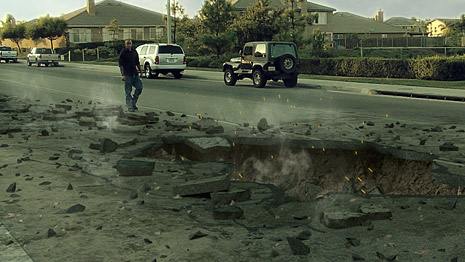
Well as usual I loved it, I think I'm going to make mine
by combining your 61. Growing 3D Vines "SEWER" as the bottom of my crater, because almost every street in California has a sewer beneath it
My only problem is I don't own a Camera to make the shot aim down in the crater
Warning: Simulated Violence
Topics Covered:
Upcoming Tutorial with Sam Loya
Behind the Scenes
Sam VS Sam
Will Sam get payback?
Video Copilot Hats!
UPDATE: The tutorial with Sam Loya will actually be online tomorrow so that our site doesn't explode!
Video Copilot Gear: Will be available from our store at the end of NOV.
 ALL DESIGN TOOLS


 me too. check out the link
 - or just some advanced 3d text tutorials in general!


