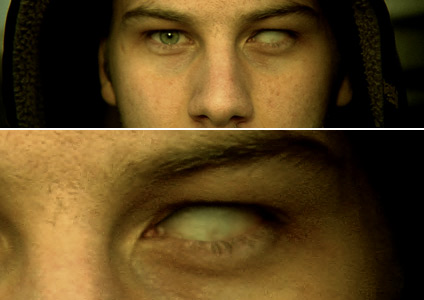
An Eye for a Guy

I'm finishing up a fun tutorial for creating some missing eyeballs. I'm sure you could also make the eyes black with this technique or even change the eye color. With a little work an empty eye socket might be possible as well.

Please don't beg or ask when it will be ready, that just slows down the process. If you are really desperate for this effect, get some sand paper and a mirror.

POSTED:
18 years ago
218 Comments
How hard would it be to motion-track a pupil? haha
17 years ago
very real!
17 years ago
@RjM: Not that i know of, but if its the only thing, just cap some test footage from WMM and import it into Premiere.
RjM
17 years ago
hmm, once again guys thanks for the help. i'm now scooping through the basics of Premiere Pro CS3 can i also make Premiere Pro capture from my webcam? (that's the only video device i have for now :S)

AK, sorry for the mess. :S

Waiting patiently for that tutorial we're ready when the tutorial is ready
Connor
17 years ago
Hi, thanks for all of your replies

I think I'll stick with premiere pro for now, and maybe have a look at Vegas or FCP in the near future....

regards,

connor.
17 years ago
You really helped me out, thanks bud
Morten Enoksen
17 years ago
GUUYYS! Why dont you open a forum and talk more about this, if you have to!
This post s about AK's video tutorial!

I can wait to see it Yes, I CAN wait
Bader Ahmed
17 years ago
COOOOl >>>>>>>>>>>>

Intensive eyes filled with fire


http://www.snowdrip.com/2007/12/intensive-eyes-photoshop/

psp with ae

Cheers
17 years ago
Cool, Cool, next time i get a DUI i know who to call JK
Alex Joyce
17 years ago
lol yeah i know AE is really but at editing film but is amazing for motion graphics... i seemed to get by with it but i dont plan on getting in the industry.. its just a hobby of mine... im actually studying to become a cop XD
17 years ago
I can't be leave what I'm reading. If you are even thinking about using After Effects for editing, you will NOT make it far in this industry. I would use windows movie maker before i even think about using after effects for editing (not saying i use WMM). After Effects is the best out there for what it dose. Motion graphics and visual effects, nothing more, and nothing less. Premiere is just the same, its NOT meant to do roto work or any type of effects (but it can if it has to). I would not even use Premiere for keying. But by far its one of the best editing programs i have ever seen.

-John
Alyster from ireland
17 years ago
You can hear audio in ae through ram preview. But ae is more for effects. I believe premiere and ae are the best combo. final cut is like a compilation of the two.
Brock
17 years ago
@ Connor:
I use avid adrenaline alot, its definitely a step up i would say from premiere or vegas,
I've also use final cut pro, i find final cut pro a bit more user friendly than avid, but it really all comes down to what the user prefers.
17 years ago
@ Connor :

Hold ctrl while moving the current time indicator about.

Hope that helps
Some Guy
17 years ago
[offtopic]

@ Steeve: After Effects is not a video editing software. It's for effects and motion graphic.

@ Connor: I think it depends on your taste. I worked with Vegas 4 and I think Premiere Pro is better, and I know a lot of guys who think the same. On the other hand I know a lot of guys who think Vegas is better than Premiere Pro. So, it's something you have to decide. I think that Vegas have a better sound tools/workflow and it's easier to beginners. But if it comes to After Effects, I think Premiere Pro is unbeatable. I never worked with Final Cut Pro, though.

PS: I think Vegas 8 is now available, so version 4 that I've used is really old (it was actually not Sony Vegas, but Sonic Vegas). But back then it was IMO way better, than the old Premiere 6.5...

[/offtopic]
Connor
17 years ago
I have used After Effects for editing before, but I found it wasn't very good. Not being able to hear audio without doing a RAM preview isn't ideal, and I just feel that (in my opinion) it is only good for visual effects work, not so much video editing/capturing.

That's why I got Premiere Pro, and I was just wondering if there was anything better

Thanks for the reply
17 years ago
Conner,
what about Adobe After Effects?
Connor
17 years ago
I was just reading through the comments and saw you guys talking about Premiere

I have Premiere Pro CS3 and although I think it's great and I can use it well, I was wondering if there is any better software for video editing out there.

I have heard about Vegas but never really looked in to it? Final Cut Pro? Once again, something I have heard it supposed to be good but never really done my research.

Thanks,

Connor.
17 years ago
If your talking about in premiere, you can too ad a MP3 to a track and just rotate the track around in the 5.1 tools to where ever you want it comming from. But its much better if you do your 5.1 work in audition. Much more controls.

-John
Migha CG
17 years ago
@ RjM
Well I've been working with premiere a while and I tell u without the dynamic link u just can't work that well, lots of rendring!
and about that 5.1 track. In order to put something in it u must have a "5.1 sound" u can't just put a usual .mp3 track in it. u can buy 5.1 tracks at sounddogs I think.. not sure!
Morten Enoksen
17 years ago
Damn, these comments are getting out of hand! From an empty-eye-tutorial to the workflow between Premiere and After Effects CS3!
RjM
17 years ago
@ WiRXMAN

I have dynamic link fully working, so i have better workflow there

i will check out Lynda.com, total training and CreativeCow (this is how i found videocopilot). thanks for the info guys

'bout that 5.1 track, any ideas?
Superbkriz
17 years ago
I am speechless at what you are giving us. Thank you so much Andrew.
Alex Joyce
17 years ago
this must be a desiel tutorial... i love waiting! XD lol keep up the good work Andrew your the man!
17 years ago
Also http://lynda.com has VERY good training. At only $25 a month (if i remember right).

-John
WiRXMAN
17 years ago
RjM, you can do some effects in Premiere yes. Depending on what you want to do though. Premiere is not set up like After Effects in that way, so it is limited if you are looking to rotoscope something or do some animated title graphics with layer blends and stuff. It just means that if you want the best of both worlds, you would probably want PremPro and AE.

And also, yes, you have to have Dynamic Link in order for the whole PreProAE work flow to work without having to render files in between. And, DynamicLink ONLY comes with the Production Studio CS2 / Production Premium CS3 packages and the Master Collection package, as those are the only packages for the video market as well.

Here is the link to the Adobe site listing the Creative Suite packages:

http://www.adobe.com/products/creativesuite/production/

I have used FCP while on a job and got to like it okay, but I prefer PC's over MAC's when editing as that is what I started on, and the feel of Premiere just works for me. Whatever you choose would work just fine. You can find sites for training all over the place through a Google search. TotalTraining has stuff you can buy to start off with. Just make sure they are reputable.
Alex Joyce
17 years ago
i might pick up premiere cs3 XD sounds really good to use.. thanks everyone you all prolly made my editing way faster and less cluttered
RjM
17 years ago
well, thanks guys, now i know what it really does

from what i picked up, i can capture a video, slice it to clips send a clip into AE for editing of VFX, bring it back (with dynamic link) to Premiere. right?

I've been snooping arround Premiere CS3 and i found some audio options, like editing sound in 5.1 channels, my problem is that i can setup the track, but i can't put anything in it :S

anyone know a good source for learning premiere? i've also read that i can do Special FX in premiere... that true?

thanks people

2 AK, how's work going so far?
17 years ago
NP man, if you need any help seting up a work flow just email me.

john AT jmmc DOT biz
Eddie
17 years ago
I might try that adobe audition program sounds interesting thanks john
17 years ago
maybe 12-21-2012 will be the day andrew reveals the main secret to his disciples.
we are all illuminati.


Damn.
I'm so sick.
STEVEN
17 years ago
Hey Dude!! Whats up with the disappearing act?? it been a year since your last tutorial!!
Alex Joyce
17 years ago
will all of this info i might try my premeire again.. sounds really good with AE and it was alot faster when i edited it but with my noobness i exported and opened instead of the whole saving thing
17 years ago
I have used Premiere Pro from version 1.5. I have tried many other apps out there including FCP, VideoWave pinnacle and so on. But non of them worked in my stream line work flow like Premiere Pro did. I can capture, edit, save, reopen in After Effects apply the effects, re save and export edited files. Re-open in Premiere export a MPEG-2 DVD file, open in Adobe Audition and edit my audio, do voice overs and then re-save the MEPG-2 Audio file and then burn to DVD with Encore or take it back into Premiere to export to tape. I have yet to see any other set of Apps that can work like that. If you can find them, let me know.

Your friend from JMMC,
John
Alex Joyce
17 years ago
I used to use premiere and i liked it but i didnt know you could open a project from it into AE lol... so i just used the worst video cut editing program... AE.. XD but o well i can cut film and stuff with AE pretty fast so i just use that.. never tried FCP
17 years ago
Tracking Control Data and make in photoshop an eye ;d and done hehe


Best
VFX Guy
17 years ago
Actually Premiere works way better with AE than FCP does. You can open a Premiere project directly in AE which means no exporting of seperate clips you want to effect. But it doesnt really matter both programs get the job done, I myself use FCP now. (with a cocagne accent) Its not what your usin', but how your usin' it.

Andrew how about a tutorial of a whale getting slapped right in the face???
VFX Guy
17 years ago
Actually Premiere works way better with AE than FCP does. You can open a Premiere project directly in AE which means no exporting of seperate clips you want to effect. But it doesnt really matter both programs get the job done, I myself use FCP now. (with a cocagne accent) Its not what your usin', but how your usin' it.

Andrew how about a tutorial of a whale getting slapped right in the face???
WiRXMAN
17 years ago
Premiere is a video editing program, After Effects is a Motion Graphics program, it is not listed as a video editing program. You can edit video in it, and many do, but its intent is not for that. It doesnt have the full functionality that a Premiere Pro of FCP would have, especially with audio. They are great together, but without either, you are limited imo.

Zach, I was unaware of any built in compatiblity with Final Cut Pro updating altered After Effects projects on the fly. Is this something new with the Intel versions of FCP and Adobe products? I thought you still had to use software such as AutomaticDuck or the likes in order to import After Effects files and Final Cut Pro files in each others apps, respectively. Am I wrong on this?
yonder
17 years ago
Its all matter of opinion. I personally like premiere cs3
17 years ago
Premiere sucks, I used it for years and knocked Final Cut pro almost everyday, until I finially used it. FCP is awesome. Plus anything you create in after effects and put into FCP, if you need to change anything, when you modify it in AE it automatically updates in FCP
yonder
17 years ago
RjM

whats up. Premiere is more for editing your video files as in cutting, slicing, and moving them around. After effects is for bringing some of those files in and adding visual effects/special effects to them. But to edit your entire movie you would want premiere.
Ahmed
17 years ago
@RjM Adobe Premiere Pro, formerly known as Adobe Premiere, is a real-time, timeline based video editing software application. It is part of the Adobe Creative Suite, a suite of graphic design, video editing, and web development applications made by Adobe Systems. visit http://en.wikipedia.org/wiki/Adobe_Premiere
RjM
17 years ago
@ HF_HeinzeFilms
So is after effects, what is it really for? what can we do there? i've visited the adobe site and still don't get it :S

thanks

AK, keep up the good work, that bridge tutorial should be almost done oh, and plz show us how to blend it with real live action footage
17 years ago
Premiere is a video editing program, more info on www.adobe.com
RjM
17 years ago
hi, there, a question just popped by my head. this has nothing to do with AE. I heard that Premiere is sometimes used with AE, what is Premiere for? Could anyone answer?
Boo
17 years ago
Looks really nice! could use this for making zompies with the face warp
17 years ago
Oh Thanks Guys,
i just had a few ideas how to do it better than before!
When im done i will share the results with you!
And yes how emberassing...im looking for Twitch
17 years ago
Oh Thanks Guys,
i just had a few ideas how to do it better than before!
When im done i will share the results with you!
And yes how emberassing...im looking for Twitch
Amano gingi
17 years ago
Hey ! Did you guys see the hitman movie ?
I just saw it, and I can tell you they use exactly the same technic as tutorial 49, "magic glass" !
It's pretty surprising when you know where it comes from xD
Some Guy
17 years ago
@ Philipp B.: How about CC Burn Film? I have already used it and it looks great. And the best part is it comes with After Effects. Good luck with your project!
17 years ago
Philipp B.

It's Twitch
I'm guessing soon. Maybe in february.
bE
17 years ago
Hey Andrew,

Can't wait for the new tutorial....I've learned so much from you, and I can't wait to learn more!

Also, I've been playing around with Evolution, and I'm loving it! When I have some practical examples to share, I will. I still use Riot Gear quite a bit, and I constantly find myself using Designer SFX alot, and I'm waiting for a project where I can use the Action Movie Essentials.

Riot Gear in action...If you check out the bonus features of the movie Stardust, I used Riot Gear to design some of the backgrounds used for the interviews. I wanted to use some of the explosion element in the intro graphic for "The Making of..." featurette, but the producer that it was a bit over the top, and I agreed.

Best wishes for you in the new year!

All the best,

bE
Garrison
17 years ago
And please help support Andrew and buy his products!
17 years ago
Yes waiting is fun
I??´m atm trying to simulate a film burn effect...as if the roll would break.
The Problem is i??´m not doing very fine till now
And my first DocumentaryFeature will have its release on the first of Feburary....
SO my quetion is: does any1 know when Stwitch come out finally??
This should be very helpfful....hopefully.

Thanks Andrew for your aspiring Tutorials&work!
17 years ago
If you guys need something to do while waiting, you can try to make the effect before watching the tutorial. And after the tutorial, you have learned a lot much more, than just watching it. And after you have watched it, you can post your methods, and compare them to Andrew's, who knows? maybe you got an better technique? and Andrew learns something? (would be fun...)

anyways, what I try to say here, try to be creative during the waiting time and "Waiting for something is half the fun" as Andrew said.
17 years ago
he is a man, and a man also need a vacations :p
17 years ago
Waiting for something is half the fun.
Steve
17 years ago
.....without a doubt. Just catchin' some needed sleep.
Alex Joyce
17 years ago
come on guys be patient it will all be worth it in the end he always comes through
jeroen
17 years ago
pls stop cryin, give Andrew some time ! did u see his beatiful wive and kid maybe he want to spend some with them
Tim
17 years ago
I played with a few eyeball replacement samples from Dosch Design

Here is a composite I came up with

http://www.timhull.com/temp/

(unfortunately you can still see some watermark) Animating the eyes in Max and importing into AE, then setting brightness, blending modes to match with masking shouldn't be too difficult. Just need to create a Look At constraint in Max...

From this collection:

http://www.doschdesign.de/e_product/indexsample.php?id=3

â??????Tim
Steve
17 years ago
.......agreed..........z-z-z-z-snore........................
Connor
17 years ago
Hi, heres just a quick suggestion:

How about making it 3D so you can actually rotate it around?
I'm not quite sure how to do it, but I am guessing CC Sphere would be involved?

Thanks.

Connor.
Morten Enoksen
17 years ago
Could this possibly be used to make a cyborg, with a type of laser-thing attached to the head?
Justin
17 years ago
Just when I was hoping desperately I'd be able to pull off doing it digitally instead of buying contacts, this gets mentioned. Awesome.
MGB
17 years ago
Will this technique work for performing home lasik surgery, like...you know...on yourself? This is the weirdest optometry blog I've ever been on.

Now that I got that out of my system...wondering if you have any kind of notification subscription system thingy when new tutorials or products are posted?

I'd like to SEE that (wink, wink...see...eye....).
Yeah, pretty dumb.
17 years ago
"We need a stunt double over here! There is some lenses that needs to be used"
They must feel really badass.
"What do you do for a living?"
"I am a stunt double in Hollywood, I have worked on movies like Xmen and such.."
"Wow, impressive, what stunts have you done?"
"Used contact lenses..."

Huge day at work :p
ye ye... really looking forward to the tutorial Andrew!
Eddie
17 years ago
Hey A K what about vains growing on the eyeball or somthing that would be cool.
Abe
17 years ago
Wow, real actors enduring pain for the sake of there job, that is really impressive. They may be able too add a stunt man title to their portfolio.
17 years ago
Interesting Read Some Guy.
Some Guy
17 years ago
@ Simon: Can you make a close-up transition from a normal eye to a white one with a fake eye? Or maybe an animation, where blood slowly covers your eye? Or make your fake eyes shine? I think/hope it will be possible with Andrew's technique.

PS: From the IMDb's trivia from the movie X-Men:
"Most of the eye effects were done by using special contact lenses that the actors found very uncomfortable to wear. Rebecca Romijn-Stamos (Mystique) could only wear her lenses for an hour at a time and had only 10% vision. Halle Berry (Storm) was supposed to wear opaque white lenses for the scenes where she uses her weather-control powers. However, she found the lenses unbearable, so her eye effects had to be done entirely through CGI."
"Tyler Mane kept the large black contact lenses in for too long one day and was blinded for a day and had to wear bandages."
Danny
17 years ago
...i wonder how you were able to write that message then :-\


^^

i think its enough now..we got enough "i took some sand paper"-jokes


gogo andrew kramer!!
Just Amit
17 years ago
i think i messed it up andrew, i can't see anymore... i tried with my other eye and now im completely blind... i knew i should have just waited for the video to come out
17 years ago
Hey you guys, i created my own tutorial for this one : http://www.youtube.com/watch?v=bYQwd4Es49I .
You dont HAVE to look, but perhaps its funny to see how i did it, and how Andrew will do it. (and improve it, because offcourse his technique is better)

I hope you are going to watch this (its in 2 parts)

-Maarten
17 years ago
@ Simon,

The advantage to this would be that the actor wouldn't have to wear a lense or contact. They can be very painful to wear.
Jacob Behunin
17 years ago
monostreet france
17 years ago
bonne annee 2008
et merci pour les tutoriaux
Simon
17 years ago
Looks cool!

However why not do in real? You can easily buy fake eyes and use them on set No??

I don't really see the added value here, sorry for being so negative but I am sure you will be able to contradict me here!

Love your tutorials Andrew!
Great Job
Happy new year
17 years ago
haha I already have a few sweet ideas I can do with this one!
Steve
17 years ago
.....still keeping an 'eye out' for this tutorial. lol
17 years ago
Danny,

lol, Andrew would get sued!
Danny
17 years ago
actually would be really funny if some guys really used some sand paper,rofl
christian
17 years ago
you should give him a scar on his eye like all the typical bad guys. thanks andrew your the best
christian
17 years ago
you should give him a scar on his eye like all the typical bad guys. thanks andrew your the best
christian
17 years ago
you should give him a scar on his eye like all the typical bad guys. thanks andrew your the best
Cm
17 years ago
Looks pretty good! Can't wait
Connor
17 years ago
I really can't wait for this one

I'm going to use it in my next film that I am working on, will be a nice image for my bad guy

Cheers, I know this is gonna be a good one

Happy new year!!!
Maarten
17 years ago
@ Joey

Thanks man! i feel honored!
I'm looking forward to the tutorial by the way.
Korean
17 years ago
I can't wait !!!!!
Korean
17 years ago
I can't wait !!!!!
17 years ago
HAPPY NEW YEAR 2008 !!!
bwoogie
17 years ago
Some blood vessels going through it would look interesting.
17 years ago
NICE, Maarten! That was pretty good for an improvised effect! If you can do THAT without a tutorial, then with it, it could possibly match up to Andrew's!......not never better then his!!!
Bolletje Bakfiets
17 years ago
Isn't this just something like the other tutorials with motion tracking? Not very innovative. I know it's a cool effect, but we can do this by watching the other tutorials.
slaven
17 years ago
bravo...

all the best for you and your family from bosnia. legendo
17 years ago
This is mine.
Looks good, not perfect (not perfect at all)
But hey, i tried, and the tutorial will explane my faults.

hope you like it.

-Maarten

http://www.youtube.com/watch?v=tM3gqK0QXgo
Wam
17 years ago
Wow!
I'm amazed: a french radio change its name (europe2 to virgin radio) they've made a teaser for it on their website, all the effects are exactly the same as "basics" with their logo (the same star...)

Watch the teaser
http://www.virginradio.fr/virginradio

And thanks for all what you do for us Andrew!
eebc
17 years ago
Happy New Yearâ???¦...Happy New Yearâ???¦........Happy New Yearâ???¦..........Happy New Yearâ???¦
Happy New Yearâ???¦..Happy New Yearâ???¦.........Happy New Yearâ???¦.Happy New Yearâ???¦
17 years ago
MAN YOU HAVENT MADE A TUTORIAL SINCE LAST YR .. DONT YOU THINK ITS TIME TO GET ON THE BALL HERE BUDDY =p END SARCASM
17 years ago
Happy New Year from Germany! Hope you can help us in 2008 Great tutorials!
17 years ago
Happy New Year...
17 years ago
Andrew Kramer I love you! I needed something exactly like this! Exactly! OMG! I've been trying to figure out how to make someone have all white eyes! This is completely amazing! I love you man! I love you I love you I love you! Like, I entirely love you man! Woah! Great timing! Man!
Titso
17 years ago
very nice. Been working on the same technique for some time
17 years ago
Happy New Year Everyone !!!
17 years ago
Woot! A new tutorial! Can't wait! I check your site every day for a new tutorial haha, hoping for one every day, and now I no longer have to wait! Looking forward to it!
Sura Shote
17 years ago
Hey, got a better and nicer result using sand paper, much more realistic except that I didnt get it perfectly on my first trial, and the 2nd trial,....u know how it goes, I just mange to horn the parameters, now I need a donor to perfect the skill and show u all, sand paper is the way to go. Remember brethens, real is always better than CG, ...yeah, practical effects ..........more sand paper to all.

Happy New Year.
STEVEN
17 years ago
A Happy New Year to all the Videocopilot crew who put together this terrific site and hope you have a prospectus year ahead.

Regards
from all your Fans from the U.K
they know who they are!!
17 years ago
happy new year full of blessings for video copilot and customers!!


new tutorial is cooming I guess,,,new year--new tutorial.....


VIVA MEXICO!!!
Jim Andrews
17 years ago
HAPPY NEW YEAR TO ALL!

And a Happy New "Creative Video Copilot 2008" to Come!

Peace & Love to you and yours on this New Years!
Bajistapro
17 years ago
Happy new year to all!
17 years ago
Jim Andrews, lol!

Happy new year to the copilot team and everyone else!!
Christel T-A
17 years ago
Looks great Andrew

Happy new year !!!
Alex T
17 years ago
Looks like its gonna be a great tutorial.

Happy new year everyone!

//Alex T
Jim Andrews
17 years ago
Plus I have "An Eye for a Guy" kinda thing

Sorry I just couldn't help it

Just Kidding HaHa
Jim Andrews
17 years ago
@ Helge Kallevik

Nope!
That is Tino Hertz,

I can spot his UniBrow a mile away

Just kidding Tino, We love your Brow!
Matt in MO.
17 years ago
"Please donâ??????t beg or ask when it will be ready, that just slows down the process. If you are really desperate for this effect, get some sand paper and a mirror."

Thank you for commenting on what has flooded the comment section on previous previews for other tutorials. Shame you had to say it and people couldn't just assume you have a life outside of VC. haha

Great work Andrew and I'm looking forward to it as I have in the past.
17 years ago
You make me puke. In a good way.
Stefan
17 years ago
I want to wish you happy new year!! A lot of luck, love and great moments with your family and friends in the new year!
17 years ago
Drivordie,

no. I'm guessing it's Bobby.
Drivordie
18 years ago
Hey it's you in the video !? no ?
18 years ago
Nice.....

Sandpaper doesn't work, believe me, i've tried....


AHHHHHH !!!!


I'm okay...
Minilem
18 years ago
ANDREW I LOVE YOU!!! I WANT THIS EFFECT SO BAD!
Take Your Time Though =]
XXX!!!
Ahah
Peace Out
knakrz
18 years ago
I wasn't going to comment as my words would've been fruitless, but Aharon Rabinowitznpieces is hanging around, so to You AK, VCP and AR, I tip my hat. You guys give so much in a world of want!

cheers
Morten Enoksen
18 years ago
Oh, and I'll bet you can use that method to make a cyborg eye to!
Morten Enoksen
18 years ago
My name is Morten Enoksen, and here in Scandinavia the clock is 13:39 Im writing this:

Andrew, I bet you track the eye, then put a texture on top of it, feathering out the edges, and color correting!

When the tutorial arrives, we'll se if im right The clock is now 13:40
18 years ago
Wow!
Plain
*A W E S O M E* !!!!
I am definetly looking forward to this one!

Hm, i think one could even use it to do some funky stuff like animated contactlenses with this!!!

Or some cyberpunk-stuff, like a programcode scrolling through the eyes....

YAY!

[METAL] Playz Air-Guitar [/METAL]
fuad miftari
18 years ago
Awesome! cant wait to see it!
Crest
18 years ago
"If you are really desperate for this effect, get some sand paper and a mirror."


OOUUCHH! Well it looks really awesome! Can't wait to see your technique.
Ola
18 years ago
Hi, Looks cool, keep going like this


Greats from holland.
18 years ago
I'm sewing! My eye, it buuuuurrrrnnnnss!!!
napoleon ram
18 years ago
you r my GURU for AE
Thanks for everything u put in this site
HAPPY NEW YEAR TO U & UR FAMILY ........Andrew.

ram napoleon, INDIA.
Fabrizio
18 years ago
Incredible!!!
Thanks for the great effort.
Jasper
18 years ago
Wow! Looks absolutely great! I think this could work great combined with the Demon look. I'm looking forward to it!!

Tnx, Jasper
18 years ago
Good evening,

doesnt seem too bad, i have a preety good idea how that could be done, but i am waiting for the tutorial for the tips and tricks part, utilitizing it all
Coldfsuion
18 years ago
Im looking forward to this one Looks really nice.
Keep up the nice work ^^
Bollyn
18 years ago
Cool
Ratfish67
18 years ago
Hey Andrew!

Amazing effects man. I wish I was as good at After Effects as I am Photoshop. I think I have come to the right place to hone my skills!

Thanks, Ratfish67
jaaaaaaaay
18 years ago
wowzers, zombie madness
18 years ago
Hi Andrew, this is an nice idea...so many ways to use it.
It is possible to make an amination with that technic to
transform an normal eye to that missing eyeball?
or do that with an cateye...or so on...i have so much ideas

waiting for the tutorial....


Note:
My christmas gift: Adobe Production Premium CS3 !!! *YES SIR*
So i can use all the new features about the Adobe Software and AE CS3 !!!
Many thanks to my Wife!!!!

your
HIStory (ArtOfDesign - Germany)
18 years ago
I look forward to seeing this one. I already know how its done but i love watching other peoples' techniques
18 years ago
I look forward to doing this one. I already know how its done but i love watching other peoples' techniques
Luke
18 years ago
I can do this in real life!! just look up and keep practicing and eventually your eyes go totally white.

just thought i'd share that with everyone..
randy
18 years ago
What kind of sand paper do you recommend???? I tried 30 grit and so far it hasnt done the effect I wanted.....Thanks alot.....hahah I hope you have fun making this one
18 years ago
Wow. I looked just like that after drinking some eggnog my friend had been brewing for the last few weeks. Serious business.

Looking forward to this one.
Korean
18 years ago
I'm very looking forward to this great Tutorial!
Thanks for Andrew

-From koera-
bruno
18 years ago
looks great, keep them good as always
Ryan
18 years ago
Awesome, I'll look forward to checking it out.
18 years ago
By the way, thats a good picture of you, which eye has the effect on it......
18 years ago
Got the sandpaper, but no mirror. maybe i'll polish one of the sheets of sandpaper to make glass, then i'll send it off to get it chromed. Then, when i get it back, i'll scratch my irises off. but then again, i'll wait a few days for something cleaner and more fun. I know when the tut goes up, i'm going to put some of the EVOLUTION effects growing from the corners of the eyes.
18 years ago
Good job Andrew! Yet another video I've had an idea for that you make a video tutorial about haha. Stop stealing my ideas! GET OUT OF MY HEAD!! Hehe
Tim
18 years ago
NO BEGGING?

Man, that just sucks the fun right out of VCP!

Anyway, a group of us are getting ready to come over and uninstall After Effects from your computer. The only app you will be allowed to have open will be MAX until those 3D tutorials are posted. hahaha
franco
18 years ago
lol, I can finally give my baby evil red eyes
18 years ago
Dude I'm totally freaked out.
!
18 years ago
1000 points to Andrew!
18 years ago
Wow that looks great! I can't wait!
Justin Jones
18 years ago
Hey Andrew,
I have done this for a while but I am interested to see how you execute it as it will more than likely be much more polished than I am able to execute without your instruction.
18 years ago
I'm excited about this one, because it is an effect that is called for a lot.

Unfortunately, things involving eyes (injuring, touching, etc) creep me out so that last line: If you are really desperate for this effect, get some sand paper and a mirror.
Made me shiver.
Leon
18 years ago
Hi Andrew, I have a problem.
I tried your sandpaper technique, but my eyes are bleeding and I think I'm blind, what am I doing wrong????

Thanks in advance, Leon.
Leon
18 years ago
Hi Andrew, I have a problem.
I tried your sandpaper technique, but my eyes are bleeding and I think I'm blind, what am I doing wrong????
RjM
18 years ago
Hey, RjM here!

Nice effect, very realistic, are the steps similiar to making a bionic eye? i would love that one

keep it up Thanks from Portugal
Darthitaly
18 years ago
I have been trying to pull off a similar effect for a long time with less than perfect results. Looks like this will definitely achieve realistic results for any type of eye effects, RIGHT ON! thanks so much brother
jeroen
18 years ago
cant wait greetz from holland
18 years ago
awesome- looks terrific. also looks like you're busting out that new redrock micro you picked up. can't wait to see the finished product.

might also be worth checking out the special features for 'once upon a time in mexico.' there's a segment in which rodriguez breaks down his many vfx, and walks through the process of removing johnny depp's eyeballs. hopefully after this tut, people will experiment with that process, as i'm sure many of the techniques are similar.

i know i will.

cheers from cleveland.
18 years ago
AHHHH THE SANDPAPER DIDN"T WORK!!! MY EYEBALL IS BLEEDING AND ALL I HAVE TO FILM IT IS A HANDICAM!!!
brennan
18 years ago
this tut is going to be a lil creepy lol!
Scott
18 years ago
Uhm, FYI, your eyeball is missing, don't know if you know this, just a reminder, hey I;m not even here. Shh shaaa
18 years ago
Got the first scene done on my After Effects Animation Short.... go to my site and check it out... and if anyone has any suggestions let me know... Thanks
18 years ago
Now THIS is what i've been waiting for! Can't wait!!!
Dustin James
18 years ago
Gee willy, that looks great Andrew. And it is even you as the actor this time.. isn't it?
illegalD
18 years ago
How to get the Sandpaper and the Mirror into AE?
Morten Enoksen
18 years ago
That's just stupid.. Everybody knows that it's easier to use correction fluid to remove your pupils


Looks cool, looking forwrd to learn e easy method for this tecnique
Johnny Handsome
18 years ago
Great stuff Andrew !

I think you got the idea from the new Predator from AVP-R, he has a dead eye too and it looks the same
Orc Master
18 years ago
Wow, great stuff! Once I tried a similar effect, using a red masked solid to make my eyes appear demonic (I was Satan in the movie, after all ) but it turned out horribly...

Great stuff Andrew! Won't slow down the process
18 years ago
good stuff as usual!
18 years ago
My eyes wont stop bleeding.... i 'm pressing Ctrl+Z but nothing is happening

oh God i should of waited
Flubber
18 years ago
very nice indeed, waiting for the tutorial, and maybe we can put a pirate eye patches in the near future ^^
Danny
18 years ago
gwahahaha some sand paper and a mirror hilarious as always xD
Yoda5629
18 years ago
I tried once with tracking, masking and curves.
Result was not bad
18 years ago
Woah...that is really cool looking. Im officially stoked
Bajistapro
18 years ago
I am just working on a short movie and this is on the scrip, this would be very help full thanks !!!
Steve
18 years ago
Hey Andrew, just wanted to let you know that I'm keeping an eye-out for your next tutorial.
18 years ago
Awesome! I've been waiting for this one
James
18 years ago
im tryibg the sand paper and mirror XD
Dan
18 years ago
Looks really cool
18 years ago
That looks like a really realistic reality!!!!

i saw some tutorials of creating glowing eyes. The results were not really realistic!
But your result of your work looks like a really realistic reality! I can repeat this sentence over and over!

cant wait! really!
18 years ago
This is just awesome! I've been thinking about this effect for a long time and in my mind i hoped you'd make a tutorial. AND YOU WILL! I've said it before, you the really the best!
Matt, UK
18 years ago
I've never watched heroes, but my first thought of the above picture was that it was Frank out of Donnie Darko!

Great work Andrew, hope you have a prosperous New Year.
Some Guy
18 years ago
This will be a very cool tutorial! Thank you Andrew.

Why is everybody thinking about Heroes when they see the picture? Why not X-Men? Because that was what I thought about when I saw it in Heroes. When I saw the picture above I thought about Sin City. I hope with this technique it will be possible to make the eyes bright in a shady environment or make them in color in a black and white video.
However this tutorial will be awesome! I can't wait.
frizo
18 years ago
is that a capture from a movie?
or is it just a picture you made?
frizo
18 years ago
is that a capture from a movie?
or is it just a picture you made?
EladMena
18 years ago
Just in time
would love to see your approach to it
18 years ago
Damned, can't see a thing...
Rick de Boer
18 years ago
Looks great!!!
Really looking forward to it!!
I'm already thinking of a thousand nice things to do with this tutorial!!!

Thanks!
Rick
18 years ago
Wow! I will wait! Sandpaper and a mirror ....sounds like a mob thing! Thanks for everything you do, have a happy new year! Hope to see you at NAB.

-James Cawley
Logan, Utah
In The Dark Studios
18 years ago
looks kick ass... thanks copilot.
BANDAR
18 years ago
cool ... when it will be ready :p just kidding

thanks for your great job Andrew ...
Jim Andrews
18 years ago
Hmm everyone thought the sandpaper was funny
I found the name "An Eye for a Guy"
Funny
oh well
Look like it will be cool!

Thanks, will wait patiently.
JOnny
18 years ago
haha i think that was a joke, the sand paper eye thing, right? haha. well, I think ill have alot ove fun with this 1. PEaCe,

Jonny
18 years ago
Very cool. Although the later suggestion to sandpaper down my eye doesn't sound pleasant.
18 years ago
Dammit my sandpaper ripped.


can't wait
That's really impressive!
Jim M.
18 years ago
Hey Andrew,
Is your father Chuck Norris?

Awesome! Can't wait!
18 years ago
Awesome. I bet people will be able to come up with some really cool ideas with this one. Or at least make some modifications to the demon face warps!

P.S. I don't reccomend using an electric sander. My friend is now missing an eyebrow, and is not too pleased with me. Maybe I need a finer grain.... Or maybe I should just wait for the tutorial....
Matt
18 years ago
Put it with the demon face to make it look better
Iain
18 years ago
amazing cant wait!

just got designer sound effects and evolution!! they're amazing i love them both!!
18 years ago
Looks great Andrew. Can't wait!
18 years ago
master! can't wait anymore
Max
18 years ago
WHOA COOL!
I've been wondering how to do this after seeing it in Heroes.
Can't wait, but don't hurry, take your time.
18 years ago
Awesome! I cant wait.
Kev
18 years ago
Back in the mix after a sweet holiday week off, hope you had love of family fun. Enjoy your daughter now, when she start moving around she won't be easy to handle.
Kevin.
btw fun tutorial. As I always do when I write a post, I must ask for more integration tutorials with 3d program (for element creation) and after effects for particle generation. Even AE for render output from 3D. Will be cool. More integration with 3D and AE is what I'm asking for.
Hope to see more blog postings soon.
I'm out.
18 years ago
Amazing! Love it!
You are my #1 source
for learning new AE effects!
Keep it up!

-GB
Blair
18 years ago
Sweet. Like the Heroes effect. Flippin nice work man!
18 years ago
Damn, just ran out of sand paper...

Looks amazing, simply amazing! I can't wait, but I will... Take you time!
Robert
18 years ago
Looking forward to it, Andrew! BTW.. What did you get for christmas?

-Robert
inos!
18 years ago
you are my master! thax from Chile!!!
dave burrows
18 years ago
this is awsome and realistic