Video Copilot MySpace

Bobby Hommel (our resident 3D guy and designer) has put together the Video Copilot MySpace. Hopefully we can reach even more of you video ninjas. Send us a friend request and help us build the army. It's pretty lonely with him and Tom.

UPDATE: Remember though, we want you here of course!

What do you use more? iTunes or YouTube?

POSTED:
18 years ago
Day for Night

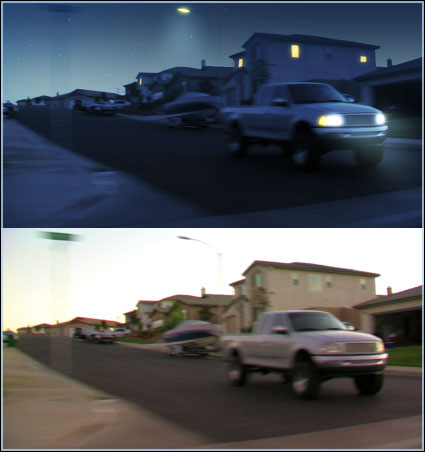
Day for night, an easy transformation right? Not always. Just darkening the shot and adding some blue doesn't always sell it. Especially when you see crushed highlights and sharp shadows.

Some good tips for shooting day for night include:

  • Limit direct shadows from the sun
  • Limit specular hot spots
  • Use a backlight to generate "moon light" in post
  • Sometimes underexposing can help
  • Shoot at dusk
  • Don't shoot the sun (duh!)
  • Don't shoot at night or this post won't help

Here is an example. Obviously there are many possibilities, like a tutorial that may come up. I need to shoot some footage so if I can get out this week great if not next week. Until then, we'll leave the light on.

By adding masks around 'bright' spots you can create simulated illumination.

POSTED:
18 years ago
Research and Development!

Here are some shots in the field as we prepare for a new product involving Guns, Explosions and lots of Blood. Real Clouds 2?

Don't expect this one for a while, there is just too much planned. Actual filming should begin early 2008.

Thanks to Sammy for the photos. Sorry about your arm ; ) JUST KIDDING!

Note: All production is supervised by local authorities and professionals. We take this production very seriously please be safe.

UPDATE: The guns are used to simulate real physics when we shoot blood packets. We are also using small explosives, and much more. Everything is supervised by professionals, one of our FX personnel has worked on some pretty big productions too.

Did I says HD 60p... Gosh, I need to shut up!

POSTED:
18 years ago
After Effects Keyboard Shortcuts

See Shortcuts

Here is a list of most of the shortcut in AE. You can also find this in you help files too. Go through them, you will be surprised what great shortcuts you will find.

You can even type one short cut like "T" to reveal the opacity then hold SHIFT and press "R" to reveal the rotation. This is a clean way to work and efficient. Learn the shortcuts and you will be unstoppable. Try to make yourself learn a new one everyday and make sure to use it everyday.

Feel free to list some of your favorites.

POSTED:
18 years ago
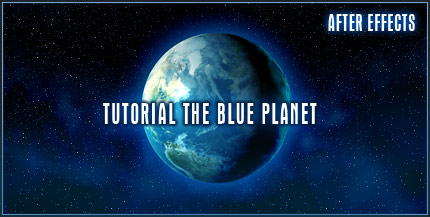
TUTORIAL: The Blue Planet

Create a blue planet in After Effects, complete with lighting effects, atmosphere and a nice glow. Orbit the planet 360 degrees and create a solar eclipse. You can even use the result for the ending of your Earth Zoom effect.


Create the entire solar system with planet maps found at this great site: www.planetpixelemporium.com Please list others sites if you find them!

POSTED:
18 years ago