More Element 3D Examples!

Our new Plug-in Element 3D is now available. Use it to render impressive 3D objects and particles inside of After Effects. Great for Visual Effects and Motion Graphics. Check out the Product Features!

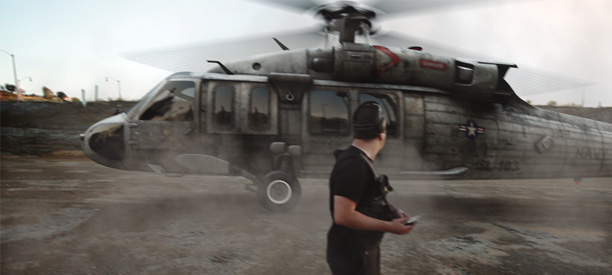
Here is a visual effects example with some re-purposed footage of Sam Loya. Watch Video! I know my roto job is bad... and I feel bad.
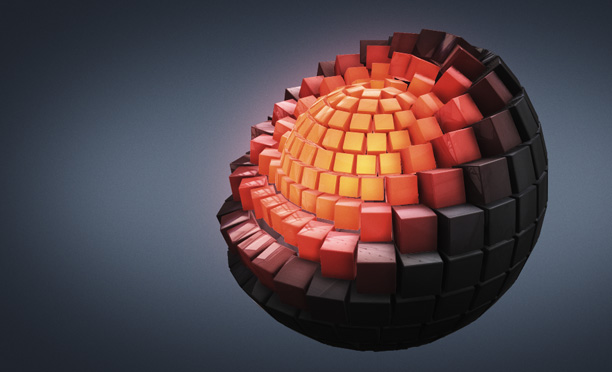
Another Motion Graphics Example Watch now!

POSTED:
13 years ago
128 Comments
11 years ago
i have problems with animating the rotors of the heli. After deviding the model in three groups (heli, main rotor and the back rotor) the rotors rotate only around the model axis and not around their own local axises like in the sample of andrew. where can i change
Were can i buy the video copilots,but the packs...help me please...
12 years ago
I exporting a Cube from Maya, in .Obj format, but the functio in Displacement Z and Y does not work in 3D element, WHY?
13 years ago
Look at my first helicopter test please ! http://youtu.be/3v9DlhzuaRM
Raad
13 years ago
hey mr andrew , r u gonna make a tutorial about how to animate something like this ? , plz reply
Adam
13 years ago
NOOOOO Andrew!! 00:12 - 00:13
ali
13 years ago
hi andrew
I'm from iran and I'm using your amazing plugin.a cracked one actually.but it's so beautiful that I can't continue using it without paying you.my problem is finding a way for pay the price.are you have any representative or dealer in Iran. I have no access to master card.
777
9 years ago
I like iran
Sean H
13 years ago
Andrew, can you do a tutorial for Element using one of Evermotion's 3d architectural models with a greenscreen subject, using the 3d model as a virtual set?
13 years ago
anyone know where I can get a free commercial jet plane obj model? Link?
Thomas
13 years ago
How do you make the glow effect on element 3d?
stranger
13 years ago
hi,how can make a eyes veins like ???vampire diaries??? with afterE?
please tell me. thank you! mr.kramer it's very Important.
13 years ago
I'm using Element on a MacBook Pro Mid 2009 with just 256mb of VRAM and the performance is AMAZING, you guys totally changed the world of 3D compositing *--*
david stranger
13 years ago
hi,how can make a eyes veins like "vampire diaries" with afterE?
please tell me. thank you! mr.kramer
Maurice Powers
13 years ago
I've been experimenting for days...but I have to ask:
Is it possible to transform an object into text or vice versa?
Or a triangle into a square?
Or am I limited to turning a sphere into a sphere?
Tae-Yoon
13 years ago
it kind of shocks me how easily manipulating 3D elements

I have a serious question that can be decisive by the answer to purchase the studio bundle.

is it possible this plug-in has a function to import external 3D objects from like 3D max or maya to be used like the 3D models here?

if it is, i say "a revolution!" and buy it without any hesitation
13 years ago
Of course, you can bring objects in from most any 3D program. The animation has to be done inside the plug-in.
Tae-Yoon
13 years ago
yep i ve checked out ur tutorial about this, and btw about the animation, is it possible either to build up rigging works in external objects?
kay
13 years ago
hi,
i have problems with animating the rotors of the heli. After deviding the model in three groups (heli, main rotor and the back rotor) the rotors rotate only around the model axis and not around their own local axises like in the sample of andrew. where can i change the axis/anchor of the separate groups to a local group mode? mayby anyone with any ideas?
thanks kay
13 years ago
does the plug in come with any models? like a starter pack?
13 years ago
http://www.youtube.com/watch?v=F56N9sdMEbA&feature=plcp


hi andrew,
i've got three versions of this animation.
i've recognized that there is no smooth transition between the polygon mode and the normal one. so I tried to achieve that effect in another way. But I think that the transition can be programed. please tell me what you think about it!
Best Regards, Atanas
ChiCho
13 years ago
You just turn After Effects into the REAL 3D World. You guys just change the game's rules! haha You don't need to be an expert to see that Video Copilot is going to the top. Good Luck up there!
Waysh
13 years ago
Andrew, where do you get all of those amazing sounds you put lately in your videos, will there be another sound pack like Pro Scores? I really am impressed with the sounds you've got.
13 years ago
Here is a video I made in a couple hours using Cinema 4D to design the model and the AMAZING Element 3D to Animate it It's called, "The Killer Pan". Enjoy!
http://www.youtube.com/watch?v=QxoI0O952Q4&feature=plcp
FloVC
13 years ago
One small step for videocopilot, one giant leap for vfx mankind
Greg
13 years ago
I have 2 new computers on order due in about a month or so, can i install this on my current workstation & laptop, then uninstall it and register on the new computers when they arrive?

Does anyone know if this will work well with the retina macbook pros?
13 years ago
Trying out E3D 1.0.322 on brand new HP Z820. I was following along with the extrude tutorial. After setting things (extrude,bevel,etc) up I exited back to AE and set final key frames for Scatter, Rotation, etc at 4 sec. Then went to the beginning of the timeline and changed the values on those same parameters. I had Multiprocessor on and the program crashed hard when I hit 0 to ram preview.

Tom Daigon
PrP / After Effects Editor
http://www.hdshotsandcuts.com
HP Z820 Dual 2687
64gigs ram
Caligit HD Pro 2 16TB.
13 years ago
Sent you an email Tom, we'll see if we can help.
william
13 years ago
Your PC is a monster 0_0
noori
13 years ago
Nice plugin Andrew. I would like to see some tutorial about it.
cheers
13 years ago
So I am trying to figure out how to do animation engine and those transitions with text. Anyone know/understand how to do that?

I love this plugin though. It's awesome!!!
Peter
13 years ago
Hi
Hovering on the buy elements today have waited for the rush to calm down, and waited for a client to pay me.
so question - Elements + 2 or the bundle you know its the best deal ? will i be content with a $249 pack ??... Im not seeing in comments if the fantastic models of the jet plane or helicopter are included in the bundle or was that an AK tease, adminsmithee turbo squid $199 was that the anwser?
are fractured geometry models included in the $249 pack, If not guess i'll need to create them.
AE and elements will be the cattails to learn 3d downloaded Blender 2.63 now with pre installed Blender to AE export
can see what i'll be doing this weekend.
thanks you Andrew and team for an awesome product
13 years ago
Hey folks, I found a chopper that could work for the beginning. It is free and in OBJ format. Here it is:

http://thefree3dmodels.com/stuff/aircraft/helicopter_uh_60_blackhawk/15-1-0-1470

Only problem: I can load it into Photoshop and see all the textures applied correctly. In Element 3D it shows up without the texture. It seems, Element 3D is missing some info.

Now, I am new to 3D texturing. Could some geniuos please explain which buttons do I need to hit in Photoshop in order to export an OBJ of that chopper, so it gets outloaded with all its texture preloaded in Element 3D?

Thanks folks!
jimp1102
13 years ago
Element isn't missing any info.OBJ's do not include texture data. Open the model, then apply the textures via materiel editor then save as a model preset.
Benjamin
13 years ago
Hi all !
I'm curious about how to make the effect in the video which the helicopter was behind Sam, how can I shot a scene without green screen and make a person stay in front of the helicopter?
Finding some helps!
DecodaX
13 years ago
It's called rotoscoping, in essence, masking out the foreground elements, but green screen would be easier if you get a good matte.
13 years ago
Andrew, thank you for revolutionizing 3d for after effects, you have made so many artists life a whole lot easier...thank you again!
13 years ago
Hello Andrew
I want ask a question.
How can I buy it from Iran?
Answer Fast please. I need your answer dude.
thx
:d
Kai
13 years ago
Hey Andrew,
Element is so far beyond what anyone imagined was possible inside After Effects. Really curious what the Genesis was for this project. Did it just start as just trying to do 3d particles? or did you realize right away that so much was possible within AE?

Adobe has to be considering this as a standard install with future versions of AE.
grim
13 years ago
13 years ago
Wow ! Hollywood fx in my room !
13 years ago
Awesome plugin, as expected!
GREAT TO HAVE IT!


ALL AE LOVERS SEE THIS!
http://www.youtube.com/watch?v=TTqm0YsnqrM&feature=g-upl
Cyrne
13 years ago
I just got the bundle with the plugin and Pro Shaders today and I can tell you guys have done an amazing job here. It's easy, enjoyable and fast to work with.
I've been messing around with it in the past few hours and I'm really happy the way Elements works with built-in plugins.

Can't wait to watch some more cool tutorials with this plugin!

Good job guys!
memy
13 years ago
plees i need tutorial soon?

How I wish
grim
13 years ago
I'm really interested in seeing what people will create with this. AK's stuff doesn't count, because he could probably use a pile of cat poo as a plugin and make it work.
Steve
13 years ago
Here's my first render test using Element. http://youtu.be/Y0bUk6uegw4
ChrisX
13 years ago
Hey Andrew,
where did you get the helicopter model from? Is it availible?
Jovica
13 years ago
Hey Andrew, where is that place where Sam is?
Jovica
13 years ago
I want to search on Google Maps
Carter .R
13 years ago
Hey Andrew,

I finally managed to get it work so excited and i hope you guys partied hard, like you shuld.

the plugin is amazing.
Jovica
13 years ago
Sam has funny clothes... xD
Jake
13 years ago
Well, its pretty awesome, way faster than adobe's CS6 3d for sure!

Even though its brand new, I have two wish list items for the future.
REALLY need an export function to get the text geometry you can create out of the program so you can do the shatter to it, and ect. for the animation engine.
Sure, you can make the text in a 3d program, bu your implantation is so easy, shame not to use it.

Brings me to the second wish list, create a geometry shatter engine so we can this awesome animation with any model inside Element. Not that I'm sure you didn't think about it!
This is an amazing tool!
13 years ago
Oooooooooooo!!! You've really outdone yourself this time. 3D elements is an amazingly creative and innovative product. As a 3d artist and producer, I tip my hat to you. This takes AE to yet another level.
13 years ago
Reptile is a showoff.
Reptile
13 years ago
oh really? Well, I'm enjoying my show! I hope you will as well!
richard
13 years ago
Don't feed the troll! everyone knows how good this plugin is, thats why he says the stuff he does coz it will get him the attention that he didn't get as a child.
13 years ago
@richard. ya you're right. he missed alot of hugs as a child.
Reptile
13 years ago
Two monkeys just can think just like two monkeys....!
Adrian (sorry for lang)
13 years ago
Easy guys, easy. Everebody can think the way he/she wants. If Reptile think like that so what is the problem?
Reptile
13 years ago
Thanks Adrian....You got it...
13 years ago
I have been a Videographer for over ten years now, and have been using Cinema 4D for my main 3D software in my videos. I have to say, this plug in is probably one of the greatest achievements in not only 3D but in all essence of Video Production. I have been working hard on a video for a client in the past couple months, and just in the final phases. Using this plugin, I will be able to make this project look even more incredible. I will be positing this video, along with other work done using Element 3D.
Thank you Andrew for another major milestone!
-Arsalan Monawar
Gaston
13 years ago
Incredible surely going to see in action in one movie!
13 years ago
OHHHH GREAT !!!

Hey Andrew It's To Make any Object explod in Element ???


Thank's Again !!!
Pablo
13 years ago
Andrew, I bought the 3-pack. I'm very happy. This is the beginning of something great! I have one question: I would like to use several solids, each with Element 3D. AE renders them but then you loose the notion of what is in front and behind, which now depends on the order of layers: objects do not interact. Is it feasible to have a powerful update where several Element instances can be linked together. The problem is that I may need more than 5 groups.
Finally, it is annoying that several developers cannot share a common OpenGL engine inside after effects. I would like to see your Element 3D interact with particular!!! Probably your efforts can be a step towards this direction.
Greetings from Spain!
Tobi0688
13 years ago
if it turned out that there is no helicopter at all will be some vehicles from you?
ali farahani
13 years ago
In sam loya footage. what plugin or software do you use for matchmove helicopter with orginal scene?
Is The foundry camera tracker with element 3d enough for any 3d matchmoving?
Adrian
13 years ago
Mocha for After Effects. It installs with AE CS5 or/and above.
AaronProduction
13 years ago
check my quick "epic fruit" result in element 3d
i have more first results on my YT channel
http://www.youtube.com/watch?v=zlOvMYqYuDM
every result took me less than one hour to make..
video copilot rocks !!
i used epic fruit as a background on channel as well
Eric Y Lin
13 years ago
Besides the cast shadow feature that ppl are really hoping for, I suggest that we can able to render z depth pass so we can add DOF in post(faster) and composite stuff in even more flexibility~ besides that, wonderful plug in!!
13 years ago
Just took it for a test drive. Pretty amazing.

http://www.youtube.com/watch?v=sb9mvaVaK_I
Christian Michael
13 years ago
Actually, this was nice :0)
Daluz
13 years ago
I liked!
Ed
13 years ago
Very nice without going over the top.
marc
13 years ago
Hi andrew. One thing which means a trouble we have now with element... Is it possible to make rotate an object from its pivot point? I mean, the shape isn't a perfect square or sphere, but it actually has a pivot point, which is not equivalent to the absolute center... I'll change the question: Can exporting an OBJ from 3D MAX preserve pivot information? Or maybe change it in Element...
Ben
13 years ago
Imagine how easy it is to make The Bullet with this plugin! If you already have The Bullet training dvd and understands it.. Am I right Andrew? So much easier and more control!
Darrell
13 years ago
I hope they release an updated version of "The Bullet" to include how to use Element 3D with it.
Adrian
13 years ago
OK, you bought Element 3d so show me now your creativity! Show me people what you can do with this plug-in.. or maybe you are waiting for antoher Andrew's tutorial becouse you don't know what to do with it???? This is only a tool, really good VFX is in your head...
Victor
13 years ago
Ill post something soon, but for now Im just getting a grip around it, and playing around to learn how to get my ideas in to something real
Victor
13 years ago
So, I bought it yesterday and played around a bit. Money well spent.

I got the pro 3d bundle, but after playing around a bit with it i know i should have got the complete studio bundle right away and i would have saved some money.
Still well worth the wait and the money!

I usually dont comment here, but I have to say Thank! I love you(r work)!
13 years ago
This will definitely change the world of making low-budget high-quality movies.
13 years ago
I made the background for my youtube channel with element! Check it out http://www.youtube.com/user/SavageAnimation?feature=mhee
Jovica
13 years ago
Yeah...really cool...
adam
13 years ago
One question for graphics card,the GTX470 is "GREAT" and
the Quadro 4000 is "Pretty Good" so 470 is better then 4000?
ed
13 years ago
looks amazing - glad i got it! - but i still don't understand how to change the colour of the elements in the animation (like in the second video).

any response would help
Sachin P
13 years ago
I like your all tutorial and this plug in is awesome. you are great man.
Dan
13 years ago
As awesome as that looks from the thumbnail, these videos (and many others on the site) are not mobile-friendly as the rest of the website is, so I can't watch it from here. If you can't fix that, I look forward to watching it later! But definitely something to consider
Mido vfx
13 years ago
great work as always
13 years ago
ye super nice


i wish the trial
13 years ago
we looking forward for the tutorials...!!!!!
Darren
13 years ago
What 3D Object was used to show the Sphere breaking up into the cubes and morphing to the smaller orange glow?

Also how do you morph an objects material to go from metal to glass?
Fred Castro
13 years ago
This will change the history of motion graphics forever! Unbelievable! This is the best thing ever, he totally outdone himself! Congratulations Mister Kramer, you are indeed the man!


Fred
DavidNMedia
13 years ago
Dang Reptile is D1ck... Spewing negativity all around. This is tool and if you feel it isn't up to your standards then so be it. But to say it has no use is a joke. Cant wait to see it being used on Movies, TV Shows, and commercials. The right artist with the right tools = Awesomeness
Reptile
13 years ago
Read comment then reply! Not open your big mouth blindly idiot! Oh! sorry! the great artist.....!
Joshua Antonio
13 years ago
So it works with camera tracking?
Mike
13 years ago
It does, because it uses the AE camera.
13 years ago
Andrew, it is possible to post up some of your scene files so we can have a root around and see how some of these things are put together? I've been trying to recreate the green ball morphing/exploding shot, but I can't figure out how to transition the two objects into one another. One state is set as scene one, the other scene two, but it doesn't work for me. An AE file would be no use to anyone who HASN'T bought the product, so it's all good
13 years ago
Wow... element did a better job than what i did on my helicopter video in 3ds Max
13 years ago
Tutorial on how to put the helicopter in the image? i want to know actaully how to make it look like its on the ground!
Izmir
13 years ago
The second example is definitely a Mograph + Xpresso combination result
genobambino
13 years ago
Nice! We need a Sam Loya figure in a future model pack.
Michael
13 years ago
For me it is not working with multiprocessor rendering enabled. It stucks when I try to make ram preview.
Justin Kuhn
13 years ago
Lots of #%&!ing about the missing helicopter. Of course it shouldn't be hard to find a chopper .obj for free, import it and texture it with Element...Andrew, I think you might be trying to push the users to put a little work in. I'm game, this plug-in has me brainstorming all kinds of things I previously thought to be above my skill level. That said I would be pretty interested in a VCP Vehicles 3D model pack, just because of the quality you're going to get in a VCP product.
13 years ago
This is insane stuff Andrew! You really BLASTED my mind! Funny how you named the Sam Loya video "Choppa Get In".... You obviously spent too much time on 9gag too Well done!
Giovanni
13 years ago
When I saw the environment reflection for helicopter example...I knew you were gonna make this.
VINCE
13 years ago
Andrew, with a shot like this, I usually prefer COLORAMA to make a MATTE (luma) with the help of curve adjustment, roto is too much waste of time
13 years ago
He wasn't against the sky, wouldn't that make the luma matte technique a little tough? Dark clothes against dark dirt?
VINCE
13 years ago
duplicate the layer, apply curves, and apply colorama and change a particular color to black and white till you make sam all white! and the BG black
VINCE
13 years ago
..and apply luma matte
Mike
13 years ago
Could also use the "change to Color' effect.
Maxi Claudio
13 years ago
Are the position of the Element or particle linkable? Could say one of the 10 headphones position, rotation be linked to say a text layer? Or is that all in the black box?
Shamil
13 years ago
If i buy the full package how many licenses do i get? Caz i have an old computer planing on buying a new one. But dont want to wait and want to use this awsome pugin..
13 years ago
Buying this today. Any chance there will be any more bundles?
I want to get the design bundle (Plugin + 2 model packs). Would be cool if the customer could choose which 2 model packs were included in the bundle!
drian
13 years ago
hey andrew i just wanted to know if my gpu is supported because i saw the list and didn't see it and i just wanted to make sure amd ati radeon HD 6310 graphics with 384MB of ram
Dean Doll
13 years ago
Get to da choppah!!

Awesome, I will be purchasing this for what it does.
mintcheerios
13 years ago
Looks awesome. Did that helicopter shot require CS6 or Cameratracker for the 3d tracking?
Goutham R
13 years ago
Sam is the BEST... How many of you agree?
eistan
13 years ago
where is pilot ? he is ghost ? ))) roto is very good!
sing
13 years ago
Can you make some tutorials about this plug-in, like the other products, you always making some amazing tutorials, so we can learn a lot.
Farshad
13 years ago
Where can get primary music of Element 3D tutorials ?
13 years ago
This might inspire you for the next pack, this the kinda stuff we would like to play with in E3D.
http://youtu.be/z-3foCU2Cnk
Bob K
13 years ago
Get out Andrew ! ! ! !
That is just too flippin' wild!
This has to be, in anybody's mind, far beyond anything we could have imagined at this point in human evolution ...!
13 years ago
Ya, the roto is kinda bad, but it looks neat anyway. Element is so great I really can't wait till I can get enough money together to spend on it! I want the whole Studio Bundle BAD.
13 years ago
Again with the missing black hawk ,you just killing me .are you gonna add it to the collection or keep teasing us with it.
Max
13 years ago
Yea, are you gonna bring out an army collection with tanks, jets, battleships and giant aircraft carriers. Not yet obviously. You deserve a couple of months holiday.
Reptile
13 years ago
Its not even look real, it looks so CG...
Sean Morton
13 years ago
for $149

YOU R AN IDIOT!
Reptile
13 years ago
So you compare everything with their prices?! your the one that is idiot! I'm using Autodesk Maya. This plugin isn't that powerful for VFX production. ps, u will figure out the pain for texturing for this plugin soon....!
Mike
13 years ago
Oh god.. One of these people... Sigh..
Ok, make one in MAYA exactly the same, and we will compare. Be sure to note how long it took to render.
The texturing pain is only as painful as the 3D program you use to UV texture it in. Otherwise you can set up separate texture channels and "Painfully" drag and drop preset textures to it... Oh the pain!
Reptile
13 years ago
Did some1 heard UVExport?! No?! I know....!
Yea, We sure know these kinda render engines such as Mental Ray, Renderman, Vray, etc. Take MUCH time to render, but you know what?! RESULT!!!!!! I think that's important too!! Right?!
Mike
13 years ago
Well if you want things looking photo realistic your barking up the wrong tree.
If you watched ANY of the many video's about this plug-in, it's not meant to replace 3D render engines like those, but provide super fast 3D rendering for motion graphics and VFX, inside of after effects. This plugin DOES get results, it's also super fast. If you have 2 months and a super computer, do it your way, Just watch the videos and find out what this is. if you don't like the product, just quietly creep out the door instead of writing stupid comments.
Reptile
13 years ago
First of all! I think ur the only1 that is barking! And ur kinda freaked out! Don't cry big boy! Everything is going to be worst EVER!!!!
I am getting my result and don't need this kinda creepy PLUGINS! Remember what ur talking about! Well, it DOES! But how kinda results?!
Did some1 chasing u with car and forcing u make a VFX scene when ur running with ur lap top?!
Speed isn't anything kid...!
And ur not the one that should be responsible for this product!!! So shoo!
David
13 years ago
Speed may not be everything, but it is a heck of a lot. Every effects shot I've worked on was as good as I could do in the time I had. Plus there is a HUGE commercial implication to all of this too. The quicker you can do a shot the more shots you can do etc. Element fills a massive hole in the market. It is not the only priduct we'll use, but it is a great, great tool to have in your box.
Reptile
13 years ago
I didn't say its useless, I said its not powerful enough for VFX, well there is MANY ways, tricks, plugins now available for speeding up your render. Maya has it's own render layers, plugins like Air Stream, etc.
But this kinda plugins can't be use in movies, and huge projects. Just maybe for commercial and this kinda small projects....

Adminsmithee
13 years ago
I have seen far worse in multi-million dollar productions.

and you sound as my Girlfriend
Reptile
13 years ago
WoW! Amainful! ha ha ha...! Dying from laugh! Actually I'm EX....!
David
13 years ago
Whilst I appreciate this plug-in might not be for you, it is inaccurate to say 'it can't be used in movies, and huge projects'. Since it isn't res-throttled it can be used as part of the pipe to do all sorts of stuff and I bet it will be. It isn't a complete solution, nor is Maya, but both are useful tools to have in your box.
Reptile
13 years ago
When you wanna use a 3D program or plugin (Doesn't matter what) you have to be sure that the program have enough tools to support what you need.
In this video Andrew used shadow and dust pass. But when u have Ambient Occ, Normal Map, Reflection pass etc, you definitely have more control and in the end have a better result.
Imagine it was a tree behind the helicopter and it cast shadow, as you know tree's shadows because of it leafs wont cast prefect shadows. And there is no way to make this scene with a tree cast shadow on the helicopter with Element 3D.
Alex R.
13 years ago
Reptile your hypothetical example is silly. Why not try thinking of hypothetical examples where the plug-in would be useful? Let's say for back ground helicopters in a war scene or maybe a set extension with buildings? There are ways to use the plug-in that will save massive amounts of time.

Your logic is flawed to think that a tool that cannot do "everything" is not good enough to do many things.

And believe me I have seen bad effects on big movies, and I've also seen bad looking things created in Maya. It's not the tool it's the artist.

Please watch this video and see Element working with compositing passes such as AO, and others. It may change your mind about this plug-in, just don't watch it to try to prove everyone wrong. Think about the things you can do with it.

http://www.youtube.com/watch?v=78G1jKgh10A
Reptile
13 years ago
Is it really? Try to make it and you'll figure out how silly is it.
I dunno about you, but if I have this plugin someday, I'll only use it for instancing 3D objects. If we could animate objects and have control on'em, ps render passes well it would be a complete and good plugin. I need a complete, powerful 3D program or plugin, not a incomplete fast plugin. And to be honest, I don't really care about time when I'm rendering. I've learn many things from Alex Alvarez in his courses for speeding up render and those really helps and works, so we get high quality with faster time that we can get, with UNLIMITED program.
Martin
13 years ago
Reptile you are mororn ya say you are CG pro workin with vray mr etc...

but you sound like stupid comparing two diferent products.

there are lot of project where you dont need ao raytracing etc .. you need fast 3d .. and hawing such capability in AE is great. latest plagin i renember was crapy zaxsverx .. practicalu usles.

i hope in future element can read fbx animation and hierarhy or maybee alembic format.

its complicated when ya need som 3d elemets and ya swich to maya render this things and then import sequences in ae ... if something changed rerender again.

when ya work mostly for comercials element is must hawe soft !!
Eric
13 years ago
you kept mentioning about render time doesn't matter. I don't know you but a lot of time studios don't have time to render forever in other render engine or doesn't have the budget for render farm. Maybe you have access to a render farm all the time, or your client can wait.

Also, please kindly share about your VFX experience, what professional project have you been working on, so people can take your word seriously. Just because you mentioned Alex Alvarez from Gnomon doesn't makes you the expert on CGI and VFX...
Squirds
13 years ago
I've got a feeling someone doesn't work in the industry yet... For me, with all the projects clients want to receive for yesterday, this is definitely a HUGE new tool in my workflow. Ok so maybe you say you could do a more realistic shot in Maya... Who cares? Sometimes projects aren't multi-million dollar films and there isn't time or budget to achieve results that are more realistic than real life. For the motion graphics community this is a really great tool. Maybe Reptile doesn't care for Element3D, but a lot of people are really thankful... Thanks Video Copilot!
Reptile
13 years ago
Well, I've spent months for tutorials in Digital Tutors and Gnomon Workshop, and even recently I got couple of courses of Gnomon Master Class. So in most of my renders which is Mental Ray, I've learned MUCH MUCH tips and tricks for decreasing render time, which effect very awesome on your time. And doesn't matter where you are and what you do, clients are clients. No one can't wait too long. So we work hard. And I've done many projects for Decoration, Commercial and tutorials. There were many nights that we didn't sleep, keep working to complete projects on time. For my last project which it was a Commercial for a new Car named "Soren", built in Iran, I didn't sleep for about 3 days. I was dying! But we complete on time.
And last thing recently I've got a concept art from my friend Z Htoi San, and I made that character in 3D. And I decided to make a tutorial for that with Digital Tutors Creative Development Series. So I'm working on that and it'll be complete in 2 weeks or so I think and you guys can have fun with it!
Reptile
13 years ago
And one more thing I didn't come here for show off! So I don't even need/want to prove my self to you, or telling ppls name to say "Hey I'm good! I know Alex Alvarez!!! LOLzzz", nope. You're wrong....
Diane
13 years ago
Reptile, it would be unwise for helicopters to land near trees.
Reptile
13 years ago
I meant the shadow genius! It could be any SHADOW! Barbed wire, or anything like that, anything that doesn't have prefect shadow. GOT IT NOW!?!
chuck
13 years ago
i am working with max/vray and the results of rendering especially animated stuff with GI etc. tooks 4 ever to render. thats not just a pimp up my render settings to improve the render speed (ok yes it is: now iam waiting 67 Hours instead of 80 Hours for 10 seconds hq animation). In my eyes element is a very very good compromise between quality and render time.
Reptile
13 years ago
Did you hear something named render layers before?!!!
Reptile
13 years ago
All of you are looking for something that do everything, fast, easy and prefect.... well you can find it in your dreams......
Dean
13 years ago
Reptile. You are keep saying i learnt this from this. I am having this courses etc. But you are not showing anything belongs to you. We are wondered. Just put your best work here. Then we decide which is more realistic.
Redo
13 years ago
Hmpf. I think you're cool. You know what you want and what you want to use as a tool. Also as I read, you can fully manage your workflow. Yet I know what I want and what I want to use as a tool. Also, he knows and she knows. Everybody has a style and a path. You seem to be very good on your path. It's always good to know what you want. Element 3D is nothing without my vision but also a pencil is nothing without my vision. I like pencils. You like brushes? Nice! Let's create.
Reptile
13 years ago
I think you're the only one that get the point, because everyone that read my comments about this plugin, he/she will immediately freak out! , and also I agree to every word that you said. I can't decide and tell/force you to use any program or do anything in your life, you either.
I really liked your words, visions and knowledge. That's kinda cool for me as well.
ChrisBohn
13 years ago
Wow Reptile. Still no link to work? Congratulations on all this smack talk, you are very talented. Put up or kindly shut up. Thank you.
Christopher
13 years ago
Element 4D
13 years ago
WOOOOOOOOW...!!!!
That's one heck of a long essay!!!
What is the matter? If someone doesn't like something then he should leave the place; in this case if you don't like the plugin then why the heck are you wasting others time and typing stress talking about the same thing???
CRoblex
13 years ago
I'd like to watch what does this VFX genius with Maya. I hope it's better than his arguments... Too much free time, I guess. For rendering, for writting here... Doesn't sound like a guy who make VFX for living exactly. Or maybe he's too better placed in Hollywood bussines than all of us, poor idiots. Cut the crap and learn something, please.
Reptile
13 years ago
You didn't get, because you didn't ask genius!
http://graphic.ir/myprofile
"Me.n.KHOF4SH" is my profile, go n search for that if you are that interesting....
Reptile
13 years ago
ps, I live in Iran and we don't have Hollywood in here. And its my day-off today. And I'm resting 24 hours in home. So keep your mouth shut!
Reptile
13 years ago
Well, Dean, ChrisBohn, Element 4D, Christopher and CRoblex I will name you The four stooges more than ever. And quite g4y like comments when I was offline! Nice! So now, because you all are shut up, I can simply go and sleep because its midnight here. Good Night....
lu334
13 years ago
sorry but this looks "Its not even look real, it looks so CG?"
Eric
13 years ago
I think ppl take it badly because personally I think it's an amazing plug-in and opens up new possibility. Video Copilot has been working very hard on this, while it might not be for everyone, beating it down like this is just not cool.

Personally, I think it's too early to tell if people will be using this for VFX or not, the plug-in just release! and I doubt anyone use it to it's full potential yet, not to mention the update that's coming with new features.
And I don't think Andrew release a plug-in that's not useful for VFX, Optical Flare plug-in are now widely used in many commercial and feature film (Digital Domain used it in Transformer!)

So let's not jump to conclusion that this will be useless in VFX and wait and see shall we?
Mike
13 years ago
LOL whoa!
@reptile,
To be honest, to save yourself time and sleep you could really use Element 3D... Take a look at your work, the only noticable RT reflection is the piano keys on the piano. the other shots could use Env Maps easily and create the same or better look. besides, all I see is a piano that would at best, only make it to your desktop wallpaper..Same with the cars. what is it's context? that yellow ferrari shot looks like an OpenGL preview. I honestly think you could benefit greatly from element 3d if this is the style of work you are doing.
And FYI, this whole stem of comments were sparked because after all the Hard work Andrew and the VC team have done so that we can benefit from a great plug-in like this, you posted a silly comment. Its an offence to everyone who appreciates what VC have achieved.
Reptile
13 years ago
lu334, It looks CG because it is! Nor of them created for VFX production! ouch....!
Eric, maybe... Its not complete... maybe next version will be better and stronger.
And Mike, First of all, I built an Orange Lamborghini and a RED FERRARI! Not a yellow Ferrari! Or I don't remember...! lol
Secondly I didn't say I don't appreciate VC team, Obviously making these kinda plugins like this are tough like *&%^!
And the only thing that was silly was your comments about my works....!
CRoblex
13 years ago
As impressive as I expected... A few Jpegs, awesome. That's why you don't mind about render times. Fantastic. Keep working like that... I've rendered in five hours some footage that could take MONTHS in Maya or whatever other 3D program. You definitely don't know what you are talking about, man. Keep trying, anyway...
Reptile
13 years ago
I don't have any answer for someone that compare art with file formats.....
13 years ago
nice job sir Andrew! is the heli included to your 3d products?
Christian Michael
13 years ago
So that was your idea of the replacing the background from the photo mat project a few weeks ago?????? I don't want to play anymore.....you can have your ball back!!!! lmao
13 years ago
Hey Andrew,

Totally off topic, how long will the studio bundle be available for?

Is it like a special offer happening for the launch or will remain indefinitely? As this is the version I want, just need a bit a moolah.
Farshad
13 years ago
Andrew , is that music in Pro Scores Collection ?
lakekover
13 years ago
no it's not in Pro Scores
Farshad
13 years ago
Thanks Lakeover
Farshad
13 years ago
Thanks Lakekover
R-CANE
13 years ago
I just got abducted by aliens and they put me in a shed where these little metal balls were spinning around in the air http://youtu.be/knmSCIYEtWU
Nic Vigil
13 years ago
Hey Andrew. Element is causing after effects to crash. AMD Turion(tm) II Ultra Dual-Core Mobile M600 processor. Not sure whats going on.
Nic Vigil
13 years ago
Every time i apply element it causes After Effects to crash. Anything i can do?
Nic Vigil
13 years ago
ATI Mobility Radeon HD 4530
sunil thapa
13 years ago
hmmmmmmmm nice one....i am getting to watch new tutorial soon
Sam
13 years ago
"I know my roto job is bad??? and I feel bad."

You make Zoidberg proud!
R-CANE
13 years ago
Wish I had that chopper to play with.
WM
13 years ago
I don't mean to be ungrateful but I am. Where's the jet and helicopter? Free download maybe since I spent 500 bucks and it was in the demo? What's shooting the rockets in the projectile pack?? AK, free download man. Do it.
KIRAN
13 years ago
This is awesome Cramer .. I luv ur work ... keep it up
13 years ago
Where do we get the helcopter model
Christian Michael
13 years ago
its in the modeling pack
13 years ago
It is NOT in the modeling pack. Can't speak to where it came from, probably modeled it himself.
13 years ago
Try Turbosquid.com
Angel
13 years ago
Im still waiting for the mega Awesome Teaser short clip like the one on the iPhone app!!!
James
13 years ago
Wow...thats impressive! I found a great UH60 model on blendswap and I'm trying to texture it in element but somethings not right(with the obj export??)...I drop a texture on a material and it looks like a glowing pinkish film negative...odd
Jeff B
13 years ago
July 10th...the day Andrew Kramer and the team at VCP became gods amongst men.

Be advised, Red Giant...you have some serious competition!
Matt
13 years ago
Is that music from Pro Scores?
lakekover
13 years ago
no
13 years ago
Did you manually do the shadows in this or does Element also have the ability to cast shadows from objects?
13 years ago
Not in this release.
Maybe in a future update hopely??
Eric Y Lin
13 years ago
There is a way, the plug-in come with some basic model under "Primitives" you can choose a plane, apply "Matte_Shadow Material"(again come with the plug-in) to it, and assign it to an empty group along with the model you want to have the "drop shadow". Now you can use it as a invisible plane that will have shadow of the model, besure you enable Ambient Occlusion.

Now that's not real cast shadow, it is only Ambient Occlusion shadow, but it's useful regardless Hope it helps
Byron
13 years ago
This plugin is unreal! I hope you and your team get a lot of money for this amazing product! In fact, I hope you get a lot of women and beer for this too! Well... you're married so maybe just money and beer for you.

BTW, YouTube is already getting flooded with a bunch of "my first test render with Element" videos. Umm, let me put it like this: we're gonna need some more tutorials on how to make it look good
13 years ago
Sweet! Just purchased and downloading now. The helicopter example was very timely - my kids were already asking me to make a scene with them as secret agents getting in a chopper and having an aerial battle. You know you spend too much time on this when a 6 year old start his sentence with "We can get out the green screen..."
13 years ago
GET TO THE CHOPPA!!!

Really!? I was the first one to say it?

Loving Element, any chance there's a more detailed walk through coming? It would be nice to get an overview of every option.
Spamer
13 years ago
THenks for all hard work ..u'r the best Andrew Kramer
Ben
13 years ago
When are you going to make another Blog Show episode -- or are you?
memolandia
13 years ago
very good!!! (Y) exelent
13 years ago
Yeahh, I already get my Bundle version, great productions ahead!!!
Thanks Andrew and Video Copilot.
I already use Twitch and Optical Flares a lot, now Elements.
13 years ago
Very cool. Element is a very powerful plugin, and I'm looking forward to getting my hands on it.

Just out of curiosity, what happen to Optical Flares for Nuke?
bnkpro
13 years ago
Yeah, I would be embarrassed by that roto too.........WHAT!!?
Chad
13 years ago
Cool, but there are no pilots in that chopper lol
13 years ago
Auto-Copilot?
13 years ago
try the steak, folks...
Marten
13 years ago
Midgets.. or just pilots that wear the Lord of the Rings Cape of Invincibility!
13 years ago
It's being flow remotely via TV. Called a Video Copilot. ::rimshot::
David
13 years ago
It's being flow remotely via TV. Called a Video Copilot. ::rimshot::
Tobias
13 years ago
Don?t you see it, 007Sam has a remote control
Buddy
13 years ago
LMAO. Andrews stuff is so cool that I didn't even notice. Just go into your models folder and add some j/k.
Brendan Tiberius
13 years ago
Shut up and take my money!
13 years ago
Need to be able to make transparent objects like diamonds! Please help with some shader tutorials.
13 years ago
element 3d wonderful plugin~

I remember there was a plugin called dragon appeared in your video tutorial.

right? not sure.
13 years ago
cool~cn

congratulations~
13 years ago
Everytime i see un example after the trailer i love it more , its just such an incredible plugin from an oustanding Kramer
eric
13 years ago
omg!!! tutorial soon???
13 years ago
If you watch the product demo's he basically tells you how do both these examples.
Tobi
13 years ago
I hope he makes a tutorial about it .. This would be more than awesome. Furthermore i would like to know where i can get this model
Mike
13 years ago
Really?

You can't take a few minutes to actually attempt it?

You can get 3D obj models from a lot of sources, including some free ones. Try it out. You might actually learn something instead of parroting what someone else does.
13 years ago
Sometimes parroting can be teaching as well...especially when you put your own spin on it.
13 years ago
Wow Mike, that was really helpful of you. What if..... some of us might not even have a 3D program to "actually" attempt this, some of us might not even have a clue on how to create something like this. And parroting has helped me SO STINKING MUCH!

Don't be a jerk.

Sincerely, Everybody