Army of Two

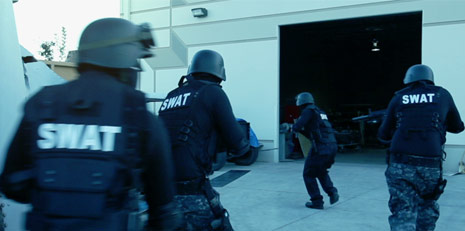
So you're trying to create a big action sequence with LAPD SWAT but unfortunately Samuel L. Jackson is busy and you only have 2 costumes...

So, I'm currently exploring methods for integrating multiple takes of the same 2 actors, to make a scene more exciting. There are several methods for doing this kind of effect, such as keying or split-screen but I wanted to explore the new After Effects Roto-Brush and see how well it could work in difficult situations.

Creating a large army requires special considerations but in this case we just want to create the illusion of a 12-man swat team so it should be more manageable. We shot a little scene and we'll see how it turns out after doing the work. I'll post it here soon.

Basic Tips:

  • Keep costumes generic and similar, unique items will stand-out.
  • Change up accessories and weapons but keep track of changes
  • Plan the shots so you know what you need when shooting
  • Track where people are with markers so they don't overlap

Be sure to check out Bloody Omaha to get some ideas on what is possible!

Sample Video

POSTED:
15 years ago
101 Comments
Daniel
14 years ago
where i can get guns like those?? please
14 years ago
I'm sorry, but is the title a reference to the game "Army of two"?
Dewey
14 years ago
Just started checking out your site. Lots of great stuff. So far, I have not seen any videos on story boarding. I know you planned out the swat scenes, could you do an episode on story boarding a project or methods of preproduction?
Thanks.
Kevin
15 years ago
I would also love a tutorial on roto.. PLEASE!
mystikhillvfx
15 years ago
Andrew - PLEASE make a tutorial for this. I would really like to see the whole workflow including camera work and of course the effects. Much like you did with the 3d ledge tutorial.

I think many of us would appreciate seeing the CS5 workflow (rotobrush) in addition to getting some realistic split screen going.

Thanks in advance.
Calixto
15 years ago
@Lindco, I understand that the clip is not about proper SWAT deployment. I'm just suggesting that he do some research so that the video look more real. The samples above have so many error in them that they detract from the topic. All I'm suggesting is that some research will only improve the end result. - That's all...
Sami
15 years ago
Beautiful compositing idea but I think there is a jump cut in the tree on the background when the solder disappears. may be I need to visit an optician.

I am a big fan of Andrew and really appreciate your all the hard work you do to help us learning new tricks.

Regards,

Sami
mixvfx
15 years ago
this is real nice
oras
15 years ago
cool andrew bring it on my main man. thanks
15 years ago
Did you play the "Army of Two" for the PSP and the PS3? (and maybe for the 360, not sure)
JosB
15 years ago
Heh, I thought it said "Bloody Obama" to start with.
VaVe
15 years ago
Hey Andrew! Great job, as always!
I look forward to follow this new tutorial!
You are my preferred artist and professor !
Tcarle
15 years ago
This is exactly what I needed! I'm making a film with limited costumes and theres meant to be a large army. Good one Andrew!
Jose
15 years ago
i was making a music video where i play every instrument and i split screen mask each individual person and i was wondering if you had any tips on rotating around one person, like the singer, and still have every split mask look good?
Jeremy Boutwell
15 years ago
I love the roto-brush. It made 3 days' work into 2 hours. I'm looking forward to this post!
Only For After Effects
15 years ago
Nice Man, You Always Do Different Man, I am Just Waiting For This Tuto. But Are Roto Brush work in Cs5 , Can its Done In CS4
Jerry
15 years ago
Oh yeah, that Bloody Omaha is one of my favorite SFX videos. It is amazing what they did with only a handful of actors.

I love how your video sample looks too. Very cool.....
Lindco
15 years ago
@ Calixto, I believe AK's sample clip above was a teaser about an upcoming split screen, roto and overlapping tutor not proper SWAT deployment techniques. I don't have the roto tool but I am sure to learn something from the pro (AK) when the tut comes out.
15 years ago
Looking forward to this tutorial! I actually spent some time at the BBC in London around the time Bloody Omaha was put together. When I read your post, that was the first thing to come to mind!
Martin L
15 years ago
Hey Andrew, nice video. Can't you make a tutorial how to do ?
Leonardo Sonza
15 years ago
i dont have CS5, nor Windows Vista or 7.
Pedro Colmenares
15 years ago
Great Andrew!
I have a project in mind which I'll have to use this kinda techniques so once again you will be very helpful to me.

Thank you very much my friend
15 years ago
I did this same effect with the roto brush in this music video for Matt Brevner. We wanted to have two of him in several shots like he's inhabiting his own memories while performing. Here's the video: http://www.youtube.com/watch?v=ZlhxpaFHvJI

And you can see some breakdowns of it here: http://www.vimeo.com/15519550
15 years ago
very nice , I can do that using a green background to create multiple people .
Miguel evL
15 years ago
I am very good video except for one minor error minimum, in making the shadow mask of the first man was cut.
But it's too cool ^ ^, a great tool.
15 years ago
Dude, what is that mad max rig on the left of screen? Nice roto too.
15 years ago
Looking forward to this and to see how you manage to roto with like colors. I'm not sure I saw anything specific here, but in general I have found that roto flakes out when you have like colors that overlap then separate; IE, like when the two guys from scene two cross paths. I've not found a way yet to overcome this other than manual roto so this would be interesting to see your methods\techniques. Thanks for posting this man!
DocT
15 years ago
I am using CS5, the roto brush tool is handy but i have noticed that its precision can be flakey and still takes a bit of work to totally roto out the areas needed. Even when you re-size the brush. It has feather, antialiasing, and search area options can help with fine tuning. It will on occasion roto out areas in different areas of your work just undo and try again. Nice post Andrew

New member to the VC Legion
"Doc"
G.f co.
15 years ago
@steely for cs4 u can using masking or plug in like powermatte..really cool plug in n check it out,
15 years ago
Hi , I've already posted this but I'm taking the liberty to re post as it was waiting for moderation and I also don't know where else to post it. so here goes ...

Mr. Kramer
I???ve been following you for a while now and you have been an inspiration. I live in Port-au-Prince, Haiti. Big fan of After Effects .
Here is a youtube link of an old video by a band called TEXAS a long long long long time ago, did I say Long ?
I was wondering if you had some insights on How those transitions were made, I???m guessing , Chroma and camera projections with some 3D, but it???s just a guess .
http://www.youtube.com/user/officialtexas#p/u/6/VAKcVrW5qZA
Thank You, and keep up the good work
Cant wait for the "army of two" as I'm making a music video wich will involve a "crowd" of fans ..
Joe
15 years ago
Next time, you might want to sneak in along the wall. Coming in straight to the opening can tend to kill off your swat team. Be safe oh great one!
troyBORG
15 years ago
So if I'm understanding this right, you just used 2 people and had them run though twice so it looks like 4 people?
Steely
15 years ago
Please don't forgot about us CS4 users Andrew, we can't all afford CS5 & a new 64bit machine. I just wish that Adobe would develope the Rototbrush as a seperate plug-in or update for previous versions of After Effects.
Ron In Calgary
15 years ago
Awesome Andrew, just in time for CS5 to arrive on my doorstep!
Paul
15 years ago
I'm interested in seeing how good the roto can be. I have attempted to use the brush numerous times and found it pretty in-accurate
15 years ago
super totally awesome! i've dabbled in the rotobrush tool for a bit, this would be an ideal tut..

how much does this tutorial cost, like $99 or something...oh wait, thats right, you do this for free!!!

you rock man.
Azu
15 years ago
Looks Great!!! Can't Wait To Watch Full !!!
-------
From NP
=======
Joraph
15 years ago
Thanks Mr. AK.
I can see that we started getting our hands dirty with CS5 new features. I Hope will see some tuts from freefrom plugins too.
Greetings from NIgerIA.
AK....... You too much
Chris
15 years ago
Cool,
we're making a new version of this movie (http://www.youtube.com/watch?v=IrzKU2Bp3n0)
wich we had made about one year ago... We have also added explosion from action essentials. But the hole idea was, that we were gonna make a movie, because I had made a Dolly, so this is the result Comments and Tips would be great,

But as I said we are very busy on a new version of this movie. what we didn't do in the first one, was to make a script. But the script for full speed 2 is already finished.
And we're going to make a party in it, and I think it would be great to use the clone technique in that scene...
It's only tricky because lots of people are overlapping in that scene but I think it would be fun/great to make!

Gr, Chris
roro
15 years ago
When will you stop to invente good stuff ?
15 years ago
Ooooooh!
That was good work Man, I Can“t wait for Roto-Brush.
15 years ago
Hi Andrew, can you make a tutorial that's using the split-screen mothed or some keying, cuz I am a real beginner and can't have CS4 cuz I am 32-bit

Here is my YouTube profile if someone wants to know: http://www.youtube.com/user/ThePentagramRanger?feature=mhum
15 years ago
Good, but you've some move with the blue bache on the last car before the entrance.
Sorry for my english
I'm fan!!!
g
15 years ago
LIKEY LIKEY LIKEY!!!
15 years ago
Bloody Omaha is the best ever made !
Alex
15 years ago
DAMN COOL Mr. AK!!!! As usual
Greetings From Italy!
Alex
Eshita
15 years ago
Oh! No wonder you had that swat guy sitting there at the end of the video u guys posted on fb!!! cool
15 years ago
I am so sad, but when I read this new blog I am so glad.
Thanks andrew for good news.
james
15 years ago
i did this with 7 people, and made 100 people:
http://vimeo.com/13570119
15 years ago
Like everything this man does, is simply great.
I imagine that the cam movement was "tracked" and added
in after effects. its the way i“d do it.
VideoCopilot has inspired me in my second job, animation.
And by the way , how is your daughter?
lonog time no see you playing "BOMBER"
LOL

regrads from Venezuela
M3DD
Ravi
15 years ago
That would be very useful Andrew.
Kyle
15 years ago
You might want to check out FxHomes tutorial DVDs. They're basic but thy have a lot of I formation. The one your looking for is the superhero and beach storming. I used it in a few movies. Pretty good stuff.
Rasmus
15 years ago
haha, nice

I actually saw "Bloody Omaha" a few months ago and made a similar video. We were 3 persons and I made it look like 30.

Check it out if you want to
http://www.youtube.com/watch?v=Trefi5Odw_s
15 years ago
I really loved the swat movie, it really was so unexpected for me, i just busted out laughing with the old couple
Mike November
15 years ago
Loving the work Andrew - as always you could take the most basic of tricks and bring them to a completely new skill level. I read some of the comments here and I really am amazed at the level of rudeness displayed by people. I come here to learn. Not every tutorial or blog is something I'm going to use daily or necessarily find interesting but I have yet to walk away from any of them where I haven't learned at least some new trick, tip or technique. Bless you buddy - you're an amazing artist and an even more amazing teacher.
David_97
15 years ago
I knew Andrew could make people appear and disappear.
bob of bobs
15 years ago
Please do something with rotobrush. The Mocha info from the last tut was great. Now, us CS5 users need a roto tut. Something more than what we can find on You Tube.
15 years ago
DAMN ANDREW!!! I'm currently working in a project like this! I'm making a scene about a command control like the NASA one! But just with my self (don't have anyone to help me out X( ) I was using green screen. I surely will be aware about this!!! THANKS!
15 years ago
That's sweet! Cloning people has always been a dream of mine
jojo
15 years ago
ha, I remember reading about something like this in Stu Maschewitz's book The DV Rebel's Guide. Except he did it with one costume into a 4 man team.
jspreddy
15 years ago
I am very excited to watch it...

BTW there's a typo in the post.
-----------------------------------------------------------
We shot a little scene and we???ll see "hot" it turns out.
-----------------------------------------------------------
Jad
15 years ago
It would be really great to have a tutorial with rotobrush!
enishi
15 years ago
yes, i need introduced me to this new tool rotobrush tutorial
Calixto
15 years ago
Andrew, one last thing...for this to look real, you're going to have to pay attention to where the guns are pointing. An officer following behind another officer, will never point his weapon at his partner's back, like your guy in the camouflage pants on the right of your video clip. That guy swings his weapon right across the first guy's back. That will make your scene look amateur-ish. Real officers (specially SWAT) will be very conscience of where their partners are at all times and where they are pointing their weapons. That's why you'll always see them all pointing down and away usually in the same direction from a line formation. - It's how they train.

Also, when they make an entry, you can use what's called a "flash-bang" explosion, used to startle the targets.

Hope that helps make your clip that much more realistic.
Mr.PeTeR
15 years ago
That's really awesome!
I can't imagine that we can turn 3 men to a army!
When would the tutorial upload?
I completely appreciate your work.
tobias stone
15 years ago
ahahah this is esh bahz but maybes have more smoke up sesh's in it
Calixto
15 years ago
Andrew, your point of using similar costumes is key for this to go off smoothly. However, similar costumes is not synonymous on a SWAT team to "identical" officers. You only have two choices - either dress them all identical to each other, which eliminates randomness and make it look fake, or have a couple of elements that you can add and remove quickly between takes from each actor, which will add the element of randomness. For example; the goggles on the guy dresses all in black. Remove them on take two. You can also add a raid jacket to one of them on take three. If you're using 'Paddle Holsters', you can switch holsters quickly from take to take (i.e. right handed shooter vs. left handed shooters). Small changes will add randomness and will eliminate the 'rubber stamp effect' that makes these scenes so cookie cutter.

Looking forward to seeing your final product.
15 years ago
I like... Is the camera shake done in post or is there some sort of match-moving involved?
D3FO3
15 years ago
BTW. The ladies in the third house playing cards were the gun runners I presume
D3FO3
15 years ago
Looks promising! Roto-brushing is some pretty freaky NT. Any possibility of a special edition Pixel Bender tutorial?
DrB
15 years ago
After reading some of the comments you'd think Kramer was charging some sort of membership fee. This fellow uploads free tutorials etc etc and no doubt is busy so give him a break.
Thomas McDonald
15 years ago
Very cool! Can you make them interact with each other. like handing each other something. i did this with CS4:
http://www.youtube.com/watch?v=RU01B7EpLZI
Andrey Kazanchev
14 years ago
great vid
15 years ago
It's not that cool, all you need is a simple mask...
15 years ago
Great Idea! I can use this technique for an upcoming zombie trailer. Everyone needs more zombies
Hayden
15 years ago
Is this going to be a tutorial? If so I've been looking for a tutorial using CS5 features.
Andrew Saunders
15 years ago
I tried doing a SWAT scene with 'clones' before with masks and split screens etc. However light and shadows messed up my final product so I abandoned the idea - hopefully Your new idea will help me resurrect the my past attempt. Many Thanks,
Martin Enoksen
15 years ago
I actually did something like this! Four times! Take a look!
http://www.youtube.com/watch?v=vGVbQuw44WU
15 years ago
bro, you are awesome
JaZ
15 years ago
Very nice andrew ... i'm a big fan ... hope you reply tis .... weeeeeeeeeeeeee
15 years ago
Oh COOL!!!!!! Keep the good work!
Pretty awesome, Andrew! Can't wait to see more!
Joachim
15 years ago
Bloody brilliant!
Can't wait!
15 years ago
that's good and it will be better if you make a tutorial
15 years ago
Funny thing about this, is that i'm doing pretty much the same. My project is in post-production right now. Unfortunately i am working with CS4 and have to do everything by myself. but i think it's worthing it.
15 years ago
Pretty cool, I wonder how well the roto bush will work with this. I never really got it to work well.
15 years ago
Tried it once. It was fun, but the rotoscoping part was a bit boring. A difference matte will not know the difference between skin and bare wood. Should have seen that one coming...

http://www.youtube.com/watch?v=mdFvWsnlX44
Will
11 years ago
Dude, that was freakin awesome!!! is that song on the radio yet?
15 years ago
Actually the above example is just a simple split-screen with a mask but the scene contains several challenging examples of overlapping for which we will try the Roto Brush.
Anthony Herrington
15 years ago
Could you shoot both shots stationary, clone the subjects together, then add a camera wiggle to give the effect of movement?
Guillermo
15 years ago
you used a mix between roto brush and mask right? you recorded it in a tripod and after you applied a shake to the footage
I think. I'll waiting your explanation

reagards.
Marco
15 years ago
Can“t wait to see the Roto-Brush
MrMaCHO
15 years ago
Still waiting to see what you did with that axe model you made. Is Sam dead? Again?
Ben
15 years ago
Very nice, was waiting for some working exemples of the rotobrush.
I guess you still had to split the screens or stitch the 2 footages in some way ? Because the "flick" of the leaves on the background when characters disappear and cast shadows from the 2 guys on the left make me think that rotobrush wasn't used as a simple "keying" method.
So what's the process ? Maybe i'll be answered in the next tutorial...
Kirk
15 years ago
This is exactly what I need to know at exactly the right time! I was planing on roto-ing multiple takes over each other (Multiple SWAT guys charging in as well as multiple SWAT vehicles moving on the road (using one van)) with pre-planned start and end positions)from a locked-down cam.

Roto-brush might save a ton of comp pain.

Thanks way in advance!
15 years ago
Ho Andrew Very very good i m like. God Bless
Redman
15 years ago
After days of no posts, this is all? Videocopilot is starting to go down. Maybe Kramer should hire people to keep the site up and running since he's so busy
Anton
15 years ago
Naaajs. I usuly have problems with only having one or two actors avalible but this may solve the problem...
Lloyd Ambrose
15 years ago
No Action Essentials??? Man Promote the product! PROMOTE lol..
amaan chowdhury
15 years ago
this is very very cooll!
Jason
15 years ago
Awesome. Cant wait to see it. Been missing the lack of posts.
Hampus
15 years ago
would be nice to see some behind the scenes or making of as a blog show episode. and "Bloody omaha" is amazing. always watch it when I need some inspiration!