Andrew Kramer on August 29th, 2011 10:43 pm
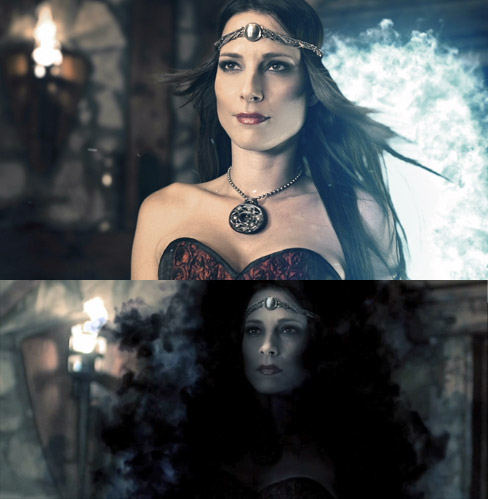
Step into a new dimension with this exciting new tutorial from the Demon Cam video featuring a powerful portal effect with advanced compositing tips. This tutorial is one of many upcoming lessons based on the visual effects for our Demon Cam film, stay tuned for more.
Includes many techniques including:
- Chroma Keying, Screen equalizing, Spill Suppression
- Building the Portal using included Smoke Clip
- Color Correction, Glow Effects & Optical Flares
- Planet of the Apes Reference
- Accurate depth revealing effect using ZPass from a 3D program
References:
Optional Plug-in used: Optical Flares
The Video Copilot iPhone App: Demon Cam
Hey, we’d buy your app if you made one!
122 RESPONSES TO "NEW TUTORIAL: THE PORTAL"
POST A COMMENT!
Before Posting
We're trying to encourage more thoughtful commenting. Â Please take a moment to write a meaningful response to this post.
Also remember to read the rules on posting first.
We're trying to encourage more thoughtful commenting. Â Please take a moment to write a meaningful response to this post.
Also remember to read the rules on posting first.
3D MODELS


First to see, extremely excited to watch and learn.
Thanks Andrew and VideoCopilot team!
really like in movies, i like a smoke part
I don’t see what the big deal is about being the first to post. I still feel the same.?
It’s a sad attempt to validate their time on the net. When you’ve got no other accomplishments to speak of, being the first to comment, for whatever reason, stands out in their mind as being important.
Welcome to the internet, please don’t feed the trolls.
Can’t wait to try this one out!
Thank you sire.. looking forward to watching this one… And thanks for bringing back the download tutorial link
Cool new tutorial – thanks!
Thanks for a in-depth tutorial.. Waiting for Element plugin..any information on release date?
Thankyou so much – been looking forward to the new tutorials coming from DemonCam (which I love!)
thanks andrew i llike ittttttttt and love uuuuuuuuuuuuuuuuuuuuuuuuuuuuuuuuuuuuuuuuuu
May you write a tutorial: how to make appear this pretty girl at your home with magic!
I was already trying out something to see if I can create something like Demon Cam Film. I missed out a number of things tho. Now I see… Thanks Kramer.
It has everythink which i need…. awsome
You are the best
when next tutorial be
ha man gd i pra
nice technics, thx for that!
thnx man. very useful………..
thanks so muchhhhhhhhhhhhhh
Totally awesome tut… Not to sound gay…but u an angel sent by God for all AE users… Tanks bro
Thanks a lot………….
Finally!
I missed that
“Hey whats up Andrew Kramer here for videocopilot dot net and welcome to another very exciting tutorial…” for a long time…..
thx man , but it would be easier to just creat that spesific effect using a 3d program like for exemple the smoke effect of harry potter movies which looks more realistic and flexible . it’s just my opinion.
Actually they do it like this in the Harry Potter movies. They create the elements, like the smoke in a 3D program and comp them. I doubt it’s easier to do EVERYTHING in a 3D program.
but consider the time to render and getting the right settings for smoke simulation, doing it in AE is definitely faster
How the HarryPotter people do this?could you give a video link? thx
Finally,I like it.
Very nice tutorial…Thanks…
hey videocopilot !!!
You Are my Soual
You are my God
This look awesome!
Yay! *watches* I also appreciate the Download link
I will be using some of these techniques in my upcoming short movie series – THE ENCHANTED
Cool Andrew..Just a question did you work done in Gerard Butler and Ralph Fiennes starer film Coriolanus.Because this film’s Title style is just as your Procedural Crumble(116) tutorial.
What can I say? Amazing, as always! That color correction was amazing!!!! And you’re definitely a genius to find all these ideas, the depth map thing… that was… awesome!!
Keep it up!! You’re and you’ll always be my number 1 resource for Visual Effects!!
Thanks for all these tutorials!
Arthur
Very nice, helps a lot!
Fantastic techniques. Thanks for sharing Andrew – again, you surprise!
Thank you a lot! That really helps me out on a project I´m working on momentarily!
Thanks a lot, indeed.
nice job helps a lot!
Awesome tutorial, as always, Andrew.
Oh, by the way, I have in fact made an app. It’s called NetBound.
Was really looking forward to it..thanks
Hello Andrew! I am very impressed with their work. The result is excellent. I am a beginner but I’m learning a lot from his and tutorials and tips. I’m always watching and trying to match possibilities. It is very rewarding. Thank you!
Very nice Mr ANDREW..wait foor you NEXT
Sei bravissimo
FAnne uno per il pc!
Cool tips for the green screen awesome thanks you
Impressed…. perfect chroma key!
Hey, Andrew , this is unbelievable exciting tutorial
, Do you intend to create a tut for breaking the shpere in video on the iPhone App: Demon Cam â„¢ ?
Frigging amazing! Gonna try this one when I get home from work.
-Simon
what a great way to begin.
I love you, Andrew, like a learner could love his master))))
You are Great!Though Stretching pleasure either)))
For a second there I got really excited thinking it was like an Aperture Laboratories’ Portal. Nice tutorial, still.
This is the one I have been waiting for thanks again Andrew. And VC team
Andrew, this is a fun tutorial, but what really impressed me is when you incorporated 3D falloff and ZDepth into this shot. That really helped sell the shot and has always been a struggle for me to successfully achieve. This tutorial helped tremendously! FANTASTIC JOB!!
“stay tuned for more.”
Just thanks Andrew!
Z-Depth trick was really awesome!
Another Great work Andrew!
Oh! my god? the thunder of tuts! Andrew! u re tha best, really powerful tuts, by the way, im tha haitian guy, i really enjoy it, thanks, now we waiting for the destructive Orb, or the scene of when they schoot power, and destroy poeple! plz do them quickle, thanks again, by the way why dont u use trapcode particular to generate the smoke radomly in the portal! and… yeah!, all we need is make thing real
Wow…I think after all the tutorials that will be out after this we will be able to make demon cam 2 promo!!! ;p
Anyway, thanks a gazillion for all your efforts and also for retrieving the ‘Download Tutorial’ link…
(What happened to that link before…….was it lost into those mountains from artbeats.com? ;D)
A lot of good, solid techniques that can be used for other things. Thanks!
Thanks a lot………….
love the keying technique in combination wit hue&saturation. I am shure this all can be done with keylight alone – but nonbody diggs that whole plugin
Awesome! I’ve been waiting for these tutorials! Thank you so much Andrew! I owe you a Beer! If your ever down in Texas let me know!
i DID make an app. Somewhat agitated fowl. Didn’t sell well.
I’d watch this time again for more Planet of the Apes ref. kewl.
Well, Andrew you have really come a long way. I’ve followed your work from the very start. Keep it up. Now great movies have come to the indie level.
Would like to talk with you guys if possible!
Awesome!……………. thankssss…………….
Interesting… =D
Great tutorial! Thanks for the awesome color keying tips!
Andy Andy Andy….
damn so many tutorials and You can always astonish ppl !
this is reaally sic tut, especially dark portal with 3d
On other hand BIG RESPECT for making ~50mins long turorial
great job mate
Super andrew i appreciate u
I’m always happy when I learn something new from you. I’ll definitely adopt this keying technique in the future; It’s very clever and allows for some very precise control over the blending colors which is something I couldn’t figure out how to do. I’ve read several books about the core of compositing but never really grasped that final step of HOW to actually do some of the things like spill suppression manually in After Effects.
Thanks again for all of your effort in providing us with these free tutorials!
Any chance of an iPad app? ^^
Great that you keep doing this
there is so much more to learn ^^
Her face is 6 time on mainpage! Very nice!
hi
well the tutorial is as always made by THE great ak
the problem about that it’s that it’s very complicated
wouldn’t it be easier to buy a chromatte ?
you know this little thing put on the lenses..
the screen is grey but the device will turn this grey in blue or green without any light problem
of course it’s expensive but it can save a you a lot of time..
that been said andrew kramer is still a genius but with the new technologies i hope we ‘ll have less time to waste tweaking around with all the knobs and parameters
cool stuff 4 all, whose working on chroma keying and other smoking stuffs, i love this a lot
Love the app. The monsters could stay a little longer than a just a couple of frames
thanks man, big up from Morocco
I’ve been stealing ideas from Andrew for years and I’ve never posted until I saw this last awesome tutorial from the DEMON CAM series. First off, Andrew, Sam, and the rest of the team – you’re all geniuses! I owe you most of my paychecks over the years.**
Second, when will you be posting the “bust enhancement” tutorial from the Demon Cam series? I noticed that you used it in almost every shot of the video… Nice work as always.
**I have no plans to actually send you money.
Some things have to be shot practically
Hi Andrew, Awesome tutorial; but what about setting up the z depth pass in a 3d program tutorial and where did you get the basic model from? without this info…. we are bit puzzled! Tar!!
I got the model from TurboSquid.com but search the net for a free 3D model of human. Tons of free stuff out there!
In serous need for some VC! The power has been out here due to Irene for 6 days!
thx you so so so much !!!!!!!!the best site ever!
one single world : ” G E N I U S ”
Will you buy the app I made? It’s for vfx folk. Scratch Matchmove.
hey Andrew.
you mentioned in the tutorial that you used particular to generate the different instances of the smoke element in the original for Demon Cam. I’m sure this stream-lined the work-flow a bit here.What settings did you use in particular to achieve this?
This is a great tut, so many good tips in one watch.
thx.
Check out the tutorials using Particular:
http://www.videocopilot.net/tutorials/smoke_screen/
http://www.videocopilot.net/tutorials/smoke_trails/
http://www.videocopilot.net/tutorials/green_smoke/
Same stuff!
Ok, We are 1th sptember and where is ELEMNT 3D?
Coming soon. I’ll be posting some info next week.
Ok, you said “next week” 1st september…Do you know that each week has 7 days dont you?
Man please release the Element 3d! At least a new preview!
hi,
what camera did you use in this tutorial??
really important to me…
thank
Sony F3
Your tutorials are always amazing, interesting, and in depth. They’ve helped me teach myself how to use After Effects and I’m happy with my results: http://www.youtube.com/watch?v=wcNOjuOYV-M
Keep putting up more tutorials and I’ll keep learning!
Firs time I’m posting. I learned so much from Andrew Kramer that I own my entire carrier to him.
Thank you very much Andrew.
Hey Andrew, I was wacthing SUPER 8 movie, and I saw something really cool.
Main Title Design – Andrew Kramer.
lol.
hey
where you gonna post freezing and crashing woman tutorial?
very important
When is Element gonna come out !?! I’m gonna get it the first day it’s out !!!
Quote : Andrew Kramer
Coming soon. I’ll be posting some info next week.
Guys, you should read all the blog sometimes, you can find the answer of your question
Doing some tuts are very cool, but Andrew let us suffer too much! After many month waiting for a good tuts like this, i thought u will put maybe 2 or 3 tuts online in this week, its only one, the portal. Where is the 3d house build in 3ds max? the power scene? the falling ball breaking in multi pixels? the Advanced Demon transform? the disintegration of the women from the portal. I think they are the Core, the most wanted tuts around the world. why u take so mush time to do them? still tha haitian man. Hey Andrew! question very Important to me, Listen When Sam hold the Ball, the area where sam is, is this from UDK environment, by the way i mean if u make the environment in Unreal Develpment Kit, its really powerful, i Thought there is a film named TRON LEGACY, there use a part of UDK in. Hit me! or anyone who have a idea try it. But Andrew and the Videocopilot team u re tha best like DJ Khaled’s team.
Can Anyone Answer me? what is the minimun laptop require for doing Motion Graphic and Visual effect film, i mean
The Ram Memory?
The Power? in ghtz
Hard disk Memory? or Back up memory?
which Windows?
32 or 64 bit? what’s the better?
If i want to put these softwar in it.
3ds max 2010, Unreal Devlopment Kit, Adobe’s Photoshop, audition, premiere pro, encore and After effect. Fuity loops.
Mompremier, your answer really all depends on what you are using and what versions of the programs you are using. Newer versions have stiffer system reqs. Check out the min. requirements for your programs, find out which has the highest reqs, and *BAM!* there is your answer.
Obviously, more power/ram/etc. is better, generally speaking. Win 7 is solid, and always go with 64bit system and os when you can (and when the software you use supports it). It will be a lot more efficient with the resources you give it.
Lastly…I recommend that in the future, you ask these type of questions elsewhere, (there are tons of useful forums out there) as they do not have anything to do with this tutorial ^_^
When I and download the tutorials, they download fine but when they open, the audio cuts out and restarts later, making the video and audio out of sync by a few minutes. Can anybody help me?
Andrew….why in movies that have vfx…..i saw alot of artists about 100 or 200 artists…
10 graphic designer and cg artist and roto painter…
why this all about although 10 or 20 can finish the movie
I will have to try this when i get home
What the heck man..there is lens flare all over the Super 8 movie…How can it not be Optical Flares? All of those flares look just like optical flares!!!
Even though I didn;t get to the Zpass part, I
.
learnt a lot from your different chroma keying techinque
That knowledge will come in most handy
Thanks Andrew!
Andrew….why in movies that have vfx…..i saw alot of artists about 100 or 200 artists…
10 graphic designer and cg artist and roto painter…
why this all about although 10 or 20 can finish the movie
Hi Andrew. Thanks again for the directions,
here is my end result.
Hope u like it!
http://www.youtube.com/watch?v=v9IVPwN9Bbo
I decided to be ultra-cheesy and make the source
of the portal’s power come from the amulet haha.
(also used twitch and glow to make a weird reveal)
Not too bad, but why dont u put a keyframe to the woman, to scare in or out?
hey andrew exellent exellent tutorial !!
please more tutorial for the 3D effect !! if you can
thank’s thank’s
in the second part of the tutorial, wouldn’t it be easier to just use a mask and expand it as she moves forward to make it appear she is coming out of the portal (nose first) ?
God Bless Andrew your tutorials have helped me so much
what’s up andrew kramer, i’m roberto i live in guatemala city, i need know what carreer follow to learn about of “after effects, photoshop, etc..”, because i love create movies and edit videos…god bless you
You may want to look into film or visual effect courses
e.g. film studies
that was really awesome…andrew..can you give us another tutorial with fight scene? please..iwant to see this so match..thanks..
I am from belguim
Now I only want to see the spell casting magic stuff from the film and the crystal ball stuff
And how to project IMAGES inside a crtystal ball like they do in real feature films
I learned so much from the ‘Planet of the Apes’ reference. Thanks so much.
As always, Andrew delivers an excellent tutorial! I like all the effects in the whole Demon Cam shot! I can’t wait to see a tutorial on the shattering ball. I love 3DS Max and After Effects! This site is my favorite!
Hi….Andrew
I just wanted to know how to create an Skull buring Effect Effect like in the movie Ghost Rider in After effects using Fire elements…plz let me know..
Awesome stuff dude! Really cool to see some more in depth compositing techniques in after effects. The Z-pass trick is extremely usefull (and im working on a production where I needed a simular effect). Kinda could see how everything was done, but watched the whole tutorial for the Z-depth pass and also learnd some about keying aswell. I’d like to see more composit stuff in the future. keep up the good work and thank you so much for your time and effort.
hi ,I wanted to know how to cteate a real smoke text…in and out,than ,, I have tried but fail..
Not sure if this has already been asked but will this app be made available for droid users?
fantastic work!
and hay you can buy our apps too coz we made lots of them
Hey Andrew, I was wondering if you were going to do a tutorial on the fight scene in demon cam. I’ve always wanted to be able to do those supernatural fight scenes.
Hello Andrew, this is an awesome tutorial!! i love it.
amm i just wanted to ask u or we wanted to ask u to make an energy ball tutorial just like the one in dragon ball evolution.
thank you.
It s good tuto. I tried do it here
http://www.youtube.com/watch?v=Gsic8v2vbPI