New Plug-in and LA Presentation

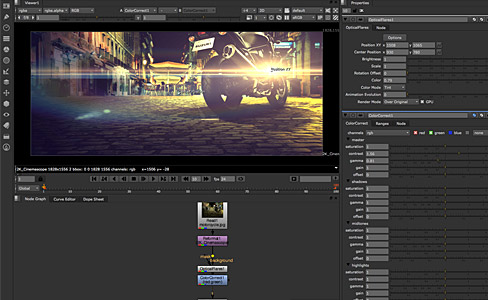
If you are going to be in LA on Tuesday June 21st, I'll be doing a presentation at the DMALA user group and you should come check it out! We are going to be taking a look a couple of upcoming plug-ins including Optical Flares for Nuke and our all new tool for After Effects that you may have heard by it's codename : Atom.

It's a new plug-in, and it does some cool stuff.

Of course, I'll follow it up on the website with some feature demos and a release date.

Sign up now to get a ticket for the presentation! And follow us on Twitter for info and updates. @videocopilot

POSTED:
14 years ago
Set Extensions in 3D Space

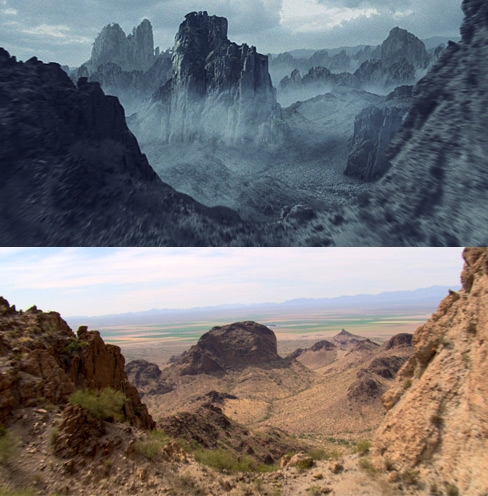
When you want to make an epic trailer, like the one we have been talking about for months, you need some footage of a camera flying through the mountains. It's pretty much a requirement. For this shot we bought some nice stock footage of a camera fly-through but we wanted to add a little more evil to the countryside. So we used a 3D camera track and added a matte painting of some jagged mountains and even used particular to build a spooky evil Myst across the land. The great thing about this promo we are making is the wide variety of shots and techniques needed to finish each shot so expect some expansive tutorials and information. More to come soon!

POSTED:
14 years ago
Back in Action

Good news! Now that I am finished helping out with some visual effects on the new film Super 8, I'm excited to get back to all this awesome Video Copilot action!

As some of you may know, we started shooting this Crystal ball promo a couple of months ago and before I could finish, my schedule filled up with some great opportunities to work on a feature film with director J.J. Abrams. Now I didn't want to release our promo project until it was completely done so now that I'm back, there are a few last minute effects to do and then we are going to premiere the promo sometime next week.

Until then, here is a short video with some behind-the-scenes coverage.

Watch Now

POSTED:
14 years ago
More Workflow Scripts

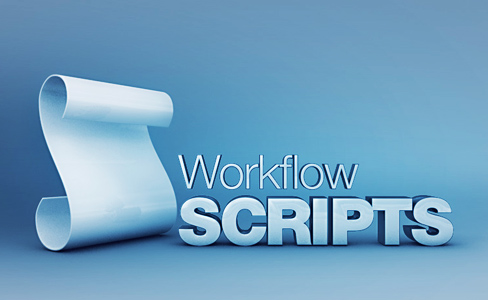
I know workflow tutorials and tips aren't as fun as blowing up a speed boat as it flies off a building but they can be very useful when you are working on a movie called Speed 3: Air Force One. Which is still in development, no stars attached... yet. In any case I wanted to promote a few useful scripts that are available for After Effects.

True Comp Duplicator

Great tool for duplicating a comp and all of the pre-comps to make an independent comp for experimenting or building graphics based on a single design. The great thing is how easy it works, just select a comp you want to duplicate and the script makes copies of all the dependencies within.

rd_Pre-Compose

This script is actually similar and better than our the Trim Compose script we just released and if I knew about it 2 months ago, I probably would have used it instead. Basically it gives you some cool ways to pre-compose layers, including a batch option for multiple selected layers.

BG Renderer

This script is pretty insane, especially if you have a decent computer. It allows you to render stuff without having to stop working in AE. Check out the help info to see how it might fit into your workflow. If you find yourself, staring at a progress bar all day, this might be helpful. Unless you want to stare at them... in which case you shouldn't be reading this.

Smart Precomposer

Another option-based pre-compose script that let's you decide what stays in the current comp and what goes through to the pre-comp. If you ever thought about leaving the transform settings but moving the masks or whatever, this gives you the options.

Save Comp As Project

This script actually is hard to explain. But the way I understand it, is that it Saves a Comp as a Project :)

AE3D Export Camera from AE to 3D

This script exports the AE camera into a variety of formats for your 3D program. This allows you to match camera information for better integration. Check out the 3D ledge tutorial for some tips.

POSTED:
14 years ago
NEW TUTORIAL: Trim Compose Script

Today we have a new After Effects script to help you work with shots on a large VFX project like a Commercial or a music video that has many edits. One of the nice things about doing VFX inside of AE is seeing your shots in sequence to make sure they flow together, but it can get tricky if you start adding hundreds of layers into a single composition as we all know.

A more organized solution is to Pre-Compose each shot into individual compositions and do the work inside. The Trim Compose Script helps make that job fast and easy but wait there's more. The script automatically takes selected layers and then pre-composes each one into time accurate pre-comps, based on the length of each edit.

Benefits:

  • Create edit accurate pre-comps based on final cut
  • Keeps projects organized and VFX inside individual comps
  • Create proxies for specific range based on the edit
  • Batch process shots to work with multiple artists
  • Adds frame handles automatically

This probably doesn't make any sense, check out the video for a full demonstration.

Watch Tutorial

POSTED:
14 years ago