Consistent Color Correction

Using an adjustment layer is a great way to add color correction to all layers in a composition. But what if you have 10-20 or EVEN 23 shots that use the same color correction settings?

You could copy the adjustment layer to every composition, but what if you make changes to the color treatment throughout the project? You would have to copy the new settings again and again, plus make sure that every comp had the latest recipe.

But, what if you could use ONE layer to rule control them all?

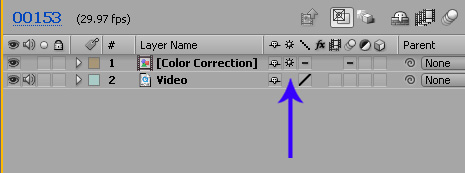
Here is a handy solution. Select your adjustment layer and pre-compose it into a NEW COMP, then inside of the current work comp, turn on the continuous rasterization switch (see image) for the new color correction comp. This will force the adjustment layer to interact with the layers below, just like before. Copy this color correction comp to your other shots for project-wide color continuity. Then when you need to change the color settings, simply open the comp and your adjustments will update in all comps.

Here is a sample project to see the setup.
Download Project

POSTED:
17 years ago
Quick Matte

You may have thought we forgot about a free plug-in we were developing last year. Well we didn't forget, we just had other things to focus on. However, I've been finalizing this matte-generating and refining tool and it's release is imminent.

This plug-in isn't going to make people like you but it will certainly help with your matte adjusting needs. Oh, and people will like you more too!

POSTED:
17 years ago
Particle Turbulence

For anyone using CC Particle World instead of Particular, you may know that Particular's Turbulent Field is not available. This feature allows random 3D displacement of a particles position. A similar effect can be achieved with Particle World by adding a TURBULENT DISPLACE effect. It works best with smaller particle and it has some limitations because it is only 2D but it is a nice way to get away from "perfect" particle movement.

Download Project Comparison

Related Topics:

Fire Title Project -- Uses Turbulent displacement
Dark Energy & Electric Energy -- Uses Turbulent displacement
Fire Burning Project -- Complex Fire Project

Related Tutorials:

Soul Removal Tutorial
Energy Tutorial

POSTED:
17 years ago
Reflecting on the Past

A long time ago, I made a tutorial on simulating reflections over a watery surface which I had to revisit recently. I cleaned the project up a bit and now you can use it as a template with your own video. Play around with the displacement map and you can get some interesting results.

Download Project (CS3)

POSTED:
17 years ago
Another Test

Here's another test using some recycled graphics :) In this example the layers rotate around the middle of each piece, instead of the center of the comp as in the previous example. This makes each piece seem self-contained as if rotating in mid-air. The process is definitely the most interesting part of this experiment, I can't wait to show you.

I've also simplified this technique so that setup can be done in only a couple of minutes. That's exciting!

View Sample Video

Stay tuned for more details.

POSTED:
17 years ago