SHORT-CUTS Episode 01: Bump Maps

Our first Short-Cuts episode is online. Now there is an outlet for all the little things that would otherwise get buried in my backyard.

In this new Short-Cut tutorial, I'll cover a cool tip for generating bump mapping with 3D light as well as utilizing 3D position with 2D effects.

This one ran a little long but in the future expect 1-5 minute videos with short tips and tricks.

Watch Now

POSTED:
17 years ago
CG Shadows

Here is a sample of what's coming up on Video Copilot. The idea is to make your CG objects cast shadows in the real world. The first image shows a Text Layer in AE casting a shadow on the street using a transparent solid layer. The second example is a 3D object with a matte/shadow material on a floor plane. This material allows only the shadow to render on the object so you are able composite in a live action scene.

POSTED:
17 years ago
Things I've Learned...

Years back, I was working for a studio on a very complicated shot. The supervisor explained what was needed and provided the source material. After a moment of reluctance I was suddenly hit with a rather impressive solution.

The supervisor was still standing over me and I began to explain my brilliant solution. Then while in the middle of divulging this master plan, he interrupted and asked "So you're all set?" I replied "Yeah, no problem", and then he said "Great!" as he walked away.

I wanted to explain to him my incredible solution and further impress upon him that I was a valuable member of the team. But he didn't want to hear it; he wanted to see the shot finished.

The following morning after dailies, he casually told me "Nice job with your shot." as we all walked to our posts. There was no congratulatory announcement or trophy at my station, just a friendly "nice-job" in passing. If they only knew what I went through.

Then later, I was asked to come back on another project so I guess they liked the work after all, despite the lack of my creative explanations.

I learned that supervisors don't really care how you get your work done; they just want to see it completed. They have other things to do just like you so don't worry that your hard-work will go unnoticed because it won't.

Soon you'll be known as the guy that gets things done, and that is like the MVP of VFX.

READ SIDEBAR

POSTED:
17 years ago
Render with Alpha


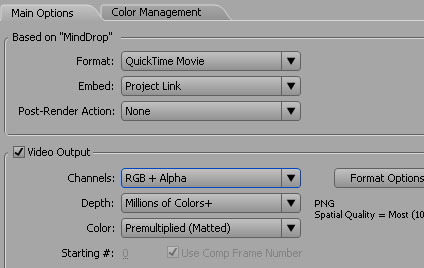
When you create a title or graphic in After effects, you may want to composite the render over footage in your editing application instead of AE. To do this you need to simply export your video with the alpha/transparency information.

To render it this way, add your comp tot the render queue (be sure to have no background layer) and use QuickTime as the output format. Select a codec like Animation or PNG and be sure to change the depth to RGB + Alpha. This option is not available for all codecs.

Some editing applications like Vegas video require you to set the properties of the footage to premultiplied so that it will interpret the transparency correctly.

POSTED:
17 years ago
Gravity in After Effects

Getting back to Motion Graphics...
I'm working on a new tutorial that will demonstrate practical ways to use gravity and give mass and elasticity to layers.

Watch Sample Video

Download Project File (AE7)

I know I haven't been posting as often but I'm working on some important website updates before we transfer to the new Dedicated Servers. These updates will make it easier for me to post more frequently and some other great features you'll just have to wait and see. I still plan to release a new tutorial every week; although this one may be out on Tuesday or so. Of course, don't worry if there isn't a new tutorial one week, just go outside and play some hopscotch. And I'll let you know when the little Kramer is here. Tick-tock.

POSTED:
18 years ago