 ALL DESIGN TOOLS

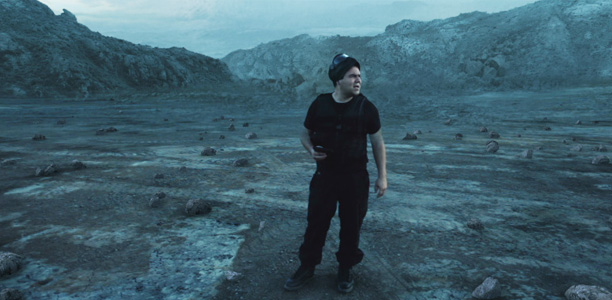
In this tutorial we will create a realistic set extension for the surface of a far away alien planet. With the help of the Matte Painting challenge we will be compositing the background along with adding 3D rocks with Element 3D and pulling out the Roto Brush tool. Big thanks to everyone that submitted a matte painting I had fun looking through all of them and I'll to post some of my favorites soon!
September 4th, 2012

57 Comments
OK, found this site 2 years ago but was sort of passing through. Since I am migrating from the old ways, to new... This site (and this particular tutorial) has compelled me to "Flip" and proceed. I have been a print an interactive designer for a long time - so, yes... Old Dog. And, with that experience,, it is also hard to impress me. This tutorial did exactly that. And, it is more than a Matte Backdrop tutorial... It is a color-correction/color-change tutorial, a motion track tutorial, a masking tutorial, and several more. As I have reviewed several other VCP tuts since, the way that topics are reinforced is what impresses me as much as the quality of delivery. Neither condescending nor presumptuous, he fortifies skills of varied levels by blending basic, intermediate, and advanced subtopics within the context. Thanks,
Zafer Ercevik
14 years ago
Please check out my work on http://vimeo.com/50297662. I used the footage provided by Andrew to create a matte painting shot that would be good enough to be used in a game cinematic. Please let me know if you guys have any suggestion or tips to improve my work. Thanks.
Ace P.
14 years ago
I was working on this tutorial and I used the foundary's plugin for this because I'm working in CS5. When I put in the matte painting and do everything like was said and then RAM preview, the matte painting is moving slightly up and down (moving in general)?? Can anyone help me?
Cody
14 years ago
Hey Andrew, as I was killing time in between class's today, I thought I'd try doing this on AE CS4. I couldn't track the mountains in the background very well, and I couldn't use rotobrush either with CS4, but I found a faster and easier way to make Sams head overlay the BG just as good.
I made a new null object and tracked the buckle on Sams chest. After that I duplicated the footage (moved the new footage above the painting), made a new solid and matted Sams head in by pick whipping that solid-matte to the new null object. Surprisingly I did not have to set any key frames for the mask applied to the solid-matte.
I would not have been able to accomplish this without learning from your brilliant tutorials.
I made a new null object and tracked the buckle on Sams chest. After that I duplicated the footage (moved the new footage above the painting), made a new solid and matted Sams head in by pick whipping that solid-matte to the new null object. Surprisingly I did not have to set any key frames for the mask applied to the solid-matte.
I would not have been able to accomplish this without learning from your brilliant tutorials.
LMBpromo
14 years ago
Andrew Kramer almost NEVER says "another exciting tutorial" this must be an amazing tutorial, like all of them!
Zaaacharias
14 years ago
Hey Andrew, the normalization of the 3D world is a real pain in the butt. Do you think there is a way to automate this process via a plugin or script?
Hi .. here is another 3D still image. Created with 3Ds MAX and lots of VC Optical Flares .. Hope you will like it .. Cheers !
http://youtu.be/AEFDgT_G04o
http://youtu.be/AEFDgT_G04o
Lucas de Souza
14 years ago
CONGRATULATIONS!
It was better than we had used chroma key in the second stage!
Wow, this is perfect, thank VIDEOCOPILOT staff, you guys are awesome!
It was better than we had used chroma key in the second stage!
Wow, this is perfect, thank VIDEOCOPILOT staff, you guys are awesome!
Thanks Andrew! I really appreciate the time you must take to make these great tutorials, manage new things for video copilot, while keeping together a great team! Keep up the good work and I look forward to what down the future road of video copilot... although I know where you're going you don't need... roads.
Just an idea:
The same way we can load a preset object (already mapped), could be useful and quicker to load a "ground plane" already mapped with matte shadow.
(just to avoid to recreate the wheel each time)
(I know i may save it as object, but...)
The same way we can load a preset object (already mapped), could be useful and quicker to load a "ground plane" already mapped with matte shadow.
(just to avoid to recreate the wheel each time)
(I know i may save it as object, but...)
Zach Ehlert
14 years ago
Whenever I do tracks with element, it never looks very good. always sliding around and stuff, even when I use this tracking technique.
Thanks u for all your tutorial. i can buy your plugin for WebMoney? With pay-pal in russia = ХУ??????.
Yay! Great stuff. Been waiting for this one.
BTW, your speech at Siggraph was good, (so how many of the thousands stayed for the whole thing?)
BTW, your speech at Siggraph was good, (so how many of the thousands stayed for the whole thing?)
Youssef
14 years ago
Quick question ... if i use the foundry's camera tracker do i need to do that null scaling and rotation trick .. or do i just place my null objects at the appropriate tracker points i see ??
Awesomeness. Once again, it was nice having that "old original" tutorial, the old intro..
Very cool tutorial with lots of great information. Thanks so much Andrew!
Very cool tutorial with lots of great information. Thanks so much Andrew!
Farhad
14 years ago
great.
really thanks Andrew, for your FREE-Perfect tutorials unlike many websites!. u are a LEGEND.
can u introduced me a PERFECT&FREE source like VideoCopilot for 3D programs(max, maya, zbrush,...)? also NUKE.
really thanks.
really thanks Andrew, for your FREE-Perfect tutorials unlike many websites!. u are a LEGEND.
can u introduced me a PERFECT&FREE source like VideoCopilot for 3D programs(max, maya, zbrush,...)? also NUKE.
really thanks.
I've loved this challenge. It was amazing to see every member of this comunity, newbies and old ones, working togheter, submiting amazing jobs. It was very nice. I hope you do more challenges of this kind Andrew.
Thanks to all of you, V.C. staff!
Thanks to all of you, V.C. staff!
Lawrence
14 years ago
Not quite sure if this is the place to post this, but wouldn't raytraced reflections not be necessary for element particles to reflect each other. Couldn't you simply render each frame twice, once just rendering the environment with the particles, and then use that rendered image as a particle reflection map for the second render of that frame, the same way you reflect the environment. Of course this wouln't be fully accurate, but it might give a decent approximation.
 <3 and waiting the new optical flares 2
Nima
14 years ago
hi
very thanks for this tutorials.
but i have one question about Free Earth Project for Element 3D:
why don???t u made the sun light off, when it goes off the Earth?
how can fix this problem?
thanks.
very thanks for this tutorials.
but i have one question about Free Earth Project for Element 3D:
why don???t u made the sun light off, when it goes off the Earth?
how can fix this problem?
thanks.


