NEW TUTORIAL: 3D Set Extensions

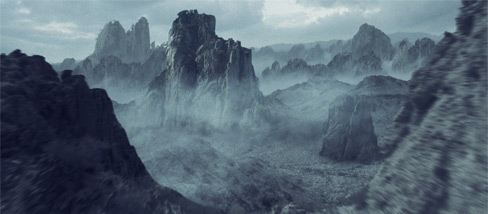
In this exciting and detailed tutorial we will transform ordinary stock footage into an evil landscape with 3D fog and mountains. We will cover 3D match moving inside of After Effects using the new Camera Tracker plug-in as well as Particular to create the soft clouds. I know it has been a while since I've done a tutorial so I tried to make this one as detailed as possible including many gritty details.

I do my best not to use 3rd party tools as much as possible as you probably know from watching the last 100 tutorials but for this tutorial we needed to generate a 3D camera for the clouds so I used the most inexpensive full featured 3D tracking software around called Camera Tracker. As we get into some more advanced tutorials over the next couple of months we may have to use one or two third party tools but I'll do my best to keep it to a minimum and only when absolutely necessary! Until then.

Watch Sample Video

Watch Tutorial

POSTED:
14 years ago
81 Comments
Bari
12 years ago
Hello,
I have installed Trapcode Particular v2.0.0, I followed the instructions but can't find it in the effects menu inside AE. I don't know where I am mistaking ! I'm running AE CS6 64bits on windows 7 ultimate 64bits. Can anyone help me please ? Thanks in advance.
14 years ago
Superb tutorial. Can't wait for other tutorials like this one.
Absolutely awesome way you make your tutorials. The tutorial is great, but the presentation is something else. Thanks a lot.
14 years ago
Thank you so much for the tutorial. Probably saved me hours!
14 years ago
Can we use other 3rd party tracking systems with this? I have Syntheyes already.
renato
14 years ago
ALMOST no 3rd party plug-ins... sounds cool. i'm a student who had to save 6 months just to buy production suite cs5 student edition and i'm already dreading the day where i wont be able to follow any more tutorials because i don't have cs5.5. hope until i can earn a little side money until then with what you're teaching ;o)
14 years ago
Hi,

can anyone tell me if there's a possibility to export the tracking data from After Effects into Cinema 4D? The data from camera tracker to help me in After Effects more limited. I will try to create a 3D animation in C4D and then use this in After Effects. Therefore I need the tracking data into C4D Camera Tracker. Thanks for the help.
Maxi
14 years ago
As always, great work. Many thanks Andrew.
14 years ago
Andrew, i am wondering, instead of leaving the track points stationary, can they be used to animate things flying around in the background? are they still fixed in Z space, that a move on the X or Y, would still look natural? seems like that would be a good way to build an ominus scene where death eaters are flying around, maybe other monsters or alien ships? just wondering what the effect of that would be. thanks for everything you've taught me and all your fine products!
sahis
14 years ago
@hijazi : ae2 is meant to be used !,plz dnt say i saw it here and there ...!
Hijazi
14 years ago
You're totally right .. But execuse me, brother. This isn't anywhere.. This is Assassins Creed. You know what that means? Andrew Kramer is now an international phenomenon .. and he always was but his products are used in massive productions .. This man means very much to me. And I'm happy for him. That's all !
14 years ago
_PLEASE Mr. ANDREW KRAMER!!!! MUST READ THIS !!_
I know this isn???t the right place to show you this .. But you must see this !!! VERY GOOD NEWS .. You must have known Assassins Creed: Revelations .. In their Trailer they used your action essentials ! CHEERS ! I???m very happy for you man. You really deserve it .. Here???s the shot where they used it:
http://i1083.photobucket.com/albums/j385/HeavensSeeker/SHOTT.jpg
GOOD LUCK ! I hope I get Atom for free for this discovery xD Kidding
ShoeToad
14 years ago
Nice one!
JIK
14 years ago
Video Copilot is getting suspiciously commercial with other products... Well, I don't care, you deserve every penny you can get out of us
Man_sokpisey
14 years ago
somebody wanna shard camera tracker plug-in fro free...? i'm looking for download free
ah shang
14 years ago
i try to do smoke effect....check this up if u have time http://www.youtube.com/watch?v=gRWi57dhz3w&feature=channel_video_title
ah shang
14 years ago
i need more than $500 for camera tracker and particuler effect ....so so expensive...
احسان
14 years ago
tanks andrew. that`s great...
Diego Jerez
14 years ago
ANDREW!! WACHT THIS
Diego Jerez
14 years ago
http://www.youtube.com/watch?v=inJUjR9iHIk .. i did it, thanks to youu!!! thanks!
14 years ago
Hello to access my channel on youtube

and look at various tutorials

Cinema 4D and After Effects.

new tutorials

every week!

youtube/pauloeditdesigner
14 years ago
Nice tutorial! A new way of motion tracking is always appreciated.
Arash
14 years ago
Wow,Thanks, again one more great job from VCP.
thanks Andrew and your Team ???
14 years ago
thanks Andrew, super work
14 years ago
Good Andrew!
i love your work!
14 years ago
Thank you. This is great tut.
OlympiaLogger
14 years ago
Why would I buy CameraTracker instead of using Mocha?
What does it do that Mocha doesn't?
Tomas
14 years ago
It does 3d tracking, If you know difference
14 years ago
Yeah, this is fairly awesome. Considering:
a) You'd have to firstly spend a huge amount for an external 3D tracker programme, and then import it into AE (not such a hassle), or
b) You'll have to pay a Post-House that do VFX and motion graphics to this kind of stuff at the same rate as this plugin.

I guess in the end it makes things a lot more efficient, and sometimes when you're working on a project and you have to open a new app you just feel it's like you're starting the project again - well that's how I feel sometimes :]
Glynn
14 years ago
Dora the explorer, lol
Fredrik
14 years ago
Really inspiring tutorial!

I downloaded the trial of the pugin to try it out, and I have run into a problem. I've tracked my footage and solved the camera. When I hit "Create Scene" I still get the warning: "Warning! Solve the camera position before creating a scene". I have no clue how to fix this. Any ideas?
Maui
14 years ago
I think you have to define the ground plane first. The Foundry website has really great tutorials for the camera tracker. They go into much deeper explanations than Andrew did. You can also look into your afx plug in directory. there you can find a pdf manual for the camera tracker
Fredrik
14 years ago
Thanks a lot for the tips mate! Hopefully I'll be able to work this out.
14 years ago
Awesome! At least! The tutorial!
14 years ago
woooow
Finally after waiting .. .. NEW TUTORIAL

Thank you Mr. Andrew

Good luck
JC
14 years ago
Hey Andrew, I can belive the degree of knoledge you have. You are awesome man!. Now let me ask you: could moka do the same job as camera tracker? Please let me know. Thx
Maui
14 years ago
mocha is a planar (2d) tracker. it's a different technology than an actual camera tracker. a while ago VCP released a Tutorial+script placing some signs onto a street in 3d using the tracking data from mocha but it is kind of a cheat. It works in some cases but it's not a replacement for a 3d tracker
Maui
14 years ago
Your daughter is a genius. Now I want to see this flick

Great Tut and camera tracker for a superb price. Keep up the great work
EDrisCG
14 years ago
Wow!
At last, after so many days of waiting!
Thank you so much Andrew.
Wesley
14 years ago
One of the best tutorials on VC ever. Many thanks!
Cube069
14 years ago
You didn't change much! Lol great tutorial, It was worth of waiting!!!!
islamoNET
14 years ago
woow great tuts
Thanks for the great effort
Aditya
14 years ago
WOW!!
At last, after so many days of waiting!
ShoeToad
14 years ago
What about PFHoe? ...
iacere
14 years ago
Nice tut Andrew
These are basics you have to know, if you want to make a film..


I´d really like to see, how you make wire removal Andrew, there are some techniques but at least.. your one is the best
Bob
14 years ago
Hahahaha! starbucks..
i think andrew should become a comedian/vfx artist
14 years ago
Great work AK.

Here´s some HD set extension that i made a few days ago.

http://www.youtube.com/watch?v=bNc4rc559A0
Andrew
14 years ago
Great tutorial, thanks Andrew!
14 years ago
Yay new tutorial can't wait to watch and laugh and feast...
Jake The Muss
14 years ago
Quality, as usual. Thanks AK.
Bart
14 years ago
Finally, now I try it and listen to your excellent English, Andrew))
How was your presentation of Optical Flare?
I was really waiting for this!!! Thanks a lot Andrew!!!
14 years ago
Very cool guys! Love it
arryarland
14 years ago
wohooo!!! ... thx AK!!
14 years ago
Love it ,Thanks ANDREW.

...

I DON'T KNOW WHAT CAN I SAY?!!
14 years ago
Great stuff AK. Looking foreword to using this in a project some day
MHT
14 years ago
Very nice.
Thanks
14 years ago
I just posted on my blog that i really want the tracker program and i also embedded the videos, check out my rss at http://feeds.feedburner.com/AwesomeVfxAndMini-movies-Blog
Piotrek
14 years ago
Very Cool and helpful, LOVE IT
\
Ramon
14 years ago
anybody know how he did the moving clouds in the background?
14 years ago
Thanks AK & Team
amrull182
14 years ago
woooowwwww......
New Tutorial.... i'm so lazy waiting...
but... Great Andrew...
14 years ago
Always excited to see a new tutorial! This one is great for the opening credits for a web series I'm developing. Thanks, Mr. Kramer!

-Simon Box

PS: Please check out my latest video, if you have a chance.

http://www.youtube.com/watch?v=MndNq-fnePw
14 years ago
Yes! I've been waiting for this one. Thanks, Andrew, for another great tutorial...that I haven't even seen yet.
14 years ago
Hello to? access my channel on youtube

and? look? at various tutorials

Cinema 4D and After?? Effects to create realistic visual? effect

new tutorials

every week!

pauloeditdesigner?Hello to? access my channel on youtube

and look at various tutorials

Cinema 4D and After Effects to create realistic visual effect

new tutorials

every week!

youtube/user/pauloeditdesigner
cruehead
14 years ago
in most cases you copying the tuts of greyscalegorilla.com
no personal ideas?
14 years ago
Hello to? access my channel on youtube

and? look? at various tutorials

Cinema 4D and After?? Effects to create realistic visual? effect

new tutorials

every week!

pauloeditdesigner?
Oli
14 years ago
The problem is that ArtBeats footages cost at least 299,99 $ , its a lot for begineers who want to practice.
14 years ago
Awesome! I've been checking the site like every hour on the hour for days and days. My wife is Pissed! Thanks Man.
pecollinni
14 years ago
Your three year old daughter made those elements!?! And she is even writing her own movie?!? OMG!!! If that wasn't a joke, how do you expect that am going to continue to work vfx... for a 15 years, she is gonna be 115 times better then im now!
I don't believe you...that was just a joke that i didn't get it...

tut is great - what can i say else
Aarons Rogers
14 years ago
Andrew!!!!!!!!!!! Amazing....
14 years ago
finally come out!Thank you so much man!
jp
14 years ago
Simply epic. Excellent breakdown of Camera Tracker.
14 years ago
Exactly what i've been waiting for. The Legend, Andrew Kramer is back
Luiz Cláudio
14 years ago
Very good this tutorial. I always subscribe to your site and access almost from the beginning. It was because of video tutorials that I became interested in After Effects. Thank you for sharing your knowledge, that God bless you, your wife and daughters. Sorry for my bad English ...
Johnny
14 years ago
Awesome Tutorial!!
What's the web site where the stock footage comes from?
Art bits? pics? sorry, I can't get it...
David Hall
14 years ago
Artbeats. I think they're a bit pricey, especially if all you want is footage for a tutorial. I also go to revostock and pond5.
Daniel
14 years ago
YESS ahaha so happy when i checked and saw this
RafaelG
14 years ago
Thank You Andrew. im a new film maker started school 2 quartes ago, I began doing your tutorials and i been applying it to my projects. All my teachers are going crazy with my work. All i tell them is " My friend Andrew Kramer showed me how to do that." lol
Thanks You guys. Keep up the good work.
Arnaud
14 years ago
I was waiting for this tutorial! Andrew did it! Thank you so much!

Regards from France.
Adil
14 years ago
amazing camera Merci Andrew
john
14 years ago
cool, whenever he says 3D im always hoping to see another one of his 3d software tutorials. anyone know where to find QUALITY 3d tutorials? thanks
Eric
14 years ago
I have yet to find anything as fun as andrew's 3d tutorials, but lynda.com has very thorough courses on many 3d aps. Unfortunatly it's $25 a month to view the videos, but they are very in depth and there are a lot of them. Of course they aren't really as cool as making a 3d crater scene, but there are some cool projects.
14 years ago
check out greyscalegorilla.com. great stuff for Cinema 4D - originally found it through a link here on VC
Kaminari
14 years ago
I was really waiting for this!!! Thanks a lot Andrew!!!
14 years ago
AWESOME AS ALWAYS AK!
14 years ago
Camera Tracker is fantastic! I have been using for about 7 months now and just can't believe how effective it is and how easy to use. I see The Foundry has you listed as a reseller of a whole load of their plug-ins, so does that mean we'll be getting Kronos etc tutorials soon too? I hope so!
14 years ago
I agree CameraTracker was very nice indeed! Just as the sky replacement, I made this yesterday! http://www.vimeo.com/25676041
14 years ago
Nice smoke and ... nice partnerships, banners looking good
James
14 years ago
yeeeeeeeeeeeeeees!!!! Thanks Andrew!!! You are the Best! Do you can see a little schance to make a tutorial from your work in super 8 except vc lens flares?
marlon
14 years ago
As we would say in the hood... Guud looking out bruh!
14 years ago
WOW, thank you so much Andrew, it's all I need (and other milions too).

VC ROCKS
Tim Creed
14 years ago
Thank you so much Andrew! I needed this like you wouldn't believe. Kudos to you!
gogec123
14 years ago
cant watch the tutorial yet,the link doesn't work,im dying to see it
14 years ago
So am I. Video Copilot has taught me so much.
14 years ago
It's working now. So glad to learn something new that is so amazing! Thank you Andrew
Ram Koshy Reddy
14 years ago
yes Andrew is the great Animator ever forever