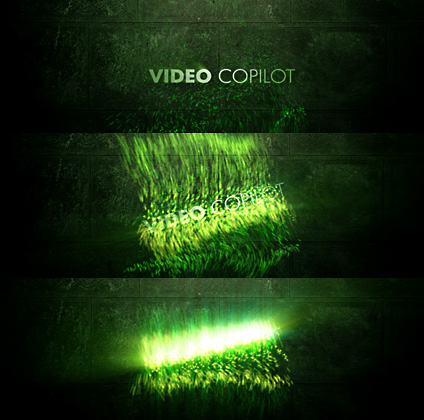
NEW TUTORIAL: Speed Particles

In this new 20 minute tutorial we will create a dynamic particle system that emits based on the speed of a layer. In other words when the layer moves fast enough, the particles go flying! Creating automated animation has never been easier!

Sample Video

Watch Tutorial

I knew I would have 2 tutorials done in the same week! Mintues to spare.

POSTED:
17 years ago
79 Comments
Looks beautiful.

@Diegatxo, I think that texture is in Riot Gear.
Diegatxo
16 years ago
How i get the texture that you use?
Drokle
17 years ago
This stuff is great. Thanks Andrew!

One question. Is there a way to get a similar effect to 'starglow' with AEs native tools? Thanks.
Kiran
17 years ago
This is such an awesome tutorial. I will name my first born VideoCopilot in your honor Andrew and call my wife dot pest, I mean, dot net again in your honor.

Cheers for all the hard work
Jedimasterthomas
17 years ago
Thank you! You're just GREAT! Whoew!

Greetzz
Jake Bartlett
17 years ago
Thanks for this great effect, I'm putting together my first motion reel and this works great for titling. I also just purchased the evolution pack and have been experimenting non-stop with everything in it. Thanks again!
Wilson G
17 years ago
Andrew,

Excellent use of expressions! It made me think of an great movie idea. We could plant this bomb on a bus and when the bus goes faster than 50mph, the expression could make the bomb go off. Maybe Sam and Sandra Bullock could co-star? Anyway, great job as usual!
Speedbreaker
17 years ago
@ Kevin J

wow thank you,
that's realy a great resource!
who
17 years ago
texture is sadly not on the riot video copilot
17 years ago
Hi all,

I don't know how many of you know but here is a great resource textures that can be used for such backgrounds.

http://www.cgtextures.com/

KJ
Hitendra
17 years ago
Hey thats wonderful tutorial I am really thankful to you for such great tutorials but I kindly request you if you could come up with wire removal tutorial in after effects it would be really graet.

Thank You.

Hitendra (from India)
17 years ago
Hey, great tutorial, i was wondering where u got the background texture from? Or how i could get my hands on it

thanks, Matt
Bajistapro
17 years ago
hello I am having a problem with the render my particles do not apears at the final render! why??? please help! (I am not following the tutorial is just some inspirational results from the tutorial!)
17 years ago
Andrew! Very cool idea and realization is also cool. Very beautifully!
17 years ago
Your tutorials rock. Great work!

By the way, those '{ }' are also called curly braces.

Ethan
Alan
17 years ago
I like this idea. One question (and I haven't tried it yet) is that I'm suprised Andrew never showed an example of using TWITCH to generate movement rather than using wiggle. Can you not get the speed from having added twitch?

I think it would be a great 'shake the drips off' kind of effect...
17 years ago
I'm starting getting expressions and they are so cool!

Thank you for all your great lessons.

http://youtube.com/watch?v=U_UdZjg3ktM
Andrew Kramer
17 years ago
Dustin, 29 seemed to work from earlier. Particles rendering was fast and it didn't seem too sparse. You're pretty much right about the other stuff too...
17 years ago
awesome tutorial. Ahead of the curve as usual. Keep it up
Dustin James
17 years ago
@ Dan

Andrew plays around in AE with ideas and things that he does in his time and occasionally shows us what he 'might' make a tutorial out of when he gets time.. what happens is that meanwhile he keeps playing with new things.. and decides to make other tutorials.. (that is what I think happens and I've been here a little while.)

@ Andrew

THANK YOU! I am really enjoying these expression tutorials because they are extremely useful for numerous things! I think you've mentioned a book or two about expressions but I don't remember on which blog/tutorial. Could you maybe let me know about your personal favorite?

QUESTION: Why do/did you choose random numbers like 29 in the 29*S part of the expression? Is that a number you found worked for you, or do you just like random numbers?
Stanislav
17 years ago
Congratulations for the 70th tut Andrew , this one is very nice ! Keep up the good work !
17 years ago
Hey Andrew,
I would love to see more tutorials with Particular involved...as you know there are some incredible results to be had. I am exploring Trapcode "Form" at the moment and playing with the audio map functions..it's very very cool.
I'm loving this use of expressions for this example btw.
Kim A. Strandli
17 years ago
@Toni Smosh:
Trapcode Particular is a stand-alone product from trapcode.com
I doesn't ship with After Effects CS3.

Great tutorial!
VCP_FAN
17 years ago
btw where did you get that texture, i can't find it in the riot gear collection or in evolution
drobins
17 years ago
Andrew, excellent stuff. Just out of curiosity. How do you know someone would fall off a car at 80 MPH??? Have you been experimenting with Sam again? Or was he trying to hang out with you and you were trying to get away and that was the speed you reached when he fell off the hood?
VCP_FAN
17 years ago
hehe
I think that i'll use twitch to create something very very cool with this technique
thanks andrew

try experimenting with twitch to see if you come up with something cool.
17 years ago
Warti, you can use the layer as the emitter but the key is to only emit particles at certain speed...
Conor Maher
17 years ago
I'm going to go with WOW!

Very cool effect, Thanks!
VFX-Anomaly
17 years ago
Speed expression!
Andrew I thought you might do something like this, although I did not think it would be this cool!

Thanks man, you can have my last beer.
Simon
17 years ago
Hey Andrew

Amazing, these two tutorials.
I have one question, how can I use particle world instead of Trapcode Particular. Because I dont have that plug in.

Thanks
illd
17 years ago
Nice one!

Its all about expressions today...
Pete Valcanas
17 years ago
Another great tut! I especially like how you sync your sound effects to the animation, it adds a lot of punch, I keep trying but never get it as good.

Thanks again,
Pete
Ross
17 years ago
You come up with the greatest tutorials. You make what seems so impossible like coding a cinch. You also make it possible to understand and use in other projects. Thanks again cant wait for the next one. I check this website everyday and have bought most of your products
Warti
17 years ago
First many THX for this new tutorial!

But is there a big difference when i use the Text Layer for the emitter Type ?

MFG Warti
Jessika
17 years ago
ANDREW!

can say more, just look at my video for you:

http://www.youtube.com/watch?v=B2I4LkxQwQ8

Jessika
Alex Lopez
17 years ago
Great job! This looks awesome!
Scott middleton
17 years ago
Hi Andrew
great tutorial as always but I was just wondering about the background texture you used did you photograph it yourself,
or did you get it from somewhere?
17 years ago
Excellent Andrew...great tutorial....
Toni Smosh
17 years ago
hmmm, im using AF CS3
but i dont got Effect>Trapcode>Particular
i dont got the "Trapcode"

what to do?
17 years ago
I must say i was a little disapointed that it wasn't about 3D text; until i watched it and realized how awesome expressions really are (and how they seperate the pros from the users).

Thanks a lot Andrew, i'll never judge a tut you drop ever again (no pun intended).

Mr Lopez
17 years ago
Where do you get these amazing SFX Mr. Kramer?
highdefw
17 years ago
Excellent tutorial. Good stuff man. I'm looking forward toward your next Advanced DVD
17 years ago
Thanks for the tutorial as always .
jorberg
17 years ago
Great tutorial!! Thanks AK!!!
Ryan
17 years ago
great tutorial, very cool effect, that speed expression is awesome. i saw in the sample there was light added, is that an expression also?
Donovan
17 years ago
oh man...where do u get these ideas from
Rock on :p
17 years ago
Bravo!
17 years ago
Pawel
17 years ago
Thank you Andrew, this one definitely sparked some ideas Love it!
Nikolaus
17 years ago
Really big thanks to you Andrew!
ati
17 years ago
happy birthfay!
from argentina!
Martin
17 years ago
I like this one, but where is the tutoril with 3D text in After Effects?
I thought you would make such a tut!!
From the example: Catching Up, with the text: TO CATCH AN EDITOR
Matt Dunwoodie
17 years ago
just 1 thing... u had particular registered as an unlicened demo and u didnt get the watermark? any response?
AMIT SHRIVASTAV
17 years ago
Hello Mr. Kramer, thanx for all these valuable tutorials. Can you plz tell me from where you took training for VFX & 3D. I also wanna buy your DVD's, they are very valuable. plz reply
Thomas
17 years ago
Hi there Andrew, all your stuff is tremendously helpful. I have a doubt, i see that in this tutorial when you wrote your text, the anchor point was set automatically in the middle. In my case the anchor point is always on the bottom left of the text.

May you please tell me how I can fix that so my anchor point can always come up in the centre of text.

All the best,
Thomas
tommie12P(Thorsten Miess)
17 years ago
nice! last minute tutorial this week
st0ka
17 years ago
I was doing this in 3ds max cuz i didn't know how to achieve the effect in After Effects. >_> Thank you Mr. Kramer! It's way easier now (:
17 years ago
Fabulous

I think that we can create particulars for a magic wand with this, in following a null object.
17 years ago
Very Pretty.
Infaas
17 years ago
wow, that looks 3d ,gonna check it out...
THEONE
17 years ago
Amazing.....Amazing......Amazing.....http://www.youtube.com/watch?v=rIa3QABoSe0
17 years ago
Love this effect. Thanks for the tutorial.

It would be awesome to see more examples of using expressions to drive complex animation, particularly stuff that's tedious to do by hand (e.g. imitating real physics - weight, momentum, collision etc.).
17 years ago
Thanks for your effort.
17 years ago
its looks sweet... i never realised this effect would be so simple...i mean i thought you need some sophisticated 3d program to achive this...
i guess the saying is right ..

"You can do anything in after effects, if you know how.."
17 years ago
awesome tut.. but of cuz all the tut s are great.
17 years ago
YAHHOOOOOOOOOOOO !!!
Thats Fantastic Andrew !
Very Very Nice
thanks again
http://After-Effects.Blogfa.Com
Bye
Josh Johnson
17 years ago
That is very cool Andrew great job!
17 years ago
wow thank you for keeping your promise (AS ALWAYS) now i'm expecting for the new website it will be legen... wait for it ... dary (does anybody know HIMM here??)
Sandy
17 years ago
ahh, what a look, Superb. U R Amazing!

How do u find those ideas ? Plz Answer. Its a BIG question for me. Plz ANSWER.

Regards
Sandy
Ben Wotton
17 years ago
hey...where did your post go Andrew? hmmm, looks like another mystery to be solved..
Ben Wotton
17 years ago
yeah,they do what they want.

Looks to be another great tutorial Andrew!
17 years ago
I have been waiting for one like this and now I got it! Thanks man!
Dan
17 years ago
Hi andrew thanx for the tutorials
but what about the other tutorials that you show a sample buit you havent show the tutorials about them
like the glass one for example and the 2D 3D text?
thanx
VCP_FAN
17 years ago
hahaha
you're awsome
"I knew I would 2 tutorials done in the same week! Mintues to spare."
i love you're phrases
17 years ago
I actually understood the expressions! I'll use that!
Thank you AK,
c
17 years ago
Do you want a longer, stronger, more flexible love life?
Well then get TWITCH from VCP.net.. yes with TWITCH
you too can have what you see your neighbors having
through your bedroom window between 7-9 pm on thurs +
fri nights, and sometimes on tuesday but not during the fall because
that's when new seasons of their favorite tv shows come out
and they get divorced! Yes.. buy now!

Haha, great clips mr. kramer
17 years ago
cheers dude....!
julian
17 years ago
nice
Casey Millwood
17 years ago
Another great tut Andrew....I love this site