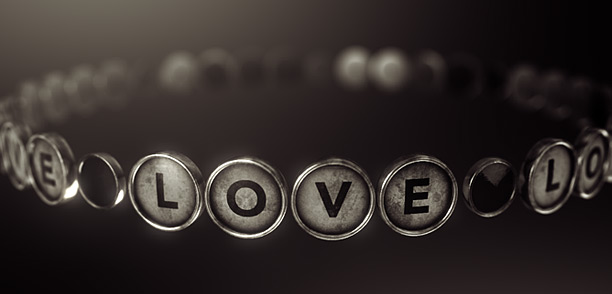
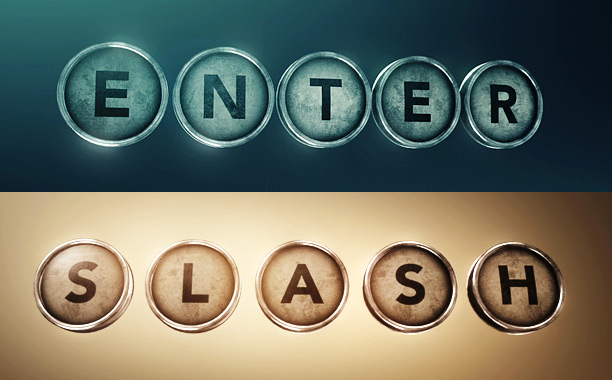
New Tutorial: Animating Typewriter Keys

In this tutorial we'll learn a cool technique for writing words with 3D objects using the super-fast Element 3D plug-in. Once setup the keys can be animated in a variety of different ways with only 2 key frames!

Watch on Video Copilot

Watch on Youtube in HD!

Typewriter Model Pack:
To follow along be sure to download the FREE Typewriter model pack.


POSTED:
12 years ago
70 Comments
stevie biko
11 years ago
i enjoyed the tutorial and like it
David
11 years ago
Andrew,

You have helped me take Valentine's Day up a notch this year. Thank you for the tools and inspiration! She loved the video I was able to make using your typewriter and paper downloads.

http://youtu.be/JnYYCFITRBE
Wow it is very nice for the buttons, which are diagonally.
Again, as always, was fantastic.
12 years ago
I am new After effect, its really awesome tutorial.
12 years ago
ANDREW, any way to create models or products build ups, like in the LEGO page? Would like to see a tutorial about that, like scattered pieces on teh floor flying to a finished model.
a.
Cheers.
12 years ago
Hi!AK,veyr like your works,I am honest fans,from china of little city.
aju
12 years ago
Hello i am downloading element 3d and typwriter but i can't see partical order option so aliment words is not correct anybody help me please
Charles
12 years ago
Viewed one of your tutorials, like it, you got class.
How does one register or sign up to purchase a template
for After Effects?
Sanchez
12 years ago
Awesome job Andrew... what font did you use for the individual keys?
Riz Qiy
12 years ago
helppp......!
how to install this for mac ? please tell me..
Thx
RUTVIK
12 years ago
Now here's what I have created with the help of PhotoShop and AE.
https://fbcdn-sphotos-c-a.akamaihd.net/hphotos-ak-ash3/1175013_574502602611993_1950233581_n.jpg

Thanks Andrew, for your amazing plugin and this model.
Justin
12 years ago
Hey Andrew, love the model. Here is a quick segment I put together. keep up the great work VideoCopilot!
https://vimeo.com/72744563
12 years ago
Awesome Tutorial, element is such a useful tool! here is a sample animation I created for my Aerial Video business.

https://www.youtube.com/watch?v=o4BChso-7KQ
ONYEJIAKA
12 years ago
HELLO PLS IS IT POSSIBLE CHANGE THE COLOR OF THIS TYPEWRITER
IMMANUEL FRANCY
12 years ago
andrew kramer can you upload 3d max or maya tutorial
12 years ago
Hi there,
I just created a new intro for my Youtube channel with a couple of technics what you showed earlier. Also it contains the newest technic what you showed in this tutorial!
Check it out: http://youtu.be/dAmUxaZqp9A
rob frost
12 years ago
speaking of future city...This is pretty hot:
http://siamon89.deviantart.com/art/Intergalactic-Meeting-197880260
khubaib
12 years ago
Only time I wish I was queen of England is when I watch you tutorials, so that I can knight you. hehehehe
reza irani
12 years ago
Andrew,what about the Vehicles pack?i can't Wait for it!When will be available?
reza irani
12 years ago
hey! it's sam's birthday!!! Happy Birthday Sam !we love you!!!!!Hope your 120 years old !
WM
12 years ago
Super! Ok, now for the vehicles. It's August already. I have c-note with your name on it.
12 years ago
It's cooll!!!!!!!!!!!
hey my name Is Muhammadkhuja, i am its funny
Andrew Kramer you is GREATE !!!!!!!!!!!!!!11
Kenneth
12 years ago
Hi Andrew!

I love how the textures of the keys have lots of shadows and am having trouble creating directional lighting on 3D titling created by element.

Ideally I'd love to even have the 3D title in complete darkness and then just light one side/point with the back of the object falling off into darkness. It seems to me that the environment map ensures that there is always some ambient lighting washing out the dark parts of directional lighting added later. Is there a trick to solve this? Perhaps something for another tutorial? To synthesize truer directional lighting, would it be best incorporated into the 3D environment or is it possible to create a completely black environment and then add AE lights?
Deepak Mistry
12 years ago
Hi
I try Replication Shape-plane and Particle Order-Forward option that time its not work proper its came mirror like first row U V W X Y
second row P Q R S T
last row A B C D E

and when select backward option than first raw E D C B A
second raw J I H G F
last raw Y X W V U

please help me for solve this in correct order

Thanks
Deepak Mistry
12 years ago
Hi
I try Replication Shape-plane and option that time its not work proper its came
mirror like
oposh
12 years ago
i can't wait to start on it, thnks DD!
micheal
12 years ago
You are just awesome ANDREW. Am still waiting on KNIFE tutorials
12 years ago
try clicking on the facebook link and it turns out I found it extraordinary.
Kent
12 years ago
Could you make a tutorial on how to light a scene? the shots you put together have a level of detail I just can't seem to get.
Tomjhons
12 years ago
HELLO ANDREW ME I REQUEST CAN YOU CREATE A TUTORIAL FOR BUILDING COLLAPSE.


THANKS I LOVE YOUR TUTORIAL...
pierregagne98
12 years ago
Thank you very much Mister Andrew Kramer !
This is greatly appreciated! )

I got a question, was this typewriter created from a blueprint ?
It would be nice to get a few drawings if that is the case.
It looks like an "Underwood Standard Portable Typewriter".

I'm trying to rig the printing hammers to be able to animate them with the different keys press in Softimage 2011 Sp2, but the hammers have a stem that is too long to simply animate the rotation from the tip.
So if there are any pictures of the inner workings, that would be great to have rigging purpose.

I will of course send you the modified file of the provided typewriter so you can offer it as well on your blog.

Also on an another note; in Autodesk Softimage,if I use the typewriter rubber feet's bottom vertex to align the origin to the center of the world, the position of the typewriter object is:

X: 127,4966, Y: -5,5819 Z: -69,1744.

Is that a prerequisite for Element 3D objects to function properly in After Effects ???

See both images: I also included the Softimage scene files so you can check it out if you have it.

http://www.screencast.com/t/sxBzdDA7OS6
Darren
12 years ago
Just wanted to say: Very, very cool. Thanks so much Andrew and the rest of VCP. You guys rock!

Can't wait to see this mysterious new plugin. Would you like my Credit Card number now, or later?
Tobi
12 years ago
I saw some Aircraft pack the *_*
When will it come out ? You told us release is this summer !!
12 years ago
i used "revolution intro sound" end of the animation

https://www.youtube.com/watch?vyWkSfD7mHY
JC
12 years ago
In reference to consolidating the textures, what exactly is that doing? There wasn't much explanation but it seems like an important step to understand. Is it rewriting a baked texture for all the textures? What other circumstances would that be useful in and why do it in the first place?
12 years ago
It is simply to make it easier to change all of the materials at once. Otherwise each copy would need to be modified if you wanted to change the reflectivity or specular amount.
Neil Ruff
12 years ago
JC - If I'm correct, this only works because all of the keys take their textures from the same UV map...so when Andrew added the 4 keys for TYPE, the same texture map was loaded 4 times. You wouldn't use this 'apply to all models' for, say, five different models which each had their own, different texture map. This also relates to VC supplying the 'blank key' texture map - you can modify that single map in photoshop, but the individual key models the map is applied to will take their own little part of that map. The result is the same, but it's a much more elegant solution for this set up when compared to having a unique map for every key
Fozz
12 years ago
There's really so much meat in your tutorials. Maybe you should release a vegetarian one. Thanks!
LordEdington
12 years ago
Euro Buildings? Interesting.
pierregagne98
12 years ago
Looks very nice and clean. Congratulations !
If you want to increase the realism, I would suggest adding a faint smoke trail behind some jets and also you could research to add the anti-collision stobe lights on the vertical stabilisers and the formation lights on the wingtips. I believe the strobe lights are blinking at a rate of one flash per second but I'm not sure.

See reference picture:

https://www.google.ca/search?q=f-14+strobe+light&source;=lnms&tbm;=isch&sa;=X&ei;=w4INUrSlFoe88AS584HQBg&ved;=0CAcQ_AUoAQ&biw;=1920&bih;=993#bav=on.2,or.r_cp.r_qf.&fp;=fe2fba3ba26f313a&q;=f-14+tomcat&sa;=1&tbm;=isch&facrc;=_&imgdii;=_&imgrc;=9s-ATu3ccovo1M:;-voAUefuaK906M;http%3A%2F%2Fonlyhdwallpapers.com%2Fwallpaper%2Fvideo_games_ace_combat_plane_f-14_tomcat_desktop_1280x720_hd-wallpaper-112551.jpg;http%3A%2F%2Fonlyhdwallpapers.com%2Fgame%2Fvideo-games-ace-combat-plane-f-14-tomcat-desktop-hd-wallpaper-112551%2F;1280;720
NLantean
12 years ago
Check out this video I have made with Element 3D,comment your opinions, thanks.
http://www.youtube.com/watch?v=QwbBh-ESxik
Dan
12 years ago
Nice work! That looks really good.
Kevin
12 years ago
I think what everyone wants is a tut on how to model in a 3D editor like 3DS max or Blender (would be best since it is free), and import that textured model into Element 3D.
Nio
12 years ago
So what are you waiting for? Go on the net and you will find tons of tutorials about how to model, texture, etc.
I like the tutorial, it showed me some tips I've never thought about that I can tweak...
Good one!
Nikolaus
12 years ago
I wanna tutorials for nuke ;D
Gaurav
12 years ago
Plz show How to animate these typewritter keys in 3d max 2013
reza irani
12 years ago
i want to kiss you andrew???!please come forward to me ... a little closer .......'''(kiss)'''.......
Maui
12 years ago
Would love to see a tut on how you made the 4k texture for the model.
Iman
12 years ago
THANKS
Please stop creating tutorials about ELE 3D ,Its getting ridiculous,where is your native amazing after effects tutorial?!!!
Jake
12 years ago
Element is the future!
Tob
12 years ago
Jake you are right
12 years ago
Dayumn!
These are the real thing! Andrew never stop man NEVER! We love you! (No homo )
Alex
12 years ago
have been seeing lots of Made-by-Elements graphics on TV and other platforms here in Australia.
Bhavya Joshi
12 years ago
Mahdi
12 years ago
Thanks a lot Andrew...
نیما
12 years ago
you are amazing boy , great , great ???
hakui
12 years ago
gooooooooooooooooooooooooooood job!
Javasport
12 years ago
Totally Awesomesauce!
Liron
12 years ago
Videocopilot Has done it again!
Thanks Andrew-You ROCK!!
Charles
12 years ago
you should include your Back Grounds those are hard to create lol
Brandon Liebenberg
12 years ago
Sweet. This tut rocks, very versatile
prathamesh
12 years ago
really really thanks andrew sir
tcbr
12 years ago
wow thery nice!!!
thx you thery much!!!
12 years ago
Awesome tut and model. I haven't bought Element 3D yet but will soon. I was wondering do you plan on releasing a vegetation pack, rock, animals, etc. These packs or models are some of the best that I've ever seen.

Thank You for sharing you knowledge.
Mike
12 years ago
btw, love the wife joke "had to download the trial" haha
Antonio Chamu
12 years ago
Hi Andrew. Very educative tutorial, and all your site.
When you have time, would you like to do a tutorial on "freeze time" using Elements 3D...
Thanks.
Mike
12 years ago
I didn't know your week started wed? :p
12 years ago
Amazing stuff Master Andrew!
shawnbooth
12 years ago
Thank you for the FREE model and tutorial on how to use it. New techniques are great. (I also loved checking out your model browser. I want bacon.)
Tob
12 years ago
Me too
Dave Thomas
12 years ago
count me in for the bacon
Julian
12 years ago
I like the tutorial, I like the 3d model, but I think now we will see hundreds of videos with this model on youtube. Personally I prefer the old days, when you learned techniques to use in so many ways. I would like to see tutorials of 3D modeling, MAPPING, for then use it in E3D of course.
israelhp7
12 years ago
you right
Jc
12 years ago
Yeah, you're right, but you can create another videos base on this one
harryo
12 years ago
exactly! modeling and mapping a 3d object to look as great as those that andrew does has been a nightmare to me. i wanna see more on that.
BlankaLi
12 years ago
A tutorial regarding mapping in Element would be great. Having a real problem with it just mapping a Starbucks cup.
israelhp7
12 years ago
MR. Kramer i have a question: where did you get that exciting music?
husseinmohy
12 years ago
Oh it's amazing i love that
12 years ago
the best thanks Andrew!
12 years ago
thank you ! can you make more motion graphics tutorials ?
12 years ago
Finally..!! Tutorial was release... Thanks...
Mohamed
12 years ago
As Always u r the best
Mike
12 years ago
Great, thanks Andrew!
megaman
12 years ago
Hello ...You know what would be cool....If you can do 3d cameraa projection using element 3d !!!!! Maybe a future update !!!!............. hmmmmmmmm
Rapheal
12 years ago
Hello ...You know what would be cool....If you can do 3d camera projection using element 3d !!!!! Maybe a future update !!!!............. hmmmmmmmm
rapheal
12 years ago
Hello ...You know what would be cool....If you can do 3d camera projection using element 3d !!!!! Maybe a future update !!!!............. hmmmmmmmm
Bilal
12 years ago
Hello ...You know what would be cool....If you can do 3d camera projection using element 3d !!!!! Maybe a future update !!!!............. hmmmmmmmm
Miniman
12 years ago
Hello ...You know what would be cool....If you can do 3d cameraa projection using element 3d !!!!! Maybe a future update !!!!............. hmmmmmmmm
12 years ago
so much impresive