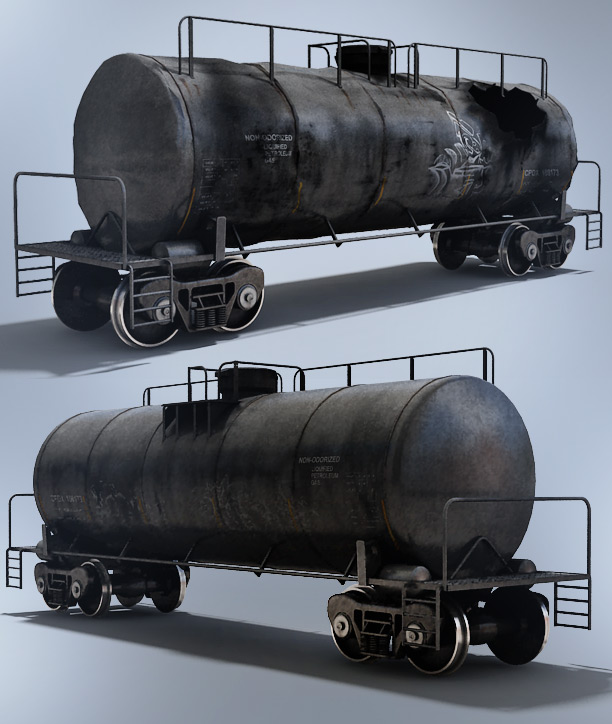
In our recent Explosive tutorial series, I used a paid 3D model for the tanker model that I could not share with the community… SO instead we built a BETTER high quality train that matches the actual scene from the training video that you can have for free!
There are 2 version, clean and destroyed for you pyrotechnic deviants. (Like myself!)
I wish I had this model in the first place! I would have been this excited!
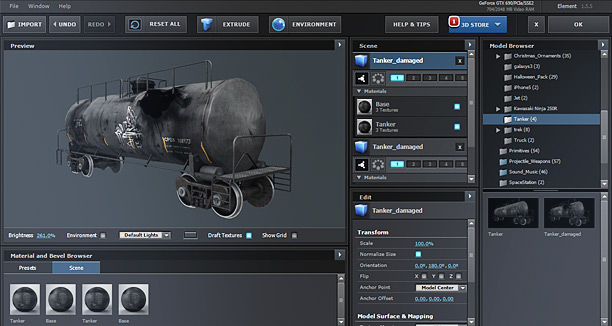
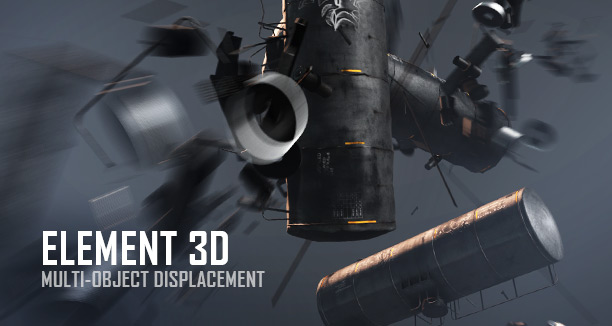
PLUS… we set it up for Element 3D so people can play around with the model in After Effects! And it looks pretty darn good. The tanker has been separated pieces to use with the multi-object mode inside Element to displace the pieces around.
To install for Element 3D: Be sure to place in the My Models Folder:
Documents\VideoCopilot\Models\My_Models
Download Tanker Model — OBJ format with 3D Max file + 4K Textures!
Watch Explosive Tutorial Series
We're trying to encourage more thoughtful commenting. Â Please take a moment to write a meaningful response to this post.
Also remember to read the rules on posting first.
3D MODELS


Thanks guys for this model
thx man! please watch and comment http://www.youtube.com/watch?v=08jXl4xmv1I
car blasting how to blastfor after effects
Excellent, Thank you!
Tanks a lot for a lot of tank!
OMG This looks amazing, Andrew! I’m just as excited as the train guy haha!
Thank you Andrew you guys rock
Crazy much Andrew Kramer
thank you for uploading this, very thoughtful.
Rich
Awesome, thank you Andrew!
Thank you doesn’t even cut it!!!
Thank you, Andrew! Is there a plan to Action Essentals 3?
Andrew’s pretty much showed us how to make our explosions and stuff.. He’s teaching us how to fish haha!
I hope Action Essentials 3 will have FumeFXy explosions…
and more FumeFX smokes, Because real smokes in Action Essentials 2 were unrealistic when you wanted to put them on the scene.
What would be really useful is some large scale FumeFX smoke
That’s very cool, Thank you
Thanks Andrew ! Keep it up !
Thanks, this is awesome!
Thanks
I can not wait to get more model
Thanks so much and God bless you Andrew Kramer…
Thanks As Always Andrew
Man!! You guys just go above and beyond. Thanks for always being awesome
Hey Can someone tell me what kind of GPU i would need to use (my rayfire is very slow) is it more about GPU or CPU. is Core i7 good for animation if so what kind of GPU’s do i need and how can i tell equivalent GPU
Awesome! Thank you Sir! I was hoping you and your team would release an Elements version of the model, and low and behold!! Thank you again!
For those visting the comment section, check out my youtube page for all kinds of cool shots produced using a lot of the techniques Andrew Kramer teaches us all here at Video CoPilot!
http://www.youtube.com/user/jransomwright
Subscribe and watch for more cool videos!
Thanks!
many thanks for the 3D Model
Whoohoo just when you thought it couldn’t get any better!!
andrew you freaking badass! love you for that!
THANXS FOR SHARING YOUR WORK WITH US ANDREW.. YOU ARE THE BEST
wow!Thanks!but can you upload another models like you’re jet model;
helicopter model;airplane model and cars model that was used in past tutorial’s???please do something about this!
We will be selling a pack for Aircrafts and Vehicles soon. Sorry they take a lot of work and won’t be free. But less expensive than anywhere else.
Of course! All of our packs moving forward include 3D max, FBX, C4D and OBJ with materials all ready to go!
Andrew please consider also the c4d user with the pack
Great work all around Andrew! I have a special request for that Aircrafts and Vehicles package. how about a Lockheed Electra 21a, circa 1930′s? a few of us still have a soft spot in our hearts for the “Lisbon Plane.”
I said to my friends and family…. Just send my birthday presents (cash only) directly to Andrew Kramer at VideoCopilot. I’m sure he can suggest the right birthday present for me.
And I think it will be named “Future Model Pack”
Thank you very much Kramer.
Amazing – is there any way to do the rigid body simulation with element instead of 3ds max?
WOoooooo!!!
Awesome! greetings from Chile
¿in the future there will be explosions element3D?
Greetings
Thank you Mr. Kramer!!!
Thanks for another amazing free model! Excited to hear that a Aircrafts and Vehicles model is coming soon…
Thanku So Much For the free 3d Model Andrew Kramer.
Can we use realflow Simulations in Element 3D.
yes u can only u have to convert it into the obj seq. from 3d software u use
“We will be selling a pack for Aircrafts and Vehicles soon.”
Andrew, do you accept donations (=models) for the Aircrafts and Vehicles pack? If yes, then I might model some hardsurface models. (Or if you have any requests..?)
And no, there’s no catch behind it
That’s so generous of you guys!
BTW’s can we have a date for the release of the Aircraft pack!?
Dang you guys are way too kind. 4k Textures too! Thanks a ton!
I think it’d be neat to have a train model pack for element where all the cars were the same size, so you could line them up using a grid on one group and make a train.
Andrew, you’re the Salvation Army in VFX(I meant it in a good way)!! this quality of model for free!? Dang!!
That’s how we roll!
This tanker has no couplers.
Anyway, I look forward to the upcoming vehicle pack as well as giving you my money the moment it’s released.
That’s why I take the bus!
Wow…very nice model…what’s the catch?? I’m not downloading it…it’s a trap!!
Thank you Andrew! Looking forward to all we can learn from you.
Thanks man…,u are the best,i always waiting your new tutorial. i hope much more new tutorial without your 3d plug in…
I’m really curious..are you dumping on element because you don’t own it?
It’s so awesome to be able to load a model into element and have it ready to go…looking forward to more packs
Amazing. Thank you Andrew. Look forward to purchasing the vehicle pack too. You rock bro.
andrew could create a tsunami with realflow 3d environment maxun palm beach knocking a disaster a great wave destroys everything
example: in spanish
http://www.youtube.com/watch?v=oLnV8p_dIsU real
http://www.youtube.com/watch?v=ZRmWLqrJkz4 tsunami
OK, Now go back and watch the excited train movie again and imagine it’s Nicholas Cage.
Thx for the model Andrew!!
Andrew Kramer I can tell you if you ride the bus you will ride on mine for free but you will have to visit Halifax NS haha. Thanks for the model share. Looking forward to more of Video Copilot products.
Just quickly – what settings in element3D would allow me to create multiple tanks in a row (Like it would appear on a train track. I’ve fiddled, but still can’t get my head inside Element yet.
fantastic Share!
i guess I will model the coupling links at each end of the car, that way I can join up a string of them
very good Andrew you are great of the world I want like you very very
Thanks Andrew, a high quality model for free, awesome!
just a little heads up
in the max file, the difusse material for the exploded tanker is set to:
“C:\users\stefan\various assets\train cart\difusse exploded.psd”
i’m a newbie in 3dsmax, but i found the way to change it to the png file that comes inside the zip file in the material editor, but maybe for other users it may not be easy to do that.
Anyways, greetings form Chile, and thank you again for the model.
thanks dude for this model . i realy want it
Thank you andrew, without you I don’t know what the hell would I do!
Oh and like this one can you give us some multi object debris models that include broken pipes and metal parts stuff like that because that could be very useful in Element 3D
and another thing…. Future Model Pack?
Thanks very much – brilliant!
After being a game developer for some years, I now find myself in this industry, and just loving it! I started with books to learn AE, but you Mr Kramer…I have learned so much from your tutorials in a matter of a few weeks, and now put together some impressive work myself. Without the help of your site, I’d still be learning bezier handle tweaking in chapter 10!!
I knocked my own train up I was going to share, but you beat me to it! And what a model, and for free!! Awesome service to your community. Keep on doing what you’re doing Andrew, it is very much appreciated. And an invaluable resource for people like me.
Thanks from the UK
Hi Andrew I Thing You Make A Aircrafts and Vehicles Pack So Please Make It Faster I Want Buy It So Make Faster And Thanks For This Free Model And Please Make Aircrafts and Vehicles Pack Please
Thank You for the free tanker model and this excellent tutorial! Looking forward to the Aircraft and Vehicles Element 3d model pack to be released, Element 3d and all your model packs are #1 in quality and well worth the money!
Man, how do you know, my birthday was yesterday?
What a nice present… okay, now I have to deal with the parking issue, but a tanker for free?!! Sick!
Honestly, there’s no place like this place. VCP rules!!
And, Andrew, are you exited because of J.J is taking place on the directors chair for Star Wars.. let me count… 7?! Be honest, you are so glad you’ve developed Element 3D because of the nice text-fading-away-in-space-effekt you can realise with it, right?!
Is there a release date for the Aircrafts and Vehicles Pack? I’m looking for exactly this at the moment and have to buy some models. I would like to buy it from VC because of price and quality but I cannot wait too long.
Loving VC!!!!!
Waiting on the vehicle pack!
Thanx for the model!
Boooooom!
http://www.youtube.com/watch?v=0s7aAbEGOuo
thank you sooo much sir.. :p
“TANK”-you so much sir! lol xD get it?
Thank you very much for spending the time to make this and share for free. You guys are the best.
You could have been as excited as this guy – Andrew
http://www.youtube.com/watch?v=kBBK2hjcPuA
LOL
Thank you for a model! I have a question.I’m going to buy a new videocard EVGA 660ti,so i didn’t found it on supported graphics card list for element 3d,so will it actually work or not?
Thanks, Andrew and VC Group for their valuable support and contribution.
andrew could create a tutorial on how to create a tsunami with real flow
Amazing! Thanks
Guys, check out my self-made UNIQUE ELEMENT 3d PACKS!
They are free for everybody..here..:
http://www.youtube.com/watch?v=pOviZcf5t3U
You deh man, meh sun!
Thanks Andrew! You guys are great, and the freebies are always appreciated! Looking forward to the new vehicles pack. Totally Green Vehicles that can go all day and never use a drop of fuel. That’s just how Video Copilot does things!
Como crear secuencia de archivos OBJ en maya alguien puede ayudarme!!!!!
After Effects 2D Tracking…learned here
GANGNAM FUNKIN STYLE
https://www.youtube.com/watch?v=gzSl26acopY&list=UUHoYJKTT-VUKB27s7_1Y8NQ&index=1
Nice man…very funny…good tracking
Haha, don’t know if I can use this in a wedding film or cooperate video but what the heck. You never know
But absolutely fun to play around with the model.
I vote you put it in a wedding video. I’m always trying to sneak explosions in wherever…
One more thing! I tested out cinema 4d and riptide pro, and of course the obj sequence export/import! So this model is modeled and animated in C4D and textured in after effects using E3. It’s the piranha plant from mario! He…..my kids still love mario, haha. Is mario getting old or am I…….
http://www.youtube.com/watch?v=gxZjqRy0JbI
Haha, you’re right! Could be a fun concept “the wedding action film!”
Oh my God this should have come earlier
I was waiting in the youtube vid’ more than 2 minutes of the explosion – but….?!!
I want to morph the good tanker to the damages tanker.
I first found that the two tankers are not exactly mapped to the same position when you place one in Group 1 and the other in Group two.
When imported they both show XY as 480, 210
I changed the damaged Tanker to XY: 484,210 and now the wheels and other unchanged elements are correctly aligned so only the damaged pieces are different.
I simply want to animate a morph as if an invisible hand has crushed the tanker.
When I change the Smoothness parameters of the Animation Engine, the first tanker shrinks away and the second tanker grows into place, not what I want.
What do I change so that the tankers can simply morph from one group to the other please?
I hope this makes sense?
Not currently supported and the models were not setup to morph.
thanks for the reply
You can apply the mesh warp effect to the tank in AE and animate it. Use 2 copy’s. 1 copy for just the tank, and the other for the base. Apply the effect to the tank layer and crush to your liking. Lastly, you can displace the particles and have it come apart under pressure, if you like. Hope this helps.
allah bless you Andrew
very helpful..Thanksss !!
I want you to know that I may never use this model, but I will forever be thankful for the link to the excited train guy on youtube
Thanks Andrew Kramer
Su-weeet!
This might even be better than an HO set and a pack of m80′s!
You are by far the best trainer on the planet! Stay Rail OK?
Thanks Dear Andrew Kramer
http://www.youtube.com/watch?v=VhFtfYMm3Y4
Ryan with the best plugin for After Effects!
Hope you like it Andrew!
I’ve also seen that episode! Good use of after effects and I think some Action essentials 2
and again i need to say Andrew for President XD thanks Andrew
best regards Mark
Awesome series, Andrew!
Did u use Maya. thanks
Andrew… gr8 work. Now Please make Action Essentials 3… m starvng 4 it
Andrew i want to use it the models and textures in blender with cycles render
someone know?
I wish the people in Washington were as kind and fair as you and your company. Andrew Kramer for PRESIDENT!!!
This is so nice, just the thing I will need soon for my new film. So thank you
Awesome
I am trying to load this model for a comp in Photoshop (yes, I know…). Problem is, it loads the texture on the tank but not on the wheels, railing, etc.. Any idea why?
Wow! SPAM bot!