 ALL DESIGN TOOLS

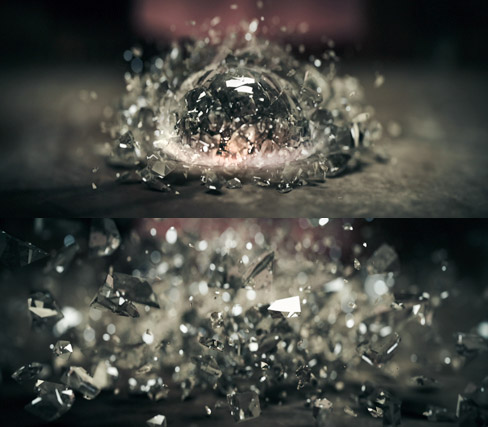
In this exciting new tutorial we will cover a complete workflow from 3Ds Max to After Effects for this exciting shot from our Demon Cam iPhone promo. A fast-45 minutes includes tips for fracturing geometry with Rayfire and creating the shatter simulation, then compositing a Z-pass in After Effects with DOF and Optical Flares.
November 21st, 2011

150 Comments
dd
10 years ago
plzz can u upload the project files for epic shatter............ or atleast the background images..... u r already doing soo much for free users So don't stop.... kindly upload the shatter's files tooo.............
TheShabbyJoe
13 years ago
Hey there, I've been trying to do this tutorial for quite some time. Tried it in Maya using Ruin, but couldn't get my particle system looking good. Finally got 3DS Max (64bit), Rayfire 1.56, Physx 2.61, and Vray. I'm running an i7 with a GeForce 560 ti card, with updated nvidia drivers as of June.
Everything goes very smooth, except that no matter what I do, all of my particles end up falling right through my floor deflector after a few bounces. I tried changing my box to be lower, I tried changing the deflector collisions to 50 or 100, but they only bounce 2-4 times and then fall right through. I tried different deflector types, like Pomniflect, making sure the reflectivity was at 100% and stop time was a high number, but no difference.
Just wondering if anyone had any suggestions. Can't seem to find many topics covering this online. Thanks!
Everything goes very smooth, except that no matter what I do, all of my particles end up falling right through my floor deflector after a few bounces. I tried changing my box to be lower, I tried changing the deflector collisions to 50 or 100, but they only bounce 2-4 times and then fall right through. I tried different deflector types, like Pomniflect, making sure the reflectivity was at 100% and stop time was a high number, but no difference.
Just wondering if anyone had any suggestions. Can't seem to find many topics covering this online. Thanks!
David
14 years ago
http://www.youtube.com/watch?v=ekqsMCrXZsQ&feature=player_embedded#! at 1:19
Congrats to the DemonCam Shatter making into RayFires Showreel!
Congrats to the DemonCam Shatter making into RayFires Showreel!
Cyrille
14 years ago
Love it very much Andrew! I would like to request (if you dont mind?) how did you create the "DEMON CAM" logo? I would love to watch the tutorial, coz I want to learn more about 3ds max..
RUGAMBA Benjamin
14 years ago
Hey Andrew! I like how you speak in tutorials,you are my inspiration,you made me like After effect,3Ds Max.... Thank you for your works, keep going on...!!!
Mainframe
14 years ago
Hi Andrew,
"Frischluft" is a german word. It means "fresh air". Here is how you pronounce it: http://translate.google.de/#en|de|Frischluft (when you click the speaker icon, you can hear it!). So you can train how to pronounce it for the next tutorial!
Greetings from Germany!
Mainframe
"Frischluft" is a german word. It means "fresh air". Here is how you pronounce it: http://translate.google.de/#en|de|Frischluft (when you click the speaker icon, you can hear it!). So you can train how to pronounce it for the next tutorial!
Greetings from Germany!
Mainframe
simon
14 years ago
CAN ANYONE HELP ME?!?!?!?!?! I've got the demo of version 1.57 (Rayfire) and no matter what demolition options I set(incl. ones Andrew said) my object wil just fall, and then bounce a little, but not ever shatter. I have tried reinstalling but no....
please help!!!
please help!!!
Shadow Dancer
14 years ago
3Ds Max's dynamic system is the worst and the most complicated thing that I've ever seen b4, thank god I didn't continue with max. anyway, what Andrew made in that time (btw I know that was tut) you could do much much faster and easier in other programs. When the idea was 4 Andrew and was amazing and I agree with that! But I made same simulation in Maya in about 10 minutes (without render), and the same in RF took about 30 minutes. I think it would be awesome if Andrew made this tut with RF and render it with element, it would be easier 4 any1 and specially awesome b4 releasing element.
Dennis G
14 years ago
I wish you would create this tutorial for C4D as well, just as you did (a while ago) on the Bullet tutorial... I'm sure you would make a lot more people happy than the ones who have asked here for a C4D-"port" of this tut.
I would really, really appreciate some help. I cannot seem to simulate anything with RayFire Tool 1.57. I keep getting "Unknown System error" whenever I try to bake the simulation.
The precise process I took is described here: http://area.autodesk.com/forum/251837
Please, any help would be greatly appreciated!
Chris
The precise process I took is described here: http://area.autodesk.com/forum/251837
Please, any help would be greatly appreciated!
Chris
Hey all! Thanks andrew for this tut. I used cinema 4D and the Thrausi free plug in for the shatter effect. I wanted to complicate things a little so I try to matchmove things:
http://vimeo.com/32732417
Cheers
http://vimeo.com/32732417
Cheers
peter
14 years ago
Thank you , very much ! Very interesting to watch your workflow with different programms. very impressiv !
naren
14 years ago
I really dont understand how can u do such difficult work so easily u r awesome man
Dead Flesh
14 years ago
ANdrew,,,,how can i be great Visual Effects artist?
and did u go to vfx academy or learn online?
and did u go to vfx academy or learn online?
Once again.. Brilliant! I haven't got some of the software so I guess this is the first tutorial of yours I can't have a go at yet... Thanks anyway.
Today I make this orb. What you think about it?
http://www.youtube.com/watch?v=Hr7vaWwve_o
Andrew thanks
http://www.youtube.com/watch?v=Hr7vaWwve_o
Andrew thanks
hoemminger
14 years ago
thank god it's friday!!!!!!
finish work, get home and try out.
AWESOME ANDREW !!!!
finish work, get home and try out.
AWESOME ANDREW !!!!
saidh
14 years ago
very very nice kramer.
next time please create 3D anaglyph title. please....
we will for that
next time please create 3D anaglyph title. please....
we will for that
zorro
14 years ago
hi AK
I am from China fans, thank you for your course, let me benefit a lot, I hope you can more introduce some of the software and the AE cooperation project
I am from China fans, thank you for your course, let me benefit a lot, I hope you can more introduce some of the software and the AE cooperation project
Alessandro Leoni
14 years ago
Hello, I tried making the particles, everything is fine but particles keep spinning when they stop motion. Is this the reason you stopped the animation before physics were over?
I will try doing some freeze camera move in the middle of the animation.
Thank you
Alex
I will try doing some freeze camera move in the middle of the animation.
Thank you
Alex
Badhan J Ganesh
14 years ago
Hey!
Just like girls never fail to attract boys, you never fail to impress us with your awesome tutorials!
One question!
After the creation of the force gravity, my standard particles bounce on the floor for couple of times and then falls through the floor. The particles just wont stay on the ground. Why that would happen? Please "show me the way" on that.
Just like girls never fail to attract boys, you never fail to impress us with your awesome tutorials!
One question!
After the creation of the force gravity, my standard particles bounce on the floor for couple of times and then falls through the floor. The particles just wont stay on the ground. Why that would happen? Please "show me the way" on that.
Hi, I have one small question, how animate DOF point? I use version 1.4.5 FL DOF, activate a stopwatch on focal point and move select depth but do not get animated results
Alpeshpatel
14 years ago
last I watch a demon demo & I try to create this crystal ball falling but i rally confuse to use a ray fire & Particle, I am wetting for this Tutorial Thanks for this, Thank you Andrew Kramer and Video Copilot for another amazing tutorial
Zack
14 years ago
Excellent tutorial. I wish 3DS Max wasn't $800. How do you shatter things in Blender 3D? I hope you can finish Element by Christmas.
Will
14 years ago
Andrew!! Please post more tutorials!! I check this site everyday for new tutorials and blogs!! I love your work!!
Vacendak
14 years ago
Wow, another shattering object. Lots of stuff looks pretty odd, opac shadows of glass fragments? I always like it, when artist cover their inabilities with lots of DOF and lense flares. Facny effects over quality should not be the way to go, bummer.
Chris Francis
14 years ago
hi Andrew im using 3ds max 9 i wonder if its still compatible with rayfire i cant open rayfire in max ive install it and unstall it many times it doesnt show up in max... hope to here from you...great tutorial by the way...!
Daniel Zaidan
14 years ago
I really enjoyed this tutorial especially because it has tons of applications other than a crystal ball falling. Thanks for the awesome work and particle flow tips!
Awsome tutorial Mr Kramer. I struggle getting the lighting+settings right in vray this tutorial helped. Any future plans to include more tutorials with 3dMax? Would also welcome a tutorial on Car crash using rayfire or other.
Wooooow! I'm refreshing the site many times per day waiting this tutorial! So, I love After Effects, but this time I think I'm gonna learn 3ds Max to integrate with AE. Btw guys, please check my music video teaser on youtube.com/AndersonRohr, or click here in my name to go to my channel. I'm using the plugins Camera Tracker and Trapcode Particular. Two awesome plugins! That's it! Thank you Andrew Kramer and Video Copilot for another amazing tutorial!

Bart
14 years ago
I feel that this tutorial going be an exciting one!!! You always show tremendous result when you combine MAX and AE. Cannot wait.....))
Bart
14 years ago
Oh, my God!!! I'm realy glad to see you post and this tutorial)))))
We patiently waited for you, yehhhh)))))
We patiently waited for you, yehhhh)))))
Chris Francis
14 years ago
its nice to have you back andrew! your getting greater and better from time to time thank you so much for your free tutorial i could'nt imagine the world of AE without you....greatings from Cebu, philippines
Petros
14 years ago
Great tut! Thank you Andrew!
Adding to Meat puppet's comment, if I'm not mistaken, the orb and glass pieces in the original render seem to reflect the surrounding scene, not some random environment. It would be nice to see how this was accomplished. Plus, in the tut you render the BG, when in the original render it is not rendered, just diffused by the glass, right?
Adding to Meat puppet's comment, if I'm not mistaken, the orb and glass pieces in the original render seem to reflect the surrounding scene, not some random environment. It would be nice to see how this was accomplished. Plus, in the tut you render the BG, when in the original render it is not rendered, just diffused by the glass, right?
Alessandro Leoni
14 years ago
The whole tut is wonderful, but let me tell you I have tried doing vray rendering in passt (i'm not a 3d artist at all) and finally you showed me the way (none of the tutorials I have found showed the way to do simple rendering with vray).
Thank you again and hope you will keep doing such wonderful tutorials.
Alessandro Leoni
Thank you again and hope you will keep doing such wonderful tutorials.
Alessandro Leoni
Jody Black
14 years ago
Loving this.... and reading between the lines i would say you must be nearing completion of Element if you have the time to record a new tut.... my excitement is building!!
Wow... thanks Andrew.. been waitin for this one for like "ages"...
I have a request though... please could you do some more simple/complex text tutorials especially for 3D programs like 3Ds Max and Cinema4D... With emphasis on materials, lighting and post production outlook. like your promo for optical flares and typo...
I really love your titles... and your text graphics on this website.
I have a request though... please could you do some more simple/complex text tutorials especially for 3D programs like 3Ds Max and Cinema4D... With emphasis on materials, lighting and post production outlook. like your promo for optical flares and typo...
I really love your titles... and your text graphics on this website.
Darren
14 years ago
Cinema4D users, here's a C4D ball shatter tutorial that I found on greyscalegorilla
\
http://greyscalegorilla.com/blog/2011/09/how-to-shatter-an-object-in-cinema-4d-without-any-plugins/
\
http://greyscalegorilla.com/blog/2011/09/how-to-shatter-an-object-in-cinema-4d-without-any-plugins/
Ênnio
14 years ago
What a pity! I just work in C4D.
would you teach us how to make this effect on it?
would you teach us how to make this effect on it?
Jedediah Smith
14 years ago
Thanks so much for this tutorial! I've always had trouble getting good results with 3d packages, and there are so few tutorials out there with excellent end products. Your tutorials truly shine. Again, thank you.
grscfide
14 years ago
andrew ....i'm vfx artist and had experience about 2 years in after effects and 3 in 3ds max and blender...but i feel that i don't know everything in after effects....i'm working with some people in independent company..and i have asked for doing visual effects that i can't do it....i dun know what to do and how vfx artists in movies are able to do anything they asked for...i want to be successful vfx artist and 3d animator too
Great tutorial again Andrew. Any reason for using 3D Max over other software like Maya or Cinema 4D. I know you can get the same result in any 3D software, I'm just wondering..
illd
14 years ago
wow this is another master tutorial. Thanks VCP - you guys are bout it bout it! (Americans say so, right?)
Timothy
14 years ago
The reason I love C4D is thinking particals... no one can argue that this would be better if it was done with xpresso/TP
JP
14 years ago
3ds Max is expensive, and yes i'll buy it eventually... but untill then i'm learning "blender"
this effect is EPIC but, is it possible in blender?
this effect is EPIC but, is it possible in blender?
Dustin
14 years ago
I downloaded the Rayfire demo. Tried to run the simulation (it limits the demo to 60 fragments), but when I run the simulation, it doesn't shatter. Any tips? I've checked the "demolish geometry", but still nothing... Is this disabled in the demo as well?
Nando
14 years ago
Thanks for this tut... really great... learning a lot from all of them... greetings from Uruguay
Fxstudio
14 years ago
Woo am almost late,
Thanks AK for this tutorial, i have been cracking heads on how to create this effect ever since i saw Demon cam,
Thanks AK for this tutorial, i have been cracking heads on how to create this effect ever since i saw Demon cam,
carlsbad
14 years ago
Meat puppet, I totally hear what you are saying that Andrew phoned this one in, especially at the end of the tut with the lens flair and the glow on the ground.... I'm left to wonder if he even created the original shot or if he outsourced it to Singapore like everyone else is doing these days. Ok that was unfair and I jest. But still it's a great tutorial and the service he gives is unmatched by anyone else on the web. I'd love to see the tut for the city shots as well as the cave interior where Sam finds his glowing ball.
Meat puppet
14 years ago
This is an amazing tutorial but I got to say, Andrew didn't seem as confident on this tutorial as he did in past ones. He abandoned the renders he did in max and forgot to measure his z-depth distance from the lens. Still a great tut, but I swore I could hear him asking for help between takes.
Mike
14 years ago
Amazing tutorial Andrew!!! It would be interesting to see if you could accomplish a similar effect using your Element plugin.
pecollinni
14 years ago
is that tutorial done on z800? you had pretty fast render time in 3ds msx... im just wondering is that power that you were talking about a few months ago...
Prana
14 years ago
I was trying to do something similar yesterday , sooo eerie that this tutorial is out today . Thanks alot for sharing
Whoa hoa hoa! This is the tutorial I've been waiting for! Makes all the silence here recently all worth it. (I know you've been busy with other stuff as well guys). Much aprreciated.
Now I can't ask, Y U NO LARV US ENIMAW &DREW!?
Now I can't ask, Y U NO LARV US ENIMAW &DREW!?
nastro
14 years ago
Hey Andrew...i really like yo tutorials....but i got a question i need to ask ...on most recent hip hop and dance videos theres a effect they use to flicker images with the drumline or snare of the beat more the video will changing secondly fickering scenes,,,how do they do that
Alberto
14 years ago
Andrew perfect tutorial, really interesting and clear as all the other.
I think you are the best teacher.
It could be fine to have some tutorial for 3DS MAX (and why not also to how integrate a 3DS MAX scene in a movie .. matching features....)
Good work
Alberto
I think you are the best teacher.
It could be fine to have some tutorial for 3DS MAX (and why not also to how integrate a 3DS MAX scene in a movie .. matching features....)
Good work
Alberto
Jyotirmay Shuva
14 years ago
Andrew it's the very Old news that you are genius.You are my hero and great inspiration to work a CGI film.I will definitely make a Film that will included lot of CGI effects.Thank you.You are a Super STAR.
Aadi
14 years ago
Hello Andrew.
I'm a big fan of yours and I learned too many cool things by you , It will be very helpful if you can make a short tutorial on the vfx and techniques used in this movie
# The King of Fighters (http://www.imdb.com/title/tt1038685/)
The movie didn't do well but special effects are Good.
I'm a big fan of yours and I learned too many cool things by you , It will be very helpful if you can make a short tutorial on the vfx and techniques used in this movie
# The King of Fighters (http://www.imdb.com/title/tt1038685/)
The movie didn't do well but special effects are Good.
josue
14 years ago
cool ... just great
Kishi in the future just to see how to replace this ball in a scene and the green ball and virtual sets.
but this is great.
Kishi in the future just to see how to replace this ball in a scene and the green ball and virtual sets.
but this is great.
William
14 years ago
day to day looking your page, waithig for this, one big and amaizing tutorial, thanks andrew yuo are a teacher for me. thanks my friend.
Mark
14 years ago
Wow, I learned so many little tricks both in Max and After Effects over the years but this one is my favorite. Now I finally know how to add that displacement shockwave I've never been able to create lol.
Thanks again for all the free tutorials Andrew!
Thanks again for all the free tutorials Andrew!
Tillman
14 years ago
would it be possible to do a tutorial like this in blender? i cant afford 3ds max...
Cool tutorial. Kind of introduced me to Rayfire and what it can do. Looks pretty simple and easy to use.
Meestrivefee
14 years ago
Thank you so much Andrew... you are the Best!!!!!!!!!!!!!!!!!!!!!!!!!!!!!!!
shibin
14 years ago
Thank u sooooooooooooooooooooooooooooooooooooooooooooooooooooooooooooooooooooooooooooooooooooooooooooooooooooooooooooooo much andrew i am waiting for this tutorial only...................................................................thank u video copilot
only...................................................................thank u video copilot
grscfide
14 years ago
really very helpful andrew?.i didn;?t expect that will be the first tutorial?i?m lost in it?.i hope next one will be the 3d set?. thanks
Miki
14 years ago
I really agree with some commentaries.
3DMAX works great with AE and if you made some more tuts we would all learn...
,...to love ou even more.
3DMAX works great with AE and if you made some more tuts we would all learn...
,...to love ou even more.
grscfide
14 years ago
really very helpful andrew....i didn;'t expect that will be the first tutorial...i'm lost in it....i hope next one will be the 3d set....!!! thanks..
You could probably use Thrausi to break the bits up in Cinema 4d. Or Catastrophe. Both are made by the same guy. Thrausi is free, Catastrophe is donationware. It offers more control than Thrausi.
Awesome tutorial, Cant wait for the next one!!
But I have noticed you mainly work in 3ds Max, can you convert your instructions into Cinema 4D instructions, or possibly do some tutorials in it? Maybe you can do a poll and see how many of your viewers want it, so you can see.
But I have noticed you mainly work in 3ds Max, can you convert your instructions into Cinema 4D instructions, or possibly do some tutorials in it? Maybe you can do a poll and see how many of your viewers want it, so you can see.
Finally
14 years ago
NO WAY,NO WAY, NO WAY...I was always thinking that he must put this shattering tuto ASAP in his list...now it's here, I can't believe it.
By the way, Andrew why did you take so much time doing this? What have you been doing for the last 2-3 weeks?
By the way, Andrew why did you take so much time doing this? What have you been doing for the last 2-3 weeks?
Ehsan Farokhi
14 years ago
hey andrew!
very late but
wonderfull.
and a question:
what is the color sampling?
very late but
wonderfull.
and a question:
what is the color sampling?
Haggai Nwokolo
14 years ago
Sir Andrew Kramer, you're simply the BOMB... Thanks a lot for the tutorial... I've longed for it so much...
Martin
14 years ago
Why don't you use cinema 4d, it's more commenly used with after effects. Since their are both in the motiongraphics alley 
Biohazardvideo
14 years ago
Amaizing thanks for this tutorial and good luck with Element 3D it will change the way anyone editing in after effects, nice work
islamoNET
14 years ago
OO My goood Finly this tutorial
Very interesting
Thanks SiR andrew
how take this to render in you Workstation Z800 ?
Very interesting
Thanks SiR andrew
how take this to render in you Workstation Z800 ?
Osvaldo Rivera
14 years ago
Andrew, one question, I see you mostly use 3d's max for 3D stuff. Why not C4D? I've been studying C4D, should I change to 3d's max? Thank you for everything! Take care!
Thanks for the tutorial Andrew! I'm looking forward to watching it! Looking forward to the release of Element as well!
So exciting to see a new tutorial up! I hope I'm not the only one who checks this site almost every single day hoping for a new blog or tutorial
Wow, a shattering tutorial! So good to hear from you and teach us all the good stuff. Thank you so much!
jamshed
14 years ago
hey andrew kramer you are my inspiration
that's a great job well done thanx for the upload
and great information
and also tell me if we could use anything else instead of rayfire and to make that voice over in the deamon cam promo
that's a great job well done thanx for the upload
and great information
and also tell me if we could use anything else instead of rayfire and to make that voice over in the deamon cam promo
Yes! A new tutorial from Andrew! After clicking on the blog at least 5 times a day, this makes me extremely happy


