VIDEO COPILOT BLOG
News, Updates, Projects Files & Tips


Surface Lighting

OK, I like making “cool” effects like this energy ball but the real challenge is finding a technique that goes beyond building a single effect.

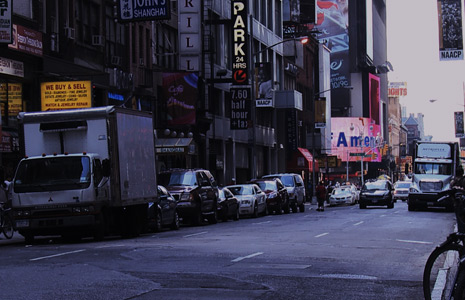
In this example, the street is generating a specular gloss from the light source that is uneven based on the surface. This makes the effect seem more realistic and blends with the road naturally. I used a similar technique in the VFX breakdown example for Action Essentials 2 in order to create the glow on the ground caused by the explosion.

105 RESPONSES TO “Surface Lighting”

Nice is this a hint for the new tut?

Can the same technique be used for passing cars?

cant wait for the tutorial

Wow, thats amazing. That’s what i’ve been looking for a long time, to give realism to energy. Would be really nice to see some tutorial about this.
Greatings from Brazil.

So cool Dude…. I’m sure it´s a very cool effect

that´s very realistic. And I see that the energy ball looks a lot like the one in an earlier post (but with a different color, of course). Cool, cool.

Looks awesome AK.

I call you Guru Kramer,comp is good.

Nice effect. Looks neat!

by Nicolas Chapleau

Hey, try sticking that energy source near a Prius to see if it will recharge it?! ;) Nice work as usual.

i hope there would be a tutorial.. cuz this would be nice to know!

SWEETNESS!!!!

Tut please! Looks awesome! :)

by Alex @ NotSoRealFX

Andrew, with full sincerity, we understand the full load of work that you must carry all the time. thank you for taking the time for us. Thank you!!!

I’m gonna have to try that

@ Andrew

thank you once again for all the awesome projects,tuts,etc. you put out for us! i was hopeing you would have a tut about illuminating elements in a scene to add realism when i bought AE2. Im really hoping that this is a hint for ur next tut :)

Wow, very realistic. I assume this goes a lot farther than just creating a bluish solid and setting it to additive transfer mode, haha. I would love to hear how you do this. Could make fire/explosions/energy a hell of a lot more realistic.

I’m going to try this….
thanks Andrew, thankyou verymuch

lookin’ good

Looks rate good. Adds so much to the effect!

thatz fabulous, by the way congratulations in advance .. did u guess what i mean, i think u got it ..

by sasha strelnikoff

look`s good

Awesome results Andrew!

Looks alot better in video with motion trackers…the energy ball’s depth would then be viewed.Gr8 Andrew.

I hope this will include lighting that truck, car windshield reflections, shadows, etc…

If you were to camera project that truck onto some simple geo like what you made for your city shot, you could use an AE lamp and get some shadows working as a starting point.

Looking good so far!


Kevin

Wow, that looks really, really great and convincing!
Is this achieved via a ground texture that’s used as a luma matte for a blue adjustment layer with low opacity or can it be done using a particular blending mode?

mmmmm espero que sea mejor de como se ve..

AWESOME!!!

by Matthew Sabia

Wow lookin good Andrew!

It is a great piece of detail to add, you made the light (reflect)intensity random which makes it look even better.

Thanks God!! No news for more than a week, I thought u were dead!!!

Great respect for your work and the fact that u pass on your knowledge.

Kobelt, working and experimenting hard.

They have this effect in acomercial on swedish cinemas!

Ive always wanted to recreate it, seems its going to be easier now!,

Thanks Andy

looks great
cant wait for the tut to come

Wahhh ! A very nice effect !

This is a true story. Yesterday I saw a dream about the video blog. Suddenly I realized I was sleeping and I instantly woke up and I ran to my computer, but the video blog wasn’t there. Andrew, this really starts to freak me out, Video Copilot is getting in to my dreams. So why don’t you just hurry with the video blog and everyone is happy :D

So cool.. ive tried to do one by myself but have failed badly :S

Qw3rtium: lol that’s funny :D

Come on, Andrew, what did you teach us about Day for Night? ;)

Nice work! By the way, I’ve recently watched the trailer of Sherlock Holmes movie and noticed that a part of the trailer’s audio is a PROSCORE track! Check it!

Hey Andrew, don’t be like that…. turn this in to a tut. Like the energy ball moving into the the distance. I would essentially like if you could move into the vanishing point and the energy ball lifts everything up as it passes… a bit much hey. At least show us how you did it I’m trying and trying but nothing. back to my sock puppets then……… P.S IT LOOKS AWESOME!!!!!!!!!!!!!!!!!!!!

GREAT GREAT JOB

it would be awesome to see this on a tutorial.

Great Andrew but can you make a tutorial for the Chroma Hoop effect which gives a professional touch to hour light effects? At least tell us how to make it! Thanks Andrew!

look like Fractal Noise right?
always great for creating watery looks and glossy effects…

WOW! Mr.Kramer I like Your stuff . As always pretty awsome .

You sure you didn’t film an orb that happened to pass by ? that looks so realistic !

I sense tutorial all over the place ^^

Guy’s and Girl’s i’m not having a rant at you, but for all of those who look at this and wait for Andrew to post how he does it, I mean, c’mon…. If you don’t have any idea, go back over some of his old tutorials and go back to the drawing board. Yes Andrew is good at what he does, but you’ll never get there if you constantly copy.

Someone go out there, take a still image or use his, and make a new thread in the forums and everyone get together and have a go, mix and match idea’s with the others learning instead of being spoon fed, that way you don’t end up forgetting it all like all of his other tutorials.

Get out there and give it a go!

Looks amazing! Tutorial wanted :D

Tutorial on this PLEASE! I have no idea how you’ve done this!

by Spencer Tucker

Please release this tutorial. I know sometimes you blog about something you’re thinking of making a tutorial for and then skip over it. I’d really love this one.

FAKE!

;D

I’ve been wondering how to pull that off. Can’t wait for a tutorial!

awesome!

Looks really great.I hope you make a tutorial for this Energy Ball :)

cool!
The lighting really makes the whole shot.

by fablemaniac

cool

Andrew I must say not only is that lighting surface dope!…but your wife is so smokin’ it kills me! One love!

Although theres depth ground wise made as if there is a ground glow, the energry itself seems to have no depth.. I would think to make it look more sphere-like.

Either way, GREAT JOB!

thanks man.

Coool

[quote]
by Chad ONeal
July 27th, 2009 @ 7:05 pm

Nice is this a hint for the new tut?
[/quote]

Awesome job Andrew! First time posting and i gotta say you have taught me so much! Thanks for your Tutorials they are the best I’ve seen ever.

Great but how did you make the scene react with the energy ball…..?
I mean the lighting

I fill tutorial coming :D
This looks like terminator is coming xD

Great . looks awesome

Wow this is great !
Please make a tutorial for this one
And boy did you master that technique making it look natural
and realistic. =)

Is this along the lines of the right idea?

http://i155.photobucket.com/albums/s313/VantagePhoto/firestreet.jpg

There’s gotta be a better way to do what I did here so that it can work with motion. cause this was a touch sloppy.

No more free tuts to these Hollywood hopefuls. You should charge double.

Hey,
Things have been crazy around here with various projects but I think this will be part of an upcoming tutorial. But I encourage everyone to experiment and try to figure out a solution, there are probably many ways to do it. Have fun!

This looks great.
I’m assuming you did it somewhat like this. 1. Create black solid, 2. Copy the original layer and mask out the lit surface area, 3. Desaturate it and boost the contrast, 4. Use those layers as matte for a blue solid, set to screen or similar.

Can’t wait to see the tutorial! Thx :D

make sure the movement when the energy moves :)

by Pejman Tahernian

your job is really great.I’m waiting to learn more from you.thank you Andrew.

by Jake The Muss

Quality…as usual. Thanks :)

Awesome FX
Luvin’ it

Looking great!

Andrew, you are the best

Here’s how I’d do it…

-Start with image/footage on timeline.
-Duplicate it.
-Take upper copy, and make brightness/contrast adjustments until a good amount of contrast can be seen between the surface of the road and the cracks. Not too much contrast though. There should be some falloff.
-set upper layer to “add” transfer mode, then hide layer for a moment
-New solid, apply Grid effect. Make it a 3d layer. rotate it on all axises necessary until the grid seems to match up with the perspective of the street. try to cover the area of the road which will be lit up.
-turn off grid effect, apply circle effect. feather heavily and wiggle radius.
-Make the solid a luma matte for the duplicate of the footage.
-tint duplicate footage until it matches the color of your light source.
-Place source (energy or strings or whatever) above where the center of the circle effect is.

Thanks for the action essientals 2…….good stuff…. hey LEE…it worked thanks mr lee… good stuff lee

Awesome !!

Does this use the color dodge technique that you talk about in the ActEss2 tutorial?

Nice!! looks great….
I think i have an idea for how to do that!!… well, i have to try but maybe can works :P .. i’m new with AE and your tutorials help me a lot to learn. Thank Kramer!! u rocks!

Well, im gonna try out… i think you can learn better if u play with the program

(im from Chile and i speak spanish, so forgive my spelling)

by tyrone the bamboozle

yo is this acheive by using the cc glass /bump map

@tyrone the bamboozle: I highly doubt it.
-David

Eric: I tried this myself and I got a pretty similar result, and I used color dodge but ofcourse I don’t know how Sir Kramer did it, he always comes up with so creative and unpredictable solutions

sucks… u dont even have the reflections on the car’s glass

Hey The Rover,

Great job on providing Andrew with encouragement. I am sure he loves to hear such glowing praises!

Thanks for all you do for us Andrew!

:) Well everyone is welcome to express an opinion… It’s definitely good to be thinking of creative ways to enhance the techniques you learn from the free tutorials.

I think most people here understand that the free tutorials are meant to teach techniques and I encourage everyone to build-upon these methods and create amazing vfx.

I’m glad you feel that way AK, there are some jerks on the internet

hey all you guys. why dont you guys STOP RELYING ON ANDREW;S CREATIVITY. He is a very talented person who likes to teach people how to use the program. you guys are milking him to come up with ideas for you. you guys are NOT artist or vfx specialists just cuz you know how to follow his tutorials. stop. think for yourself.

im guessing you took a solid fliped so its horizontal to the floor then lined up with the floor made a mask around the area you wanted it to look like lighted up and then turned up the feathering

simple and very detail…
can i watch the tuts…?

Wow this is great !

Pakistan

What is he even talking about.. Not only is the street have light in the perfect spot, but there is a blue tinted light in almost EVERY single windshiled there.I thought positioning was perfect.

Looks cool. I am really digging that energy ball.

Here is my attempt at shedding some light on a 2D situation.

I used a 3D shape layer aligned to my surface with a feathered mask and an overlay blend mode. I then parented it to my little UFO. :)

http://www.sinewavezero.com/desktopCompressed.mov

no.. i didnt mean to be discouraging when i said it sucks. I actually like the glow on the street.. it looks cool

I just think it would have been better to like wrap another instance of the energy ball onto the glass with a glow or classic color dodge and a very low opacity and fast blur.

sorry kramer.. didn’t mean it like that. dont be discouraged :( ..

im like saving up money to buy AE2 for you!! thats 250 bucks in your pocket!! how encouraging is that :)

Nice :-) How did you do that? I wanna know please :-P

Hey whats uppppp!!!!!
Andrew did u used Magic Bullet Colorista ?

Hehe, Rover’s like “OMG! I didn’t know he would read that!” :D
Just kidding

what happend to the promised tutorials?
everyone is waiting

Farhad, Please read the blog rules.
http://www.videocopilot.net/blog/rules/

i really LOVE this tutorial but i dont have a good camera soft i cant really make good footage can you post the footage somewhere?

I actually was..

lol nice tutorial AK…..

So good!!

I made a great little vid of the street outside my house using this – -aliens invading etc, but when it rendered, even in RAM preview, the original footage skipped backwards every frame or so, so cars would suddenly leap backwards.
I restabilised the footage and reimported it, and again it was fine until rendering. The aliens’ flight was smooth enough though lol

Any ideas?

:o )

actually that last post of mine isn’t right – - the footage was fine until I precomposed it and put it in the new comp – THEN it started jittering.

apologies if this isn’t the right place for this sort of thing

:-)

Hey Andrew

I think I figured out another way, It’s in my head but not on the PC…. on holiday at the mo but no AE on the laptop here(haaaaaaaaaaaaa!!!) but Wednesday I’ll be back to normal AE civilization

Post a Comment!

Before Posting
We're trying to encourage more thoughtful commenting.  Please take a moment to write a meaningful response to this post.

Also remember to read the rules on posting first.

Leave a Comment