Element 3D & Live Action Footage

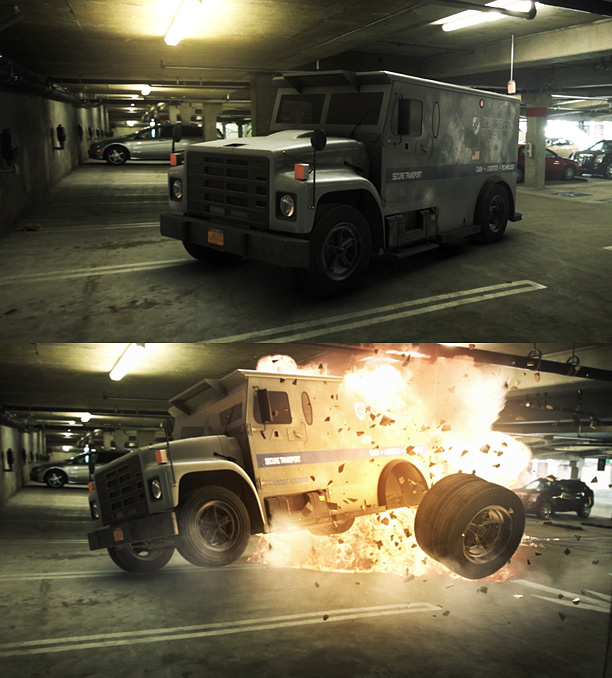
Here is another fun example using Element 3D with live action footage and 3D Camera tracking. I'll be posting a 3D tracking tutorial soon but for the explosion, I used some Action Essentials 2 along with some colored lights to create the fire illumination.

The truck model was imported in to Element and one of the tires had a separate material so that it could be animated separately from the rest of the vehicle. All animation, lighting and rendering done inside After Effects with Element 3D!

Watch in HD

Element 3D Available in the Video Copilot Store!

POSTED:
13 years ago
Improved Anti-Aliasing in Element 3D

Exciting news for a boring (but crucial) feature... Anti-Aliasing! Element 3D is about to get some powerful new options next week that will clean your clock! Or at least your edges with impressive Super-Sampling!

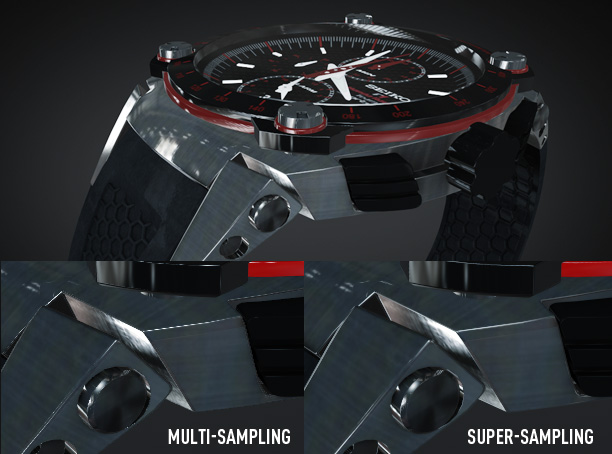
Anti-Aliasing Comparison

What is anti-aliasing? Basically it's the method used to reduce jagged artifacts in your renders with sharp highlights or reflections like the above example.

Currently Element 3D uses hardware Multi-Sampling which is very fast but with extreme highlights and thin edges, some renders may look flickery or jagged. Not any more. We're listening to our customers and so we created an impressive new solution called Super-Sampling.

Key Benefits:
-Maintains crisp image quality and textures
-Smooths sharp edges and highlights
-Improved clarity of high-poly detailed models
-Easy to use, just turn it on!

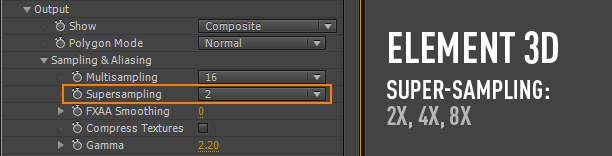
Super-Sampling basically renders your frame "super" large and then re-samples down to the frame size. This allows more detail to be saved and smoothed properly from the extra data. But, it does this on the GPU using a special render method.

The new method will add a minimal performance hit but it will NOT require additional MEMORY! (This is kind-of a big deal...) The other great thing is that you can turn it on when needed or just the final render. Element is all about control!

To give you an ideas of the performance... A 10 second render time will be around 20 seconds with 2X Super-Sampling. Not too bad considering Element 3D is already blazing fast!
Available Next Week:
This update will be free to current and new customers of Element 3D and includes many bug fixes and improvements. If you think we're going to let this product stand still, watch out!

Element 3D Available in the Video Copilot Store

Watch Element Tutorials and videos here

POSTED:
13 years ago
Element Examples:

Here is a clever use of our new Plug-in Element 3D by Serge Mustu using pre-fractured text in creative ways.

I even have more tutorials planned this week and also a 3D Tracking tutorial to talk about integrating 3D with live-action footage. More importantly though, we'll learn how to manage a scene with 3D tracking data and not have everything in weird places and crazy scale values. Should be fun as we push the limits of AE!

Element 3D is now available!

Reminder we are looking for experienced C++ Programmers if you would like to join our team!

POSTED:
13 years ago
TUTORIAL: Element 3D Particle Replicator

Here is new tutorial that shows how to use Element 3D replicator options with many new tips!

Watch Tutorial on VC.

Watch in HD on youtube.

Included Tips:

  • Using position noise
  • Use 3D object as replicator shape
  • Use Layer alpha as replicator shape
  • Assign multiple objects to a single group
  • Create particles on the surface of a 3D object
  • Auto-Orientation and rotation options

UPDATED: Here is the final animation with Sound Design

POSTED:
13 years ago
Surface Displacement

Here is another technical example of integrating the animation engine with live action footage using our powerful new 3D object plug-in Element 3D. I'm currently working on a 3D camera tracking tutorial that should make it easy to work with 3D tracking data inside of After Effects. Once the footage is tracked, it is easy to add objects and change the scene around, you could even add mini-choppers! Think of the possibilities... what will you create?

POSTED:
13 years ago