 ALL DESIGN TOOLS

Gkaster just posted a very inspirational spot using Cinema 4D, After Effects and our own Optical Flares Plug-in. Great work with close attention to the little details... who knows, maybe we can convince him to give us a little breakdown of some of the creative work.
February 18th, 2010

February 17th, 2010
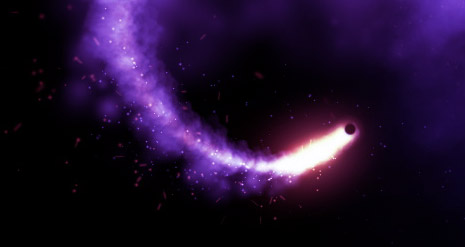
What's up! Anyone notice how sad particles look when they are played against slow piano music? Well here is a test I did using CC Particle World linked to a 3D NULL! I used several copies featuring different settings to serve as the smoke particles and the light debris. I think CC Particle World has great potential to create amazing particles but it may take a little more work when compared to Particular.
Another cool tip: Once I completed the particle animation, I put the comp in a new comp and slowed it down 200% so the particle movement is slower and also more depressing in a happy good way!
Now close your eyes... and imagine what it would like with some Optical Flares!
February 10th, 2010
One visual technique that I find so fascinating is Camera Projection. It allows you to project imagery on 3D surfaces and then fly a camera around in 3D. It has it's limits but the capabilities are amazing.
Here is one example of using images with basic geometry.
Cool Examples and 3D max Tutorial
AE Camera Mapping on Video Copilot
Random You tube Video in Blender
Written tutorial by Janine Pauke
Digi Effect Camera Mapper Tutorial in AE
Do you know of any cool examples? Post them below!
February 8th, 2010
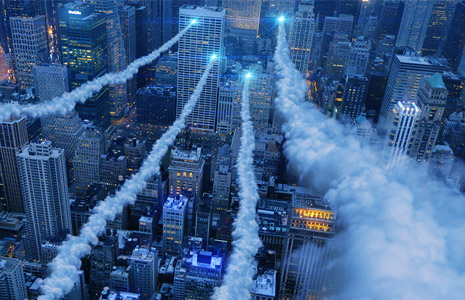
In this tutorial we'll use Particular and a single smoke picture to create pretty realistic smoke trails in After Effects. As a bonus I will also be using Optical Flares to add the bright lights.
Check out our New Plug-in: Optical Flares!
February 1st, 2010
One year before I was born HBO made a very ambitious intro that was said to be the most expensive and innovative concepts at the time (for the medium).
I love the idea of incorporating techniques from the real world inside of After Effects for even more unique results. In fact the whole idea of mattes for compositing come from the early days of film-making...
Watch the final intro above then be sure to check out the making of video below, especially the part towards around 5:30 that talks about the burst of light...
I've also created a project file using that similar technique that mixes 2 images into a subtle animation. Download the Project

Tutorials
162. FX Console Plugin
Speed up your After Effects workflow
158.5. Element 3D V2.2 Features
Group Symmetry Creation Mode

Blog Show
Flour Fusion: Real Particles
Creating particles in After Effects is awesome! We have all used Particular and Particle world but why not combine those particles with some real ones! Sometimes you need to create elements that are so complex and organic that you are better off taking out the camera and making a mess.
In this example we use a little bit of flour to mix things up!
Watch on Vimeo

Plugins

Stock Footage


