Video Copilot in Action!

Some of our Video Copilot customers have been taking our products to new levels. Through all of the emails I have received with video links, it is great to see them helping so many.

I had an idea to create a customer reel, but I think it would be easier if people posted videos on "free" sites like youtube.com and link them here.

Todd at Ripley's used Designer sound FX for world record video:
https://www.ripleys.com/

It is the video with guy trying to hold the airplanes off (top right).

Ben is a finalist in the John Woo Contest with "Rivals":
https://www.myspace.com/strangleholdgame

He used a few VC products so be sure to vote for him, or your favorite one ; ) Remember we are a family here.

I know there are many other great videos I have received, so please repost them here for everyone to see. This is your chance to show us your stuff (not literally). And don't worry, we have all used the free tutorials to make videos ; ) I mean, who hasn't blown their head off?

Of course I encourage you guys & gals to go beyond the basic tutorials and apply the principals from all of them to your own projects and videos.

On a side note, when I make a free tutorial I don't mind if they are used professionally or in your own work. In fact I encourage it. If it helps you make some money or win a contest, all the better.

I've seen some Video Copilot stuff in news promos, show promos on the BBC, ABC, CBS and many other places on TV. If you have a link to VC in action please feel free to post it here as well.

Remember to keep the videos PG-13, fake violence is okay, of course.

So clearly buying Video Copilot products will only make you a better person, more productive and more attractive to beautiful women OR if you are a female, beautiful Men AND Women ; )
So you know what to do

NOTE: Be careful about using your own pay hosting to link videos, because you may get smashed with a bill.

POSTED:
18 years ago
TUTORIAL: Advanced Sky Replacement

In this tutorial, learn how to replace a blown out sky with a nice sky image. You will also learn to create a procedural matte and perform position and rotation motion tracking.

UPDATE: Here is the footage

NOTE: This technique can also be used on blue skies as well. Instead of creating a matte, just use the Keylight plug-in instead.

POSTED:
18 years ago
GFX or VFX?

Motion Graphics or Visual Effects?

Of course we all need both but if you had to choose. I just want to get a feel for what interests you most. I have several compositing VFX tutorials coming soon, including:

  • Advanced Sky Replacement
  • Day to Night
  • Incorporating Live Action with Old Footage (like Forest Gump)
  • Mystery tutorial So amazing, it will turn your shirt inside-out!

This isn't necessarily the order, but certainly coming soon. No matter what the tutorial is on, remember to retain what you are learning and apply the knowledge in your own projects, or else.

POSTED:
18 years ago
Expressions : )

After Effects has this little things called expressions. You may have seen them in our tutorials. You may also fear it like the Chupacabra, but the fact is, they are here and they are real as are the goat eaters.

The majority of expressions I use are simple equations, so simple they can hardly be called equations. However they can be very powerful as well with a little bit of knowledge.

Check this site out for a great overview and very good solid information:
https://www.jjgifford.com/expressions/basics/index.html

And for some more practical examples check out Dan Ebberts newly designed site:
MotionScript.com
Be sure to click on the design center.

For now, I have to go check on the live stock :=

QUESTION: Are the expressions in the online tutorials easy to follow and understand? At the very least is everybody comfortable with pick whipping of other parameters and linking them to others through expressions?

POSTED:
18 years ago
New Sky Replacement

I'm pretty sure the next tutorial is going to be on advanced sky replacement.

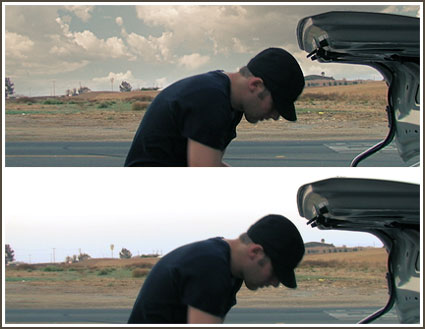
We're going out to film today, but here is an example on some behind the scenes footage. Notice the telephone poles on the left side still appear in front of the clouds even though they are small and nearly transparent. Using a procedural matte allows us to control the blending between foreground and backgrounds. This Matte generation can be used for so much more as well, I promise this will be a must see tutorial.

I figure it is about time to update that old tutorial with some new tricks and treats. Not even a single joke in that tutorial...

Sam Loya said he be in the tutorial but that it would cost 20M... All I had was a warm root beer, so filming begins at 4pm.

POSTED:
18 years ago