ALL DESIGN TOOLS

A brief look at working with Audio in AE
Importing:
Audio files import just like other media types but the best format to use is WAV as opposed to MP3, which can be problematic. Audio files can be placed on the timeline just like other media files. There is also an audio switch that can be toggled on or off.
Previewing:
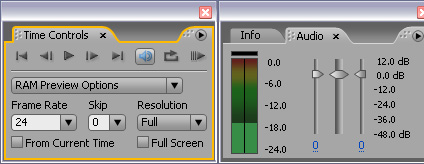
Essentially there are 2 ways to preview audio in AE, first you can play just the audio in a composition by hitting the PERIOD key on the number pad. This will begin playing the audio only, in realtime. The other alternative is using the RAM preview function by hitting the ZERO key. Be sure the audio switch is on in the Time Controls Panel. Also audio levels are displayed in the Audio panel while sound is being played. To render Audio just be sure to check the audio option in the OUTPUT Module from the render queue. Read More about this from Adobe
Viewing Audio
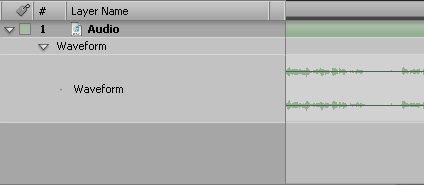
There are many tips for working with audio as well. To view an Audio Waveform, select an audio track and Press LL on the keyboard; one L will display the amplitude. You can also scrub the Audio by holding down CTRL and dragging the Current Time Indicator across time. More by Adobe
Audio Effects
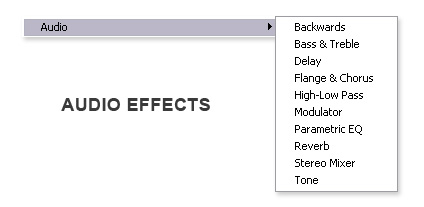
After Effects has several audio Effects as well. For fading out audio, the Stereo Mixer filter is great because it uses a amplitude percentage rather than Decibel (db) value. There are also many effect that will use audio to generate a visual Waveform or Spectrum, these can be found in the effects generate category. More by Adobe
New Features in CS3
In AE CS3 Speed changes and Time Remapping, will also affect the speed of your audio. This allows you to Ramp both video and sound, unlike in previous versions.
More by Adobe
Tutorials with more info
Check out our Audio to Animation tutorial for more tips and tricks, as well as how to convert Audio to Keyframes. Watch Video
Our Audio Product
Almost forgot, our very own, Designer Sound Effects also includes several helpful audio mixing tutorials and designer sound elements. Be sure to check it out.
PS, I'm a little under the weather so my singing voice is a little off... tutorials will return soon.