Free Script: 3D Pre-Compose + Tutorial!

I finally got tired of doing this manually, so we created a free script!

What is this script for? The 3D Pre-Compose Script makes it easy to pre-compose 3D-aware layers by automatically copying all cameras & lights into the new comp with linked expressions! Just watch the tutorial to see all the amazingpossibilities! Plus it's Free!

Watch Tutorial on YouTube

Watch Tutorial on Video Copilot

What can you do with it?

  • Create displacement maps out of 3D aware layers
  • Isolate 3D layers for different lighting setups in the same scene
  • DisableDOF for certain layers
  • Lens Flare obscuration maps in 3D: For Element 3d & Particular etc
  • Apply 2D effects to a 3D layer in screen space
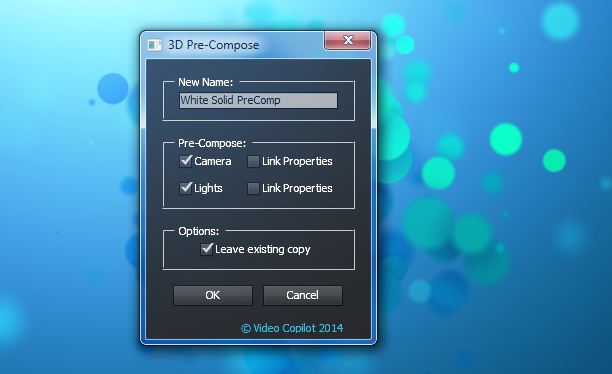
Download Script

POSTED:
11 years ago
92 Comments
hello . Thanks Andrew it's AWESOME u are simply the best
jos martinez
6 years ago
Muchas gracias por el script esta maravilloso Mr.ANDREW DIOS le bendice
9 years ago
Super thanks! This saved me on a project I'm currently working on!!!!
phil
9 years ago
I got it to work using my own manual method. You'll have to go in and add your own expressions... customize your variables "main comp" "Camera 1" with your layer/comp names of the one camera you'll be editing.

comp("main comp").layer("Camera 1").transform.pointOfInterest
comp("main comp").layer("Camera 1").transform.position
comp("main comp").layer("Camera 1").focusDistance
phil
9 years ago
I went in and deleted line 75 section and following. No error, but it doesn't work.
alexandre
9 years ago
the script is AMAZING!!

however, it doesn't work in the project I currently work on :/ it says error at line 75.. any suggestion?

thx!
Austin Bollinger
9 years ago
Same problem
Oree
10 years ago
Not working for 2015 :<
Joey
10 years ago
Hello i just upgraded to AE CC 2015 and now this plug-in will now work... The error is: http://prntscr.com/88hdkj

Anyone know how to fix?
Kevin
10 years ago
Getting the same error.
Vincent
10 years ago
Thanks VC team. It is a nice plug-ins

A quick question: Does it work with E3D group null or camera null? I want to use it for Optical Flares and 3D obscure E3D in foreground. But seems that if I animate E3D with group null, the pre-compose output doesn't match with the original. Causing weird obscure
Ra'fat
10 years ago
thx anderw it was amazing script i love it so much
10 years ago
Amazing! Just purchased a template of a table with photos for AE, but realized that the table was MOV file with tracked photos placements and not a 3D layer.
http://videohive.net/item/wedding-photos-slideshow/4565295?WT&ref=Ary1378
Instead of a wasted 32$, I quickly 3D precomped the photos comp layers and inserted a new table cloth
Dove
11 years ago
VC and Kramer are why the businesses that hire me think I know what I'm doing! Thanks guys.
I know this is an old thread but maybe someone can help me. I've downloaded the script, but when I go to FILE > SCRIPTS> the options that pop up (run script, open script editor, list of installed scripts, etc.) are darkened/un-selectible. I'm still working with CS 5.5 and my OS X is Mavericks. I know that in some ways AE 5.5 has some problems with Mavericks (e.g. the color picker will crash AE) so maybe that is the issue. Surprising to say, seeing the field I'm working in, I'm pretty computer ignorant. Anything might help.
11 years ago
another amazing tutorial from androw. tnx for sharing us
let me know
11 years ago
make this avaliable for educational use and it will play easly on lausd computers....
presently these vid lesson are filtered from playing ..

lausd has over ten thousand computers with adobe software ,
please get this matter taken care of ....
Arthur
11 years ago
Thanks, I have to precompose 116 layer from C4D and the interface disappear after 1 precompose any suggestion ?
Thanks Andrew it's AWESOME u are simply the best
Denzil
11 years ago
Hey, could someone help please?
How do I get the sound/audio to work? I don't have any sound like he does..
good after effect tutorial, tnx andro
Adrian
11 years ago
i hope one day became someone like you are, greetings from CUBA.
Chris
11 years ago
I got a feeling... (ooh ooh)
that next week will be the best week
that next week will be the week we are waiting for...
shaun viks
11 years ago
oh thanks man..... i was just working on a project and i wanted some cool lens flair behind the 3d layer look but i just couldnt get it right.... u r a life saver
Joel
11 years ago
AE Keeps crashing when I use this script. Im using AE CC2014 on a mac running OSX10.9.4
ramon
11 years ago
unable to execute script at line 75. Object is invalit
Michael Corvin
10 years ago
I got the same error. Unable to execute script at line 75. Object is invalid. It seems to be a different error than the one others mention because of a camera linked to a null.
FX
11 years ago
how to release helicopter model Pack?
11 years ago
I'm a little disappointing. I asked a question regarding Mario's post above. I was having the exact same problem and wrote the question out twice. Twice it was deleted.....that surprises my guys especially when there is more than one person with the issue.
Xav
11 years ago
to those who got the following error :


After Effect undo group mismatch, will attempt to fix
After Effect can't continue: damaged item (26 :: 132)
Unable to execute script at line 105. After Effect can't continue: damaged item

I had it too and found out it was because my cameras were parented to null objects... if you can unparent them the script will work like a charm.

Anyways thanks Andrew for this awesome script, this would become a killer if :

-it could manage parenting options
-it was possible to dynamically add cameras and/or lights after having run the script... but I guess this might be tricky
Alex
10 years ago
Xav, thanks so much for writing your findings on this. Was scratching my head as to why it kept crashing.
very very much

thanck you
11 years ago
Toxico! meaning Awesome!!!!
11 years ago
hi andrew i used cinema 4d to create a star dust just like our particular and tutorial also take a look and say how it is

http://gloriasriramanimation.blogspot.in/2014/08/star-dust-tutorial.html
11 years ago
Andrew Kramer, this is the kind of thing that should ensure that there is a religion which you would the god. haha thank you for continuing to teach us your wisdom
vipin
11 years ago
awesome script very useful amigo thanks for easing our work you are a Rockstar Andrew
11 years ago
That is nice! Andrew, thank you for my expirence. Check my music video maded with After Effects.http://youtu.be/t46uTAERCWM
Vince
11 years ago
Thanks again, Andrew!
mohammad
11 years ago
hi Guys

first vedio work at after effect and maya and mudbox and photoshop and premiere look that :
https://www.youtube.com/watch?v=ZUnyAuSO5oA


and this like film transform that in after effect element 3D
https://www.youtube.com/watch?v=AfKeMKxf5Cw

thank you
Daniel
11 years ago
I need help, my problem is not with lights or camera but the 3d layers going flat when i pre compose them. I used a script called dojo extruder which makes 3d from a pseudo effect but when I pre compose it makes it into a flat layer. How do I fix this?
11 years ago
Oh my God this is so useful!!! Thank you!
Wow Great!!!
incredible! simple and useful at the same time! thank you!
Morgan John
11 years ago
Thanks you guys rock... You brought simplicity to after effect in Nigeria
towhid
11 years ago
You are really Awesome Andrew!!!
Thanks a lot for your great Plugin...
could you please make a tutorial on, how to build this type of plugin ( .jsx or .aep) from scratch?
i really need this
BasherRehsab
11 years ago
Andrew Krammer
im so thankful to you and your team working hard for our relief from messing with VFX world it would be more easier if you make an application which runs Element 3D on unsupported boards
Mansooryan
11 years ago
Nice script.. thanks Andrew
But I have one problem .. when I use it after using Malty simplecamerarig 2.05 ..and choose camera and link properties
"After effects warning:undo group mismatch,will attempt to fix"
"After effects can't continue: damaged item .. ( 26::132 )"
"Unable to execute script at line 105. After effects can't continue: dameged item"

I hope to find a solution for this .. thanks again
Karl Dreyer
11 years ago
Mee too! Can?t make use of your great script in combination with malty simple camera rig.

Would be perfect to get a working combination like it?s established between simple camera rig and sure target.

This would be really, really awsome !!!!
11 years ago
Mee too! Cant make use of this great script in combination with malty simple camera rig. Having the same problem with Mansooryan~
Will Dano
11 years ago
Let me know what you think of my new short skit!

https://www.youtube.com/watch?v=uoVZnrvEfac
JTownPotatoMan
11 years ago
Unfortunately this script is crashing on AE CC OSX... Can't wait for it to be fixed!! thanks!
Diopama
11 years ago
Thanks Andrew it's AWESOME u are simply the best !!
Ahmed Rashed
11 years ago
what's new in after effects cc 2014
duh?
11 years ago
Have you heard of Google?
11 years ago
With the arriving of OCTANE on After Affets, i can imagine the improvement of your tools, especially Element3D ! !
Michał
11 years ago
what about vc reflect, vc displace, vc shadow, plugins ?? on 9:00 film
Brian
11 years ago
Please Andrew can show us how to create Light Flares coming out from F-35 passing by fastly. I mean anyone can make this thing but i am talking about stuff like star trek into darkness like wooooosshh and bam the magic and details.
Evren
11 years ago
I think i found a bug. If the camere connected a 3D null object, then 3d pre comp gives an error if you use it. I just tried it on element 3d. I don't know maybe only i getting that error. Thanks for the scpirt.
dHoward
11 years ago
Same here.

I created a new comp, made a new layer, added Element 3D to this layer, dropped a random 3D object, went back out and created a camera, made a null object layer, parented the camera to the null object, added the new 3D Pre-comp script to the element layer and got a fatal error.

Did I do something wrong, or is this an error that needs a fix?

Thanks!

"D"
11 years ago
you are just awesome, you are very creative
11 years ago
Hey,

Can't you do this natively by just clicking the collapse transformation button on your precomp?

Very handy for adding effects to 3D pre's though.

Cheers!
11 years ago
Little sun shaped button next to the Shy Guy.
11 years ago
Thank you VC team and Andrew, this has been doing my head in for months, especially with camera mapping and integration of 3d with cam mapping, this is going to save me a lot of work. Thank you once again Richie
Cyclonefire
11 years ago
Keep yourself calm, forever with these great scripts by VC team & think of the future date when Element 3D studio(5.0.2) will release......& Vehicle model pack too.
Rodrigo
11 years ago
You are the best by far Andrew! I'm gonna make you a monument someday!
Christopher Scott Knell
11 years ago
Awesome.
And thanks for reminding me that I should call Mom.
He livingroom window is in that shot of NYC and the invisible headphones.
I'll be sure to say hi for you.
Mario
11 years ago
I used the script with a 3D Element layer and checked Camera and Link Properties. It gave me the next messages:

After Effect undo group mismatch, will attempt to fix

After Effect can't continue: damaged item (26 :: 132)

Unable to execute script at line 105. After Effect can't continue: damaged item

After that let me save and the software close.

Help me please
11 years ago
Hey! If you can duplicate the error, can you please contact us at support@videocopilot.net and we can take a closer look there. Thanks!
Neo
11 years ago
same mistake too....
after effect CC 2014
koko999
11 years ago
same error here with OF track lights
Christian Michael
11 years ago
I got the exact same error and checked on here before contacting VC. The project was using a E3D layer and a wall of lights like in the light array to create a back lit stage. I wanted the lights to flicker behind the instruments. Was there a resolution here or a updated script? feel free to contact me VC either here or at my email address on file. The error is identical to the above.
Christian Michael
11 years ago
I have the EXACT same issue with the same error message. the project is a stage with instruments, and a wall of lights behind it. I want the lights to flicker behind the drums etc. What was the resolution here, or was there an update for the script? The Error is identical.
Alexander
11 years ago
Same here - FUCK I WANT A SOLUTION! THIS IS THE ONE THING THAT CAN SAVE ME
Eric Lin
11 years ago
dude you don't know how much time this is going to save me!! Thank you so much!!!
Tony
11 years ago
Awesome... Thanks Andrew
PHILIPPE LEBRET
11 years ago
He's the king for now and forever
Cool plugin from Sir Andrew Kramer !!!!!
11 years ago
my god... MY GOD!!!
Andrew Kramer marry me!! Nah I'm just kidding. Well, not if you would like, agree to. Then I'd be serious.

Anyway, this is AMAZING!!
Luke
11 years ago
#MindBlown! This is awesome, life will be so much easier now, at least the After Effects part of life Way back in college I was using your tutorials to do amazing things with AE that the rest of my peers thought weren't possible.
Marko
11 years ago
Hey, I think someone followed your tutorial
http://www.razerzone.com/chroma
Beaver77
11 years ago
Thank you for building this script, massively useful. The time it takes to link properties by hand. I know in CC you can now copy with property links option but this is neat and tidy. Thanks to you and your team!
Michiel
11 years ago
The problem of not being able to precompose 3D-items and still being able to move the camera has been bothering me for such a long time now. Thanks to whichever member(s) of the VC team who wrote this thing. You guys are genuinely awesome!
11 years ago
Great script!
I like this.
11 years ago
Thanks We Really appreciate your Hard Work . Really these things are Helping us Day by Day ,And this time you again Rocked
11 years ago
Hey Andrew,

Thanks for putting this together (and for giving it to us for FREE)! I few days too late for me to use this on my last short, "Amazon Dröne", but it will definitely come in handy in the future!

Thanks again!
Chris
11 years ago
Hi Andrew,

you could place this also on the VC Website under Free Presets.

Thanks. Sure I'm going to use this!
11 years ago
Aweeeesome.
I was waiting this for so long... thanks !
terenom visual effects studio
11 years ago
thank you Andrew Kramer i love this it is going to help us a lot in Uganda love this is all.
Ridwan007
11 years ago
I really appreciate your help and hard work...thanks.....this will save me a huge amount of time..
Jok3r
11 years ago
Very great job. thanks a alot AK
Brandon Liebenberg
11 years ago
Thanks a lot. You have made my life so much easier and less hassle free. You guys ROCK.
11 years ago
Weriy good job Andrew. I wish you bulid new 3d cosmic object colection !
11 years ago
I am sory! I wrote you with errors last time. Now I want if you make 3d cosmic object coletion like star trek Into darkkness title design ,I will be glad!
11 years ago
I am sory! I wrote you with errors last time. Now I want if you make 3d cosmic object coletion like star trek Into darkkness title design ,I will be glad!
Eric
11 years ago
Already used it for a solution.
I was using a 2D solid in 3D space to 'fake' a shadow with Element, but with Depth of Field on, the solid would disappear. 3D Precompose, and disabled DoF on the precomp...and Ta-Da! Fixed.
Great Script!
11 years ago
Hey Eric, noticed your comment and wanted to share something that worked for me. If your camera's DOF settings are quite high, 2D layers (in 3d space) might disappear. Decrease those settings until the layer comes back. If you need to then increase the DOF on the E3D object to make it match, go under the E3D Depth of Field settings and increase the DOF Radius Multiplier. This might be more helpful should you have multiple 2D layers.
martin (^_^)
11 years ago
Man, oh man, oh man!!!!
Only from the mind of Andrew and video copilot .

THANKS !! (^_^)
Lj
11 years ago
Thank you This is what I was looking for
Viki
11 years ago
Thanks buddy! you are the best!!
Bader Ahmed
11 years ago
Great work.. Great script... Is it possible to make it Dockable for easy access as a window within As.
Janus J
11 years ago
Great! Is there a keybind/shortcut, that would be really helpfull! Thanks for the script!
Mehmet
11 years ago
As always thanks very much for this free script
illd
11 years ago
Great 10 minutes - Thanks VCP!
jtown
11 years ago
This is awesome! I'm working on a project right now using E3D, OF, and 3D layers with animated cameras. I've been doing it manually also by linking the cameras to get everything all gravy. This will save tons of time! Thanks so much!!!
phoenixfilms
11 years ago
Hello Andrew,

it would be very cool if you can make some other "Flight School-Tutorials" like the scene in the Video.
Or a lesson how to make a own Script. That would be very nice!
Alex Mercer
11 years ago
what an amazing script , i been thinking of something like that while i was in the middle of a project last week and you just came up with it , thank god to have you andrew !
11 years ago
incredible! simple and useful at the same time! thank you!
Luciano Daluz
11 years ago
As always. Thanks! Any chance we heard some update about ELEMENT 2?
11 years ago
You Genius Cool I liked the effect of the sun in general everything's cool you're a real Hollywood Editor.....GOOD!
11 years ago
Really useful plug-in Andrew! I'm sure i'll use it soon.
11 years ago
Andrew "God" Kramer!

Thank you again!
11 years ago
Thank you!!! Now i can make a invisible ship effect
kayongo
11 years ago
He is not(Andrew Kramer)God, he is human being like you,he is just genius.
paiwand
11 years ago
your crazy man , this is human he isnt god ,,, F@$k you
Andrew Irish
11 years ago
Thanks you so much for this! I can't tell you how much time this will save me.
Rogue Robot
11 years ago
This looks fantastic - can't wait to put it to use.
Thanks!
Timo
11 years ago
https://www.youtube.com/watch?v=ZW7Nc7C279U

very cool script! Immediately used it for our new no budget music video!
Tural
11 years ago
Hi , please Check it out , this is my first short animation movie , in the beginning used e3d
https://www.youtube.com/watch?v=-EHjCAl3uP4&list;=UU9o1ziyLuxylUJu-gGJLGww