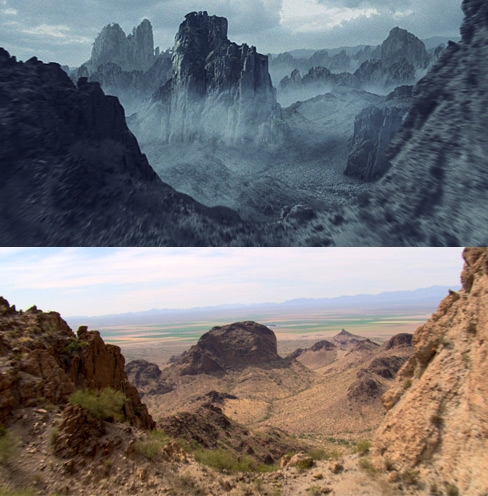
Set Extensions Footage Online!

After all the exciting announcement for our new Plug-in Element, I forgot to let everyone know, that the stock footage from our recent Set Extensions Tutorials is now online at no charge! Should be perfect to follow along with the tutorial and practice these techniques. The footage is half-hd at 960 x 540 with no watermark thanks to Artbeats.com so if you are looking for a new shot for a project you may working on, check out some of the clips they have, some are even in Stereo 3D.

In the download, I've also included, the matte painting PSD file, the smoke/cloud element, the BG sky image and the roto-matte for the front mountains, just in case you don't want to practice rotoscopting and work on the look.

Watch tutorial and download project files here

POSTED:
14 years ago
65 Comments
Yitayewamlak
14 years ago
I wana be like u andrew. 10 Q
jayson
14 years ago
hey what ya know... thinking back on your last tutorial on earth zoom... people can actually put a balloon in the air to take pictures!!! you are not bullsh**ing us!

http://www.dailymail.co.uk/news/article-1162659/Students-tie-56-camera-balloon-send-edge-space-capture-stunning-images-Earth.html
anil deshmukh
14 years ago
hello sir ,i am a frasher vfx artist and i want to make a vfx and compositing shoreel .please give me some tips .thank you.
pacifican
14 years ago
dude, your tutes are kickass!! much respect from the pacific islands!
14 years ago
Just watched the video again....uh...did that say RF_liquid_01 in the list of objects...seriously if this plugin imports Realflow meshes/particles into AE I'm going to run out into the streets and tell everyone and their dog about this plugin...seriously. I will even post it to youtube. Just sayin...that is EPIC!!!!!
14 years ago
Happy 4th of July, Andrew!
Luis
14 years ago
Hello... Great tutorials.

Andrew; diference of Boujou and Camera Tracker or any tracking plugins?
mudang takar
14 years ago
mr. kramer, you are awesome... thank u very much
Samsote
14 years ago
Hey great tut.
Im not sure if you've seen this one, but it seems EVERYONE is using Action Movie essentials 2 now though still fun to find videos of the Pro's using it.

if you've seen the music video for Fast Lane by Bad meets Evil "with eminem and royce da 5'9 then you know what im talking about
http://img38.imageshack.us/img38/1432/badmeetsevil.jpg

im 99% sure that those shells are from the AME2 pack
also it seems they use alot of textures and stuff from Riot Gear aswell... though im not sure

just thought it would be a fun thing to post
Artem
14 years ago
That`s Greate that people like you do this for us, we need just to listern and wait for a new stuff...
N I C O L O N E
14 years ago
thanks for another video tutorial Andrew. i want to ask can you make tutorial about Twixtor plugin, am about slow motion?
14 years ago
Thanks Andrew. Great ideas, and the inventive use of a 3D null was something that never even occured to me before. (I would of carried on masking in 2D, because I'm like that) And then, you slapped me across the face with it! (the... inventive use of a 3D null, that is)
Shahin
14 years ago
cool
amazing
it's really useful
thanks Andrew !
14 years ago
nice andrew your the best... just like in the movie sucker punch... yipeee..... thumbs up!!! for andrew
Matthew Sabia
14 years ago
Hey guys, check out the first episode of a new YouTube series we're starting. The series is about Victor Rossi, a hitman. Every week we will upload a video of Victor killing someone, blowing something up or etc. The first one was actually filmed and sent from a friend, but all of the other will be more professional, shot with a DSLR, lights and etc.

Please check it out and let me know what you think!
http://www.youtube.com/watch?v=FMWoB7FIFWw
Calixto
14 years ago
Can this technique be used for a video game and if so, how much footage would you suggest should be created. I would assume a lot would be needed as the video game moved from scenario to scenario. Is there a way to adapt this for a video game?

Thank,
Calixto
tony
14 years ago
Thank you
14 years ago
Thanks andrew!

always rockin !!
Master Mind
14 years ago
Thanks Andrew, really love this tut and the Camera Tracker plugin but it is quite expensive
Remington M
14 years ago
It's really not. It's probably the most affordable 3D tracking program out there. Try paying 10 grand for Boujou...
VS
14 years ago
Thank you Kramer....its really useful ! i appreciate your work
Excalibur
14 years ago
Thank you very much Andrew! The tutorial was so exciting! And now the footage for free again! Thanks a lot for sharing this for free and thanks to Artbeats.com!

Regards from France.
14 years ago
Response 50 AWESOME THANKYOUSO MUCH!!!
14 years ago
It would be great if you could upload the full HD version. That would be so helpful for many of us. Or does artbeats.com not allow that?
Remington
14 years ago
I'm quite sure they don't.. it was already extremely generous to give away the half res version.
14 years ago
Great Footage! Thanks Andrew
14 years ago
Andrew, do you know if the camera tracker data could be taken into a 3d app like maya, etc...?

Thx,

George
Remington M
14 years ago
Yeah, I'm sure it can. In the example for the Plugin they bring the data into Cinema 4D. I know one way would be to create the null objects in AE and then export those into Maya. If you watch the ledge tutorial Andrew does that into 3ds Max so I'm sure the same principles apply. Hope that helps!
tc
14 years ago
hi andrew!
what do you suggest using as a matte painting resource ... did you use royalty free images for the extra mountains?
veera
14 years ago
Nice job,
Thanks guru,
veera.
14 years ago
This is great! It really is, i knew it would come, and i knew the benefits it would bring.!!
Thanks Andrew!
By the way if we have an HD version of the t505-02, do we have to do the matte again, or is the one you gave us still applicable?
Remington
14 years ago
Hi Brandon,

Just a quick thought (I haven't really looked at the matte) but if you scaled it up there might be a loss of detail or quality. So an option might be to auto trace the lower res version and then once you have those masks, create a new solid and paste it on to there and the scale the mask up. I've done similar stuff before but haven't tried anything with this shot! But I think the original matte would more than likely be good enough.
Andalia
14 years ago
@Arsh
Yes cameratracker works with Cs4, look at this page
http://www.videocopilot.net/proshop/plugins/cameratracker/
arsh
14 years ago
Plzz guys tell me i am waiting for such kind of work alot but i have CS4 wats the best sulotion for me ??? waiting
arsh
14 years ago
does the The camera tracker work in AFT cs4???
Michael W
14 years ago
Fantastic tutorial!
Marçal Solé
14 years ago
Thxs so much for the effort you put in this free tutorials. So many people are learning AE thanks to you.
Edie
14 years ago
wow! thank you so much!!
Johnny
14 years ago
Woooooow!!!!!!!!
Andrew!!
I really was thinking about buying this... this is awesome!
I wanted to try the plug in and the footage!!
So now I will only buy the camera tracker!!!
THANKS!
Steely
14 years ago
Thank you so much for the project file & footage. I also noticed that you did the tutorial in CS5, but the project file is for CS4. So thanks for your consideration of us that can't afford CS5 yet. I cant afford the Camera Tracker plugin, can you use Boujou for the same tracking data? as I know somebody (My Uncle)that works in an editing suit that I can use. Thanks.
RemingtonM
14 years ago
Hi Steely,

You could certainly use Boujou if you have access to it! Some of the techniques Andrew used might not apply exactly. I'm not really sure how AE friendly Boujou is, but I'm quite sure there's a way if you google it or play around. The important part is getting the tracking data and Boujou will do a better job that Camera Tracker. I like how Camera Tracker so easily integrates with AE though!
Steely
14 years ago
@RemingtonM. Thanks. I will be trying it the weekend if I can get in. Depends how busy they are.
14 years ago
Actually, Boujou does quite well with After Effects CS5.5. The only problem I've had is that it creates a ridiculous number of null objects with the Artbeats footage. You have to adjust the settings before solving the camera.
Steely
14 years ago
I have tried it, and it works very, very good. You save it as a After Effects & Maya(.ma) file. @CoolChannelFilms you are best to flag certain tracking pionts e.g. top fo far mountin, near left hand side of mountin and other good related pionts for export and best to rename them. When you come to export it, Check the export flagged pionts only and scale to 100% in the scale properties box. Hope this easeir for you as loads of tracking points will really slow down your pc.
loso
14 years ago
hey steely send me an e-mail and check this link out my e-mail youngbuck87s@yahoo.co.uk
14 years ago
Andrew...I think...I think I'm falling in love with you. We can make it work! I can change! Oh, and thanks for the footage.

-Simon Box
Thanks Andrew for this footage and great plug ins
Remington
14 years ago
Haha... you rock Andrew! That should silence the haters!
Michal
14 years ago
I'm not hater I just said my opinion ;]
Remington M
14 years ago
Then I probably wasn't referring to you then!

There were a lot of people upset about the cost of the footage and price of the plugin (which is VERY cheap). The purpose of the tutorial wasn't for everyone to create this same exact shot. It was to learn the techniques behind it. The footage being provided is certainly nice, because it can help to follow along. The important part is just watching it and absorbing the larger techniques, because every single shot you encounter will be different!
recycle
14 years ago
Kramer for President!!!!

To track footage i usually use boujou, or for 2D mochapro. I would like to test this new plugin used here and i was looking for a trial version of camera traker plugin, does anyone knows where i can find it?
Michal
14 years ago
that's what I was talking about ! Great thanks Andrew !
14 years ago
Thank you very much Mr.Kramer!
Ben
14 years ago
Hey andrew, will you also make the other footage from artbeat available you've shown in the preview?
MacAnge
14 years ago
You simply rock man!!! I learned after effects with you and I can't stop. I am addicted to after effects and to your site. Tks for all you're doing - love your products by the way!
14 years ago
this is really very cool from artbeats .. Thanks guys
Aarons Rogers
14 years ago
Andrew, so so Awesome!! Hope to be as good as you someday
14 years ago
Hugs from Brazil!
i love this website
14 years ago
Nice!
I will download now.
spademax
14 years ago
very nice work for the partnership with artbeats! this tutorial shows us a new step into vfx
14 years ago
Thanks for the footage.
Rob
14 years ago
Nice one!, and thank you Artbeats!

Formal request for you (Andrew Kramer) to come to the UK and do a visual effects workshop! would be awesome.
14 years ago
an european workshop tour would be even more awesome
14 years ago
An european workshop tour would be even more awesome.
Hathrox
14 years ago
Yes, come in whole Europe
Arnold
14 years ago
Thanks Andrew, very impressive.This is great result for a straight forward fly-thru. But if there was more camera movement or rotation would we have to use a 3d model with a 3d package or could you push this technique to the limit.

I really enjoy ur matchmoving stuff,
thanks again
Hathrox
14 years ago
Really thank you And I wish good luck to your daughter making the moive she's working at
14 years ago
Thanks! Artbeats is awesome.
14 years ago
I know this isn???t the right place to show you this .. But you must see this !!! VERY GOOD NEWS .. You must have known Assassins Creed: Revelations .. In their Trailer they used your action essentials ! CHEERS ! I???m very happy for you man. You really deserve it .. Here???s the shot where they used it:
http://i1083.photobucket.com/albums/j385/HeavensSeeker/SHOTT.jpg
GOOD LUCK ! I hope I get Atom for free for this discovery xD Kidding
14 years ago
hahaha you have good eyes
EDrisCG
14 years ago
Yeah! he's right.
Digic Pictures, the creator of this Animation, used Action Essential 2.
(My english is not good, sorry.)
Cube069
14 years ago
Thanks!!! )))))
tcarle
14 years ago
Awesome, I was wondering how I could practice because my budget is literally nothing. Thank you heaps!!!
14 years ago
It helps when you've got contacts that helps you practise with expensive software
http://www.vimeo.com/martineriksen/cameratracker
Check out this test I just did, with help from this tut!
simplekhent
14 years ago
wow well done andrew.. i hope more 3d tutorials to come
14 years ago
Ace tutorial! Thanks for the generosity.
14 years ago
Wow thats very generous of artbeats, thanks andrew!
islamoNET
14 years ago
Thanks Andrew
I liked this tuts a lot
14 years ago
me too like everything with matte painting
Love VC
14 years ago
thanks master Andrew
thanks a lot
thanks thanks and thanks .......
VorpDAHACKA
14 years ago
Great... thx a lot .. and btw i am 3rd
14 years ago
Geez... thanks Andrew... Much Appreciated
EDrisCG
14 years ago
I am first!
Thanks Andrew!