Machine Gun Test

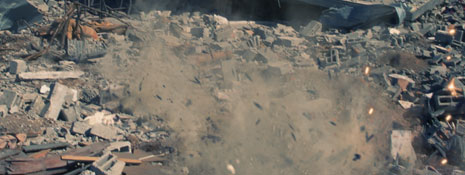
Here is a test video that uses pre-keyed elements from our stock footage collection: Action Essentials 2 for machine gun hits. I used 3 random clips with Trapcode Particular's custom sprite option. Using a particle system allows you do build complex effects without duplicating the clip hundreds of times, while maintaining precise control.

You could potentially duplicate the particle system and make dirt marks or holes underneath the main particles. I'm sure you guys and gals will think of really creative ways of using real footage elements as particles.

Watch Sample Video

POSTED:
15 years ago
99 Comments
Zamir A.
13 years ago
and more than a year later, here it is!:http://www.videocopilot.net/tutorial/dynamic_machine_gun/
hehehe, XD Thanks!
Amer
14 years ago
Can we please have a tutorial of this Andrew?
haili
15 years ago
i love it very very much!thanks,but we need a tutorial
Thomas a
15 years ago
Great fx, please make a tutorial! it could really help me out with my own movie!
JaanBoy
15 years ago
Andrew, not wanting to sound really pushy, but is there a possibility of a tutorial on this please?
Hassan A. Al-Tarooti
15 years ago
Dear. Andrew

When you will do this project tutorial for us ,,, because we are need that one

Thanks

Hassan Al-Tarooti
shahrooz
15 years ago
plz make a tutorial for this magic... we need that
plz my master
Videozen
15 years ago
WOOOOwwww! Nice shooting! Good thing I wasnt the target! hehehehe
It really makes me think... I DO can redecorate my backyard! It looks prety much the same as the footage... SO: a little of work in AE and MISSION ACOMPLISHED! (I´m a genius I know)
Rob
15 years ago
Tutorial plz. xD i know this probably is easy but i'm a little bit noob in after effects xD
Jason
15 years ago
Yeah, a tutorial would be awesome!
Manuel
15 years ago
Hey andrew can u made a tutorial on this because I can't make the sprite working with a clip .. hope u will made a tutorial on this greets from me u'r the best
donass
15 years ago
amazing !!!
i was wondering if i could do as good as u
here is my test
http://www.youtube.com/watch?vL3U82A3GXk
15 years ago
Really good visual effects. The only downer was the sound fx of the gun shots.
Max max
15 years ago
I'll make you a tutorial:
1. Take a house destroyed picture
2. Add a null object and put some traking data on it (it can be from a wiggle (it seems it's what Andrew used, the camera movement is very mathematical) or a tracking data from a real footage that you tracked).
3. Open footage 3 clips from Action Essentials 2. Color correct them.
4. Layer» new layer» solid » effect» trapcode particular.
5. Than play with the settings and instead using a sphere, use a sprite and the clips as texture.
Voila
Vasco
15 years ago
Please post a Tutorial, Sir!
Dil
15 years ago
PLEASE! A TUTORIAL!
luke
15 years ago
hello Andy,

I'm a noob with after effect, never used before, I spent the last 4 weeks watching your tutorials, and.. man, you are a God, I'm here just to thank you for everything, I'm learning so fast!
15 years ago
A tutorial would be amazing if you can spare the time
Chris Slowik
15 years ago
Quote from Lynton: "Only problem I see is that non of the bullets have any impact on the debris on the ground(no indentations from the bullets or breakup of the debris at ground level) other then that it looks nice. Lol"

You can easily achieve that effect. Just use the Aux System generator in Particular. Set the main particles to the bullet hole graphic, and use the aux system to show the dirt hit video as the sprite. Just set the aux generator to only show one particle, with no movement.. maybe some random rotation to make it more realistic.
Kirk
15 years ago
Perfect. Please create a tut for this one -- it has universal applications.
Alan
15 years ago
Great job, looks very authentic!

For all those so-called, "experts" with the, "Not realistic enough" or, "We don't need a tutorial." How about you show us all how great you are and post one?

Let's give Andrew some props, guys. He works very hard at what he does and still shares his knowledge, free!
James Price
15 years ago
Reminds me of the end shootout sequence in District 9
merosathi
15 years ago
wow this is great. never knew such things can be done with Particular. is it possible with CC Particle World???
AB
15 years ago
Looks pretty damm good to me. Nice work.
jerry
15 years ago
WOW...awesome....I have to go try this now....
mani
15 years ago
Great mr.andrew, very coooooooooool wrksss
15 years ago
how Steve Jobs would say, Amazing Andrew. Please Tutorial!!!!!
15 years ago
Thanks again! Hope to see a new tutorial soon.
Damian
15 years ago
Hey Andrew I have a action essential 2 and I noticed that the way you use it is pure genius. I love the way you combine tons of videos to make it perfects. Like there I noticed dirt charges, sparks, and smoke. Thanks for sharing this
15 years ago
hey check out my version of thathttp://www.youtube.com/watch?v=IMpxkXYway8
15 years ago
This is pretty amazing. I think all it needs is some film grain. If Twitch or something like it was added, it could be really incredible.
15 years ago
This is soooo good...
But i also believe the shadows need more blue darks!

But this is incredible! When will you become a VFX artist/Compositor in holywood movies?
nuklearwanze
15 years ago
just a a little detail i noticed: you could make the composite even more realistic looking, by varying the rotation in which smoke and debris is flying off.

a bullet impact only throws debris UP if it hits a horizontally aligned surface. in case of the rubble field in the shot, debris would fly differently. (always align the impact 90 degree to the surface it hits in the shot)

also: you are hitting some very prominent and easily visible (bright) pieces of rubble in the shot - you should definitely keep some scorch marks in place after the smoke clears.
Amer
15 years ago
perfect....just perfect
GreedOra
15 years ago
Are you going to teach us how to do this in AE ?

Ray
15 years ago
I did something similar as a test here;

http://vimeo.com/11707831
c-r-u-x
15 years ago
Actually I feel like the AE2-elements don't sit perfectly well in the scene. The shadowy parts of the debris should probably be more blueish like the shadows in the plate and I'd try and match the color of the debris better with the color of the concrete since that's the dominant color and most debris would have to come from those concrete parts.
Jenovation
15 years ago
Looks fantastic! Wow.
Did you do any tracking for this shot or just animate the emitter across the perspective plane?
Stefan
15 years ago
Great! Looking fantastic! It will be great to create something like a quick tip tutorial to show us how to made something like that. I think that will really help you to sell your product even more!

Best regards Stefan
Dominik
15 years ago
Is the background a still picture? Is it the same technique (camera rig) as in the last tutorial?
caives
15 years ago
A tutorial would be nice! Nice work, Andrew.
Hassan A. Al-Tarooti
15 years ago
woooooooooooooow ,,, mr. Andrew Kramer This is like the truth
15 years ago
realistic wow awesome effect with a still image. i dont care if the derbis on ground dint change...
bobthenob
15 years ago
Andrew your the man
wooooooooooooooooooooooooooooooo
daro
15 years ago
andy you totally rock.smart composition.
elhora
15 years ago
I need a rope.... and a tree. Or a tut ! ^^ Really realistic fx. Impressive.
Tim XIANG
15 years ago
Awesome... Looking foreword to the tutorial..hahha

hey I used some Action Essential 2 stuff and made a Dragon Ball style fighting, I posted it on the form...do you think maybe you could take a look at it...

http://www.videocopilot.net/forum/viewtopic.php?f=11&t=39525
Hiphopjoe
15 years ago
i used this in one of my vids a few projects back, very nice bro!!
bob 268
15 years ago
well done andrew!!!
Gee
15 years ago
Incredible! Nice one Andrew!
15 years ago
andrew what if you make this video your new tutorial?
its awesome
15 years ago
Nice stuff Andrew! keep it up man!
Ryan
15 years ago
haha damn you Lashan i was hoping no one would notice. I couldn't delete my typo haha
15 years ago
Particular is a great plugin. The only time I used it was doing the 'medical zoom' tut. (And that was the demo version) Linking video to particles is quite awesome. But alas, I would rather buy a few bargain VC plugins than Particular at the moment.
15 years ago
Hey Andrew, I just was wondering if a tutorial was coming for this or not. I'd LOVE one...because the ground hits it my movie didn't turn out the best. Here it is: http://www.youtube.com/watch?v=L5aXqsd8r6U
Udit
15 years ago
That was Hell Cool !!!!!!!
Versianni
15 years ago
I bet that this background is a still image as Andrew usually do to trick our minds!!
15 years ago
Not bad! Too bad the particles never hit the ground though This would work great in a quick cut.
lucio
15 years ago
Ese efecto se ve realmente muy bien! te felicito desde argentina! Continua con tus maravillosos tutoriales, son lo mejor!!!

you rock!
15 years ago
This looks awesome! Definitely worth a tutorial.
VFX-Anomaly
15 years ago
I like pie and 3/4 is how much of one i can eat

Nice Action Essentials 2 pre-keyed element Andrew
15 years ago
I completely agree with this Ryan guy, this can be easily achieved if you've watched the other Video Copilot tutorials.

It's just a still picture with the Particular over it and has some added camera shake with some nice sound effects..

Only thing is, PIE is 3.14 backwards. ;D
Ryan
15 years ago
I don't understand people who are asking for a tutorial...what do you guys even come on this site for.

This is easyer then realising PIE is 3.16 backwards.

It looks cool but there is no need for a tutorial, just look at his old ones. Jeez
Thomas
15 years ago
That looks awesome!!

Now, you just need some guys (And of course, by that I mean Sam. :p ) who will let you shoot around thier feet and maybe down by the side of thier car? :p
jason smith
15 years ago
looks mechacool! hope you do a tutorial! ...and i'd love to see lots more action essential 2 tutorials. recently purchased and always interested in potential uses of that product. you are THEE MAN.
Keninchina
15 years ago
Woah, how did you make the debris? This effect should get its own tutorial~
15 years ago
Oh, that is sick.
Adrian
15 years ago
Sorry, it happens only to me or are there more people who can not see the video?
Daniel
15 years ago
Why does everything you do come out so great? seriously though, you're awesome, thanks for all the great stuff you share with us
syaf
15 years ago
is that an anamorphic size for a video?
Arilla
15 years ago
We need a tutorial for this :O! Awesome!
15 years ago
it looks very realistic..
Jason
15 years ago
I think Andrew was tired when he posted this blog.....a couple grammar errors in there.
Navigas
15 years ago
That looked really great, but with a little adjusting on the ground and objects laying around(simulating movement) it could look even more realistic.
The idea is brilliant though!
Darren Case
15 years ago
Hey! Thats great! I love the aspect ratio!
Whats up with the building? Action essentials 4 maybe?!
Daniel Harrison
15 years ago
Oh man... Mr. Kramer, you impress me every time again and again.

How's the "Dragon" Plugin doing?
dannykneip
15 years ago
awesome video - made me laugh! i continue to be amazed at the possibilities...
15 years ago
Great stuff! I know how to use AE2 and motion track, but I'm having trouble with my particular. Looks efficient, but I would love to see a tutorial!
15 years ago
Amazing effects as always Andrew , I hope I can do something like that.
15 years ago
Awesome, that's great, but that gonna be a tuts? anyway, thank Mr. Kramer
Mr. Pink
15 years ago
Good. You are learning well Andrew...
Matthew Park
15 years ago
Wooow so cool. many thanks mr. kramer
15 years ago
so cool, as always my friend...
15 years ago
Any chance there will be a short tutorial or Video-Blog about this?
Rikchard
15 years ago
Great Job Andrew!

You are the best, definitely!
XHD
15 years ago
Great technique, you always making great stuff...
At the end the dust looks kind of fake.
THANKS FOR THEM GREAT TUTORIALS!
Marçal Solé
15 years ago
This definitely needs a tutorial! It'll be really useful. Fantastic realism.
wick
15 years ago
i would almost run!
Zen
15 years ago
Great job man !
Kasa
15 years ago
NICE ONE!!!

How much time did you spend on a test like these??
gabriel
15 years ago
due make a tut!!!
Lynton
15 years ago
Only problem I see is that non of the bullets have any impact on the debris on the ground(no indentations from the bullets or breakup of the debris at ground level) other then that it looks nice. Lol
Jon
15 years ago
Really realistic!
15 years ago
I always forget about particular....this could have saved me hours of work. Me likee time savers.
oras
15 years ago
nice coming down in z line
Steely
15 years ago
Wow! that looks ace. I tried something like it with particular using a pic for a sprite but looked nothing like as good as that. Never thought to use video as a sprite! Thankx
NEWGUY
15 years ago
U GOOD ANDREW AND DA VC CREW???
15 years ago
That looked quite realstic...what was the footage shoot with? Thanks Andrew
theguttz
15 years ago
God! really great FX! :O