 ALL DESIGN TOOLS


I occasionally get questions about what the various camera settings are for in After Effects. Usually I just ignore them and go about my day playing with my tinker toys. But what the heck, here is a little write-up.
Now I was going to put together a complete technical explanation and try to confuse you with complicated facts and made-up equations but I want to explain it to you the way I wish somebody had with me.
The first thing we'll talk about are camera presets, such as 50mm and 35mm etc. Simply put, the lower the number, the wider the angle of view (wide-angle) and the higher numbers indicates a telephoto. This number is called the focal length.
Figure A
Figure B
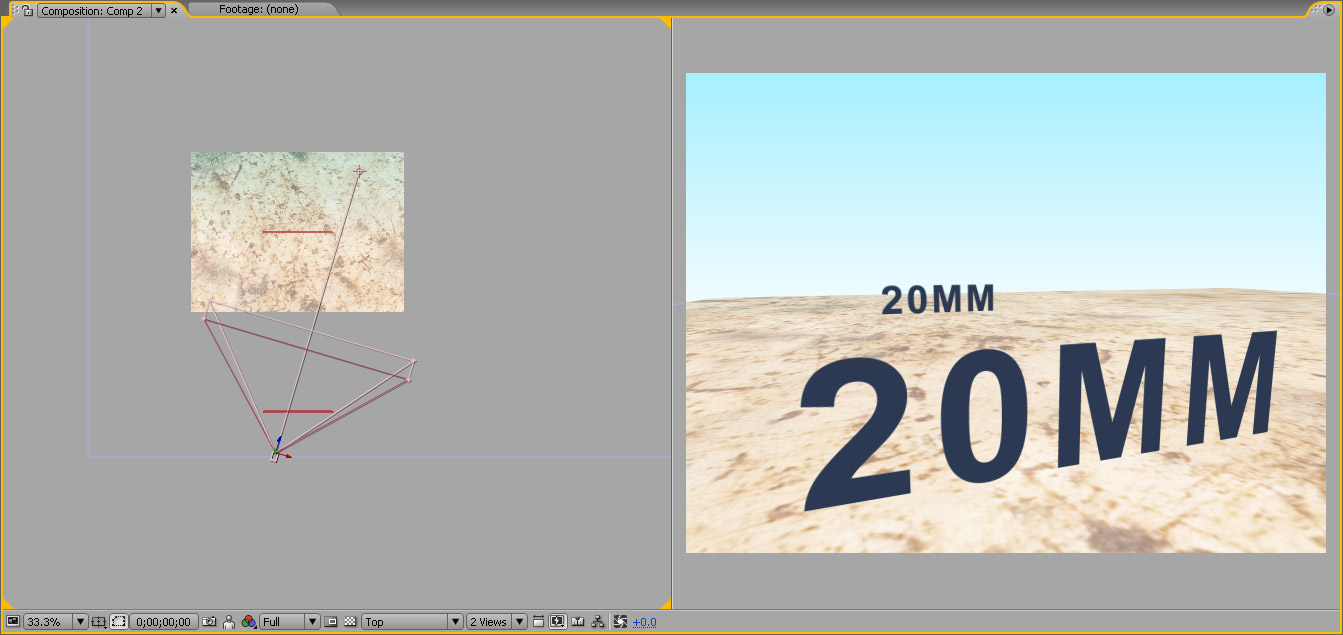
In the above examples, I've used 2 cameras a 50mm and 20mm. You'll notice that I've matched the perceptual size of the front text in both examples. To accomplish this I moved the wide-angle, 20mm camera closer to the front text so that it would fill more of the frame.
Now it is easy to see how a wide-angle lens can make a shot more dramatic because the background is smaller and seems further away. It also allows you to get closer to objects and still see most of the image.
On the other hand, although there is no lens distortion like in a real 3D application, this can sometimes be an awkward, exaggerated point of view. So for many things I like to use a 50mm and 35mm preset because it is more natural to what we are used to seeing everyday with our own eyes. But to make things seem bigger and mighty, a wide-angle lens possesses the necessary attributes.
Here are some of our tutorials demonstrating various camera setups and tips:
Maybe in the next one, we'll talk about apertures and depth of field; but that's easy stuff.


 your tuts are all so usefule just wanna say that again and again


