Andrew Kramer on September 17th, 2012 4:57 pm
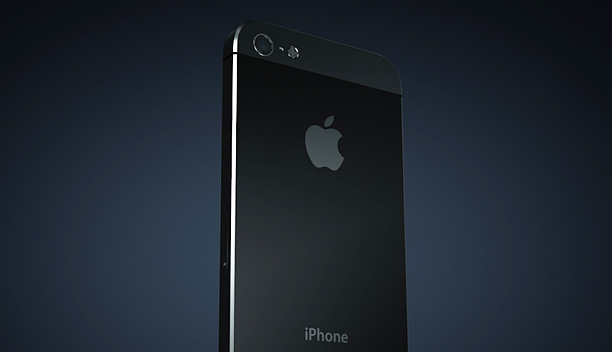
If you wanted to get your hands on the new iPhone 5, “Congratulations”, we have a free 3D model just for you! Along with this free model I also recorded a short tutorial that focuses on animating the screen and preparing the model for Element 3d.
The iPhone model is in the OBJ format so you can use it with any 3D program such as 3D max or Cinema 4D.
124 RESPONSES TO "NEW TUTORIAL & FREE IPHONE 5 MODEL!"
POST A COMMENT!
Before Posting
We're trying to encourage more thoughtful commenting. Please take a moment to write a meaningful response to this post.
Also remember to read the rules on posting first.
We're trying to encourage more thoughtful commenting. Please take a moment to write a meaningful response to this post.
Also remember to read the rules on posting first.
3D MODELS


Just black color? Is there any possibility you’re gonna make a white one? =)
Well i haven’t see it but i know is a 3D Model and Pretty sure the Texture/Shader Can be change to a different color.
i will download this file, edit the textures a little and make it white and put it up somewhere. I’ll link the download if that’s ok with VCP ofcourse
Uhhh! Its free! why dont you go buy a white one geese the guy gives us free stuff and you complain about it.
Open the Defuse png file in an image editor and change the dark grey sections to White. I did this and changed it in Photoshop CS6 until it looked right. I know have a white and black defuse png file which I can swop out as I need.
he wasn’t complaining at all he was just curios if they color could be edited in element at all
Hi,i have a problem,when i import the iphone in cinema4d,cinema 4d import the iphone without textures.
ionut, then apply it by yourself!
MGT You still planning to upload the white one?
holy shat guys… if you cant change black to white, you should not be doing motion graphics. i cant believe how much hand-holding people expect on this site… especially on stuff that is being given to you for free! god knows you probably wouldnt be able to place vert 1 if you had to build the model yourself.
Hi guys! I’ve made a white diffuse pass for this model. Check it out and leave me a comment and I’ll share it with you!
http://www.joakimulseth.com/blogwhiteiphone5model/
This is amazing, it will be great for many people that are going to create these fake apple ads
Great .. thanks a lot !
Excellent as always!
SH!T HOT! This will be a huge selling point for element!
woooooow amazing,
good job Andrew =)
YAAAAAAAAAAAAAhoooooo number 6, or 7 – shoo by the time is stop typing number 10! Nice job anDrew!
How did you design your iPhone model ?
3D program or AF ?
cause I’ve seen a tutorial before on how to make it using AF and i would love if you showed us how =) Thnx
Sorry I mean AE
Tutorial show 3DS Max so i bet he did it in 3DS Max…
Modeling in AE with 2D pictures or by drawings masks and extrude them with element?
it was in made in a 3d program
i know this because its an obj model and you cant export from element
PS
could you please add a feature to export from element
Thanks so much for the model. I haven’t found a good, free iPhone model since element 3D has come out, thanks for giving us one, and the new one at that!
YEAH! Thanks for this one!
andrew you need to check this out? this a creative way to use element, i know that doesnt replace any 3d program but what if with some time you can make your own models inside AE only with mask? like this http://www.youtube.com/watch?v=gi012Ls_rHo&feature=g-user-u or http://www.youtube.com/watch?v=vvoly5SKJzk&feature=relmfu
pls check it out its an awsome job and tell me what do you think
amazing work………….
Good job, man! Keep on working!
Thanks for plugging my videos! I’ve actually created a few tutorials on how I create things in AE using Element. You are right, it’s not a replacement for an actual 3d program, but you can get some pretty nice results. They are available here if anyone is interested http://www.youtube.com/playlist?list=PLD17DA67601F2BF9F&feature;=plcp
Too amazing Andrew …. you’re spoiling us rotten!
hmmmm. Did anyone notice in the video when he was applying the element effect there was another plugin named “LiveCam”? Is there perhaps another product coming in the near future?
I did… and I’m still searching for that one…
.. just in case you missed it .. here is another short clip done with Element 3D .. feel free to comment & share .. cheers !
http://youtu.be/KRBPdYgDVZQ
Andrew & crew,
I am semi-knowledgeable in C4D…I want to know how I can create these multi-texture files like “Iphone5_specular.png” and “Iphone5_diffuse.png”. Any chance of a tutorial or a link to one online?
You are the best – Thanks.
~ Joey
…to be more specific…I want to be able to create multi textures that are EASILY RELINKED IN ELEMENT like you did here for the iPhone5 and the other assets / models I purchased with the plug-in package. I try bringing in C4D project files with the shaders on the pieces & parts and Element strips everything off – making it extremely difficult to relink everything successfully. Please help. Thanks so much.
~ Joey
Perhaps you would find this useful: https://vimeo.com/49391176
cheers
Thank you Andrew for this free 3D Model. Really usefull
nice, i loved the jokes. you sounded scared when you said ill take the trash later:)
I Love Andrew Kramer.. Im a married man, but she’ll just have to get over it!!
how awesome! freebie plus a tutorial
Great, †h♌kڪ for carrying us along
Andrew,
I tried using your technique of using video or footage as the texture map, but I can’t get it to work.
I’m using the Sphere HD model from the primitives pack and I made a precomp with Particular and some different effects to use as my map, but it won’t work! I followed all the directions in the vid, but it’s not working. Any suggestions? I want to create a sphere with some cool effects inside without using CC Sphere like you did in your other tuts.
Thanks!
Hey, this is another great tutorial for the best plugin of the century.
Thanks,
Thorsten
http://www.PhotoMocha.com
Very Good as always !
you are great man, thnx for the model……
this is awesome!
I think I’m gonna use this model and render with real photo as background, and see if I can trick my friend that I already get iPhone 5! lol!
I Love U Master Andrew
Thanks For Everything
I can’t have real iPhone 5 in my hands , but with Element i can have iPhone 5 in my PC
, thanks Andrew
Thank you Andrew for this free 3D Model.
Awesome Tut! Anderw….
Thanks for the Tut & iphone Model…
VC the BEST !
Hey, thx to you and the Video Copilot Crew for this really awesome and free iPhone 5 model. It’s much fun to watch you tutorials and i really love your jokes.
With you and your wife… all ok so far?
Thanks Andrew and the Video Copilot team! BTW, just saw Revolution last night and several of the effects looks like your handiwork.
Thank you Andrew, I hope all is well with you, wife and the kids. Cheers from Portugal/Singapore
Excellent – loving Element more each day.
Making tutorials gets you out of housework? Guess we can expect more
Awesome stuff Andrew.. but what the heck is LiveCam ?
Just on time!!! Thank you so much!
U are the King !! Nice Job.
Always awesome to get a free iPhone
Slick Tutorial!!
Tell your wife I’ll be the house maid in exchange for you to provide me with one on one AE Training!! Its a win win win situation – I get personal training – your wife gets more free time – and you get….um… well…. I guess it’s a just a win win – ha! Thanks for the quick yet awesome tutorial!
Thank you Andrew, this model is really well made, It’s great of you to put it out for free when you could’ve charge like $70 on turbosquid or something. You rock dude
any other phones???? why it’s only iPhone?
Because it’s free.
My comment must have been 5th.Is this very important?Yes it is!Why?Because this is obsessive community,not joy.So how we can love Andrew so much unless being some maniac
Shining tutorial?What could be else?
I know it is off topic, but while i was searching tutorials i found proshader on youtube http://www.youtube.com/watch?v=JNiHup-rbqc
http://www.proshader.com/
But i´m still not able to bring it into AE ^^
I still want to know what LiveCam is!!
Couple of interesting models in his my models folder there..apache and 50k liquid mesh test. Surprised no one’s mentioned this yet..
Beautifully done…all the way down to the high detailed text on the back of the phone! su-bloody-purb!
Thanks Andrew and Video Copilot for downloading of the 3D file. I’ve edited a project and insert small test videos and family photo. Extremely interesting layers with the integration of the Element. This gives us more options to create new ideas and possibilities. Great done!! Congratulations!!
Element 3d just made 3d renders on my machine literally 1000% faster. LITERALLY!
Check out what I made with this model already:
https://vimeo.com/49660712
The possibilities are ENDLESS!
https://vimeo.com/49091397
awesome!
How about a Suretarget update…
thank you very much for everything, especially for the plugin Element and here’s a little test I did with the iPhone 5 https://vimeo.com/49686838
Thanks for the 3d model! and I create this:
http://www.youtube.com/watch?v=eeNeWM6CFgk
Thanks!
Very Clever
Hey Andrew till now Element is a powerful plugin to import 3d obj files but i wondering could the plugin import a 3D model with its own animation .. for Example i have a running 3d character model can i import it with element to AE ?!
Thanks .. i will check it
Do I have to sign a two year contract before downloading?
Greetings Andrew!
Your work is unparalleled and you have amazed me again. My small inquiry showed me that you have made some mistakes with the materials and colours of the iPhone 5. You can check it on Apple’s site : http://www.apple.com/iphone/design/
I tried to fix it myself with Photoshop but I’m lacking of skill in that program, although it is quiet similar to After Effects.
Is there any chance you post an updated version of the model or just tell me how to fix it myself? It is kind of odd that I am the only one who has noticed on that mistake. Anyway, please respond.
Thanks in advance.
cool tutorial , i think thats is the best plugin for after effect, greetings from arequipa peru.
nice, and I see I have a lot to learn.
!HELP! For some reason, its coming up as plain black, the screen shows up and the camera but nothing else. the specular map doesn’t show up. I tried adding it on the specular tab on the material editor as a bitmap and clicked on the image but nothing happened HELP!
This makes me want to bash my head against a wall. I just finished a job for an iPhone case company where I spent hours making one myself because I couldn’t find a pre-made one…Guess I should check VCP more often.
You definitely have a great wife…greetings to her.
Please Andrew, next tutorial on the wonderful city sce posted yesterday in twitter
just 1 question
If i made animation in 3ds max with camera set up and animating body and export in element 3d would it get that animation?
Means can i use element 3d as a render engine?
sorry, no. Element doesn’t support animated files of any sort. It’s too hard on the GPU memory or something like that… Read the help guides to find out more.
Where we can get other phone models ?
Great. It’s good. We can change color to make white. It’s simple. If you can’t do please buy white option. It’s only for stuff.
It was just yesterday that I bought this iphone 5 model for 30 bucks. This one looks better than what I have. Cheers Andrew!
Hej Andrew. I need to recreate a bottle and add a label on it, then whack it through element. Have you got any tutorials planned for something like this?
Many thanks
Jay
HEY ANDREW I WANT white one too can you please tell me textures to be used there ?
Drop the Diffuse png into Photoshop & replace the black textures with white & reassign the drop down- worked for me.
hey i made this
sorry for bad quality and w/o sounds but still its ok ok..
http://www.youtube.com/watch?v=1uRg7pV6gKI&feature=youtu.be
Andrew! You probably will not read this, but hey, here’s to trying.
I use a lot of your stuff to teach my students. You don’t maybe offer like educational packages or something like that? Would really love to get Element 3D for the lab!
Keep up the fantastic work, from your South African fans.
Andrew,
Why not 3d track it to sams hand and have payment plan guy facetime sam? I would love that haha.
What do you guys think about this model? http://www.turbosquid.com/3d-models/3d-c4d-m1-abrams/692846
So I did it, I render out an image of iPhone 5 with element and bunch of post work, posted on fb, everyone thought I bought the phone lol, simply awesome, thanks Andrew!!
http://www.ttyi.net/images/iphone_element.jpg
Hi Andrew,
best wishes for now…
I really wonder if element could be used with object tracking,i mean like replacing a cardboard sword with a 3d lightsaber or such.not for static objects but moving ones.i watched your tutorials about the use of camera tracing with E3D and it would be so great if you could make a tutorial about using element with object tracking(if possible) love the work and effort you put it in this plug in,it is really a genius invention for AE
Hi Guys, can someone knows how to do the UV Mapping in C4D with all texture save as a jpeg then add that material into 3D element, just like that iphone texture wrapped around in just one click. Any tutorial link? thanks in advance. God Bless
Microwave vs. iPhone 5
http://www.youtube.com/watch?v=j50x942vNuU
God Bless you richly Andrew Kramer! You are a BIG blessing to VFX and Motion graphics guys. Thank you for this wonderful iPhone 5 model. I’ve seen lots of them offered for sale, but here it is, FREE! I’m looking up to purchasing element 3d soon. Its awesome. Great thanks for the tutorials and many more tutorials you’ve been offering in the past. My VFX and motion Graphics career had its teenage from your basic tutorials online. Now my career is in it adulthood. Great thanks to you Andrew Kramer. Great Thanks to VideoCopilot. Greetings to Sam Loya, and the others. I love you all so dearly. Im Palmer Noah
I’m sure this question may have been asked before, but is there a way to add more than “5 groups” to element 3D? if not is there a work around way to be able to manipulate more than 5 groups in the same layer?
Thank you for any and all help
Very great work! Keep it up
In this tutorial AK Sir you using Element version 1.0.351
And whats new on this update please classify :]
When you giving us update on that
Hi Andrew and VC Group. I created a puzzle in C4D, but when I use shatter the Element not only unravels the puzzle, each piece is individually dismounts. How can I solve this problem in C4D for the element?
Hi guys! Just one question, is there any “opacity option” for each group?
It would be great. Im doing some text any they come in and disapear in distance, and dont want to use a lot of copies of Element, so I set each word in a diferent group, the problem is there is no opacity option for each group!
Hey Guys, i have a problem when i render the Iphone Comp.
http://youtu.be/Ge1BHcVjcCI
Output settings are:
Multisampling 0
Supersampling 0
I also render it in
Multisampling 1
Supersampling 0
the problem is the same. I also try Supersampling 2, the same bad result.
My System is weak, but i render the Biohazardlogo and other projekts without problems. Could it be the Reflaction?
Thank you for any help
For all who has the same problem. The Support give me the Tipp to try disabling Multiprocessor Rendering in AE. I done it and now it works pretty well.
i’m trying to get this model into C4d but can’t seem to get the textures to work properly.
I applied the diffuse.png to the Diffusion texture and the Specular.png to the specular colour texute. but its nt right. can some one point me in the right direction?
many thanks!!
Ah dude thanks so much! Used it here already!
https://vimeo.com/49660712
Hey Andrew, no front, but you should add some scratches on the corners to the Iphone. You know i mean?
Greets.
Could anyone post the white version of the diffuse png ? I can’t make it look right.
talking about objects and logos… I did not find a way to import my Illustrator Logo into Elements 3D and extrude it. Does this just work with fonts?
I even tried to create an obj in Photoshop CS6 and import to Element 3D, but it looks wrong. Any tutorials on that how to create a 3D Logo from a 2D logo in Illustrator CS6 as we use this all the time?
thanks for any response….
Andrew, check this ad:
http://youtu.be/BnhXSRZvAMc
Hi ANdrew,
I really enjoy your tutorials and humor. I an curious if it is possible with Element 3D when showing multiple instances if the iphone to have different screen images of movie files on each. If so, please provide an explanation or point me to information already posted.
jeff
Hi Amdrew.
Tried loading the .obj into photoshop. the diffuce and screen textures load, but not the specular. have i done something wrong, or shall i add the specular manualy and how…
Stephano
Is there any way to make material for 3d Element?
i have followed your tutorial but still i have a problem.
i cant insert the mode into after effects cs6 after doing the screen setup..!!! after clicking ok…nothing comes in the after effect screen
I actually enjoyed using elemen 3D and find it usefull hope ya find this animation useful
http://www.youtube.com/watch?v=hCIWYAUJ6Ss&feature=relmfu
Thanks to Andrew Kramer
Just wanted to say a quick thanks, E3D and this model helped me meet a rush deadline that was sub 24hr turnaround quickly and easily for a short 15 sec commercial.
http://youtu.be/ahgtjeBUQGA?hd=1
VCP = WIN
wow…Kramer u really making it easy for the creative industry….awsome
Really really nice!
Any plans for an iPad model too (paid or unpaid)?
man i was watching the series Revolution,what u did with intro was tight man
Hi there! If somebody still need a file for white iphone please check the link. I have done for myself it in few minutes, so it is not so perfect and might want to fix some details, but it will give the idea.
http://imageshack.us/download/811/misplacewhite.png