Andrew Kramer on July 5th, 2012 2:54 am
UPDATE: Now Available
If you are still wondering exactly what Element 3D is all about, check out this new video!
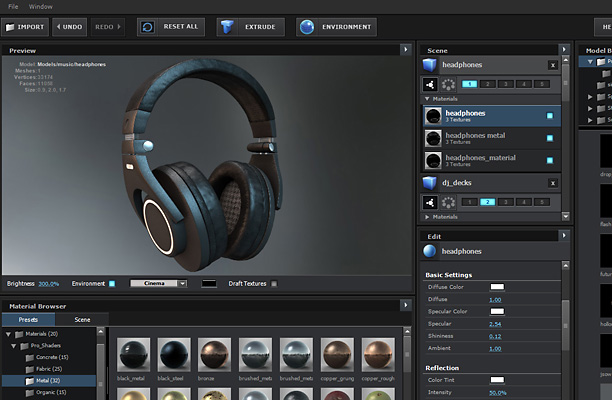
The video shows you exactly what it is like to work with the plug-in so you can see the impressive controls and ease of use.
There are many more features to cover in the next few days so stay tuned for those!
Also on Youtube and Vimeo for your convenience.
Features shown in this video:
- All New Element User Interface
- Importing 3D Objects with Textures!
- Interactive Lighting
- Material Options and Presets
- Group Array System
- Environment Mapping
- Motion Blur and Depth of Field
- New Expansion Pack demonstrations: Pro Shaders & the Motion Design Pack
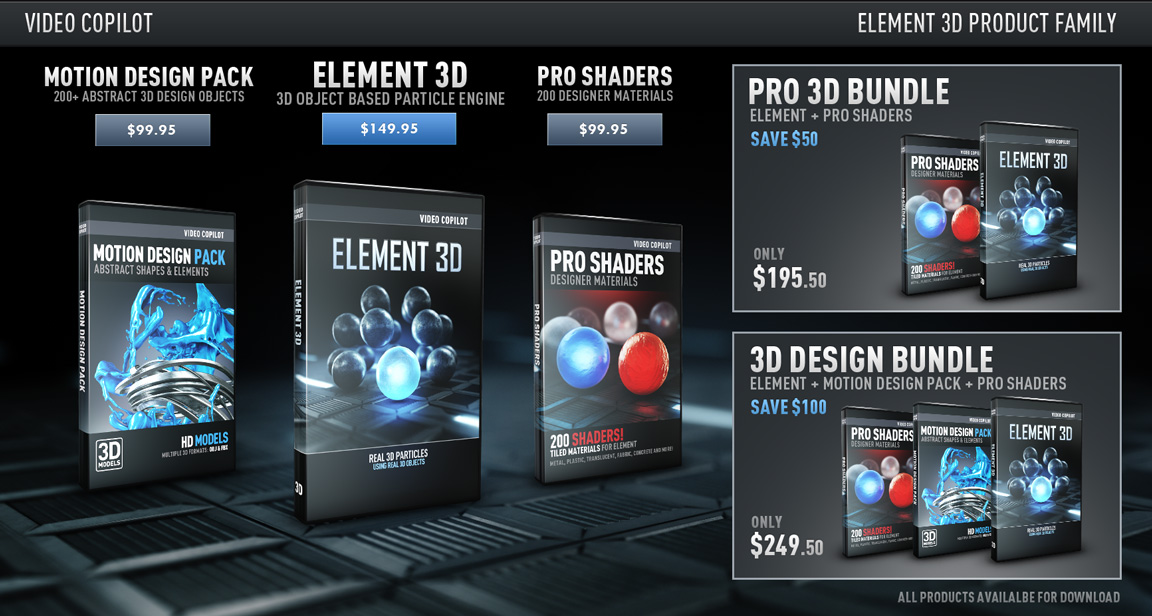
The Element Plug-in will remain at the low price of $149.95, and we will also have several bundle options available as well!
Click here to see all Bundles and Prices
Element will be available Tuesday, July 10 2012!
714 RESPONSES TO "NEW ELEMENT 3D VIDEO DEMONSTRATION!"
3D MODELS


wow andrew kramer
Uhhh… insane man. That’s just crazy cool! Glad you guys took the time on this one. Wow.
Wooh.. Lo que muchas veces el propio Adobe no hace … lo hace Video Copilot… Felicitaciones Felicitaciones esta muy bueno… mejor que las mejoras de After Efects 6
Shut up and take my money. Take it. Bathe in it, I don’t care.
This is NOT GOOD!!…. this is AMAZING!! my mind can’t rest till I buy a copy!
that’s owsome amazing……
Can we edit objects in Element 3D
meowzers
Oh my! this is incredible! Good Job AK, Big fan
woooowwwwwwwwwwwwwwwwwww
=))Nice man= )
Cool Stuff!
Those look exciting..!!!
This’s EPIC !!! Hats off to the master !
I’m Agree with you man! Andrew, you are the master, maybe it is the best plugin for AE ever!
This is the greatest thing I have seen for After Effects in like.. er… ever! Kudos to the VCP team!
Element 3D is Evolution !!!
O my GOOOOOOD!!!
AMAZING!
wow !
element 3D in loading …
awesome
Getting a little excited here.
EVEN MORE AMAZING THAN I EVER IMAGINED!!!!!
Could you give your machine specs Andrew? Just so we know how close to this our performance will be
WHAAAAAAAAAAAAAT
THIS IS A PLUGIN!!??!?!?!?!?!?!?!?!
YES Xavier
THIS IS A PLUGIN , I understand you !!
I have to say, this looks pretty damn cool. And easy. And fast. REALLY fast.
Well done!
Looks great! Two questions though. 1. Is it possible to create own shaders (inside the plugin or with a 3d program)? 2. If I got it right, models are static. Is there any workaround so its possible to use animated or do you have plans to include this in a future update?
I also would like to know the answers to both of these…
If they put that as the “BOMB” of the final information about Element 3D, for the price they are offering that would be the most Powerful Plugin ever made for AE for a really low price!Anyway even without that is an amazing Plugin work, awesome price and of course The Gods of VFX-er VideoCopilot with Andrew Kramer and his Fantastic Crew!Thank you guys can’t wait to try out…Hungarian guy from chicago…
I think he hinted at the ability to do some simple animations. We will see soon enough!
WaW, I Can’t Wait to get it , but it to expensive ,Why ?
expensive? are you taking the piss??? thats an amazing price for what it does. He could easily of charged twice the price and it would still be worth it.
This is super-cheap considering the amount of content we get.
This is expensive but After Effects is not?
are u freaking kidding me.. with this kinda plug-in.. it’s totally worth it.. the plugin that does 3d stuff inside after effects thats freaking genius..
haha wow. 3d software can cost thousands of dollars. this is an amazing deal for what it does!
don’t be ridiculous. C4D costs over $3,000. Granted this doesn’t do all that C4D does, but it’s also exponentially faster. Even comparable 3D “plugins” cost nearly twice as much and don’t perform anywhere near what we’re seeing here. This is a game changer in the motion design world.
SO EXCITING!!!!! Thank you Andrew.
Killer Plug!!!!
Is ELEMENT 3D capable of reading OBJ Sequences?
What is a must in todays HiEnd Comps and i have no need to use ATOMKRAFT in NUKE,ore Nuke anyway.
I cannot wait for this to be released
That looks so fantastic! Its like christmas!
What graphic card were you using Andrew?
at the beginning in the top right it said he was using a 580gtx
So it definitely works with ATI cards aswell???? not just cuda based Nvidia cards?????
look awesome sauce btw… nice 3d animation just got a whole lot quicker
awesome price to btw… well done with that !
Yes, it obviously works with all present time GPU’s because as he said it is built on OpenGL which all GPU’s support!
Yea I noticed that also, its just in an old element preview video from last year he said it was Nvidia cards only.
I am guessing the extra time they spent on the plugin they could have made the switch from cuda to openGL but this is just speculation until confirmed. As my laptop has an ATI gpu im seriously hoping this is the case
Carl is right. No cuda, just open GL, ATI and Nvidia cards will work I think ATI 3870 and the Geforce 8800 are the minimum cards. I’ll post the supported cards and info soon.
We reccomend 1GB of Vram and the target OpenGL mode is 3.3
Quadro 4000 cards are also supported on mac and PC!
Please tell me that it will work with an ATI Radeon HD 4670
in iMac 3.06 Intel Core 2 Duo
My GPU has only 256MB. will it be worthy to acquire it?
You just made my fricking day, Andy. So annoying most apps around at the moment using cuda pish only. Awesome job !
omg this is sooo cool!!
I have no words! Great product!
I can’t wait 10 July
I can only say, thank you, what your doing with this plug in is both revolutionary and evolutionary, my mind is going crazy with all of the potential that it is has. The price point is also ridiculously cheap, I was expecting a $499 suite but 149 just congratulation for winning at life.
BAAAAAM ! A lot more interresting than the new features of CS6 ! Works with all cards not only Nvidia, all versions… Incredible ! It will change all my daily work !
Certainly since they downgraded (=removed) the 3d import options from CS5.5 to CS6!
I want it now !!!!
Still 5 days to go, still 5 days to go, still 5 days to go, still 5 days to go…
Ok, back to work for now but i’ll be there on July 10th to buy this great pack. (i want the full monty !)
Congratulations to all involved in the creation of Element 3D, looks really amazing.
I clicked the “Click here to see all Bundles and Prices”, but it’s just a picture
( WHERE’S THE ‘BUY NOW’ BUTTON?!
dude… you need to read everything… it says release on 10th… 5 days left…
I have to admit I had my doubts about the efficiency of this plugin,
But now after seeing the demonstration I am really impressed!
This is great for 3D artist and non 3D artists and the render time is amazingly fast.
The UI is really cool looks like a small 3D application inside after effects.
Way to go Andrew well worth the wait!
Where does that intro music come from?
Nothing will never be the same in After Effects with Element!
Excellent again Andrew!
Wow! Thanks VCP. You are opening the scary world of 3d to 2d animators and making easy and fun to use.
This is a masterpiece, you have changed After Effects as we know it. Thank you Video Copilot! This plugin is just beautiful.
Andrew this is potentially one of the most useful plugins for After Effects in ages! The speed at which you can work with 3D in the AE environment is astonishing!
One question though…
Can you use a .obj sequence as exported using the Plexus exporter plugin from Cinema to get an animated 3D object into in Element 3D?
Because that would be amazing!
Let me start out by saying we wanted to make OBJ sequences work but there were speed issues that we couldn’t get around to fit in with our goal of keeping this plug-in fast. Due to the size of OBJ files and limited GPU memory…
So instead we created some amazing ways to animate the objects that you bring into your scene. One of the things you may have noticed is we have 5 independent Groups that can be animated individually plus the animation engine that I will be explaining soon.
I wouldn’t be worried about this, the stuff Element can do, from what you’ve just shown so far is amazing, who cares if we can’t import already animated objs? If one has the need for that, he or she could split the object up in multiple pieces and animate them individually within after effects and it would still be faster.
Is that also the case for c4d animation files?
Yes, the C4D import saves the trouble from having to export to OBJ out of Cinema. It takes the objects on the first frame and imports them.
OK righto gotcha, thanks for info
Will it work with Blender files?
,
Is there any chance for this to work on Macbook Pro 2011? Would be lovely!
Yep. I’ll be posting the minimum specs tomorrow. The speed on a laptop is good you just have to be mindful of how many textures you add to your scene with the limited graphics card memory. We recommend 1GB and I believe your system has 512MBs.
MacBook Pro 2011 should have 1GB ram on the GPU
What does the Motion design pack and the pro shaders pack do?
Check out the video around the 18 minute mark for a demo.
The Motion Design pack is a collection of 200 3D object files for creating motion graphics and the Pro Shaders are 200 perfectly tiled materials for creating things like Metal, Concrete, Organic surfaces and more. Great for 3D text and even work well with the motion graphics models as well.
the world will never ever be the same (virtual own)
Wow!!! This is just amazing… I can’t wait til this gets out in a few days…. Really impressive stuff… Way to go Mr. Kramer
Hi Andrew
are wa able to import animated OBJ’s ? fox example a Helicopter?
regards from Germany
Short answer is no Element currently only handles static OBJ files, however I can tell you that it is QUITE possible to animate a helicopter inside of Element… I’ve done it.
This makes me look even more forward to you presentation of the Animation engine. As if this presentation wasn’t mindblowing enough on it’s own ..
Even from what we’ve seen here, the way I break that shot down in my head would be to import the helicopter without the main and tail rotor – make simple AE comps of said rotors spinning – parent those rotor compositions to the helicopter Element layer (or tie everything in with a null object) in the correct position/angle – and boom. Animated helicopter.
Really looking forward to this, by the way…
Does Element use Linear Workflow?
Well.. It uses the settings in AE so technically it should not be a problem at all … In short; you shouldn’t need to worry about it
It is fully 32bpc so you can work with a linear workflow.
I’ve never felt compelled to comment before, but this time i feel i have to as what i have just seen was completely amazing and i was astounded at the results and speed!
i knew Element was going to be good, as all your products are excellent……..but i never dreamed that it was going to be THAT good!
excellent work Captain Kramer……..roll on the 10th!!!!!!
I popped a tentpole watching this demo!!
Um… Great…
Hey Andrew,
Absolutely astounding work. Just wanted to point out that on the promotional image you’ve written “Availalbe” in the bottom right corner. Not usually a grammar nazi but thought you might want to know.
Thanks, I’ll try to fix that! So much to do
THIS WILL CHANGE THE WORLD.
thats great. in fact the plugin is jaw locking fast! but… how about linking after effects with 3d application like c4d or xsi, maya, max… would be great if a tool can bring the camera and 3d scene back and forth between AE an 3d apps. youre hero andrew!
OMG, AWESOME!
The best 3d plugin
I can’t wait for this to come out, its gonna be amazing
This is the best thing I have ever seen in After Effects!
BOOOOM!…simply stunning,I think Ive just witnessed the best plug-in every written for any package.By the way Andrew,you said in the tut that you will come back to the animation engine because it will blow our minds.Any clues on that section of the plug?.Man, I’m so super excited about this, I’m giggling like a child.roll on the 10th.now i can really see why element has taken so long to develop. thank you.
This looks absolutely fantastic and §249 for the bundle is a steal! Cannot wait until the 10th to give you some of my money. Good, good, good work everyone who has put in time to make this a reality (because I’m guessing you didn’t swing this entierly by yourself)
Andrew, can you right-click on the texture you’ve just imported for your model and save the texture in a folder like the ones already in there? So can you make your own texture folders inside of Element?
Cause you explained how to save the objects, but can you save the textures you use in the same manner?
Oh ya! You can save your own shader presets and even modify the Pro Shaders and save alternate version that you fancy.
Just to be clear you don’t save the Texture but you save the preset for the material which can include texture images.
Ok, that would work as well but can these presets contain textures which aren’t from Element’s original pack? Like a mixture of one’s textures and what’s in the Element folders?
Basically, could you import and save your own Shaders?
You can import your own textures indeed. We have a central texture folder that we recommend you use but you can import them from anywhere. We don’t recommend a network.
Thank you for making it an affordable price. Again, congratulations to you and the Video CoPilot team. God bless you guys and we all can’t wait for the 10th to arrive. You guys are excellent.
Great… and fun !!
Thank’s Andrew !! real good job !! ; )
ахереть! фшоке)
Dont know what this means but it looks awesome
I woke up and immediately saw that you posted the video and it was like christmas morning. Only it was the christmas morning 1977 when they handed out vouchers for Star Wars action figures, making me wait for element!!
5 days is a whole lot better than 5 months though
I’m not old, I just watch Star Wars docs in my free time
Christmas in July. Funny how that worked out.
Hi,
are objects included to simulate muzzle flashes? Real 3d muzzle flashes would be great (like the old muzzle plug plugin).
Solo
You can make some pretty good 3d muzzle flashes in particular
Ah, good hint. I’ll check their website for prices. Would be great though to have it in Elements 3d. So no need for purchasing another tool.
Oh, good hint! I’ll search for a tutorial on that.
One quick question, will this product allow the import of Sketchup objects? If not, can you consider adding the ability for those times when you really need to use something from the Google 3D Warehouse?
Hi Andrew,
You talked a little about translucent materials. I’m wondering if there is an option for actually transparent or translucent material, i.e. glass and such materials which distort light but are see-through?
Amazing plugin so far, can’t wait to try it!
Not exactly. Open GL is pretty specific and somewhat limited but here is what you can do.
Refraction mapping to make things look like water etc.
We do not support variable opacity maps but there is a force opacity slider that let’s you lower the opacity of a material. Like in the demo video, the stop watch has a front face that is “clear”.
We do not support variable opacity maps but
I’m also interested in getting that “glass look”. Would love to see a bit about your workaround.
Looks great! I can’t wait to slap textures on stuff! Thx!
This is fantastic. One question though. Will it be compatible with sure target? I already have some ideas I want to start working on!
I don’t see a reason why it shouldn’t! WORST case scenario is place a null object where you want the camera instead of the actual layer
It should be no problem, we are also updating the Sure Target for CS6 right after we launch.
Great, Thanks for the response.
Hi andrew, congratulations, we’re all here astouded of your work. Just a different question, we’re wondering about HOW does Element map so good all the textures???
That is simply amazing!
No more rendered images of 3D objects!
That looks pretty amazing! Once again, congratulations Andrew Kramer and Video Copilot! This plugin will revolutionize the industry of VFX, of course!
Well Done Andrew and the team, sort of thing I have dreamt of before and though it must be impossible otherwise it would have been done already by Adobe, but no. They have missed a massive trick there as you have done it and it looks incredible. It will change the way I work day to day totally.
I’m blown away, looks amazing and you’ll have my money on Tuesday that’s for sure. Well worth the wait and I’m still giggling from watching the video.
Congratulations!
Thanks Derek! They make a great API for developing plug-ins and we’re thankful for the opportunity!
Andrew I’d like to ask if is possible to model or extrude objects like in C4D?
Model no. Extrude text and mask shapes yes!
Andrew Kramer has surpassed himself this time. This is about to change my workflow. Great plug-in.
Andrew with this cool plugin now we can make camera projection on 3d model like in Nuke? Right?
Element 3D is really amazing!
Few Questions Though
1) Do we need to unwrap the model before bringing it to element 3d?
2) How were u able to bring in a 3d model like that soda can with textures in it? Like that “Power Shot” text on that.
just an answer from my point of view… yes of course, and with any program, a correct UV map is needed for best result.
he showed in the video that you can import pictures as textures which is probably what he did to get the texture of the can into element
UV mapping doens’t always require a unwrap but it is a good method. It is ideal to bake a UV into the model before exporting but Element has a few basic UV modes such as BOX and Sphere for applying basic UV’s for textureing.
For a can of soda, it was setup previously.
new bgm ,right?waitting for that surprise~
Awesome!That really blew my mind..GJ,AK!
This plugin is amazing! VCP revolutionize the whole motion design world, again!
Quick question: is it possible to use comps or animated textures inside of Elements? I.e. an animated screen on an iphone/ipad?
great job!! – what about cast shadows?
You can use animated textures that are imported into After Effects and use as a custom layer. As for shadows, we don’t currently support them because of memory issues but we have the Ambient Occlusion system which makes things look really nice and shaded. There are some cool ways to fake shadows of course and we have to have some features for V2!
Any luck with this? I’m trying to find out how to do this too with a custom layer like mentioned below. Thanks!
but what about the shadows, will be like in partitsular shading objects will cast shadows on other objects
We have Ambient Occlusion that creates inner-particle shading but AE lights don’t “cast” shadows for V1.
This is fantastic!Congratulations.
I am not halfway through the video at this point and I have to stop to mop up the drool under my desk. Video Copilot does not disappoint!
This is amazing Plug-in!!
And question.
Does schedule that will mount a function like a Meta-Mesh in the future exist?
If it can, animation, such as fluid, is able to make and it is glad.
Wow. This is out right when I need it…Can’t wait to hear about animating the objects. From what I have seen so far, this does more and better than another “3d” plug-in I have at about a fourth the price. Can you use this with text or does the text need to be created into and OBJ first?
Wow! this will blow up my head, thank guys you always making amazing things.
I have quick question
it works with text or illustrator, after effects shapes or just with 3D object made ?
Hey Andrew,
do we have to UV unwrap the Model before exporting it from 3D application?
*picking jaw up from the floor* Ya wee beauty! VCP lads, you have made my day. I’m excited to see what else it can do. Have you prepared any tutorials to show the rest of the features off?
Thanks, I’m looking forward…
Videocopilot is gonna get A LOT of artists employed
Uh WOW! Coming from a programming background, I can totally appreciate the amount of work that went into this. I’m looking forward to see how well it can “replace” blender for me.
Interface is clean and easy to use. Tell your team what a Great job they’ve done.
Congratulations Andrew and team – you all should be very proud.
This is AMAZING! Even more AMAZING than a new Spiderman!
Bargain price Mr Kramer! I cannot wait to find out about the animation engine!
woooo, amazing product! Just a little question, is there a wireframes option? could be cool!!
Yes.
You are prophetess of After Effects.
Andrew,can all the objects be motion tracked IE) camera tracker etc?
ooooooooooooooooh Andrew
Does optical flares have any effect on the model like the lights?
As always, you are the guru of AE. I Love all of your tutorials.
In a picture you put on twitter the other day, I saw some 3D guns and all that stuff. they come with the plugin or with any of the packs or none?
Future packs perhaps…
Hey Andrew, this looks amazing!
The only question I had after watching this preview is when you dragged the headphone texture onto the object it mapped correctly. How did you do this? UV Mapping? Does UV mapping include itself in an OBJ file?
Thanks, can’t wait to give you my money!
Dave
The model was setup with UVs inside a 3D program and ELement is able to read them. If you were to buy a model online it is generally setup this way already.
There are also many tutorials for doing this depending on what 3D program you use.
Invigorator on steroids.
Can’t believe , Oh My Heart !!!!!!
I have to admit
this was worth waiting for!
Can’t wait to get my hands on it!!!
It is possible to “become Element3D?
http://b.vimeocdn.com/ps/255/604/2556047_300.jpg
Cake.
What is the animation engine? I am very exited about it.
It’s an engine for anim…. JK. I’ll be showing that soon!
Thanks. But I will be even more thankful when you show me this. Even the name sounds great!
DAMN man you make it fast and this blow our mind
Great work i will be the first one to buy this.
Hi Andrew,
so far ELEMENT looks amazing! I’m working a lot with Nuke and After Effects and this Plug-In really seems to speed things up. Especially when it comes to Motionblur and Depth of Field, you guys are crazy.
So, I was wondering if I can import .fbx and .dae files as well or do I have to stick to .obj files?
Thanks in advance (and greetings from Germany)
Moritz
The DOF can be fast under some situations and slow if your scene gets really complex but if you shut it off while you work things move nicely!
Hey Andrew! here’s an idea,
remember the 3D crater tutorial you did with 3Ds Max’s particle system that took 3 videos? You should make a remake for that tutorial using only After Effects and Element 3D and maybe some imported objects, and try make it all one video.
I think it’s a preaty good idea and i would love to see how you can do it with Element.
With that amazing plugin I think everything is possible now!
You mean the blood cells tutorial. Yes, that is completely possible with only Element, the OBJ from the blood cell out of Max and AE.
Yes, that to.
But i meant the meteor crash that made a giant crater in the ground. again, with that amazing plugin I’m sure both possible and simple to accomplish
it’s Rocks, you make it fast and this blow our mind
Great work i will be the first one to buy it
really You are prophetess of After Effects.
Is it possible to manually change the position of one of the “particles” if you don’t like where it is?
Or create bounds that say “do not float here” ?
There is not collision detection, and particles are not individually repositioned but you can use one of the many channels to adjust where a specific object and there is also many random particle position modes like, position noise, scatter and surface offset.
Thanks Andrew. 1 more quick question.
In the first preview video from last year it looked like you could deform the shape of an object. Has this feature been retained? All the best.
Yo Dan, Actually sad to say that we had to remove the “Model Noise” feature because it ruins the surface normals and causes texture problems for the engine. We love the feature and hope to resurrect it in the future.
Hey Andrew. No sweat. It did look like a sweet feature, but I can understand if it was causing issues. Hopefully you guys can work something out. Still super excited for this and kudos for all the hard work that went into it.
AWESOME!!!!
Can’t wait to sit down properly and watch this.
and the pricing is great., writing out a cheque just now.
- HOW LONG WILL IT TAKE TO DELIVER over to Scotland?
- IF I DOWNLOAD IT FROM YOUR SITE, AND LETS SAY MY PC MESSES UP.
DO I HAVE AN OPTION TO RE-DOWNLOAD?
Thanks
Our new download system keeps track of all your purchases and you can redownload anytime. It’s downloadable so it doesn’t take anytime to deliver to Scotland!
As I understand from a previous post we will not be able to destruct objects (as I would do in 3ds max using Rayfire) but we would be able to use imported objects that have been fragmented in 3ds max and manipulate them in Element. Is this correct and if so do you foresee this being demonstrated as part of the tutorials?
Andrew
Yes and we’ll see this soon!
I think Andrew, you have just changed the face of Motion Graphics, just as you did when you introduced Optical Flares. It looks amazing and I know it will be just that.
I am really curious how Optical Flares combines with Element 3D, can you tell us something about that?
Definitely gonna get the 3D Design Bundle… I’m blown away by this plugin.
Pretty much the same, you ca use 3D lights. Optical flares renders on a separate layer so you can composite it normally. It doesn’t automatically go behind geometry since the 2 plug-in can’t interact but you can use as a alpha matte or just animate the lights on and off.
Hey Andrew I am sure Im not the only one wondering this but I am just curious. can element use matchmoved data from the camera tracker in AE? I would think so, But I am just making sure.
im pretty sure because if you think about it a little, the camera tracker inside of after effects puts the match moving data on to a 3D camera, and element uses the 3d camera to move around a 3D object. so the answer is yes, if the 3D camera already has the match moving data on it then you simply need to drop the real live footage into the background, and there you have it. unless you need to animate the object,
Of course!
Okay thought so. I have so many things in mind for this plugin can’t wait to purchase it. They should change the A in AE from After to Andrew. well done man.
Holy crap. You just made a sale lol. I don’t care if there are more features, from what I’ve seen, it’s already worth the price
Andrew Kramaer and the Videcopilot crew- going to be written in the Hall of fame of AWESOMENESS and VFX!
Amazing work!
Looks impressive… I’m looking forward to seeing what you can do with the animation part of element!!! How much can you animate?
Hey Andrew! Awesome Work! Awesome Programmers and Team! Can’t wait to try it out. I recognize now that your Grenade animation a little while back with Sam was using a model from this. Was your plane animation of “”Kramer Airlines” done inside this too? Have you been test running this plugin with some of your Fringe title work? It just looks awesome.
Looks awesome! Will the 3d models cast shadows from the After Effects lights once shadows are turned on?
Oh!!!!!!! This is so awesome I cannot believe it! Element is the best thing I have ever seen in any program! This will entirely change our workflows and be so helpful that it’s like it’s un-describable. Element is amazingly fast too, WOW I can’t wait to find out more and more about it as we count off the days, 5 more!
Also the price is very cheap considering how much went into this plugin and what is included….
Hi Andrew!
Maybe I missed a post, but did you talk about the shadows?!
Will the shadow of an .obj particle be calculated onto a solid for instance ?
By the way, can’t sleep since you’ve announced the release date..
I hate you and I love you in the same time
No shadows in V1 but we have a very nice Ambient occlusion system for creating inner particle shading and surface contact.
Stunning… Just mind blowing. Really cool pack
OH WOW! This is soo fast and so astounding it’s just the best thing i’ve ever seen for AE or any program really. I can’t wait to hear more about it, i must check the site every hour for updates! 5 more days left……
Im gonna talk to WALTER BISHOP to make me a TIME MACHINE coz i just can’t wait for this product to be released! its amazing! Its just opened up so many possibilities for wider creativity on projects.
Unfortunately its not easy to experiment on a job when on a tight deadline – but the fast interactivity with this plugin and what we have seen it do, really makes me wonder if Ill ever need to jump into C4D for 3d comps for simple stuff, Im really excited to get going with this new gem!
Just like Particular became a must have, this product will be a great must have for any Motion/Animation Creative’s tool box.
Hi,
I wonder about Nvidia support in the Mac version. Quadro 4000 is unfortunately not fully supported by your previous plugin – Optical Flares. The plugin crashed with Open GL acceleration turned on.
The 4000 is the fastest GPU option for Mac Pros, so I hope it will be fully supported.
Yeah, I second this inquiry. This plugin is aimed to replace a chunk of our motion graphics workflow because we found that presets were what worked best for most projects. This plugin could save us a lot of time; but we only have mac pros with Quadro 4000′s.
Yes the Quadro 40000 is fully supported on mac and PC. Plus we figured out the problem that is causing Optical Flares too and a fix for that will be release soon as well.
There are faster GPU options for MacPros (although not officially supported by Apple), you might want to read this thread:
http://forums.macrumors.com/showthread.php?t=1360927
This is the sickest thing I’ve ever seen…truly revolutionary
I have a computer with Intel 3000 Graphics, will Element run on that? Or will I have to buy a video card? Just want to know so I can start saving up!
Doesn’t sound good enough… I’ll post some recommended cards soon.
holy cow! that was like giving an addict a little crack! i was wondering if element will extrude text as well? awesome product guys!
Yes it can and I believe Andrew just hasn’t done a video demonstration yet to show it off. I may stand to be corrected, but I believe everything in the image here on this http://www.videocopilot.net/blog/2012/06/element-3d-feature-26/ blog update was created in Element, and you can read about it in that blog write-up….
this looks incredable. you will not believe how much i have wanted a good way to get my Maya 3d models easily into Ae. this is beyond what i hoped for. and those 3D text you’ve been showing us. that was made in Ae with Element correct?
I will be buying this on the release day!
can’t wait to get to work animating 3D models in Ae!
you’ve bridged the gap between 3D and AE!
my jaw just hit the floor. What an infinite perspectives now just in AE. wow!
Andrew, do the 3D objects created in Element 3D work well in conjunction with Camera Tracker? (I’m assuming they would work as any other 3D object would, which would make for some amazing effects!)
This is unbelievable. Can’t wait until the 10th.
Quick question – you can’t import animated objects as you mentioned above – can you have video as a texture, though? Is that what the custom layers are for?
No animated OBJs but you can use video layers as custom textures no problem!
AMASING I LIKE THE METAL SHADER TANK YOU
Hey !! Really you and your staff make a phenomenal work with this plugin, it seems so impressive, but what about the addition of importing or exporting the camera to 3dsmax, I not mention c4d because maxon has a plugin for it … It will be possible in a another release? Have you think about this ? It will be a great enhancement workflow I think.
Thanks in advance ..
Our plug-in just handles the 3D, you can create your own cameras and use 3D camera tracking software too.
Can I pay in gum?
Great job guys, I can’t wait!
Excellent !!!! bravo Andrew !!!
You crazy bastard…. that looks amazing
so, no need any more rendering in 3d software just make a model go element 3d u will get a professional touch
I want this bundled with 6.5!
YES!!!!
That would be amazing!!
I don’t understand how is it possible those guys from Adobe never thought about including real 3D tools like this AMAZING Element plugin.
Also I don’t understand why AE is so slow previewing and rendering some things. To me there’s a lot of work to be done by the after effects team in terms of optimizing the program’s speed.
I think ELEMENT is something many artists were looking for ages!!!
VERY GOOD WORK!
I love it, but the rest of the plugin industry will hate it… best I’ve seen -thanks!
I can not belive my eyes!!!
First of all, let me pick myself up from the floor as I was knocked off of my chair by the video. Alright, all good! Andrew, I don’t know what to say about this thing, undoubtedly one of the most exciting things I’ve seen in a while. I’m very interested in what the “EXTRUDE” button can do but I have a general idea
) I cannot wait to get my hands on this one!
it’s Just so AMAZING what it could do
All those super advanced advertising company is going to hate you Sir Andrew lololololololololol
WOW this is AWESOME
In-sane. Looks great Andrew.
Looks fantastic – would really like to see animated deforming meshes supported somehow in the future, not sure if the limitation is more fitting them in GPU memory or a suitable file format, or both?
Just trying to think of the possibilities of simple flocks/crowds.
Looking forward to seeing what the animation engine can do, and of course for the release itself – the material options look great!
This is amazing! I got my start with motion graphics 6 years ago with VideoCopilot. I’ve always wanted to do some 3d work but there’s such a steep learning curve! Now, thanks to you guys, I’ll be able to tackle some cool 3d stuff! Thanks guys!!
You just wrinkled my brain Andrew, I cannot remember the last time I told my monitor to shut up from the sheer amount of awesome it was showing.
Can’t wait to see what you have up your sleeve for the animating element of the plug in too.
Sorry particular, someone new has come into my life.
Throwing money at screen, nothing’s happening.
^ This.
Hey Andrew what happened?!
Why did the video end so quickly??
I want 5 more hours of demos!!
AMAZING PRODUCT!!!
BUWAHAHAHAHA!!! Now nothing can stop me! Oh… I mean, what a great set of 3D tools Andrew. And clearly, they would only be used for good… Yes, because with great power comes great bla bla bla I can not wait for the 10th! BUAHAHAHAHAHA!!!!
All the Best!
This so sweet Andrew!!!!!Thank you and your team for this briliant product!!
This is really revolutionary!
Can i ask how the 3d objects integrates with f.ex live footage as a background.
MOTHER OF GOD!!! JUST SHUT UP AND TALK MY MONEY!!!
This is just amazing i love…… looooove it and i have not even seen it yet…
Faaaantastic, Mr. Kramer. Even more control than I was expecting, and it’s probably even an understatement to call this a game-changer. Very much of what I do involves static objects, or at least basic transforms, so this can very easily slip into my workflow. One thing, though, that I didn’t see in the video: since it’s kind of a “fake” raytracer without real object reflections, I assume that also excludes refraction?
No matter, it still covers the majority of my work!
Wow Kramer,
I’ve been on this site now for almost 4-5 years I think, this plugins looks fucking badass! I cant wait to get my hands on it!
Woot! I had budgeted $250 for this product. Andrew, I would have paid more. It’s fantastic work and I can’t wait to sink my teeth into it (the product, naturally).
For a long time I’ve been trying to persuade myself that I really must learn Maya or 3D Max to flavour 3D objects into my productions. But as I’m primarily a filmmaker, the sheer amount of work that would entail doesn’t justify the means.
But with this new plugin, it will revolutionise my entire approach to some future productions. In fact I can think of a few already. Really excellent job at an amazing price point.
I’m super excited about this plugin but I’m even MORE excited about AK’s upcoming tutorials using it!
I want! May you all make lots of moneyz on this uber-nice plug-in!
I believe the words “SHUT UP AND TAKE MY MONEY” are appropriate here.
This!
Element is a game changer.
“Lets skip the animation engine for now, because that will blow your mind”-AK
mind was already blown!
Thanks for this Andrew, well worth the wait!
This is real hard work, God bless is all i have for you now.
LOVE <3LOVE <3LOVE <3LOVE <3LOVE <3LOVE <3LOVE <3LOVE <3LOVE <3LOVE <3LOVE <3LOVE <3LOVE <3LOVE <3LOVE <3LOVE <3LOVE <3LOVE <3LOVE <3LOVE <3LOVE <3LOVE <3LOVE <3LOVE <3LOVE <3LOVE <3 ELEMENT and VC
¡ Vamo’ a toca’ bocina al Patio Olmo’ !
that was one of the best 20 mins of my life lol
Helps me all of my gods. This is been so many dreams i have…
One question, will i be able animated .obj sequence? MUST GIVE ALL MONET TO ANDREW KRAMER!
Someone’s knocking at the door…oh wait…that was the sound of my JAW HITTING THE FLOOR !!!!!!!!!!!!!!!!!!!!!!!
So beyond amped for this…This is gonna change the game for sure!
Is there a way to import FBX file formats? It’s nice to have the option to import all of the textures, instead of re-assigning every material AGAIN inside of of this new plug-in (useful when an object contains several hi-rez materials on different parts).
Also, I’m not sure if this is planned for the future, but FBX would allow you to import animation as well… since it doesn’t seem like any of the objects here can have their own animation (via skinned-joints or even simple keyframing of translation/rotation/etc.) Is animation coming in a later release?
Yes we will improve our format support for the future and this will likely allow us to do animation as well.
Can you delay this another 2 weeks? I just do not have the time for this right now, and I need some sleep
AHHHHH!! I AM SO LOVING THIS!! Can you say game changer?? Thanks again Andrew
Wow, this is epic
One thing that I was hoping that it could do was some type of .obj deform animation. For example, using an animated noise map to deform a sphere into some animating blobby thing
brilliant user interface.nice speed.this one was better than previous video demonstration.
Gonna buy this one! This is really awesome. You brought the best of both world into this and I absolutely love it!
Who wants to be a millionaire? Andrew Kramer. Done. Congratulations for the plugin!
astonishing, Andrew !
i’m asking myself….what the hell have the c4d format, that others don’t have to be imported directly in AE?
YOU ARE AMAZING! Really great work, great is just not enough pointin out how fucking mindblowing this plugin is!!
I WILL SO FUCKING BUY IT!!
Early 2011 MBP 15″ with only 256mb… even if my machine was supported, this fast plugin would be slower than molasses. I’m super excited though, gives me something to look forward too.
I… CANT… WAÁÁÁÁIT >:[!
HOLY MOTHER OF…….
SHUT UP AND TAKE MY MONEY!
Dude Andrew this is unbelievable! Thank you so much!!
THIS IS A COMPLETE GAME CHANGER!
The Motion GFX industry will never look the same again.
SHAME on ADOBE’s development team! I don’t know if they “fell asleep on their watch” or deliberately didn’t create this divine engine themselves but the fact that a small software company completely revolutionized the 3D animation engine in AE says a lot!
Andrew, you have been a GURU for many VFX artists around the world. Now you are going to be remembered as the pioneer and leader of an entire industry!
Keep blessing us with your revolutionary work giving us the tools to create and achieve what was only available to a few.
THANKS FROM ISRAEL!
This is so awesome!
We all sat together as a group and watched this! Just awesome!
Though…..Any idea if you will support animated 3D objects? or Animated C4D Scenes?
Keep up the awesome work!!!!
Jacob
jacobbehunin.com
Incredible plugin !! how do you make that? is really astronomic work, congratulations, Saludos desde Honduras
almost there, so Andrew manufactures its own composition and animation software…
Respect. Andrew and the Team, thanks for this plugin. You guys surely deserve the best.
THAT IS AN AMAZING PRICE, just wish our exchange rate wasn’t so bad
I have to save up….
A true game changer.
Give me a minute to mourn all the time wasted making crappy 2.5D graphics….
I expect we’ll be seeing WAY more 3D effects in TV shows and commercials because of this. We’ll be adding this to our production pipeline on or around the 10th. Andrew and the folks at VC deserve a lifetime achievement award for what they’ve done for our business.
Hello Andrew,
thanks for bringing long needed feature to After Effect. And to finally create a “renderer” that uses the fast video card shaders and effects…
I have a question about the shaders. Is it planned to implement an opacity channel for the materials? I didn’t see anything in the presentation. Only the common diffuse, specular, etc. It could come very handy to have an opacity option in the material.
Regards from the other side of the planet!
Opacity maps are not supported on the target version of Open GL but there is a force opacity slider for lowing the opacity of objects on a limited basis. You can see the stop watch in the video above has a lowered opacity surface that allows you to see the time.
In the future we may be able to offer this on supported graphics cards.
Hi Andrew,may I ask does it support other 3d packages lile autodesk, z brush when it comes to importing models plus textures especially?
Can in also import MDD?
Nice conception and appealing design ! I wish you more success !
Game Changer
There are so many possibilites for this for so many things. This plug-in will make a tonne of ‘cool looking stuff’ so, so easy to create as opposed to using a 3D programme. Render, view, tweak, render, view, tweak, Monday, Tuesday, Wednesday etc.
I say game changer, becuase it’s exactly that. I won’t even need to open up my 3D programme for half the stuff I currently use it for. Sure it isn;t raytraced etc, but call me Stevie Wonder, but I really couldn’t tell the difference, especially when it’s flying past in a two second shot.
Great, great plugin (that is such a low-brow word for what this is!)and of course it is totally worth the wait. I’m surprised you got it out this quick looking at the features.
This is a great plug-in. I think the most original i’ve ever seen…
Just a question: how Elements use shadows? Can we use standard lights in an AE 3D comp to project Element’s 3D objects shadows on solids?
Thank you so much for your great work!
Roberto
That’s amazing ! Can we import animated 3D things ? ?
Can extrude paths or vector graphics?
This is the best of After Effects. It won’t get any further because it is just amazing.
MOST AMAZING THING EVER!!!!!!!
Thank you for everything Andrew Kramer – we really appreciate this!
Also, we will be able to incorporate these 3D Objects into full motion-tracked scenes because they respond to a camera, right.
Andrew Kramer blows our minds once again…
Super Like Andrew..
this is an awesome plugin… reducing many headache
Thanks for showing how it works in really simple manner..
Cheers !! (+_+)
and also want to know the limitations…
This is just amazing and I foresee a great amount of money landing in Mr. Kramers pocket because of this
And that’s well deserved
I don’t even know what to say… so i’ll just say: i’m impressed. After Effects just became something totally different. Saludos from Costa Rica.
Few questions… after working in 3D software for a while, how are the textures applied UV style without the user having to do any unwrapping? how does the plugin know how to unwrap the objects almost instantly? very cool… just wondering how that is done.
I hope your servers will be able to handle the traffic on the 10th. Great job!
U R a CRAZY GUY!!! IT’S AMAZING!!!!
Love the shot at 22.22 as well. That liquid is definitely moving so there are plenty of tricks still up your sleeve.
Just need that ‘buy it now’ button to appear on the 10th and then the fun begins.
Andrew u r truly a gift from above, you have safe all visual effect & compositors, from a lot of money | time on a production, i cant thank you enough for this amazing plugin, this is super cool, as for me this is the most useful and best AE plugin av ever seen in my life. good job ANDREW and COPILOT team, i can’t wait to mess around with this New revolutionary Game changing piece.
I was afraid it was going to be expensive but I can definitely afford this. Great job and thanks!
DAmN!!!! that is one sweet plug in !!! I WANT IT I WANT IT !!! Take My MoNeY !!!
releasing my first movie with no money lol
But I Wish I had money though
anywayz THank you for your superb efforts !! even though i wont be buying this now…..BuT I wIlL surely buy ThIs onE day when i become a huge film maker
Thank you for your previous products like Action Essentials 2, Pro Scores, Riot Gear etc and the many awesome tutorials …which have really taught me a lot…you are lyk a VFX guru
I am speechless. I can’t see the end of the horizon of possibilities. This is going to change the visual effects business definitly. Just like Duncan said, “nothing’s happening”… From your great great grand children, thank you Mr Kramer!! lol
Wow, can’t wait to get those nice textures in maya too hahaha
Really really impressing. All hail to you for the price, wish you the very best.
Thanks Mr Andrew! This is the so awesome product i have seen in your collections! Good luck with your sales
This is the Best thing that ever happened to AFTER EFFECTS! just WOW!
This is just freaking insane… mind blowing… i cant even explain how amazing this plugin is!!! Thanks to all the VC Team for creating such amazing thing!!
Is there a specific list of graphic cards that you’ll support on Mac (like the one posted by ADobe for AE CS6)?
It was awesome cool. Like it very much. Cheers~
George Takei just said “oh my”.
Hi, my question is: This plugin works in CS4? and, You can import 3d’s max files with that? ThankU
Yes CS4 is supported, we support OBJ file exported from 3D max!
It works on CS4… ? :O
ok great. I use a 32 bits CPU and CS5.5-6 don’t work in my PC.
Thanks
What the F*ck…………..
U are really Awesome Andrew
Can we animate the object Liquid like the water?
Job Well Done. Can’t wait to get it.
I’M SO GOING TO BUY THIS!
A question. is it possible to animate, as in distort the shape of objects in this already AMAZING plug in?
So, is it possible to use animated textures? That would be great. Also, it would be great if we could see some of Andrew’s work done in element 3D.
Thanks a lot!
I’m sure we can… a texture is an image (animated or not) and as in every program you can map (animated or not).
; )
I sure hope so
thx for reply
Will the plugin work with the new CS6 3D Camera Tracker?
OH MY GOD! YOU’RE THE BEST MAN IN THIS WORLD! I LOVE YOU, MAN!
Looooovely tool, Andrew. Congratulations for you and your team and thank you for the contribution!!!!
I’M I DREAMING!!!!???
I’m really sorry to swear but……that will be really f****ng cool!!!!
Because if i am.. it looks so real…
I noticed at the end of the video one of the liquids seemed to be composited with a 3D energy drink, parts of the liquid looked to wrap around the can. Just wondering how that was done? Looking forward to seeing some practical tutorials in the future that address that.
Coñoooooo! Man u guys r da best by far….. I really hope u are making as much money as u deserved and that sooner rather an later all of you are worth the millions you should be making… Thanks a lot
$150? I feel like I’m stealing this product Andrew! Amazing stuff!!!
please!!!! vesion 2.0 import fbx!!!!
Hey Andrew! Thank you for this amazing plugin!
I know importing OBJ sequences would be too heavy… but how about reading a point cache generated from a 3D program? hard to do such thing?
I think would be a lighter way to have an animated object inside after effects.
Müridin olayım Andrew Kramer
so i noticed you went over atoms but will your next video be about text
holly shitt !!! cant waittt
Andrew!
you said you left the animation part to the end of the tutorials and you said nothing about it.
Also you pointed out the group numbers and didn’t say what they do>
Paired with MotionTracker, this seems like a game changer for 3D compositing. No more Boujou?
Holy shit this is exactly what I needed. When adobe removed the ability to use photoshop 3D in AE, but added the 3D camera tracker, I was thinking to myself (what good is a camera tracker if you can’t import 3D objets?) and then boom! you did it. Thank you. I’m sold.
WOWOWOWOWOWOW!!!! Definitely worth the wait guys, huh? 5 more days…
Awesome work AK & Crew. Can’t wait to get my hands on it!!!
Thank you for all the hard work!
En mi país diria ” Esto esta de la Puta Madre”.. sinceramente es lo mejor que hevisto!!!,, no puedo creer que Adobe toda una mega corporacion de cientos de trabajadores no puedan hacer algo como lo que acabo de ver!!,, solo un extrude para texto no es suficiente!!.
Andrew Kramer y su equipo deberan pensar en sacar su propio programa!! seria el primero en adquirirlo.
Gracias.
lets hope i can wrap my head around it in time to use it on the uk premiere of the dark knight in london on the 18th
I WANT THIS TO BE OUT NOW! AMAZING!!!!!!
Estoy flipando!! este tio es el Steve Jobs de los Motion Graphics!!!
now my ice is molten
very nice plugin
My man, you truly inspire me and I can’t wait to buy this plug in. You DA MAN! Nice job, keep it up!
Awesome!!!! Great job cant wait to get my hands on this.
That’s freakin awesome Andrew!
Talk about Over delivering. I had set my expectations reasonably high since the first sneak peek, but what you’re now showing us REALLY calls for a loud ShuddupAndTakeMyMoney!, as noted earlier. Put this for sale ASAP. You can always work on new features behind the curtains, and offer the full fledged 3D app later, maybe for the v2.0 update
.
COOOOOOL!
What would make this EPIC would be if the Pro Shaders could be exported for use with C4D. It would make continuity less of a hassle to maintain.
Very sweet and AWESOME! When you were rotating around the sweet as all hell arrow, love the texture they’re amazing by the way, I noticed that the edge looked very “CG” due to lack of texture displacement mapping. So question is what about object displacement maps/texture displacement and how will everything react within Elements?
That’s the REVOLUTION! Absolutely freakingly revolutionnary, this will change the whole look of the video world! Breathless…..
I must say, very impressive! When more specs and information will be available, i’ll post some news into our site about this totally awesome plugin. Nice Work
// Visual Design Workshop
I just could not wipe the smile off my face while watching this demo …Andrew, thanks again for another fantastic and essential tool…and SHUT UP AND TAKE MY MONEY!!!
This is going to revolutionize everything! One question though…So say I want to crash some cars, I know you can at least animate the wheels since I read earlier you animated a helicopter, but does this allow for deformation of materials to simulate a car crash?
Animating a helicopter, yes because it is fairly simple objects rotating. I wouldn’t recommend doing a car crash that is probably not going to look very good.
Wow, looks amazing! I have no experience with 3D, so maybe my question is stupid: Is it possible to import a animated 3D-object? Per example a walking person, a helicopter with animated rotor blades or a watch with rotating hands? That would be awesome!
Sorry, I just read the answer in other comments. So I am looking forward for some tutorials
anyone beta tester could test the plugin on the Mac Mini 2011 (with Intel HD Graphics 3000 512 MB) ?
Is there a way to load a obj sequence?
I have no words to descrive how amazed I am with this new plugin!
And I loved the new tutorials music, very good!
Congratulations to all the team who has worked on this amazing tool for us.
Thank you!
The 3D layer and 3D text in AE comp can interact with Element 3D plugIn ?
I mean setup layer position in a 3D scene together with 3D element plugin objects.
I’m gonna buy the sh*t out of this!
Can I install it on my laptop as well as my desktop, or does that require 2 licences? It would be cool to play around with Element when I’m travelling with my laptop.
Fantastic work from you and your team Mr Kramer!
This is amazing plug in! Andrew you are making fantastic staff! Thanks for that. God Bless you!
Impressive. 90% of my workflow is rendering out and comping the output of various 3D apps in AE. Now it seems you can add OBJ’s directly over backplates straight in AE! What a fantastic time saver. Might not be for all projects where VRay or a high end renderer such as Maxwell is needed, but still, this is a Godsend.
Now SHUT UP and TAKE MY MONEY!
How does it play with other 3D layers? Is there any interaction or does Element have its own 3D world in the layer like ProAnimator?
Will 3D objects cast shadows onto other AE layers like AtomKraft does?
There are 5 Groups. Does that mean we can bring in up to 5 objects which can interact with each other in the Element 3D world? E.g. say I want to have multiple gears rotating at different speeds.
License: Can we put it on two machines if not used at the same time?
Finally, can you make it available NOW instead of the 10th?
I laughed sooo much when you said ” It doesn’t have real ray tracing but what it has is… real fast.”
OMG I am buying this right after I watch the dark knight!
Hello Mr. Andrew K. will this element picture be easy?
http://www.videocopilot.net/blog/wp-content/uploads/2011/06/green.jpg
p.s. im dutch too.. i know you are because of your last name lol.
Will we be able to import from Lightwave??? Oh please??????
why do you hate maya??
Hate? Not at all, some of our Beta testers have used Maya and Element without problems. Just export OBJ files and load them up!
OBJ is pretty well a native format in Maya, I’d say Andrew loves it.
As an Electric Image user (exactly) we’ve grown very used to using various third party tools to convert models into native files .fac (OBJ to FAC for example).
OBJ files however are everywhere, and any 3D website offers all of their models in OBJ format. Good choice of format to me.
This looks AMAZING! and the speed aspect just blows my mind.
Most amazing to however…is the price. I think people should be very happy with the price point, especially the initial launch price. I think you will be very successfull with it from a sheer volume aspect. Red Giant can learn a thing about pricing from you guys!
Congrats on a masterful plugin guys!
most gfx companies could learn a thing about pricing from Kramer and VC
Wooooooooooooooow … now that a plug-in .. I liked the Pro shaders alot … I hope you have blood one hahahahah
Hello AK,
This is a game changer! by spending my money on this i am actually buying more hours to earn from.. yay!
Few question though:
1. How about 3d interaction, any physics?
2. So after a round trip from element to after effects .. does it support render farm.. it should as we end up in AE but just wondering?
3. Animated obj seq? from C4d through plexus?
4. Does it support editing of Texture and environment maps, round-tripping from Photoshop?
5. I have some ideas, and some developer skills too.. is there any chance that you can allow 3rd party to extend element universe or at-least add to it?
Thanks for you hard-work and congrats! my money is looking for your door
greetings from Washington DC
Aftab
This is going to change the workflow of the entire industry. Even those fearful of 3D can jump in and play.
I think this would make the late Steve Jobs smile because Mr. Kramer has literally revolutionized the way we create.
Now about those headphones…any chance of a modeling/texturing tutorial??
Awesome!
great job Andrew and the team.
here is my dilemma. maybe someone in the forum or you Andrew can clear it up for me.
What exactly is the differences between Element and ShapeShifter?
I saw really nice thing with that plug-in, include an option to animate/skew/rotate the object.
I understand the power of the render speed inside of AE using Element Etc…
I was thinking of purchasing shapeshifter before but not sure about it anymore.
Thanks for whoever respond
I haven’t been this excited for a virtual product since the release of Action Essentials II.
But I have a couple questions. Will the 3D layers be able to work with luma/alpha mattes? I assume so since the 3D seems to be internal verses the ray tracing which disables it in CS6.
Also, will transfer modes be preserved if we wanted to use them? Make a 3D object for our needs, but then set it to add or overlay?
This is just insanity! Thank you mate..
This has blown my mind…This plugin takes AE from being good to being amazing in my opinion. I am a student and have been worried that my lack of knowledge in Nuke would be a big downfall in the industry but with Elements I am a lot more comfortable in the thought that AE is still going to be massively powerful thanks to the amazing work you and your team are doing Andrew. Can’t wait till the 10th, Need to find a way to make 200$ by then!
Cheers from Toronto!
Dave McGuire
Would we be able to incorporate video footage onto a material like here?: http://vimeo.com/33262804
The heck with the plug-in – I just want that cool orange soda shader
Seriously, how many separate objs can you actually load into Element 3D?
Is there a limit or just GPU memory (or both?) I imagine loading separate building objs and creating a city scape as an example.
Count on a sale from me in any case!
Just picked my jaw up off the floor, great job AK and VC team!
Are your Server’s Ready for this man?
I know I’ll be there on Tuesday…
Will you be posting something about making our own textures and other customization’s or maybe a tutorial with the purchase?
u are crazy man
very cool
Sir, Is there any way to convert .max file to .obj file?
3D max can export OBJ files perfectly.
Hi Shahzaib!
It is quit easy to do this in Max (even I am a LightWave-user).
1. Select the objects in your you want as OBJs
2. Choose “Export…” in the “Application-menu”
3. Now you can choose if you either only want to export the selection or all objects in your scene
4. Choose from the “Save As”-dropdown “gw::OBJ-Exporter (*.OBJ)”
5. In the following dialog you can adjust things like switching the YZ-axis, export materials, etc.
I hope this was helpful
Greetings from Germany
I CAN’T WAIT TO BUY IT!!!
Thanks Andrew to you and your team. VideoCopilot RULES!!!
Buy it and give to me…
Hi Jovica,
hmmmmm, I think if I will have installed on my PC I will be the keeper of it like Golom with the Ring
no words can explain, I was blown away..
this is crazy Andrew…
i can imagine that there is tons of possibilities in this great plug-in…
this is crazy videocopilot….
GOD bless you Andrew(videocopilot team)!!!
hi andrew, amazing plug in!! one quick question, will it be able to install on more than 1 pc/mac also is it possible to install on pc and mac off 1 purchase?
thanks
Andrew !
You have also created something extraordinary that is awesome.
I’m sure the product will have a big success and we will soon recongize it from commercials and movies.
Thanks for your work guys.
Greet from Hungary
Andrew… Just want to say that this is probably the most amazingly awesom plug-in I’ve ever seen for After Effects… And I hate you for once again taking all of my money when this comes out…
Mind is officially blowned. Good job!
Shut up and take my money haha. Can’t wait Andrew.
You mentioned target Open GL v. is 3.3. When I go into AE and check Open GL info it says v. 2.1. I have a year old Mac Pro with an ATI HD 5770 graphics card. Does this mean Element won’t work with this card?
That is the version of Open GL that AE is using. But your card graphics card is supported!
Yessssssss……
I am just crying at my desk, people are looking at me weird.
Damn Funny.
I actually wanted to go to bed, because I’ve got to hold a lecture tomorrow in the morning, but I saw this update, thought “Yeah, let’s just have a quick look at the start and then go to bed”.
I didn’t.
I was gazing at my monitor. This is so phenomenal! What used to be a “normal” How-To-Page really turned into a big name. Can’t wait to test it myself.
Wow, thanks! And damn you, my students will have to deal with a sleepy Mischa
Cheers!
Wow…
3D Design Bundle for sure!!!
Shame we can’t pre-order
Andrew I only have one thing to say…..YOU ARE THE MAN……element 3d is incredible it’s just simply amazing….i am a huge fan of your work and i love you…you are the best…
Guys… you did it again!!!
Thanx
wow, wow
Congratulation to all.
and welcome to the real 3D space in After Effects.
Will we be able to 3d track a 3d object into a scene?
Yes ofc, Element 3D is about importing 3D objects to your scene no matter if the scene tracked or not, as long your tracked scene has the 3D camera ready from AE or Boujou then its alright no matter what you add to the scene.
Mr. Andrew,
Is a built-in Graphics Card (1GB) enough to run this amazing plug-in?
Btw, I really want to thank you for being so honest about DOF.
I trust your products blindly. This Product is Priceless, and you gave it such a modest price. Video Copilot is more than a Website. It’s a Family now.. I hope you stay like this forever!
(excuse my bad english)
Andrew, how many separate objs can you actually load into Element 3D?
Is there a limit or just GPU memory (or both?
No limit except your GPU memory. I’ve loaded objects with over 400k polygons… 4k textures etc.
Thanks, that makes things real interesting!
Hi Andrew! Just a question related to the actual Environment pictures
reflecting off of the objects. They seem to be some sort of really cool seamless panoramic or photosynth. I take it you will be able to import your own pictures as well? Lets say the ones I take with my phone?
This is revolutionary. Insane. Can’t wait to get back to work and try this puppy. Great stuff. Seriously, I feel such happiness right now. Wow!
“There was a version of the this plug-in that we were almost ready to release last October, it was very impressive and we think it would have been one the most advanced 3D plug-in available for After Effects. Now here we are 9 months later and we hope you understand all the extra hard work!”
This was the key thing you did .. that’s helping blow peoples minds… you waited..you didn’t rush it out,but you took your time,tested,added ..and now boom Killer product.
I cant wait to see examples with text…AE needed a killer 3d text since version 4.0 for me !!!!
As a matter of fact ..Hey Andrew your 3D product for AE looks a billion times better,faster and looks more like what Modern Motion Graphics Designers need today and tommorow …. then What ADOBE was or is working on FOR 3D…lmao !!!
Sorry I shouldn’t laugh at other people
Hey A.K. Bro, listen. I know your all busy taking over the computer world and all. (making that cheese). But I’ve been waiting and WAITING, I know you can put out at least a mini tut on realflow 5. I work with it sometimes but a simple tut on melting liguid like text melting then bringing it into element to texture and light etc. would be super-fancy and such. hehe.
Bro. If anyone can do it you can!
Can we 3d track a scene then put the 3d object into the scene??
Of course!, the plug-in creates a 3D camera
that’s the basis of AE (and Element)
I can see some great potential with this! Thanks to you and your team, Andrew, for developing and offering this at a great price.
Wow, that’s really amazing… can’t believe what took all those Adobe Devs so long to integrate 3D, and all they finally came up with was a simple 3D extrude.
Are there any limitations to poly count, texture resolution or max. replication count? Does the opengl engine also use IBL from hdrs or do i have to create AE lights?
Just wondering if the 3D system can obscure mid-ground optical flares in 3d space correctly.. that would be awesome
No IBL – that’s raytracing, GI, bla bla, advanced time-consuming stuff. Andrew said in a previous comment it has no way to communicate with OF, and you think about it for a second (knowing the way AE works), it really can’t.
The guys frome Adobe devs made a new ray-traced renderer with realistic reflections/refractions so that’s why you can’t do so much in their engine. It would just get WAAAY slower to integrate custom objects. This plug-in is just faster and is based on the fact that you can make things look good without using physical accurate renders, especially in motion graphics. It might be difficult to use this plug-in for VFX, but hey, no-one designed it for this purpose.
Challenge, accepted
Look up “Game Changer” in the dictionary and it will now and forever simply say “Element 3D”.
Andrew, love the new product. one question tho’ the motion pack elements, are they animate-able or are they only scale-able? it appears, while i understand its early on in the demo phase, that they are fixed objects. i would hope things like splashes or broken glass elements have a motion path of some kind? thanks to you and your team for all your hard work, you’ve certainly changed my world when it comes to after effects
They are not animated but there are several ways to animate things including glass pieces etc. Keep your eyes opened for something called Multi-Object mode.
thanks Andrew i’ll just be lurking in the corner over there until then
If AE would support channels, like nuke, it would give you the possibility to integrate Element with Optical Flares (talking here in terms of light occlusion). Also, I’m not really sure, but I don’t think OF can get obscured by extruded text or bent layers in AE6′s ray-traced engine. Will you be able to do this in the future?
Even though, your plug-ins are amazing. All of them (including Sure Target and even VC Reflect). I would like to congratulate you for the amazing work you’re doing and to thank you in the name of this community.
Also, I would like to say that I totally understand this plug-in’s purpose and wide variety of uses and I agree that is no need for animated OBJs, at least for this first release. Also I agree with the faux reflections/refractions and the AO against default shadows. Enough said.
Congrats for your new kids, Joshua and Element
Alex from Eastern Europe
Our studio experienced several eyegasms today as a result of this post.
Super excited about this, can’t wait to see the animation engine. This is what 3D SHOULD have been in CS6
Wow that renders really fast!…But what if it renders too fast… What if we can’t control it! My God What have you unleashed! I think we’re gonna have a Will Smith sorta situation on our hands.
I hate to think of the things you’ll be doing to poor Sam with E3D!!
Ticking off the days til’ Tuesday.
Simply amazing! I am impressed. Can’t wait to buy this!
This is the most excited I’ve been about After Effects since I found videocopilot in the first place.
(sorry my bad english) Hi Andrew, this is EPIC!!!, this is defenetly going to chainge the way i work, i have a question, when an objects is imported, does it retain the scale and pivot position that previously had in the 3d program?? would be great to import an entire scene without have to reposition all the objets again
Really nice work Andrew, at this point you and your team could create your own software and people would buy it for sure. I hope the ‘complete’ Element pack won’t be too expensive :p
Andrew just wondering if there are any future changes to the plugin are the updates going to be free or are we going to have to pay for the updates.
Yo! We’re still thinking about V1 before making V2
But I would imagine we will have a reasonable upgrade fee but you could bet the new features will be well worth it.
With Optical Flares, we add useablity features and small tweaks when we upgrade but with Element and 3D the new features will be actual new capabilities so we need to keep the development resources alive and keep the plug-in growing!
man this plugin is making me wet.
Andrew, does it support multiple gpus in SLI or Crossfire?
EEEEEEEEEEEEEEEEEEEEEEEEEEEK!
The speed at which all of that renders is astounding. This is truly a game changer, especially in terms of workflow. AAAAAAAAA—-
How did you make this program so INexpensive?! I don’t even…
Great job, AK and team. You really nailed it out of the park, not surprising coming from you guys ;D
Fantastic demo. Im guessing this is based on a modern game engine like Unity or Unreal ?
Andrew, thanks for keeping the price so low! I’ve always struggled with learning 3D programs and this looks like it’s going to be a life-saver!
On a side note… on your bundles graphic there’s a tiny misspelling. It says “availalbe” on the bottom right. I realize this probably makes me look like ‘that jackass.’ Sorry. Keep up the awesome work man!
Yes, Thank you Andrew for keeping the price in my reach. I know that you were thinking about larger sales and I think you made the right move. But there is also a generous quality to the decision and it is noticed by more than a few. Thank you again.
This is gonna be the best plug-in ever. Can’t wait to see animation part.
Andrew, thanks for another great tutorial/demo. To the entire VCP team, thanks for another great product. It took less than 30 seconds to convince my boss to purchase this once we told her how we could improve one of our existing apps.
I have two questions though. Will this work in conjunction with Particular. Particularly (haha, no pun intended) with sprites. Example: using particles to create blowing leaves. the leaves being a 3D object.
Will this be a floating license or do we need to purchase multiple copies? Not trying to be cheap just trying to budget how many copies we’ll need?
Thanks again and an early congratulations on what I’m 100% sure will be an award winning piece of software.
Absolutely! In fact this is a great idea to use Element to create animated sprites and then use Particular to emit them. We will have a node-locked license for each copy that can be installed on 1 workstation and 1 laptop.
Best!
^___^ hands down to you Andrew! as always you blow our minds up!!!
can’t wait to try this super amazing plug-in… been doing 3d and i think this will revolutionize it
you ROCK!!!!!!!!!!!!!!!!!!!!!!!! \m/
Just friggan amazing! can you assign multiple materials to diiferent parts of the model?
let me rephrase that: like in a 3D program can you assign multiple materials to certain sections of the model?
I’m guessing by what he showed in the tutorial that your model would have to be separated into sections in your 3D program prior to importing it into Element.
thats what i kinda figure. the only way to find out is to buy it and try it!
This looks fantastic, got my money ready. Im building a new PC and Plan on buying a geforce GTX 690 for it. Im assuming it should be a good card for this.
Yep, works great. In fact about 30%-40% faster than the 580.
In the case we pay all this money and the file gets deleted in a computer meltdown, can we get it on DVD?
(DVD or Download?)
You can download the item more than once if need be after purchase.
Worth twice the price!! I’m buying the entire bundle. Amazing.
Andrew, Will this Plug-in run on a 2010 MacBook Pro laptop? In terms of it’s built-in video card…? Thanks
Hey Andrew (or anyone), I noticed in the demo you were running GTX 580 GPU. Is there any disadvantage in running something like a Quadro series for this plugin or AE itself? I apologize if this is a dumb question. I’m primarily a 3D Max and Maya user so may be moving to Quadro.
Quadro cards work great, the Geforce ones are just less expensive. The Geforce 4000 on the mac is also fully compatible.
Thanks Andrew!
Hey Andrew, What about 3D motion tracking? Can you attach 3D position data to the 3D objects?
OMG this is really cool plug-in
But I think its not just a plug-in its a full 3D program inside after effects .. Now I knew the big efforts and all this days for made this great Element .. Thank you so much Andrew and thanks to everyone who made this plug-in with you.
I’m probably repeating what around 400 other people have already commented, but this is so amazing, so mind-changing. It completely expands the creative possibilities when working with After Effects.
Andrew, you really have an influence on hundreds of thousands of people. You have affected us through your tutorials and plug-ins (free or charged).
Your work has made a lot of animators and filmmakers grow, and although I bet this plug-in will span a legion of trendy looks that will most likely even become cliché (the misuse and abuse of Optical Flares can still be felt around many videos, not to mention how many people directly steal your tutorials’ projects and use them commercially) it will also change and increase the quality of the content most After Effects users can pull in the most positive way. You, my friend (your team included, of course) are a visionary. I want to be like you when I grow up.
Shut up and take my money !
As everybody I’m waiting for the animation module preview video ^^
For the look, will DOF option have the ability to use custom bokeh shapes, procedural or image loaded ones?
Absolutely fantastic, you’ve definitely got a sale coming from our company, just one question, do you offer multi-seat licenses or would we have to purchase 2 bundles to use on 2 computers? Cheers.
Hey Andrew, amazing stuff – this is a game changer! Just a quick question – does the system allow for in built 3d text extrusion for logos and titles, or would you have to create the 3d text first, then import it in?
Question – with the headphones you just quickly grabbed that texture and applied it quickly and bam you had full textured headphones. I’m assuming it’s not straightforward to create those texture maps? If one were to bring in their own model from C4D, what would be required to texture it?
Mainly for an OBJ. file or any other format, you need to unwrap to have a correct UV mapping.
This point was previously mentionned, and an answer gived by Andrew : ” UV mapping doenst always require a unwrap but it is a good method. It is ideal to bake a UV into the model before exporting but Element has a few basic UV modes such as BOX and Sphere for applying basic UVs for textureing.
For a can of soda, it was setup previously.
This point was previously mentionned, and an answer gived by Andrew : ” UV mapping doenst always require a unwrap but it is a good method. It is ideal to bake a UV into the model before exporting but Element has a few basic UV modes such as BOX and Sphere for applying basic UVs for textureing.
For a can of soda, it was setup previously.
This is cool! after the year for waiting, now it is!! Feel like trying it out!
Will Element work along side Particular in the 3D space? I want do a teapot that has steam coming out of the spout. I did it the 2D way this year’s High Tea Promo clip. If it can it will save me time next year.
And Baz Hippo, you are hilarious! Don’t lose that part of yourself ever!
Love to see Video Copilot text in a 3d tut with elements…making 3d text in after effects is such a pain right now. Even CS6 seems to be a hack with visual adjustments full of eye strain.
I’m really curious if it will have a feature similar to Particular’s render distance, so that you can have two layers each rendering in front and behind a certain distance, so that you can put a layer between them so that the layer is only covered by the foreground elements.
I’m just wondering if the release is kinda late because a lot of 3D plugins like this for after effects are already out ( like ZAXWORKS) ? but i saw the demo and it seems promising and very AMAZING!
eh? None of those other plugins are even remotely on the same level as element feature wise or quality wise. This is one of those one of those trend breaking pieces of software that only come around so often and change the game.
Come Tuesday, all that will be left to say will be, “Tell Your Wife It’s After Effects Time!”.
It will take a month just to try all the ideas that I came up with in the past 25 minutes.
Wife already knows what’s in store
(figures it’s better than me hanging out in bars!)
you just changed the game, kramer
Unbelievable accomplishment. I am in awe.
I am also in support of Claytons question above.
How did a custom mapping emerge
from just applying one texture?
Now, my thoughts…
This is the greatest thing I have ever seen for After Effects and when the apocalypse comes and us digital packrats surface, you shall be named king Andrew Kramer I.
Amazing! I have been waiting for something like this for a long time. Will I be able to import a 3ds max file thats already animated? Also I must say THANK YOU SO MUCH!!!!! for all the time this product will save me during post production! ANDREW KRAMER for PRESIDENT or ANDREW KRAMER for GOD that is the question.
I wish you the best VideoCopilot!
JESUSUSSSSSSSSSSS…….are u kidding