UPDATE: Now Available
So we are only days away from launching our new plug-in Element 3D (Watch DEMO VIDEO) and as you may know it renders using OpenGL on your graphics card. We are working on a more official list of supported cards but here are some general requirements and info.
Video Card Memory:
We recommend at least 1GB of video memory but 512MBs will work fine. We technically support 256MB cards but you will be limited on texture capabilities and you can actually buy a killer card for $150 right now which will boost performance a ton.
Minimum Cards Supported:
Nvidia Geforce 8800 and newer.
ATI 3870 and newer.
Support includes Geforce Series: 9000, 200, 300, 400, 500, 600, Quadro 4000 (4800), 5000
IMPORTANT:
We HIGHLY recommend that you update your graphics card drivers from ATI or Nvidia for best performance. Users on Macintosh should update there OS which includes updated drivers.
Other notes:
- Element 3D does not require CUDA only Open GL.
- Quadro 4000 and similar cards on the mac are supported! We even have a fix for Optical Flares to allow full GPU performance in an update that will be out later this month.
I’ll have a full list of cards soon but you can look up your card online to see if it supports these features: DirectX 10 / OpenGL 3.3 / Shader Model 4
If you are in the market for a new card here are some nice picks:
$150: (For the price, these are insane cards)
NVidia GeForce GTX 560
AMD Radeon HD 6870
$300: (This is similar to performance of my machine a 580)
NVidia GeForce GTX 570
AMD Radeon HD 7870
$450+:
NVidia GeForce GTX 680
AMD Radeon HD 7970
We're trying to encourage more thoughtful commenting. Â Please take a moment to write a meaningful response to this post.
Also remember to read the rules on posting first.
3D MODELS


Hi, thanks for these information and advices !
Element 3D looks amazing! Cant wait to see the final renders!
Thanks for the update man, but ive got 256mb VGA on my mid 2009 macbook pro, can that do the job?
My MACBookPro 4,1 is equiped with the Nvidia GeForce 8600M GT. Got 512 MB but only supports OpenGL 2,1 (and Shader Model 4.0, DirectX® 10).
Is that enough ???
256mb 8600m GT will it work?
cool)!Tell me, how much will go to the render gefors gt 430?
It will not be very fast. I suggest you get a PROPER GPU
thank god I have GTS 450 1giga
In after effects CS6 when you make a 3d text using Ray-traced 3d feature
I noticed it is too slow (maybe because of my PC performance is low -NVIDIA GeForce 9200M GS)
But we know we can do amazing things with Element 3D including a 3d text and I believe it is going to be faster
However, I am going to have a new card
That’s because After Effects is using NVIDIA’s Optix ray tracing engine which is GPU based. My guess would be that either you need to update your graphics card driver or that the card is too old to support this particular NVIDIA technology. This is one of the neat things about Element – it will not require CUDA, OPTIX (ray-tracing), or OpenCL at all, just OpenGL.
Aha I see
Thank you Dennis
Where you say that mac users should update the OS it says “there” where it should say “their”, just thought I’d let you know. Also glad to see that element is compatible with graphics cards surprisingly lower than expected.
One think that hasn’t been addressed.
Can you animate these items?
Like animate the arrow?
In the demo video above, all the transform options for the array can be animated and you can even link the object position to a 3D null and move that around. The objects themselves are static models but you can use multiple models together to create animated parts etc.
Is it possible to integrate Element 3D along with the new 3D raytracing render engine in After Effects CS6?
Nope. Element uses a custom OpenGL render engine that we built separately.
Im using the gtx560se and opengl is working amazingly! takes all the strain from the cpu and cuts the time in half. I was just working with/rendering full res 4k footage and a 4 minute music video took around 10 minutes to fully render.
What is your processor? I have a 570. It’s time I update my processor
Hi Andrew. This Plugin will change the industry!
Do you have tips for MacBook Pro Owners (mine is Mid2010) ?
I got used to long render times. But will the plugin work?
Or do I have to upgrade? An iMac with 512MB GPU is on the list. But not before Next Year.
Thanks
Hi,
I have iMac from mid 2009, I run Photoshop, Maya, Nuke, AE, etc. and I have only NV 120GT with 256mb,
This card is also support my second monitor, so I run the above software and two FHD monitors, it is not strong enough?
I won’t say that I have excellent performance but I’v good performance…
Sadly, on iMac ATI HD4670 graphic card with 256MB doesn’t support optical flares and element completely (because of GPU doesn’t supported)… Even lower multi-sampling and tex quality with hardware accelerate still it have very poor quality or easily crashes, open gl errors etc… And ATI doesnt support apple drivers since 2009. Ive tried before CS5 version of plugins and its work perfectly but now i’ll forget them i think…Im sure all new versions of plugins improve a lot but if it doesnt work in an average computer it doesnt matter how it improve…
Hi mate,
Really looking forward to Element!
I have the latest MacBook Pro Retina with 16gig ram and the nvidia 650m 1gig graphics card…….will that be able to handle Element okay do you think?
Many thanks
Cheers
Scott
Thats really good specs, Im sure thats plenty of power for Element 3D
Andrew, I have ASUS EAH5870 OpenGL 3.1 Shader Model 5.0.
Element will works with my graphics card?
Please give me answer.
It’ll work pretty good! Your card actually supports OpenGL 4.1.
Andrew Kramer, I love this plugin already and plan on picking it up. I gave up on trying to render realistic 3D objects from Blender and other 3D apps I have tried. I can see myself using this plugin for some motion graphics work but it would be helpful if you could make a tutorial on rendering realistic objects from popular 3D apps without it taking 24 years. Love your name BTW, always reminds me of Cosmo Kramer, any relation haha?
This is gonna be the bestest birthday in a while !
I noticed that you have the Classic 3D renderer selected in Ae CS6. Does the plugin also work with the new Ray Traced 3D renderer, so that you can have reflection passes from the environment you set up in Ae, rather than inside the plugin itself?
Regarding the available environments – how easy is it to include new (custom) reflection maps? Could you do a panorama photo stichted together in Ps and load it inside the plugin?
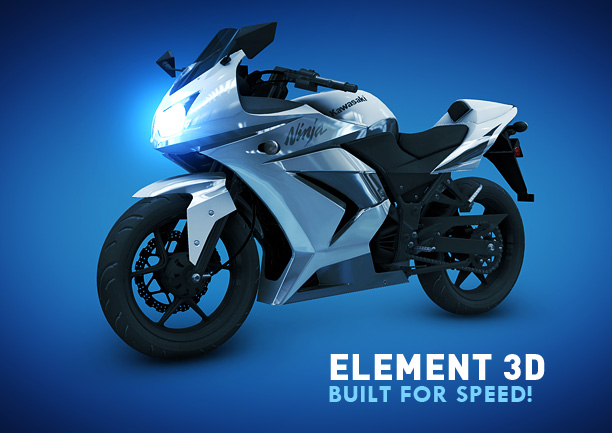
Kawasaki ninja 250 as a example
IM sold!! lol
This is absolutely INSANE! You guys are awesome… This plugin should absolutely be bundled by default inside AE, and Adobe should pay you millions for all the work you are doing, and all the customers that indirectly will be using AE because of you.
Keep on rocking!
Is SLI/Crossfire supported? or does it just use one GPU?
I have an ATI Mobility Radeon HD 4250 on my laptop. I have also upgraded my RAM to 8gb, So do you think thats ok?
I have four GTX 580s with 3gb memory, all water-cooled. Does the plugin use all four cards if it finds them in the system?
Give me one card, you rich fatty
Will it render on ATI radeon 6630M on laptop??
I have 2nd gen i5 with 4 GB RAM.
mr andrew,… how about zaxwerks plugins???
Can it work on NVIDIA® GeForce® 410M GPU
I just bought a used evga 580 classified 3GB for under $400. I plan to put element and the new card to good use, along with octane render too
Was the bike rendered with elements ?
hey Andrew, how animatable are the individual parts in the models, and would someone be able to simulate some particle interaction?
Thanks Andrew for these information
Lack of news in this case seems to be bad news. As far as I read it, seems that Mac users with 256MB GPU will have to change their computer if they want to use this plugin.
I don´t want to insist too much, but I guess there´s a lot of potential buyers in this situation. Is worth acquiring the product with these hardware specs?
Thanks in advance, I know that could be difficult to be honest in this subject.
Yo Jorge, 256 cards ARE supported just not recommended. Just depends on the card version. We support graphics cards that came out in 2006 (8800)… at some point we have to draw the line to provide the features that make this plug-in work.
Ok, I get it. There´s some risk involved…… Have you made any test? Maybe a video showing performance on a 256MB Mac would be helpful to take a decision.
Sorry for the incovinience.
Our technical director Sergio, uses a 256 card and says it works pretty well. I wouldn’t call it risk… you just have to limit your textures. The example in the recent video would not have any problem but we just don’t want people to think they can just add unlimited textures and models…
It seems to be reasonable. Thanks for your explanation.
Looks good. At least for me. Nvidia 8800. We can make it SLI to get better result I think.
One more question about Element 3D, Shaders, does them support UV mapping and does Element have built in texturing?
I have Nvidia GeForce 610 +2gb graphics card on my laptop so that should work just fine to do everything, right?
It will work, but the performance will be reduced.
Andrew, Can we use Element instead of 3D programs for instancing 3D objects, and emit 3D objects?
Since Element doesn’t support collision, did you add any options or tricks to solve this problem?
I’m planning on sticking a GTX 570 into the hackintosh rig I’m building, so i’m glad this is a recommended option!
That sounds awesome but it isn´t possible to animate some parts of an object like the wheels from the bike, right? So you need to splitt it of in mulitble objects?
And it is possible to animate an arrow in an organic way? And what is about 3D Tracking? It would be so awesome if you can track 3D elements in 3D space (Or 2D optimized). If you create a Null-Object with some trackingdata, it is possible to link on an object from “3D Element”?
I think it would be awesome if you activate 3D Mode on “3D Element”, so you can add trackingdata to the x,y,z space and the Object would move in the right way like it should.
Sorry for my englisch and the many questions.
Geforce GTS 250 1 GB is enough?
Andrew! We are just dying to know if this accepts obj. sequences? Please tell us its true!
nope, he’s already said it doesn’t
Andrew, and what about laptop graphics? For example, I have Nvidia GeForce GT640M with 2 GB VRAM. I think, my graphic card has enough capabilities for running Element 3D, right?
In reading what Andrew posted, seems yours is well in the zone.
Hi, Andrew, What about Geforce 8600GT?
Can you import animated objects, like walking human or so?
Since i like to work fast and with good visual quality, i have an ASUS Matrix GTX285. I know it will work, but is it going to give good results or you suggest me to upgrade?
Ok I am confused on the graphics cards. You are giving out some cards here and saying openGL when I look up the say Nvidia GTX 580 it is saying OpenCL says nothing about OpenGL what is the difference?
Thank you Andrew! Oh is it the 10th yet? Like a kid in a candy shop!
This card is supported. OpenCL is another GPU feature in addition to OpenGL
I got a Macbook Pro for Christmas:
Chipset Model: Intel HD Graphics 3000 VRAM (Total): 384 MB
Will this work?
Yeah i got the same thing. I was hoping this will be very good for the plug-in
You probably have two cards in your macbook pro. I have a macbook pro from mid 2010 and it has a Intel HD Graphics card as well as a GeForce GT330M. The GT330M card has 512mb ram. Go to About this Mac and More info
Does it support Quadro 2000?
Actually yes, I’ll add this to the list.
Sweet! that saves me some “$”
When Andrew started with a Basic Sky Replacement Tut a few years back who knew someday he will be building an opengl render engine someday that will give some literal meaning to the word 2.5D. Great going man! Always a great follower of yours!
Your Plugin will increase Adobe AE’s sales..
So… if the models are static, you mean there are not any deformation options at all, like stretching or twisting, etc?
Does Element’s OpenGL support nvidia SLI or AMD/ATI Crossfire configurations?
That’s a good question! It would be awesome if Element could take advantage of two SLI GTX 680 for example…
Andrew the new plugin supports animations (OBJ sequences)?
If you use an Nvidia card you can head over here- http://en.wikipedia.org/wiki/Nvidia_Quadro to see if it supports the features Andrew mentioned.
First, what are you doing up at 3:30am in the morning answering posts!? Second, are you going to post more demo videos prior to release? Curiosity is killin me!
Andrew or anyone who might know: since it was mentioned having a GeForce GTX570 as a upgrade I’m assuming then this is fully compatilble with Element…I don’t have to worry about memory, shader model, etc. I have the 570 and I think it has 3mb memory and I know (errr..maybe know) it has directx 11 and open gl 4.4. I’m not too much into this side of computers (I simply told a computer guy that I needed to run 3ds max and then gave him a budget to build me a machine). I can’t seem to find any clear indication on the Nvidia site. Thanks to anyone who can educate me.
Hi Andrew,
A slight question aside from graphics cards, but a relevant one I reckon.
I’m wondering if the elements (no pun intended!) in the motion design pack can be used to create stock video footage?
Best,
Jack
any recommendation for laptops? i have Nvidia GT 550M!
P.S: the plugin worth to buy even a new high level pc, just to use the plugin! … VFX AKA AK!;)
Well, I’m happy to say I have an ATI Radeon 6970. I guess 6900 series is better than 6800? Hope so. And 2GB RAM! Wahoo.
Thing I like best is Element Plug-in support various GPU,so people who uses older GPU can use it easily, which can’t be supposed in Adobe. With Element Plug-in, I think we don’t need use 3D program. That’s great
Just an assumption but in the specs (DirectX 10 / OpenGL 3.3 / Shader Model 4), anything with higher number is even better, right? Like DirectX 11, Open GL 4.1, and Shader Model? I mean that’s usually the case but worth asking.
Eric
Correct!
oops, Shader Model 5.0.
Andrew, here’s a question: Would this work on a GeForce GT 525M? That’s a laptop graphics card, these would be the details:
Core Speed * 600 MHz
Shader Speed * 1200 MHz
Memory Speed * 900 MHz
Memory Bus Width 128 Bit
Memory Type GDDR5, DDR3
Max. Amount of Memory 1536 MB
Will it work on laptop cards in general? I travel a lot so that would make it a ‘mobile plug-in’ as well, lol.
Ya should work fine!
Andrew, it doesn’t work on my laptop with the GeForce GT 525M. It only recognizes the Intel(R) HD Graphics 3000. Nvidia is already my main video card, so what should I do? The plugin is not working… This is what I see when I click on the About button:
GPU Vendor: Intel
GPU: Intel(R) HD Graphics 3000
GPU Driver: 9.17.10.2875
GPU RAM: 0MB
GPU Code: 0
And did it work for you xandercorp?
Hi!! ELEMENT 3D WOW!!!! AMAZING!!! where i can buy it ?
I’m not sure how you got this far without the answer to your question.
Right here, Tuesday, July 10th!
Anyone have thoughts on the best MAC card? The only card i know of is the Quadro 4000 for Mac, and that has mostly bad reviews and it is slow.
The 285 is a good card too. Unfortunately the graphics card selection is limited because apple doesn’t allow manufacturers to provide driver support. Apple includes graphics drivers inside the operating system.
The geforce gtx 560-580 has good results on mac
wow…all of your plugins are incredible for low price gfx also…you are great.
This fully supports sli right? It would be a shame if i could only use half my power.
Hey Andrew ! you mentioned in the Demonstration video that the OBJ file should not be animated ! Can you guys try to fix it , I mean like to work with an Animated OBJ file. Would be Awesome
Thanks !
The beauty of an OBJ file is that you CAN animate it. It renders only the mesh of the object as one OBJ file but once in AE, you can animate it, rotate it, etc. The only two plugins I know of now that use the OBJ file are Red Giant Trapcode Form and now E3D.
That will probably not be implemented. The animation engine that Andrew Kramer did not show us is probably for animating obj files.
@Eric !! thanks man !! i almost forgot it.. Andrew is full of surprises.
but i am like trying to figure up about fluid animation !! ok ok lets see that when Andrew releases it
To the other Eric (looks like I answered myself here. lol I was a bit confused on your OBJ response on animation. The comment says “it will probably not be implemented” but then you follow by saying that the animation engine probably will animate it. Given that the package includes multiple OBJ files that are clearly animate-able, not sure I understand. If you can spin around the object on all sides, I presume you can keyframe that movement, i.e., animate. Now, someone else asked about deforming, etc….not sure on that but I have to think that once he shows that engine, there should be some capability like that too.
SLI/Crossfire support?
I have an AMD Radeon 6750M with 1GB of memory. That should be fine, right?
Of course!
Dude,
You haven’t said nothing about Intel stuff!
Does it support PC’s with Intel motherboard and all that?
If possible can some one give any information if it is capable to Intel E4600 motherboard??? And 2GB ram?? I AM DESPERATE!!!!
After Effects itself won’t even run on 2Gb of ram (http://www.adobe.com/products/aftereffects/tech-specs.html).
But it does, it runs even with 700mb of ram! (with no crash)
can run in 700MB ram.. Too Laggy not even Optical Flares are working well !!
do you wanna use Element3d engine for Optical Flare?
hi,
will it work eith geforce quadro 2000?
thanks in advance
Yes it will!
Does it support nVidia GeForce 9500 GT ?
It is supported, but the performance will be reduced.
I need to ask the obvious question regarding the Nvidia Quadro 4000. Since you will be providing an update for OF for those with the Q-4000 for Mac users, will you be providing an update for those of us on a PC as well?
Doesn’t affect the PC users. Should be all good on Windows.
Allright. Thanks for the answer, Andrew.
My Card is ready for DirectX 10.1, Shader Model 4.1 and OpenGL 3.2. But just 256MB GPU.
Does this mean it´s enough? Sure, for speed you need more but I could do simple texturing?
Would be awesome!
like Andrew said, it will run but with limits on how complex your project will be (3D objects and Textures files) he recommends as minimum 512MB but will run on 256MB cuz he supports it.
Dear Andrew, Even though i have less business for the last few months and i have no income these days, I will still buy this product to support you. Because i have no other way to pay you back for what you have taught me so far and i believe that i will be able to impress my clients like never before. TC Andrew. You are the best!
Dear Andrew, maybe i’ve missed it but will the liquid in the motion design pack be animatable with text like real flow…Thanks man your a genius…
Damn
My Quadro FX only supports OpenGL 3.1
Gues i wont be able to run it then..
I don’t know of any Quadro FX card that supports 3.1 but not 3.3, which card is it? Maybe it does support 3.3!
Im using a Quadro FX 3800 and as of Nvidia Website it only support OpenGL 3.1
http://www.nvidia.com/object/product_quadro_fx_3800_us.html
Ok i have found the Answer..
so im good to go i gues..
They Updated Open GL from 3.0 as of Release of the Card
with the Current driver 296.88 it actually supports Open GL 4.2
i would recomend checking your driver to se if they updated openGL to later versioans
NVidia’s website is out of date. With the most current drivers the Quadro FX 3800 supports 3.3! So you are good to go!
Thanks Sergio, i found out that with tha latest driver it supports opengl 4.1 so they update it through Drivers
do you have support for multi gpu’s, for example if i were using 2 nvida gtx 460′s would both be utilized in element?
Fantastic work Andrew, also congrats to your “behind-the scenes” collegues – I’m definetely buying this and I’ll do my best to promote it elsewhere.
Sounds like it could be a good idea, to include some info/recommendations on setting up Element, OpenGL and graphic cards. Also the compositing features and limitations with standard AE 3D layers. Thanks!
Quick question – I have an Nvidia Gefore 555m graphics card… Can I use Element 3D with thi? I can see the the 500 series is approved, but 555m is mde specifically for notebooks and laptops.
Yes, Element will work with that card!
Andrew, given the prevalence of texture maps in your new plugin, it might help y user base to do a breakdown of the UV mapping process. I’m not asking for myself, I already know the basics, but at least a simple description of your process might help some new users wrap their head around the process. Granted, it’s not required knowledge for using E3d, but I think you agree it would be most helpful.
Hi Andrew. Looks very exciting. I have a ZX Spectrum 48k with the rubber keys. The tape cassette player still works fine to load the programs although sometimes it chews the tape and I have to respool it using a pencil. The last program I bought was Jet Set Willy, which I preferred to Manic Miner, but now I’m looking for a new challenge. Will Element work on the Spectrum or will I need to upgrade to the 128k?
Can I run element with OpenGL 3.1?
What card is it?
Hey Andrew, the Texture you used seems to wrap real nice around the model.. but when i create a new texture for an Obj. File how does Element 3d know how to wrap it ?
i have intel hd card will it work? please answer
thanks
sweeeeeet so glad i got my geforce gtx 560 ti. can not wait to buy this.
very nice.
curious though, is there support for more than 5 groups?
ps, your plugin interface looks slick
Is the quadro 5000 a good card for VFX work? I have one in my machine now. Also do I have to set up anything in the preferences or does the plug-in just natively use the open GL or CL features?
It’s a good card indeed, lots of VRAM. I’ll work with Element just fine, you don’t need to set anything up
Andrew, I run CS5 on an Intel HD with a Core T3i. Will the plugin work for me? Also, will it run on 32 bit CS4?
Andrew, Will this work on my iphone
I have all the right specs apart from i only have OpenGL 3.2 will this work?
This is amazing BUT if you are not going to use your own obj or things youve created on your own in a 3d program , this thing will be boring and useless because i presume if this earphone is the only earphone style or there are a couple , people might use it over and over again . it will be soo boring . So i think importing OBJ will help someone like me . Another BUT, lets say i have an object i want to texture 2 side of it (say blue and white) , how would i be able to do that here?
oh cool . if it has 2 materials u can change em .. cool.i sent mah first comment before finishing the video. nice.
but seriously , i think this will be a good render than vray for motion graphics. so i will just import my obj and it will be even easier to animate in ae . But there should be something like gravity etc.
Wow! Man, this looks fantastic! This is just what I’ve been looking for.
But, Animation Engine?
It’ll blow your mind?
Awesome! You guys just made Adobe After Effetcs user-friendly video editing program/interface. This blog make it worth having After Effects. I just switched from Apple Final Cut 7 to Adobe Premiere CS6.
i like the see how you create metal title in 3ds max please tank you
andrew for real
I know everyone is asking about this, but is this good enough for a mac laptop? Anyone who answers would help
Processor 2.3 GHz Intel Core i5
4 gig ram
OSX Lion
Graphics Card: Intel HD Graphics 3000
384 mb VRAM
Looking at many comments people are concerned if their machines are capable of using ELEMENT 3D. Andrew you reply to one comment that cards back to 2006 are supported but in the features you state OpenGL 3.3 as a requirement.
The GeForce GT 330M for instance (in my laptop) just supports OpenGL 2.1 but is built in the MacBook Pro from 2010 – so it’s a bit confusing. The »minimum« card NVIDIA GeForce 8800 GT also has OpenGL 2.1 – does that mean that OpenGL 2.1 will be enough?
Both the GT 330M and the 8880 GT support OpenGL 3.3, the confusion comes from the fact that OSX reports the OpenGL version as 2.1, and not what the card really supports.
Dear Sérgio, thanks for the reply. But even on the Geforce-Website it states OpenGL 2.1 for the mentioned cards (http://goo.gl/M0p0o) in the specification section.
Unfortunately their website is not accurate. I’m guessing the 2.1 version was the supported version when the card was launched, although with driver updates they now support 3.3.
Here’s the first drivers where 3.3 is supported: http://goo.gl/9RhgN
As you can see on the bottom it says:
“Supports OpenGL 3.3 for GeForce 8-series and later GPUs.”
So fear not, your card is supported
That’s what I thought, too. I would appreciate if you answered my last question as well: In System Profiler Mac OS 10.6.8 shows OpenGL version 2.1 for the card. Do I have to upgrade to Lion or Mountain Lion to get the higher version that is supported by the latest Mac OS or will it work fine with 10.6.8?
Thanks for taking the time to reply!
It’ll work fine with 10.6.8!
I wanna make a coin with two different sides and make it flip into the air…can I do a 3D toss with Element 3D ? Maybe add random value to it falls different everytime?
Element doesnt do any real physics simulation (as far as we know right now). So, actually making it interact with a floor automaticly will not work. Making it spin is possibly, and you can do the fall animation by hand.
Motion Boutique has a physics engine for AE, though managing parts could be tricky.
hi there, i made this effect without use of element, just by multiple layer extrusion
check it out http://www.youtube.com/watch?v=b2sM3TSc5Vo also use bump maps to enhance the texture
Can you explain the difference.
$150: (For the price, these are insane cards)
NVidia GeForce GTX 560
AMD Radeon HD 6870
$300: (This is similar to performance of my machine a 580)
NVidia GeForce GTX 570
AMD Radeon HD 7870
$450+:
NVidia GeForce GTX 680
AMD Radeon HD 7970
I mean I Don’t mind spending $450+ but how does it compere to the $150? What am saying is. Is it worth the extra $?
You can view a performance comparison here:
http://www.anandtech.com/bench/Product/543?vs=555
It’s obviously dependent on the application, but you can get an idea of the performance differences between the cards.
Was the bike image created inside ELEMENT 3D .. using also optical flares ?
pretty sure the Bike was created inside either of 3DS Max or Cinema4D… you CAN’T create 3D object in Element 3D just import them using OBJ, or native C4D file (C4D non-animated one)
Hey ! has anyone clicked on the bike image above ? Try it out if you haven’t. it’ll only take 1.1 seconds
Yes, Blue Ninja. This capability was demonstration in the last demo video and will be a time saver to be able to re-color or re-teuxture an obj’s material zone without re-rendering in a 3D app!
Amigo Andrew Kramer donde queda Intel que no mencionaste nada!! me decepcionas amigo!
Hoping for some clarification on MacBook Pro performance. I have a late 2010 model and I really want this plug-in but won’t purchase if it won’t run on my laptop. Any info would be great! I’d even test it for you if need be!!!
I know you stated it does not require CUDA open GL, was wondering if you tested a CUDA card, if so, does it enhance performance?
Waiting anxiously for this one! Is Element going to be used in conjunction with the Matte Painting Challenge winning entries ? Just wondering.
I had a brand new560 Ti. My little brother picked it up and dropped it without me knowing and before I could install it. Warranty can’t replace it. Looks like I’m saving up for two awesome things now! =)
Awesome as always, but… The only question that wasn’t answered yet is multi-GPU support… I have a 5970 which is a dual GPU card, and I’d love it if Element could use all that power. Altough it would probably still be fast on a single GPU.
Hi Gang,
I upgraded my 2010 mac pro with a new Other World Computing Accelsior SSD PCI slot hard drive as my operating system drive, adding a NVIDIA Quadro 4000 card and bumped up to 64 gigabyte of RAM and my system screams like I’ve never experienced before. Just the Accelsior amazed me every day when I started working with it. I had a :30 spot that was very intensive in AE that took a 50 minute render. I did all of this before my upgrade from CS5 to the CS6 master collection. With the new upgrades I rendered the same spot one week later in 7 minutes. It’s the first set of upgrades I’ve done where I’m even surprised at the speeds. Boot time is nothing, Photoshop, AE, Bridge, Final Cut, etc… are all crazy fast.
I can’t wait to put this new tool into my arsenal and have fun with my new toys!
andrew what about this card?
GeForce GT 520
it only 64 bit
It’s supported, but the performance will be reduced.
As far as I know Mac OS 10.7.4 is still capped at OpenGL 3.2 support.
So the tired old macpro and its crappy cards don’t seem to meet the minimum spec of OpenGL 3.3
Will Element even run on a mac with 3.2 ?
Could be another nail in the macpro coffin
OS X doesn’t directly support OpenGL 3.3, but the cards (depending on the card of course) do support it, so through sheer magic we are able to tap into those 3.3 features, even with OS X not supporting it directly.
Long story short, it’s about the card itself, not the OS.
There’s a fair few good cards for the Mac Pro’s that will run Element really well.
Thanks for the reply Sergio,
Thats great news Element bypasses the OS X OpenGL 3.2 limit and works with the macros ancient choice of cards – Shame AE CS6 can’t do the same unless you fork out $2k on the Quadro 4000 which is a joke
That 250cc ninja model may not be the best ilustrational pic for element 3d… i would personaly imagine 1000cc Superbike there… i am definitely buying everything related to element… i don´t think that i would be able to make a decent living out of video production without Video Copilot so quickly… You mr. Adrew Kramer are life changer and now a game changer as well..Bravo
2xGTX560 in SLI…I’m all set
Awesome! That means it will even work on my laptop!
Hi Andrew,
Have a new Macbook Pro 2.4 GHz Intel Core i7 with 16GB RAM and for graphics an AMD Radeon HD 6770M 1024 MB. I’ve heard I can’t change out the graphics card… Will Element work with my system?
Many Thanks!
can we import animated charcter using bones in 3dsmax ?
and also particle system from the same softare ?
does it support the gtx260, pretty old card now i know but worth asking
Hey Sergio, I’m on a year old mac pro with an ATI HD5770 card, and I really don’t want to update past 10.6.7…so I’m wondering if you think I’ll be ok driver wise. From what I can find online (not much), I think 10.6.7 has the latest drivers for the 5770(EFI DRIVER VERSION 01.00.436). Fingers crossed…thanks in advance…(truly amazing plug-in you guys have created…congrats on the Element revolution)
Hey Andrew love all you do man, your tutorials, blogs etc. are what got me started into “motion design”.
Just a quick question regarding the new Macbook Pro’s (the one’s with the fancy retina display’s” will element’s interface support the new screen? I know Adobe has to update their software to support the new screen space still, but will the images in elements interface be scaled up for the new MacBooks? (I’m not talking about any code work just any images you have made and inputed into the interface)
Just want to see element looking as sexy as possible
.
Thanks!
I would love to see this offered as a standalone renderer for Maya and Max.
It looks like us folks using a Quadro FX1800 CUDA are ready to go ! ! ! !
—>Dual Display port, single dvi depending on model, Shader Model 4.0, OpenGL 3.3, DirectX 10.<——-
I've got my credit card ready to roll!
Oh my God this plugin looks amazing!!!!! All the possibilities that come to mind make me foam at the mouth. Thank you Andrew!!
WOW!
I know two sweet little kids who’s daddy’s a GENIUS!!!
Nice product sir Andrew!!!
but anyways… congratulations sir Andrew and team. Continue inspiring us!!!
i want to have this… but kinda have a problem… I don’t think that this could be handle very well by my laptop pc… upgrading is the only solution.
God … Accomplished something amazing, merge with 3D Real Magic of Post Production … that comes after that? I can now rest in peace .. hahaha … thanks for this great tool …
Dios… Lograron algo increÃble, fusionar 3D Real con la Magia de la Post Producción… que viene despues de esto? ya puedo descansar en paz.. jajajaja… gracias por esta excelente herramienta…
Hi,
here at my working place the pc only has a Nvidia Quadro 600 – Do you guys think Element will work?
Nice information Andrew
I fear rent may be a couple of weeks late this month!!!
I’ve got my savings ready ! can’t wait until tomorrow!
hello andrew i`m a little bit afraid, that element is to much for my computer – it`s a mini – i can`t push it up with a new graphiccard:
Mac Mini i7
(2,7 GHz, Prozessoren: 1, L2-Cache: 4 MB, Speicher: 8GB, AMD Radeon HD 6630M, VRAM: 256 MB)
if is enough i will meet you in your shop tomorrow
thomas
hey andrew you said that 3d element doesn’t need CUDA well i have CUDA does it make it run any better ??
Ramy
This is my system configuration..plz tell me if its good enough
intel core i3
4gb DDR3 RAM
Asus Geforce 210 silent Video card
unbef***inglievable. Game changer.
Congrats.
What time does the store open?
Hello, the VGA card XFX AMD Radeon HD6770 3D Element works well?
You posted this right on my birthday couple minutes after i was born.
you rock i wish i could be as good as you. I try my best..
I hope you can answer me before it comes out today…
I have a GeForce 7100 GS graphics card. I didn’t see that on your list. Is there any particular reason why it wouldn’t work on my card?
Im running 32bit XP on 2GB ram. 512 MB DDR2 graphics memory.
Please Please Please get back to me before it comes out. I wouldn’t want to make any purchases before I know if it works on my PC.
Thanks,
- That Guy
Anybody know if my ATI RADEON 4670 is supported?
Hope so, thanks!
Hi Andrew think this is awesome, keep up the amazing work.
So will my AMD Radeon HD 6770M 1024 MB on my Macbook pro be ok?
Cheers
Phil
I noticed the minimum graphics card was a Geforce 8800, my Mid 2008 MBP 2.4 ghz Inte Core 2 Duo, 4GB 667Mhz DDR2 SDRAM has Geforce 8600m GT 256. I hate to ask a silly question, but will this work and can I run Element 3D off an external hd, so I can use it on my MBP and my work iMac?
Does this card work?
AMD Radeon HD 6750M with 512MB
I have an iMac 2010 model. I wonder if it can handle it. Here are the specs: ATI Radeon HD 4670 256 MB, i3, 16GB RAM.
Does Element Support SLI? I have 2x GTX 460′s in my system.
I think next plugin will be something like “MAKE STUNNING ANIMATION” and it will have one button, and a couple of checkboxes )))) Great work, I’m really impressed and my wallet is wide opened!
But!
Is OpenGL 3.3 is the ‘must have’ minimum?
I’ve got ATI RADEON HD 5770, it meets DirectX and Shader model specs, but only 3.2 for Open GL.
And it is inside mac pro, running 10.7.4 as well.
I have a mid 2008 MBP w/ a Geforce 8600 GT card 256mb. Will this be sufficient? Also can I download Element3d,the textures/shaders and the models to an external HD so I can also use it on my work iMac? thank you
in the future do you gona make a plugin to do camara projection in 3d geometry?
Can you do a demo on a Mac? If so an intel based mac? with a AMD Radeon HD 6970M?
I think would be in good shape. It does the raytrased in CS6 AE fine.
thanks
Allan
Do we get to download both Mac and PC versions with a purchase of a liscene
Is Intel HD 3000 supported? its does have openGL.
How did you save the material you used on the head phones?
andrew what about this card?
Qudra fx 1700 card support Element 3D????
I have the NVIDIA Quadro FX 580. I already bought the plugin, but it says when I open it, it says that I don’t meet the min requirements. Is this card supported?
I updated the driver and everything seems to be supported, but whenever I go to effects>VideoCopilot>Element 3D, after effects crashes and I get error code 6, which says that my hardware configuration does not meet minimum specifications needed to run the application. The application must close. I am confused since OpenGL 3.3, Shader Model 4, and DirectX 10 are all supported.
Hi andrew,
I saw the demo video, its a “fadu” plugin (in india funny way = “fadu” means ground breaking )
I have also same Question…
Qudra fx 1700 card support Element 3D?
When I click OK. Appear only black and anchor points. My graphic is GEForce GT 555M. Brand is Lenovo. Help me please
<<>>
I wanna buy a nu laptop ruinning win7, without making any update before i buy ELEMENT 3D.
what laptop u can advise me without changing any card or OpenGL
and not too expensive?
I NEED YOUR HELP ANDREW K.
Hello Andrew ,
I’m using Adobe after effects cs6
i have the AMD 7970 . .
when i run AE .. i dont have any open gl .. it says its not supported !
what should i do ?
Can’t install on my xp???
Andrew, since we’re all on the subject and assuming you created this on your machine, Could you share with all of us your PC’s Specs? It will help many of us if you would kindly share what you chose to use to create this great plugin. And maybe you could share some of the reasons behind your hardware choices.
Things like CPU, Chipset, MB, Clock speeds, Ram, SSDs?, and of course you GPU.
Please and Thanks!
Hey guys can someone let me know is it will work with that card:
nvidia geforce gt 650m 1go openGL 4.1 ?
Thanks
I have a GTX 460 … This will work correctly?
I got inspired Sam’s helicopter scene so much that I had to make my own
http://www.youtube.com/watch?v=DtdXJfM8Qz4
i have updated intel (HD)3000 processor graphics…elements open,but when i click on a model…it shows error and the whole AE freezes!my laptop plays all complex graphic games…but still,elememts doesnt support my card?
please help…its my new laptop!
Core i5
4GB ram
500GB HD
I have the same prob did u fix it ?
I have a Quadro 4000 and under system info inside of element 3d it recognizes the Quadro 4000 but only says 512mb of Vram instead of the 2408mb that the Quadro has. any ideas?
when i use 3d element told me ( your video card does not support the selected configuration please reduce the lire size ,, what can i do for that :S i have laptop hp probook 4530s video card ati mobility hd 3000 8 gb ram really im confuse :S
My macbook pro 13inch core i5 2012 with card intel HD 4000 its work to edit
But i’m still afraid to render with element 3D, must upgrade? with video card?
please answer
Hey Andrew, It’s Urgent !!! Pls HELP ME OUT DEAR BUDDY !!!
I have ATI Radeon HD 4250 Card & Install AE 5.5..8gb RAM & I think i have a mean machine which can handle AE-Element 3D motions..
Problem is, i’m learning Bio-hazardous demo to work with my company demo..but when i start elements it’s shows reduce space layer & m/c hang for a while with error & AE shut down..i’m beginner & need your guidance URGENTLY !! Hope u do it ASAP !!! So SOS flag from my end!!!!
I have a Intel HD Graphics 4000 (Newest Update).
Will the Plug-In run with this GPU?
I have a i7 3770k, Nvidia Geforce GTX 660ti Ftw+, 32 GB RAM…. ELEMENT RUNS LIKE CRAZY ON IT…
Thanks so much for that awesome plug in… Hope there coming more Building Models like the Metropolitan soon… Keep up the great work… A lot of people are seriously addicted to you tutorials
Hi Andrew, I’m actually usin a MacBook pro thunderbolt late 2011 using a graphics card: Intel HD Graphics 3000. Will Element 3D and plugins work well?
Thank you inn advance
Edward
Thank you for this amazing plugin.
but I have a problem with my hp laptop, it has AMD Radeon HD 6700 series, will it work fine? thank you again and again
If a card is better does that mean that the graphics will always look nicer, better cards = better looking element 3d??
is element 3d will work and can be use for intel graphics card notebook lenovo 3000 G430, ? Mobile intel(R)4 series express chipset family?
Andrew
I am using intel 3000 with latest drivers and the spec is OpenCL, shader 4.0, directx 11.0. Before I purchase, because there is no trial, will this work with this card. Thanks
PS. Many thanks for excellent piece of software.
Andrew
pl help me for use 3d element whit Redeon HD 6800.
I have a geforce 8400m GS I dont think it will work, i dont mind it being slow if it still works (element 3D v1.6)
What about the new gtx 780 and 770.. Or even the titan? Will this enhance the rendering speeds or are they just overkill?
Andrew help!
is the Nvidia GeForce GTX 560 good enough for video editing and 3d stuff?? I love your works and wanted to do what everybody loves to do… MOVIE.
please help, thanks.
i have nvidia ddr3 2gb is this ok for this? and i use after effect cs3 i hope this virsion will not creat any kind of problem in the time of usin element 3d??? plzzzz help
the best plugin ever ! i use it a lots ! great job !