ALL DESIGN TOOLS

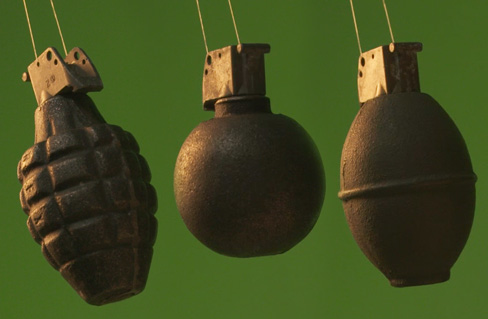
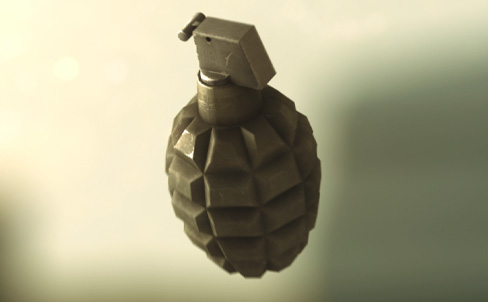
As I was working on this new tutorial that involves a flying Grenade, I realized that I could create the entire tutorial without the use of any 3D software like Cinema 4D or 3D max. So that's exactly what I did! Now if you looking to create some live action elements for compositing, the key is to try and match the lighting of your original shot. If you watch our recent video Shell Shocked, the sun is coming from the top left side of the frame, so I tried to match the look on the green-screen. This same principle applies in 3D animation if you want to composite that futuristic grenade too and I'll be sure to include some tips for those interested in the 3D workflow! No matter which way you use, do your best to match the lighting and you can use After Effects to blend right in. Stay tuned for the action packed tutorial!
January 9th, 2012


128 Comments
Chris
13 years ago
where can i get free footage of a spinnng grenade in front of a green screen, like the one used in the tutorial?
Ralph
14 years ago
Hey andrew can you post the diff nades??? its awesome stuff and the ramen noodles one...ahahah..plss post the download link or upload them..plss
Falandriel
14 years ago
Hey! How've you made the grenade spinning in front of the greenscreen, and how do you have fixed the real grenade prop?
As i can see the grenade is spinning in the special way.
I want to rebuild this at home!
As i can see the grenade is spinning in the special way.
I want to rebuild this at home!
Bob
14 years ago
Hi Mr.Andrew, you are my no.1 idol when it comes to video editing... How about a download site for the other grenade elements? Like the cup noodles?  i'll be waiting! Thank you!
i'll be waiting! Thank you!
THE US ARMY
14 years ago
if any of u buddies planing to make a 3d granade tutorial in 3ds max or cinema 4d plz share the link !! luv u all
TVFilms Productions
14 years ago
Oops, meant to say not a 3d tutorial. Oh, I see now, your greenscreening an actual grenade, BUT you can use a 3d grenade. Nice! have to wait till a later time to watch the tutorial due to limited internet, but I can't wait until then!!!
Bluestorm STUDIO
14 years ago
Wow the futuristic grenade looks really great ! Andrew, do you use V-Ray to make it seem better ?
OlliB
14 years ago
Greetings from Germany
Your Site was so helpfull for me.
What a great work, so many years ... Respect.
The new video ist fantastic.
Maybe my English is not perfect ... but what else.
Great work
Olli
Your Site was so helpfull for me.
What a great work, so many years ... Respect.
The new video ist fantastic.
Maybe my English is not perfect ... but what else.
Great work
Olli
http://www.imdb.com/name/nm3135304/
By the way Andrew, just wanted to let you know that you are listed in the IMDB, but there isn't any bio info on your page. Sadly, the star of this short doesn't have a page on IMDB at all. Poor Sam, and after all that dirt eating too!
Thanks for all the hard work, really appreciate it since there are very few books out there on this and the only one that I have uses example files that must be from 1995.
By the way Andrew, just wanted to let you know that you are listed in the IMDB, but there isn't any bio info on your page. Sadly, the star of this short doesn't have a page on IMDB at all. Poor Sam, and after all that dirt eating too!
Thanks for all the hard work, really appreciate it since there are very few books out there on this and the only one that I have uses example files that must be from 1995.
Bluestorm STUDIO
14 years ago
Wow the futuristic grenade looks really great ! Andrew, do you use V-Ray to make it seem better ?
Alessandro
14 years ago
Hey there! I'm so glad I know English so that I can learn from this website! Thank you for teaching us a lot about this awesome world of VFX! I doubt there are any better tutorials out there on the web! Right on!  best regards from Italy!
best regards from Italy!
wilboy
14 years ago
Hi Andrew, Really cool to know that you make entire tutorial and I am really waiting for that. Thanks for spending your valuable time for us. Anyway, You're good teacher. so can u teach us with cinema 4d tutorials in your style ? I think that you can because you made some 3ds max tuts. Please !!!
Blood Lust
14 years ago
Having a love hate relationship with these tutorials great to see the workings behind them. No mistake Andrew is one smart Guy. Not so good see 100 versions of cloned videos or 100 versions of how to shoot somebody in the head using some blood splatter and a slow motion bullet. When they all end up on youtube, makes me a little sad. I'm unsure, seems to encourage mass bastardization of the art of film making. Watch for the next youtube experience 1000 Grenades in one take.
LukasVideosify
14 years ago
Wow. awesome. -_-
Andrew Price already made a tutorial on creating a hand grenade with Blender. In my opinion that's way more worthy than doing it all inside After Effects.
Andrew Price already made a tutorial on creating a hand grenade with Blender. In my opinion that's way more worthy than doing it all inside After Effects.
Grscfide
14 years ago
andrew...when i install rayfire and everything is right and when i start to record the animation it pop-out small menu called "maxscript rollout handler exception" and writen in it "type error call needs function or class got undefined "
if you can help..that's good.
if you can help..that's good.
Denard the Effects boy
14 years ago
Mr. Kramer you hitting on my favorite buttons, this is pure Awesomeness, you and I and VC cant wait you know, Grenades, Element 3D, freebies like Stock Packs etc etc, OMG
Esli
14 years ago
You should do a 3D max tutorial. Iv been dieing for a good one since majority Iv seen aren't good tuts. I know you have some but they are basic.
anadaido marika
14 years ago
is the socks mr andrew !!!! rocks !!! i want make grenate tutorial youtube video best !!!
PEDRO OLVEIRA
14 years ago
Estimado andrew con gusto voy a estar esperando ese tutorial.... parace que va a ser interesante.... desde uruguay
Dear Andrew, I'll be waiting like this tutorial .... seems it will be interesting .... from Uruguay
Dear Andrew, I'll be waiting like this tutorial .... seems it will be interesting .... from Uruguay
xandercorp
14 years ago
Andrew... I don't mean to #%&! about this stuff but, I'm sorry to say that this stuff is not useful, except for maybe bollywood. Let's face it, there's a lot of ways to skin a goat, so why not just get some grenade props for that precise shot? If you're good you plan your shots, thus you plan your props, no need for chroma-keyed of 3D generated grenades.
Seriously, you should focus a bit more on stuff that's actually helpful, techniques or stuff that's just cool. This isn't amazing, it's stuff I've seen before.
Sorry for deriding you here, but I'm hoping you'll take this and strive for more.
Seriously, you should focus a bit more on stuff that's actually helpful, techniques or stuff that's just cool. This isn't amazing, it's stuff I've seen before.
Sorry for deriding you here, but I'm hoping you'll take this and strive for more.
Albert
14 years ago
This site is great. However guys, the tutorials are free but they are there to sell PRODUCTS too. We want to buy VC products but have no real clue on when they come out unless a time is reached. I do believe that Mr. Kramer is a little too busy and cannot finish his product like he wanted to. But in regards to almost everybody, please, have someone respond to us when we have serious issues or questions. You, Mr. Kramer can offer advance tutorials for a fee and not only use them to sell yours and other company's products. We will buy them and still watch the free ones. You are great at what you do but have been lacking on what we are asking for.
I Visit Videocopilot.net almost daily, to check news about Plugin "Elements", but no news :/
When it will be releasing, what more features it will have!!
I am really excited about it.
Keep doing the great job Andrew
When it will be releasing, what more features it will have!!
I am really excited about it.
Keep doing the great job Andrew
Everything I have learned has been from Andrew, I would not know how to make a solid if it were not for Andrew, whenever I can I support and promote Video copilot I do. I think its great that You are thinking about how someone with Zero experience with 3d software can utalized a 3d effect. As always u da man! but u already knew that.
bilal
14 years ago
last night i just kept dreaming about elements 3D being released and i was watching the tutorials made on it...
Andrew this is too much now please atleast give us some update now
Andrew this is too much now please atleast give us some update now
Liam Vickers
14 years ago
Mmmmmmmm . . . without any 3d software outside of after effects . . . I wonder . . . can element make . . . grenades perhaps
Daniel Boye
14 years ago
Andrew for some reason i feel u gonna delve more into 3D this year.RIGHT? i can feel it, its a 3D year
Jacob
14 years ago
I do love visiting this website for the wealth of After Effects based knowledge on display, but I must confess that I find the general quality of the English language used in these comment sections to be offensively bad! Utter gobbledigook sometimes.
Andrew, I would like to know if you like my new cat video.
http://vimeo.com/34634869
I got some techniques from VCP.
http://vimeo.com/34634869
I got some techniques from VCP.
Willmer Wonsang
14 years ago
I have been waiting for this for quite some time. I am a former Marine. FYI the types of granades out there are:
-Fragmentation
-Smoke
-Incendiary
-Chimical
-Stun
-and classified specialty
-Fragmentation
-Smoke
-Incendiary
-Chimical
-Stun
-and classified specialty
LB
14 years ago
I wouldn't pick any grenade, I think violence is appalling, JK Id take the futuristic lookin M*F and blow S*%& up!!! lol
Imran H.
14 years ago
A long way from "The Bullet" to "Grenade".
It seems that, you used keylight stuff for greneade. If i use a light material which will be keyed out, what kind of technique should be followed?
Example: Eyeglass.
It seems that, you used keylight stuff for greneade. If i use a light material which will be keyed out, what kind of technique should be followed?
Example: Eyeglass.
Tim Creed
14 years ago
Are you working on Star Trek 2? Production starts this Thursday! The film is going to be post-converted into 3-D which made me realize that this grenade would be perfect 3-D material. 3-D conversion would be a great tutorial.
Looking forward to this! I'm liking the idea of doing this sans 3D. Not sure that really needs a tutorial?previously covered material, no??but it will be fun, nonetheless.
BTW, today your birthday, Andrew? Have a good one if it is.
BTW, today your birthday, Andrew? Have a good one if it is.
Samuel
14 years ago
Will there be a tut showing us how to make the really cool looking on at the top?
Kosta
14 years ago
I want to know, how to create these awesome looking grenades... Especialy the upper one...
Could you create any tutorial, please
and the important thing - how to import them into video...
I?ve tried it many times with other (much easier) objects, but no succes. Could you or anybody else advise me, plese...
contact: kostik1@seznam.cz
thanks a lot
Could you create any tutorial, please
and the important thing - how to import them into video...
I?ve tried it many times with other (much easier) objects, but no succes. Could you or anybody else advise me, plese...
contact: kostik1@seznam.cz
thanks a lot
Jason
14 years ago
Cool looking forward to the tutorial... I'd also like to see a tutorial on a person morphing into liquid if possible? hopefully...please!
grim
14 years ago
*Off topic Alert* I downloaded the Action Movie App from itunes and immediately knew it was a Videocopilot product before I checked the credits. Nice work Andrew!!
Tim Creed
14 years ago
Awesome. I got an actual WWII American frag grenade from a gun show in Arizona a few years back. Finally I can use it for something in real life that isn't death. lol Can't wait.
lol Can't wait.
RenyV
14 years ago
i m pretty sure that its a spinning grenade hanging in from of a green screen. then keyed and rotate the layer in after effects to match footage. some motion blur. color correction. plus any other effect to give more realism. but good idea andrew 
Jerry
14 years ago
Ooh, I love the first grenade picture....more futuristic looking......what is that? ....a French Press ????.....
As usual, so looking forward to the tutorial.
Anyone know where i can get the future grenade from?
Dave
Anyone know where i can get the future grenade from?
Dave
Hi Andrew, please please dont forget to put in the burning smoke from the top of the grenade. Having seen grenades (real) being tested when the pin is pulled, a device called a rat trap springs over hitting a percussion cap, this then ignites the cambric cloth, burning down to the composition explosive which detonates setting of the main explosive.
When the pin is pulled and the fly off lever has gone you get smoke frome the fuze well, sometimes slow sometimes a fizz. Everyone forgets to comp that smoke in which is slightly annoying as i think the smoke makes it more dynamic and says to the viewer Im active.
Cheers Rich
When the pin is pulled and the fly off lever has gone you get smoke frome the fuze well, sometimes slow sometimes a fizz. Everyone forgets to comp that smoke in which is slightly annoying as i think the smoke makes it more dynamic and says to the viewer Im active.
Cheers Rich
julio
14 years ago
O mierda!! espa?ol... crea subtitulo... igual lo traduje todo con google...
por favor ense?arlo en un video tutorials!!!!
PD: como exporto para que quede en carpetas organizadas?
por favor ense?arlo en un video tutorials!!!!
PD: como exporto para que quede en carpetas organizadas?
Andrew do you want to kill Sam finally... lol... I love the video.... Its creative, Heroic and comedic all at the same time.... Keep up the good work....
Ed Price
14 years ago
Cool Andrew, I am still waiting for an all out "Motion Picture" or at least a 30 min. shortfilm from the Video Copilot team!
You cant find any danish commercial these days that uses no optical flares or Action Essentials effects for their commercials! Amazing to see how to website grows year after year. You are inspiring every filmmaker, Andrew. Thank you so much!
Phillip
14 years ago
andrew! Very nice buddy! So I was looking into 3D programs and I have C4D. Any chance you could post some intro training videos for this. Much apprciated
Rafa
14 years ago
I want to thank you for all the time you put in your tutorials, you are the best! thanks to them I was able to increase my knowledge on after effects!
http://www.youtube.com/user/rov2004
http://www.youtube.com/user/rov2004
Awsome cant wait..
So when is action essentials 3 coming out :X or a new music one..i like the idea of an optical flares style muzzle flash collection for those moments where we want to move the camera
So when is action essentials 3 coming out :X or a new music one..i like the idea of an optical flares style muzzle flash collection for those moments where we want to move the camera
Dot
14 years ago
Hi
sound like a great tutorial but what about the other Demon Cam tutorials???
***********************
***********************
***********************
sound like a great tutorial but what about the other Demon Cam tutorials???
***********************
***********************
***********************
Aww.
I was looking forward to some more 3dsm tips and workflows, especially in designing and animating some grenade models.
Thanks anyway, looking forward to it.
I was looking forward to some more 3dsm tips and workflows, especially in designing and animating some grenade models.
Thanks anyway, looking forward to it.
Steve
14 years ago
Excellent! When someone interacts with these though are you using a "real" object and if so how close a match is sought. Oh and it would be really cool to have the "pin" flying off...
Jay
14 years ago
Thanks, guys. Your tutorials always blow me away. And I love the success you are having in the movie industry. May 2012 bring you even more wonders and success.
Henrik
14 years ago
But but... I want to learn how to model and render a realistic grenade that has a matching light...
Xanne
14 years ago
If you have the Time can you please make a Blender Tutorial.
That would be really nice.
That would be really nice.
If apples weren't green I'd use them instead of handgranates. The closest of a fruit I can think of coming close to a granate would be a kiwi or a pineapple without the topgreen. I know I'm kinda fruity sometimes.
Dead Flesh
14 years ago
why all professional Vfx Artists using Maya and nuke and no body using 3ds max and after effects? is after effects really unable to do some visual effects that nuke can do..??
Nathan
14 years ago
I must say than Andrew Kramer and the Video Copilot team are simply amazing. Thank you all for your time and dedication. Keep up the fantastic work!!!
I'm really interested in the colour correcting in this short video! Also, as a person who lives in a small community in Canada, I don't have the means to get a hold of a grenade anywhere around here, I would have to order it on-line. As if you don't do enough for us, is there any way you could upload grenade footage for us in front of the green screen doing a single rotation?
Ben
14 years ago
This is so cool!!! I am looking forward to this tutorial!
Also, how did you add those lights around the grenade it in the future nade picture? can you animate the light with the nade?
Also, how did you add those lights around the grenade it in the future nade picture? can you animate the light with the nade?
REYO
14 years ago
Hello Mr. Andrew , What about [Element 3D] Boss. when it releases 2012 or 2013. Please Releases Before 2012 Dec 21 [ Before World's End ]. Take Care
Joseph
14 years ago
Thanks so much for teaching us ! But why do you skip the 3D castle set tutorial in the demon cam, when the man open the energy ball ... sorry for my bad english ...
Subash
14 years ago
You won't Failed to surprise me.If you make a film I will ready to to give any thing watch that movie..
Ben
14 years ago
Really looking forward to it! It never feels right when Sam doesn't die for a tutorial.