VIDEO COPILOT BLOG
News, Updates, Projects Files & Tips
After Effects for Photoshop work

Using After Effects for Photoshop work:

My guess is that most After Effects users utilize Photoshop but very few Photoshop users take advantage of After Effects. I realize that many Photoshop users are photographers and don’t necessarily need graphics but what about the graphic designers in the group? Why don’t they use AE at a higher rate?

I often use After Effects to create elements specifically for my Photoshop designs and I think it’s a powerful exchange.  In  After Effects it’s easy to build a quick lens flare or detailed particle cluster using Particular or CC Particle World and then I’ll render a frame out to Photoshop. We even built a tool to Copy and Paste screen shots from After Effects to speed up this workflow.

I know there are many AE users that rely on Photoshop to build titles or logos and then import these into After Effects for animating and compositing.  There is even an option inside of After Effects to create a PSD file! (Not that I have ever used it.) But with all the amazing imagery possible through After Effects, why is it used by so few Photoshop graphic designers who would probably benefit from integrating both.

I think one mistake we make is limiting our use of tools based on the specific purpose it was designed for, instead of figuring out its actual capabilities. There is a fun story I just heard about a guy who did not speak English but was learning After Effects in English. Since he did not understand all of the names of parameters, he just adjusted them to figure out what each one did.  He probably didn’t know what the plug-ins were “Meant to do”, only what it “Could do”.

This principle of exploring creative ways to use common plug-ins is something we try to do at Video Copilot through our tutorials but perhaps this principle could have bigger implications across the creative spectrum.  Even though After Effects is ideal for “Video” and “Motion” that doesn’t mean it can’t be extremely useful for graphic designers as well. I say, use whatever tool helps you be more creative and get the job done faster.

What are some things we do in After Effects that you would recommend for Graphic Designers? Do you think After Effects is a useful tool for Graphic Design?

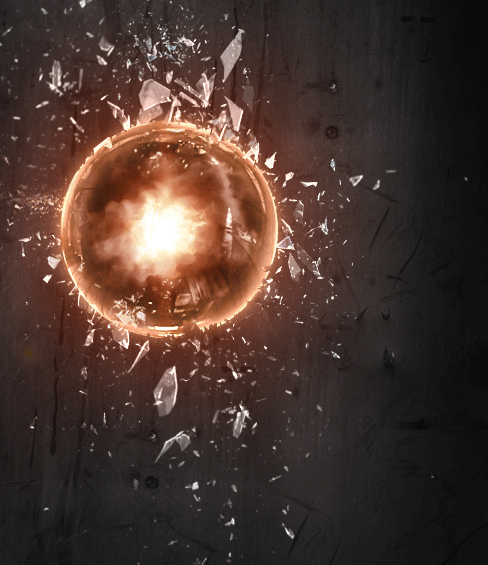
ASIDE: The background design above was created in Photoshop but I used some elements from our Action Essentials 2K video collection to build the glass.  Even though the most elements are video files, I simply saved a few frames and imported into PS. It was great because each clip has hundreds of unique frames so I didn’t have to use the same looking glass pieces over and over, I just scrub through the clip and everything changes nicely.

342 RESPONSES TO "After Effects for Photoshop work"
pijuejushi
July 19th, 2011 @ 5:43 pm

wow,,that’s amazing!that’s so cool!

    Kumar
    July 27th, 2011 @ 10:44 pm

    Real amazing dude!!!!
    MORE ACTION!
    MORE ACTION!
    MORE ACTION!
    i like action;)

    OddWord
    August 2nd, 2011 @ 7:25 am

    Yes Action!!!
    So lets see some…….
    Don’t leave us all hanging!!!
    AEDUDE.com Has New Stuff
    precomposed.com also has new stuff
    Even Revostock.com Updated!!!

    Keep up the Good Work AK!!!

    LET US KNOW, WHAT’S UP!!!

Brad
July 19th, 2011 @ 5:43 pm

You can also open Quicktimes directly in Photoshop, very handy!

    Aaron
    July 20th, 2011 @ 8:33 am

    Who needs After Effects when you can open a .MOV in photoshop, right?

    Facundo
    July 21st, 2011 @ 1:11 pm

    Of course it’s very handy to open a .mov in PS, Aaron. but AE it’s useful to create some elements that aren’t avaliable in PS. Think in Particles, some organic elements, lights, flares. Just think in Optical Flares and use it’s elements in PS!

    July 22nd, 2011 @ 7:43 am

    I have been working with my company trying to help them understand this… I go back and forth between AE and PS for just images. Actually, I use AE for image editing than I do in photoshop. But they are like twin programs, with different personalities. It’s brilliant. Thanks for this Andrew I sent this to those in my company I am trying to help understand this.

    Jason
    July 29th, 2011 @ 4:19 am

    I have been using a few after effects animations and effects to import into photoshop.
    The key to understanding how to use this is making sure you work with the right DPI for web or print.

    So when I’m creating a print document for A4 it is very very very IMPORTANT to set the size for 300 dpi(print) at 2480 X 3508.
    And for screen/web design 72 dpi at 595 X 842 pixels.

    Other than that, when the correct document is set up, you can go nuts and use heaps of effects in AE then put into PS. I myself have created a lot of optical flares which I just drag and drop into my PS layers [=

Dwaine Vassell
July 19th, 2011 @ 5:45 pm

Wow, that is amazing…I love it!!!

I am eager to get my hands on Element.

I love coming to this website.

Dwaine

nickyazu
July 19th, 2011 @ 5:45 pm

thank you so much

Mark
July 19th, 2011 @ 5:48 pm

Sometimes I find myself using After Effects for things that could be done in photoshop. I find it humorous sometimes just how much can be done in AE without needing to touch other applications.

    Yeager
    July 20th, 2011 @ 7:00 am

    Amen! I often find myself using AE over photoshop to design things, usually because I am more familiar with AE’s interface.

    Owen
    July 20th, 2011 @ 8:25 am

    I do too! I have learned the AE interface and feel like it’s more efficient to do what I know than to learn photoshop. Plus, in AE I can use some Optical Flares to spice things up.

    Michèl
    July 22nd, 2011 @ 1:44 am

    Actually I create 99% of 2D elements in AE, just because I know the tools better and also, because I want to get better in using the tools, since my primary output is video.

    Rheikann
    July 31st, 2011 @ 10:32 am

    That’s so true man! AE is the best!

Dwaine Vassell
July 19th, 2011 @ 5:48 pm

What are some things we do in After Effects that you would recommend for Graphic Designers?

I think the 3-D stuff is great and particle design.

Silent Smile
July 19th, 2011 @ 5:49 pm

i really cant say anything …… AMAZING !!!

I LOVE IT

Dwaine Vassell
July 19th, 2011 @ 5:56 pm

Do you think After Effects is a useful tool for Graphic Design?

Of course…I think After Effects can be a useful tool for Graphic Design, but with maybe with a pluggin? Photoshop is indeed better and faster.

But also, it depends on the application use of how you use After Effects…

July 19th, 2011 @ 6:00 pm

I thought I was the only one that did this! I use AE for many graphics and it’s a great tool :]

    tim
    August 2nd, 2011 @ 2:36 am

    i know aye!

July 19th, 2011 @ 6:02 pm

I’ve often taken elements from AEssentials and output frames from AE so I could use them in PS. Like you said, I can get a much more realistic lens flare from Optical Flares than I could ever get in Photoshop.

It’s also always good to be reminded; so once again, thanks for making us think about this stuff and broadening our creative minds…

Some Guy
July 19th, 2011 @ 6:03 pm

I think that After Effects is better for graphics design because the controls are more straightforward. And its easy to do lots of stuff in After Effects that you could do with Photoshop.

Justin J. Wood
July 19th, 2011 @ 6:04 pm

Yeah since using After Effects I use it way more for my ‘Photoshop” work. Especially as you can choose the pixel dimensions of the artwork. I’ve used it for DVD artwork for clients and I can’t wait for ELEMENT to come out so i can do more with 3D text and logos.

Justin Kuhn
July 19th, 2011 @ 6:07 pm

I used a still frame from an explosion in a movie poster I was creating in Photoshop but that’s about it. I have thought about using your strokes tutorial to make a static logo before as well.

July 19th, 2011 @ 6:15 pm

This is really nice. Thank you again.

Doug Kendall
July 19th, 2011 @ 6:17 pm

See my problem is, I started in film and I’m since getting into compositing to be able to get whats in my mind onto film. I’ve had little experience with graphic programs like Photoshop outside of cropping and resizing, so the thought of learning yet another extremely in depth program when I’m still scratching the surface of my knowledge in AE scares but also excites me. Oh well, I guess all we have is forever to learn. Thanks to you Andrew for all you do. You’ve made my job of learning so much easier.

    John Brownwood
    August 1st, 2011 @ 1:54 pm

    No Problem. My Photoshop experience is helping me unravel after effects, surely your AE experience will make PS that much easier to learn. I love this new combo. I am a fashion/screenprint designer by trade, but now I am becoming a film maker almost overnight. one month of serious tutorials and I am ready to fly, low to the ground, but I am still flying. jump in PS is way easier than AE

kyktommy
July 19th, 2011 @ 6:18 pm

PS for photo
AE for video
are they guys always keep that rules in their mind ?

Ali-John Sondossi
July 19th, 2011 @ 6:19 pm

A while ago I was having trouble with Photoshop it kept crashing and I needed to complete a homework assignment for a digital media class. The assignment was to manipulate an image. I ended up doing it in AE and I got an A, everyone liked my work during critique. Technically that was cheating, but in the end I learned you don’t have limit yourself to certain programs. If it works, it works.

AJ_21
July 19th, 2011 @ 6:24 pm

GREAT POST. I HONESTLY FEEL THAT MOST DESIGNERS LIMIT THEMSELVES TO JUST ONE OR 2 PROGRAMS. I`VE BEEN A VIDEOCOPILOT PASSENGER FOR THE PAST 2 YEARS I THINK. AND MY LEVEL IN ADOBE PROGRAMS HAVE HELPED ME DO MORE THAN JUST GRAPHIC DESIGN, OR EVEN JUST MOVIE EFFECTS. I CAN MAKE PEOPLE SEE MY PROYECTS, MY VISIONS… IN A WAY THAT I DONT HAVE TO WRITE IT IN.
SO MY POINT OF VIEW IS, DONT LIMIT YOURSELVES WITH JUST PHOTOSHOP OR AFTER EFFECTS. MR. ANDREW, YOUR BEST LESSON YOU HAVE TAUGHT ME IS TO “NEVER STOP CREATING”.
BENDICIONES Y MUCHOS EXITOS DESDE HONDURAS (GOD BLESS AND BEST WISHES FROM HONDURAS)

    troll
    July 19th, 2011 @ 8:02 pm

    Yet you don’t know how to tap the Caps lock while typing.

    anti troll
    July 19th, 2011 @ 10:10 pm

    (addressed to the guy named “troll”)

    Trolls!!
    How dare you invade VC
    Even if you are right, the comment wasn’t necessary.

    Go away troll.
    And don’t come back!
    May this be your last visit.
    Exit now in shame.

    AJ_21
    July 20th, 2011 @ 5:20 am

    Jajaja. Guess you didnt understand the intensity of my post. Anyways, thanks for your reply Troll.

    AJ_21
    July 20th, 2011 @ 9:13 pm

    I gotta say. I wasnt expecting this kind of reply. But I thanked the troll for at least reading it.
    Gracias por el apoyo “antitroll” (Thanks for the support anti troll.)

    anti troll the 2nd
    July 21st, 2011 @ 7:23 am

    Lol I don’t know why people get so touch with capital letters, talks to me of a great % of computer world over real world :) echale ganas papa palante!!!

    AJ_21
    July 21st, 2011 @ 7:26 pm

    Asi es papa. Jejeje.
    Pero yo aun sostengo, nosotros como diseñadores deberiamos ampliar nuestros conocimientos en otros programas. Pero aun asi, el post del Sr. Andrew es muy acertado que After effects tiene muchos usos y que de verdad sirve para ampliar la creatividad de los diseños.

    July 26th, 2011 @ 5:07 pm

    I respect those who type in all CAPS because its a good tell-tale sign that they are “rendering”! :D

    Duncan
    July 26th, 2011 @ 10:11 pm

    I think I still remember the RULES of this BLOG. they say do not use UPPERCASE in all of your comment. And do not use any LANGUGE other than ENGLISH. The problem is the we tenf to ignore the LINK to these rules.

Richard (Singapore)
July 19th, 2011 @ 6:28 pm

I’m probably the only one in class using after effects to create graphics and posters LOL. I do think it saves alot of time working in after effects in creating good imagery!
Of course thanks to Ak for his unselfish sharing of his great knowledge to the world!:)

Gary Bird
July 19th, 2011 @ 6:33 pm

I often use After Effects to create cover art for dvds, saving frames out as layered Photoshop files, to match an opener created in After Effects. It’s an invaluable feature. After Effects definitely has a place as a very useful graphic design tool, for print as well as on-screen work and its ability to export layered PSD files back to Photoshop is potentially extremely powerful. By the way, Mr Kramer, you really are a generous genius with your time and knowledge. I’m going up the wall in anticipation of ordering your incredible new Element 3D…!

Marshal
July 19th, 2011 @ 6:34 pm

With the exception of text, I do most of my still or print work in AE. Funny that others do as well.

Cang Nguyen Duc
July 19th, 2011 @ 6:37 pm

i sometimes use AE to create animation for Flash, save as flv format and import to flash haha.

    varanosh
    July 22nd, 2011 @ 6:42 pm

    That’s how I got into AE ;) . Just didn’t get cool looking animations in Flash.

    July 25th, 2011 @ 9:59 am

    Haha, I do the same. I took a class on Flash, but I still use After Effects and just export it for Flash. I forgot how to use Flash now :(

Alek B
July 19th, 2011 @ 6:38 pm

Yes, I agree completely. Getting elements out of scenes is faster in AE so I do that even when I am just compositing a still. And pulling mattes is better in AE as well. is there anything not better? Well…. Cloning and painting are more flexible.

Sybert
July 19th, 2011 @ 6:43 pm

Mr. Kramer, I have been following your website and your tutorials avidly for over a year now. I have learned so much in AE, but I haven’t learned nearly as much in PS. I recently took an “Intro to Multimedia” class at my school, and the main focus of the class was PS. With the little that I knew about PS I was already far ahead of the class. As we moved from project to project I found that there was a number of things I wanted to do, but didn’t know how to. I was able to go home, fire up my computer, and apply what I have learned to create the image or element in AE. For my final project in the class I was creating a space explosion, so for the debris, asteroid field, and the title design I used AE.

In short I use AE and PS together, and for me it is a FAR more powerful workflow. Also, because of my limited knowledge of PS it is often faster for me to go into AE, create the element, and then import it to PS.

Richard (Singapore)
July 19th, 2011 @ 6:48 pm

I seriously have a dream that one day I can shake Andrew Kramer’s hand personally!!! :) haha funny to say that though! But yeah! I really wish so!

    deepak dhyani (India)
    July 20th, 2011 @ 3:07 am

    me too mr. richard

    emaldives (Maldives)
    July 20th, 2011 @ 4:23 am

    I also would like to shake hands and do a short interview :D
    Love the gr8 work you do here.

    Ferret
    July 30th, 2011 @ 1:38 am

    Totally!! :) But for many of us it will be an evasive dream :( Unless of course, one day Mr. Kramer heads down to see us Aussies, and is in the Melbourne area! Hint! Hint!

July 19th, 2011 @ 6:50 pm

I do it all the time, and then some

July 19th, 2011 @ 6:53 pm

I use AE exclusively for design. I’ve even begun editing my personal photos in AE. The only i use photoshop CS5 for is the auto content feature so I can add motion to still photos.

Bruce Wainer
July 19th, 2011 @ 7:09 pm

After Effects is very handy for HDR imagery since it has more 32 bit capable effects than PS, at least in CS4.

July 19th, 2011 @ 7:11 pm

This is cool. I don’t have photoshop so this could be useful if I can actually figure it out with after effects.

July 19th, 2011 @ 7:11 pm

Coming from the film and video world, I vastly prefer the three-wheel color correction paradigm over Photoshop’s native color correction tools and wish there was a similar toolset. Thanks for a great tip.

Tony
July 19th, 2011 @ 7:20 pm

Thanks for pointing that out Andrew makes lots of sense…. never thought of it this way before…. In soviet Russian Adobe After Effects uses Andrew Kramer…

Lewis Nankivell
July 19th, 2011 @ 7:23 pm

This blog post isn’t showing up on my iPhone. Not sure if anyone else has same problem

Jan Post
July 19th, 2011 @ 7:24 pm

i always do that too. it’s definitely a cool and fast way to get great looking pictures.

gaston
July 19th, 2011 @ 7:30 pm

andres .. great when you teach us to make as realistic an effect as in the advancement of dexter?

http://www.vimeo.com/26657192

Greetings from Argentina

Timo
July 19th, 2011 @ 7:43 pm

i reckon i use after effects more than photoshop for graphic design for the very reasons you pointed out! plus you can use handy ae expression such as the one in the tron tutorial for interesting layer effects! i’ve not exported to photoshop because i tend to start and finish in after effects!

Toby
July 19th, 2011 @ 8:03 pm

I use AE for photoshop projects quite a bit. Most recently to create chunks of a wall breaking off on a huge banner. It can take a couple of minutes to render but it works out really well usually.

Simon Steele
July 19th, 2011 @ 8:05 pm

That’s very true Mr. Kramer, I design slides for sermons in church and 80% of the time I do it in after effects because I know how to get the look I want.

Damian
July 19th, 2011 @ 8:25 pm

If Adobe want to really create a killer graphics app then they should re-build photoshop using aftereffects architecture. The non-desctructiveness off aftereffect layers is absolutely incredible. Imagine being able to apply filters etc like that in photoshop. To be able to adjust filters as you go.

The only limitation using After Effects currently is the dpi setting is always 72dpi. When for print we need a minimum 300dpi. I know you can just start the comp at a very high pixel size – but if After effects allowed you to change the dpi then you could do without photoshop altogether.

    July 19th, 2011 @ 10:08 pm

    I concur Damian about the non-destructive nature of AE over PS, When in PS i attempt to be as nondestructive as possible making use of adjustment layers and layer masking often. With AE the amount of control is so much easier fo later refinement of a design piece.

    Petja
    July 20th, 2011 @ 1:46 am

    In Photoshop, when working with smart objects and smart filters you can adjust them as you go

    Ivar
    July 20th, 2011 @ 4:48 am

    That’s exactly it isn’t it? 72dpi is the pitfall. AE’s NDWF (non-destructive workflow) offers superior control. If only we could get 300dpi….

    Alan
    July 21st, 2011 @ 7:38 am

    But you CAN work in PhotoShop non destructively! It’s been a while but it has the same idea of adjustment layers you have in AE. Probably even called the same thing. lol.

Ayb from the Philippines
July 19th, 2011 @ 8:26 pm

I usually do the same workflow like using some of the stock footage, render a frame and place it somewhere in my photoshop work… very nice tip and reminder AK.

July 19th, 2011 @ 8:28 pm

I’ve done this for a while now, and seeing as I’m much more competent in AE than PS it works out great. My question is how do you deal with the DPI limitation in AE? Just make the comp a lot bigger than needed to match a higher resolution or is there some trick?

    July 19th, 2011 @ 10:03 pm

    I have just imported directly into AE and the file will interpolate the pixel dimensions not the DPI in AE. Then after I export from AE, convert back to 300DPI and bring back to CMYK color space; however, there are limitations. I have had trouble when working on large format film posters for example at 27″x40″

July 19th, 2011 @ 8:45 pm

Andrew I’m just wrapping up my BA in Graphic Design and after working on VFX and color correction work I have in the past 2 years began to combine After Effects work into still design work, and yes I use the save frame as PSD very often.

Most of which is color correction, like using Magic Bullet products to shots for instance mainly Mojo. But I also make us of other visual effects elements from assets like Action Movie Essentials and Optical Flares too. I think the two media have visual core concepts in common that are fundamentally the same. And I think to be a good graphic designer one ought to exploit as many tools as he or she has at his or her disposal to convey the most effective design possible.

    July 19th, 2011 @ 10:05 pm

    If anybody wishes to see some of my work please check-out my portfolio: http://aaronpoisson.daportfolio.com/

    July 20th, 2011 @ 11:12 am

    You know you can also use photolooks for photoshop if you want the power of magic bullet right?

    Magic
    July 21st, 2011 @ 1:34 pm

    @Aaron Poisson
    Great stuff you have there. :o )

tebs
July 19th, 2011 @ 8:47 pm

its not too amazing, After Effect needs Photoshop for some its work and Photoshop need some effect from After Effects

July 19th, 2011 @ 8:54 pm

PS: I also like the non-destructive nature of AE of PS as well.

Design Example using Illustrator/Photoshop/After Effects/InDesign

Zigtech Reebok Advert:

    July 19th, 2011 @ 10:04 pm

    Please delete this comment

July 19th, 2011 @ 8:56 pm

HTM Tag didnt’ work so here is hyperlink:

    July 19th, 2011 @ 10:04 pm

    Please delete this comment also

July 19th, 2011 @ 9:10 pm

Haha! Yes I’ve done this before, and I’ve WOW’ed the hell out of clients!

July 19th, 2011 @ 9:14 pm

Interesting concept. The 3D/2.5D aspect of AE can be used in PS. I know PS imports 3d objects but you can make a 2.5D scene or elements in AE and render out different frames or angles to use in PS. Plus AE can now use larger images since it’s 64bit.

Riffy86
July 19th, 2011 @ 9:17 pm

Yeah, I’ve used AE quite a few time for graphic design. I share you view. I’m glad you put that out there. Only a few times I’ve been asked, “why are you using AE?” I just say… “why are you still in the box?!” Thanx for putting that out there! And to everyone one else as well!

Júnior
July 19th, 2011 @ 9:20 pm

Really! Most times is better work in the After Effects than in the Photoshop. I was doing it, only I guessed that was wrong. God bless you!

July 19th, 2011 @ 9:25 pm

It’s interesting you bring this up Andrew. I actually learned After Effects through this site and a few other sources. I’m far more competent in AE than I am in Photoshop. I find things like masking, feathering, lens flares, and other generative effects much easier in AE. Plus AE simply has way more built in pictures. I usually do most of my design work in AE, and then export photoshop layers for any final touchups that I can’t do in AE.

Júnior
July 19th, 2011 @ 9:27 pm

Like in the text, I am learning English for here. So, nobody speaks Hey, What’s up? I am Júnior better than me hahah I don’t understando all that’s spoken in the tutorials, but like I see what you are doing I understand the goals. I hope you understand it. God bless you!

Jeremy Romero
July 19th, 2011 @ 9:37 pm

Funny Andrew posted this today. I just finished taking photos outside in front of a bluescreen – And since I know how to key and use colorista 2 in AE – I did all the photo editing in AE just importing RAW files – and of course a little Optical Flares as well. :)

Abel Edwin
July 19th, 2011 @ 9:39 pm

hahaha
I do exactly the same for my Desings!

ah shang
July 19th, 2011 @ 9:46 pm

i always use after effect for my graphices design ~even my fren think i am freak ~BUT is really useful!i love after effect!

Daniel
July 19th, 2011 @ 10:20 pm

Funny you mentioned this,.. just the other day I used your smoke & fire elements this way. And like you said the variations within one file are huge! I also remember thinking when I bought Optical Flares of the possibilities this way! VC rocks!

heres a sample of the photoshoppness!

http://2.bp.blogspot.com/-wbYdrXEuSIQ/TiZyd8Uei2I/AAAAAAAAAMQ/XtNiCrGt4sk/s1600/B%2526A_Kyle.jpg

Dan…

    Steely
    July 25th, 2011 @ 10:42 am

    That picture is brilliant & worth a mention.

    Dan
    July 25th, 2011 @ 6:20 pm

    Thanks!!!

July 19th, 2011 @ 10:21 pm

I think it’s a resolution thing. Although there’s absolutely no reason why I shouldn’t use AE for stills work. Time to play I think!

Jice
July 19th, 2011 @ 10:27 pm

Wow, this is an incredibly interesting topic to bring up because I actaully skip most of photoshop and go right into doing most things in AE for graphic design.

Lights, familiarity, and a very forgiving interface for changing things on the fly means things are much easyer in AE for me.

Easy to do texturing with alpha mattes, it’s better handling of Illustrator layers, and not to forget expressions that allow you to change whole peramiters without having to do it individually with each layer.

Everything is better for me in AE than Photoshop when I’m doing graphics.

cj
July 19th, 2011 @ 10:29 pm

i totally agree!

July 19th, 2011 @ 10:40 pm

I always use after effects in my graphic work. Colour correction for example. If you look at after effects as a “POST PRODUCTION” tool for your graphic design, there are alot of advantages. Like AK said, Lens flares are a huge help thanks to this. Using elements from Action Essentials can make a huge difference in some action shots. Thinking outside the box definatly plays off. I would suggest sticking with PS for stuff like text but compositing inside AE for still images is definatly the way forward. This is all helped by Adobe’s Dynamic Link feature.

EDrisCG
July 19th, 2011 @ 11:21 pm

He probably didn’t know what the plug-ins were “Meant to do”, only what it “Could do”. :)
I totally agree!

July 19th, 2011 @ 11:36 pm

This is awesome.

Gustavo
July 19th, 2011 @ 11:45 pm

I understand not even an Englishman’s word, am Latin and am using a translator in order that they could understand me; These words go for the gentleman Kramer since I listen to a graceful story on a person that aprendio to using AFTER EFFETS seeing tutoriales in English!!I am not this person but I have learned to use this tool thanks to the tutoriales, it is true that I do not understand the concept of a plugin or the function of an expression but with many patience try to go out of this spiderweb to catch the concept for vision and reasoning leaving of side the ear … lacking me much for walking in this program; But the first thing that aprendi with your tutoriales was to transladar in PSD of some capture achieved in AE to work in photoshop… Thank you Kramer and if you think in YOU CROSS BORDERS … it thinks of subtitling the tutoriales to the Spanish … this way us reimos all of the GRACEFUL STORIES!!!!

Dmitriy
July 19th, 2011 @ 11:49 pm

I’ve learned PS with a very low knowledge of English, & once I’ve decided to try myself in motion graphics I thought if I’ve learned PS myself I will handle AE to. And now I’m using PS only in small cases that only PS can handle, like content aware staff etc. Even for color correcting photos. And the thing Andrew said about using footages is exactly what I came to some time ago, that’s where the randomness comes from ))) +100500 Andrew )))

Gustavo Olaza
July 19th, 2011 @ 11:50 pm

I understand not even an Englishman’s word, am Latin and am using a translator in order that they could understand me; These words go for the gentleman Kramer since I listen to a graceful story on a person that aprendio to using AFTER EFFETS seeing tutoriales in English!!I am not this person but I have learned to use this tool thanks to the tutoriales, it is true that I do not understand the concept of a plugin or the function of an expression but with many patience try to go out of this spiderweb to catch the concept for vision and reasoning leaving of side the ear … lacking me much for walking in this program; But the first thing that aprendi with your tutoriales was to transladar in PSD of some capture achieved in AE to work in photoshop… Thank you Kramer and if you think in YOU CROSS BORDERS … it thinks of subtitling the tutoriales to the Spanish

July 19th, 2011 @ 11:53 pm

When you wrote this article I do not think we knew it?

July 19th, 2011 @ 11:54 pm

I ALWAYS do that… I never use Photoshop for designing still images! :D

July 19th, 2011 @ 11:55 pm

i sometimes use AE to create animation for Flash, save as flv format and import to flash haha……..india

Ln
July 20th, 2011 @ 12:04 am

Sometimes i use after effects to create some rain for my photoshop creation, it’s too long to do it great in photoshop

rob
July 20th, 2011 @ 12:27 am

Weird, I was having a conversation about this very subject with someone last night!

Looks awesome :)

DaFx
July 20th, 2011 @ 12:33 am

It is totally true, AE provide a lot of very interesting tools to build up some amazing design that would be quasi impossible ( or very long ) in toshop. They are very complementary in a lot of ways and don t use all the exchange possibilities of these 2 soft would be a BIG error !! Thank you mister Kramer you’re definitely the best ;-)

July 20th, 2011 @ 12:37 am

Ive also use AE for graphic design, one job i did for a laser company ,intence photonics, involved getting a good looking quick ‘lazer’ and the point the lazer hit a sample to vaporize various types of metals, it would have took hours in photoshop,, but in AE i got great results in next to no-time.
cool tip, i can wait too ‘Discover the secret’ and bring on element,. thx

July 20th, 2011 @ 1:19 am

I’ve used AE to render stills before. I think it’s more feature filled and being non destructive, makes it more useful than PS especially for non print work.

Render still passes in C4D, add FX in AE then export, no PS needed :D

Aditya Mulgundkar
July 20th, 2011 @ 1:31 am

OMG!! Can’t believe! I was working on Some images since 2-3 weeks, and surprisingly, i find the same way very useful! (I prefer AfterFX over Photoshop) Probably for the only reason that VCP doesn’t make tutorials for Photoshop!! XP

Dr_Stef
July 20th, 2011 @ 1:32 am

I’ve used it a couple of times to render out some cool stuff to superimpose over my photos. It’s very handy sometimes :)

Ahmed Rashed
July 20th, 2011 @ 1:43 am

for me I don’t need after effects for my graphic design
I just need 3dsMax and Ps .
but After effects I use it for my Media design and FX .

Max
July 20th, 2011 @ 1:51 am

Hi there,

I rarely use Photoshop. Instead, I use After Effects for work with “picture manipulation”. ;)

… the reason for that: I have no practical experience with Photoshop. Perhaps I should learn it like the guy in your story: Have a look, what all these functions in Photoshop are doing. ;)

Greatings from Germany

July 20th, 2011 @ 2:08 am

I actually use AE instead of photoshop most of the time for photos, video editing, simple audio work, even to throw a quick a quick flash banner :D
I know AE is not specifically designed for photo editing or whatnot, but I’m just very used to AE’s controls.
I only use Photoshop when I need advanced brushes, like smudges, etc.
:P

July 20th, 2011 @ 2:09 am

I TOTALLY AGREE!
i also use after effects rather than photoshop, because to tell you the truth, AE is WAAAAAYYY easier than photoshop. and i totally agree to andrew about building an easy + complex element for just a few minutes :D

THUMBS UP FOR THIS POST!

Waysh
July 20th, 2011 @ 2:16 am

Yup, i always use AE in Photoshop, nothing new for me :)

Max
July 20th, 2011 @ 2:20 am

I still find all this OMG SO COOL comments funny after all this years.
After all this was a post containing only a good dose of common sense..
It’s like OMG COMMON SENSE IS SO COOL :)
Anyways, i use a lot AE for print designs, simply because i can just use effects and edit non destructively (photoshop has this too but it’s ankward)
We eagerly await Element to play tho.

July 20th, 2011 @ 2:38 am

Haha :D I usually do the PS stuff in AfterEffects ’cause I’m used to work with AE and it’s more organized for me. Jumping between AE and PS is like if you’re working with 3DS Max and then you come to Cinema 4D and all the panels are somewhere else (or most of them). :D

Alex
July 20th, 2011 @ 2:48 am

Some things are simplier in Photoshop, but some are just horribly complicated. AE is more organized and helps a lot if you care to know it and master it. I use a lot of AE and 3D for photography, if think it’s actually the first step of understanding compositing in it’s true form. OK, mostly I use AE for things like Particular, when I don’t really need a 3D generated raytraced particle system. Other things like using 2K screen-caps might work for some things, but when you’re working on very big resolutions like 20+MP, you just can’t get the right amount of detail from a 2K video file.
BTW: always wondered why you can’t apply effects like let’s say gaussian blur on an adjustment layer with a mask in photoshop. In AE it’s so simple and straight forward, in photoshop you actually have to merge and change your layers, so if you want to make some adjustments after this, you have to revert to a previous state and then redo the merge and apply filter. It’s SO COMPLICATED!

July 20th, 2011 @ 2:49 am

I Always do this, especially for concept art. it also means you can simple continue the project file on to the finished shot… nice

Vector Blur… is awesome, and as far as i am aware it doesn’t exist in PS, also AE is nice for building textures for 3D

July 20th, 2011 @ 2:56 am

I often use AE to set up layers with ramps or solids that have a fading effect/mask. I find AE more handy than the “classic” photoshop method and it’s easier (for me) to come back and change de settings of a mask in AE.

The “Copy frame to clipboard” tool is a bliss !!

    July 20th, 2011 @ 6:00 am

    Yeah, me too… Masking in AE is so much reliable and faster than PS.

Arnold
July 20th, 2011 @ 3:02 am

I stopped using photoshop for CC and other tedious tasks, the speed at wich you can do still image FX are insane in AE I wish there was an easy way to bring photoshop brushes into AE then it would be perfect

Markus
July 20th, 2011 @ 3:09 am

most of the time i use AE to edit photos/ images instead of PS

one big advantage of AE is that you can always adjust settings in effects control and view it in real time (eg. blur, filters etc)

whereas PS you always have to push “OK” to see it? (or view it in that tiny preview window which is not handy)

not to mention the amount of plugins, and choosing a frame from the timeline (PS preview videos really slow..)

erik cantu
July 20th, 2011 @ 3:17 am

I started using AE for still work as it is completely non-destructive and I can go back and change every effect setting. Once you apply a blur to a layer in PS, you can’t just remove or adjust it it you can in AE.

Faithfuly
July 20th, 2011 @ 3:31 am

Since I don’t have Photoshop or any software like it I started to use AE for editing/creating images and I’d say it’s a really powerful tool even in a beginner’s hand. I made some pictures for our programmer course in school and my teacher was like “what the….”

And yeah to the guy learning AE in english. I’m from Germany but installed my version of AE in english too, since I think it’ll help me in the future. And on top of that it’s way easier to understand your tutorials and follow them step by step instead of watching them in english and looking up the name of the effect in another language.

hoemminger
July 20th, 2011 @ 3:46 am

Hi to all of you,

It’s my first post on this forum ever.
I’m a 3D CG Artist and working with PS and AE for years now to do postwork on my graphics and animations. I guess it’s a perfect way to combine both to get high quality and proffesional looking results.

Andrews and his team is doing great work to help us all.
Amazing plugins and tutorials — thanks a lot and keep on doing.

LukasVideosify
July 20th, 2011 @ 4:00 am

That’s exactly what I have been saying since I started to work with Adobe products… :D

3dmus
July 20th, 2011 @ 4:14 am

Light & casting shadows. For me it’s an easy way to introduce realistic shadows and lighting in my PS designs.

July 20th, 2011 @ 4:26 am

I usually did that technique exporting it on frame by frame.. the output is so FaB.

Silver Dance
July 20th, 2011 @ 4:29 am

the way is is cool …

Kevin M
July 20th, 2011 @ 4:29 am

I have done work between the two but that copy and paste frame tool would make it easier, hmmmmmmm but the link is no good

July 20th, 2011 @ 4:38 am

Excellent Tip! Been doing this for years!

July 20th, 2011 @ 4:53 am

Andrew,

First thanks for this post! I’m a graphic design and Adobe Photoshop Certified Expert. I’m also an amateur user of After Effects, Apple Motion and Final Cut Pro. I’ve actually considered using After Effects for my graphics work many times. I’ve always thought of AE as Photoshop with a timeline. I know this is on me but I’ve always felt that After Effects wold not support higher resolution images that I’d need in my work. Just for kicks I set up a 4000 x 4000 composition. So it appears that AE supports large custom compositions although I’m not sure it making a composition that large will cause performance issues.

Would you consider doing a tutorial showing how you might use AE for non motion graphic design? I think such a tutorial would be a great kickstart for designers like myself. If you could open our eyes a bit more than this blog post with a video tutorial it would really bring some bright light to this topic.

Again thanks for all you do!

Nick
July 20th, 2011 @ 5:07 am

Yes, it is really great way to achieve some effects more faster.

I use a lot of DOF and the AE Camera is great for this!!!

The particle world or other things. It is just perfect.

But I haven’t thought of using Action Essentials …it will be great!

In fact I prefer the AE user interface, when I want to use some effect in Photoshop I have the habit to try to type the effect’s name just like in AE…Maybe they need to make AE UI plugin;-)…

illd
July 20th, 2011 @ 5:21 am

It depends on. Most Photoshop features/filters I am able to simulate with AE. But sometimes it is a pain in the a** to do/undo some essential things in PS which would be done with one click in AE. For example adding a Noise or a Glow in PS. Those effects are not procedural unless you start to convert your layers to smartlayers and use smartfilters.

On the other side the paint tools in AE totally suck compared to PS. You can get so creative in PS by only painting around in the highlights/mids/shadows. This won´t give you your typical “oh, this is probably done with with plugin XY” look. It´s somewhat handmade ;)

July 20th, 2011 @ 5:25 am

it’s very good. ;)

July 20th, 2011 @ 5:26 am

I’ve done this a couple of times for images I’ve worked on that needed to be designed in a 3D space and just couldn’t be done in Photoshop itself.

DecodaX
July 20th, 2011 @ 5:38 am

Hi all,

Yup totally have to agree with Andrew here, I’ve used After Effects extensively in my photoshop designs as it is a very powerful tool. It opens up the opportunity to design better graphics at faster rates.

DecodaX

July 20th, 2011 @ 5:49 am

I can only say the same … thought i am the only person who makes a lot with AE in GraficDesign

just a frame and few minutes work in AE … would take too much time in PS
http://img543.imageshack.us/img543/9616/blackglobe2.png

BMagic
July 20th, 2011 @ 5:50 am

Part of it may be the suite options available from Adobe. Working under the assumption that people use legit software, it’s a lot more cost effective to buy Design Standard than it is to by the Master Collection. If you need Ps, Ai, and Id for your print work (as I do), then your only option is Master Collection at that point. I’m lucky in that I make my work pay for everything, but I know that many people (especially hobbyists) aren’t that fortunate.

Perhaps Adobe needs to put out Creative Suite: Andrew Kramer Edition?

Mike of the Desert
July 20th, 2011 @ 6:15 am

That’s right, AE and Photoshop are like brothers to me, and to be honest.. That’s a great story you have there Andrew, It remembered me of myself a couple.. Of couples (lol) of years ago. :] Being Italian and full of passion about these arguments I started studying these programs in the exact same ways.

About BMagic.. Sheesh, that’s right, Adobe suites aren’t that accurate, somehow. I do this for work (and in my country is.. Hell), and I had some real problems not having someone to pay for me.

rmdragon
July 20th, 2011 @ 6:26 am

Hi Andrew,
on the flipside of this topic… optical flares plugin for photoshop would be a great crossover as well. The interface and manipulation of OF is fantastic and would be great to have the option to work in natively in photoshop.

July 20th, 2011 @ 6:29 am

Totally agree! After Effects has been my design “secret” for quite some time. In fact, I think it has better type controls than Photoshop – not to mention various ‘standard’ plugins that behave much better. Example: apply the Glow effect in Photoshop, then apply the Glow effect to the same layer in AE. Much better – and more control in Ae.

Not to mention that EVERY single effect in Ae is NON DESTRUCTIBLE. They also can be duplicated many times to achieve something really special.

In all honesty, even though I started in Ps and became certified, I’d much rather design in Ae nowadays. I may be able to do a million things in Ps, but I can do a lot of ‘em with much more finesse in Ae.

    July 20th, 2011 @ 8:28 am

    Completely agreed!! I do photos but for the majority of the time i’ve used AE, because right now, i don’t have time to learn the hard and complicated features of photoshop, the effects on different layer, ugh, to complicated for me to learn right now, unless, of course, if andrew kramer started to do photoshop tutorials to.

Stan
July 20th, 2011 @ 6:39 am

Gradients and Feathering in After Effects for SURE!

cheekylilbasterd
July 20th, 2011 @ 6:50 am

In fact I do the reverse a lot. whereby I do all the initial designs in Photoshop and animate and add extra elements in AE. some time back too I use to do vice-versa and I always tell people who struggle with AE to do their designs in Photoshop if possible, it’s so easy
Adobe’s dynamic link is so powerful dat I do one design in photoshop , use the same design in Premierre , AE and Encore all without having to do a single render until final burn.

Alex Kuzelicki
July 20th, 2011 @ 6:57 am

So agree! At the moment, we are making a children’s book entirely in After Effects! It involves compositing 32 pages of artwork, with photos of characters shot on greenscreen. I did some initial tests in Photoshop and just couldn’t find any plugins that keyed as well (or as quickly and easily) as Keylight in AE. At first I wasn’t sure if it was ‘right’ to do the project this way but, after some more tests back and forth to Photoshop, couldn’t see why it wouldn’t work. Eventually, the book pages will end up in Photoshop and converted to CMYK for printing. There may be some issues there but I’m sure we’ll get a good finished product in the end. I actually much prefer working in AE – just feels so intuitive. Anyway, glad I read your post – now I don’t feel so weird about using AE in a ‘not what it was designed for’ way :)

July 20th, 2011 @ 6:59 am

I started to do this exact same thing but was just wondering are there any printing limitations when using RGB from After Effects when converting to the CYMK printing colour gamut. How do you also control the DPI? Just change the resolution?

Speaking from a Print Designer’s perspective. I’m ALSO a motionographer and 3D guy so don’t flame me! :)

    Alex Kuzelicki
    July 20th, 2011 @ 10:20 am

    Hey Dave. Just to let you know from my tests so far. Knowing I was going to go from compositing in AE to print output from Photoshop in the end, I just made a mockup document at 300 dpi in Photoshop, brought that into AE and loaded it as a Comp. AE just blew it up to the right size comparatively. If I then do my work and “Save Frame As” a PSD it comes back into Photoshop perfectly. As far as the RGB to CMYK conversion goes, I know there’s going to be a bit of playing around to get it right but… at least I’ll learn something :) From my initial tests, converting to CMYK always makes things print out a whole lot darker. If anyone has any advice, it would be appreciated. Cheers, ALEX

    July 20th, 2011 @ 7:35 pm

    I don’t have any solid advice but I have printed RGB files digitally just to see the outcome vs. converting to cmyk and it has been pretty good, obviously the printer will convert to cmyk on its own but it looked better that photoshops conversion in my case and it was professionally printed at a shop. Not sure if this helps any.

Janus
July 20th, 2011 @ 7:15 am

After I’ve learned AE, I’ve become a better graphic artist all over. But I often find myself using purely AE, apart from maybe text effect, layer styles ARE easier to work with in PS, but things like applying effects to adjustment layers is much easier and not as ‘persistent’ as in PS, and it matters alot to me to be able to go back and adjust, for example, a distortion effect, which I can in AE, while PS’s adjustment layers only allow for a pre determined amount of effects, levels, curves ect. So yeah, I use it alot too :)

Grscfide
July 20th, 2011 @ 7:18 am

there’s some shots in photoshop i can’t get it done without Ae……sometimes i need to make background, floor , sky, and these things i can’t get it in ps!!!!!!!!!!!

July 20th, 2011 @ 7:23 am

Awesome post! I totally agree with using After Effects for stills. I’ve designed business cards, color graded my printed pictures with mojo and Looks, and the list goes on. AE’s workflow is so much faster and just makes so much more sense to use.

In Photoshop I just feel so STIFF! The layer functionality is junk, and what crap is that where you can only ctrl+z twice? It makes you hesitant to try stuff out! I try to do ALL I can in AE without going into Photoshop.

    cheekylilbasterd
    July 20th, 2011 @ 9:27 am

    yep,dat control Z things sucks, but the history panel can help with your undo’s, also you the set your history preferences to a hugh number dat’s if you computer can handle it.

July 20th, 2011 @ 7:24 am

That’s the truest thing i’ve heard all day, you don’t have to use things for their intended use!!

BT
July 20th, 2011 @ 7:25 am

I learn english through AE = =

July 20th, 2011 @ 7:26 am

I use stuff that I’ve made within AE quite a lot for projects in PS, it really helps, especially Optical Flares, due to PS’s basic flare, which can kill an image, if you ask me, but Optical Flares just brings it to life. ;D

Lawrence
July 20th, 2011 @ 7:30 am

Hmm, is there actually anything that photoshop can do that after effects can’t?

Ben
July 20th, 2011 @ 7:31 am

I actually know AE better than Photoshop, so I find myself using AE to do a lot of things that most people would do in Photoshop. I’ve been learning Photoshop more and more, but I still find myself going to AE for things that I can do faster than trying to figure it out in Photoshop.

Brian
July 20th, 2011 @ 7:32 am

I often wonder the same, even third party plug-ins for Photoshop just don’t cut it sometimes when you want to get specific things done, first started utilizing AE for PS yeaaarrs ago when I was taking some stills shot on green screen and finding it much easier, quicker and cleaner to key them out rather than cut, later playing around with a few of AE’s tools, if it looks great it motion, why not as a picture? Actually interesting you mention using frames from Action Essentials 2 as I’ve done the same for many ‘action’ shots; HD on trans background? No brainer.

Mario
July 20th, 2011 @ 7:32 am

i use this technique since my first steps with AE. there are a hell of fx for that you might need weeks to work it out with PS. so why working hard if you can have it for less and it looks killer?
btw. andrew, this site and your tools are a big inspiration for my daily work.
greetz from vienna, austria.

July 20th, 2011 @ 7:33 am

I do all the stuff people use photoshop for ,inside of after effects

Darren
July 20th, 2011 @ 7:41 am

Web graphics sure, I can see how After Effects can be “Reverse Engineered” to Photoshop, but print it could be a struggle.

Anyone ever tried creating an After Effects composition for A3 print or higher?

Working together yes, but both Photoshop and After Effects do different jobs.

There are many things Photoshop can do that After Effects cannot, and there are many things After Effects can do that Photoshop cannot.

    July 20th, 2011 @ 8:45 am

    Darren, the output resolution of AE is so high you can easily use it for 300 dpi A3 work (or beyond)

    Not sure I’d tackle a huge comp in AE alone, just becaase photoshop is probably better equipped and laid out, but certainly to create elements and then use them as part of your photoshop comp.

    Jason
    July 29th, 2011 @ 4:31 am

    I myself, actually have tried setting one up which is 4960 X 3508 pixels. You’ll be setting your computer up to a hard task when you start applying a few filters and maybe looks and optical flares all at once.
    So with a few descent layers with all these effects your AE will crash, happened to me with my macbook pro 8GB RAM.

    I can only suggest exporting the layers one a time with the desired effects and or… contineously saving your work and pushing your computer to the edge until AE crashes, at that point go back to where you were and you know your computers limit, so now export the desired layers.

    [=

    Hope this somewhat helps

July 20th, 2011 @ 7:41 am

I often use After Effects in my photoshop work (does that mean I’m ahead of the curve? :D ) not least your Lens Flare plug-in as yours are so much better than anything built into Photoshop.

I also use Particluar as well when needed too. I’m sure Adobe had this kind of reverse pollination in mind as the res you can output After Effects project out too is huge – way more than you’ll ever need for motion graphics.

    July 20th, 2011 @ 8:57 am

    I’m sure I’ll also be using your spiffy new Element plug-in on my ’2D’ work as well – assuming there isn’t any kind of resolution buffer on it.

Crush
July 20th, 2011 @ 7:56 am

I do alot of Photoshop work in AE. Depends on what I am trying to accomplish mostly

July 20th, 2011 @ 7:57 am

I am a guy not speaking English but learning After Effects in English haha

Shawn
July 20th, 2011 @ 8:02 am

I’ve been using AE for design for quite a while. I think I started using it because I knew AE better (thanks VC). But what keeps me using it is the Non-destructive filters and workflow. I can modify a design much more quickly in AE thank in PS. PS’s smart objects are nice, but AE just makes sense for so many things.

Also, on a recent project I used the Rotobrush on a still to yank the people from the background. Tried it on a whim, and it was easy and worked fine.

I’m a big believer in using whatever tools you need to in order to get the job done. AE is simply one of the coolest tools out there!

John
July 20th, 2011 @ 8:07 am

This is definitely useful in photoshop. I don’t really like the lens flares in Photoshop, so like you said, I use After Effects to render out lens flares.

Evan
July 20th, 2011 @ 8:11 am

Working in an inside marketing group as an editor / AE artist, I would save AE comps out as layered PSD files on a regular basis so that the graphic designers could emulate a video design for packaging for vise-versa.

cheekylilbasterd
July 20th, 2011 @ 8:31 am

Hi Andrew, is there any Plans to Port Optical Flares to Photoshop, should be dat hard for you guys. it will be be great though Thanks

Christopher Rose
July 20th, 2011 @ 8:32 am

I am a professional photographer and have been using Photoshop for over 10 years! Only this week did I notice the capabilities of using AE (mainly the work on the videocopilot website). I feel excited now at all the possibilities now open to me (if only I could learn it in a day).
Previously, I thought AE was for only editing motion graphics, not stills. But can AE export large images at 300dpi for print? If so, my year just got a whole lot better!

Thanks

Christopher

victor raudales
July 20th, 2011 @ 8:38 am

thanks to you im wroging up using AF my design are more atractive more realistic some times i import my elementes from PS to AF because i like the film look you have when export your art some times i do it the other way i love to use motion clips in my design instead of using still images you been a teacher for all of us and i say thanks for having this website and by the way i like yours stories jejeje

San
July 20th, 2011 @ 9:00 am

Glad there are lots of user with me….proud to be like Andrew ;) (atleast in this)

OlympiaLogger
July 20th, 2011 @ 9:07 am

Right now there are MANY people thinking ‘why didn’t I think of that’…

An earmark of real genius… just seeing the obvious that no one else sees!!!

Kamran Raza
July 20th, 2011 @ 9:13 am

I exactly know what he is talking about I use AE most of the time when creating things in PS for example Optical Flares is my savior when i need good looking lens flares and Action Essential 2 when creating a Digital matte painting

July 20th, 2011 @ 9:15 am

I also often use AE for PSD work whenever I need functions that work better in AE; also for keying stills (Greenscreens). Whats also nice is to use other apps like C4D for complicated distortions that cant’t be easily accomplished in Photoshop…

jason
July 20th, 2011 @ 9:21 am

I use AE for most, if not all, of my graphic design needs. The Track Mattes in AE are awesome, but Photoshop doesn’t support them. On a recent project, the client wanted the Photoshop layer files, but they all came out wrong because of the mattes i was using (although i did warn them this would happen).

Other than occasional needing the magic wand tool in Ps, I’ll work entirely in AE.

Mev
July 20th, 2011 @ 9:30 am

I agree there’s some excellent tools in AE that can help GFX designers especially particles and shatterize are 2 that spring to mind, the iontergration of these apps is very good though and easilly take work from 1 app to the other.
It makes life so much easier to do general work in PS then take that into AE and add some nice effects that would have been extremely hard to do in PS if not impossible.
Now if Adobe can intergrate 3D modelling more into their software that would be awesome.

WuzzysBrand06
July 20th, 2011 @ 9:38 am

I use AE for graphic design all the time! That’s because I learned AE first and I just feel much more comfortable in the application. It’s also a lot easier for me to create certain looks.

Adrian
July 20th, 2011 @ 9:42 am

Motion blur in AE is very helpful. For example bouncing ball:)

July 20th, 2011 @ 9:56 am

Wish I had all the time in the world, because I’d love to master After Effects, Photoshop, AND Illustrator. I just bought the Adobe Production Suite CS5.5 and I’m having a blast. Now I eagerly await Element 3D…

-Simon

July 20th, 2011 @ 10:25 am

Hi!

I draw in AE web sites design. In AE for me is more easy to work with Adj Layers, color corrections, masks…

Goher Ali
July 20th, 2011 @ 10:32 am

i use AE for photoshop.. :) nothing new.. :)

Talitha
July 20th, 2011 @ 10:48 am

I have a great deal of PS experience, but if I need to make a lens flare, I’m off to AfterEffects and Optical Flares. The standard lens flare in Photoshop sucks.

eran
July 20th, 2011 @ 10:57 am

Not Video Not Interesting!
I love andrew but still images are boring. sorry:)

william
July 20th, 2011 @ 11:06 am

Es impresioante, yo igual aprendi a usar el After Effect en ingles pues la mayoria de los tutoriales son en este idioma, de hecho uso la version en ingles pues como no entiendo ese idioma solo sigo los pasos que van haciendo en los videos y eso me ha servido para entender muchas cosas, y de igual forma lo utilizo para crear graficos en lugar del photoshop, pues hasta para crear un controno 3d me es mas facil que utilizar el photoshop. gracias Andrew, deberias pensar en dar un cuso en Cancun, Mexico, pero en fines de semana. yo me apunto.

Agradeceria que alguien pudiera traducir mi mensage.

July 20th, 2011 @ 11:19 am

Thanks, very nice point.
I guess a basic example would be the 4 color gradient. it’s so powerful and unique.

cheers

Kasule David
July 20th, 2011 @ 11:19 am

Thanks fopr this great info

JordanLG
July 20th, 2011 @ 11:55 am

Hola!! no hablo muy bien el ingles, pero sé que estos dos software (After Effects y Photoshop), son muy buenos si los juntas y puedes lograr cosas maravillosas… yo también indago, experimento y malogro estos programas pero así se aprende. Saludos desde Huánuco – Perú :D
———————————————————-
Hello! I do not speak English very well, but I know that these two software (After Effects and Photoshop) are very good together and if you can accomplish wonderful things … I also inquire, experiment and failure of these programs but it is learned. Greetings from Huanuco – Peru :D

Ehsan Farokhi
July 20th, 2011 @ 12:18 pm

H andrew
Pease help me!
How can i take a 32bit HDR) ootage with 7D or 5D camera?

Ehsan Farokhi
July 20th, 2011 @ 12:19 pm

Hi andrew
Please help me!
How can i take a 32bit (HDR) footage with 7D or 5D camera?

Dwaine Vassell
July 20th, 2011 @ 1:00 pm

@ Ehsan Farokhi…you can bring your footage in after effects and duplicate the footage 3 times.

So you should have 3 videos One on top another. The top footage should be set to normal and the middle footage should be set to screen, and the top footage should be set to either overlay or add…just play with those settings and see what you like.

Now you have instant hdr type footage.

    Ehsan Farokhi
    July 20th, 2011 @ 3:13 pm

    Tanks Dwaine!
    I tested it and result was good.
    But i want to color correcting this footage and in 8bit footage i can not change it too much.
    What is your Idea?

Mr.InF3ction
July 20th, 2011 @ 1:56 pm

One thing i hate about Photoshop is that you can’t change the effects after you add them on a layer.If you aply blur to a image you can’t change it later in photoshop and experiment with final look. In after effects its possible to change the value of everything any time.

    July 21st, 2011 @ 4:50 pm

    Wow, that’s a real valid point actually….

    Darren
    July 26th, 2011 @ 12:54 am

    You can actually, use Smart Objects…..

Xosema
July 20th, 2011 @ 1:56 pm

@Andrew_Kramer

Ha! that non-English-speaker story reminded me of my own with AE.

I’m Spanish, so I installed all CS4, which took somewhere between half an hour and a full hour, changing discs and all that stuff, in Spanish. It was kind of painfull but it worked nicely.

Problem was I started some tutorials, handbooks and, finally, I got here as a main source for how-to’s… so thank you!, but since my program was in Spanish and all the captures were in English, I got really “Lost in Translation”. I mean, I know how to translate all of the words (and if I find a new one, there are plenty of online dictionaries that would come for help), but those who translated the CS4 did not always chose the same word I would use… so keeping up with tutorials, which are mostly in English out there, at least most of the great ones (yep, videocopilot being one hell of an example), was painful, I had to stop “the tape”, try to figure out what the translated name was for that particular plug-in, setting or whatever, and then continue.

So I uninstalled it all, and painfully reinstalled it all again, this time in English. Now it’s way easier.

July 20th, 2011 @ 2:51 pm

actually I use after effects all the time for graphic design
such as making shatter effect,3D,orbs,particles,lens flare
sometimes even backgrounds with lights or color corrections cause I’m more comfortable on AE
it just makes my workflow a lot faster

Felix
July 20th, 2011 @ 3:06 pm

I have to confess: My lack of knowledge in photoshop won’t let me do anything valuable, using photoshop. I only use it for the magic pen tool, or/and the stamp tool.
all the designed picture I created, are actually AE work I export as single frame in PSD format.

to be honest, I don’t see a thing that you can do in photoshop, that you can’t do in AE (aside vanishing point maybe)

but then again, I ‘m not a Photoshop pro.

truely yours,

huge fan of your work, btw, andrew.

Lyndon
July 20th, 2011 @ 3:22 pm

I’ve been incorporating after effects into photoshop for some time now. It would seem that given the time spent in whatever, you figure out pros and cons w/ diff. software you use. I love optical flares and don’t mind taking the extra step to whip up a jpeg in photoshop then copy the dimensions and edit away in after effects.

You bring up a valid point, all to often we overlook what we can use to help our creative flow. We get discouraged by the minimal things that can be easily drowned in the terrors of starting a new application. We should not be discouraged to explore, it’s the time spent learning that apts us to deliver on a much broader scale. Besides, how much time did it take for us to learn “said” software and NOW what are we able to do that we were not before. This, to me, is always a motive to search and combine.

Keep it movin’ peeps :D

JP
July 20th, 2011 @ 3:25 pm

I used tons of Action essentials 2 elements in my Graphic Design Course at college. For my final piece i used so much VCP Stock imagery/ Video frames if i didnt have the great resources you guys provide it wouldnt have been half as effective!

Darrik
July 20th, 2011 @ 4:01 pm

i use after effects for all my youtube work. that includes backgrounds :P i dont really like photoshop as much :]

July 20th, 2011 @ 4:23 pm

I use after effects as my primary image editing tool since I am more familiar with the tools in AE. You said just what I do!

memy
July 20th, 2011 @ 4:46 pm

3dsMax and Ps .

July 20th, 2011 @ 5:35 pm

I agree. I used AE as Photoshop for 4 months before I got Photoshop and I only stopped once and though, “now Photoshop would come in handy.” I managed a website using only AE for graphics.

July 20th, 2011 @ 5:36 pm

Also Video Copilot plugins work with AE.

Daniel
July 20th, 2011 @ 6:31 pm

Just the other day I used a bunch of elements from the action essentials pack to create an action packed facebook picture. I love how fast I can do some things in After Effects.

Darren Manden
July 20th, 2011 @ 6:45 pm

I actually do most of my image work right within AE. Don’t get me wrong, Photoshop is great and for certain things it’s perfect (automation is brilliant), but I just find AE works in well with the way I think.

I once sat down to try and do something in Photoshop, and I endeavoured to have a good go at it and not just give up. If I didn’t know how to do one thing I’d either ask my girlfriend (who is far better at PS than I :-P ), or, if she wasn’t sure, I’d head over to Google (the source of all knowledge/adult films), but I took the time to have a proper go at it because I wanted to learn more about using PS. I got there in the end, and that was cool, but, I realised more than ever that AE quite simply works best for me when it comes to most of the image-based stuff I need to do.

I still use Photoshop, but I imagine it’s not nearly to the extent that most people would.

    Lyndon
    July 21st, 2011 @ 3:53 am

    you should surf over to my comment if you got the time :)

Chris D.
July 20th, 2011 @ 7:12 pm

I use After Effects all the time to design graphics to bring into Photoshop. Even though I’ve been using PS for over 10 years and After Effects for a little over 4, a lot of the color correction and masking options feel smoother and more fluid than anything PS can offer. I definitely prefer AE over PS for certain generic design functions. I wish more agencies and companies hiring for simple graphic design gigs understood the details you mention in your post.

July 20th, 2011 @ 7:45 pm

I like the idea of using AE for design purposes I came to AE after Photoshop so I’ve always designed in Photoshop feeling that the Text and Filters for AE seemed always to be ‘Photoshop-lite’ rather than fully featured as in Photoshop itself.

I have used Photoshop for AE but never really thought about using AE for Photoshop this give me food for thought.

July 20th, 2011 @ 8:17 pm

Yo Andrew,

Great post…I use both programs as much as I can. I’m definitely more proficient with Photoshop though…

The one thing I like to use AE for is the image reflection and 3d cameras to change perspective. I think they look better in AE than using the Photoshop “perspective” and “transform” tool.

Thanks for all the great work you and your crew does..

Word to your motha!

B.rad

July 20th, 2011 @ 10:00 pm

Andrew/VCP

I’m not sure if this was mentioned, but would VCP be interested in putting its tutorials in a different language? Would create nice voice over work for someone.

Just a thought.

AZP
July 20th, 2011 @ 10:18 pm

Andrew, your message is dead on. I work at a graphic design school, they don’t teach after effects but have the software. I taught a workshop and my class was full. These are such valuable tools and were just getting to realize how each platform can truly enhance the other. Thank you for the awesome tutorials and the fabulous work you do. JJ Abrams’s work is my favorite and can see why you’re on his team. Please see my workshop video at http://www.youtube.com/watch?v=G5bHhHFOjF8 ?…heavy influence from AK. Thanks again.

July 20th, 2011 @ 10:48 pm

I used AE for just this purpose back in Feb actually, in the header portion of a web design for a client. Optical Flares did an excellent job. Clicked “Composition, Save Frame As, Photoshop Layers…”. I will try your “Copy to Clipboard” plugin as well.

I expect I’ll be using AE more often for graphic elements. Speaking of elements, looking forward to the release of your new 3D plugin.

klaus brandenburg
July 20th, 2011 @ 11:08 pm

Hi Andrew,

I agree and actually used AE for grafics a lot of times because I like the non-destructive ways of AE. You can play around with effects and stack them until you get the right result. Also it’s the only way to use your Optical Flares ;)
PS got a little more dynamic these days but still feels too rigid if you don’t know exactly where you want to go.

July 21st, 2011 @ 1:17 am

thank you andrew . you perfect and professional ( bazigoosh)
you are my teacher.

chris
July 21st, 2011 @ 2:58 am

Action Essentials Glass look so plastic

Ken Renan from the Philippines
July 21st, 2011 @ 3:42 am

I’ve been following Sir Andrew Kramer’s tutorials for almost 3 yrs. up to now. I used AE for both video and graphics, and PS for some graphic enhancements and 3DSmax for 3D texts. Thanks for the fantastic tutorials. Keep it up, and don’t forget to add some more funny jokes with your tutorials.

Omizu
July 21st, 2011 @ 4:51 am

Yes, 100% agree. I already use this idea since in started AE as AE can do great things that Photoshop don’t (or with a lot a work).

I understand your point but it’s true that Photoshop user are not necessary ready to learn AE.

Waiting for Element :) and 150$ is very attractive price. I think that people won’t think “it’s not a good plug-in because it’s 150$” other wise they don’t know what they are talking about. My guess, they will say “What!!! 150$ for such a nice plug-in!!!!!”

Ken
July 21st, 2011 @ 4:54 am

nice…u’re amazing

July 21st, 2011 @ 5:04 am

I totally agree, I was able to achieve effects not possible in photoshop with After Effects. Like I made this design for my sister’s make-up company: http://i3.photobucket.com/albums/y84/MBurly33/190680_205982106078620_205981979411966_898493_4274642_n.jpg (it is a little of in spots, but it’s not 100% done yet.)

Dan
July 21st, 2011 @ 6:16 am

I use AE pretty regularly for my flat design work.
It is especially effective when design for digital billboards.

Dan
July 21st, 2011 @ 6:31 am

I should have elaborated a little in my previous comment.
As a matter of fact I just finished creating an invitation (printed piece) that included many elements from AE. I wanted to create a surreal environment of 3-D arrows winding across the pages and even make them lose focus as they moved outside of my depth of field. I did this using a camera and ProAnimator. Within the same piece I utilized Particle World to create a few layers of realistic floating elements mixed within the arrows.

I can’t tell you guys how often I go to AE to create an effect that I then bring into PS. Lens flares are a perfect example – you just have so much more control over the flare as compared to used brushes in PS.

I regularly create flash animations within AE as well. I bring the footage into Flash to create the interactive part but design the actual movement in AE.

And like most of the folks in the blog – I owe almost all of these new skills to Andrew.

Thanks,

Dan
July 21st, 2011 @ 6:39 am

Can you make some tuts about 3DsMAX ! I know you r good at that!!

July 21st, 2011 @ 7:08 am

Yes I totally agree, there are so many times when what I want to do can be done more efficiently in After Effects than in Photoshop.

I often feel more comfortable designing in AE the in PS and will render out my image without even opening PS.