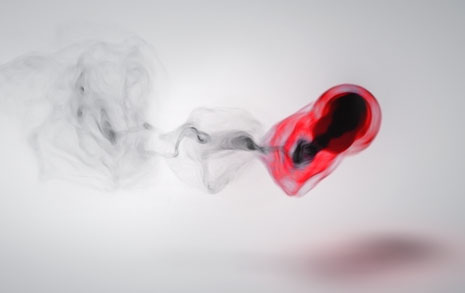
One of the many uses for a particle system plug-in like Particular is the ability ‘visualize’ music through the formation of particles. I’ve seen some amazing examples over the last few months and this is one of my experiments called Red Smoke.
Download Project (CS4 & Particular 2 required)
About this Project:
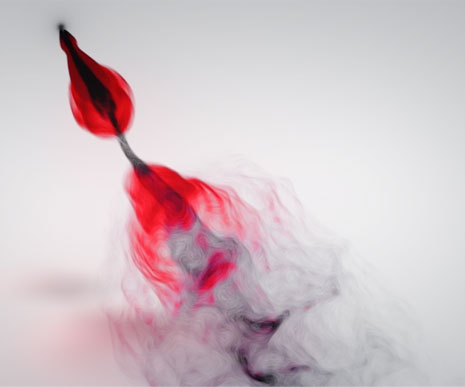
After I extracted the keyframes from the audio amplitude, with this technique, I linked the particle birth and the velocity to the sound intensity with expressions. This made the bursts of particles shoot out farther for the louder notes and tighter for quiet parts.
The original comp was actually black with colorful particles (See sample) but I wanted to create something a bit more unique so I inverted the luminance and colorized part of it so it would be more dramatic Red on Black.
To get away from the sandy look of small particles I used a vector blur set to “Perpendicular” to blend it more naturally.
There are about a 2 million particles per frame so the render took about 4 hours but I lowered the rate while working to speed things up. I also offset the final audio a few frames to match the visual since the birth causes a slight delay.
Side Note: Harry Frank did a pretty in-depth tutorial at RGTV.
If you have any questions, post them!
We're trying to encourage more thoughtful commenting. Please take a moment to write a meaningful response to this post.
Also remember to read the rules on posting first.
3D MODELS


:O very very nice
That was beautiful. Made me think of my Pie-O-My. A salut.
Andrew, what are the specs on the machine you use to do all your AE projects? I know you’ve posted the answer before, but I’ve searched the forums and FAQ and I can’t seem to find it. I’m wanting to buy/build the perfect workstation for post-production and I thought I’d take a cue from the best. Thanks!
@Daniel: I did this test on a core 2 laptop. My main workstation is a dual quad-core xeon with built-in flux capacitor.
Damn, I always wanted a flux capacitor, where the hell did you get that?!
Wow 2,000,000 particles!? I doubt my comp could handle 100,000. Looks sweet Andrew, the colors are awesome!
LOVE IT!
May have to upgrade my flux capacitor though.
LOL, just watched the video, “Sorry, camera man fell asleep”. BRILLIANT!!!
Whoa Very Very Nice Its Beautiful an unique keep up the work. Thank You For your hard work
Full tutorial please?
Btw, I actually like the black background one better.
thxxxx for the hint about worckstation andrew
Whoa that is amazing quality work!
@ David W. Your computer can “handle” as many particles as you can throw at it. Just takes a long long time to render thats all. Like Andrew said, he turns the numbers way down to work then turns them back up to render.
Fantastic job.
2 mln particles would kill my computer for sure. Today I’ve rendered out a trapcode form clip- about 4 min length. WIth motion blur AE says 18 h left. SO I passed, and turned off motion blur. Everything took me 5 hours.
Wish me good luck with further projects with that PC.
You should choose another colors, diferents to the menstruation!!! hahahaha anyway, It looks so Good
lovely work Andrew.
The shadow on the floor? Is that made with a render of the main particle comp, with blurs, etc added?
really good choice of colours on this. very original and a different look for you. i think the community would benefit from a quick tut on this even though you’ve uploaded the project file since working with that many particles can be troublesome.
Wow.. there has been a lot of reacting to sound featured lately…
Here is a video I did and released today… (there is a bunch of optical flares in it…)
The first fully accessible music video:
http://www.youtube.com/watch?v=BGRFrUFPdRk&playnext_from=TL&videos=2PmDvkdRpWo&feature=recentlik
Sorry my English is not write very well because I’m from Brazil. Would make a complete tutorial of this great effect? It can be 1, 2, 3, 4 … parties. These system particuals really was VERY GOOD. Thanks for sharing Andrew. Hugs
Stop talking about tutorial on that. You have a lot of resources @ internet and just play around.
I tried to do some vector blur like you describe on a network visualization a while ago for a very different look.
http://vimeo.com/7663373
I love that yours has that wonderful pysop ink look.
@Justin Jones not mine, if I tried to render one frame it would crash. Of course, I’m running XP, so that’s an important factor.
Totally Awesome.. the “Sorry, camera man fell asleep” was epic
!!
Wow. That’s wierd. I was just at graymachine.com last night watching that tutorial. Always good to see different takes on it though. Thanks A.K.
Will you be doing more Trapcode-related tutorials in the future? I could see a separate section for that…*wink*wink
This would be genius if it had some fire embers!
I still would love to get that project file Matthew.
Andrew, apart from the visual effect which is actually stunning, I wanted to ask you something, do you compose the music yourself ? Like this one or the Pro scores music, because I saw your name in Payment Plan’s credits in the music, and because of the Piano that’s behind you in the Payment Plan blog show.
If you do compose the music, then you are my hero.
Seriously.
No, I don’t compose the music, I mix and do sound design, I do create some stuff but usually not for broadcast. This track is by Bob Aci.
Andrew, I plan to buy CS4 soon and I want to make the best investments, so other than Particular what third party plugins would be essential for the best After Effects experience?
what a beautiful amazing animation .
What is the name of the song that is playing? Excellent work too my man!
Interesting. Would like to do something where you have a track for every instrument(Drum, Guitar, Vocals, etc.) and do individual partical system for every music track.
That Was Magical
Happy Canada Day Andrew and the most awesome Video Copilot Crew!!!
My new hero O.O
Oooh a flux capictor in your computer!? That is awesome…. Now all you need is some plutonium, and a Delorean. Then we can go to the year 2015 and see how funnier you got…
the track is my favorite lullaby song
Bob Acri – Sleep Away
Amazing! Awesome job Andrew!
Andrew, I don’t know if you have answered this question before but I haven’t had any luck in searching prior forums. But I was curious as to what title font was used for Super 8?
2,000,000 ?
I don’t think my PC can handle that. Can I get away with fewer but bigger particles (Cloud-lets for example?
H” Great work, and the idea is as simple as difficult (for me at lest) I not expert on these things but I think that the red colour looks so ugly it’s too strong for the eyes I’m not sure if that right but It’s going to make you boring after 2 or 3 seconds I know it’s just a sample although it should be perfect( I have no I idea what I’m talking about!!! I’m just an amateur) for the song it’s nice but there is some kind of noisie layer that I didn’t like
anyway very very Great job ANDREW we DO love you man, and we wait always something new and creative THANKS it’s only what I got to say.
i open the project in my AE cs5. All things in black , all disappear … its my pc can not afford huge amount of particles?
hi andrew..can you do a video about the workstation you use?please…..?
So Andrew, you dream about what the future holds for story telling in visual arts?
What changes will we see in the next 10 to 20 years if the last 20 years have changed so drastically. What computer power and display methods will be around the corner.
Can only dream…..
Hey Andrew,
Thanks for sharing. How did you achieve the look of the “seamless” backdrop? John Dickinson posted a piece some time ago by Esteban Diácono which had the same effect and I just can’t seem to replicate inside after effects.
Is there a shadow catcher layer that particular projects the shadow onto? Would love to hear how you approached that!
Have a great 4th!
I love this kind of work immensely. It is proof as to what kind of work load one may through at AE
it was drop tears my eyes because of laughing. Cameraman falls a sleep. lol. I like that wit.
It must nice to work with you.
Omg..so awesome…Kramer I love you : )
How did you achieve that sandy look on the one with black background?
Hey Andrew ! I wanted to thank you for all your job, you’re an amazing man with beautifull idea and you share with everyone ! Thank you a lot for all you did =). This video is amazing, the particular system you made is awesome, fluide, poetic and offcourse with your funny humour ! ^^ I’m sorry, i’m french, and like all french, i dont write/speak/think english very well. I hope you can read my comment and… have a good day
Oh yes, this will give people a lot of inspiration!
thanks man!
plockroy
Looks nice
Did you only use CG-particles with a vector blur filter, or is there smokeelements from Action E. II?
Wow this sample video could actually be played on the iPhone where im using twitter!
It looks great Andrew!
fire that goddamn cameraman!!!
btw this is beautifull
Heard this song somewhere…Win 7 Sample Music “Sleep Away”
My god its amazing explendide
Show de Bola ( portuguess)
Arrazou veio..
Amazing sir ji…
Wow amazing.
I saw that tutorial by Harry Frank and I thought the first half was quite good, but when he started adding water and the stars it began to look a bit tacky..
Could you please do a tutorial on this as well?
some of my creations
http://www.vimeo.com/user2183189/videos
oh yeah, nice Andrew …. as always
How did you made the shadows? Just for change…Ecellent work
Hold on.. why didn’t i think of that.. I should have used a light as an emitter, instead of all that expressions, parenting for linking different particlar systems, making my file complex..
Thanks AK
what is flux capacitor
? is there something we can put in our pcs called flux capacitor… other than the one from the movie?
Thats so funny !! I just watched this on red giant software minutes before you posted it!!
Great anyhow,
I’m interested if you can loop this type of animation seamlessly because I have a loop that i would like to put this animation onto…
hi Mr. Andrew
i like the work very much it’s really remarkable
i love you
Love your work. This comp is beautiful.
What I’m having trouble with is mapping the amplitude to the particles/sec. I’m trying to reverse engineer the expression you used in the project file, but no matter how I adjust the values, my particles/sec stays at zero the entire time. Is there a quick explanation for this? Or do I have to wait for another exciting tutorial?
Thanks!
Bob Acri… <3
Great vidéo.
Greatings from France.
Hi Andrew,
This is Very amazing & beautiful.I seen ur all tutorials on videocopilot.net.i made Glass Orb, Volcano,(But Not as u made from ur tutorials, Now im working on Green Smoke.
Thanks for ur guidance & same will need in future also.
THanks & Regards,
Devinder Sidhu,
Bathinda, Punjab
India-151001
+91-988309385
Thanks.
You have done so many awesome examples that encourage and guide me to do lots of experimental and interesting outputs in AE.
waiting for your up-coming fabulous experiments.
Thanks again…..
Nice! “Sleep Away” by Bob Acri, love the tune!
hey~~
AK
i did try some blur effects
and i personally ” bilateral blur ” is the best
Why when I try to open the project it told me that is missing Optical flare effect???
Regards
Love your work and love how you teach:)
full tutorial please!
thanks!
Very cool, smooth result and great music !
Check this, not as nice as particles, but it’s live !
–> http://soytuaire.labuat.com/
Great Video! Great particle! Congratulations!
I would lile a tutorial for integrate 3d max camera and after effects camera
Thanks!
Hey Andrew
do you think you could explain how this here works?
http://www.trapcode.com/journal/2010/7/2/terminator-salvation-by-imaginary-forces-jeremy-cox.html
This is so amazing
VERY BEAUTIFUL!
Stunning! I had a similar attempt with particular and sound. I linked the particle velocity, position, and emitter amount to the sound element. I also used vector blur in variation with overlapping compositions to achieve the illusion of a very HOT flame.
Here is the result of my exploration. http://www.vimeo.com/11852442
Render-time: 5.1 hours OUCH!
Nice work Andrew.
That this intelligible to them in our Gzashth Thank you
Any possibility doing a CS3 version. Looks wonderful
Seriously, this was magical. I don’t have CS4, is it possible to put out a CS3 version on the blog to download? Anyways. I’ve been looking for such a smoke – like effect for a while now, and I wondered if you could make a tutorial? Please.
Can you make a tutorial on how to do this? I tried but had a very hard time making it look that good.
PS: Your tutorials rock
would you please to make a tutorials about Particle Animation to Music… because you can explain very clear how it makes…if you have time , could you make one ? Thank you so much..
Hi, this is great!
is it possible to have a tutorial for this? I have CS3 and I couldn’t open the file, so just a quick tutorial should be cool
thanks
I’d also appreciate if you’d make a whole tutorial for that. I am a real beginner in AE and I just don’t get it…
Although great work. Love it
Very nice effect and I was able to follow your tutorial without any difficulty. I do though have a question about generating sound keys. As a student I just cant afford Trpcode Soundkeys …but I find this method very limiting (and not always accurate). Is there a way, like in sound keys to isolate parts? ie Piano etc?
Great site wonderful tutorials.
Mark
PS I have to try moving back the frames a bit, maybe that will help align it better.
my version of after effects (cs5) wont do audio, it wont do it period. is it because i have it on a mac or what is wrong with it? I really need audio and i am only a beginner at after effects right now
This truly is a piece of art. It is extremely beautiful and I am glad you chose the white background with the black and red particles instead of the other one. Also, have you ever thought of producing commercials for Apple, because when the bit where it said sorry came up, I seriously thought it was going to say Apple iPod.
As always, great stuff. Could you please consider this to be a full tutorial on the future?!
Looks like Sam was at the camera again…
I made something similar here … gratz for the great tutorials http://vimeo.com/14282568
Hello Andrew. Just thanking you for another jaw-dropping effect that you created. Now I was wondering, couldn’t there be a way to turn this into a Windows Media Player plug-in? I’m tired of those cheap effects. Anyway, well done again; you got me hooked.
Hello Andrew. A question about the expression linked to the Particular layers. I know it takes data from the slider. But you din’t just pickwhipped it to the slider. You defined a variable named R and added the that ‘linear’ command. Does it has something to do with keyframe interpolation, or continuous interpolation between keys? And the data inside the parenthesis, i guess it establishes a range of values but I’m totally lost with the R part in that command. I noticed R is what links the expression from the slider. What is exactly the function R doing and why it’s in that position in the array? Thanks for your time.
Forget it Andrew, (about my last question) i figured it out, thanks anyway!
For CS5 Users:
1. Convert Your Audio to Keyframes in “Particles” Composition;
2. Change Top layer in “Particles” Composition from Add to Screen
3. Paste Audio track to “Output look” Composition
4. Tune Mask and Adjustments
BTW: Motion At Black background can make if render Scene from “Particles” Composition.
PS: Strange but Render at CS5 Darker Than in Tour Movie.
Thanks for nice Self_Edu Experiment
Andrew,
How is the shaddow/reflection created?
Thanks!
Forget that… I just saw =)
Any luck on getting out a CS3 version of this file please & thank you
Hey, Andrew!
I’ve got a question, I did the music visualization comp like you did with 2 minutes long. but when I wanted to export it like *.mov file the After Effects cs4 saves the comp to 14 Gb video file.
So could you please tell me the optimal settings for exporting the comp to *.mov file, so to have it with nice quality and acceptable size.
thanks a lot.
Any luck on getting out a CS3 version of this file please & thank you
Hey Andrew,
I was messing around with some settings and my particles/sec maxed out at 1,000,000
When you said you had a couple million did you stack particular layers?
Thanks dude. Would love to see your file. – you CS3file
Hey Andrew,
i tried this but m not getting d waves effect properly, so can u suggest something…
i’ll b really glad n thankful to u if u do so…!!!
Can you make a tutorial out of it?
I don’t get it really how to make something beautiful
Thank you
Congrats by this excellent effect, it’s a beautiful use of a particular. I think tha this video could be in the tutorial section. Thanks for all Andy and again congrats
Great job Andrew, please full tutorial, your are the best explaining step by step
Congratulations
First of all, this was great, awesome, you’re my hero
I only got one question, do you already have a tutorial which uses the same particular effect because I really want to know ow to make it smokey, like a whisp. I watched the Red Giant tutorial but they don’t make it like you had it, I tried some settings but I get only dark clouds now…
This was just beautifull, thnx!
hi Andrew. I’m Muzhafar from Malaysia and I’ve been watch and learn AE from all of your tutorial and I’ve been learn it around a month now. Nice work from a pro.. I really enjoy watching your tutorial and I’ve learn so much from you.
Andrew, can you do some tutorial on how did you make the particular move like in the video and how & what kind of effects that you use??
First, thanks for all the great tutorials. Truly inspiring.
This looks soooooo interesting but unfortunately the links for just this 1 tut seem to be dead. Any fix would be great – I’d really like to download!
Awesome work dude…..
Wish i could do something like that…..
Maybe you should take a look at this.
http://www.youtube.com/watch?v=7c4WYzr30B0
Done in 3D studio with FumeFX and Krakatoa
Andrew, could you PLEASE make a tutorial on this smoke? I know I speak for many of your fans when I say that it would have been amazing.
Greetings from Norway!
great tutorial, I will try to migrate this to my music and see how it works out. If people need music for projects like this let me know. I can send you the music in exchange for the video reacting to it.
Could you put up a tutorial or tell me if there is one?
Hello,
I’m very interest in this, but it seems that I am not able to link a music file to the particle movement??
Any way you can explain more detailed?
Hello again,
i’ve read the tutorial out there, but I can’t seem to know where to put the music file in your project so it works??
That thing is absolutely awesome!
Hey Andrew
this is awesome. Could you (or someone else) make a tutorial of thise? I tryed it on my own but had problems to link velocity and so on….
I guess many people would be happy
Please make a tutorial on this one… i tried to duplicate it, but didnt get so lucky :/
Hi Andrew and everyone at video copilot, hope all is well. Is there a project file for this awesome animation, it would really help me with my current project. Thanks for the tips over the years.