Andrew Kramer on June 25th, 2010 1:03 pm
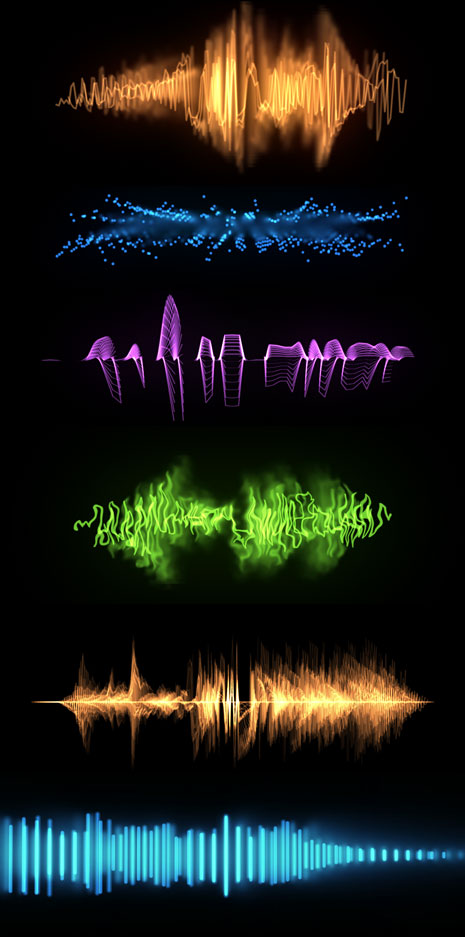
Using the Audio Waveform plug-in I’ve built several comps with interesting looks, including many with 3D space. I linked some of the waveform settings to a control layer to offset multiple copies. You can swap out your own audio and make changes to the control layer.
If you want to make some more serious changes, delete all of the copies except for one. Then make changes to the settings and then duplicate it a dozen times or so.
Most of the concepts used to offset multiple copies can be found in this tutorial. You can also extract keyframes from audio with this animation tutorial. And, if you are new to audio in After Effects check this blog post too.
94 RESPONSES TO "AUDIO WAVEFORMS IN AE"
POST A COMMENT!
Before Posting
We're trying to encourage more thoughtful commenting. Please take a moment to write a meaningful response to this post.
Also remember to read the rules on posting first.
We're trying to encourage more thoughtful commenting. Please take a moment to write a meaningful response to this post.
Also remember to read the rules on posting first.
3D MODELS


Thank you!
This is great,
These are sweet. Many thanks!
I’ll keep this in mind. Thanks!
Nice Andrew thanks
much thanks for sharing! it just the thing i was wondering about few days ago!
Awesome! i was thinking about doing this a couple of days ago!
great for tv commercials…
coooooooo one THANKS ANDREW
Greetigs From Egypt
Hey Andrew cant wait to try this out,
Rich
I’ve used this technique a few times to good effect so it’s excellent to see how you approach it and, as usual, you’ve now got my imagination going! And by that, I don’t mean that I’m fantasising about you or Sam as that would be both terrifying and nauseating. Ha!
Hey, whatever happened to the surround sound plug-in thingy? :S
Andrew, as usual, you just plain rock brutha…. way freakin cool… By the way… I’m somewhat of a drummer as well.
Peace.
Cooler than winamp! woot!!!!
Great! thank you, Andrew!
mmmm, it also may be morphed into some text appearing during the dynamic musical animation, I believe.
Andrew Kramer – Awesome Komps!
The first post came literally, ONE minuet after Andrew post this up, Thats just ridiculous, more followers than Justin Beaver!
This is so awesome. To bad you can’t make it live.
Is there a way to manipulate the audio waves to make shapes and spell words in after effects. I would use particular and form together. Or what i have to something more advanced like MEL//python in maya with splines?
That was just so totally awesome, I love it.
AWESOME! Thanks Andrew, I’m going to use the basis of these in a few projects.
thanks alooot andrewwwwwww
WOOOW ,, Very Cool Andrey >>.. Love It
i love it… plus the music is in russian lol… respect
lol nvm i was playing music while watching your video and it perfectly matched… but nice job and thanks for the project.
Nice movie? Andrey Love it? God Bless
awesome andrew, makes awesome creative, good stuff. once again you proved.
Thanks Andrew, Will be using this one
Andrew this is just awesome…
…thanks
We Love you Andrew !!
nice but i think it was like too..aggressive…it just gave me that feeling..i think id like i more if the movements were a bit more fluent or sth.
wonder how long it will take some TV show to use this in one of their commercials…
Wow Awsome I like That
this tutorial is great but is there anyway we can make it closer to the iron man jarvis voice animation? its a simple line wen there is no audio and wen jarvis starts to speak … the line is animated like a sine wave moving up and down
Cool! Many thanks Mr. Kramer. Cheers.
Mr. Kramer Power!
thanks for your energy and to share with us your talent.
Sorry by my english… I live in Brazil!
go Brazil!!!!
See you.
Thank you so much Andrew!!! I was waiting for this type of tutorial!!!
Pretty coo, thanks! : )
Thank u U are Great…………..
Awesome! Thanks for the project file!
as always inspiring great work.thanks a thousand times and over
This reminds me of when I first learned to wrap my mind around animations based on sound keys. An old tutorial from Aharon Rabinowitz got me started down that path. Though You defiantly have a skill for putting a new spin on things I’ve known about for some time.
Hi Andrew,
with German AE can´t open this file correctly
“cant find Color control”
“Slider exxpression deactivate”
iam sorry
ahah thnxx Andrew Kramer…perfect like in all others tuts and Project Files
Kosovo
thank you andrew
Stunning work, Whats new
Merci Thanks شكرا ありがとうございます Teşekkürler धन्यवाद Gracias Спасибо ^^
very cool !
thanks andrew
Mr Andrew..YOU ROCK!!!
I just got ran over by time. I’m still using CS3!
hi iam from afghanistan
a have very match projects and concept for you
we have production in KABUL we have very projects
in here
tnx videovopilot.net
and tnx Mr andrew you are king of VFX
we are using your projects in afghanistan
tnx
obaid popalzai KABUL
Thank you alot andrew
you’re the best
greetings from EGYPT …
There are alot of interesting looks – I wonder how you did the microvibrations in some of these… Gotta check out the file..
Hey! cool thanks!
Another awesome sci-fi short!
http://vimeo.com/8768676
Check it out!
They maybe used Optical Flares in some parts:)
That’s cool. I like the last 2 waveforms best. I also use Trapcode Form when I need a bit more tweaking on my waveforms like these.
Thanks for sharing this Andrew.
Thinking along the same lines of Andrew’s previous posts about ‘focus rack’ and ‘still animation’, using actual sound to distort / morph / animate virtual effects is interesting. Think of:
- laser beams / shots / electricity (ambient sfx)
- an open flame (fire / burning sfx)
- dust / smoke (wind ambient sfx)
- etc.
If the sfx loops, it might be possible to create looping visual effects very easily (with simple constraints).
Keep it up and regards.
Thanks Andrew , I’ll Be using This One
I too, name the files: **** Awesome XD
Or you cold go to winamp and record AVS or Milkdrop with Fraps… xD
oh my gawd thanku verry much!!!
Hey The Green One Looks Like The One They Use In The Mw2 Intro With The Waves! It’s Perfect For The Montage Im Making
Greeting’s From Germany!
-Josh
This is really great. Simple and NICE! I have read that post in Afghanistan people use project files from videocopilot.net and just want to say here in Bulgaria we have a few televisions witch use not just the project files but in some cases they doesn’t touched a thing in it.And in almost every single commercial or video clip is used Action Essentials 2 or Evolution.
great idea, i’ve been loking for something about making theses form and, & i found it finaly.
l
tnx my far friend andrew.
walid from morocco.
Man… I love you
Amazing!
Hey, a swiss broadcaster called RSI uses many of your tutorials, like this, smoke trails, etc.
Also the music packages and optical flares!!!
You’re awesome Andrew!
I don’t really work with audio in AE, but i think this will be useful.
Thanks Andrew
-Niklāvs from Latvia
thanks andrew
greetings from munich
gr8 post dude, i was looking for some stuff like this…….
You NEVER fail at blowing my mind away…hats off
Hi, Andrew. First, my english sucks, sorry.
Thanks you very very much for all stuff. (its correct? I dont now jeje)
Whenever, thank you again.
Please tell us about Advanced Color Correction tips. Some like favorites movies or series colors. Like “Film Magic Pro”.
Sorry for my english again and Thaks a lot for your help!
Thanks Andrew for these beauties!
Hey ANdrew I know this is kinda random on this forum but i feel the need 2 say it. You gotta se the movie Wanted. Such and AK movie lol.
The German vision of After Effects cs5 has some Problems.
oh yeah amazing i need it right now on my work, i love you Andrew!!!!
speacial thanks andrew you are in paradise inchalah
andrew sir..thanks you and you rock…but this time…Sam Loya is better cause im still using cs3…
that looks like windows media player
great work andrew
thanks , greet India
great work andrew
thanks , greeting from India
Hey Andrew,
thx again. But could you add a version without duplicated comps? Clicking through every error-message in EVERY LAYER takes agonizing minutes, just to open the files.
You probably already know, but to be complete. I get the errormessages using a german version of AE.
Thank Andrew first time ran you into After Effects
not work for mac
hi , dont work on french version
, tuto for make ? or maybe someone got a tips for tfiw that ? same problem like the germanfan !
thanks, very cool .could you make a video about Turblence 2D of AE?
Would it be possible to turn one of the waveform comps into an inverted mask? So that the edges of the video will be black an animate in sync to the music. If so, how will I be able to do that???
really nice, but 1 question though
i downloaded this for my vids at youtube, cuz i’m a hardstyle producer
now, my songs are like 4 – 5 minutes long, how do you get it to be that long ? when i input the song, the waves go like really slow & only half the vid, & the vid’s like 30 seconds long, so that sucks
1 other thing, in what format do you i have the make the finished ( if i maybe will once get a good one that works
) to get it to be under a vid in youtube ?
thanks,
x
you could search for the BIGGEST noob in the world, if you find him, come get me & i’ll proof you i’m still a noob compared to him
Andrew, thank u very very mu4! May saccess attend you, dear TEACHER!
Thank you Andrew!
It’s just what I’ve been looking for!!
Hello.
My name’s Pouria.
This is a best project for after effects.
Iran
Thanks From DOMINICAN REPUBLIC!!!
You so Awesome!!!/’(>_<)'\
I too am having trouble understanding how to get my own music files into this template. I have tried everything to get the time to be the length of my audio but it always results in only 30 secs of duration. I am not super experienced with AE but was able to build two other waveforms using other tutorials that turned out nice but not as good as some of these examples so any help would be appreciated.
Examples:
http://youtu.be/S2QP4EO4Ir0
http://youtu.be/-Z9OlVQ5UUk
This is going to seem like a really stupid question I bet – but here it is:
How do I change the direction of where a waveform starts? For example on Comp 14 it comes in from the right and runs across the screen to the left. I would like it to be the opposite? I feel like it’s something very easy but I can’t find it anywhere!!!
Hi guys
Where’s the Project File gone?
The one time I need it for reference and it’s gone!
Would appreciate a link to the CS4 file if anyone can help
Thanks
these are fantastic!