Andrew Kramer on April 27th, 2010 1:42 pm
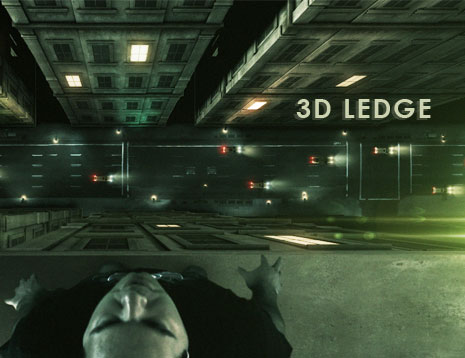
In this exciting new tutorial we will be keying, tracking, roto-scoping, exporting, integrating, color correcting and a lot more. This 47 minutes tutorial starts out in After Effects and covers generating the 3D building in 3D Max & Cinema 4D. No match-moving or 3D tracking required everything is done with the 2D tracker in AE. I’ve even included the 3D building for everyone to use.
You can even skip the 3D programs and build a sweet building in After Effects alone with the 3D City Tutorial.
Watch behind the Scenes Blog Show
Plug-Promotion:
You can even add some of your own lens flares with our 3D Lens Flare Plug-in Optical Flares!
161 RESPONSES TO "NEW TUTORIAL: 3D LEDGE"
POST A COMMENT!
Before Posting
We're trying to encourage more thoughtful commenting. Please take a moment to write a meaningful response to this post.
Also remember to read the rules on posting first.
We're trying to encourage more thoughtful commenting. Please take a moment to write a meaningful response to this post.
Also remember to read the rules on posting first.
3D MODELS


awsome! i was waiting for something like this!
I’ve been waiting for this!! Thanks Andrew! You rule!!
Ha Ha Ha A. Kramer God Bless
Looks interesting. Thanks for including C4D techniques in there!
Good work! Awesome!
Nice TUTORIAL!!!
Now I will fake my death and make millions. jk great job andrew.
Watching this thing now… looks promising!!
Can I come visit you this fall?
ohhhh yeahhhh really cool
Muy bueno. Gracias
Very nice, I’ve been wondering when the next tutorial would be coming out, haha, thanks Andrew.
opss…, be carefull Andrew with our SAN lol
yeah ! 13
i like !
oh yeah! been waiting for this one!
good job!!!
Nice finally its here..
Yah! I was really waiting for this one, thanks!
AND we also get another awesome performance by Mr. Loya. breathtaking!
HOLY SHIT! increible! we like this tutorial
amazing tutorial
long time u dont use 3d max,the tutorials with 3d max are the best
plz make more tutoriales with 3d max and ae
Hi Cameron Lee.. from UK too !
YEAHH!! Ive been waiting for this looks amazing!
YEAH!
Bring it on Andrew! You rock!
Hmm. Interesting.
A wide variety of techniques employed as i see.
This gives me a great idea for a short
Thanks Andrew!
Brilliant as always Andrew, and so appreciated! I’ve one question, and it concerns the relative sizes of everything you have created and used in 3-d space. I’m wondering the conclusions you have arrived at for the size of the building in 3-d; is that a relative real world size building in 3dsmax, and if so, why would one work in this way, and how that relates to where you place the street(car level) in after effects? Basically I suppose, I’m wondering how you deal with scale when it comes to compositing and creating 3-d objects, with reference also to your recent FRINGE balconty shot.
Cheers
Sean
We did something likes this for a movie (check my website)
I got a lot better results for this with some tracking points. A great guy (Eric Alba, http://24liespersecond.com) a genius in visual effects has some free tracking marks
go to
http://24liespersecond.com/#134754/VFX-Kit-gallery
and print them, he has some instructions on how to do it on black or green. I hope this helps.
“FINALMENTE” ANOTHER TUTORIAL !!!!!
WOW !! THANK YOUUUUUUU ANDREWWWWWWWWWWWW
I knew you were up to some great stuff to share with us as generous as you are. I just made this opening of the Forta Award 2010 that was used today and I used Optical Flares.
http://www.vimeo.com/11074227
@vidvillain, Hey Sean, Great question and point. The truth is, for this scene I did not pay much attention and I just winged without much consideration. I building is not really based on a real building so one thing to consider is the window size, another idea is to use a real image as reference. There are definitely some Scale issues in this shot but you should be able to make it look good if you plan your stuff out with a little creative direction.
Great, art always wins over technicalities, thats why I gave up engineering for this lark!
Thanks for this…. 3 posts in the past 2 days
Andrew Kramer, you are officially a legend
From the uk
That’s looking great
!
I was just wondering, are you guys working on a new plugin called ‘Dragon’?
Sounds exciting..!
Awesome tutorial. What’s the Dragon Plugin???
What’s the Dragon Plugin???
Wow, super cool result Andrew, Hope my PC can handle the project. WHAT IS DRAGON!? A new plugin? Or is it a joke?
Mr. Andrew Kramer, the internet is an awesome piece of technology but without people like you to put brilliant content on it like these tutorials – it would be nothing. You absolutely ROCK hardcore!
Great Tutorial!
May I suggest: Stewart’s Root Beer works great during the “water break” portion & What’s VC DRAGON?!!
Thanks for the knowledge and great blog posts. Truly inspiring.
Off to create a city now. Back in two weeks…
Amazing tutorial! Looking forward to more amazing ones.
Love the tutorial, but when i comes to the 3d, i find it hard. I try to use blender, which you do touch on sometimes, but I don’t understand it. The tutorials i found are not that great, so i was wondering if you or anyone could help.
That’s was a great tutorial! Thanks!
Where is Loya’s imdb page?
Wow! That look’s amazing!
Excellent! Love it!
More Blender please, if you could.
man it’s so great…
i dont belever.
it’s true reality
Excellent work, as usual Andrew. This tut was hilarious — hopefully Sam is having fun too (much love to you Sam)!
Hi Andrew.. I cant open the tutorial on the mobile site yet? It doesnt show up there only on the normal website.
loved it. so good. ae3d is so useful too.
thanks.
Video cuts out at about twenty five minutes. brilliant tutorial but you seem to be having some technical difficulties :/
How do you download the script? i went to the link and i cant download it,any ideas how
curious as to what the dragon plug in is….
anyways, great tutorial!
after the copy and past of the position to the anchor point ,i bring the concret texture and put it at the bottom it looks transparent on top of sams comp why is that happening its driving me nutts.
wow 47 min this is a nice tutorials ^^
Tutorial good.
Thanks:)
the longer the better it gets
very thanks and good….
excellent job, thx a lot! great tut as always.
just a thought, windows looks way too big at the bottom of the buildings compared to cars size.
Thank you very much Andrew!! for this Awesome tutorial…
Great VFX tutorial, I needed this
great andrew was waiting for this tut since a long time ……………
thanks andrew
A great tutorial!
Thank you for this
Andrew you definitly rule man (hope the spelling is right xD)
Ive been looking for a tutorial like this
thnx
Andrewww YOU MY HEROOO
Wow! Awesome! Thanks man.
Goody goody goody. Will watch right now. Peace out bros.
awesome ! Thanks !
Great tut man………….wonderfull.
Thank you very much Andrew.
awesome. Thanks!
great tut! big thx…
but what about lightwave example ?
)))
Who Can give me the ae 3d Export Script
I can not get it on webset
The tuts I’ve been waiting for.. Thnks Andrew
Btw this is my version..
http://www.youtube.com/watch?v=jPj-Ak6l9r0
hey
sam’s wearing a video copilot t-shirt:))
hey andrew:(
i can’t download the video copilot presets
That tutorial treats only things that are also treated in the other tutorials (except Cinema 4D) and the final result is not so good, It seems that Sam is there not because he wants to suicide, but because he must go to the bathroom!(really)
Why don’t simply put Sam on a real skycraper? We want to sse him jumping! muhahahaha! ok, i’m a little bit crazy, but that tutorial isn’t exciting. That’s not the Andrew Kramer i discovered two years ago, that’s not the Andrew Kramer that made me good at aftereffects!
Come on, you can do better!
He is Andrew, and he is Awesome
great job! big thx
I’m not sure if anyone one else had seen this but, what is that VCP Dragon plugin? Just wondering
hahaha yes the Dragon Plugin. Very funny. I hope they release the 64-bit compatible ‘Super Dragon’ that will have a grenade launcher Secondary fire
nice one Mr Andrew i was waiting for somthing like this ur r great
thanks Andrew…:)
Yah! I was really waiting for this one, thanks!
I love Anderw
I am Edris Mohammadi From Iran,Sanandaj.
Very nice, thank’s Andrew. Don’t silent, what the plag-in Dragon?
hi nadrew , iam verey ned tutorial ( boujou )
thanks very much
ilove you andrew and Cast
Did anyone else notice AK’s Video Copilot Plugin folder had a plugin called “Dragon” in it?!?
what a great job andrew … keep up the good work
really loved this tutorial ..
Hey Andrew,
good work! Everything here is a good work!
I did it in blender and yes, there are some scripts!
Bye
Greetings from Germany (or so …
)
Hey Lukas! What script did you find, can you post a link to it? I’m sure it would help others as well.
Best,
AK
Always a fun watch, but my favorite part was the dragon preset.
DRAGON?!
Haven’t watched the tut yet, but the sample vid was awesome. Would’ve been perfect if you had Sam jump though…. BTW, bought AE720p, Pro Scores and the Sound FX pack. Worth every penny.
Oh my god! Andrew speak with me ;P
Just a Joke <:)
Here is the link.
http://www.sharecg.com/v/32616/Script/Export-After-Effects-Camera-To-Blender
Hi!
Awesome tutorial! just wondering, can you do some tutorials about how to moddeling objects? like cars, and buildings and stuff. would have been real nice to make some objects custom too. =)
Anyways, fantastic tutorials, as always!
Cheers.
The building file does not open in blender any ideas why?
We need a solution for this matter cuase its confusing the hell out of me, i click on this link
AE3D Script for Maya, 3D Max
and all i get is text now i know andrew is runing it for 3dmax can you include it in the download file and how to get it to work if thats not tooo much of a trouble sir boss god master andrew the rock kramer:)
i think this is the last tutorial in AE CS4
very good tutorial, also enjoyed the behind the scenes!
Excellent Tutorial – a pleasure to watch and learn. Thanks VCP, once again1 I just was wondering that the ambient occlusion in Max has a different name. I always thought ao is ao in every app…
“Five dollars… plus two dollars…”
It’s looks well enough , it’s too useful .
Thank you kindly – Very good stuff;
Also!
in Lost In Space (1998) the scene where they’re being pulled into the suns gravitational pull, having to switch into light-speed-overdrive is another terrific example of Virtual Cinematography~
X37V
14:25 use Content-Aware Fill with CS5. I’m surprised you didn’t just wait a month to do that.
The part where Andrew created the shadow around 35:54 with a subtraction and add mask kind of confused me. The part where he added the two masks to the black solid, Why do you need two masks instead of just making one to represent the shadow?
Thanks Andrew! Definitely some great tips I can use for work. Tell Sam that he rocks
Very cool effect
nice! very cool!
Pardon me for asking lord Kramer, but when you goes to add Optical Flares at 44:15, a plugin called “Dragon” is clearly visible (along with quickmatte, which at this point i’ve given up on ever seeing)
Andrew! Whats with all the plugins that we don’t know about?!
Thanks for some more free knowledge, Andrew.
Lot’s of plugs for Optical Flares in this one… Hopefully sales are going well.
Anyone who has not got it should get it NOW. I gave my Knoll Light Factory license to my financially broke friend and did not look back. I am so stoked on Optical Flares, it is very artistic and enjoyable to use.
Combustion? Lol, nice. Had to laugh because I use Toxik, which might be even more obscure then Combustion… anyway… Cool tutorial, though. I found your application of turning a 2D track into 3D really interesting, I’ll have to try that out.
Out of curiosity, do you do any node based compositing? I find it far more easy and effective than AE, and was just curious what you think of it. I’m always amazed at what you can do with after effects! Cheers.
Create Best Tutorial…..!!!
Yeah….. I Like You Andrew.
Great Stuff. “In the future” it seems that the car lights illuminate the buildings. How was this done? Keep up the good work.
hey andrew,
i am mehrdad amini and i from iran
i need your plugin for after effect cs4
and i can not order from iran
???????????????????????????????
now
what i do?
when i downloaded the tutorial i didnt get the builing wall
Nihice! I bet I`ll get to use it in my new website! http://hadselvgs.com/martin ! I love motion graphics, prints, special vfx and filming!
Very nice and helpfull tutorial. I like those one which get deeper into it. You have to think for yourself and be a bit creative on you own way. I hate those people who build a tutorial 1:1 and post “their” result on an other website and say: “Hey, look what cool things I can do with After Effects!!1″.
A tutorial that shows you new things how you can work with the program and don´t give you a step by step manual are good tutorials. And this one is definitly one of those! Keep on that way Kramer!
Greetings from Germany.
Remarkable tutorial – the web makes so much possible now. Exciting times for the creative community.
BB
Cool tutorial. Thanks!
For making buildings in 3ds Max, check this:
http://forums.cgsociety.org/showthread.php?p=6489736
“Building Generator! This is a tool for 3d Studio Max which generates procedural building objects based on a list of user-controlled settings.”
Worth checking out if you’re into architectural visuals.
Great tutorial!
i love these 3d tutorials like the crater video!
i didn’t think that you can do it in a simple way like this when i watched the first sample vid.
asome stuff.
will the next tutorial be Sam actually jumping ?:P
Master Kramer, We have a problem and need your help!
The AE3d Exporter link on the site you use dosent work- just lots of text coming up….??????!?!?!
Thank you for another GREAT tut!!!
You are and will always be The Master!
Andrew Kramer is taking the After Effect to the next level. I can’t imagine it was possible. I can’t believe it. I do now
Nice tut…
Also Optical flares are (as you americans like to say) Awesome…the more i get into this package the more I love it…very involved and well thought out features
would love to see the last set of tutorials(65-) put onto a DVD though..
thanks mate
Indeed a very nice and useful tutorial…help me a lot…
keep up the good work andrew…..
thumbs up for u!!!
No comment…
awesome!!!
Awesome tutorial!
btw guys, After Effects CS5 trial is finally released!!!!
check out adobe’s site!
hey there
Love the TUT, just a question to those of you using C4D, when you imported the track from AE, did it come in on a totally different plane, so instead of the camera running over the roofs edge, it ran up the wall, plus the distance it travels is was far.
I’m new to C4D.
AWESOME STUFF ANDREW!! GREETING FROM LAREDO,TX! My Names Armando Gomez and I work for a local tv station and do commericals, can u do a news intro? PLZZ
GREAT WORK ANDREW!! greetings from Laredo,TX my names armando gomez and i work for a local tv station and do commericals wanted to ask if u could do a news intro tutorial PLZZZZ me and the others guys would be thankful!!
Hey Andrew If I may can I ask wot camera do u use 2 shoot with?? or wot type of camera would give u that professional cine look
Andrew i love this tutorial, i really want to get into motion tracking as living and i want to get a camera to start.
What would u recomend me? my bucket is only 1.500 dollars
I have a HV30 but i couldnt get nice results and i have readed that is not a good camera for tracking because of the rolling shutter / CMOS .
I have been reading that i need a ccd sensor camera, do u know something about this one?
http://www.masoportunidades.com.ar/aviso/3597186-panasonic-hdc-hs9-3ccd-high-definition-disco-duro-de-60gb
Thanks in advice.
nice….iwas one of the 1st persons who have see it
this great. can I study with you.
I cant seem to bring the building level into 3ds max…Any help?
This may have already been said….but check out Tyson Ibele’s building generator. It’s very comprehensive for this sort of thing.
Hey Andrew and people from videoCopilot.
Thanks for includion C4D in this tutorial, we where working on a simmilar video like yours, but we ran into some problems, but your tutorial all cleared it for me.
This is own version http://www.youtube.com/watch?v=SLNYcr42QrI
For added the “on the edge” filmed part in to the C4D Render, I worked the other way around with the camera export. What I did…I added a NULL in C4D and added is in the render data for AE, so that I could attach both the hanging guy video…and the street/cars to this NULL. so once the camara moved…all would stay in place.
Anyway,
Thanks for this great tutorial, and keep up the amazing work.
Regards,
Denny
wonderfull man very nice
Please do a tut with the roto brush!
HEY ANDREW…. HELLO FROM MEXICO. DID YOU KNOW THE SOFTWARE “MAYA”. CAN YOU DO SOME TUTORIALS ABOUT THIS PROGRAM BECAUSE I AM A GRATE FAN OF YOUR SITE “VIDEO COPILOT” AND I WANT TO LEARN SOME 3D ANIMATION. I ALMOUST UNDERSTAND AFTER EFFECTS THANKS TO YOU. AND I HAVE THE POSSIBILITY TO PLAY WITH MAYA. SO PLEASE HELP ME OR RECOMMEND A NICE PAGE FOR BEGINER TUTORIALS, THANK YOU
great tutorial, although the building on the left is on the middle of the street
could you do a typography tutorial?
When will “SERIES TWO” Tutorial DVD be made available?
Great Tutorial!
Great Tutorial!
Honestly, I never thought th@s the way it’s. you’ve opened new horizones in my mind. you are the man. Thanks Andrew!
To make buildings, even cities in blender check out these links:
1. http://jerome.le.chat.free.fr/index.php/en/download/blender/city-engine-download.html.
2. http://arnaud.ile.nc/sce/
More of the 3d tutorial please
Is not easy this tutorial. I must learn more of cinema 4d before! Anyway… that’s very cool, as usual!
Fiquei com medo só de ver o “sample”. rsrs. Vou mergulhar nesse tuto agora! Você é um animal!!!
Muito obrigado.
he andrew, I was wondering could I use a trackingmethod like boujou like you used in the meteor tutorial. to create a 3d camera in 3ds max. Because I dont have a cameracrane and I would like to pan around the actor before I show the edge. Hope you understand my question
Andrew,
Thanks to your tutorial, I finally feel like I’m understanding the concepts of 3D camera moves and basic tracking principles. I used to avoid these elements like maths at school!
I don’t have the space to build a dolly, so I’m going to stand on a chair taped to a pair of skateboards to duplicate this shot. The guy that I’m filming will wear a crash helmet for the first few takes.
Just kidding.
Cheers from the UK!
Hi Andrew, I liked the tutorial. Also wanted to mention that there is a cool and helpful free Maya Script for creating buildings: KludgeCity version 0.1.7
http://www.whetstonevfx.com/tools/EdW_KludgeCity.zip
There’s also information about it in CGTuts+:
http://cg.tutsplus.com/freebies/software-tools/kludge-city-01-7-maya-script/
this is perfect Andrew
Good Bye From KOSOVO
Article super, though I have not got to do everything as you had to improvise a bit )))
Another top tutorial, although, it’s becoming increasingly difficult — employing differing browers, differing RealPlayer plugins etc. — to download tuts for future (offline) reference.
Shame.
Darren.
woow!!! coool tutorial thax..
this is my Color world project
software:c4d r11.5,AECS2,PsCS2
http://vimeo.com/11376586
thanksssssssss..the best ever us usual
Nice! Cant wait : D In the meantime, check out http://hadselvgs.com/martin for inspiration!
Amazing Tutorial !!
thank’s allot Andrew Kramer for this Amazing Tutorial
Really great tutorial ! Love it !
One question comes to me… Can this be used in a lateral movement? I mean not on the top of the actor’s head but from his profil to him facing the camera, or another camera plan…
Thanks,
Guillaume from France
Hey great tutorial!!! but have you ever heard of Max2AE from boomerlabs.com?? solves that AE comp issue that us max users have been so jealous of C4D users of. It uses the script too but its more effective. check it out.
Hey What you guys think about this Video and Sp you Andrew Kramer!
http://www.youtube.com/watch?v=koMSi3sizRI
really interesting n useful man… great job…
just saw the new Eminem Video “Not Afraid” and the scene at the roof reminds looks exactly like the one you guys did.
Props on that one
Look the begining of the Clip Of not Afraid by Eminem (http://www.youtube.com/watch?v=j5-yKhDd64s&ob=av2e) that’s pretty nice response to this.
hey bro,
cud u plz hlp me out of this ae3d export prob.whnevr i m tring to excut its shwing the line 1. syntex error
or plz send me the script which is tested.
thankx
The film “LIMITLESS” used this technique, frame by frame as it seemed. Very cool and very effective visual effect.
Hey Andrew,
I am having some difficulty with getting the correct textures, did u upload all of the resources files?
or can you at least point me to where you got all of the files such as the roof cement, the building walls
oh btw fyi jg2s Nice work bro!