|
VIDEO COPILOT BLOG News, Updates, Projects Files & Tips |
|
Posted at 7:29 pm on February 16th, 2010 by Andrew Kramer
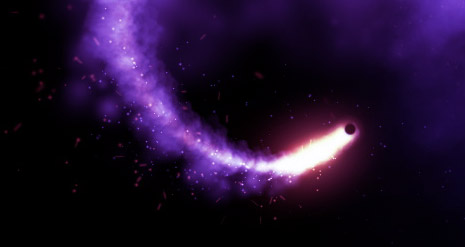
What’s up! Anyone notice how sad particles look when they are played against slow piano music? Well here is a test I did using CC Particle World linked to a 3D NULL! I used several copies featuring different settings to serve as the smoke particles and the light debris. I think CC Particle World has great potential to create amazing particles but it may take a little more work when compared to Particular.
Another cool tip: Once I completed the particle animation, I put the comp in a new comp and slowed it down 200% so the particle movement is slower and also more depressing in a happy good way!
Now close your eyes… and imagine what it would like with some Optical Flares!
177 RESPONSES TO "Sad Particles…"
Post a Comment!
Before Posting
We're trying to encourage more thoughtful commenting. Please take a moment to write a meaningful response to this post.
Also remember to read the rules on posting first.
We're trying to encourage more thoughtful commenting. Please take a moment to write a meaningful response to this post.
Also remember to read the rules on posting first.


Nice project, thx andrew
Cool, Thanks for the vid
Thanks for this project! Interesting
Wow, that really does look amazing, it’s hard to believe you did it all using Particle World…
I like the quick zoom in on the particles, it looked really nice
Thanks for the project
Wow that looks great you truly are amazing thanks for the project and nice music
Wow, that’s cool. So beautiful and creative.
gotta love particle world
Thanks! Looks amazing. But I was really looking forward to playing to the sad music in the project, hah
Gracias por el proyecto, realmente interesante! saludos!
great project, thanks for sharing it.
Awesome! I cried…. Where is the music from? xxxx
Agreed.. but particle world was a godsend when I didn’t have particular….will be buying flares shortly…..its hard getting people to pay their invoices sometimes, yet when you owe them money they want it yesterday
That was simply.. Amazing.
I watched the sample about 5 times. It was just so peaceful to me. I will definetly download this project, maybe make a screensaver for my computer.
Also, I am glad you didn’t use Particular so that I am able to accomplish this.
Now i think your just taunting me for not having enough for optical flares =[
You did all this is CC Particle World?
Amazing!
Quite astonishing! Great music choice too. Tears came to my eyes. j/k, but I was close.
Awesome as always!
By the way, for those who didn’t notice, you can watch the video with the sad music just by clicking the image at the top of the post…
i thought it was still a little fast for sad particles but it was really neat to watch and cool project file
It is a joy to watch your creativity, always looking forward to the next tid-bit you throw out to us..lol
nice vid for a snowy night, thanks for the project..
Good stuff!!! sniff sniff
It’s amazing I was just working on a test with linking cam to emitter just for fun , was taking a break and here I saw you doing the same . I’ll post my test in a bit
and if you can help me remember how to link far and near vanish to cam I forgot which tutorial you went over this in, is it just picwhip or expression needed ?
this really cool andrew. . it’s been a very long time since
i post a comment. . i’ve been busy studying the Optical Flares. . Thanks for that awesome job creating that plug in. . With your words. . Now, I imagine what the CC Particle world looks like with the Optical flares. . ^^
AMAZING AND USEABLE!
That looks Cool! And thanks for making the project file in CS3!
No problem Dustin, sometimes I forget and use CS4 but I was careful!
Today my daughter turns 3, I’m happy, and this video gave me the peace he needed to finish the day. Thanks Andrew. From Argentina
music does make it look cooler lol
just made one with alicia keys – love is my disease in the back.
enjoy
http://www.youtube.com/watch?v=NTQ1shdeG2U
That is really good. Incredible lighting/shading, use of 3d space and color too.
Very cool, thanks for sharing man. Did you get my e-mail by chance?
Andrew,
STOP CRYING and get back to making the next tutorial.
BTW optical Flares 11 out of ten
Optical Flares is like my guitar amp it goes to 11, thats one more then 10!
Nice. I think it was moving to fast in my opinion to be sad… but the camera moves were amazing.
Hey AK,
Longtime watcher and amateur at AE, but could you give us more tips and tricks at camera movement? I have seen your Advanced Camera tutorial, but a few things are missing in that tutorial that make this specific composition look really organic. I think I noticed in the zoom that the focus lagged behind the zoom, so, in clearer terms, it seemed as if it was an actual camera operator zooming THEN focusing. Maybe it was just motion blur, idk, but I would love to see what other tips and tricks I have been unaware of.
Thanks, Good work nice. thanks for using CS3 Although I’m upgrading to CS4 Today.
So I added an optical flare to the light.
Love the way it moves larger and smaller and flickers.
I just did a quick test – looks cool with optical flares – quick everyone try it
Nice ,
Thanks For New Project !
I love U
Just Anderw
I Am Edris Mohammadi from Iran/Sanandaj
Thank you, Andrew!
I was looking for something just like that, and this project will give me an excellent help.
And, obviously, thank you for all your amazing tutorials!
Wagner (Brazil)
That was pretty cool Andrew!
Amazing camera moves, textures, particles and deep
So creative and soothing.. Nice one and thank you for always inspiring me…
)
This is my favorite, I wish I can figure out how to do this.
http://www.vimeo.com/6045312
hello there. the shadows are not casted, they’re the same particle layer in 3d perspective, blured and masked
no, just spheres for une system and cloudets for the other.
hello. The sparkles are produced by the fantastic Trapcode Starglow
no, the new per particle shading and the new independent aux system settings made this posible. i don’t think it can be achieved with 1.5.
vimeo.com/6284199
yes, sure there are LOTS of turbulence and spherical forces applied. You should try fine-tuning the turbulence and the aux system physics.
There are two particular emitters in this vid, one for the piano part and the other for the strings.
the smoky look is created by using a HUGE amonunt of particles, and the new shading capabilities on V.2 does a beautiful volumetric job.
Also there are spherical fields and lots of tweaking at the turbulence parameters.
hm, I wouldn´t call it sad, it just looks beautiful and the music makes it even more beautiful!
Nice Work!
nice job andrew.. realy cool bro. god bless
This set to Philip Glass’ “The Kiss” from the movie, “The Hours” would be powerful and emotional.
http://www.youtube.com/watch?v=f5CUy6VDInc
So Charming!!
Thank for sharing Andrew..
Have a nice day..
Sweet!
I agree…particles can look very moody..in a good way
I think that was slow harp music. Didn’t hear any piano. Hardly matters as this project is amazing.
PLEASE PLEASE Make this a tutorial and show how you could possible tame this and steer the light to make something or write something
Very sweet man…once again thnx for sharing this with us!!
That truly is amazing. I sometimes do use CC Particle World over Particular. It is a powerful plugin, but unfortunately lacks a few key features from Particular. Anyways, that was a stunning preview, and you obviously are a master.
That looks so nice!
Thanks for sharing.
You were talking on a previous post about camera mapping.I would be happy to see another tutorial on that.
All the best!
Hmmm…
Was there some sudo motion scripts used to follow the null by camera?
thx very much Andrew
Well, this was looking very nice.
However I like your “more exploding projects” most.
But though I liked it
Very nice Andrew, thinking of it it is kind of sad =D
Hi Andrew,
)
you are the best !!!!!! I watch every your work and i love it.
Please, post the tutorial for the last ! :=)
Thank’s from ROME :=)
Byeeeeeeeeeeee
ANDREA ( ANDREW
this is so nice thanks for upload.
Wow its very cool!
Can you make a tutorial for this?
AK, Can you possibly make a tutorial on this? Thanks for sharing the project file. It looks great!
I’m guessing this is where his inspiration came from:
Olafur Arnalds – “Ljósið”
http://www.youtube.com/watch?v=mYIfiQlfaas
Absolutely beautiful. I do have a question though, for the somewhat bumpy camera motion did you use the sure target plugin with the bounce thing and rotation around the object?
NICE work, I love the different angles!
Andrew, is there any chance that you would tell us where you got the music theme from? I am considering using it in one of my projects.
Thank you
It reminds me of Wall-E. I don’t think “sad” is the word for it… more like “beautiful”.
this is awesome you are the best
thank you very much ..you r awesome
Andrew Kramer you always make simple ideas to look complex artwork. I am absolutely impressed…more thanks than ever.
I was having trouble getting the producer x,y,z to follow the NULL object in 3d space then I remember from an old tutorial of yours the wacky bit of code that ties these together on the x,y,z. What you have done in the file also basically
Bottom line is you are a clever man!
Can you supply us with any tips and references to links or books that are best for getting grips with code like this?
Thanks
Oh my! this is really sooo sad! seems like this litte guy is searching to find back home right? reminds me to nemo, this poor little clownie… can’t stop the tears… thank you, Andrew!
Paticle world is a bit more difficult to use than Particular but can produce some nice results as in your video. I find Particle Playground to be almost indecipherable. I’m inspired to try something similar with Particular with some colored AE lights positioned in 3D space and the shading parameter turned on in Particular. Got my creative juices flowing as always, thanks Andrew!
I closed my eyes like You said and couldn’t read any further!
Anyway, quality particles there!
Hey guys, this made me think of this AWESOME video. I think he uses also particular but I never could get the effect with the particles flowing to the left and to falling down.
Anyway, do yourself a favor and be inspired by this video:
http://www.vimeo.com/6045312
Paul
Awesome! Any chance you will do a tutorial on this project?
Thanks!
Looks great, although I don’t really like the music. I think this song by AIR (from 1:00) would fit better
http://www.youtube.com/watch?v=QJ4Pm0N8s78
hımmmm interesting
Great Piece! Can you detail your steps for compression to get something so crisp! Thanks
this is awesome you are the best
Great animation!
It´s so full of depth, really inspirating.
I prefer partiular, but it you showed that the same things are able with particle world, too.
You used expressions to link it to the null, right???
Maybe I should practice a bit… I don´t know much beside wiggle
Hey Andrew, it looks really nice, did you made a tutorial about this “Sad Particles”?
AK can you explain how is this clone video done? its so holy cow great:
http://www.youtube.com/watch?v=mxgPXsNN7lE&feature=fvw
thank you in advance.
I’m glad you posted this. I too have found that I can achieve the “Particular” look in some of the tutorials by doing a bit of extra work in CC Particle World, such as the Ring tutorial.
wow although …the music is my life..not sad..but i really like the song…something i would play if something sad would to happpend other than that…the cc partical is excellent …sometimes overlooked a little …most people rely on particular…i use them both …great work video copilot…OF ..is amazing glad to be apart of something great
now try it with some Queen music!
Wow thats really cute. Thx Andrew
And that video
http://www.youtube.com/watch?v=mYIfiQlfaas
Is very inspiring
i knew it!! i had a feeling to come to this website, i was right there, ooh, i will go to videocopilot, maybe there are some new cool stuffs, and i was right, yeah. that’s true, yep.
Make a tutorial!! XD
I hope AECS5 comes with a new particle generator that generates pizza slices. Not that damn frozen pizza stuff either.
andrew make a tutorial please im very interested
Very creative and nice camera movement :]
fantastic … good work Andrew .. thanks for project to CS3
It looks beautyful Andrew, think a girl would like this if you would write her name with it or something like that
wow n1ce smoke!
You did all this is CC Particle World?!?!?!?!
Great Job!
There is a way to open a CS4 project in CS3. It is posted on creative cow i think.
I totally agree that CC Particle World is capable of amazing things. I always try to use plug ins that come in After Effects and a lot of them are under estimated, even over looked.
I used Particle World the other day for a Dracula commercial, it was used to make clouds. Used the same technique to pre comp and time warp and added shine to give deep evil red colour!
With the camera, did you lock the point of focus to the emitter or manually keyframe?
this is really amazing Andrew… and your right the possibility’s are almost endless with partial world. i also was really amazed the with camera movement in the second part. that’s what captured my attention the most. it just had this innocent and smooth feeling to it. But great job
Awesome! Hey Andrew, Greetings from Arequipa-Peru
All credit goes to you again and again Andrew!
http://www.youtube.com/watch?v=LeeN1Z4VdbI
I like the music is that a score in proscores?
sad particles make me cry :’(
is there a good way to increase the workflow with a huge amount of particles, without upgrading the computer???
No need to imagine Optical Flares in it, when you can SEE Optical Flares in it!
http://www.youtube.com/watch?v=tG5YgS6Jgr0
I wish you would dump your wife, and marry me!
Wow, it does look pretty cool in slow motion. I’ll bet at 400 times slower, it would be even cooler….and yes, it did look a bit sad, but in a happy way….loved the particle environment too. Very ethereal.
Dude, your particle made me cry. Thas just so sad man, you shouldn’t do that to us VFX artists
creative and nice look, stunnning vfx as always.. thx for sharing!
ken c
Awesome!!! I love how you used a color range of purple to red – it blends it great with the BG! Only thing is… heh… the music isn’t all that sad, much. You are truly a god for After Effects!!!
I said it once, and I say it again, you’re the Einstein of after effects, dude!!!!!…..Hola from Mexico.
I’ve made plenty of sad particles. The next step is to make them B&W to really add that “Schindler’s List” sadness.
“not so good” remember that one ? .-D N1 work Andrew, i didn’t even realize potencial of particle world
Hey Andrew. That’s good looking. But the motion is a bit too much unrelated to the music
I know you know it but, the movement of the emitter is too constant in it’s speed.
I know, the point is more about the particules handling here, but you started to talk about things related on music, and so that’s just too fast & constant.
we have to use the time remap to slow down the animation or there another way?
WOW how do u come up with these great work i mean all products are simple the best i have seen.
You real need to do documentary Call the raise the greatness the VIDEO-COPILOT story.
Have you guys seen this one?
http://vimeo.com/9142476
Wow!!!
Hi cool video!! and btw i wanted to throw this video in the comments http://www.youtube.com/watch?v=aScBJvwKSqU&feature=player_embedded ;D
Did you use Sure Target for the camera move in the second part? I’m working on a scene and I’ve been looking for a way to do that kind of camera move.
Also, I just watched the latest Fringe ep.(Jacksonville) and I have a couple of questions
1.Do you make all of the words that are hovering in the episodes?
2. If so, was “Manhattan” spelled incorrectly on purpose?
(if you don’t, totally disregard my stupidity, LOL)
Awesome, Andrew. I had no idea cc particle world was capable of this.
Very.Very…very helpful.
gkaster using VCP optical flares.
Check it out http://www.vimeo.com/9542135
Andrew,
Is there any way we could get a tutorial for this?
Hey Andrew could you make a short tutorial or a short blog video about how to make the smoke element?
Hey Andrew. Great stuff as ever. This reminds me of a video for my icelandic friend Ólafur Arnalds – made with particular v2. Have you seen t?
http://www.vimeo.com/6045312
It’s great, Andrew!
Wow! I love this so much. Are you going to do a tutorial? I downloaded the project but cant seem to figure it out completely :/
IT MADE ME DIZZZY
Cheers for making the project available, its going to be interesting to see how you put it together exactly
Not many people will give away their projects and awesome tutorials for free. You are one among the greats – No matter what your wife thinks of you for spending hours in front of your comp!
Omg, so nice movements !
man u r the best
i like your work
it fantastic
ahmad from sudan-khartom
i am not impressed,
How to creat that smoke, that it follow light object or sth
thanks andrew, having thoughts on your next tut?
Here is my example of the music and how it changes the video itself
, thanks for the inspiration mr. kramer. http://www.youtube.com/watch?v=a2ylArCUYlo
@CCIDgfx
Actually for a camera move like what he used, in my Video it’s not quite as dramatic although it wasn’t meant to be, but using a combination of attaching a camera to the emitter, a small point of interest wiggle, a larger but slow camera wiggle, along with key frames from a basic starting position and a rotation to an end position, you can get very smooth random but good rotation around a specific moving point.
@Paul
There is a tutorial for attaching particular to an object (3d stroke effect), but attaching CC Particle world to the emitter I just used the pick-whip from the x/y/z coordinates onto the light emitter, also if something doesn’t look dead on where it should be (my central glow ball was not) use +/- [*,*,*] for x y z values that need to be fixed, once I got the glow ball where it needed to be (it was about 300pixels off for some reason) it stayed there and didn’t stray, so it worked well for me.
wow sad but beautiful
This just shows you that sound is half your picture,
The particles are great, but enhanced so much buy the soundtrack!
awesome work,
Derrick
oh great, i like it! but…is this really 200% slowed down?!
still looks fast! but still: nice project, thanks!
Hey Andrew, I brought this up in the forum, lots of views but no answers.. I don’t see how the smoke cloud comp is linked to anything, it’s not a custom particle cause they are all faded sphere and lens bubbles, I’ve gone over it and over it and I do see where that is being used, and now I am super confused!!! so a tutorial would be nice!!
erm do not see where that is being used .. I couldn’t edit that =/
Well, good work, but…
Not as good as the VideoCopilot ones.
I thinks that the particles are too fast for the kind of sad piano music.
Ultra slow motion particles would have a much mor dramatic look.
Hugs.
@Brandon R – I ran into that a while ago; I think it had to do with multiplying the axis it was off on by the pixel aspect ratio. Particle World works with an arbitrary 0,0,0 coordinate for center screen and so doesn’t translate nicely with non-square pixels.
simply great!!!
This question will probably get some faces, but can someone walk through (briefly) how to slow down the animation 200% as Andrew stated? I tried Timewarp, but the quality looks blah.
Thanks in advance ^_^
Très poétique.
Jolis déplacements dans l’espace.
Excellent travail sur les particules.
Le choix de la musique reste tendancieux.
Bravo pour votre travail.
Euclid.Paris.
Thanks for the project
*snif* … is so beautiful…
Tryed to download the file and it wouldn’t connect to the server to download
Beautiful!
Andrew (or anyone) is there a specific tutorial for ending a particle trail? For example, I want a 2 sec sparkle to fly up and gently land on a shelf – without the particles continuing to spit out after it has stopped.
Thanks!
Hey andrew, I was wondering, how do you record your tutorials? I know you don’t have time to do a tutorial for every question that someone has, but maybe if I knew how to record tutorials, not only would I take time to make a high quality product, but I would use your method of explaining in detail, (I’m not quite as awesome at after effects as you, but I can answer some questions with a tutorial)
@Brian
Create a new comp in the project, drag the original comp (Default is Comp 1) into the new comp. Right click the original comp > time > time stretch. Choose the amount you want to speed or slow (100% default, 50% = 2x speed, 200% = 1/2 speed). If you’re looking to do regular speed and then a speed change, also select time > enable time remapping after doing a 200% (or more depending) stretch. Example using a 5sec come. 200% stretch = 10sec comp. Put 1 keyframe at the start = 00:00:00, 2nd keyframe at 4sec 00:04:00, 3rd keyframe at the end 00:05:00. This will make the first 4 seconds at normal speed, and the last 6 seconds at 1/6th speed (1sec of animation over timeline seconds).
Please please please can you do a tutorial on this its GREAT!!!! Thanks
God bless you man,thanks for sharing your knowledge.
Watch my work with Trapcode Partikular
http://www.vimeo.com/9142476
Very good idea. Can you make a tutorial about this??
Hi Andrew,
I want to thank you for all the great stuff you’re willing to share with us all.
When i looked at this video i really was stunned… It has so much potential.. I think its GREAT!!
With a few ajustments this should be great for some underwater movements
Grzz from The Netherlands
Hey Andrew, I wondering if you could shine some light on how you did the camera move? Is it done using expression or keyframes?
Really like this one!
http://vimeo.com/9933176
Check out my new music video, with inspiration from VCP, such as Sure Target : )
PLEASE can ANYONE tell me how Andrew did this???
@djoshi: read the comments, it pretty much tells everything how its done or download the project file.
ANDREW Please make a tutorial
@Dhaval Mistery Ive read the comments and kinda understand but im knew to After effects and just need some guidance… If anyone could help or do a quick written or video tutorial that would be really helpful
i made a video inspired by this… i created the smoke particles using particular… but will be going back into AE soon to see if i cannot reproduce something similar using CC Particle world.
http://www.youtube.com/watch?v=tDQRzaR9g_o
i quite enjoyed there not being a tutorial for this one.. but can understand why some might want it.
id suggest for those that would like a tutorial for this to check out the Light Streaks (nano advert) tutorial and also the more recent smoke trails Tutorials as i’ve watched both and they give you more or less everything you need to knwo to go ahead and create this.
Really great, dude!!!
Really nice video…. i guess best one ever
wow i Really like it , goood work
Thank you for a lesson, he super!
Hi Andrew,
Amazing work – absolutely fantastic! Can you tell me how to control the producer to ‘steer’ the ‘particle thing’ (comet?). I want to be able to control it’s movement, while still getting the tail of the comet to react to the direction of the comet, and I’m not sure how to go about this.
Jonno
dude amazing work, btw you should make a tutorial on how to do this i love to learn how to : ) Thanks for the post!
Yeah that was beautiful man! You never cease to amaze/inspire me!
GAH! It was beautiful already and then you had to add the music I mean *sniff* can I get like a hug from you or sumfin! *sniff sniff* Seriously cool stuff!
dang that was pretty amazing just using CC Particle World… what’s the name of the song u added? I wanna learn that on the piano
andrew cud u tell me is there a full tutorial for this sad particles project or somthing related tutorial……………..
Wow! this is awesome. I would be pleased to know how you can make this simpler. I just want it coming out of text! Some coloured smoke….
Like in the Modern Warfare 2 trailer, when the letters appear.
Anyway, nice. Will try to decipher the file xD
This reminds me of something I did a while back…
http://vimeo.com/5334539
very sad particles.
nice NICE nice NICE video thx for the video:D
Hi,
What an amazing video/tutorial.
Does anyone know the name of the sound track used in it?
Thanks,
Paul.
It’s probably something from Video Copilot: Pro Scores… but I’d still like 2 know the name of it 2
A work of Art Master Kramer! U have a style and i love the way you put your own touch on things. U True master.
Wow, thank you by the project Andrew.