VIDEO COPILOT BLOG
News, Updates, Projects Files & Tips


TWITTER FEED

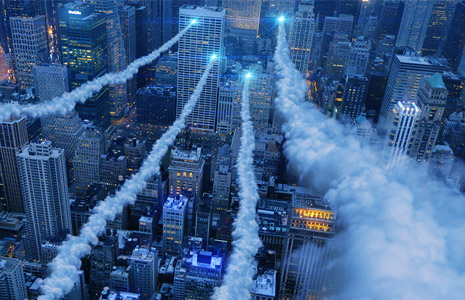
NEW TUTORIAL: Smoke Trails

smoke_trails

In this tutorial we’ll use Particular and a single smoke picture to create pretty realistic smoke trails in After Effects. As a bonus I will also be using Optical Flares to add the bright lights.

Watch Tutorial

Check out our New Plug-in: Optical Flares!

86 RESPONSES TO “NEW TUTORIAL: Smoke Trails”

Grat Tutorial continue like this :) can you send me a license for non profit use like a trial?????

Too bad I don’t have Optical Flares.. :(

Very cool, Going to watch it soon! :)

Yes!!!! Finally!

this is so sweet cant wait to dive in!!!

Sweet Andrew thanks a lot!

Hey Andrew can’t wait to see the tutorial and I actually made this video last week lol – http://www.youtube.com/watch?v=DPBeLhK9NyE

Thanks for this cool tutorial…one question…does the plugin include the rock concert tutorial and other project based ones?

Best from Uruguay

so sweet ! like it andrew ;) you rock !

@Maneco,

Yes the DvD does include tutorials and the ones that you mentioned ;)

hey Andrew, I got 2 questions:

Would Optical Flares also work with 3D Matchmoving Software like Syntheyes?
Oh…and when will the promo vid be released? :D

Greetings from Autria

hey andrew , great tutorial , thanks very much

Finally, thanks a lot! great stuff ;)

Nice. I’ve been waiting for this one!

Thanks, this looks awesome!

Such a fantastic product – It really takes home videos to the next level

SWEET~!!! Nice Tutorial 11th to post :D

Andrew, this is fantastic! I was waiting for a tutorial just like this one!!!

Great!@!!!!!!! Ans when the promo for Optical Flares will be on line?

thanks andrew .. sounds cooll.. lemme go n watch it ..

cheers

Hey Andrew, why do you like to use the transfer mode rather than the render on transparent feature? Is it a render time issue, just a work flow habit, or is there a visual difference? You’ve done it in several of the tutorials and promo material and I was hoping you’d enlighten us.

Fantastic!!! Great tutorial, but , don’t have the plugin :(

HAHA, sweet tutorial Kramer. Cheers!

So, is there EVER a situation where telling OF to render on Transparent is a better choice than changing the transfer mode to screen or add?

Looks Amazing,

Great Job.

Max.

That is amazing, I thought it was done in a 3D program (the smoke)!

Thanks Andrew great tutorial.
Türkiye…

Dang andrew! another one of ur great work . thanks a lot greetings from texas :D

I couldn’t wait for this tutorial just like Matthew Sabia and i did everything myself by just looking on the movie with usage of optical flares. I am really amazed how much i have improved thanks to You Andrew, You inspired me and showed me new way of beeing creative, I will gonna be in debt with You forever:D
Btw, it is such a pitty You don’t teach us physics in my school because You are such a good techer that i could pass every exam with no sweat:D

that smoke reminds me of the old arcade game After Burner, same technique was used on all the missiles and jet trails

Thanks AK,
for another piece of cool works of yours!

thanks, Andrew – another great tutorial, I was hoping you’d do this one… super job. Great to see how a pro does it.

Finally,new tutorial comes.I waiting for a long time.
Thank you very much Andrew.

fantastic tutorial. Thanks a lot

Dude… you guys are really good at this stuff.

I hope you’re making $#iT tons of cash.

-D

by av.rishi Tamilnadu

great great turotial andrew…. thanks

great tut as always….hope your flares are selling like hotcakes I’ve got them in the next budget for plug-ins this was an easy sell to the boss

Looks great. BTW – Absolutely LOVE Optical Flares. The absolute best plug-in I have ever purchased.

Sweet LORD……

Number One. Tut good

amazing.
what can i say that no one said before.
you are the chosen one.

YES!!! I was waiting for this one!

by Edris Mohammadi

Thank For This Tutorial!!!
I Have question:

why you don’t take my Comment on your web site?
please tell me ?

I Learn Every Thing From You.
I Am Edris mohammadi from Iran/kurdestan.

I like to see at next that VC brings out a Plug-In like Particular :-)

@Gimei… i hope so too…

A Video Copilot particular alike would be great!!!!!

so hot , hey hny Are you just working on videocopilot ?

Hey Andrew, hit the “/” button, my friend…

Another great tutorial by the way!

I was looking forward to see this one, great andrew!!!! guy’s optical flares rocks!!!!!!!!!!!!!!

thank you

oooh, i was wondering how to do that, thank you, why am i thanking? i didn’t see it yet, well, it does not matter. thanks anyway.

Cracking tutorial mr kramer always inspiring!!
Nigel

hey guys ,in my trapcode i dont have sprite nor texture in the setting any ideas why ,i cant change the cloud.

nice tutorial
“Carnivale title sequence TV DRAMA (2003)
any idea about its make off did they use after effects

by the way i have idea what about a tutorial for somthing
like Carnivale title sequence

Clancy… i think you may not be using Particular 2.0 – Do you know your version?

-D

wow!!!!thanks so much!!!!
thats what i want!!!

Waaah…..
Ini yang saya tunggu-tunggu….
Keren.
Lanjutkan.

Da5id thanks , it seems i have the old one.it realy hurts when you cant afford these things.

Andrew u use Optical Flare on Fringe?

Hi Andrew Can you make a tut on how to make those circle. square and torus and how to add optical flares to them please.

Thanks!
Jefferson

Hey Andrew nice tutorial.

you are the god in after effects

Love this tutorial Andrew!! :) You go big guy!

Thanks for this great tutorial. One of my favourite parts of the Optical Flares showreel is the part with the soda can and the two colored lights with the smoke trail. I hope there will be tutorials of those too.

I’m very glad I bought Optical Flares with the pro presets and I would recommend everyone that reads this to do the same because there are so many ways to use it which makes it a must-have.

The smoke you’re using in Particular from a picture and turn it into particals… I was wondering if you could use a transparent movieclip or 3D object of let’s say a butterfly, and have particular make it look like a random group of them flying around.

Excellent as usual. I bought optical flares for a project recently and it really is great especially when combined with effects like in this tutorial.

Thanks – Trev

nice tutorial,

by the way it’s a nice way you used Optical Flares in that cinama-commercial:
http://www.youtube.com/watch?v=FPj3UdnDmm0

greetz

Haha, ok the “Free Tutorial” joke made my day.
Thanks for this nice tut.
Didn’t know how you were getting those cool smokelets maps for the trail particles. Now I do. I feel alot better.

Anyway, keep up the kickass wor! Big fan

yeah thanks, i wait so long for this tutorial ^^

now i finished :P

wonderful animation

http://www.youtube.com/watch?v=w5EXTRZGk6Y

thanks andrew !!

Thanks. That’s great!
Maybe it’s not a time, but haven’t you think of some sort of tutorial, where a person turns to an Avatar. Like in “Demon face” tutorial. That would be interesting.
From Ukraine.

Cool !!!!! Nice one.. !!!! Nice Tips.. !!!
It’s nice to know about the different of sprite and texture poligon.. !!!

thanks Andrew :)

Nice tutorial. But would it be possible to make the smokes differently then using an expensive USD 400 plugin? Thank you

ah again excellency vid…good work andrew..!!!

nice tutorial, andrew! i hope i could get my hands on particular 2 and optical flares someday ^0^

That’s exactly what I want. Thank you.

To live a life i need heartbeat, 2 have heartbeat i need a heart, 2 have heart i need happiness, to have happiness i need a friend, and 4 a friend i need U.ALWAYS

Hey andrew thanks for this tut… awsome

by the way the shortcut to bring the zoomed out comp
i think its like hptoshop ctrl+0

thanks for your work!

please andrew can you make After Effects tutorial to
créate a réalistic twister.
thanks

you are the best

WELCOME TO THIS…..my name’s…………

by Juan Francisco

Thank you for this tutorial. Greetings from Peru!

Andrew you are the man…I just need a particular

Hi Andrew

Thanks for the ultrafast delivery to France. After just 6 Days I had received my own optical flares plugin. Optical Flares and Action Essentials bundle :-)

Now after playing and trying a little bit around,I just can recommend to everybody to buy it.It is every single Dollar worth. It produces fast and amazing results.

It was nice that you added a “How to install this plugin” as a Tutorial DVD-lesson. It made the installation very easy.(I am normally a Noob in this things)

Have a nice Weekend
Kind Regards
Robert Herrmann

Great tutorial Andrew. I had to look it up: http://en.wikipedia.org/wiki/Countershading

I can use these plugins in Final Cut Pro?

Andrew.. Please make another bundle!!

Hey andrew really awesome stuff!! hey check this video out dont know if youve seen it already, its from lakewood church in houston texas.

http://www.youtube.com/watch?v=_RJGKFTKF_8

Hey Mr. Kramer! You are bringing magic to the people and it will probably be mentiont in history books!
Be good..

Post a Comment!

Before Posting
We're trying to encourage more thoughtful commenting.  Please take a moment to write a meaningful response to this post.

Also remember to read the rules on posting first.

Leave a Comment