NEW TUTORIAL: Dynamic Bar Graphs

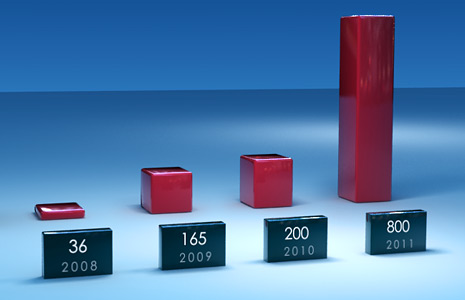
In this new tutorial we will isolate bar elements from a 3D render to build a customizable bar graph in After Effects. We will use expressions to control time-remapping and link values for the displays.

The tutorial is a cool 20 minutes for quick viewing and easy reference for when you get the call... the telegraph call... That's a telephone call about making graphs. Be ready!

Watch Tutorial

POSTED:
16 years ago
121 Comments
14 years ago
Thank you so much .
14 years ago
Hi guys!
Hi everyone... is the 3d max file avaible for download??? I want to make some modifications, like a color modification and add more bars.... Thanks!!!
Joe
15 years ago
I think a great name for this chart would be "average days between tutorials on video copilot, by year."
15 years ago
amazing tut but i have an easier way to it

///u isolate each bar and just freeze the frame when the bar has reached its destination \\\
Scooter
16 years ago
Awesome!
Can you make 3D pie charts happen too???
Rafa
16 years ago
AMAZING!!! Thank you!!
emeka samuel
16 years ago
God bless you Andrew. much love from Rigel pictures Nigeria
16 years ago
it's amazing tut
thanks
Gabriel
16 years ago
Pavan,

Thanks for the Max file! Could you share the tutorial with us?

Thanks in advance!

Oh, and thanks for the master, Mr. Kramer!
16 years ago
Are those numbers the millions at the VC??´s bank account Andrew?

In that case...You and your team really deserves it!
Great Tutorial!

Thanks!
Gustavo from BA-Argentina.
moises
16 years ago
Hello friends when you going to do a tutorial human torch?


Brazil
Brent
16 years ago
This is an awesome tutorial! What's great is that it can be used in so many ways. Thanks a million Andrew.
Carl
16 years ago
Oh my god that`s so awesome, can`t wait for the 100th tutorial!!!can you please post it in a new blog show?
16 years ago
Yo're excellent Anrew! We love youu )))))))))
pavan
16 years ago
if u cant see the plane just right click and select unhide all...........
pavan
16 years ago
So if u guys need the bar animation u can download it from here done in 3ds max 2007.........
http://www.megaupload.com/?d=88KVF3IF

if u want the tutorial just ask me....
Nick
6 years ago
Can you send me the 3dsmax project for that 3d bars graphic? The link is dead...
pavan
16 years ago
Hey Dextrmania there is a very easy method than that--------just use melt on those bars in 3ds max and make sure u cliked on custum and rise and decrease the amount and keyframe them..........
Later if u can see some black color at the bottom of the bar then just apply relax and adjest the amount till u not see the black color and thats it done.............easy...
Dextrmania
16 years ago
@bob

Just use Arch@design material in mental ray(3DS Max) and set fall off in the reflections with fresnel mode of 3.5 IOR,any diffuse color....then throw an HDR map in the environment slot...thats it.

or just car and paint material and HDR in the environment slot.

did i get that right andrew..?i bet u didnt use the scanline renderer this time..
Dextrmania
16 years ago
Looking forward to see the tutorial...not this one...the 100th!!!
If its not "nuking a city" then dont post it big man haha u'r amazing!!!
Ur man Dextrmania from Dexter's lab!!!
|SuZ|$oap
16 years ago
thx andrew! another fantastic tut! I refresh to ur blog several times a day (lol) just to see if any new vids come up even though sometimes the tuts don't have anything to do with my works/projects, I just have a great time viewing them and watching u teach.
bob
16 years ago
Andrew. I was just wondering what material you used on the bars.
Joka
16 years ago
its so cool andrew, sos un duro, aca en colombia te aprecian mucho!!!
Peđo
16 years ago
hey andrew,Im kinda new in filmmaking, and your tutorials are great, just one question...how much time did you spent working in AAE before you made all this stuff? And in your oppinion, how much time should take to 15 year old gets on your level of editing?
Bahaa
16 years ago
Yeah Archat.... Cool idea ! I hope Andrew will read your post..
Jackson S.
16 years ago
I bet for the big 100th tutorial he's going to do something super lame and boring just to bug everyone that expects something great. Like how to make a new orange solid.
Juan Antonio
16 years ago
I tried to replicate the lighting that Andrew has been used in his scene, I think I'm almost right. If you want to download:

http://www.megaupload.com/?d=0Q1Y5Y93


It is made with Cinema4D. To fit 100% play around with the lights.

Sorry for my poor English.
pavan
16 years ago
http://www.youtube.com/watch?v=yuI6cnIJF3A

I Myself did The Modelling And the Animation,The lighting,but the 2nd animation-i mean the bars moving according to the numbers is from my guru andrew kramer
Check it Out..................
16 years ago
Heyy Andrew, Really nice Tut as usual !! Thanks for this huge work !!

Greetings from Casablanca, Morocco
Archat
16 years ago
Hi Andrew,

Can you do a tutorial based on movie 2012. Building fall effect due to Earthquake.
Cassius
16 years ago
New is always beautiful.
Thank you, Andrew. Cool.
Cracchus
16 years ago
Andrew, you keep pulling em out of the hat, very impressive.

Where is the rabbit?
16 years ago
tutorial Number 100 in 2010 I believe, Cool tutorial.
Dave
16 years ago
I bet the 100th tutorial will be a crazy amazing one!!
neri
16 years ago
hi andrew,
taking this opportunity to give thanks to your video tutorials, its very useful specially to those students and non-professionals who canâ??????t afford studying like me. you dont know how helpful it is, not only to earn money, find job and add to skills, but it can also be used to spread the Words, finding it more interresting to the listeners.

thanks again for sharing your knowledge, more success to you and your companyâ???¦ keep up the good works
16 years ago
The number 100 will be EPIC.
Erick
16 years ago
yesss. great . awesome.
thanks.
Sterlin
16 years ago
Andrew, is there any chance of you showing us how you did the bar graphs in the first blog you posted regarding this tutorial?
TJ
16 years ago
Sweet. I'm going to check it out.
16 years ago
Woah ! Nice done !!
Keeping the site up-to-date is the best way to keep visitors.
Lenin
16 years ago
yessssss..! i was need this tutorial.. Thanks Andrew!!!
16 years ago
Thx for this tutorial Itâ??????s very very nice tutorial !!!
Sri Lanka
Jhon
16 years ago
Awesoem, Andrew! (As always)

By the way... 1 to 100 tutorials!! I can't believe it!
I'm really looking forward that tutorial. I'm sure it'll blow up everithing!

Cheers from Argentina.
babamaba
16 years ago
n1ce work!
I hope the next tutorial ( 100th ) will blow up our mind!
bolaji
16 years ago
it's wholesome. thanx for being my personal online teacher. i started using ae about a year ago. now i can boast of some great jobs for couple of clients. there's shortage of multimedia trainers in my country, but your site has being a world library for me. thanks for sharing.
bolaji -NIGERIA
it's that!!thanks Andrew
16 years ago
YES its finally here!!!
Matthew Park
16 years ago
Awesome, finally, it's out. Was looking forward to this tutorial. Thanks, Kramer, looking for more tutorials. Peace out, live free.
16 years ago
Excellent tutorial!!!
femola
16 years ago
Did you make this with Cinema 4d ??
illd
16 years ago
Excellent tutorial - Thanks VCP!
Would it make sense to modify the expression and use it with a full 360 degree render? So that I have a 3D render inside AE which I can choose to watch from every angle (of one axee) - every frame is a different angle. Does this make sense to anyone out there?
Nikolay Kolev
16 years ago
please share with us the complete scene and especially the materials in 3Ds max ?
Otto
16 years ago
greetings from Latvia. Thanks
BESTIA94
16 years ago
Thanks vc!

Yeahh!
Radu
16 years ago
Thank you man... I was in need for something like that.

Problem is that you move so fast that is hard for me to follow.
Great tutorials
16 years ago
think you Andrew for this tutorial,I always learn something new, this one really helped me.
Babak
16 years ago
Thx for tut. I need this 2mach.
Bertrand SIKATRICE
16 years ago
niceeeeeeeeeeeeeeeeeeeeeeeeeeeeee ANDREW
Steve
16 years ago
Great tutorial, but I was really hoping andrew would have gone into the 3d aspect of it more. I know the modeling is simple, but the lighting and shading looks really great and would have been interesting to learn.
16 years ago
Amazing tutorial Andrew!

PS. Glad you feel betting! Maybe tutorial 100 should be that passing it along to neighbors technique
Sean Daigle
16 years ago
Expressions FTW!
Gimei
16 years ago
Thx for this tutorial. Great and helpful.
16 years ago
Thanks Andrew, very nice tutorial
(T??¼rkiye)
sohail
16 years ago
wow,thanks
pakistan.
16 years ago
this tutorial good but the AE project only is save to understand the idea
Good Andrew good as as always. Keep it up!!!
Cheers
Renat
Cisco Systems
Jon
16 years ago
Good info, thanks.
I made something like this for Flash a while back.
Nice to know how to do it in AE as well.
Cheers,
Jon
dai
16 years ago
Than you Andrew!!
It's very very nice tutorial !!!
16 years ago
Andrew, I knew something was wrong! And I had (emphasis on "had")a pot full of home-made chicken soup, custom-formulated for those under the weather.
Thanks for this really nice gift just before the holidays!
Remington McElhaney
16 years ago
Awesome, thanks! Really usefull, I was wondering how you were going to control the animation, and time remapping is so simple. Lets see one of my teachers not give me an A if I turn in a graph like this.
Linus
16 years ago
looks like a dangerous predicted graph for 2011! im quite scared now!
Jaffe
16 years ago
HEY ANDREW!!!! Your cool...
16 years ago
what about 2012? lol...alright

AWESOME TUTORIAL!
XtremeAttractive
16 years ago
great tut! thanks!
Craig
16 years ago
Andrew, How about animating these bars to music showing time remapping linked to dynamic audio points. Wow!, I can't beleive I just rolled that off like it makes sense. Does it?

Great stuff!

Merry Christmas in advance.
Qw3rtium
16 years ago
We've seen 99 free tutorials full of awesomeness. Now we're just waiting for the universe to explode
Bastian
16 years ago
you had a bar graph tutorial up earlier this year.
what happened?
thought you could do better?
16 years ago
Great stuff Dude

Thanks
Mazarelly
16 years ago
I dont know. Awesome for sure.
16 years ago
Woo tut No 99. Who knows what nNo 100 will be!
Sterlin
16 years ago
I've been waiting on this tutorial for so looooong! Thank you very much sir!!!
16 years ago
Una vez m??¡s, gracias Andy!
16 years ago
Cool! I wonder why your AE project was called Giraffe2...lol
Simon Bonner
16 years ago
Any chance of error bar control? Statistics nerd ahoy!
AnthonyP
16 years ago
Thanks a ton Andrew! Hope everyone and yourself are feeling better!
ElDombre
16 years ago
Hello Andrew, it??´s time to say thanks from sweden.
Great site, great tutorials!
But, why not use .rla or .rpf sequences. The 3d channel filters working perfectly in after effects and You have a lot of more control.
(sorry for my bad english)
16 years ago
Awesome, that looks great
Wlanoli27
16 years ago
thanks andrew !
its very good but can you also make a toturial about the 3d part ?ok its easy to modell and animate these things but i the lighting and these thinks look pretty well.!
Disecto
16 years ago
I wonder what tutorial #100 is going to be?
Gareth Harrison
16 years ago
Is this for CS4 only? - not able to open the file in CS3.
zak
16 years ago
Awesome ,thanks Andrew
16 years ago
Thank you so much Andrew Very cool! you the bombâ???¦
Zin_onos
16 years ago
Whoa thanks! You should also make a 3d tut, on how to make the graphs, and how to create reflections on objects, and create an amazing scenery
16 years ago
this is some cool sh!zzle!!
16 years ago
Awesome! I can't wait to watch it!
YESSSSSSSSSSSSSSSSSSSSSSSS!!!

GOOODDDD Andrew!! EXCELENT!!

VERY VERY GOOD!

SALUDOS A TODOS EN VIDEOCOPILOT DESDE GUADALAJARA MEXICO

YEAHHHHHHHHHHHHHHHHHHHHHHHHHHHH
Titou-x
16 years ago
Hoo that's greaaat Thank you so much Andrew
16 years ago
Great tutorial Andrew, this'll be great for showing prophits, etc!

Keep it up!
Yura
16 years ago
thank you!
100 is near)
16 years ago
TUTORIAL NUMBER 99!
16 years ago
Perfect Work Cong.
16 years ago
Very cool! you the bomb...
Kevin
16 years ago
Keep them coming! almost 100 tutorials
16 years ago
YES!!! going to watch it right now and I just noticed it's the big "99"!

Can't wait to see what you have planed for the big "100"
16 years ago
Fiiiinally! #:-s
you're like glass of water in the desert...
just a little more and i could die )
Fady Anwar Egypt
16 years ago
a long time ago I need to say THAN YOU
Kevin Lee
16 years ago
Last of the double digit tutorials, thanks Andrew! Is #100 going to be astonishing?

I mean of course.. they are all astonishing, I apologize for my behavior.
we thought that your gonna come up with
the same type of bar graph tutorial that
you have just showed us before in the previous
blog. . what happened? is there a part of this
bar graph tutorial?
Andrew
16 years ago
Thank you for this very cool tutorial. However, I'm unable to open the project file because it was created in after effects cs4. You think you can save a copy in the older version of after effects for those of us who doesn't have cs4 yet? I have cs3.
Derek
16 years ago
It's weird, but I refresh this site every day just to see if a new tutorial is up so I can watch it, even if it's something I don't plan on doing myself. Just watching you work is so fun.
Aleksander
16 years ago
Total Coolio!!
I really like the way the reflection follows with the animation! Awesome!!
Some Guy
16 years ago
Yay! New tutorial. Thanks Andrew!
Epy
16 years ago
Yay!! been waiting for this tut quite a while now Great tutorial as always!! Keep up the good work
saqi
16 years ago
Very good very grateful to the!
Spencer
16 years ago
As I'm watching this, my mind is being blown. This is such a great idea, why did I never think of this?

Props.
T.M.
16 years ago
Thanks for this cool tut
16 years ago
I knew 2011 would be a good year! I just don't know what for... ...yet...
Mani
16 years ago
Thanks Andrew ... Great tutorial !
Spencer
16 years ago
Awesome. Really good for clients that want you to do business oriented things so they don't have to use a power point slide.
Grubson
16 years ago
THX cool tut ;]
Pro & Me
16 years ago
Thanks Andrew !!!!
ShoeToad
16 years ago
YEEEEEEEESSSSSSSSSS!!!!! ^^