VIDEO COPILOT BLOG
News, Updates, Projects Files & Tips


Ab-Normal Particles

Here is a fun example that uses Normality on a pre-composed particle system emitting a custom texture.  I used Trapcode Particular because the Depth of Field option blends the Normals unique coloring together, for a more liquid concoction.

Watch Sample Video (720p HD)
High Quality Pic
(see the real colors…)

You can download the blob-element as part of the project files for the latest Normality Tutorial.
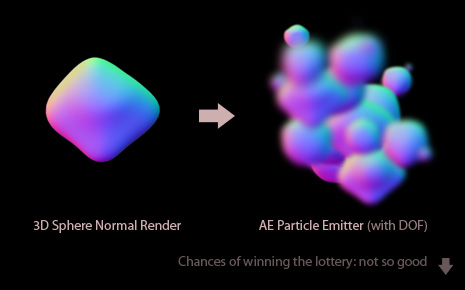
One of the interesting benefits of using a normal pass element as a particle (instead a pre-rendered one with shading and reflections), is the viscous coupling generated by the depth of field.  The other benefit is happening is the random movement of the highlights in the glob.  Even the reflections have variable coverage, which adds to the feel of the scene.

Normality is  a 3D re-lighting tool for After Effects which introduces some interesting opportunities when used with other techniques like particle systems.  I’ve also had some fun tests using CC Mr. Mercury but they were a little bit flat looking so I used multiple copies with variable settings. Of course, experimentation is the key to discovery!

Stay curious my friends…

For more information on this free plug-in Normality:
Watch latest tutorial & read our Normals Guide

Using Custom Particles in AE:
Watch Medical Zoom Tutorial or the recent Particle Explosion Tutorial!

82 RESPONSES TO “Ab-Normal Particles”

by Asllan ismaili

Woww so cool..!

by Rainier Markmann

Very very cool.. i like it…

really didnt think of using a particle system for it…GREAT

Andrew need ur comment here :

Why u wanna mess up with normality when u can render it in passes in ur 3d application.

is this any better than maltaannon’s youvilizer preset

need a little tip on it Kramer…?

AWESOME

very nice i like your use of particles

@dextrmania: youevelizer is used for completely different things than normal passes, as he mentioned in his last blog post. UV passes and normal passes are different.

as for the particles, that was a really cool idea to utilize the DOF before the normal pass… woulda never come up with it myself. thanks for the update!

Feed me more my creativity.

it’s amazing, fun and free knowledge!

i’m very very happy with those tutorials, i don’t have experience with 3d programs but I’m gonna learn. I swear.

Cool, Thnx :)

@monroe
thanx for ur tip there they r totally different ya.I was reading Gnomon’s Multiple passes in 3ds max and i happen not to find out the need to reEdit ur normal passes as though. there r plenty of ways u can blend about DOF with normal passes but this out kindaa looks better…but not professional indeed…thanx for the tip man!!
Kramer…thats not the right name for u man…maybe “Scott Farrar…”

Oh….sob :-(
I wanted to win the lottery ! :-)

Thank you Andrew for the tutorial and the useful stuff,
you’re the best!

Greetings

Hi Andrew its a Cool Info dude

now thats a beauty!

Thanks A..K.

by Matthew Sabia

Thanks keep up the great work

by the way “experimentation is the key to discovery!” I like that ;)

by Matthew Sabia

@Prodat TV
what 3D program do you have of any?

Andrew u r totally sick about After effects…man i wonder how much time u spend on a computer (that means on after effects to u).I will never forget u,never.

Greetings from Eritrea.

by James Twyman

Hey Dextrmania
In answer to your question about messing up a render. This plug in is in no way a replacement for a multiple pass render. These can still be useful, especially if you are creating an entirely 3D effect. I.E making a CG film or creating 3D art work.
What Normallity achieves is the ability for you to make the lighting in you after effects comp and any 3D imagery you have composited on top completely congruent. Theres nothing worse then getting your lighting looking the same, only to want to change it all. So you have to change the lights in after effects, go back to the 3D software, change the lighting there to make it fit, render again and then import it back into after effects. With this plug in its all doable right inside of after effects and speeds up the production process.
Plus, lets say you have a picture of a car you want to animate, using this plug in can help you gain realism by allowing it to react with lights.
Basically, this is another useful tool that will help you create better art, and its free so if you download it and never use it you’ve not lost anything.
hope that helps.
Thanks Andrew for finding this for us, I’m gonna have so much fun with it

boring stuff

Amazing tip Andrew Kramer, like always.

BTW: Here in Portugal (EUROPE) Arnold Schwarzenegger is in all TV channels… LA on fire… :)

by SkyFall Productions

You’re really liking Normality eh? ;)

For good reason too, so powerful, and so useful!

by Godfrey Meyer

sweet man.. gooberiffic

awesome work AK I hope you will do more “normal” animations :D

First laugh of the day “Chances of winning the lottery…” so random, so real, so funny.

Lot of good stuff lately. Too much for me to internalize.

Rock on!

Hey Andrew! Haven’t watched your newest tutorial yet but I will!
Anyways you amazing as always!

Hey Andrew Kramer , what’ up! Greeting from Greece! I want to tell you tha evertything you’ve done is just amazing. Just one idea…. how about if you combine 3d light casting with a still frame and a normal map in order to create a super realistic 3d space lighting emmiter ? If you try something like that post it on the blog to see the results. thank you.

Really nice Andrew, a little quick though!!!

NOT SO GOOD!…

…Nah, i was kidding, totaly awesome, just hoping you´ll show my commentary on the next tutorial, hahahaha.

Ha ha, Awesome! :)

Sweet!

Awesome Andrew! Thanks for the tip!

And the quote of the year iiiiisssss:

“Feeding creativity with knowledge”

lol’ed @ “Chances of winning the lottery: not so good”. Eventhough it isn’t a good joke, you still get a smile on your face. ;)

You love Normality now don’t you? :p

AWESOME ANDREW

first off thx, im always doing this because your always turning us on to cool shikiasjfo. Thx to Stefan as well.

TOTALLY OFF SUBJECT AND PROBABLY UNCALLED FOR BUT WHAT EVER HAPPENED TO THOSE T-SHRITS ANDREW?

sorry, i had to ask.

Whats kind of blur effect you have there?
Or its some kind of camera settings?

Thanks for response..

Im really impressed by the solution with the Particle emitter.

Do i smell a short cut Tutorial 95a ?

@Tobiasz

It’s called Depth of field.

Chances of winning the lottery: not so good :(
I’ll have to keep trying…

Really awesome!!!!Thanks a lot Sir Andrew and The Video Copilot Team!!!!Pretty cool!!!

How do you get the cool hexagonal simulated aperature reflections from the lens blur to be so prominent? I can never get those to show up that clearly and I love the effect.

Winston, did you watch the particle explosion tutorial?

Ab-Normal? That is so bad…

congratulations andrew, a good idea to remove the middle constant in this program is very interesting to do, easier than they are in programs like 3dmax but also can be done in this program, prove ‘re

I must be the only one that caught the Dos Equis commercial reference at the end of that post. Funny stuff Andrew.

andrew, querialhe ask if you can make a tutorial on how to make the universal logo!

i love you very much…
your voice is very nice…
i like it!

Graphist, you sure have changed your opinion quite a bit. :-)

Normality is seriously one of the better plugins I’ve seen for After Effects. It makes my brain hurt thinking of the number of uses for it, the ways it can enhance effects I’ve done in the past, combining it with some of the tutorials on this site for interesting results. Truly great.

I must say, you are delving deep outside the boundaries of the Matrix.

Andrew you just give and you give and you give, Really excellent stuff, so creative!

I’ve seen all the Andrew’s tutorials. Now I’m advancing to the Aharon Rabinowitz Tutorials who (I have to say) is a great friend of Andrew because It’s always mention the Andrew Kramer work and products…

Hi Andrew,
great stuff once again. Any chance of sharing the project file for the ‘knowledge’ clip?

2 Orbs…? I mean Blobs…

Andrew

How did you do the blob effects particles??

As an utter noob, I’m miles away from wrapping my cramped little noggin around the normals (though I will be down loading the plug-in, thankyouverymuch). Heck, I just got my copy of Twitch and I’m busily making every bit of footage I have flash, shudder and split colours. I also ordered my copies of Evolution and Riot Gear so now I run down to the mailbox hourly, just in case the post snuck them in while I was busy Twitching things. Thanks Andrew, for all of your brilliant effort and ideas. You’re a real inspiration.

Hallo.
Mr. Kramer could you create a tutorial with these organic things. I think this is a right step in the future.

Rock on!

I didn´t understand the “chances of winning the lotery: not so good” though. LOL

Cool idea to blur the normal maps! Makes the particles stick together like they have surface tension. Looks like liquid metal!
Maybe you could enhance that effect by having a soft-edge alpha on each particle? Give it a try! ;)

It’s called an info-graph, I added some info.

Eric, the info to create this example is all right there…

It’s Mr. Water Drop… and his extended family…

Hey Andrew the top picture in the post would make a realy nice banner for the site ;)

Hey Matt, I thought so too, maybe I’ll have to open up the ‘ol photoshop…

CooooL

Could you post the AEP file for this project please.

Thanks
and Regards

Hard refresh CTRL+F5 to see the new header… tough fit but nice change of colors.

I like the subtitle 8-)

What does “Moshun” means?
Sorry I ain’t english…

oh, I got it, motion : Moshun :D

Hi Andrew, that’s a very nice and professional intro. I always wonder how you create those lens flare in the product page and also in this design? Thanks

by Jory Federighi

this normality stuff is soo AWESOME!
however i only have AE6.5
so im feelin’ a lil left out, any chance we’ll be taking at least a tiny break from it any time soon? i know it’s helping out the majority of people out there, but for the minority that is myself, this would be appreciated, thanks andrew!

Ha Ha Andrew, the banner looks great ;)

by Seth Johnson

Andrew if you know that water blob started our LA fires you need to tell someone.

Ha HA, love the new header. awesome awesome looking design Andrew, ( the particle video i mean), one of the best i’ve seen here on VC. Love your creative thinking.

Great~!

GJ Andrew!!!!! Rock On!!

Andrew, what is your computer specification
you use in your tutorials?
just wondering :]

Nevo.

Man this with normal maps is give me a completely new look to the compositing, I’m generalist(ae and 3D) and now I think that 3D is going to use only for some models and 3D animation, shading now can be done completely in ae.
This will speed up a things alot…
I think that people are still not aware how big this discovery is… but let them find out…

Great tutorial, and I’m glad that you shared with us.

Cheers

Wow, I never had a clue people were so confused about normal maps.
It’s really no different than a bump map, only exception is that the color information provides more detailed information for the light.

how to be cool like u
you so so so cool
u are a Super tutorial man
i love your tutorial
and your way to make it
i want like u
are you have a secret in your life make you the best of the best
u freak me out
Andrew Kramer we love u ………… :D

Maaaan…
Instead of giving us knowledge…
would you mind to give us some mind ^^
mine is not working anymore

i hope he’ll speak about this comment in his next video…
maybe is because i’m not expert in english and he understands better all these settings in those plugins

Greetings from Greece!!!
Come come!! we have an amazing city (Thessaloniki) and let me eat a bit of your mind @)

dear andrew:
can u help me to make a text with particle?please

Post a Comment!

Before Posting
We're trying to encourage more thoughtful commenting.  Please take a moment to write a meaningful response to this post.

Also remember to read the rules on posting first.

Leave a Comment