VIDEO COPILOT BLOG
News, Updates, Projects Files & Tips
Start the Montage

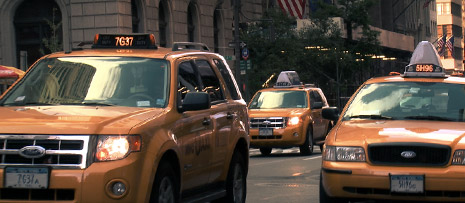
As promised here are some shots from my trip to NYC. The weather was great all day on Saturday and so was dinner.  I shot everything with the Sony EX-1 on a tripod as well as some hand-held stuff.  I used Premiere CS4, even though it would hang during editing and crash occasionally.  I’m sure they will work it out. Please?

Back on subject, the clip contains a variety of shots, as well as some tracking shots taken from the back of a bycylce carriage. Now I just need to intercut some cops and a district attorney then add some 80′s music and I could have a hit TV show. Then I could stop all of the crime.

Watch Video

Still Image to see Detail

284 RESPONSES TO "Start the Montage"
^DURLI^
July 20th, 2009 @ 10:17 pm

COOOL !

HughJass
July 20th, 2009 @ 10:21 pm

Hey im here right when you posted it!

Anton
July 20th, 2009 @ 10:22 pm

Looks great!

no1uno5
July 20th, 2009 @ 10:23 pm

Wow, you really captured NY. Nice job =)

3DPRAY
July 20th, 2009 @ 10:23 pm

AWESOME MAN! KEEP GOING!

July 20th, 2009 @ 10:23 pm

Wow! The shots you took are really amazing, and the camera quality is gorgeous. I wish i had a camera like yours

tankman37
July 20th, 2009 @ 10:27 pm

New York ,New York….so good they put it in a Videocopilot video (oh ,and named it twice )

July 20th, 2009 @ 10:29 pm

Hey Andrew,

I’ve never had any issues with CS4 crashing with XDCAM EX footage on my Mac or PC. I’ve always found it to be extremely stable. Might be something else interfering. Send me a shout if you need any help.

Cheers,
Ralph

JT
July 20th, 2009 @ 10:29 pm

AWESOME AWESOME AWESOME!!! That camera films SO clearly. Awesome shots! oh, did I mention awesome?? :o )

Ryan
July 20th, 2009 @ 10:30 pm

Hell yea I cant wait to see some visual effects Micheal Bay style with some awesome Action Essentials 2 tutorials.

July 20th, 2009 @ 10:30 pm

Yo Ralph, It seems to be pretty common problem. Some people don’t see it but many more are just stuck.

noddy
July 20th, 2009 @ 10:30 pm

puuuurrrdddyyy…

July 20th, 2009 @ 10:32 pm

very beautiful. do you always edit with Premiere?

flo
July 20th, 2009 @ 10:34 pm

Kooooool :)

Ajax
July 20th, 2009 @ 10:36 pm

Wow, nice footage and was amazed with the clarity and as always nice work.

July 20th, 2009 @ 10:39 pm

Andrew,

Ugh, that sucks. Guess I’ll count myself one of the lucky ones then. Hope you get it figured out. I love the color range the EX1 offers. One of my favorite sub-$10,000 cameras I’ve ever worked with.

Cheers,
Ralph

Qw3rtium
July 20th, 2009 @ 10:39 pm

Looks haw-some!

LSL
July 20th, 2009 @ 10:40 pm

shots looks clean!!! I gotta save my money to purchase that camera.

Mike D
July 20th, 2009 @ 10:44 pm

I find just about all my Adobe CS4 apps crash at some point. I find Premiere rather unstable.

As for the footage, I’m in australia so I’m still waiting for it to download on my dodgy 500kb conection.
:( The still frame looks nice… I’ll just keep staring at that till the download completes later tonight..

perry blunt
July 20th, 2009 @ 10:46 pm

DO you see any difference with the look of your footage when edited in final cut pro vs Adobe premier? cause I do, I don’t know if its the pull down thing with the Panasonic p2.It looks better in Final cut than premiere.help please

Alby Smith
July 20th, 2009 @ 10:46 pm

cool stuff AK…
really inspiring, I wish to go there sometime.

Thanks AK, you’re the best!

perry blunt
July 20th, 2009 @ 10:48 pm

Andrew your photographic skill are nice did you a a special effect lens filter on the camera for the star light effect and did u color corrected the footage?.looks awesome.

July 20th, 2009 @ 10:56 pm

Just color corrected it, no star filters. Maybe a touch of Twitch. There isn’t a difference in video quality from premiere vs final cut.

Peter
July 20th, 2009 @ 11:00 pm

No Way, if you slow the footage down you see a guy snatching some lady’s purse… i kid i kid.

Good work on those shots, very artistic. Now to add some action essentials to it :)

David
July 20th, 2009 @ 11:01 pm

Excelente trabajo, really good, that means its a good camera!!! thanks for sharing…

Matt
July 20th, 2009 @ 11:03 pm

Wow, that’s some decent quality! Nice one.

July 20th, 2009 @ 11:08 pm

wouldnt be nice if andrew made a section on the website for downloadble footage ,like free stock footage for those who cant fly and own nice cameras ,to be able to use the magic of the videocopilot products . loved the buildings.

However
July 20th, 2009 @ 11:12 pm

LOL andrew you link to the most random stuff :D and dude i have the same problem with not just Premiere CS4 but After Effects CS4 AND Photoshop CS4..

Hope adobe can fix this stuff…thanks

July 20th, 2009 @ 11:15 pm

My PS and AE are fine… Premiere CS4 works well too, just not with XDCAM stuff.

However
July 20th, 2009 @ 11:17 pm

Oh, man than its probably my problem. Everytime i load a 2k file to AE cs4 it crashes. I have 8 gigs of ram!!

LMC
July 20th, 2009 @ 11:23 pm

Great picture quality, I wish I could afford that cam:(

Soul
July 20th, 2009 @ 11:27 pm

MEAN!!! AWESOME AK.

Pavan
July 20th, 2009 @ 11:30 pm

Dude Nice Video Man Even I Have Done One Like That And it Did Come Like This One So You Use Premiere But I Use Final Cut Pro I Mean Final Cut Studio Whatz The Differece Between Premiere N FCP?

July 20th, 2009 @ 11:34 pm

COOOOOOOOOOOOOOOOOOOOOOOOOOOOOOOOOOOOOOOL!

July 20th, 2009 @ 11:36 pm

I too own an EX1, but I haven’t had any major problems with Premiere CS4. At least, not any more than usual. But I agree with people that it isn’t the most stable piece of software.

July 20th, 2009 @ 11:42 pm

Looks good nice shots.

July 20th, 2009 @ 11:51 pm

Hey Andrew,

I know u said u color corrected the shots… is it possible to post a couple of before and after stills???

no worries if its too much trouble

Thanx

BigApple
July 21st, 2009 @ 12:18 am

nyc baby!

July 21st, 2009 @ 12:39 am

Nice footage Andrew
So will u be shooting some naked ladies for us or teach us how to make 3d one in 3ds max…Kididng:)

greg
July 21st, 2009 @ 12:43 am

CMOS sensor… There is rolling shutter distortion in your shots visible. Tracking that will be a pain.

Justin
July 21st, 2009 @ 12:43 am

Man those images are incredible! That camera is amazing, but 7.8 thousand! Wow, amazing images though, definetly worth the cash if you’ve got it :) Congrats Andrew

July 21st, 2009 @ 12:47 am

As Justin said, great quality!
A little better than my hv30 :P

Will,

MYU
July 21st, 2009 @ 12:51 am

whooooooooaaa lets !! i’m sure all the artists will luv it !! hey artists don’t u ?? lol lets rock again ardrew..

Ben
July 21st, 2009 @ 1:10 am

Ooooh, I realize how much I miss NY

Doug
July 21st, 2009 @ 1:11 am

wow amazing shots and that camera is pretty amazing as well. love the video

Damabiah
July 21st, 2009 @ 1:19 am

Wow, want to try this camera (if I knew how it’s working ^^)

studionightbird
July 21st, 2009 @ 1:20 am

wow great quality I’ve gotta get my hands on a Sony EX-1 as well xD

Peter Holmes
July 21st, 2009 @ 1:29 am

Great footage … and just like a true videographer – you finished up at McDonalds

July 21st, 2009 @ 1:40 am

The editing alone is very well done, the music is nice too, but what really blew me away was the quality of the footage. Now even if color-correction was done, the actual sharpness and crisp image is amazing. Plus with this kind of resolution it made the video that much better.

Hats off Andrew!

Adam
July 21st, 2009 @ 1:42 am

awesome i think you should become a proffesional director lolz

Ross Charnock
July 21st, 2009 @ 1:53 am

Awesome footage Andrew!
Was that all shot with the stock EX1 lens?

Bahaa
July 21st, 2009 @ 2:18 am

Hi
How did you do that on 0:00:53:04 ?? and whats that ?
reall

Bahaa
July 21st, 2009 @ 2:18 am

Hi
How did you do that on 0:00:53:04 ?? and whats that ?
really nice stuff man ..

Bahaa
July 21st, 2009 @ 2:19 am

sorry for doubling the post, it was a mistake

Kai
July 21st, 2009 @ 2:38 am

I AM SO ENVIOUS OF YOUR CAM :-( :-(

Dany
July 21st, 2009 @ 2:45 am

Which codec did you use? The quality is impressive for 17mo…

Aleksander
July 21st, 2009 @ 2:47 am

Hello AK

I am doing a project in Pr CS4 too, but my media encoder tell me that the project/files is moved og deleted, but they have been same place all the time!!

What can i do?? Do you know?
Maybe export to AE project, og Pr CS3 project (Haven’t used any effects, just putted together.)

The forum didn’t help me out of this…

Please!!

Aleksander

July 21st, 2009 @ 2:56 am

Géniale !!!
COOOLL =D

” sa serais cool que vous faite un film ! =) “

Jeremy
July 21st, 2009 @ 3:00 am

cool

acap
July 21st, 2009 @ 3:02 am

nice video….
so cool!!
btw, what song did u use in this video…
can u give me the title or maybe the link to download the song…
please…
thank u

Clayton Light
July 21st, 2009 @ 3:07 am

XDCAM has been reliable for me (Mac, AE, FCP).
Nice exposure and framing AK. Very cool camera work.
Did anyone try to bust you?
I’m guessing you didn’t have a permit.
c

dorin
July 21st, 2009 @ 3:08 am

Andrew, try the latest updates for Premiere, this will solve the problems with the XDCAM suport.

Repheon
July 21st, 2009 @ 3:22 am

hey, Andrew, very nice work. Very inspirational :) if I had a camera, I would go to the streets and try to shoot some footage right now. Lol

Thanks again for the inspiration,
Cheers,
Repheon

July 21st, 2009 @ 3:30 am

Hey Andrew;
Which compression did you use in this footage?
Thanks..

July 21st, 2009 @ 3:46 am

awsome stuff AK

James Reid
July 21st, 2009 @ 3:46 am

that was really good, i am hopefully gonna purchase the camera come september, i take it you didnt see spidey again then? i think cause you are a nice guy you should let us have some of the footage that you took, you know to see the difference between our own cameras, and i also think sony should send you some free stuff for doing such a good plug!
keep up the good work man, u rock :)

Paco
July 21st, 2009 @ 3:55 am

Wooow!

I’t was extremaly definition. I like it.

Adrew or Anybody can explain How i can get a velocity effect like the 00:00:35 to 00:00:52

Thanks!

July 21st, 2009 @ 4:21 am

Kramer show, you could also post a tutorial at the end of the video …. still have a camera these … hehehehe

Eugene Opperman
July 21st, 2009 @ 4:22 am

Hi Andrew
Hope this is the correct forum to ask this, the timelapse portion of the video, is that a setting on the cam? i.e. do you reduce the number of frames per second?

Thanks in advance!

Eugene Opperman
July 21st, 2009 @ 4:23 am

PS, beautiful stuff on the vid…
From music to visuals.. true Video Copilot Style!

July 21st, 2009 @ 4:59 am

AWESOME! You should have come over to the west side and taken in some of that clean country air. ;)

July 21st, 2009 @ 5:03 am

Hey really nice!!

Can we use this footage for our Movies?
What´s about the terms of use?

greetings from the shiny Germany

Mark
July 21st, 2009 @ 5:05 am

Great Quality!

July 21st, 2009 @ 5:42 am

Andrew, That’s Amazing!
Wich Cinema styles you used?
Greetings from Holland

July 21st, 2009 @ 5:42 am

Hey Andrew, i just saw something like a subliminar message on the end of the video.
When something like red lines come, i stopped the video and i can barely read “The world, and that`s the way” can you explain that???

sorry! english its not my main language =D

July 21st, 2009 @ 5:52 am

Andrew,
You cut everything on the downbeat. That makes piece feel very predictable to the viewer. Try cutting on the upbeat.

1-and 2-and 3-and 4-and.

The “and” is your friend. Don’t be scared to switch between the 2.
The NYPD Blue intro is a perfect example. They even lead the titles by a half a beat before you see the actor.
I’ve been editing for 15 years. I’ve picked up a few things here and there.

Lou …

July 21st, 2009 @ 5:57 am

I live in texas… if i shot a video like that it would be cows and grass.

lolz

July 21st, 2009 @ 5:58 am

Andrew,
the H.264 file is quite small. What parameters have you set while the compression? What kind of codec converting software do you use?
Rolf

Dan
July 21st, 2009 @ 6:00 am

Surprisingly I think some of those shots my HV30 could do just as well on.

Stinkinmushroom
July 21st, 2009 @ 6:09 am

how can ou get those lightstreaks when you speed up the cars? It doesn’t do that with me :(

Looks awesome by the way

July 21st, 2009 @ 6:24 am

The EX1 is Fantastic! i bought it like a year ago and its one of the best digital cinema cameras around for a good price!

Showreel: http://www.vimeo.com/4634821

Nice footage! NY looks good! i wanna go there just by watching this video.

Cheers Andrew!

July 21st, 2009 @ 6:34 am

awesome! AK, really you are pro.
question: what is your method of compression? can you give us some tips about it? i mean how the hell do you get that quality for the streaming? i know you have a killer cam, but i also know that it must be a compression trick here… please share you wisdom!!

and again forgive mi poor english.

ash
July 21st, 2009 @ 6:56 am

shot with RED ONE OR EX1 ?

Martin
July 21st, 2009 @ 6:57 am

Hi Andrew,

I wound be so grateful if You would present the Premiere CS4 workflow in one little tutorial. Please? :) ))

Eric
July 21st, 2009 @ 7:05 am

Premiere CS4 & EX1 (I have a PMW-EX1)

I got pretty frustrated with Adobe support. The problems with Premiere and EX1 footage are pretty common, but you call/email support and they don’t know what you’re talking about. Here’s my list (none of these problems happen in CS3):

1. When previewing, the video stops, the mouse freezes, and the sound continues until it feels like stopping, even if I pre-render (I never had to pre-render in CS3)

2. When exporting to a movie, ALL raw EX1 footage is garbled. To fix this, I have to put a blank title above my entire work area to force CS4 to render the video.

3. When using Time Remapping to do a stop frame, any effect keyframes after the video resumes are ignored.

Premiere CS4 is just unusable. I love all of the other CS4 apps in Master Collection, but Premiere is just shameful

patricia
July 21st, 2009 @ 7:28 am

Premiere in general is not the most stable editing software,I had tons of problems with it, so I moved to Final Cut and my problems were solve. Remember that Premiere is a copy of Final Cut.

Gunnahan
July 21st, 2009 @ 7:29 am

really nice material there.. always surprising what difference a little sound can make :-)

i was just wondering about the “message” at the end ^^

“one/the World… and That’s the Way”

what are you trying to tell us, andrew? ;-)

Zizo
July 21st, 2009 @ 7:40 am

Andrew!!! come to greeece!!! :P and let me meet you!
i want an autograph!!!

James D
July 21st, 2009 @ 7:53 am

Great stuff i hopeing to get a new camcorder (If i win some money) well done

James

Yianni
July 21st, 2009 @ 8:00 am

Dont go to Greece GoTo Greece, Crete… I want an autograph!!! lol

Ron
July 21st, 2009 @ 8:12 am

I use this camera very often to shoot concerts and footage for television. I also use CS4 for all of my editing and compositing and I have not had any problems in working with any aspect of this camera. I am also running on a mac if it makes any difference for Adobe users. My footage to the web maintains a good amount of its original quality and normally comes out looking very similar to AK in terms of resolution on the web.

Also the use of Dynamic Link in CS4 has really come in handy. I rarely need to render before project completion, but when I do I export pieces and parts between other editors also on Apple using AIC for codec and just the same settings the footage was shot in (1920×1080 60i HQ square pixel, etc). We have never had any real issues with quality loss except in a rare case where we had to go to AVID from FCP.

Either way, this camera is a beauty. I have no bad claims about it – year and a half later of concert use all three I work with still amaze me with the quality. If I wanted to be picky I would say the light response under low lighting may be a little lacking, but I am talking pitch black stage.

July 21st, 2009 @ 8:16 am

Great Looking stuff. I know it might be a bit outside of the scope of this, but I own an EX1 too, and like to compare picture profiles recipes and other settings. Could you drop a quick note about what gamma, and type of saturation you used, as well as any other fiddly menu things?

E
July 21st, 2009 @ 8:17 am

Hey, Andrew.

I’m confused as to how you get that real film look going on here.

I know it’s 24p, but what I don’t know is if the camera can only shoot in 24p.

I use a really good digital camera for the time being. It shoots at 29.97 fps and I find myself having to either set the AE comp to 24p if I want that 24p look which comes out choppy and crappy, and sometimes I use your Frame Rate Converter, but even then it doesn’t bring that true feeling of authentic real shot 24p footage.

I love the converter, though, don’t get me wrong.

Is it a setting on the camera that you’re using that can allow it to shoot in all sorts of fps or is that what that camera is made to shoot in?

July 21st, 2009 @ 8:18 am

Wow that camera shoot’s some nice footage (and so do you Andrew)!

Good stuff. Looking forward to a possible tutorial on how to shoot / composite shots like these…

Seth Johnson
July 21st, 2009 @ 8:19 am

Nice man,
You should do a tutorial on maintaining video quality, cause I’ve learned a lot of tricks here, but I feel like I must be doing something wrong if I’m using the same equipment and getting fuzzy shots.

yosif_400
July 21st, 2009 @ 8:37 am

U R very imbortant

Drew
July 21st, 2009 @ 8:42 am

That’s pretty sweet Andrew – love the cuts and music. Kudos!

Wcl Nc
July 21st, 2009 @ 8:44 am

dang you are soooooo good

Felipe Moreira
July 21st, 2009 @ 8:55 am

Really nice!

And that’s the world.

Thanks!

July 21st, 2009 @ 9:02 am

just wondering, could I use some of those shots for stock footage?

tony maserati
July 21st, 2009 @ 9:04 am

the problem concerning nyc is that.. is so nyc

everything you shoot in the big apple will look like a tv movie, is nearly impossible to put in the shoot something personal

thats so frustrating

Cristian B.
July 21st, 2009 @ 9:05 am

Hi, nice shoots, I love XDCAM EX. I have several problems with CS4, one of the problems was that I didnt unistall CS3, so Media Encoders hangs all the time, the other was I wasnt using VISTA x64. On a Quad Core with 8 Gigs of RAM and VISTA x64 it runs smoothly, even if CS4 isnt x64 (well, just Photoshop). Sorry for my bad english, greetings…

Kai
July 21st, 2009 @ 9:06 am

Looks great!
I agree with Seth, you should make a tutorial on maintaining video quality, I have a ton of problems converting my vids into stuff compatable with AE.

Popov
July 21st, 2009 @ 9:09 am

This site always inspires me! Actually ill buy miself a camera, yeeah. This is so good.

July 21st, 2009 @ 9:26 am

man…wow…holy fork.
first guy that I know that travels to NY just to shoot footage for a site. Cool…cool…

Prashanth
July 21st, 2009 @ 9:29 am

Hi Andrew I’m really impressed.
There is only one Question I have. How have you made, that the footage looks so original, is that because you got a HD camera ? Or have you color corrected it ?

Thanks

Prashanth

Rob
July 21st, 2009 @ 9:41 am

That looks amazing. You should upload some footage so we could play with some effects

Stefan Myskow
July 21st, 2009 @ 9:56 am

I agree with Seth Johnson too!
You should definately make a tutorial on maintaining video quality.
What is your secret Andrew?

Amazing footage there. Stunning. :)

Brooks
July 21st, 2009 @ 10:20 am

My wife and I just got back from a four day trip to NYC about a month ago. You captured some of the sites we saw and walked by! Great footage!

blake
July 21st, 2009 @ 10:42 am

wow that was awesome! great cam

Martin
July 21st, 2009 @ 11:22 am

Hi Andrew,

just found your site and this video. It looks awesome! I’d love to have your tutorials also in a quicktime format if possible :)

Regards
Martin

Diego G.
July 21st, 2009 @ 12:06 pm

Whoaaaww, this city is beatiful, excellent video AK, I hope someday I’ll be there…

PMV
July 21st, 2009 @ 12:09 pm

Sweet!

Dominik K.
July 21st, 2009 @ 12:13 pm

Wow, really nice shots. Andrew you’re really good in cutting. I think this one is much better than the NYPD Blue intro ;)

Josh Scott
July 21st, 2009 @ 12:14 pm

That camera is awesome. What Lux does it have? Very crisp, and probably very expensive.
Great Video Andrew.

July 21st, 2009 @ 12:29 pm

Looks great Andrew! I’m at work now so i can’t watch it but i cant wait to see it when i get home

Otto
July 21st, 2009 @ 12:30 pm

Wow what is that sound track? made by you andrew? amazing, great video.

Brian
July 21st, 2009 @ 12:37 pm

Very nice. Was this shot with any prime lenses or was it with the lens on the camera?
Love your work!

Jonas Schneider
July 21st, 2009 @ 12:50 pm

Stupid question: is there any specific name for the technique at 0:11, the fast zoom and the little backswing?

Braden
July 21st, 2009 @ 12:53 pm

Footage looks awesome! I’m a teacher and my school just got 4 of those cams. Can’t wait to play around with them!

Dusty Deen
July 21st, 2009 @ 12:56 pm

Nice. Are you using a 35MM adapter or just shooting with the lens as is?

July 21st, 2009 @ 2:14 pm

:(

i am getting this camera

http://www.fotoriesel.com.au/shop/images/sony_hdr_xr_200_v.jpg

and looking at yours.
:(
makes me think that the camera i am getting it going to suck

:(

July 21st, 2009 @ 2:25 pm

GREAT FOOTAGE

July 21st, 2009 @ 2:29 pm

Really, really cool! How is the EX-1? I’m considering buying the EX-3 myself – any thoughs?

John Dangerous
July 21st, 2009 @ 2:35 pm

Wow, that video looks crisp!

Dan
July 21st, 2009 @ 3:01 pm

I’m always alright when I’m with you Dundee.

Anthony Villanueva
July 21st, 2009 @ 3:03 pm

Great videoand music i would like to know where did you get the music from?

Lyndon
July 21st, 2009 @ 3:20 pm

I understand the frustration w/ premiere. Maybe after 6 more releases of premiere pro they’ll have one thats actually worth purchasing as a stand alone program :)

July 21st, 2009 @ 3:36 pm

Andy,

this video is pretty good, because it goes well with song Anybody Seen My Baby (The Rolling Stones)… :-)
I´d like your video, as well as The Rolling Stones.

R. Wynaki

July 21st, 2009 @ 3:40 pm

I never wanted to post this cause I think it’s lame… but i’m gonna do it anyway…

Mr. Kramer if you ever retire, is there any chance that you want to be my teacher?

Your on my Idol list,
Greetings from Holland!

Vizion
July 21st, 2009 @ 3:50 pm

Camera quality is amazing. I wish i could do something like that :) ! unfortunately my town doesn’t have pretty lights like that >.<!

July 21st, 2009 @ 3:56 pm

wow. great video !!! the camera is awesome and i like the way you edit.

July 21st, 2009 @ 4:12 pm

CSI producers should take care of you Andrew…

Viktor
July 21st, 2009 @ 4:17 pm

Really great footage.

But unfortunately this cam costs 7000 €. :(

July 21st, 2009 @ 4:18 pm

I tried playing the video, only to find that it started fine but started repeating two frames and flashed green about every 2 seconds. At first I thought it was some clever effect, but I soon realized that it was, unfortunately, not. Wish I could see it.

P.S. I don’t think it’s a problem with an old version of Quicktime since I’ve got v. 7 Pro…

AB
July 21st, 2009 @ 4:19 pm

Great Shots. Thank you for sharing.

Thank you also for the heads-up regarding CS4 crashing on your machines. I know you mentioned you are on PC, so I can’t see it being anymore stable on Intel Mac, especially in light of experiences I have had. I think I’ll wait a while before upgrading from CS3 to CS4.

Brain Blast
July 21st, 2009 @ 4:49 pm

Andrew Kramer…That was great..you really rock..by the way you really are an advertiser…haHaHa..you love e-commerce huh…

Akhil Tanwar….
July 21st, 2009 @ 5:05 pm

Pretty much looks like an IMAX Movie…man i can’t wait for this…
But great great quality i must say…i can only dream to have such an amazing camera….
well…i am keeping my fingers crossed……

July 21st, 2009 @ 6:01 pm

I got question andrew did you use any of the essential 2 PRODUCT FEATURES on this video..
The shot is great and timelapse

Joao
July 21st, 2009 @ 6:32 pm

I just would like to know, what’s the name of the song :f

Amazing video btw.

July 21st, 2009 @ 6:35 pm

Hey Andrew, amazing, incredible, all time creating material, for us, tank you, forever tank you, one friend more … And follow here always, learning of you much more…ever

Camilo Saavedra
Bogota – Colombia
Proudly Colombian.

July 21st, 2009 @ 6:36 pm

i have an ex-1 as well and cs4 with just not handle the xdcam footage :( its just a shame!!!! please fix it!!!!

The Real Smithy
July 21st, 2009 @ 6:46 pm

Nice footage, im currently using cs4 prem also, and Damn they took off the short cuts like ctrl + K.

Diego
July 21st, 2009 @ 7:00 pm

Really nice shots,i love that cam, i hope i get one of those soon for my visit in south america.
Greetings from Spain!

Russ
July 21st, 2009 @ 7:30 pm

I really need a nice camera. My consumer grade digital video camera bites.

edd
July 21st, 2009 @ 7:33 pm

coooooooooooooool!! about that track whats the name or where is from??

Joey
July 21st, 2009 @ 7:55 pm

Damn Andrew! You really know what your doing with that camera. That clip was gorgeous! So gorgeous I downloaded it and watched it in fullscreen!

July 21st, 2009 @ 8:28 pm

good stuff… great quality image

Ampix0
July 21st, 2009 @ 8:59 pm

could i use some of this amazing footage? lol

Ampix0
July 21st, 2009 @ 9:01 pm

Sorry scratch that last comment. the quality is just about the greatest i ever saw. seems better than real Movies

jim hines
July 21st, 2009 @ 9:07 pm

Wow! And I’m not just talking about the camera. Great work.

July 21st, 2009 @ 9:27 pm

Did use particular & light streaks on the timelapse it does look familar the effects .. I would to get more details what effects was used on this vidoe

Brett Perry
July 21st, 2009 @ 9:28 pm

Hey Andrew,
I’ve been using the Adobe CS4 Production Premium Collection for about four months now and haven’t had any problems with Premiere Pro “crashing.” It’s the best software out there in my opinion. Let me know if you continue to have problems and matbe I can offer some constructive advice. Keep up the good work and I hope to add action essentials two to my kit soon.
Brett

andi
July 21st, 2009 @ 11:28 pm

CS3 ftw

C.S.McNabb Productions
July 21st, 2009 @ 11:31 pm

Hey Andrew,

Are you using a stock EX1?

What picture profile settings were you using to shoot the NYC footage?

Thanks :)

andi
July 21st, 2009 @ 11:32 pm

wow that footage was insane, both the quality and the cool camera work, even the timelapse stuff looked better than usual

July 22nd, 2009 @ 1:03 am

STUNNING!
Im in love with NYC as it is, however this video is so nicely shot, beautifully put together and the music backs the visuals up superbly. LOVE IT!
AK whats the name of the song on this video? It sounds really nice.
Im going to NYC this Christmas and CANT WAIT!!

Shavkat
July 22nd, 2009 @ 2:15 am

Very awsome footage. Quality is perfect, I like it

July 22nd, 2009 @ 5:17 am

is this a subliminal message that you put in the video ? http://img195.imageshack.us/img195/9981/videosubliminal.png

WHAT is written ?

Andy
July 22nd, 2009 @ 6:23 am

nice shots man !!!!

Pixelito
July 22nd, 2009 @ 6:49 am

Need New Tuts ^^

Muhammad Waseem Ata Attari Qadri
July 22nd, 2009 @ 6:51 am

Hi,
Very Nice and i think that was very awsome Footage.Nice Shoots.

Zura
July 22nd, 2009 @ 6:53 am

Hi Andrew, can you send me photo of your Sony EX-1, I like it very much
please send me on my e-mail: zzz.easyjob@gmail.com

Best regards, Zura

Maertsch
July 22nd, 2009 @ 7:07 am

Sometimes a bit shaky but the night part is cool :)

the Text at the end is something like: “one world… and thats the way”

pev
July 22nd, 2009 @ 7:33 am

Hey Andrew IS SO COOL!
I LOVE NY TOO!

I have HD camera TOO!
LOOK!
http://www.cksinfo.com/clipart/electronics/cameras/old-camera-1.png

Craig
July 22nd, 2009 @ 8:06 am

Hey Andrew, care to share your profile settings?

PK
July 22nd, 2009 @ 8:22 am

Nice! Whered the tunes come from?

MR.Storm
July 22nd, 2009 @ 8:25 am

oh, I were there at the same time :D

Sandy
July 22nd, 2009 @ 9:16 am

awesome footage thnx Andrew! even this tells everyone that VCP always have some new stuffs to show!

gr8 going as usual!!!!!

Regards
Sandy

Tim Callahan
July 22nd, 2009 @ 9:20 am

I was there the same day you where! Sad, it would have been wicked if i got to shake you hand. Here’s a montage of my stay at NYC. Same place, same day. :D

http://vimeo.com/5705225

July 22nd, 2009 @ 9:22 am

Great job. We have an EX1 and RED. Using the EX1 is a dream for run-and-gun shooting. Perhaps one day you could share your ‘picture profile’ settings for the EX1?

Thank you for all you’re doing.

Dave
July 22nd, 2009 @ 9:25 am

wow that looks very professional i loved it great great video man

July 22nd, 2009 @ 10:24 am

If you are having problems with XDCAM EX files, maybe this GPU decoder might work. It claims to fix any problems with XDCAM EX files not working in premiere. ALthough I have not tested it since I do not own an EX1.

http://www.divideframe.com/?p=home&PHPSESSID=75bbfc0d3e95e13ee1fafbc880736c9e

RTB
July 22nd, 2009 @ 10:24 am

Very filmic.
Picture profile settings on the EX1 please?

July 22nd, 2009 @ 10:26 am

I didn’t change any video profile settings. Just manual focus and the stock settings. Also, no DOF adapter either.

Ken
July 22nd, 2009 @ 10:56 am

I too use the EX1 but with Premiere CS3. I am using a quad with a raid array. I had many crashes especially when shooting with 1080 30p. I found if I convert the files from .mxf to no compression .avi files, I had eliminated my crashes.

David Shough
July 22nd, 2009 @ 11:07 am

Andrew, I understand you didn’t change any video profile settings.

But, for the benefit of us with cameras that have an “interval” mode, can you share how you set up your camera (frame rate, interval setting, shutter speed) to get those great night shots where the cabs and the people are smeared (unless they stood still for a bit), but the buildings are solid? Pleeeeeeeeease? I’ve been wanting to do this forever on an HVX200, but can’t figure it out.

Joao
July 22nd, 2009 @ 12:11 pm

Song name Andrew !!

WE WANT IT.

WES WE CAN ! :P

July 22nd, 2009 @ 1:04 pm

Great looking footage and I love the edit job with the whip pans! Cool camera. Oh maybe one day…

Phil

amiGo
July 22nd, 2009 @ 2:48 pm

at second 1 ther’s a Michael Jackson poster on that cart:D

July 22nd, 2009 @ 3:09 pm

Very nice, :D loved it

Chad ONeal
July 22nd, 2009 @ 3:51 pm

My videos are always alright when done with VCP…man that sounds corny!

July 22nd, 2009 @ 3:59 pm

OHHHHH Andrew,

please stay at building amazing animations and compositings. An old truth comes true, a man how can create animations and vfx is not the right man to edit whole films. Hope this work is only for showing us, how you camera is working.
Don`t understand me wrong. I think your are a great artist in animation – no discussion. And I am a real friend of your community work here. So let me tell this little critique as a friend.
By the way, if you decide to learn editing on Avid in the right manner, you can always ask me.

Greats from Germany

Robert

Sina
July 22nd, 2009 @ 4:07 pm

I loved this!
Very classy! :D

isi123
July 22nd, 2009 @ 4:24 pm

Wow! Pure Awesomeness. Looks soo clear and ‘filmy’. Man, i’m jelous :-P

July 22nd, 2009 @ 4:53 pm

I haven’t had any problems with the XDCAM footage in Premiere CS4…could be from Vista (I’m running XP 32 Pro).

nyhm
July 22nd, 2009 @ 4:53 pm

I dont understand how you have such great quality in your video.

Im using a Panasonic AG-DVX100B, and everything i film looks like i used a camcorder :/

Sunny L
July 22nd, 2009 @ 5:25 pm

Andrew! This looks SICK! Sony EX-1? Damn thats nice
I have a canon XHA1 but cant get results like that! Did you colour correct? i KNOW you have probably already said you have, But there are ALOT of comments
You ever thought about starting your own VCP Army?

Chad ONeal
July 22nd, 2009 @ 6:05 pm

yeah battle of the fx army. We all meet in NY, and the company that brings the most fans, Adobe gives free stuff to!

jerome
July 22nd, 2009 @ 6:38 pm

Totally amazing, I am so far with my shitty Sony DVcam no-HD lol. I struggle also with encoding, even with quicktime pro, it’s a hell, quicktime changes my colors ! (more lights). Which software do you use for encoding ? I think adobe media encoder CS4 is not bad… But in mov, it is no good….

My Premiere CS4 works well but crashs sometimes, it’s the same thing with After Fx CS4, and problem with digifx plugins… hope they fix that…. (Photoshop and other softwares CS4 work very well… excepted sometimes when in Premiere CS4, we call the Media Encoder, the AdobeConnectionServer crashs also lol)

Tom S
July 22nd, 2009 @ 8:50 pm

Andrew, next time you’re in town let the AENY people know so we can have an impromptu meeting! We would love to have you again! Glad the weather cooperated for you.

Daniel Ademinokan
July 22nd, 2009 @ 11:22 pm

Hey Andrew,
You are the World’s Greatest!!! I love your works and this representation of NYC deserves word from the mayor of NY (only that i doubt if you had a permit. LOL)

Anyway bro, what would it take to bring you down to Nigeria to hold a seminar and teach you thousands of fans down here who are dying to see the great Andrew Kramer?

Dex
July 23rd, 2009 @ 2:11 am

Nice video, Andrew, can’t wait new tutorials.. :)

July 23rd, 2009 @ 3:54 am

@ Sunny L
You’ve got a Canon XH-A1 and are not able to produce similar quality to the EX-1? Are you kidding me?
I am working with 2 EX-3 and 2 XH-A1 and the Canons deliver almost the same quality as the Sonys (except the Canons have no true progressive mode and are 1440×1080 compared to the Sony’s 1920×1080).

Try a better custom preset on the XH-A1:
This one has been setup with a calibration target to yield the most natural colors and greatest latitude possible with the XH-A1
Setting for Daylight (-3dB):
Gam = 2
KNE = A
BLK = S
PED = 2
SET = 2
SHP = -2
HDF = L
DHV = 4
COR = 1
NR1 = 0
NR2 = 0
CMX = 2
CGN = 10
CPH = 0
RGN = -1
CGN = 0
BGN = 2
RGM = 50
RBM = 4
GRM = 5
GBM = 23
BRM = 10
BGM = 5

Setting for Night (+6dB) is the same except:
GAM = N
BLK = P
PED = -3
SET = 1
SHP = 1
COR = -2
NR2 = L

Have few with you XH-A1 on steroids…

macnimation
July 23rd, 2009 @ 4:14 am

Phew, I thought it was just me.

I updated to the Adobe CS4 Video suite, and luckily I tend to keep the previous version installed until I’m happy with the latest one.

Premiere Pro CS4 crashes a lot, so I am saving constantly not knowing when it will crash.

For fast projects I use CS3 still. It’s a nuisance.

sunil thapa (nepal)
July 23rd, 2009 @ 4:45 am

i don’t have cam to shoot these kind of footage :( but even i don’t mind as usual i always view videocopilot.net daily…………. thnx andrew……. from nepal

sunil thapa (nepal)
July 23rd, 2009 @ 4:53 am

awesome andrew i love this muzik and video………..

veer
July 23rd, 2009 @ 5:00 am

great dude you have always shown that adobe products are best but then why big houses rely on apple and autodesk systems like shake, flint, toxik etc.

veer
July 23rd, 2009 @ 5:04 am

by the way u must consider making ur own full length action movie i m sure it will be a blockbuster. u always do award winning job and ohhhh !!! this all is free. man i love you..!!!

Paco
July 23rd, 2009 @ 5:44 am

Wooow!

I’t was extremaly definition. I like it.

Adrew or Anybody can explain How i can get a velocity effect like the 00:00:35 to 00:00:52

Thanks

Ray
July 23rd, 2009 @ 6:12 am

Andrew,
totally love Action Essentials 2! Thought I might post my quick test and see what the masses have to say about it. Just me goin nuts with some firepower! I send a million camels in honor of you yes? May take a while, desert storm season may slow them down!!

http://www.youtube.com/watch?v=JQjfZZ3gbRU

July 23rd, 2009 @ 6:17 am

Hey Andrew, nice shots!!

I have a Sony EX1 too. Great camera!!

I’m editing the footage with Sony Vegas Pro 9, without crashes or any problems. It’s a very useful software, with native support for the XDCAM EX footage.

Cheers from Brazil.

astalavista
July 23rd, 2009 @ 6:31 am

I love it !!!!!
Andrew please SONG NAME !!!!!!!!!!!!!!!! :D

July 23rd, 2009 @ 6:34 am

Andrew how speed of shutter and how long you recording this momment in 38s

mohamed
July 23rd, 2009 @ 6:44 am

hey andrew,a liked ur shot and i loved nyc more than befor ,but the most atractive thing in the video (for me) is the music ,could u tell me where did you get this music ,u made it or what?

thanks

jamal
July 23rd, 2009 @ 8:22 am

which programme did you use for the color correction. PLZ let us know.can u suggest any special color correction programme- Thanks