 ALL DESIGN TOOLS

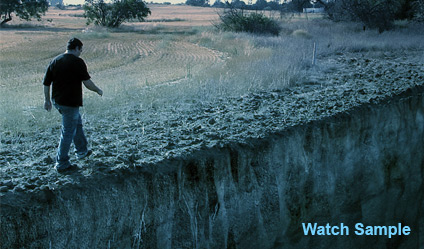
Here is a short video sample of a 3D set extension... the texture is bit primitive but you get the idea :)
July 30th, 2008

129 Comments
Nikolaus
14 years ago
Hi,
i know. It's an very old post. But i am really intrested in do this myself.
We film without moving. We did not have boujou. Could you give me a hint how to place this texture?
I try to make a 3D layer. But this wont work very well...
Thx.
i know. It's an very old post. But i am really intrested in do this myself.
We film without moving. We did not have boujou. Could you give me a hint how to place this texture?
I try to make a 3D layer. But this wont work very well...
Thx.
rookie artist
17 years ago
Thats really nice. Is there a tutorial for this? Are You planning one? Andrew Can't Wait.
Its been a long time. When are you going to make a tutorial for this?
Tnx a lot.
Its been a long time. When are you going to make a tutorial for this?
Tnx a lot.
kippyjoe
17 years ago
here is a link plus some tutorials for blender and ae to
Icarus which will do the job and is remarkably similar to boujou Did I mention its freeware?
both mac and windows versions can be found here
http://www.peerlessproductions.com/tuts/pages/Icarus.html
Icarus which will do the job and is remarkably similar to boujou Did I mention its freeware?
both mac and windows versions can be found here
http://www.peerlessproductions.com/tuts/pages/Icarus.html
metalpig
17 years ago
Hey, Awesome! upload this tutorial, please ! I'm waiting it.... pls, pls ! Thank you very much !
hey andrew...
i m ur die hard fan from india....
because i wanna become a vfx artist its my life time ambition.. i hope i get it... its all credit goes to u only andrew...
u r my guru(teacher in inian language)
thnx guru...
i wont forget u in my life...
waiting for ur new website...
if u dont i wanna tel u something please start one vfx college...
tats very useful for us..
i hope i ll join
i m ur die hard fan from india....
because i wanna become a vfx artist its my life time ambition.. i hope i get it... its all credit goes to u only andrew...
u r my guru(teacher in inian language)
thnx guru...
i wont forget u in my life...
waiting for ur new website...
if u dont i wanna tel u something please start one vfx college...
tats very useful for us..
i hope i ll join
fear_13th
17 years ago
I think, it would be better, if there would be a shade on a rising surface from a surface on which there is a person
Jayrold
17 years ago
Hi Eric.. Nice work.. How to use proper lighting matching the light source and shadow of the footage? I'm using 3dsmax9..
Okay so ever since Andrew posted that .pfd file about match moving I've been messing around with it, this is my first 3D match:
http://www.youtube.com/watch?v=yVFDSM4sHEg
I can't wait for the upcoming series!!!!!
5:23 AM and counting ... new website!!!
http://www.youtube.com/watch?v=yVFDSM4sHEg
I can't wait for the upcoming series!!!!!
5:23 AM and counting ... new website!!!
3Rkfilms
17 years ago
HEY ANDREW I WANNA TRY THIS TUTORIAL..
IF U CAN TO TEACH ME!!
FROM DOMINICAN REPUBLIC I NEED UR HELP
THIS SAMPLE PIC IS AWESOME
ME GUSTARIA APRENDER HACER ESO!!
ESPERO TU RESPUESTA!!!
I HOPE UR ANSWER!!!
IF U CAN TO TEACH ME!!
FROM DOMINICAN REPUBLIC I NEED UR HELP
THIS SAMPLE PIC IS AWESOME
ME GUSTARIA APRENDER HACER ESO!!
ESPERO TU RESPUESTA!!!
I HOPE UR ANSWER!!!
If anyone worried about the $10,000 (or even $1000) price tag of boujou you should seriously look at syntheyes. It is really robust for the price and Russ has great video tutorials on his site ssontech.com.
I don't always use the exact same software as Andrew K [i.e modo instead of 3ds max] but am able to learn from the concepts and processes presented then interpret them into my own pipeline.
With all the $$ you'll save you can order the whole video copilot dvd series, and still have money left over to buy some wine gums for the wife and kids. Unless you're 16 and then you'll probably want to eat the wine gums yourself.
James
AK, this is a great direction you're taking the tutorials
I don't always use the exact same software as Andrew K [i.e modo instead of 3ds max] but am able to learn from the concepts and processes presented then interpret them into my own pipeline.
With all the $$ you'll save you can order the whole video copilot dvd series, and still have money left over to buy some wine gums for the wife and kids. Unless you're 16 and then you'll probably want to eat the wine gums yourself.
James
AK, this is a great direction you're taking the tutorials
Here's a movie I just finished using set extensions... check it out and comment...
http://myspacetv.com/index.cfm?fuseaction=vids.individual&videoid=39660756
http://myspacetv.com/index.cfm?fuseaction=vids.individual&videoid=39660756
I checked the VooCat demo. It looks really nice.
Syntheyes seems nice, too, though slightly more expensive.
Syntheyes seems nice, too, though slightly more expensive.
Moca MX
17 years ago
In my country it 1. august! 
Can't wait for new site it's gonna be grait i can feel it!
Can't wait for new site it's gonna be grait i can feel it!
andrew,
Good thing you use Boujou. I hope though we can apply our freshly learned skills to a cheaper app.
I hope this one will do the trick :
http://www.scenespector.com/index.php?option=com_content&task=view&id=10&Itemid=25
I'll report back, if i find the time for testing.
Good thing you use Boujou. I hope though we can apply our freshly learned skills to a cheaper app.
I hope this one will do the trick :
http://www.scenespector.com/index.php?option=com_content&task=view&id=10&Itemid=25
I'll report back, if i find the time for testing.
Speedbreaker
17 years ago
@Eric
Thank you for the detailed explanation! Realy helped me!
To your HD vs. SD tracking question:
HD Footage tzracks much better than SD in my experience!
Thank you for the detailed explanation! Realy helped me!
To your HD vs. SD tracking question:
HD Footage tzracks much better than SD in my experience!
highdefw
17 years ago
I wish I had a team to help me do the projects I have. There is just no way one guy could do it all....
Alex
17 years ago
WOW!!! amayzing wonderful you are the BEST OF THE BEST realy. Thankyou Andrew, greetings from Macedonia
Thanks for the feeback, guys.
re: Speedbreaker...
The lighting on those clips wasn't very complicated... mostly just a single soft-shadowed spotlight and some ambient fill, with shadows being cast onto proxy "matte" geometry. I would really prefer to use Mental Ray for all my 3D stuff, but MR's global lighting doesn't play well with Max's matte material, so you've gotta do workarounds. As long as the lighting and shadows are in the same ballpark as your baground plate, it's amazing how much the simple act of 3D tracking and motion blur can cover up any inconsistancies.
Andrew:
Quick question regarding tracking HD vs. SD...
Do you find that you get better or worse results tracking from a high-resolution source clip? I've only worked with SD tracking so far, but I'm considering upgrading to an HD camera specifically to improve tracking consistency... Extra rez is generally good, but 3D tracking can sometimes get thrown off by "too much" data (and extra noise)... Thoughts?
re: Speedbreaker...
The lighting on those clips wasn't very complicated... mostly just a single soft-shadowed spotlight and some ambient fill, with shadows being cast onto proxy "matte" geometry. I would really prefer to use Mental Ray for all my 3D stuff, but MR's global lighting doesn't play well with Max's matte material, so you've gotta do workarounds. As long as the lighting and shadows are in the same ballpark as your baground plate, it's amazing how much the simple act of 3D tracking and motion blur can cover up any inconsistancies.
Andrew:
Quick question regarding tracking HD vs. SD...
Do you find that you get better or worse results tracking from a high-resolution source clip? I've only worked with SD tracking so far, but I'm considering upgrading to an HD camera specifically to improve tracking consistency... Extra rez is generally good, but 3D tracking can sometimes get thrown off by "too much" data (and extra noise)... Thoughts?
I got some questions on the difference between the different Imagineer Systems application. I use mocha and money
monet is about Tracking, stabilisation, rotoscoping and compositing are a fundamental part of visual effects work
mocha is a stand alone 2D tracking tool packed with features that make the life of the effects compositing artist easier and less stressful. Now compositors can avoid the guess work and inaccuracies that result from painstaking and time consuming difficult hand tracking shots. The process of generating solid 4-point tracks, giving position, scale, rotation, shear and perspective matched tracks is sped up thanks to the next generation tracking. Once the track is complete, mocha is designed to export the data to the industryâ??????s most well known compositing and finishing packages such as Inferno, Flame, Flint, Smoke, Combustion, Avid DS, Quantel generationQ, After Effects, Shake and Digital Fusion. This gives the artist the freedom to finish their shots in the compositing application they feel most comfortable with.
http://www.strongmocha.com/2008/01/27/imagineer-systems-starts-2008-with-an-amazing-50-90-discount-offer-expires-013108/
Cheers,
Thorsten
http://www.strongmocha.com/
monet is about Tracking, stabilisation, rotoscoping and compositing are a fundamental part of visual effects work
mocha is a stand alone 2D tracking tool packed with features that make the life of the effects compositing artist easier and less stressful. Now compositors can avoid the guess work and inaccuracies that result from painstaking and time consuming difficult hand tracking shots. The process of generating solid 4-point tracks, giving position, scale, rotation, shear and perspective matched tracks is sped up thanks to the next generation tracking. Once the track is complete, mocha is designed to export the data to the industryâ??????s most well known compositing and finishing packages such as Inferno, Flame, Flint, Smoke, Combustion, Avid DS, Quantel generationQ, After Effects, Shake and Digital Fusion. This gives the artist the freedom to finish their shots in the compositing application they feel most comfortable with.
http://www.strongmocha.com/2008/01/27/imagineer-systems-starts-2008-with-an-amazing-50-90-discount-offer-expires-013108/
Cheers,
Thorsten
http://www.strongmocha.com/
Speedbreaker
17 years ago
Hey Nicolas,
I don't think so, we will get it later!
Here in Germany we are about 10 hours ahead not behind so we have to wait longer
I don't think so, we will get it later!
Here in Germany we are about 10 hours ahead not behind so we have to wait longer
Nicolas
17 years ago
I think because of the different time zones
we in Germany will get it today..maybe.
we in Germany will get it today..maybe.
Nicolas
17 years ago
Yes!!! I can't wait !!!
I know Andrew did a very great job and created the best design ever !!
Sure he did....i mean....he's ANDREW KRAMER !!
I know Andrew did a very great job and created the best design ever !!
Sure he did....i mean....he's ANDREW KRAMER !!
LabraInc
17 years ago
Hey Andrew do you think you could help me out with a project? Tell me so I can e-mail you
u know what i just thought of? Since we all ARE a community, why not have one...a VCP forum anybody?
Nikolaus
17 years ago
Great! Thank you for this little preview. Im looking forward to the tuto for this.
@Eric: looks very nice! great work
@Eric: looks very nice! great work
D4 Manager
17 years ago
Haha, it reminds me of an old game on Nintendo where a trap was set to move up and down like that
Some Guy
17 years ago
I imagine Sam falling down that cliff and Andrew standing there and shouting "THIS IS SPARTA!!!"
Speedbreaker
17 years ago
@Berkan
That's not a problem at all. The import works similar in max and C4d, the only difference is that max uses a Z-up coordinate system but you can set that up in Boujou so don't worry, I'm sure Andrew will talk about that in the tutorial.
@Eric
wow, realy cool. How did you do the lighting on your test?
That's not a problem at all. The import works similar in max and C4d, the only difference is that max uses a Z-up coordinate system but you can set that up in Boujou so don't worry, I'm sure Andrew will talk about that in the tutorial.
@Eric
wow, realy cool. How did you do the lighting on your test?
Dude,
You NEED to do a short of Sam falling over the side of that "cliff" lol. It would be so funny.
You know it needs to be done, so do it !
You NEED to do a short of Sam falling over the side of that "cliff" lol. It would be so funny.
You know it needs to be done, so do it !
Hi! Just saw this blog post and couldn't help myself to post this test I did a couple of weeks ago. Matchmoving is fun!
http://video.google.co.uk/videoplay?docid=3651476331468157332
http://video.google.co.uk/videoplay?docid=3651476331468157332
Alberto
17 years ago
I personally LOVE boujou, apart from its rough UI it's an awesome tool, once you get acquainted with all the tracking stuff, it becomes your swiss army for any CG addition. It's really a GREAT tool and I like working with it .
Thanx Andrew!
.Thanx Andrew!
Thank you, Andrew, for going over this subject. I feel there is very little information and tutorials on match moving compared to other aspects of visual effects. It will be greatly appreciated.
Berkanism
17 years ago
Hi, I'm Berkan.
As I use C4d, I don't know how to use 3d max that much. So, i assume that I won't understand boujou tutorial.
If it's possible, I'm looking forward to see a tutorial in which you will show both boujou ve c4d together.
As I use C4d, I don't know how to use 3d max that much. So, i assume that I won't understand boujou tutorial.
If it's possible, I'm looking forward to see a tutorial in which you will show both boujou ve c4d together.
Ori Lahav
17 years ago
Hello Andrew,
Thanks for 3D motion tracking. I can't wait to begin playing with it.
Can you tell us a name of a free (or at least cheap enough) so most people will be able to do that? I'm sure we will be able to watch your Boujou tutorials, and try it with other programs.
And here is a little thing I did, not related to 3D motion tracking:
http://www.youtube.com/watch?v=EC01rtaKG0Y
Thank you, and all Video CoPilot staff for your great tutorials and products!
Ori Lahav.
Thanks for 3D motion tracking. I can't wait to begin playing with it.
Can you tell us a name of a free (or at least cheap enough) so most people will be able to do that? I'm sure we will be able to watch your Boujou tutorials, and try it with other programs.
And here is a little thing I did, not related to 3D motion tracking:
http://www.youtube.com/watch?v=EC01rtaKG0Y
Thank you, and all Video CoPilot staff for your great tutorials and products!
Ori Lahav.
Aj
17 years ago
Eric, you did an amazing job. Even though it was a fake object it moved and tracked so well it was convincing me that it was real. Haha keep up the good work.
WiRXMAN
17 years ago
That matches awesome. Nice job. Will be cool to see this tut that is for sure.
Thanks AK
Thanks AK
Working with Cinema4D now, still learning it actually, Checked out the Bonjure software and have thought about getting it in the past. I betting the upcoming tutorial will push me towards the buy. Look forward to seeing it. I really enjoyed the sample video with the cliff here. That was fun.
Hey all. Long time lurker, first time commenter...
I'm a CG professional by trade, but I can't say enough good things about Andrew and the VCP crew... I've learned so much about more After Effects than I ever expected to. And to hear that he's going to cover his tracking techniques is really exciting. I've done a decent amount of work with Boujou, but I can't wait to hear all of his sneaky tricks to streamline the process.
Here's some rough tracking tests I did for a music video project that never quite materialized a few years back (2005-ish). Tracked with Boujou, rendered in 3DSMax, comp'ed in AFX:
http://www.ericaanderson.com/video/RoughTracks.mov
Thanks Andrew! Keep bringing the hotness!
-eaa
I'm a CG professional by trade, but I can't say enough good things about Andrew and the VCP crew... I've learned so much about more After Effects than I ever expected to. And to hear that he's going to cover his tracking techniques is really exciting. I've done a decent amount of work with Boujou, but I can't wait to hear all of his sneaky tricks to streamline the process.
Here's some rough tracking tests I did for a music video project that never quite materialized a few years back (2005-ish). Tracked with Boujou, rendered in 3DSMax, comp'ed in AFX:
http://www.ericaanderson.com/video/RoughTracks.mov
Thanks Andrew! Keep bringing the hotness!
-eaa
Josh Johnson
17 years ago
Hey highdefw you are right about photo real very tough task! I'm still learning syntheyes it has so much to it.
thanks for the comments highdefw.
I use AE, C4D, Syntheyes for now...
thanks for the comments highdefw.
I use AE, C4D, Syntheyes for now...
highdefw
17 years ago
Nice Johnson. Like I stated before, learning matchmoving is very easy, since apps like Boujou are so powerful. I personally think compositing is the hardest step in the whole integration process.
When I say compositing, I mean the photo-realistic look.
Boujou, Maya, and Shake 4 are the apps I use to get my stuff done
When I say compositing, I mean the photo-realistic look.
Boujou, Maya, and Shake 4 are the apps I use to get my stuff done
Josh Johnson
17 years ago
Here is a little test I did last week. I used syntheyes and cinema 4d.
before/after
http://www.joshjohnsonfilms.com/matchmovetestsyntheyesC4DAE.html
before/after
http://www.joshjohnsonfilms.com/matchmovetestsyntheyesC4DAE.html
Wow.. looks great, I might even dare say as good as Speed breaker..
I hate those people who watch a great tracking video and go
"Oh well you could have fixed the gamma levels from frames 8.5-11.2,
and the pixel at point 148,234 was way off.. please correct that, but other
than that it looks great.."
Bah! Phooey! Why can't they just give you the credit you deserve and move on?!
LoL, I mean the end user isn't going to even notice! I hope Andrew shows us
something just as amazing as your youtube clip there.. who knows the
possibilities with the Kramenator/Speedbreaker/Yimbo combination!
I hate those people who watch a great tracking video and go
"Oh well you could have fixed the gamma levels from frames 8.5-11.2,
and the pixel at point 148,234 was way off.. please correct that, but other
than that it looks great.."
Bah! Phooey! Why can't they just give you the credit you deserve and move on?!
LoL, I mean the end user isn't going to even notice! I hope Andrew shows us
something just as amazing as your youtube clip there.. who knows the
possibilities with the Kramenator/Speedbreaker/Yimbo combination!
Speedbreaker
17 years ago
Hey Yimbo,
that was nice for the first attemp! The track looks solid, but you should try to set up the coordinate system right, it's much easier to work that way.
the quality on youtube is not so good, but I think I saw some flickering on the cg elements, you should try to render an ambient occlusion pass instead of global illumination. All in all good work!
greetings from germany
Fabian
that was nice for the first attemp! The track looks solid, but you should try to set up the coordinate system right, it's much easier to work that way.
the quality on youtube is not so good, but I think I saw some flickering on the cg elements, you should try to render an ambient occlusion pass instead of global illumination. All in all good work!
greetings from germany
Fabian
yimbo
17 years ago
Hi Andrew.
This are some great news.
I've been trying to figure out that myself :
http://www.youtube.com/watch?v=oOT7Bb6cDT8
But it's gonna be a lot easier seeing you doing some more advanced stuff, step by step.
I'm really looking foward to see it,
and the community examples.
(I think it would be great to have some section where we can show how your tutorials helped us, maybe a youtube links in each tutorial page, just an idea.)
see you.
This are some great news.
I've been trying to figure out that myself :
http://www.youtube.com/watch?v=oOT7Bb6cDT8
But it's gonna be a lot easier seeing you doing some more advanced stuff, step by step.
I'm really looking foward to see it,
and the community examples.
(I think it would be great to have some section where we can show how your tutorials helped us, maybe a youtube links in each tutorial page, just an idea.)
see you.
Daryl Booth
17 years ago
@ Hassbundu
Cheers, the caps lock seems to be working.. I am going with the Jpeg lossy as its a rinky dink spot for a no-name company called ENRON
Cheers, the caps lock seems to be working.. I am going with the Jpeg lossy as its a rinky dink spot for a no-name company called ENRON
omg I've done 3D integration but that always look realy realy realy bad !!!
Andrew I can't wait to learn more
french thanks by Hugo
Andrew I can't wait to learn more
french thanks by Hugo
Breyon
17 years ago
WOW Andrew... that was tight! I can't wait for this to come out. I have a shoot in two weeks that I will have to use match-moving on. Right no, I am playing around with SynthEyes and I have downloaded the PLE version of 3D Equalizer. Can you give me the same information as you did "Speed". I want to work on this now!!! You are the man. I filled in my email on the form above.
Compositer
17 years ago
Just a few things I noticed...
1. The matchmove slides around especially in the last few frames
2. I would have the camera on the dolly because having a hand held cam out in space doesn't really make sense.
1. The matchmove slides around especially in the last few frames
2. I would have the camera on the dolly because having a hand held cam out in space doesn't really make sense.
@ Daryl Booth:
Well it really depends on who the final product is going to..
If it is for a small no-name company like Playboy or something
like that then go with .jpg, they will barely notice the artifacts
from the lossy compression, but if you are doing a big one for
a really important company like Coke, Pepsi, VCP, ThinkGeek,
Express, Bananas Republicans, or even Senator Obama then
definately go for the .bmp 24-bit non-lossy... [BTW if you hold down
the CAPS lock key while rendering from MS Paint, it goes MUCH faster.
Well it really depends on who the final product is going to..
If it is for a small no-name company like Playboy or something
like that then go with .jpg, they will barely notice the artifacts
from the lossy compression, but if you are doing a big one for
a really important company like Coke, Pepsi, VCP, ThinkGeek,
Express, Bananas Republicans, or even Senator Obama then
definately go for the .bmp 24-bit non-lossy... [BTW if you hold down
the CAPS lock key while rendering from MS Paint, it goes MUCH faster.
John
17 years ago
I can't wait to see this!!! I am counting down to the new site....Keep up the great work Andrew.
Daryl Booth
17 years ago
@ Hassbundu
I am currently on frame 15 of 23432 using your technique. Should I save out the result as jpeg or bmp?
And also how can I get an alpha channel in a bmp?
Thanks in advance.....
I am currently on frame 15 of 23432 using your technique. Should I save out the result as jpeg or bmp?
And also how can I get an alpha channel in a bmp?
Thanks in advance.....
Promises, promises..
we won't get the tutorial for another two weeks.
Who wants to put money on it?
LoL, just kidding.. Andrew always delivers..
I mean look, the guy already has a baby so we
know he can deliver.
Thanks for the free tutorials Andrew!!
I buy your products like I drink water!!
we won't get the tutorial for another two weeks.
Who wants to put money on it?
LoL, just kidding.. Andrew always delivers..
I mean look, the guy already has a baby so we
know he can deliver.
Thanks for the free tutorials Andrew!!
I buy your products like I drink water!!
ARNALDO DIAZ
17 years ago
La verdad es que siempre nos sorprendes andrew, soy fan tuyo y en tan solo un a??±o he aprendido de tus tutoriales mas que desde que inicie . gracias por tu generosidad que bueno seria poder ver mas colegas como tu que muestren sus conocimientos para darnos la posibilidad de mejorar a nosotros que no tenemos los medios .
Otra vez gracias desde Argentina
Otra vez gracias desde Argentina
What 3d App will you be using for your example. I know that you like 3ds max, but alot of us have c4d.
Tanner G
17 years ago
That is so sick, I have been wanting to do that from the time that killer BMW commercial came out. Now...... Does any one have $10,000 that i could borrow????
I think it's fine that AK has decided to branch out from strictly AE. I'm tired of seeing people on youtube with their "home video" (bad interepretations) of AK's work. I'll give it to you if you tried your hardest and really care about the industry/art...but if you just go on here click "download project," open it and render it out and post it on youtube...you're not doing anyone (especially yourself) a favor. I sound like i'm venting...
Off topic, does anyone know if AK does his tutorials in HD? How does he get such crisp output. Even with Lossless Animation I don't get mine as crisp? Is it 16 or 32bpc? Even with 16bpc i don't get as crisp of output. Any help?
Off topic, does anyone know if AK does his tutorials in HD? How does he get such crisp output. Even with Lossless Animation I don't get mine as crisp? Is it 16 or 32bpc? Even with 16bpc i don't get as crisp of output. Any help?
Lyndon
17 years ago
dispite not being prepared software wise i'd like to say thank you none the less. the work you do is amazing and no one really has a reason to complain, so thx. your work is awesome and i look forward to your free training.
YOU'RE THE MAN DREW!
YOU'RE THE MAN DREW!
Josh Johnson
17 years ago
WOW! Great stuff Andrew really looking forward to it. I'm very curious how it was put together!
Florian Zeitler
17 years ago
Funcalicous : D
looks totally awesome. can't wait to see the tutorial. !!
thanks in advance!
looks totally awesome. can't wait to see the tutorial. !!
thanks in advance!
Wow, i totally underestimated this! I know you're amazing with AE and such-- and i love your tutorials. But this turned out ASTONISHING!!! Now i cant wait! Ive been looking for a good tutorial on 3d tracking forever!
Here is a fantastic way to do motion tracking:
First, import your video into .jpg images
Then open up MS Paint [Start->All Programs->Accessories->Paint]
Copy and paste every frame into Paint, and then draw a line around
the object to be tracked on every frame..
Then use calculus and trigonometry to quantize velocity, acceleration
and angular momentum on every shot.. piece of cake..
Then you don't have to spend the $1,000 on Boujou..
First, import your video into .jpg images
Then open up MS Paint [Start->All Programs->Accessories->Paint]
Copy and paste every frame into Paint, and then draw a line around
the object to be tracked on every frame..
Then use calculus and trigonometry to quantize velocity, acceleration
and angular momentum on every shot.. piece of cake..
Then you don't have to spend the $1,000 on Boujou..
Milan Mitka
17 years ago
Excellent effect, like everything that is made by you, Mr. Kramer. I??´m 16 years old and your website is the most helpful I??´ve ever seen. I??´m intermediate in After Effects and I??´m starting to work with 3D Studio Max. It would be nice if you??´ll make some tutorials those are using 3D rendered special effects from Max, such as missiles, comets, asteroids or anything to explode and fire. Thanks for you great free tutorials. I really find them useful. And of course, I love your jokes!
THats cool stuff there, NOt sure if the shake was intended or not but it looked cool. WHen can we be looking forward to seeing it?
Jeankevl
17 years ago
Nice job Andrew
I'm really excited for this one!!!!
Thanks a lot for al your free sharing
I'm really excited for this one!!!!
Thanks a lot for al your free sharing
Wonderfull!
The only thing i would criticise is that the bottom should get darker/brighter when it moves...shame on me
Can't wait to see your masterplan growing!
The only thing i would criticise is that the bottom should get darker/brighter when it moves...shame on me
Can't wait to see your masterplan growing!
allllright!! this is like a hot chick take it married it an make it pregnant .... eeuh what i mean is ...... im so excited 
take it married it an make it pregnant .... eeuh what i mean is ...... im so excited
Right i'm signing out for the night here in the U.K but I just want to say that was a fantastic day for this blog.... its amazing to see the scope of the community out there and so many people that care about this site, Vfx and our future together...
Good night all... see ya all tommorrow!
Sean
Good night all... see ya all tommorrow!
Sean
I think this video tutorial is going to be one of the coolest on Video Copilot. To me, integrating a 3d object into a video scene seems like the pinnacle of VFX. I've been wanting to learn this for quite some time.
That's cool. I could totally see a guy running from something and have the environment around him just collapsing!
I know you were just showing the original and final plates but the way you presented it just reminded me of a shot like what I described above.
I know you were just showing the original and final plates but the way you presented it just reminded me of a shot like what I described above.
Please make it a long tutorial Andrew!
We love listening to your voice, sometimes when I am at work
I gather my co-workers, just click on a tutorial and listen to Andrew talking..
there is nothing wrong with that right? haha.
We love listening to your voice, sometimes when I am at work
I gather my co-workers, just click on a tutorial and listen to Andrew talking..
there is nothing wrong with that right? haha.
rotundus
17 years ago
Will you be showing how to match lens distortion or bloating on the lens corners in the tutorial?
Very impressive effect, I can't wait to learn more!
Thank you as always.
http://youtube.com/watch?v=U_UdZjg3ktM
Thank you as always.
http://youtube.com/watch?v=U_UdZjg3ktM
Very nice...would look cool with some dust/soil particles dropping when the ground disapears (even though it is a test shot!)
I am really glad that you are adressing more 3d based work with after effects integration as this is the most sparten area of information on the web right now.
Keep up the awesome work.
I am really glad that you are adressing more 3d based work with after effects integration as this is the most sparten area of information on the web right now.
Keep up the awesome work.
Speedbreaker
17 years ago
awesome,
oh man I want to try this right now!
Andrew could you please tell as how you did the texturing? Is it a camera mapped texture or uvw?
thank you
Fabian
oh man I want to try this right now!
Andrew could you please tell as how you did the texturing? Is it a camera mapped texture or uvw?
thank you
Fabian
Steven Anderson
17 years ago
Andrew... you are an After Effects Superstar!! Thanks for all your brilliant tutorials, can't wait for this one!
Hi Andrew,
I can't wait till you post your new tutorial. I use Imagineer Systems monet and mocha, but I'm sure I can work around that you use Boujou
There are some mocha Video Tutorial for after effects:
http://www.strongmocha.com/2008/05/22/new-imagineer-systems-mocha-ae-tutorial-released/
mochaâ??????s planar tracking in depth tutorial
http://www.strongmocha.com/2008/02/07/mochas-planar-tracking-in-depth-tutorial-imagineer-systems/
Cheers,
Thorsten
www.StrongMocha.com
DFX (Digital Effects) VFX (Visual Effects) Photo Food Travel
I can't wait till you post your new tutorial. I use Imagineer Systems monet and mocha, but I'm sure I can work around that you use Boujou
There are some mocha Video Tutorial for after effects:
http://www.strongmocha.com/2008/05/22/new-imagineer-systems-mocha-ae-tutorial-released/
mochaâ??????s planar tracking in depth tutorial
http://www.strongmocha.com/2008/02/07/mochas-planar-tracking-in-depth-tutorial-imagineer-systems/
Cheers,
Thorsten
www.StrongMocha.com
DFX (Digital Effects) VFX (Visual Effects) Photo Food Travel


