VIDEO COPILOT BLOG
News, Updates, Projects Files & Tips


TWITTER FEED

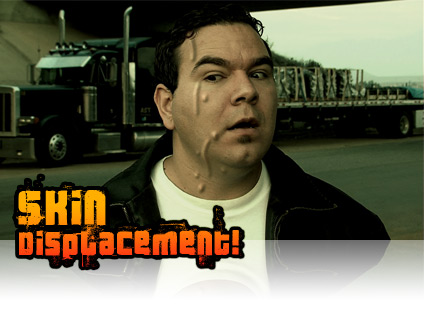
New Tutorial: Skin Displacement


In this tutorial we’ll learn a procedural way to make skin displace as if bugs are crawling under the surface. This technique can be used for numerous things, including Halloween videos.

Watch Video

PS, Thanks for your patience ; )

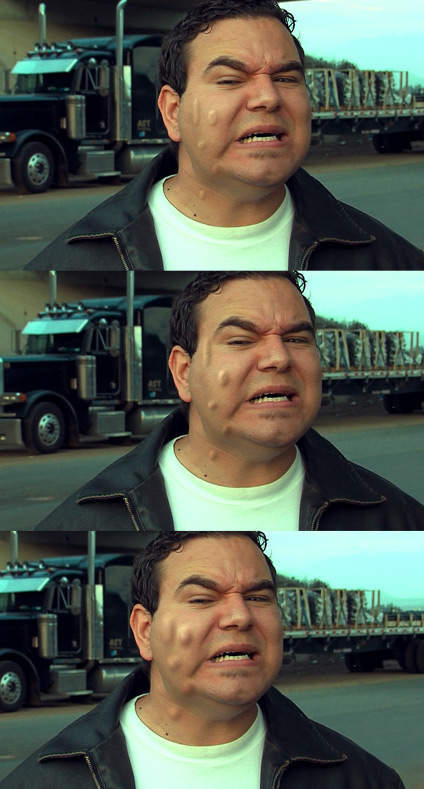
Here are some different possible looks:
94 RESPONSES TO “New Tutorial: Skin Displacement”

yeah.. nice halloween special! :D

thanks andrew!!

Wow! Fantastic!

I am definitely going to use this!

Thanks.

woohooo =))))))

yooooooooo !!!

even better than the simpsons

WHOAAA…this is going to be the best halloween EVER!!!!…Thank you Mr. Kramer for making this an unforgettable halloween!!

Sam is just the king!!!!

YESS!!! Thanks dude :)

it`s okay…….

great work, worth the wait.

WWOOOOOOOOOOT NICE:D:D:D

Thanks. Finaly I was checking web site for this update like every day during this week…
CooOOl

Awesome work Andrew!!! I LOVE IT!!!

Now if we can only get our hands on Evolution….

YEAAAAAAAAAAAAAAAAAAAAAAAAAAAAAAAAAAAAAAAAAAAAAAAAAAAAAAAAA

YEHAAAAAAAAAAAAAAAAAAAAAAAAAAAAAAAAAAAAAAAAAAAAAAA!!!!!
Great!! Andrew, I Love U man!!!!!!!!!!!

by هـــاشم

CoOl

by Marc Biorklund

Look’s amazing :) Sounds like I know what I am going to play with for the next hours :p

Thanks for the sharing

Awesome I knew you would be releasing it today :)

Thanks Andrew :)

HAPPY HALLOWEEN. Thanks Andrew for this great tutorial. You’re doing a brilliant job. I will be using this tutorial in my new project.

WOOOOOOOOOOOAH

happy halloween :)

I think I’ll use this technique to make money flow into my wallet.
Thanks AK!
c

Haha ew! That’s gross- but so awesome! Thanks Andrew.

More complicated than it looks :)

Well, it’s ok. Nothing special.
No, just kidding. :-D It’s great. It’s awesome. It’s even better than I thought it would be. Thank you very much.
Happy Halloween everybody! Especially to you, Indiana…

PS: Andrew, do you have a dog and if yes, what’s his name? ;-)

this is mind bottling.

Great tutorial. You are very witty Andrew Kramer.

Happy Halloween Mr. Jones…

Indiana Jones that is! :)

Andrew –

You are going to give Sam a complex with the receiting hairline joke… who am I to have any room to talk – check out my picture on my homepage:

http://www.youtube.com/AG3MiniFilmsStudio

FANTASTIC! NOW I CAN MAKE BUGS CRAWL UNDER MY SKIN AS WELL AS ON TOP OF MY SKIN! IT’S EVERY BOYS DREAM! :)

Awesom tutorial.

Happy Halloween!!

Wow… now all I need to do is to find a victim… WOW…

Maybe a politician would deserve a “treatment”….

Great, Junior!

Congrats on tutorial number 50!

Great now that we have our Fix (Tutorial Addiction) when can we expect Evolutions Release?

Yep I am pushing for an answer, what are you going to do about it?
Make bugs crawl under my skin or something?

ROFL HAHA, well I guess that can be done so I better shut up now :)

Thanks again AK, You make VFX simple for the masses.

it is a super idea
you did a very great work
thank you Andrew for all

Yessssssssss!
I knew that you were gonna put this tutorial on Halloween

it’s here the golden 50th tutorial
=D

Simply beautiful as always. It’s amazing how you can make these things so easy for us. You’re big, Kramer.

This is amazing! Soooow great!!! Thanks alot!

The sounds at the beginning of the tutorials sound good
I think they are from a TV show called the “x” something

your the man !

thanx man your awsome ^^

AK FTW !!!

awesome great!!!!

u should have this tutorial part 2- with the bug dig out of his face and fly, then land on the camera lens :D

that would be so cool!!! definitely cool!!!

Hi Andrew :)

as usuall, you are amazing.
this is fantastic, when i thinking about all your effort i wondered how kind this person is ?

thanks for all your amazing work

Yay! Happy Halloween!

Dude, that’s gross…but awesome.

Muy buen trabajo! fede de Argentina…

this tutorial is awesome…. i love u andrew…. (im strait, but this to to damn good)

nice tut.

was Sam really on 24? If so, which season/episode did he appear in?

Gr8 Tutorial,

But you didn’t show us the HAND.MOV which was there on your project window

Try to incorporate that you by creating a new part of this tutrial.

Thanks

Lovin it!

Man you are the best, i really hope that you will not stop this, guz you have given me new point in my life, man really i totali respect you you are funny helpful and really nice to listen your tuts, oh, there is no way to but all the words on this post but, u konow tahat you are one of a kind!

im amazed at how simple you make things that seem so complicated . you are the best teacher ive ever learned from seriously so effective and to the point and simple . genius

cool

Sweet sweet sweeet, I think they just keep getting better!

I love it Cool :d :d

Whatever happened to the good old days when we used real bugs? We would put a slit in the skin unter the shirt area. insert the roaches, then tape the wound up. The actor had to hold the roaches in place till the scene was set up. Usually only once chance of getting it right though.

AMAZING!!!! I love horror movies so this is the kind of tutorials I love. Thanks so much!!!!

On first pic is that Green Easy?

Vikram, the technique is exactly the same for the hand and arm as shown in the tutorial. Track the hand and arm and follow the steps. Don’t think of it as a face…

If you can’t use what you’ve learned then I have wasted my life… and what the hell are we trying to save.

I agree with Tuan you should make a part two of this of a bug entering or exiting. that would be soo cool. It would add to the effect soooo much.

Andrew,

In response to your second state above:

True… True… True…

Wait a second, that was a rhetorical question… right? :)

Any crazy Halloween stories from last night you wish to blog today? Surely Indiana has some adventures to share!

“If you can’t use what you’ve learned then I have wasted my life… and what the hell are we trying to save.”

lol

Here is my try at it. Its only a test so I didn’t spend too much time on it.

http://www.youtube.com/watch?v=X5JtX9lx4_8

I was going to do the same thing eith real bugs but now ‘m thinking this might be a little safer

I was going to do the same thing eith real bugs but now ‘m thinking this might be a little safer. Awsome stuff.

I tried to use real bugs but I couldnt get the tube to fit to get em in. Then theres the issue of trying to get them out.

http://www.youtube.com/watch?v=X5JtX9lx4_8

Jason- I just checked out your first run at this effect and it came out great! Unfortunately I would not be able to pull it off in the same manner as you since no one want to look at creepy crawlers scrolling over my fat beer belly. :)

I will have to come up with another creative approach.
Excellent work on your part though!

Thanks Art G. I appreciate it.

So, Andrew, did you get a lot of candy last night?! :O

This tutorial basically answers the questions i had about “the mummy” and “the mummy returns” because its those films where i saw this effect for the first time and i thought it was soo clever how they did it. However as a video editor just like a lot of people, nothing really shocks me anymore, because I have learned so much in special effects in video that anything i see on screen now i just say to myself ” so how would andrew show us how to do this”

Hey nice, How much slack did you get for being in that costume?

@ Video-Fx-Universe

haha instead, why don’t you say to yourself, “hmmm, i wonder how ‘I’ could do that.”

Cool tutorial. That was a really fun one to do. I hope Sam has a good health insurance plan with everything that you do to him.

Andrew,

Well i’m posting my first trial video for the bug on my face

But there is one glitch. I have removed the shadow matte as it is not giving a good result and was looking slightly fake. Well here’s my pre pre version

http://www.youtube.com/watch?v=8rHX6qyf9mc

and one for the demonness

http://www.youtube.com/watch?v=3LSeVO0U8mk

My work is not as good as Andrew’s but i had given it a shot.

Keep the volume up white watching the demonness

TAKE CARE

Great work as usual! Thanks for taking this one several stages deeper with the displacement and shadows. I don’t know where you find the time to do everything, but THANKS A LOT!!!

This effect looks awesome. I cant wait to put it into use!

check out the one man short I made with the help of Action Movie Essentials.

http://vimeo.com/367034

Bones -

Not that I carry any skills to where I could be considered any type of professional movie critic or anything, but Damn… that was good!
Outside of just the visual effects, the scene sequence, camera shots, voice over, and music was all perfect. Can’t wait to see more!

Andrew,

Any updates on Evolution? Your first post on Oct. 12th said less than a month. The clock is ticking and Nov. 12th is fast approaching. I am getting anxious. Still planning on getting it out by the 12th or is it going to be a little longer?

By the way check out my bug try at the bugs under the skin.

http://www.youtube.com/watch?v=X5JtX9lx4_8

@ AK: Now that, i call a comeback ;) I thought the fires got you…

@Bones: Nice shots in your flick, especially the last one ;) What cam did you use?

Please keep posts on topic. There are several places to post relevant information.

ähhm, ok im sorry for that…

great job mr kramer. Incredible

Andrew-

I have completed my own trial utilizing the footage you supplied us in the project file and was very pleased with the outcome. I was wondering if you can provide some insight on the best method to achieve the effect of a vascular build up or veins branching up or down the arm utilizing this method? How would one animate the silhouette matte to strech by remaining static at one end and yet animating at the other?
Any help is greatly appreciated.

Thank you sir!

Great stuff there! Making fun of Sam’s approaching baldness, of Sam’s face of terror, even of Sam’s job as an actor for 24 and that commercial thing… (what sticks that friendship together anyways? :P )

You even remembered that I said that we in Venezuela didn’t celebrate Halloween! Or you didn’t? :s

Well, anyways, great stuff. Now I only have one doubt… What about the worms? Imagine I wanted to make worms crawling under skin, would I have to animate the mask? Could I use the puppet tool or something else to animate it more easily?

As I said, GREAT FREAKIN’ STUFF! I however also miss the good ol’ times when actors actually had to have cockroaches climb their butts and then wait until the bugs where in place for filming; don’t worry, the roaches were clean :P

@Art G:

Just animate the mask. It’s the same parameter, just drag the point or edges.
You could also create a path and use the stroke effect.

@Alejandro -

Thank you sir! I will definitely give it a shot. I appreciate the response and by the way, your portfolio on your website is very impressive!

Thanks again for your help!
-Art G.

Art:

No problem! Hope it helps, the final animation should be interesting. Please let me know when you complete it so I can give it a look. And thanks for your comments!

Regards

Alejandro

Hey whats up Andrew, wow what a great tutorial you made for Halloween, um I’m asking if u can make a tutorial on the sand effect from the movie Spider Man 3 using the particle presets, well cuz im new to After effects so..

Jeffrey Maniebo,

I just watched a show on how they made the Sand Man, and it was made in Maya

Cheers

Andrew, any clues how to make one of the bugs rip out of the skin and still look believable?

http://www.youtube.com/watch?v=X5JtX9lx4_8

Hey Andrew I just purchased the Designer Sound FX DVD and it is worth it big time! I cant wait for the release of EVOLUTION ! thanks!!

Great tutorial.. stunning !!!

How do i download a tutorial from andrew kramer instead of veiwing it online all the time ? my bandwidth is pretty crap and it takes ages to load and drops out all the time is there a wasy to save the tutorial so i can watch it from my computer ???

I couldn’t understand some parts of this article nnial 2007 – salvatore iaconesi – del.icio.us poetry, but I guess I just need to check some more resources regarding this, because it sounds interesting.

Borg nano probes!!!!!

One of your tutorials used in another movie… lol Shutter…
http://www.youtube.com/watch?v=J98Nh6fECNc
(look at around 1:38)

Hey you guys are great you had did graet job thanks very much ……….

Post a Comment!

Before Posting
We're trying to encourage more thoughtful commenting.  Please take a moment to write a meaningful response to this post.

Also remember to read the rules on posting first.

Leave a Comment