 ALL DESIGN TOOLS
 CAMERATRACKER
• Core Tracking Workflow
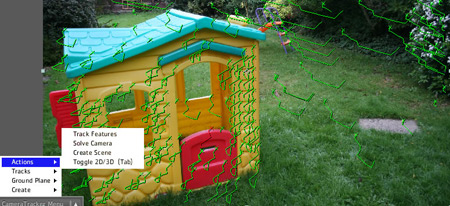
• Stats Readouts & Refine Workflow • Point Cloud Feature Preview After Effects Camera Tracker and Match Mover CAMERATRACKER for After Effects® allows you to pull 3D motion tracks and matchmoves without having to leave AE. It analyses the source sequence and extracts the original camera's lens and motion parameters, allowing you to composite 2D or 3D elements correctly with reference to the camera used to film the shot.
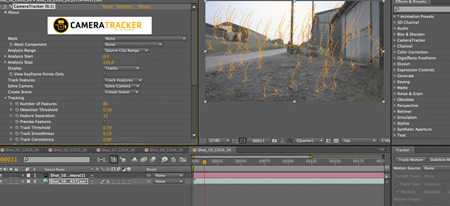
You can now match camera moves within Adobe® After Effects® 2.5D environment, opening up new, robust options for the placement of composite elements, such as the creation of Fringe / Heroes style 'in scene' titles, insertion of animated design elements, match-moved virtual set extensions, motion-tracked projection mapping and much more... This 3d motion tracking technology was previously only available in NUKEX, the Foundry's high-end film compositing tool. You can now do all this in Adobe® After Effects® without exiting your application. DominoIn this sequence, Alexander Lehnert of Haus&Gross communications demonstrates 3D camera tracking with CAMERATRACKER inside After Effects®, exporting to Cinema 4D, projection mapping, rendering, reimporting to After Effects® and comping. He also shows the use of KRONOS retiming plug-in to add visual impact to the shot's timing. https://www.vimeo.com/13881402/ Camera Tracking Test By Matt Silverman Matt demonstrates in-scene text with shadowing using CAMERATRACKER for After Effects, along with integration with Red Giant's Trapcode Particular via composition cameras. https://vimeo.com/13608228/ AE Camtracker - Shot Breakdown - The Door By Alexander Lehnert of Haus&Gross communications Alex demonstrates the use of CAMERATRACKER for After Effects to generate mask mattes quickly and easily, and to insert text on to a scene element. https://vimeo.com/13881203/ Core Tracking WorkflowCameraTracker analyses a source sequence and allows creation of an After Effects camera, which matches that with which the original sequence was shot. The basic process is 3 stages, namely:
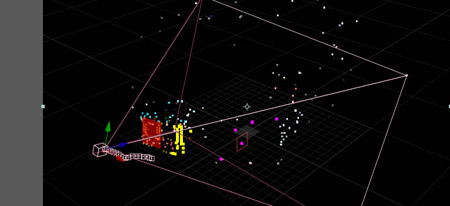
Object CreationCameraTracker features a unique in viewer menu which allows the user to interactively select a series of feature points and create After Effect's Solids and Nulls at their location. Ground PlaneCameraTracker allows the user to configure a ground plane, thus setting the entire scene's orientation and offset. This can be additionally tweaked manually using the scene null. Point Cloud Feature Previewonce a shot has been solved and a scene created the user can flip the CameraTracker into rendering a 3d feature preview. This details the positions of the individual feature points, and their current selection and frame state. This can be used to visualise and assist in setting ground planes and creating objects. Stats Readouts & Refine WorkflowCameraTracker features a comprehensive solve stats and refinement workflow. Parameters are setting showing a number of useful statistics, both after the track phase and the solve phase. Particular features can then be easily isolated individually using the track finders, or deleting en masse using the refinement thresholds and deletion functions. Other features
|

Price: $249.95  Specifications:
Requires: AE 7, CS3, CS4, CS5, CS5.5, CS6, or CC
After Effects CS6, CC or CC 2014
|

CAMERATRACKER


About Us:
© 2005 - 2026 Video Copilot and Final Image Inc.


