Andrew Kramer on March 1st, 2012 8:42 am
UPDATED: CS3 project file is now available
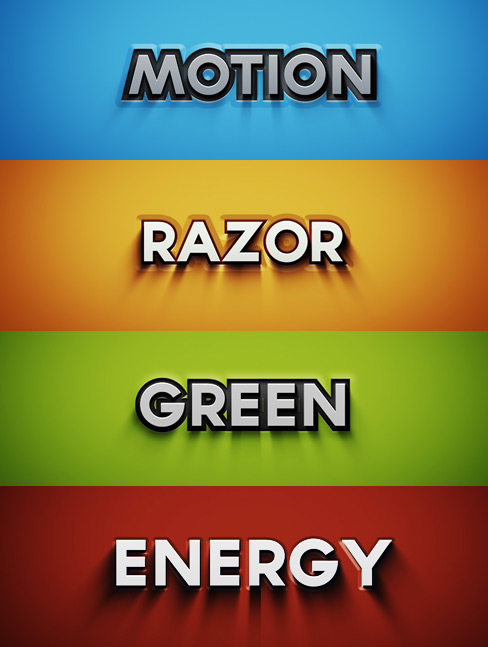
If you are trying to make sense of the words above… have at it! Actually they are various layer styles in today’s free Project File.
Since they added Photoshop layer styles to After Effects, I pretty much never used it but I recently decided to spend a little time creating some clean titles to share with everyone here. I’ve even recorded a short tutorial to show you how to edit the project file along with some tips for customizing and adding textures. I’ll be on soon with more tutorial so until then… Enjoy!
237 RESPONSES TO "FREE AE PROJECT: LAYER STYLES"
POST A COMMENT!
Before Posting
We're trying to encourage more thoughtful commenting. Â Please take a moment to write a meaningful response to this post.
Also remember to read the rules on posting first.
We're trying to encourage more thoughtful commenting. Â Please take a moment to write a meaningful response to this post.
Also remember to read the rules on posting first.
3D MODELS


Thank you
I love them especially the blue & the green ones… all the best AK!
Everyone, the converted version is at the bottom! It works on CS3 and up!
hey andrew i have been watching your tutorials for a long time now i have a few questions if thats ok 1 where do you get your props for guns 2 can you do more chroma key tutorials when you get the chance and maybe on redgiant software thanks your awsome i feel like i dont even need to go to school to learn this when you do your tutorials thanx and keep up the tutorials
these are awesome
great man. thnx for this
Greaattttt andrew thaaaannnxxx alootttt !!!
Looks great! Many thanks!
Sweet !!!
Thanks !!!
Keep up the Awesome Work !!!
Wowww. This is very exiting. But we want the baby ( ELEMENT ) thanks
YEAH what about the Element plugin???
I use layer styles like crazy in photoshop, but whenever I’m in after effects, I cringe at using them because the interface is slightly different. I’m a wad.
sweet deal! i’m surprised you didn’t precomp the text to make them procedural for logos and such. But that’s no big deal, they all look good!
thanks!
I guess that is not possible, because it uses the stroke effect and this effect is only usable with text layers
hmm but maybe you can achieve that with a choker
WOW… a freebie… but more importantly…. Andrew is still alive! wheeew! I was worried there for a few weeks.
Thank goodness your alive. I thought something had happened to you
Thank goodness You’re still alive. I thought something had happened to you.
Yeah, agree. Too long time ago for an update… But yeah, he’s back. Thx for this project-files.
I was also wondering but I confirm that it’s him.
Nobody else will come up with a joke of duplicating a comp to have “15 comp” :p
Always nice hearing from you Andrew.
Oh maaan… your alive!! Thanks GOD
Many Thanks MAN….
How did you do those amazing shadow? The zoom blur effect has that annoying quirk of going upwards as well as downwards. (I have CS4, otherwise I’d check it out myself)
It’s two separate black text layers with Radial Blurs at different strengths.
When you try it next time, make the y position of the blur a negative number to increase its height
Thanks! I love it every time you update this blog!
Thank you Andrew, I’m sure this will come in handy!
Long time Man……Where are u?
You had a great free project file awhile back with similar layer styles where you linked the shadow and emboss direction to the camera position with expressions so you could move around and it would look 3D, as long as you didn’t rotate. Would make for a great expressions tutorial.
1993! Cheeky. I’m only on CS4. Call me Armish boy…
Nothing serious, For now, every people is dead, cause Andrew has posted a tut since one month, and he doesn’t know that everypeople is visiting the site everyday to know whats going on, for me everytime i visit the site and i see nothing new, i feel bad, and andrew work on 3ds max and integrate to after effect to do realistic thing for now, he use only AE, after 3d ledge, 3d crater, 3d falling glass, all the 3d tuts is the best for me, so plz Andrew, i know u re the best , u re the god of tuts bout Ae and 3d max, so Do more tuts in 3d max, and fume fx is also god, so i will never forget the tuts i ask u and the demon cam, When the enchantress is disintegrate like the pixel of rock, if anyone like the comment, plz! lets con-vain Andrew to do it for us
Yes ! the effect of disintegrate of the movie deamon cam is amazing do a tutorial for this please ANDREW !!!!!!!!!!!
Awesome!!! Can’t wait for the Jet tutorial! Or for element…
ooooook..thanks for make me fell really ooold…..hi to all of us who can´t buy a 64 bits pc…and still works in cs4…thanks for the tutorial ..always the best
I remember when this website was used a place to go everyday for amazing tutorials, tips, and tricks. Now when we visit the site we get updates every 20-30 days.
Where is the old Andrew who cared about teaching VFX instead of selling it?
Focus more on teaching then selling….after all that is what got your website so popular in the first place.
I agree the post about the latest tutorial was a couple of months ago and we still don’t have the tutorial…?
Give poor old Andrew a break guys. There are well over a hundred, amazingly in-depth, totally free tutorials for all of us to look at in the meantime. Sure we’re all impatient, but I’ve spent the time looking through old ones which has been time well spent. As for the ‘selling’ aspect, this site is so time consuming you can’t expect it to always be for nothing with no financial return. I think he’s got the balance just about right…
Yes, we’re all wanting the tutorial on the plane, Elements, etc. but since we don’t know what’s going on behind the scenes, it’s quite unfair and even selfish to deride Andrew for not having a new tutorial when WE want it. For all we know Andrew’s kids may have been in the hospital, he might have been working 22 hours a day on a major film, we don’t know. One can only devote so much time to giving away free stuff and he’s done more than his share of that, in my opinion. It’s a great way to drum up business but at some point, he has to actually sell stuff or the website with all its free tutorials will disappear. Someone has to pay the bills and Andrew and his crew have to make a living. It’s funny that when someone gives away so much free information, that suddenly people feel entitled to it and get upset when it doesn’t come as fast as they want it. It’s ludicrous to think he can devote a ton of time to free teaching and still support his family. Give him some space, guys!
^ Ditto
@VOX
IF you read my post more carefully, I said ” focus more on teaching then selling….I believe you are taking my comment out of context. I am in no way selfish in the fact that I just want FREE stuff from Andrew, hell I would BUY tutorials from him. What I am frustrated with is the lack of activity recently on the site, and your right I have no idea what is going on in the background, but I can only base it off what I know and that’s the site has rarely any updates lately, and when he or his team do update the site, its nothing really that interesting, yes it’s helpful, but I know Andrew’s potential to show us stuff is so much more then what he has been posting lately.
@VOX…. his kids at hospital… you didnt find another idea than this??
like say, he have two kids, it take time to take care of it….
Hospital… gosh…
You are infact accusing Andrew of failing the moral aptitude test, and succumbing to greedy behaviour and “selling VFX instead of teaching it it” (SIC). Now I dont know if you are aware of the absolute revolution this site has meant for VFX all over the world: I for one tend to find bits and pieces of the tuts all over tv and film. But more so he has brought the joy of creativeness to hundreds of thousands all over the world, not only professionals but also the everyday man/woman. Mr Big shot? I find your comment offensive, to the extent of being deranged.
Andrew
Could you make the tutorial download available.
Thanks.
George
Only for CS5?
Im a CS3 LOVER!
Thanks anyway for all the things you share with us!
Go to the bottom, I’ve converted it
This is a great ideal for a typography video, I been thinking about doing.. Thank you
Finally, we heard from you.. Wellcome.. And Thanks..
Hey Andrew,your voice is a little bit diffirent in this video ^^
very nice sir, and that too after so long
As always if one hasn’t looked into things you have the idea and open up the possibilities. Thanks for your unique way of investigating the tools and the time you invest in all of this, as well as sharing this with us. Keep up the good work
Thanks! Looking good! Love all your tutorials. CS5 was nice to see finally!
Be wary of using layer effects in a 3d comp.
They can really mess it up.
They effect light shadows and all sorts.
I stopped using them due to erratic effects
Using this template I must put credits in my project like: “@Project file by_ANDREW KRAMER_from: VIDEOCOPILOT.net” etc..?
Awesome! Have been waiting for something like this!! Thanks!!!
hey!!!
what’s up???
where are u???
are u ok?????
Thanks you Andrew Project file looks sweet, much appreciated man you rock dude.
Thanks! It is great to have this stuff!
Sometimes I wander… if you only make this stuff to keep the peace… so ppl will not get made at you for not posting something lol
ELEMENT
:D:D
ELEMENT
ELEMENT
ELEMENT
ELEMENT
ELEMENT
ELEMENT
ELEMENT
ELEMENT
MORE ELEMENT
xD
ELEMENT
ELEMENT
ELEMENT
ELEMENT
ELEMENTELEMENT
ELEMENT
ELEMENT
ELEMENT
ELEMENTELEMENT
ELEMENT
ELEMENT
ELEMENT
ELEMENTELEMENT
ELEMENT
ELEMENT
ELEMENT
ELEMENTELEMENT
ELEMENT
ELEMENT
ELEMENT
ELEMENT
Yeah!
Flooding the blog with ELEMENT is not gonna help you guys, be patient.
why only for CS5? please give for CS4
I think it’s because layer styles for After Effects were introduced in version CS5.
hhhhhmmm. may be alternative way o.O ?
Nope, layer styles have been there a while. I think Andrew just started working on these in CS5 and not an earlier version, and didn’t want to redo it.
Check at the bottom, I have converted it for everyone.
Nate thank you very much
yeah….after effects is amazing for gfx….!
stunning !
alot of people from 1993 !! hahahaha
you don’t mean me, do you ? thanx andrew
sadly, I have CS4
Check the bottom, I have converted it for everyone!
Thnx man you’re super! I love this!
Oh damn. I love these!!! Thanks
Thanks Andrew! Finally, a GFX-based tutorial again…I was getting a bit tired of things blowing up or warping back to the middle ages. Keep ‘em coming!
When I download the project files, I seem to be missing preset #15. I believe it was called “Sunny 2″. Would really like to have that one.
Thank God(andrew) I have CS5!
Great job, Andrew!
Project “Motion Razor Green Energie” is in affect.
Standby for world domination.
All Hail Leader Andrew!
Awesome! Thanks for the project file. You guys are such geniuses!
Brilliant stuff. Quick to render and some of them even look like real 3D and Global Illuminiation. Who needs a 3D app if you got those presets
I like your style man!!!
Thanks a lot, my favorit project is the 15. LOL
Another great project file! Keep up the good work.
Whats happening with the element thingy…???
Recently I realized that if I want to sketch some idea as a picture I use AE instead of Photoshop. AE is more comfortable and smarter for me )
Thanks Andrew, the inspiration is you (y)
Wonderful Andrew .. GO ON
Thanks for these! It’s cool to see how you do, and more or less, why you do it.
Thanks!
Now I’m feeling anxious. Which layer style are we on?
“Welcome back, Mr Anderson… we – missed – you”
Hey thanks Andrew!!! I’m a 13 year old vfx artist and I’ve been watching every one of your tutorials since spring over and over again! You’re my inspiration to make movies!!! You are really gifted and I hope to be half as good as you are in visual effects when I get older!Keep up the tutorials!!!
D
-Abby
Your awesome Andrew thank you so much!!!
Feeling Luck to see my name in Project file…
Thanks Andrew , u’re a good joe !
there is some new toturial Andrew!!!…now you take long time to upload O_o…
Disappointed by the quality of this tutorial …
thnx for this
Your awesome Andrew
the sec image u want to write ?
I knew this would come in handy! I’m making animated nametags a.k.a. lower thirds. This gives it a nice touch. Thanks man!
HI Andrew thanks for giving these layer styles
and
i need some advance photoshop tutorials for the
after effects works
plz help me… !
Omg I havn’t Cs5 Please if you have Virsion For Cs4 Thx
if anyone has a cs4 version, plz share it with us.
I took the liberty to make everyone a CS3 Version!
Thanks Andrew! this is hot!
what can i say .. ! “i m really really miss your tutorial mr. Andrew Kramer” ..
Nice post
you rock as usual
keep it up
Thanks Andrew
God bless you
what microphone do you use andrew??
you just added me in your FB account=) i take that as an autograph!=D So sad, but i dont have any cs5 app=( but… how about giving atleast a bit of an Illustrator tut=) i want my elements all vector=) Thanks again andrew=) Godbless you more more Recognitions to come=) so generous of you!!! im with yoy all the way!!!=D
Please reply to this please another autograph=( please please please….=(
Better than Stern, Better than Rabinowits, better than hahaha no joke=)
Saturate all Adobe apps=D
I’ve been leaning towards making better looking graphics lately, so this project comes as a welcome surprise. Thanks, Mr. Kramer!
-Simon
Is anyone else having aliasing issues with this project file? at 100% i notice jagged lines big time.
The project file’s set to Half Resolution by default. Just switch to Full.
I have the resolution set to FULL and scaled at 100% and still noticeably see aliasing. I thought it might be a font/smoothing issue but can’t figure it out. Especially on number 7 “focus.” This has serious potential if it could look a bit more smooth
Try playing with the settings for the layer styles, add some softness or lower the opacity. Good luck.
Hello, guys. There’s a way to fix this problem (I had it in the text parts of my showreel too). You need to precompose the text layers. Aliasing problems dissapear. Hope to help!
I ve noticed the same thing. And sorry CRoblex but it doesn’t work better with the precomp. I think it’s depending on the font you are working with. Anyway it’s a wonderful tut. Thanx a lot…
Yes, Foux, it works, I promise. But I don’t remember if was necessary to activate the “continuous rasterization” option too or what, sorry. I’ll try to find some time to investigate this matter again asap.
super man Andrew Kramer… kkk
All this stuff is cool, but we still can’t wait for Element 3d!
Maybe you could just tease us with some more pictures it would put us down for couple of weeks more.
whens the next tut coming
thx a lot bro
do you have time to post another tut this month?
cuz 4 us is a tut every month like xmas in december
god…..thanks..goodness…you showed up after so long..now leave the layer styles game etc….and play whit the big mans toys…..we want the airplane tutorial….fast….we want it now boss…its a mast seen before we die…!!!!!
CS5 only? But, I only have CS4. CS5 is so bad with my laptop >.<
your work is great…
i am also photoshop user, but in after effects i’m stuck…
thanks andrew…
Thanks very much from Peru!
another demoncam tutorial. .. ???
Element 3D…???
Emergency Landing… ???
and another tutorial, and another experiment. .. where is Broo…. >.<
very2 nice AK, thanks.. good to know video copilot its still available for awesome tutorial after so long lol..
Blast, another project file made in the hated (because i dont have it) CS5
amazing project though. trying my best to do it all in CS4 from scratch.
Very Nice
And I Want Element 3d
Thanks for working on these and sharing them for free.
Always look forward to your tutorials.
PJ
tnx Andrew.
VCP is greatest as always…
hey Andrew Kramer, you can put this tutorial for download ?! thank you, god bless you
Damn, I just own cs4… -.-
please can you tell me how to make these type of titles
I like these , these are really nice .
But ,
Element 3D ????????????
Emergency Landing … ????????
Thank .
I have converted it for you everyone! It’s for CS3 and up!
http://www.mediafire.com/?r9qt4audq66bwit
You, Sir, are a God among Men.
OMG thank you sooo much! This needs to be added to the main post for sure!
thanks!
thank you very much
Thanks for that Nate, I appreciate your effort \^^/
THANX A LOT!!!
Thanks!!!!!
. . . I wish you would have posted this BEFORE I went and upgraded to 64-Bit. Haha, Thanks anyways though!
NICE! Thanks!
Please help spread the word of the converted version everyone! http://www.mediafire.com/?r9qt4audq66bwit
Please help support me do more stuff like this!
http://www.youtube.com/subscription_center?add_user=Peregrinecommando99
Thank you andrew kramer
How did you copy Video Copilot’s HTML and CSS? I am mainly focussed in on the blog but can you contact me through email telling me how?
Jordankcarney@ymail.com
Hey Andrew Where R U , We Miss You Lot
I think Andrew is working hard to get the new plugin out… Is been a long time when he said that it will be out soon… so i recon something went wrong and they are trying to fix or (even better) they are adding greater features…. Cant wait to see!!!
Thank you SiR Andrew Kramer
Great stuff man, are you allowed to give us a hint about the release date of your awesome looking plug-in Element?
and also, are there any new tutorials coming up soon?
Thanks, Andrew! I’d love to see more styles, templates and presets from you in the future. You have a great eye for motion design!
I’m prepared to pay for quality templates. I’d love to have more templates based around each of your product sets.
I bet andrew is just making another masterpiece announcement video for Element 3D. Just perfecting it.
PLZ POST A CS4 PROJECT FILE>>>>
OR
HOW TO CONVERT THIS?
hi
possible convert cs 5 to cs 4
thanking you
Dude, look a few posts up and there’s a link!
In my opinion, very beautiful green color, in your opinion?
thank u!!!!!!!!!!!!!!!!!!!
you should do a good tutorial on CG vehicles suck as a tank driving by the screen and incorporate shadows and stuff like that is what i would like to see from video copilot in the near future keep up the great work
liam
I second this notion, i really want to see some more CG integration with 3Ds Max, because im trying to learn Max right now and its really difficult!
CS4 version
https://rapidshare.com/files/2755086889/Videocopilot_Layer_Style_CS4.aep
hello everyone and you can tell me what’s the study that I will do to become a director of special effects
Hey Andrew …your Magic Crystal Ball from Demon Cam Short is Featured in Rayfire Show Reel 2012
http://www.youtube.com/watch?v=ekqsMCrXZsQ&hd=1&t=1m19s
Lol, I upgraded to a 64-Bit OS just so I could use After Effects Cs5 and this template! I don’t wanna be falling behind now. . . Haha
thanks for wonderful sharing.
When I click on the cube, the XYZ handles don’t appear.
How can I get them to show?
Hey Andrew! This might come out of the blue and this has nothing to do with after effects or anything like that. But I was just wondering are a fan of football and if so what’s your favorite team? ;D
A curious soul from Finland =D
sorry there’s a typo, are YOU a fan of football…**
WOW great work.
Saleh from Saudi Arabia.
oh,I am still CS4.
God
Once again, there’s a link to a version that will work for you a few post up.
http://www.youtube.com/watch?v=Y4MnpzG5Sqc&feature=share
If there is anyone who cares for other people, watch this video , it might change your life.
This organization is a straight-up fraud.
Do your homework.
http://maxkeiser.com/2012/03/11/arrest-angelina-jolie-for-war-crimes-kony-2012/
I agree with Vox March 5th, 2012 @ 9:29 am
Give Andrew a break. A great way of using your time would be to use what you have learned on VCP and create some new and innotive tutorials yourselves. We would really appreciate that.
And remember it is not wise to bite the hand that feeds. Show Andrew and the other VCP guys some respect, or they might get pi**ed off with whinging people that moan and moan and we might not get any more free tutorials. I know that’s what I would do!
Keep up the good work VCP and thank you again for these layer style templates. Totally appreciated as ever.
Thanks for the new templates.
These pages are a place to comment on the subjects of Andrew’s posts and not a place to give him a hard time. As Jay said. Don’t bite the hand that feeds. Take what is given gratefully and say thank you.
Tony
Wow, again an amazing short tutorial
Thx for all this free stuff
Great looking stuff AK! Thanks a bunch!
I use layer style a lot on my animations.
http://imageshack.us/photo/my-images/192/aejet100070.jpg/
Ny need Some Destruction….
Thanks Andrew. Here is some gratitudes of Video Maker Magazine of your amazing plug-ins.http://www.videomaker.com/article/15332/
(ENQUIREY)
hey Andrew,
just wondering whether you could post the NY textures ’cause my computer wants me to find them but they didn’t come with the project.
thanks, I’m 16 and your changing my life for the better here.
p.s can you possible do a short blog on converting jpeg’s so they can be used in AE.
Learn to google… he’s posted it… also .jpg’s can be imported directly into AE… maybe you should go back to paintbrush !
You sir (Papa Doppolis) are retarded for putting a link like that on this website!
Andrew…i use camatsia and i use mic carol UDM-246…and i made channel of camatsia 48 mono….but the sound is low it’s quality is perfect but low..
oh.. only CS5? lol
I have CS4….
they updated the project! now compatible CS3 (So, CS4 too)
i hate this it is confusing!!!!!!!!!!!!!!!
Many, many, many thanks Andrew!
!!!!OMG BRING ELEMENT!!!!
oh.. awesome ! It’s only for CS3 and CS5, and i have CS4…
epic. KEEP UP THE GOOD WORK ANDREW !
Thank you Andrew for getting my CS3 version!!!
I’ m loving the CS3 update of this great post, I only own that version, so this great preset is useful even to me .
Thanks a lot.
Cheers
Andrew I love U for Your regard to AE CS3
Hey Andrew, man! loved the freebies once again.
I can’t wait to use it for my future projects!
Waiting for new updates from your blog!
its siply woooooooow!!!!! thnx
Andrew…i use camatsia and i use mic carol UDM-246…and i made channel of camatsia 48 mono….but the sound is low it’s quality is perfect but low.
Dear AK (aka Mr Big Shot),
Please stop doing the stuff you enjoy doing like creating awesome plugins at affordable prices and creating titles and special effects and ios apps for J.J. Abrahms, and start focusing more on spoon feeding me tips and tutorials so I can learn how to do AE without having to try anything on my own. The more you focus on me, the better this site will be.
Sincerely,
Me
LOL. Exactly grim, I think you’ve nailed the sentiment of one or two people around here
Hi there Andrew K. I loved this priject and the tutorial you made with it. but i was trying to animate the stroke width. Like start with one word make the stroke width up and when comes back with a different text (word). Please help me anyone and thank you all again!
Help: Abandoned website!
Legend has it that this was once a thriving and active place where you could find Tutorials for free. A guy named Drew K-man, or something like that was like God and the masses followed and cheered. I may be wrong but so I was told.
So what do we do now? Lets help each other and look for this mythical creature.
Go home and look in your trash cans, Your garden flower beds or under the bed in your bedroom. Suddenly out of the blue there might be a little old man who pops up and says “Hey what’s up? Andrew Kramer here “:-)
http://www.youtube.com/watch?v=pBIYcJSEGfs
This video is made by Andrew Kramer Indirectly !
Check it Out !
This video is boring as hell…..directly!
Don’t check it out!
Very Nice Video!
Good Work Dhruv !
@diego You don’t have the Sense of Analyzing the Graphic.
Any I don’t Blame you for this.
As its your own opinion.
May be you are not familiar with topic.
OR what you expect from a 9th Class Student Man?
These look great! Thank you so much!
Hey Andrew I had an idea. What if you get someone else to do the tutorial videos and you pop up on cameos or special appearances? That way you have more time for the things you need to do and copilot fans can get regular vids from your site. What you reckon?
http://www.youtube.com/watch?v=BnY2e3AL_W4
Please chek out ma work
its ma work done in after effects nd 3ds max
nd i proudly say that Andrew Kramer is MA Teacher
it does not look good
Sorry but this looks horrible.
hey kramer there’s a fly in your optical flare imgs Light_Headlight.PNG……………………………….
um… the link for the tutorial isn’t working?
Still no update,i’m so upset.
Hello I am Nestor Coronel and
I’m from Ecuador
please prepared
a tutorial about 3D Stereoscopic
Thanks for all the tutorials and all your products
God bless you and to all your family
Andrew kramer, how do these letters appear in 3D, is done in cinema 4d?
I am a big fan of Brazil and his accompany all your tutorials, although this beginner area.
Didnt you read the article?
So sad, to see the website being updated less and less. Last update was on March 1st, and the quality of the tutorial was very weak. Looks as if Andrew has bigger things on his plate or he is just trying to get Element together so he can sell sell sell, instead of teach
. Andrew, get back to how things used to be, after all that is how you got your fans here in the first place.
Disappointed.
I think the picture above contains a subliminal message for everyone to switch to green energy.
pls check this link
how to edit this video any beady tell me?
http://www.youtube.com/watch?v=b601_tUuNDM&feature=fvst
Man, they are very cool. Thank you for the share. I learned a loot
is this AE work or real?
http://www.youtube.com/watch?v=GYW5G2kbrKk
Whew… the blog is getting to be really slow….
Really cool stuff, i am doing motion graphics my self, first in fact check it out.
http://www.youtube.com/watch?v=mxm6lYiGzWQ
its really simple but i enjoy doing it !!!!
Peace!
Hope You Learn us How To make Them !!!!
Thanks!
My buddies are starting a webseries and wanted something fast to I threw a wiggle on it.
Check it out!
http://www.youtube.com/watch?v=iF6Ee34-wwM
Thanks Andrew ! I will do my best to learn AE !
When i download the CS3 file, where do i have to paste it or what do i have to do with it? Thanks
hanks Andrew For this nice Tutorial ..!!!
Please andrew how do I download your video tutorials this website …or anybody who knows. Please help.
As for your work ….Magnificent, it kinda makes me push myself in AE. THnaks man
hi andrew ure my hero in after effects tnx 4 the tutorials
can u add the download file of cs4
this is freakin’ awesome! I have always been searching how to do the backgrounds with that cool style (without using the ramp). This is such a big help! God bless!
Thanks Dude, really useful
Where is the cs4 one???
Cs3 works with cs4
Thank you for these Sir Andrew… More power as always!