Andrew Kramer on November 28th, 2011 12:32 pm
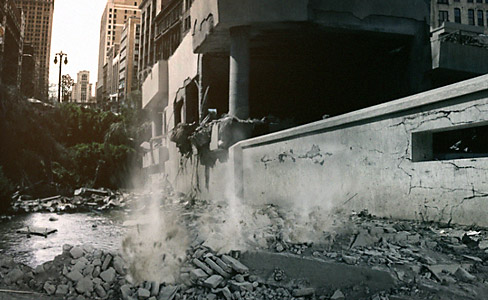
In this tutorial we will create a particle system for emitting specific particles based on a surface type. For example, when the emitter is on the ground we see dirt chunks and when it touches the water we see water splashes. This technique is easy to setup and can be used for motion graphics situations that require dynamic particles types that would be difficult to hand-animate.
The project files contains the expressions and some sample footage to start understanding the concept. For high-resolution footage elements, please check out Action Essentials 2 from our products page!
Side Note: If you use multiple elements from Action Essentials 2, you can create more random effects, like this.
79 RESPONSES TO "NEW TUTORIAL: DYNAMIC MACHINE GUN"
POST A COMMENT!
Before Posting
We're trying to encourage more thoughtful commenting. Â Please take a moment to write a meaningful response to this post.
Also remember to read the rules on posting first.
We're trying to encourage more thoughtful commenting. Â Please take a moment to write a meaningful response to this post.
Also remember to read the rules on posting first.
3D MODELS


2 in one week! thanks man!
and 2 awesome, i love the design of this one… remember me cod e bf3… thanks andrew!!!
This looks sweet! I just may have to breakdown and finally get action essentials.
omg blog is exploding xD
Thank you Andrew!!!
Looks awesome! Can’t wait to the tut.
Your name is from The League and I loveit
Opps, meant to say:
Looks awesome! Can’t wait to WATCH the tut.
You also promised tuts about how you did the motion graphics with the AE2 in the product.. And please tell me that you didn’t finish posting the demon cam tuts. And is there an estimated time for when you’ll publish Element 3D?
I cant wait to get home from work to do this tut!
Finally, someone who DOES the tut and doesn’t just watch it!
AWESOME TUTORIAL
Thanks man
youre awesome My hero!
Hallo Andrew, wieder ein tolles Lehrstück von Dir. Sehr gut. Wann kommt denn ELEMENTS? Gruß aus Deutschland!
great tutorial sir… awesome as usual
hey, nice effect. i will try it, you are great andrew – thank you!
Awesome! Thank you very much!
Wow! You’re on a roll Andrew! Thank you for the tutorial.
Got money saved for Element wanna be the first to buy it!
That’s AWSOME!
Awesome stuff, Andrew! Wasn’t expecting this.
Wow Sir, now you are back on “Track”
)
Thank you for great stuff!
¡Muchas muchas muchas gracias!
what i like about you andrew….you have sense of creativity ….!!! really amazing….!!!
so i cant use Sprite
any other options?
both are must-have
wooooooooooooooow
I like your woke my REF..
GOhed
keep them comming
Sir…what require to be a talented vfx artist?
please tell me ….i wanna know how vfx artists that working on movies and in studios ? how they do anything they asked for in movies?
Today was my b-day and you gave me the best gift ever an amazing tutorial and the second in one week! something wired! Thanks videocopilot for all your tutorials. Check out my youtube channel http://www.youtube.com/user/androspapa1996 with some nice vids!!
Ahh this looks SO awesome. Nice to see a couple of Tutorials coming out all together as well!
Thanks Andrew.
Freakaliscious mate! I was actually able to follow this one (coming from a programming background). Never thought of adding “smarts” into After Effects. This opens up a whole to new can of possibilities! Tell me, is that brain of yours always in ‘thinking’ mode to come up with these ideas?
Thanks again for sharing despite your busy schedule, it’s appreciated.
Nic.
WOW!!! Awesome Indeed… Keep the good works up sir Kramer…
Very nice tut, but i havn’t AE2
and no other footage like this
@Ralf :Kann Andrew deutsch, wenn ja war mir das nicht bewusst wär aber cool
@english guys they dont understand german: do adrew speak german?
PS: excuse me that my english isn’t so good
AE2 ??? like from 1995 ?
hehe
No Steven, Action Essentials 2, not After Effects 2 but I’m sure you know that
Thanks Andrew!
This tutorial could be very helpful for my current project.
One of my favorite tutorial!
wow, that was pretty nice:) after watching this i think i need to experiment a little bit more with expressions, cause they can be very powefull
Andrew, could have sworn I saw a commercial for some upcoming TV special that had effects suspiciously similar to your sneak previews of Element. Are you beta testing in the broadcast world?
wow Andrew throw us 2 big tutorials after a silence… this is too much…
Wow! This one came out of nowhere! Thanks Andrew!
hi
thanks about your info . nice all of them
Heay Great one!
THX Man!
creazy awesomeee….
Really love the tuts, super helpful and fun!
Amazing
………………
Awsome, Will check it out after work. U really need to make the videos work on the iPhone
Keep up the good work!!
Regards Sweden
Two in a week? How did I get so lucky?! Andrew, you complete me.
Hi Mr.Andrew….about Expressions? how can i identify the expressions? i mean make any expression my mind set to…i can’t save them in my mind….how can u do that?
Very cool.. I used your 108. tutorial to figure out what you did with that earlier machine gun sample like a year ago. So this is fantastic to see it used in such a tailored way and expanded on. Thanks so much!
I was all like, “Hey! I’m going to try out that new awesome shattering orb tutorial Andrew Kramer made!” Then I got to the page and was like, “WHAAAT?!? Another one!” I know what I’m going to be doing now…
2nd tut within 7 days? AK, You Rock!
Nice man thanks.
love it.
nice andrew – the only thing i need for my movie is what i learn form this.
thanks mich
cheers
You always rock sir …
I’m really going to try this one!
Great work Andrew…hoping for more of these in the future.
hello) hello your tutor bomb Respect to you) more to the lessons from partikl) thanks)
Great tutorial! Even more uses for Action Essentials!
-Simon
What kind of BLACK MAGIC IS THIS?!
Eres un genio amigo…… gracias por los
tutoriales….
hi Master Andrew

thx very very much
it is so cool
good worck
repeat my question for you:
what is the color sampling?
please answer dear friend!
Wow, this is a remarkably cool one! Never thought about
the split clip alternative in particular,cool expression setup and very interesting use of Trapcode P.with different layers and sprites. A lot to learn from and definitely even more to play around!Thank you very much! LK
What a fantastic tutorial. This is the stuff that really puts this site ahead of everything. BTW, I like the Detroit joke, I don’t think you missed on that one
It’s cool to see your progression as the years go by. O and thanks for reminding me how awesome Doom was.
Andrew.
This might be the best tutorial you have ever made.
Really amazing what you can create with your creative mind.
Keep the good work.
Wow. I am very happy to see this!! no… happy is not the word….. OVERjoyed is the word!! YES!! YES!!! VERY OVERjoyed!!!
YES YES!! I’ve been wanting something like this for soooo long!!! THANKS ANDREW!! AWESOME!!!
may you do a tutorial for the mw3 audio waves?
Kramer…cool it took me a little while to get bullet holes to appear on the wall and then the ground. I am glad you left that out, you know to make us think. Also, I took the displacement trick in the Epic Shatter to make ripples in the water hits.
i realy love that tute kind
Hi Andrew,
Another excellent Tut. I see.
Listen. Could I please get those expressions in a
text file instead of in the project file as you originaly
suggested ?
I don’t have that version of AE, but I can still use
the expressions.
If you would be so kind it would be greatly appreciated.
Regards
Wow Mr. Kramer ! I think you guys should make a plugin with this effect ! You rule ! Greetings from Denmark
Well….I Love you, Andrew)))) Doom was the first videgame I played, but I rather expected to see BF3 or MWF 3 than the good old Doom))))))))))))))) This was funny point of the tutorial. Thank you for showing us unlimited possibilities of AE.In my opinion Adobe should pay you and help to support the site!!!)))))))))))))))) May IT BE so… and until then we’re buying your great products!!!
Looking forward to buy VC Element 3D
very very goooooooooooooooooooooood
thx
awesome Mr Andrew
I want to thank you for all the time you put in your tutorials, you are the best! thanks to them I was able to increase my knowledge on after effects!
http://www.youtube.com/user/rov2004
http://www.youtube.com/watch?v=H_bswV7rsYw
http://www.youtube.com/watch?v=VEwYVT4rAgk
http://www.youtube.com/watch?v=zk4o2o1vQaY
THANK YOU. i remember asking you to do a ‘tut’ on this last summer.me and my brother david, we used a garden hose with holes in it,, we wanted to make it look like a spitfire was chasing us and shooting up the ground.
so w, we hid the hosepipe and then quickly turned the water on and off.
it didnt work well.
and dad went nuts when he saw the hose pipe.. maybe this summer we can try again wtih this
thanks again
please andrew upload the bullet tutorial for free
Appreciable blog !! The tutorial given here is really stunning.Nice job done.Keep on sharing.