|
VIDEO COPILOT BLOG News, Updates, Projects Files & Tips |
|
Posted at 7:29 pm on February 28th, 2011 by Andrew Kramer
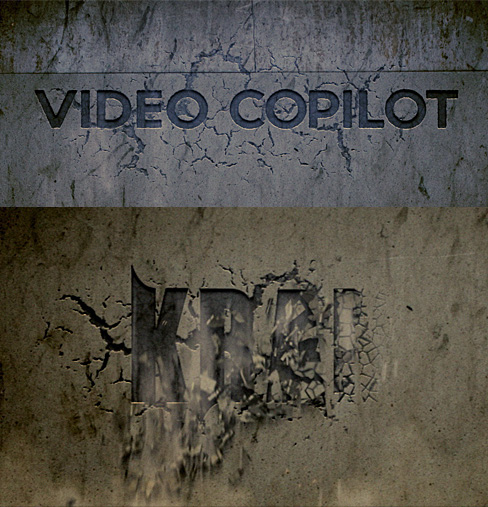
As you may know at Video Copilot we like to do things procedurally when possible like in the Shatterize and Disintegration tutorials. Recently I’ve been working on an all-new technique to procedurally carve words into a wall as the pieces crumble away using just After Effects and a few dust elements from our Action Essentials 2 product.
The results are getting better but the technique is quite interesting, first the wall begins to crack followed by pieces falling out of the words, then it is mixed with dust elements and particles.
This method is great for creating disaster movie fx too, I’m planning the tutorial so stay tuned!
286 RESPONSES TO "Procedural Crumbling in AE"
Post a Comment!
Before Posting
We're trying to encourage more thoughtful commenting. Please take a moment to write a meaningful response to this post.
Also remember to read the rules on posting first.
We're trying to encourage more thoughtful commenting. Please take a moment to write a meaningful response to this post.
Also remember to read the rules on posting first.


again. really good at compositing you!
Wow, that looks really cool!! You are the best dude!
Yeah, looks great! If you want, check out this: http://www.vimeo.com/20035797
Inspired by Andrews tutorials
How exactly this video Martin posted is inspired by Andrew tutorials?
It’s just a bad TV channel promo. ><
Definitely, he keeps astonishing us.
Yes, how in the hell is this a tribute? And how hard is it to get a real lumberjack axe so that it looks a little more real. This goea for every thing, for example the opening of the can which is jitterish he opens, stops, opens, stops and then opens again? Crap, just crap. For all the time you spent doing it, be THOROUGH! Why are the keys on the inside when he comes in? Reshoot a take when you dont nail it, and then some!
Please send me
Tutorial
Good work men..
I made a tut on this effect, check it out:
http://zevodesign.blogspot.com/
Nice. Fantastic effect. I’m already trying to figure out in my head how you’ve done that (rather than just waiting for the tutorial). How about making it crumble to reveal a face?
Cool work man .. can’t wait for plugin ..
Awesome!I did both disintegration and shatterize tutorials but I still want to see a tutorial for this.
Actually, I’m planning a tutorial, because the technique here is completely different…
Andrew, this is the first time you commented to someone who requested a tutorial for some showcase of yours. I think it’s great, but was just curious why.
Andrew hurry, my next film depends on this tutorial!!
kmfilmz.com
andrew, i think the crack transition too soft, but it still awesome… i’ll wait for this tutorial. luv your stuffs, u r genius… thx
Your like those guys who comment on youtube videos when the answer is IN THE FREAKIN DESCRIPTION.
I think he just came here to tell you all that, instead of just commenting he replied to one of the comments to look like he actually reads all of them kkk :p wouldn’t blame him
dono, thanks. Every single blog post has a tutorial request. Some eventually get tutorials and some don’t. Of course Andrew always has his reasons when to make a tutorial but he usually just makes one without responding to the requests. That’s why I asked.
Fantastic. Great font too.
um…….Yes, please.
You used shatter with a custom shatter map didn’t you? that’s the only way i can think of to do it.
you just need a font with cracks and things like that around it and then use that as a custom shatter map on a texture layer and have a darker version of the texture layer behind it, and set the force to close to 0. I don’t know how you managed to move to force though, shatter uses one explosion, not a continuous force, as far as i know. unless this is similar to the shatter tutorial where you had to mask and duplicate the layer 10 times… I don’t know.
Looking forward to the tutorial though!
try the “28 days later” font
The cracks and stuff are actually dissolved in. And if you look closely the pieces that fall are not actually the same as the crack pattern that emerges.
what’s the font’s name? It’s the same font that a band called “miss may i” used in their logo
Its called unrealized
I believe it’s called “unreal” Here’s the link I found:
http://www.dafont.com/unreal-tournament.font
I stand corrected by my own mistake, lol. The font is called “unrealised” on the dafont website. Here’s the new link:
http://www.dafont.com/search.php?psize=m&q=unrealised
Unrealized is misspelled and that’s why I couldn’t find it. It’s spelled unrealised. Anyways, it’s all good. Thanks people!
can’t wait to see this..because you said it’s COMPletely different,
man, you’re Awesome! sure I’m gonna find something nu after “stroke” tutorial, wait..
I haven’t seen the orb tutorial yet,
well, thanks Andrew and team,
oh wait..will you do this “crack Tutorial” to mess around with Sam? that will be a good Idea
Looks good for ae. Could use a lil polishing. How bout some rayfire tut’s.
The point of videocopilot is after effects not 3ds max.
well actually…….i feel that its the same vfx field isn’t it? so for that if you take some help from 3ds max or do a complete tutorial ON 3ds max…..i dont think anythings wrong in it….and also the whole point for video copilot is to share knowledge about vfx…..(excluding all the money you guys make from it andrew…..
) so yeah….. thats all….
Awesome! you come up with awesome original tutorials. loving it
Cool.. Looks Great! I found some of the techniques a bit more revealing scrubbing it through backwards! Still stumped on a couple though. Looking forward to this.
Nice one
Can’t whait for the new tutorial
Good work Andrew, once again you rocks
AWESOME SIR …… WIAITING UR NEW TUT ABOUT THAT
Wow … waiting
Sweet! cant wait dude!
ANDREW !!!…. ANDREW!!!… ANDREW!!! …..
INSPIRING NEW STUFF EVERY WEEK! YOU ARE AWESOME! I made my point, thanks for reading
I’ve been racking my brain about this technique for a while, I have been trying to create something similar to this video http://www.youtube.com/watch?v=JArdpTN2BlU&feature=fvw and I think this tutorial will be helpful! Nice one Andrew.
Sweet Jesus!
cool
that was just awesome…especially the second part…
how did you do yours? I would like to see a tutorial on it… it was awesome
SWEEEEEEEET!!!! Im Excited..
much of linear wipe and overlay a think
wow….awesome….just 5 sec clip and this great..wonder how a minute long clip would look…
ANDREW !!!…. ANDREW!!!… ANDREW!!! AWESOME! Wow … waiting for tutorial
Really amazing stuff, as always. Looking forward to seeing how you pulled this off. The amount of work you put into your tutorials is unbelievable, and your attention to detail is outstanding!
-Simon.
This is by far the coolest title animation you’ve made so far!
Wow………..thanks for the share ………u rock dude !!
man that’s great and man! I love your work and i wish if
if could have the opportunity to speak to you please……….
nice work and very usefull ,cant wait
真的好棒哦ï¼ï¼
Yea!!! I think the same way . . .
Very cool. What font are you using for Karmer? Nice concrete, hope to see where all the elements came from in the tutorial.
OMG thats soo ironic i just downloaded this font today!!
its called unrealized
dafont.com FTW
That’s not really Ironic, Alanis. It’s a coincidence for sure though. What would have been Ironic is if you’d downloaded the font, and then Andrew had said something like, “whatever you do, don’t download this font cause you wont be able to do the tutorial properly.”
This is the second time, I read this here on this post about the font name. But even when I go to that website or google for that matter, it doesn’t show up. Confused of what I’m doing wrong. The font’s name is called “unrealized”
That shows up nothing in the search.
Well, I found it. It’s called “unreal” Here’s the link:
http://www.dafont.com/unreal-tournament.font
I stand corrected by my own mistake, lol. The font is called “unrealised” on the dafont website. Here’s the new link:
http://www.dafont.com/search.php?psize=m&q=unrealised
Unrealized is misspelled and that’s why I couldn’t find it. It’s spelled unrealised. Anyways, it’s all good. Thanks people!
yehey! another lesson to learn. thanks.
The main reason I stay tuned to video copilot is for any tutorials you publish with complex mixing of effects. Understanding how to build a complex effect by combining smaller effects is the most difficult thing to do.
I got some great ideas from just watching the disintegration video. If this new technique is similar in complexity I hope i can garner plenty from it as well.
Thank you Andrew ,I had posted a question on the forum on how to do carved title on ancient wall long time ago ,the question remained without response ,now I got the answer .
CAN`T WAIT FOR THE TUTORIAL !
Gr8 I’ll wait for this Andrew
Fantastic Andrew
You always make an amazing ideas
thank you for this creativity ^_____^
Sweet… Looking forward to the latest and greatest tut.
Your genius and creativity don’t stop never Andrew.
Thanks.
Awesome this should be great! I’m already thinking of ways this effect could be used.
Great Job! If only the camera shake started only when the smoke approaches! (i.e halfway thru the video)
Great! When can we expect the tutorial? because I’m doing a video where I really need this!
Niceeeeee
)))
so that’s how you leave us in the dust?!
i cant wait to see the tutorial of this andrew….your the god of After Effects
Woow, that looks just awesome. Looking forward to the tutorial!
Very nice. Thanks man. Looking forward to the tutorial.
it’s really good . nice effect
FANTASTIC!!! You did it again!!!
It’s a shame! I had to learn that on my own LOL I had to make an ID vid for my company and I ended up learning to use shatter and shatter maps on my own.
Anyhow. Can you make a tutorial on how to take advantage of the 3D effect that you get from the shatter plug in? I sometimes take afvantage of it to make some fake-ass-poor-looking 3D, but I’m sure you can tweak it to do some really nice and realistic 3D FX.
The world would definately suck without you. Thanks again for sharing your knowledge with the rest of the world!
wohoo! nice one andrew! tut-us!
Wao Great!, Can’t wait for this
Awesome, can’t wait ! I think it will be pretty useful for the movie I’m working on in school!
OMG!!!!! really cool
Wow, you never fail to impress mate. Can’t wait to see how this one works. Keep up the good work!
Yeah !! Cool one Andrew.. We’ll be waiting to learn this one =)
You should make the tutorial, it’s great!!!!
hello Andrew,
you are the best for me!! i am french people so sorry for my english, but i like yours videos!! great imagination!!!
I’m glad these lessons
Once more amazing!!!
What font is that?
Please…
Nice man! You rock =D
Completely awesome, as always. !!! xD
So good… the technique very Close to Blog Show Intro
nice Andrew i wait to this tutorial.
Awesome, looking forward to the tutorial!
Nice! How do you always come up with stuff like this?
Looks cool when you reverse it, too!
Very good Andrew!:D This effect reminds me also the movie Silent Hill. When the darkness coming, the walls going to pieces, but not just like crumbling stones, more like red pieces of paper. Strange effect but very nice. Thanks for making this tutorial! I need it!
Thats awesome,it looks like you were using a mask to reveal the text, are they two different parts like the text on one comp and the shatter in the other one and than just revealing it with a mask and mixed with action essentials 2.Anyway maybe its all the opposite.
Great Job
Looking forward to the tutorial!
This is very good because I was getting sick of the orbs… I thought you was going to do Triangles next ..lol and I do know all your tutorials are hard work… and free and you are the best I will never forget you Andrew.. come back to NY …
looking forward to the tutorial!
cool…nice work dude…
you know andrew…..you and the whole video copilot team ALWAYS reminds me of why i am in love with doing vfx……i just wanna say thanx for that……and one more thing…….I LOVE VFX AND I LOVE VIDEO COPILOT!!!
You’re a GEUNIUS !
Awesome! Can’t wait for the tutorial!
AMAZING! your team and separately you, the best!
Is there anything called saturation limit with Video Copliot ?
please be a tutorial.? Please write to the .. Thank you.
OH o_O very good. Can use in game as intro. Yes, “Kramer” may leave ?
Wonder if this was done with a custom-made gradient map in
AE’s Shatter plugin. Anyways, nicely done.
wow!! it just looks very nice and fluid!! does it still use the shatter effect?? like with custom map? ’cause this is really nice… looks 3D.. thanks for all your work it is really inspiring!!
Awesome! i was really looking for something like this.
Thanks!
whoa…i think u still using adobe cs4 in next tutorial..after effect cs5 launch before Apr 2010 and u still not use it for tutorial..,bro, whats ur plan??
I love these tutorials and all, but do anybody know a website as good as this one which has photoshop tutorials?
hmm… kinda looks like the wall crumbling effect of silent hill.
basic comp works with 4 layers:
Top: Wall image. Just an untouched pic of the wall to conceal everything beneath it.
2nd: Particle system. animated emitter that scrolls from left to right.
3rd: Cracked wall. With the letters als cracks in the wall.
4th: letters carved into the wall. works as background and final image.
1.the top layer has got a mask applied, that reveals the layer beneath it (cracks) over time.
2.the cracked layer got the same mask (dont forget the time offset) (maybe with a expression linked to the original mask, so you can set the time the cracks are visible) so it reveals the letters in the background.
3. the emitter of the particle system follows the second mask, to hide the mask and to add the crumbling effect (particle world should do with normal polygons with the right color).
after that you can make some “decorations” with dust, CC, additional effects whatever.
Didnt try it yet, but it makes sense to me, thinking about it.
Mmmmm………did you do the sample video? or Master Kramer?
thats just the way i would do that. the problem i see with my solution is the procedual part of it… a linear wipe wont do. should be some animated simple choker or something like that, that makes this gradual change of size of the cracks possible…
Andrew should make a competition on a “Who is gonna make the tut first!?” And . . . if someone write the tutorial before Andrew do, thennn . . . he can punch his mum in a face . . . with Action Essentials 2 BOX, . . .
Anyone want a pancake?
gonna try this myself, thank u ^.^
i like this, im gonna try and do it without a tutorial, man i am so bad
I Love You guys! You’re tutorials are the ABSOLUTE BEST! May the Gods of After Effects Smile upon you all! Thanks!
I’m really impressed with the quality of this! Usually wall crumbling ends up looking really smeary and false. Good work, as usual, Andrew and Company!
looks really great
Another awesome one to look forward to AK! Also looking forward to see what you did on the DVD menu design with the dark spell casting
Holy Helen of Troy! That’s an inspirational addition. Can’t wait for the tutorial (and to see how many people here are on the right track).
AHHH can’t wait. I also like to tune into the tutorials for the humor.
Looking good, waiting for a tutorial as I’m such a jobber when it comes to AE (basically I have to keep pausing you and following on step by step!).
For your next one how about bullet’s blowing chunks out of a wall, just a thought…
Cheers, Hal
Refresh Refresh Refresh Refresh. I’m gonna be waiting! looks cool.
It looks like there are 2 main layers. The foreground layer is what gets “cracked” and the background is what is revealed (slightly separated in z space). Looks like a section is carved out of the foreground layer and duplicated as an additional layer, so it can be used with the shatter effect.Possibly added some type of bevel to the foreground layer to make it look engraved in the wall. I could be way off but this is what i took away from watching it. I guess we’ll find out soon enough!
very cool guys! watched it again and again
really great work ANDREW…
“Video CoPilot is a natural part of life. Rejoice for those around you who transform into the Force. Mourn them do not. Miss them do not. AE leads to jealously. The shadow of greed, that is.â€
Can’t wait for this tut! I only hope it doesn’t involve any 3D software! lol
Your like those guys who comment on youtube videos when the answer is IN THE FREAKIN DESCRIPTION.
You crack me up… Get it!!! CRACK ME UP.
Poor pun, but in the spirit of this effect.
really good at compositing you!. Tutorial ?
Ow, hate to nitpick but it looks like it could use an “outline” evolving in where the edge of the letters are. When you play it back slowly you can see the cracks just “ending” where the edges of the letters end. Realistically there should be lines or cracks there as well. Knowhattamean?
Text with inner shadow>linear wipe on text>make a cracked texture and put that on the top of text and set text to Luma Matte>put falling dust element on top of it>color correction to match everything. Its done Andrew. M i right?
Great! Can’t wait for the tutorial!
really cool wow …………..no words about it …….
Really coooooool! Can’t wait for the tutorial…
Thanks Andrew, you’re the king!
check out this video. uses action essentials 2. let me know what you guys think. http://www.youtube.com/watch?v=fUnXhRSQQGs
Love it. Really good work… Action Essentials 2: the best DVD for this kind of thing.
It was really good, I like the story a lot. Good actors and color correction, as well as effects. If I were you I would have add some camera shake to the scenes were the SH without glasses used his powers, but it is a small detail
it says , the video has been removed…????y?
nice job!!! how do it that???!!
Looks awesome but u could kinda see the edge of the letters but it looks wicked cool! trying to do this type of effect i can get it to work so im happy to finally get a tutorial!!
Thats really nice. cant wait to see more
Check out the mysterious Phantom S********
http://www.youtube.com/watch?v=SX3xhVN6BwE
I reckon the usual band of Kramer copycats posting this effort (when it comes out) on Youtube. You guys/girls should experiment more rather waiting for Kramer to produce a tutorial. Don’t get me wrong Kramer is good on what he does but there is too much hero worshiping for my liking instead of creativity or technique etc from others.
What’s the aspect ration on that video? 2.4?
tutorial please…please…u are the best Andrew.
Andrew I have an idea about the teqnique.you made a wall in 3ds max,and made the text in there as well,and boolean the text from the wall,and by that way you had the wall+the text,but the text is hidden and it cracks out.and with the particle system or maybe i dunno with rayfire plugin,you made the animation,thats just what i assume but!!! maybe you used another teqnique covering after effects,right?
i hope i have made my statement right about max,well maybe i have some lack of english,really don’t know if you can understand what i meant there,but anyway,that’s another way too
and about the cracks,maybe you used some grunge text and keyframe it,from left to right,or made it again in max by keyframing the material.and with some bump map or normal bump map it should be greater i guess,right?
i liked your video by the way,tnx Mr. Kramer
Dust is too perfect. It should appears from left to right, not at all lenght of screen.
Polish Fan of Andrew Kramer.
Freakin sweet! This looks really cool. As always. And I liked how you used “Kramer” for once. Fitting!
I think the text looks to clean after the crumbling ..it will be great if some residual dust and crumblings are left on the text letters,, or way more slowly fall off the text.
hey, here’s some refference footage that may or may not be incredibly useful to develop this:
http://www.geekologie.com/2011/03/controlled_chaos_murals_from_e.php
Real good. What happen with the tutorial, aw man, I was so excited thinking there was a tutorial…thanks for the tease. But good work!!
i read through the comments and seen you wrote that you was making a tutorial. I be looking for it, thanks.
Thanks Andrew you’re a great teacher.AE was like reading Chinese until I discovered video Copilot. love all your products and tutorials. you’re a genius! Thanks Again.
This looks awesome! cant wait for the tutorial!
i’m eager to watch that man!!!
hmmm,i made a search in the web,and well it should be made with custom shatter maps as well,just needs some tuning which requires Andrew Krammer skills…
Andrew have you ever thought bringing 3ds max tutorials which is presented by you on the table?(I know some of your tutorials covers max)It should be a great deal to see and learn max from you,or at least can’t you look forward to make some more exciting tutorials,which is powered with max(some easy modeling which depends on covering the tutorial+mudbox or zbrush+photoshop(maybe some matte painting)+and final composite in after effects,I really wanna see a complete job(which doesn’t mean lots of ppl here respects you as I do)I know you can do it,or don’t you wanna go deeper into the cg world?I really wonder that.I wanna see your limits,if you have limits…Please prove it.I hope I am not rude about what I say…I really love your works,but when we learn something from you,our hunger gets higher and higher…Just lead us to the victory
I agree, that will be great to have 3DS max tutorials with you
+100
I agree, that will be great to have 3DS max tutorials with you !
thats same like doing boujou tutorial..no one have that money..,unless using pirate version..
i believe that not even adobe,or autodesk cares about pirated software…they want people to learn and make amazing things…but in the learning process they just let it be,this works both in 2 ways,the software popularity and users grow up+and users don’t pay when they are learnings…but when it comes to earn money from what you have learnt,or in another way of saying when it comes to business we have to respect the programmers,and pay for their great affords making these great softwares…if those who learns and makes good works with these programs can make millions of dollars,so paying like 25.000 or 50.000 dollars for those,will not be so hard to pay…it just looks at your skills,and software publishers are aware of it
,with my best respects…
NICE !
AK ftw
Amazing!…..love your tuts. Thanks for providing them.
Yes. Mr. Kramer. Yes.
Excellent, can’t wait to see the tutorial
Thanks Andrew
we are waiting 4 tutorial
No words to thank U Boss!!
this is why we love U Man
We love VC
Just cant wait, U R a Silent killer man.
Is very cool!!
We love VC~!
Thanks!
Very nice work Andrew
Andrew can you give us a tutorial on Procedural Crumbling
WOW, I just cant await for that…
Hi Anderw,
You are a best amazing.
I am waiting.
Andrew, u are awesome and i can’t wait for your next Tutorial!
Heyy man this is awesome !!!
It Looks Awesome.can’t wait for the tutorial.New Stuff to Learn.:)
This is reeeeaaaaallly not bad at all.. giving me ideas for new clip intros…that would be coooool
You are a fx magician, Mr.Kramer.
If you can teach this it would be great, because almost all of the tutorials I have seen use 3D MAX plug ins to do it. I dont even have the software. Thanks Andrew I bet all of us fell like your padawans!
Let’s put him under pressure
“….soooo Andrew…..nice little tutorial you are working on there?…ha?…..you got a….got a little awesome tutorial there?…you’ve been working on for the last 4 days…ha?…you got some wall cracking words for us ha?…”
Can’t wait.
I’m highly interested in the new tutorial for this technique. I think it’s great that you never seem to rest on your considerable achievements with the tutorials posted to date but rather keep creating new techniques. Really love this site!
Cool man.looking forward for the tut
@Andrew Kramer Man U Really Rocks…….. I need Tutorial For this…….. Help me
I would suggest also a smoother sound effect for this clip and a tutorial of sound compositing to integrate it.
dude chnge ur sound system and should be regularly use ears drop.. andrew sir forget it these non sense words.we r waiting.
waw … good video is nice …
Very Exciting, Can’t wait to see it. Looks like the effects are really becoming a combination of other effects in the past tutorials to achieve awesome new looks. I will have to brush up on some of the older ones
That could be the opening title for the Kentucky Fried Movie sequel! REX KRAMER!!!!! Part time airline mechanic…. FULL TIME DAREDEVIL!!!! LOL.
Greetings Andrew.
I’m just wondering when you’ll be uploading the tutorial? If you’ve got any idea yourself of course. I’m very excited!
As always: not only great vfx but where did you get those fantastic sound effects (again!), Mr. Kramer?! Please tell us!
Is Calf shaking or what? Very realistic and the carving looks great…hungry for this tut.
I’ve Learnt so much from you master Kramer….In watching this amazing video i feel that I can recreate that look….but it just goes to show that you really need to learn how to use the tools in AE and not just learn how to create someone elses effect….Keep up the Good work…Master(in old Chinese voice)
hey andrew iam shahir from sdesgisn site youer the best
man iam from afghanistan and in afghanitan the video copilot product is very famous
give youer EMAIL FOR ME PLEAS
hey andrew can you put this toutrial project or watch
hi andrew. again you prove yourself as a solid motion graphic artist AND a good humanitarian teaching part of your knowledge to people out there.
if i may have some comments (i’ll skip the good ones since everyone is praising your work already)
- first of all i’d loose some of the camera shake. it has some effect, true, but you’re overusing it. making abuse is not always a solution
- i’m not sure this i’d to this in afx with no help from a 3d package since a dramatic lighting would highly emphasize the scene, still it’s quite good as it is right now
- the dust that’s raising from the ground when the first letters are falling is way too wide (as long as the comp), while it would be nice to grow wider as more letters are falling down
- adding something crowling behind the wall’s plaster from left to right might be nice .. so there would be something to cause the crumble (ok, maybe i’m getting way too creative … anyways, that’s all i’d like to say .. and again thanks for what you’re doing for the motion graphics comunity – you’ve already earned your place in history
need this tutorial!
Gr8 job Sir!!The vfx and the sound was really Awsome……..:-)
What an ego !
Puting his own name !
Livedraz – whats ur probolem…. Andrew will upload the Project file once he is done with the tut, put ur name in comp & upload it on youtube. please try to focus on technic & not an attitude
With the 2nd (and 3rd … and sometimes 4th) degree Andrew has, how can you answer me that ???
Do you think “technic” is the main quality of Andrew and Videocopilot ?
Sorry … sure it is ! But not only that …
Hey, agreed i shoudnt be replying on ur comment but cant see anybody talking unnecessary & disrespectful things about our robbin hood. felt really bad cause he is the best Compositor i have ever came across who is good at his work & ready to share his knowledge with the world for FREE. thats a BIG DEAL man & even u will agree on it. Just want to tell that he is good person and lets appreciate or encourage him for that. Please no hard feelings… Enjoy the creative world. Cheers
It’s not big deal
It’s a funny situation and I agree 100% with you by the way !
I love AK and his work.
(i have my tshirt and i’m from france)
Now its really funny for me also but it was nice chatting with u. i’m fron India
take care Dude
Expect tutorial
Thanksï¼VC
Very2 Inspiring ANDREW!! … thanks man’
This effect seems to be pretty popular right now. Check out this opening graphic.
http://www.youtube.com/watch?v=kh29_SERH0Y
I wonder if they used a similar shatterize technique.
Hey Andrew !!!!!!!!
We all r still waiting for the “SWAT”(involving rotoscoping etc) Tutorial,SO please hurry…….
SWAT(roto brush) is AE cs5 tutorial..mybe it will come late..
There is… Not really a tutorial but a decent explanation of how its done in the latest episode of the blog show, just showing how to film it, incorporate the blending modes and you can get a decent understanding of the rotobrush from almost any tutorial on YouTube. =)
please guys ..i just bought a MAC and i dont know how to export AFP files from PC to MAC…if anybody knows how to do it ,..i beg to let me know..thanks
sorry to insist but IT’s really important for me…….please ,please guys ..i just bought a MAC and i dont know how to export AFP files from PC to MAC…if anybody knows how to do it ,..i beg to let me know..thanks
I’ve got a slight idea of how you’ve done this, but mines probably complex and more difficult, can’t wait to see your technique for this!
WOW !!! That’s the first page I see Sir Kramer writing an answer to a comment :O And again great compositing, we are waiting for the tutorial that you are planning, but please make it faster
We are waiting too much time for new tuts
Andrew can you put AE project???
u r a rdx….again hats off andrew.
This looks super cool!
ok… tutorial for that would be awesome! I could definitely use that effect.
Great FX Andrew! ))
Who can say how make split on wall?))
Very Nice
hope it will be easy T.T
looking forward to this one.
Jlo new vid looks like it’s using twitch, and alot of ads on new zealands sky tv
WOoOoOoOW I can’t wait…..!!!
Think i used a similar technique a few month ago
http://www.youtube.com/watch?v=SQnb195dmMw
Again amazing
Regards from the Balkans !
this is very awesome!!! cant wait for the tutorial!!
Left me Speechless, just waiting for the tutorial
saying Andrew is “too much” will be to quantify his awesomeNESS and lordSHIP in motionGraphics and compositing, then i’ll leave it at “Andrew is much”. thanks for all your tutorials. Lot’a luv from Nigeria
Andrew,
If i may make a small comment cause i think it has a great look I would minimize the camera shake it is a little bit too much and taking away from the crumble.
Just my thought.
pup
Really nice tutorial, looking forward to seeing this one and see what you’ve come up with this time!
Hi Andrew
I wish you make more VFX videos I miss those a lot 
This doesn’t mean I don’t like intros but more VFX would awesome
WOW! Once again Im in search of a technique and you go and make a tutorial on it! Damn this is just getting creepy now. Cant wait to dive into this one great job man!
can you tell us the release date for this toturial if you dont mind .
yeah Andrew dont be lazy! Tell us when its coming out!
Hey guys,
We’re just beginning to venture into VFX, but we would like some help ’cause we’re beginners. Some constructive criticism would help a ton. Thanks!
http://www.youtube.com/user/TheJETAProject?feature=mhum
Hi, thanks for all this great tutorials. I´ve been watching it again and again. Love your jokes.
Oh, there is one thing.
What did you think about this?
http://www.youtube.com/watch?v=SaM7GjNmIKA
see ya
Andy
Awesome Andrew, by they way I just saw your light particles project on a Lopez Tonight commercial!
“Hey watz up” that starting line itself a good effect for us,andrew try make more tutorials on action movie essentials 2
I can’t wait to use the procedural crumbling for my movie titles Andrew you are great
When comes the tutorial about?
When will be ready, you will know…
I found a crazy easter egg in after effects I wonder if andrew knows this : http://www.youtube.com/watch?v=l-KL28Z1FcI
Because of his robot god powers I think he knows
Funny
Real funny part is “tutorial”
werry nice video………
oooohh boyyy YOU ARE AWESOME!!!!
Great effect cant wait to see the final
ho my god. i have trying to do something like this for ages, but i havent could.
Every day I go several times checking out the lesson in this video or not, Andrew the whole world is waiting.
Rashid – North Caucasus.
Andrew Kramer, your work is incredible and this crumbling effect is killer!
Been about a month since ya posted it though, I’m getting pretty anxious for the tutorial dude!
Does anyone have any idea how the cracks around the letters are done? I have something I am working on on photoshop that would look good with the cracking (not talking about the stuff that animates just the cracks that are already there).
Any tips would be appreciated.
Thanks.
3 simple ways:
1 – paint (using tablet or mouse if you’re good)
2 – texture & bump map inside a 3d program
3 – overlay&manipulate free images found on web
the way I did it (see youtube link a few posts below under the name Pete) is I just found a texture with some good cracks in it, and then just animated the mask. So when you play it, it just looks like its growing.
you are awesome dude………….
really…. you are great
cant wait for the tutorial
make it soon as possible
Wich format do you use for this example videos?
It isn’t 16:9, so what is it?
THNX!
Very nice!!!
tutorial???
hi.
it’s so cool.
We’re waiting for this tut.
i need a tutorial for this baddly!!
HELLO COULD HELP ME. WANT TO LEARN HOW TO MAKE infographics LIKE THIS
http://www.fluxvfx.com/shop/infographics-version-2/
COULD YOU MAKE A TUTORIAL FOR THIS…. REALY THANKS
Ola! I’m Jamn de Santa Catarina, in Brazil and I found your site when in 2010 looking for mega and good tutorials on after effects that fascinate me. Then I began to see all the old tutorials (which are many and good) the problem is the difference of language (Portuguese and English). A tutorial in particular that had never seen was the effect of making a word wall with cracks, such as extruding a solid being carved, the name of your tuto is prcedural crumbling in AE. You posted a video so I ask you if you make a tutorial of how to create this effect, because I still couldn’t make this effect. If not, if you can help me saying a little walkthrough of how to create it in my email can send a text with the step (jamnmatos@hotmail.com). I thank you and congratulations! Love your work, are magnificent and brilliant.
I took a shot at this, It’s not perfect but I think its pretty good. It’s missing the Kramer touch tho, thats for sure. haha
http://www.youtube.com/watch?v=1Ht2wLlUpyI
not bad at all. the spread of the falling debris should be bigger. yours is falling right down.
Thanks dude, you’re totally right tho.
wow! this will surely be another great tutorial!
Sir Andrew, can you make a tutorials on how to make 3d anaglyph using AE.. Thank You.
Dude! That’s wicked! Can’t wait for the tut, man!
Dear andrew. I have seen the most of you tutorial. But I want you to make more action vfx like the medical zoom, lighting explosion, meteor hit… So I hope you see this and use my tip…
cool cant wait for the tut
cant wait for too long andrew…i need it badly…pls make it fast
Can’t wait to see the tutorial, Great stuff as usual.
That looks quite neat Andrew. In fact, it is a perfect effect for the title of my thesis, a short animation, which I am almost finished with. Its due in less than a week – any chance that tutorial might come out within that time? Would be awesome if so!
Keep up the great work.
Great Work Indeed! Can we look forward on some tuts on realistic clouds like this on here
http://www.trapcode-content.com/PierreMichelParticular.html
God Bless
I’m just a little girl who love AE
I think, no I’m sure, VideoCopilot is the best site for newbie like me that I’ve ever seen before!
And you are really nice, Kramer
I can say that this site is pro
Everything that was presented is cool and useful… I Love It! >v< Keep on the good work. Nice job
Is this blast code?
this is something i always wanted to do
I really liked that Tutorial. Here’s my movie to that:
http://www.youtube.com/watch?v=_gRWRjc7yRM&feature=player_embedded
seen this on tv. Spartacus tv series is using this effect.
http://www.youtube.com/watch?v=jpVfZTP03UM&t=0m56s
Hey Andrew how did ya do dat? it`s so prety cool effects.
Hi andy yoh! got great stuff man. amazing n sizzling fx.