 ALL DESIGN TOOLS

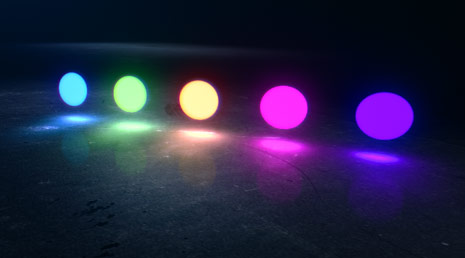
In this quick motion graphics tutorials we'll create a natural light glow illuminating from your title onto a 3D surface. This tutorial also includes tips for generating a simple chromatic glow effect.
November 29th, 2010

103 Comments
This is awesome Mr. Kramer thank you!
I would like to see a tutorial that simulates the death of
invaders like the movies The Invaders, a Quinn Martin Production(1967).
From Brazil - São Paulo
I would like to see a tutorial that simulates the death of
invaders like the movies The Invaders, a Quinn Martin Production(1967).
From Brazil - São Paulo
Lucas
15 years ago
hey, i'm new on your website, so can anyone help me ?
where's the download of the Stone_Wall.jpg
where's the download of the Stone_Wall.jpg
Omar
15 years ago
Im just wondering how come you did not use VC Reflect here? As always. Nice wor. Andrew Kramer is my hero...
We are following VCP for years now since the beginning it started and we must say the quality level of this site's tutorials and its products have gone from GOOD - BETTER _ AWESOME
Just amazing, VCP, Andrew and his team ROCKZ!
Kind Regards
SAN
9dlabs.NET
Just amazing, VCP, Andrew and his team ROCKZ!
Kind Regards
SAN
9dlabs.NET
oz
15 years ago
your tutorials are mostly too confusing for me. but this one is so simple and versatile too. thanks.
m0Nte
15 years ago
Thank You so much! Mr.Kramer this is very cool tutorial . Waiting for more  . Good job respect
. Good job respect
SAGGU
15 years ago
i always like under the tutorial, what is required to create the tutorial, i.e. trapcode particular, thx 
marcello_f
15 years ago
Hi Andrew, I'm from Brazil and I always watch yours tutorials and based on those tutorials I produced a school project called "Posimusic" in which I had to create a parody of a music.
I'd like to tanks the amazing tutorials.
This is the link of the movie-clip: http://www.youtube.com/watch?v=dF9IeMys9js
Tanks!!!
I'd like to tanks the amazing tutorials.
This is the link of the movie-clip: http://www.youtube.com/watch?v=dF9IeMys9js
Tanks!!!
Rob
15 years ago
I guess you cant teach old dogs new tricks... no one has actually replied to a comment yet haha
mikdavy2
15 years ago
just want to say thanks for all your time that you put into this site and allow us to see whats going on in your world and seeing what your doing with experiments in after effects and such. super fantabulous man!
anywho.. just wanted to make a suggestion, not super important, but after seeing your last tutorial I was think that you can do so much more with type with the character palette there to give it some interest. Such as changing the spacing from metrics to optical which is based on mathematical increments that determine how the characters should be spaced. I don't exactly know why I am telling you this other than that I am studying graphic design and notice these types of things all the time.
anywho.. just wanted to make a suggestion, not super important, but after seeing your last tutorial I was think that you can do so much more with type with the character palette there to give it some interest. Such as changing the spacing from metrics to optical which is based on mathematical increments that determine how the characters should be spaced. I don't exactly know why I am telling you this other than that I am studying graphic design and notice these types of things all the time.
htetnaing
15 years ago
Hey!Congratulation for your blog update and thanks a lot for your tutorial.
Your online student..:
Your online student..:
ravtom
15 years ago
so simple...no 3 party stuff...
purely procedural...
yet so enormously magical.....
purely procedural...
yet so enormously magical.....
mktnet
15 years ago
wow! you did better than SONY entertainement logo intro and trapcod lux
professionnal work!! thanks
professionnal work!! thanks

"Hey, What's up? Andrew Kramer here" - Was Dying to hear this for weeks!! Finally a new tutorial!! Thanks a lot AK!!!
hey andrew...
i live in iran.you'r after effects leader in my country and 80% of you'r teachings used in IRAN broadcasting.
my idea is : andrew and sam traveled to IRAN and get their much money.
you know how much money to make a Special Effects Movie gave to one korea person ? his works very very very weaker than you . if you see this Movie and specially Special effects , sure hate after effects and select another work.
yeah , 300,000$ dirty money for this Movie.
-------------------
andrew we love you'r work and you'r mind .
i live in iran.you'r after effects leader in my country and 80% of you'r teachings used in IRAN broadcasting.
my idea is : andrew and sam traveled to IRAN and get their much money.
you know how much money to make a Special Effects Movie gave to one korea person ? his works very very very weaker than you . if you see this Movie and specially Special effects , sure hate after effects and select another work.
yeah , 300,000$ dirty money for this Movie.
-------------------
andrew we love you'r work and you'r mind .
Oscar
15 years ago
Ey what's up mr. Kramer....you are awesome but what's happen with the tutorials...... i can see In my iPhone.....!!!!Aaaaaaa. I'm sorry. But my English is not gooood. ----- Bryan tx----
Joraph
15 years ago
Won't have expected any thing less from AK.
Hey andrew.. When are we getting a cs5 update for the free Videocopilot plugins..
Am tired of switching back & front. i.e cs4 - cs5..
Guy u still rock as ever b4.
Hey andrew.. When are we getting a cs5 update for the free Videocopilot plugins..
Am tired of switching back & front. i.e cs4 - cs5..
Guy u still rock as ever b4.
Mike D
15 years ago
Looks suspiciously like my video copilot banner that I submitted a while back lol
SONY.....A HAHA!
That was great, and im sure they wouldnt mind considering your site traffic is probably getting close to there site traffic wich is crazy LOL
you teach us things i wouldnt even think was possible in after effects so thank you andrew!
and thank you videocopilot.net team!
That was great, and im sure they wouldnt mind considering your site traffic is probably getting close to there site traffic wich is crazy LOL
you teach us things i wouldnt even think was possible in after effects so thank you andrew!
and thank you videocopilot.net team!
I imagine these glow balls flying in as the I'es in my logo! This was actually not the coolest tutorial ever, but definitely one of the more useable ones!
naijaboy
15 years ago
your name should be changed to Andrew E. Kramer as in A.E.K. Meaning After Effects King. U r a legend even in countries like Nigeria.
Sweet Beings This is Awesome! I can't think of a better source for Kick Ass-ery than Video Copilot.Net.
Awesome tutorial Andrew, although I was expecting a more advanced method for the lighting instead of using blurred layers.
AJ
15 years ago
So happy to have Andrew Kramer in my life...at this point, I feel as if he is my brother...or maybe a 2nd cousin...or at least a far removed distant relative!
cheekylilbasterd
15 years ago
That's what I would like , if I were making fun of how I sound like. I didn't watch the rest of the tutorial but it was worth it.
Andrew,
Thanks. Sure could have used this tut a couple weeks ago. The thing I like about your tutorials is that you make them "real-world" in appearance, which adds to my inspiration. Thanks for all you do.
Thanks. Sure could have used this tut a couple weeks ago. The thing I like about your tutorials is that you make them "real-world" in appearance, which adds to my inspiration. Thanks for all you do.
thomas
15 years ago
niceee andrew honestly this is a godd work
but whats with the sony subliminal commercial ?
have you started working with sony ?
but whats with the sony subliminal commercial ?
have you started working with sony ?
Zipwind
15 years ago
I support the idea of making some tutorials about after effects and 3ds max. Maybe you can make something about blowing up, exploding, destroying.
I think it will be useful for many people who want learn what cool thing it is possible to do to make some kind of Hollywood like film with impressing FX.
I think it will be useful for many people who want learn what cool thing it is possible to do to make some kind of Hollywood like film with impressing FX.
hey thank andrew for a great tutorial, i have done something similar.
I USED ACTION ESSENTIALS, OPTICAL FLARES AND THIS TUTORIAL
http://www.youtube.com/watch?v=toT9FpPT3ZY&hd=1
I USED ACTION ESSENTIALS, OPTICAL FLARES AND THIS TUTORIAL
http://www.youtube.com/watch?v=toT9FpPT3ZY&hd=1
Dan
15 years ago
"I knew a guy that used levels... hes dead now." That made laugh. Another great tutorial.
By the way, what ever happened to the roto brush tutorial?
By the way, what ever happened to the roto brush tutorial?
Really nice one.
Just a question...
Shouldn't the bright be born exactly where the circles are crossing the floor?
Just a detail.
Just a question...
Shouldn't the bright be born exactly where the circles are crossing the floor?
Just a detail.
JIK
15 years ago
Not sure if it's just me, but I THINK I saw product placement somewhere in the middle there
zin_onos
15 years ago
LOL! Your jokes and hilarious, and your tutorials are also amazing! it's 2 birds with 1 stone! Laugh and Learn. That should be your slogan!
Polymr
15 years ago
I have been here, following the pied piper since about tute 10.. What a STRANGE tutorial Andy; did u sample some of ur kids cold medicine? brill as always and thx, i owe a lot to u, a msg no doubt reciprocated by 1000's. JK
anyway. well done andrew. that was the best tutorial you made funny wise in a year or two. its like your back, you never left, but your back.
Bart
15 years ago
Look at this comment, please!
Andrew, please help!!! I'm messing around with MagicTraking tutorial. The technique of planer tracking and using its data for a null object is brilliant! I did the tutorial and everything looks great. Then I thought what if I add a 3D object to the scene just like we did in the Advanced Time Freeze lesson. I made our Futuristic Ball in 3d max and tried to create a camera with Reference point in AE. But it doesn't work! Is there any way to get data from Corner-Pin_to_Null for a camera? Is it possible? Or am I going the wrong way? Maybe using this particular technique I cannot place any 3d objects?! Thank You anyway!!!
Andrew, please help!!! I'm messing around with MagicTraking tutorial. The technique of planer tracking and using its data for a null object is brilliant! I did the tutorial and everything looks great. Then I thought what if I add a 3D object to the scene just like we did in the Advanced Time Freeze lesson. I made our Futuristic Ball in 3d max and tried to create a camera with Reference point in AE. But it doesn't work! Is there any way to get data from Corner-Pin_to_Null for a camera? Is it possible? Or am I going the wrong way? Maybe using this particular technique I cannot place any 3d objects?! Thank You anyway!!!
Bart
15 years ago
I have nothing to say....Absolutely great!!! thanks for the new tutorial. But I have some problems with previous one, the MagicTraking...
Daniel
15 years ago
Awesome! Now did Sam die or something?... I recall an Axe Tutorial in the making awhile back(plus haven't seen Sam for a few hahaha)
Jorn
15 years ago
Having seen the sample video now, with "Sonya", I'm pretty sure where Andrew got the inspiration from
Jorn
15 years ago
The first thing that comes to my mind after seeing the pictures is "Hey, the PlayStation Move!"
Gonna watch the tutorial now!
Gonna watch the tutorial now!
Adrian
15 years ago
Did you just watched the Harry Potter tutorial at AEtuts+ ?
The guy the used the same blur technique to create his glow.
Greetings from germany, you are awesome
The guy the used the same blur technique to create his glow.
Greetings from germany, you are awesome
LifeType
15 years ago
"i know this one guy who didnt like it he used levels ,
now he is dead"
LMFAO!
now he is dead"
LMFAO!
neloman
15 years ago
very nice, 1 question though, how do you reduce the banding of that gradient background? tnx.


