|
VIDEO COPILOT BLOG News, Updates, Projects Files & Tips |
|
Posted at 12:50 pm on October 27th, 2010 by Andrew Kramer

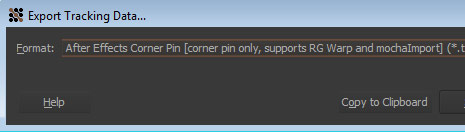
Our latest tutorial called Magic Tracking features a handy preset to work with Corner Pin Data from Mocha AE. Well if you are using Mocha for CS5, be sure to export the data from mocha using the “Corner Pin Only” Option. This method does not include any transform data so the preset can function properly.
Also we know the preset is currently only in English, so if anyone would be so helpful to modify the preset and upload it for others to use. We’ll try to package it up and get all the languages soon.
42 RESPONSES TO "Mocha CS5 Export Option"
Post a Comment!
Before Posting
We're trying to encourage more thoughtful commenting. Please take a moment to write a meaningful response to this post.
Also remember to read the rules on posting first.
We're trying to encourage more thoughtful commenting. Please take a moment to write a meaningful response to this post.
Also remember to read the rules on posting first.


Cool. This is definitely useful info.
First yea!!! good tip
Definitely something to remember for when I get my hands on CS5. Thanks.
Sounds good! I can translate it to Danish if you want… But how do I do so? :3
Thanks for all your help and hard work. Keep up good work.
Cool…………
Please help me.. I cant open Mocha fot AE CS4.
It Crash in the startup box and tell me tath the GUI Aplication Fail and need to close
In the report box says that the ntdll.dll is the problem.
I have Windows Vista SP2
I tried everything and i dont get the problem.
Please. All of you are my last hope.
Thank you
Thanks for everything !!
Hi VCP team…thanks so much for this!!
It’s working now..Great!!
You guys rock
Cool Tip, Thanks A.!
Ðе плохо =) Thx (:
@CrisXT20 First problem is Vista lol. Have you tried reinstalling?
sounds good. i use cs5 and needed to know this. thanks!
track tuts!
http://www.vimeo.com/15920209
track results!
http://www.vimeo.com/15610120
CrisXT20
I agree with DUSTIN about Vista.
I’d almost bet than if you stop right where you’re at, and upgrade to Win7, it will go away.
Thanks Andrew. Does anyone know if the Shape Data export option works with CS5? I have tried to use it but it just does not seem to work for me. Could definitely be Pilot Error though… Let me know if you know so I’ll know and we’ll all know
Thanks!
Is there any way to export corner pin tracking data from Mocha cs5 that can be used in cs3 on a mac? Thanks
nice, keep it up, we need it!
Hey Andrew!!! I can translate the preset to Portuguese, but like the Danish guy, how do I do so???
Thanks so much, I was wondering why it wasn’t working.
I can deliver you a Dutch version, if you want. But give me a week or so.
Ciao Aldo Smit
Hi Andrew! I’m looking forward to translating it into Spanish, but I need to know how to do it… any clue?
Thanks from Europe!
Thanks…I gave up because it wasn’t working. Stays put now.
hey can you please do a tutorial on tracking something just to a wall i tried it on one of my new projects and it didn’t work at all
Hey Andrew an VCP Team! Like the other guys, i can translate it to spanish, but how i do it? I think that we need that tutorial, haha!
This is why your the man Andrew. Thank you so much!!!
thanks dude it so useful thanks man
It can be cool if your preset will exist in french
Hey Andrew! I can translate the preset to Russian, but like the others,I dont know how to do it))
hey thanx andrew , love cs5
I tracked the top of my external hard drive in mocha cs5 and tried the corner pin to track the text on top of it but for some reson the text keeps pending around and going off thenull, any ideas why,i followes the tutorial to the details but no no luck.
@CrisXT20:
Either make an upgrade to Windows 7, or use Google to find the exact same .DLL file to replace it with the broken one.
Just use ”ntdll.dll download” as your searchterm and you will probably find some websites where you can download the file you need. After you have replaced it, it might just work again. Ofcourse, if you don’t understand all this technical stuff you can consider buying W7 or ask a friend to do it for you.
Hope it helps.
-Rutger
Hi Andrew,
Thanks for the tip!
It would be SO nice to have a Mocha tutorial from you, is this possible?
Also, I could translate to Swedish, but as the above speakers I also would like to know how to do it.
Tobias
I’ll try to translate it to Spanish
Hey Andrew! I just translated the preset into german!
And thanks for all your tutorials, man
Check out this piece I did that has a lot of Mocha tracking. Every sign and graffiti you see was motion tracked in Mocha AE and designed by me. If you like it please click the vote button next to the video! Soon I hope to have a before and after video showing what I did and how I did it.
http://now.sprint.com/e?dP646es4Ims
Hi,nice work again!
To translate the expressions you only have to change “Layer”, “Corner Pin”, “Upper left”, “Lower left”, “Upper right” and “Lower right” into your language. Example in german: “Ebene”, “Eckpunkte verschieben”, “Oben links”, “Unten links”, “Oben rechts”, “Unten rechts”.
Greetings from Germany.
Hi Andrew
I don’t have CS5 yet nor your handy preset, but I can translate into french pretty much anything you want (as long as I understand the english word first
If you can have the text sent to me, I’ll email back translated ASAP.
Thanks for your amazing work, I hope I can help in return
Thanks, i will wait the spanish version
.
bye.
thanks so much
fr vietnam
hola mi problema es el siguiente
yo instale el AE cs5 y no me venia con el Mocha
y ahora no se donde encontrarlo por favor estoy desesperado
necesito ayuda algun link donde pueda ubicarlo full
muchas gracias.
Hey .. i have problem exporting files from Mocha into After Effects. I have copied the files from .txt file, but where to paste that ???