 ALL DESIGN TOOLS

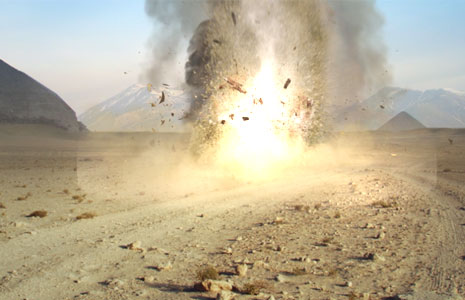
In this exciting new tutorial we'll be creating a powerful explosion and shockwave inside of After Effects using elements from Action Essentials 2 and built-in effects. We will use Mocha to motion track the difficult shot and explore advanced blending and compositing tips. It's a good 44 minute tutorial so tell your wife (or spouse)... it's After Effects time.
September 29th, 2010

186 Comments
I loved this tutorial. You rock Andrew! I made my own version and put it on youtube and a co-worker thought it was real. I still see areas that I could improve on to make it better. But I???m onto other tutorials. Comments are welcomed on my channel.
http://www.youtube.com/watch?v=TbeGpHqhUTY
http://www.youtube.com/watch?v=TbeGpHqhUTY
I loved this tutorial. You rock Andrew! I made my own version and put it on youtube and a co-worker thought it was real. I still see areas that I could improve on to make it better. But I'm onto other tutorials. Comments are welcomed on my channel.
http://www.youtube.com/watch?v=TbeGpHqhUTY
http://www.youtube.com/watch?v=TbeGpHqhUTY
Art
15 years ago
LOL....LOL...LOL...AWSOME...
I did awake everybody with my laughter..it's 2:00 AM CT...This is great !!!....
 )))...Thanks Andrew...u're the man !!!..
LOL...
Gracias..
I did awake everybody with my laughter..it's 2:00 AM CT...This is great !!!....
)))...Thanks Andrew...u're the man !!!..LOL...
Gracias..
Shrey Malhotra
15 years ago
Hi Andrew , thanks for the tutorial , really amazing .. earlier i used to make stupid,over done effects but now after seeing your tutorials i learned alot???
Greetings from India keep up the good work !!
Greetings from India keep up the good work !!
Shrey Malhotra
15 years ago
Hi Andrew , thanks for the tutorial , really amazing .. early i used to make stupid,over done effects but now after seeing your tutorials i learned alot...
Greetings from India keep up the good work !!
Greetings from India
keep up the good work !!
Hi andrew thx for posting this amazing tutorial look at my blast wave with your tu.........
http://www.youtube.com/watch?v=hXq10-CsdZE
wish you a good time and greetz from germany
Maniac221
http://www.youtube.com/watch?v=hXq10-CsdZE
wish you a good time and greetz from germany
Maniac221
Mazen
15 years ago
Hey Andrew,
you'd doing a great job. Thanks for these great tutorials and all these stuff
And I was anstonished as I saw things from your tutorials and VFX-Stuff in german television
Greetings from germany, and keep it up
you'd doing a great job. Thanks for these great tutorials and all these stuff
And I was anstonished as I saw things from your tutorials and VFX-Stuff in german television
Greetings from germany, and keep it up
mystic7
15 years ago
I'm kinda pissed because I don't have anyone to control the camera for me, and then I realized I don't actually have to be in the video. So I'm gonna try this again with camera movement so I can play with Mocha.
Francis
15 years ago
Incroyable, vraiment très bien ce tuto... comme tous vos tutos, c'est magistralement réalisé. Quelle classe !!! Bravo Andrew !!!
Andrew Larson
15 years ago
Hey Andrew was just wondering I noticed that the footage that you used in the tutorial was an image sequence. I just wanted to why and what camera you used. Thanks man! it was a very cool tutorial.
Kasule David
15 years ago
Or man Andrew Every time you come to be my best
Thanks for this wonderful new tut
Thanks for this wonderful new tut
Martin Enoksen
15 years ago
I enjoyed this tutorial much! What do you think about my newest film, using After Effects? http://www.youtube.com/watch?v=vGVbQuw44WU Thanks
Wes Cordell
15 years ago
http://www.youtube.com/watch?v=rGkmRrEebXg&feature=recentu Thanks for the tutorial! Came in very handy
Morhaf
15 years ago
omg this tutorial was so amazing I fell asleep half way through!
but maybe that was because I was watching it in my bed, and I was really tired, and it was cold so staying under the covers kept me warm. anyhow, great tutorial!
I just wish I knew how it ended..
but maybe that was because I was watching it in my bed, and I was really tired, and it was cold so staying under the covers kept me warm. anyhow, great tutorial!
I just wish I knew how it ended..
Zak
15 years ago
I vote that you continue producing tutorials that are more theory based, where instead of explaining how to do one specific task or group of tasks (e.g. extracting keyframe data from audio and using it to animate through expressions)
Instead go the route of explaining the technique of more advanced compositing (reflections, lighting, interaction, super fast garbage matting, etc...) I think that quite a lot of your viewers (including me) know how to create and use blending modes, masks, keyframes, expressions, and most effects as well as a handful of plugins, what we are really looking for is how to utilize our toolset to create awesome stuff like this explosion!
Another interesting thing to show would be creating motion blur in post using Real Smart Motion Blur plugin from Revision Effects or the CC Force Motion Blur effect. Shooting at fast shutter speeds allows for better keying, tracking, and wider apertures without ND filters in bright lighting.
Instead go the route of explaining the technique of more advanced compositing (reflections, lighting, interaction, super fast garbage matting, etc...) I think that quite a lot of your viewers (including me) know how to create and use blending modes, masks, keyframes, expressions, and most effects as well as a handful of plugins, what we are really looking for is how to utilize our toolset to create awesome stuff like this explosion!
Another interesting thing to show would be creating motion blur in post using Real Smart Motion Blur plugin from Revision Effects or the CC Force Motion Blur effect. Shooting at fast shutter speeds allows for better keying, tracking, and wider apertures without ND filters in bright lighting.
Tobias
15 years ago
Hi,
Copy and Paste of the mocha data did not work for me. Can anyone explain what aim doing wrong.
Copy and Paste of the mocha data did not work for me. Can anyone explain what aim doing wrong.
Pablo
15 years ago
Hi andrew this is a great tutorial thanks for sharing your knowledge
i want to ask you if you dont know how to edit a video with effects and all that stuff but broadcasting live i hope you can help me
thanks youre great
i want to ask you if you dont know how to edit a video with effects and all that stuff but broadcasting live i hope you can help me
thanks youre great
I have been researching and trying to figure out the best way to use Mocha for visual fx. Every tutorial I ever see if mainly for motion graphics with the corner pin effect. Thank you, Andrew, for showing me a perfect way of using this application with motion blur! You saved a lot of headache! This is why I learn from you.
Thanks!
Thanks!
EDI
15 years ago
Andrew, you think is possible to use optical flares to create the shock wave effect ?
Great tutorial !
Thanks,
Great tutorial !
Thanks,
Spencer T
15 years ago
Great tutorial! The only thing missing is a shadow; It probably wouldn't be too hard to precomp some of the smoke elements, turn them on their side, and tint them black.
Arley Daza
15 years ago
Muy, muy vacano tu material... es espectacular la forma en que explicas paso a paso los efectos y el resultado final... es transparente y MUY CLARO tu lenguaje, lo que me a encantado de tu sitio y de tus productos.
Muchas gracias por el tutorial.
Saludos desde COLOMBIA!
Muchas gracias por el tutorial.
Saludos desde COLOMBIA!
NO-ME-star.light
15 years ago
hi andrew so amazing u chang my life style with my job as animator.....thaks for u and ur all team of vediocopilot.....
Simple
15 years ago
Andrew u're genius u bringing hope into the visual stuff,impressive creativity kp it up.
fel
15 years ago
awesome. any idea how this commercial is being done? http://www.youtube.com/watch?v=9ZuFqs7O5qc
hi agine
this the pic 2 u know what it's abute
http://sphotos.ak.fbcdn.net/hphotos-ak-ash2/hs007.ash2/33732_1431242376169_1086153317_989816_2723143_n.jpg
thanks bro
this the pic 2 u know what it's abute
http://sphotos.ak.fbcdn.net/hphotos-ak-ash2/hs007.ash2/33732_1431242376169_1086153317_989816_2723143_n.jpg
thanks bro
Very nice. It's such a big coincidence because I made a video over the summer using the same techniques... Mocha for tracking, as well as the AE2 for the VFX stuff.
Cheq it out: http://vimeo.com/12496331
Cheq it out: http://vimeo.com/12496331
mystic7
15 years ago
Well, here's my take. Remember, I'm just an old fart, fartin' around with After Effects, so this is, at best SyFy movie of the week quality
http://www.youtube.com/watch?v=z1c71ihSCp8
http://www.youtube.com/watch?v=z1c71ihSCp8
hi boby ..
thanks alot for those tutorials they are help me so mutch ..
I wona aske u something in A.F.E .
i lost the icone that was 4 3D in A.F.E and I couldnt find it nowhere would u help me please .
so wher i can find it ?
thankx agine
thanks alot for those tutorials they are help me so mutch ..
I wona aske u something in A.F.E .
i lost the icone that was 4 3D in A.F.E and I couldnt find it nowhere would u help me please .
so wher i can find it ?
thankx agine
ABPROductions
15 years ago
This is awesome!! Actually for those of you interested, check out this link I found for movie effects:
http://www.techxilla.com/2009/11/17/visual-effects-of-your-favorite-movies-in-the-breakdown-mode/
It talks about how they made the special effects for several movies. Maybe (Sir) Andrew Kramer, you could reproduce these and make some more tutorials.
http://www.techxilla.com/2009/11/17/visual-effects-of-your-favorite-movies-in-the-breakdown-mode/
It talks about how they made the special effects for several movies. Maybe (Sir) Andrew Kramer, you could reproduce these and make some more tutorials.
Nice tutorial Mr. Kramer! I just thought you'd be interested to see that I made a CG blood burst simulation for compositing! http://www.youtube.com/watch?v=tFOKc-5RWXY Hope you check it out
Hi Adrew great Tutorial look this Blast Wave with your tutorial
http://www.youtube.com/watch?v=hXq10-CsdZE&hd=1
greetz from Germany
http://www.youtube.com/watch?v=hXq10-CsdZE&hd=1
greetz from Germany
Dear Andrew Ur Perfect and Best Animation Designer...
Your Effects and Using it is very nice i liked it very Much....Samir from Afghanistan
Your Effects and Using it is very nice i liked it very Much....Samir from Afghanistan
jeroen breevoort
15 years ago
Wow, I really did not expected that explosion! Please keep making movies this is really good!
Hope You Will Add My Page To Your Andrew Kramer's Page...
Also, Is This Really Your Page Andrew :3
Want To Know If It Is Officially And Originally Made By You Sir Andrew...
???http://www.facebook.com/pages/Andrew-Kramer/39992939221
Just Want To Make Sure Bec. Some Of It Are Fan Made....
Also, Is This Really Your Page Andrew :3
Want To Know If It Is Officially And Originally Made By You Sir Andrew...
???http://www.facebook.com/pages/Andrew-Kramer/39992939221
Just Want To Make Sure Bec. Some Of It Are Fan Made....
Andrew Kramer Is So Cool And Awesome... That's Why I Make His Website On One Of The Best Editors on The Internet....
Here Is My FanPage And You Can See Andrew Kramer And Freddie Wong On My E.A.P.C. Tab
http://www.facebook.com/E.A.ProductionCrew?v=app_4949752878&ref=mf
They Can Easily See Andrew Kramer's Works And Also, Freddie Wong's Works
XD
Here Is My FanPage And You Can See Andrew Kramer And Freddie Wong On My E.A.P.C. Tab
http://www.facebook.com/E.A.ProductionCrew?v=app_4949752878&ref=mf
They Can Easily See Andrew Kramer's Works And Also, Freddie Wong's Works
XD
Zak
15 years ago
Very nice tutorial, and glad you were able to bring Mocha into the mix finally. You seem to like using 2d tracking for 3d effects, with mocha you can use multiple planes within the scene to simulate 3d tracking in most shots, it's not as accurate as bojou, but then again after effects doesn't cost 10k...
Marcello
15 years ago
Hi Andrew,
Your stuff is truly great and using action essentials 2you inspire me to do stuff like this
http://www.youtube.com/watch?v=4TDfSbDk8rY
Thanks
Your stuff is truly great and using action essentials 2you inspire me to do stuff like this
http://www.youtube.com/watch?v=4TDfSbDk8rY
Thanks
Ben Kramer
15 years ago
hey Andrew this is a great tutorial but i am in Mocha 2.2.1 for after effects cs5 and i think there is something different about it because even after checking all of my settings in mocha, once the solid is in after effects it only covers half of my video and the corner pin info is different from yours. it'd be great if you could tell me what if anything i am doing wrong and keep up the good work. Thanks
hi,
nice tutorial...
i used your plugins & elements...
we creat music videos & publicity videos
you can see in
www.benta.me
thanks andrew
nice tutorial...
i used your plugins & elements...
we creat music videos & publicity videos
you can see in
www.benta.me
thanks andrew
erblin shala
15 years ago
Andrew thanks for all these magnificent tuts.
Can you make a tutorial like this
http://www.youtube.com/watch?v=ij_QrkpNyuc
(3d text with reflection of lines etc )
Can you make a tutorial like this
http://www.youtube.com/watch?v=ij_QrkpNyuc
(3d text with reflection of lines etc )
mauro castillo
15 years ago
Exelente tutorial, gran calidad y sobre todo muy útil para aprender After Efects
Saludos desde Quito-Ecuador- Sur América
Saludos desde Quito-Ecuador- Sur América
hei people. i have cone clip and want to have same kind of effect on that video. bulding in the background have to explode and smoke have to some straith to the camera and stuff. is there anybody other like andrew kramer would like to realstic vfs to this video? please email me. you will get reward(: if you do great job as andrew.
you can find the raw video to work with in:
https://files.me.com/ryankai3008/qo3mwh
and about me in www.ryankai.com
email ryan.kai3008@gmail.com
hope to hear from you guys, and this is urgent.
thank you
you can find the raw video to work with in:
https://files.me.com/ryankai3008/qo3mwh
and about me in www.ryankai.com
email ryan.kai3008@gmail.com
hope to hear from you guys, and this is urgent.
thank you
MarleyHutchinson
15 years ago
Hey Andrew,
i tracked some Canon 7D footage in Mocha and then followed your tutorial through (having never used mocha before, and solely relying on after effect's built in tracker) i imported my image i wanted on screen. When i put into the pre-comp of the black solid and played, the image distorted and bent as i played, and the image was not representative of the tracking data seen in mocha. Do you know any reason why this could be?
Thanks.
Marley.
i tracked some Canon 7D footage in Mocha and then followed your tutorial through (having never used mocha before, and solely relying on after effect's built in tracker) i imported my image i wanted on screen. When i put into the pre-comp of the black solid and played, the image distorted and bent as i played, and the image was not representative of the tracking data seen in mocha. Do you know any reason why this could be?
Thanks.
Marley.
Kurt Wright
15 years ago
It's so funny, the same day that I watched this I saw basically the same thing on "Undercovers". You work on that show too don't you? Was the car bomb in the second episode your work because it was awesome!
w3dran
15 years ago
Explosion is great but I don't like static ground in front. Maybe some scatter ground as a reaction from blast/dust wave.Everything else...HELL YEAH!!!
How much fun would a little Action Essentials 2 and OF be with this Vimeo video?
http://vimeo.com/15286128
Keep up the inspiration!
wb
http://vimeo.com/15286128
Keep up the inspiration!
wb
Shaked
15 years ago
Thank You for all the tutorials!
Maybe you should be the president of USA and then we will be learning after effects at school!
The first president who is also a AE expert!
Sorry for the useless comment IM FROM ISRAEL
thx again
Maybe you should be the president of USA and then we will be learning after effects at school!
The first president who is also a AE expert!
Sorry for the useless comment IM FROM ISRAEL
thx again
Polymr
15 years ago
wow, my comment sounded dodgy; im all about the sexier half of the food chain. (Also a writer, is there wind prob in here)is the aussie cow legend who intervwd u based in oz? id google it but i hasta roto poledancers feet an hair. LONG LIVE COPILOT
jjoe
15 years ago
Brilliant as always Andrew!
only thing is my motion track wont work properly, I copied your points exactly using mocha cs5 but it doesn't track well.
if anyone can help me id much appreciate it.
only thing is my motion track wont work properly, I copied your points exactly using mocha cs5 but it doesn't track well.
if anyone can help me id much appreciate it.
atul palande
15 years ago
adrew you are awsome and thanks for all this tutorials and hope you would help all us in future
Polymr
15 years ago
re "The world would need other Andrew Kramer!". bro pls... do u know how silly that concept sounds? :p Andy U R 1 of a kind an we all know it. you are my digital hero, PLEASE incorporate skateboarding into a tutorial, im sure sam is a natural hipster doofus.
Joe S
15 years ago
AMAZING tutorial! huge fan of your work, and your tutorials are the only one that i keep tabs on. everytime i see any of you and your teams stuff, makes me want to go out and film and put the effects in. keep at it!
BobFromChicago
15 years ago
As always a fantastic tutorial, the one thing i thought of was that since it was suppose to be caught on tape and not part of say a film being made i would have thought that maybe cause an iris effect for the camera, you know when a sudden burst of light happens and your iris automatically closes a lot to limit the amount of light coming in. So that way things kind of get dark for a second then lighten back up. Just a thought.
Bob
Bob
jacob zelaya
15 years ago
good tutorial, like all other videocopilot tutorials. Greetings from El Salvador
Peter
15 years ago
MORE MOCHA TUTORIALS ANDREW! great work by the way. shout outs from the philippines
Pablo
15 years ago
Hola Andrew, te escribo desde Argentina.
Aca hay muchisima gente que te sigue y aprende de tus tutoriales. Seria un honor que vengas a este país a brindar una conferencia, saludos!
Contactame si estas interesado
Aca hay muchisima gente que te sigue y aprende de tus tutoriales. Seria un honor que vengas a este país a brindar una conferencia, saludos!
Contactame si estas interesado
illd
15 years ago
Hi Andrew,
great work - thanks for sharing! I saw that you worked in 32 bit mode - would you suggest to work with "Blend color using Gamma 1.0" activated inside AE?
great work - thanks for sharing! I saw that you worked in 32 bit mode - would you suggest to work with "Blend color using Gamma 1.0" activated inside AE?
Awesome, man.
Great tutorial as always. But to watch you solve every problems on the projects, that's something more to see.
Great job man. Always admire your work. Thanks!
Great tutorial as always. But to watch you solve every problems on the projects, that's something more to see.
Great job man. Always admire your work. Thanks!
Donny Williams
15 years ago
IM NOT GOING TO LIE.......IT KINDA.......JUST A LITTLE BUT..........DIDNT MAKE ME........NOT JUMP
Very nicely done!!! I love how the AME2 dust filled the frame really making a volumetric feel from the blast wave to blend reality with the compositing!
Reza
15 years ago
Thank you soo much! By watching this tutorial, I learned how to track motion even if the markers fall out of view! Thank you! Thank you! Thank you! Dude!
Someone might have said it already, but you can export the tracking data as transform and not corner pin data. Save you a ton of time.
Jrob
15 years ago
I have a challenge for you Andrew.
what would be your approach to making a building collapse, i have wrapped my mind around this one for a long time have yet to come up with anything decent. (i know part of the problem is that i don't know how to use a 3d editing program and i do not own one either)
so building collapse help please?
what would be your approach to making a building collapse, i have wrapped my mind around this one for a long time have yet to come up with anything decent. (i know part of the problem is that i don't know how to use a 3d editing program and i do not own one either)
so building collapse help please?
AdrienF
15 years ago
Yeeah you heared me !! Ty very much for this AWOSOME tutorial !! Really well done, and for free !! I really appreciate all your free work, just for us !! So Thanks a lot for that !!
Here's what I did : http://www.youtube.com/watch?v=u-24t3xU8x0
Hope you're gonna like it !!
Have a good day, from Switzerland, land of cheese and chocolate (no that's a terrible bias !! )
)
Here's what I did : http://www.youtube.com/watch?v=u-24t3xU8x0
Hope you're gonna like it !!
Have a good day, from Switzerland, land of cheese and chocolate (no that's a terrible bias !!
)

Blindpixel
15 years ago
Sam leaving the scene at the end of the explosion or Sam re-loading a grenade launcher (to create tension and drama also to reveal the source of the explosion would make it a more complete scene.."like Sam taking revenge for all the past abuse at VC")
Hi Andrew.
Woooooooooooooooooo! This is Good Work Man!
Thank You.
And What About your New Product "Series Two"?
tutorials is enough for Series Two.
Please listen to the @Edris Mohammadi Comment.
Woooooooooooooooooo! This is Good Work Man!
Thank You.
And What About your New Product "Series Two"?
tutorials is enough for Series Two.
Please listen to the @Edris Mohammadi Comment.
Excellent.. can't wait to dive into this. I just finished an explosion scene for my film day before yesterday, now I'm interested to see what I did compared to this because the process sounds very similar in the description. But then again, now I may have to revisit my scene based on what your teaching here. Either way, excited. Thanks mate!
anadaido marika
15 years ago
wow ! BLOWSOCKS is make BLASts bomb inevate tutorial is mr Kramer the !
Dominik
15 years ago
" by Edris Mohammdi
Hi, Andrew
Did you see the movie ???Wanted??? (please see).
Do you can make a movie Like ???wanted??? (00:30:30 to 00:30:40)
"
LOL
Hi, Andrew
Did you see the movie ???Wanted??? (please see).
Do you can make a movie Like ???wanted??? (00:30:30 to 00:30:40)
"
LOL
Jerry
15 years ago
That is such a cool video effect. I scrubbed through it and saw so much detail going into this effect...flawless....you even did the ground bursting up in a pile of dirt right before the fireball....AWESOME!!!!!
David
15 years ago
I've seen all of your tutorials but I was really excited to see this new hobo action star!
Hi, Andrew
Did you see the movie "Wanted" (please see).
Do you can make a movie Like "wanted" (00:30:30 to 00:30:40)
Did you see the movie "Wanted" (please see).
Do you can make a movie Like "wanted" (00:30:30 to 00:30:40)
anxs220
15 years ago
I thought that the failed blog show was like a joke
and the explosion was fake, and it looked like created with ae2 footages ))
Thx for the tut!
and the explosion was fake, and it looked like created with ae2 footages ))
Thx for the tut!
damn HELL YEAH
im owner of paintball field and this is things i've been looking for - as inspiration and so on.
Planning to launch promo video of my field - will give You link Andrew when finished.
great respect.
Andy
im owner of paintball field and this is things i've been looking for - as inspiration and so on.
Planning to launch promo video of my field - will give You link Andrew when finished.
great respect.
Andy
Stephen
15 years ago
Very convincing. I like how you set up the viewer to be looking away from the explosion as it occurs. Like a magician does to distract the slight of hand. The only suggestion I have would be for you to be knocked forward and incinerated once the shock way reaches you.
Cheers!
Cheers!
great tutorial Andrew it's different and have really really great tips into it I loved the tip of tracking it's really smart
Chris
15 years ago
Powertase, these tutorials aren't here for Andrew to show you 'how to make an explosion', but rather to show various techniques in AE. Honestly, the thing I most took away from this tutorial was how to get a good track out of blurry footage (which, when shooting on a 550D there is LOTS of it!).
AK could probably spend a week on a shot like this, adding in hundreds of small details to sell the shot-but he has 40 minutes to give a quick overview of how he approaches certain problems.
If you want a 'better shot' and to 'Go further, go harder, go over your limits' then create a shot that has all of those elements you feel are lacking.
AK could probably spend a week on a shot like this, adding in hundreds of small details to sell the shot-but he has 40 minutes to give a quick overview of how he approaches certain problems.
If you want a 'better shot' and to 'Go further, go harder, go over your limits' then create a shot that has all of those elements you feel are lacking.
Thank you so much Andrew for new tutorial!
Andrew:
Did you see the movie 300 (please see).
In this movie, movie creators used Blood videos like
"Action Essentials 2: 02. Blood"
Do you can make a movie Like 300 (00:48:00 to 00:49:10 Slow Motion) with your Axe (or Spear like 300) and with your Action Essentials 2.
Do you Understand?
I am Edris Mohammadi from Persia.
Andrew:
Did you see the movie 300 (please see).
In this movie, movie creators used Blood videos like
"Action Essentials 2: 02. Blood"
Do you can make a movie Like 300 (00:48:00 to 00:49:10 Slow Motion) with your Axe (or Spear like 300) and with your Action Essentials 2.
Do you Understand?
I am Edris Mohammadi from Persia.
Duncan
15 years ago
Hey Andrew, did you have anything to do with the film "skyline", the trailer looks like an optical flares advert? Keep up the good work.
dutch_steven
15 years ago
love it! may i ask what kind of camera you use? the effect looks very realistic! thanks Andrew!
Eshita
15 years ago
This looks sooooooo realistic
i loved your tutorials
i love your tutorials
and i will continue to love them !!!
i loved your tutorials
i love your tutorials
and i will continue to love them
!!!
Powertase
15 years ago
Hi all. i challenge you to make better explosion.
What we miss is shockwaveson the ground. one can see that ground is not moving. In such powerfull explosion, ground would "dance", not only shake. So people, if you want the real thing, probably FORM should be envolved (If not 3D).
Also, some camera movement should be envolved, little zoom, and particles ricochetting from the lens of the camera (leaving small dents and scratches on it)
So Andrew, we know you can do better.
Go further, go harder, go over your limits.
PT
What we miss is shockwaveson the ground. one can see that ground is not moving. In such powerfull explosion, ground would "dance", not only shake. So people, if you want the real thing, probably FORM should be envolved (If not 3D).
Also, some camera movement should be envolved, little zoom, and particles ricochetting from the lens of the camera (leaving small dents and scratches on it)
So Andrew, we know you can do better.
Go further, go harder, go over your limits.
PT
NEVER
15 years ago
You roll the world!You even professional than all of my lecturers...i feel that it is so watse time to go to the college after I found this website...
by R.A. Elliott
September 29th, 2010 @ 10:49 pm
"Dear Andrew,
I hate to bring this up again, but its always in the back of my head every new blog post: what ever happened to the Action Essentials short film?"
Exactly! I think we've waited long enough!
September 29th, 2010 @ 10:49 pm
"Dear Andrew,
I hate to bring this up again, but its always in the back of my head every new blog post: what ever happened to the Action Essentials short film?"
Exactly! I think we've waited long enough!
Dear Andrew,
I hate to bring this up again, but its always in the back of my head every new blog post: what ever happened to the Action Essentials short film?
I hate to bring this up again, but its always in the back of my head every new blog post: what ever happened to the Action Essentials short film?
Aung Ko Ko
15 years ago
I'm so like your idea when I watched your blog show. I believed that u can be best actor
KKG
15 years ago
I don't have a wife, so Instead I told my homework that's due tomorrow "Its after effects time!"
Sazarret
15 years ago
GREAT TUTORIAL!
And, even though you should use the tracking data straight forward from Mocca as transform data instead as corner pin data, your technique was really helpful with a big roto project I'm work on with a product that comes in and out the frame changing shape and rotating.
Thanks man you are the best.
And, even though you should use the tracking data straight forward from Mocca as transform data instead as corner pin data, your technique was really helpful with a big roto project I'm work on with a product that comes in and out the frame changing shape and rotating.
Thanks man you are the best.
Andrew, Looks Great!
I knew I would see the shockwave work it's way back to the front someday
http://web.archive.org/web/20051029005515/http://www.videocopilot.net/resources.html
It ain't a "city explosion" or anything, but the end result looks nice.
I knew I would see the shockwave work it's way back to the front someday
http://web.archive.org/web/20051029005515/http://www.videocopilot.net/resources.html
It ain't a "city explosion" or anything, but the end result looks nice.
Ramon Villalba
15 years ago
Thanks once again Andrew!, this is a powerful tutorial and very useful too...greetings from Colombia
Tincho
15 years ago
Thanks Andrew! I wanna know this... Like alwais, in every tutorial, you surprise me! Hugs from Argentina!
I know you will do this Andrew!! I had been waiting for this since your failed blog show,lolx.Thanks you!
paul holt
15 years ago
excellent, great to see you back as always, I look forward to extracting the core techniques and applying them in new and interesting ways...its also great to see you mention Mocca in a previous comment...have been learning this for a while now and its tracking abilities never fail to impress
...its also great to see you mention Mocca in a previous comment...have been learning this for a while now and its tracking abilities never fail to impress
tkank's andrew for this exellent tutoriel !!! et thank's for Mocha for motion tracking XD
VIVE VIDEO COPILOT !!!!!!!!!!
VIVE VIDEO COPILOT !!!!!!!!!!
Étienne
15 years ago
Einstein was smart...But YOU are a genius! Thanks for sharing your knowledge like this, everybody loves you and everything you do is great. It's cool to know that there's still some people on the planet doing things with passion, not with the purpose of getting rich. I've bought few of your products and hope you see it like a "thank you for all your free tutorials and presets!" The world would need other Andrew Kramer! Thanks again!
Tyler McCue
15 years ago
Hey Andrew quick question, is there an easier way to instead of masking yourself frame by frame? I looked closely at your final shot and i could see some masking errors around your hand. Couldn't you duplicate your footage then mask and feather it in such a way they co-inside. something along those lines?
Wow i was here 20 minute ago and went to WC came back and NEW TUTORIAL!!!!!!!!!!! Yahoooooo!!!! Andrew Best))
Well the one good reason for using corner pin data is the you can later extrapolate tracking points based on any position within the frame so you can multiple tracks for multiple areas... Although admittedly for my example a straight transform data would have been easier.
Guillermo
15 years ago
Hey Adrew I have a question, why you don't used the transform option from mocha directly? whats the diference between your way and the normal transform data applied to a null object?
Good job
greetings from Chile.
Good job
greetings from Chile.
@Dvpstudios, in retrospect that is probably a simpler solution I was going to talk about the benefits of using expression but the tutorial ran long.. I'm considering a small followup using mocha v2 with the new shape tool as well. Thx!
Great Tutorial! Is there any reason that when using the tracking data from mocha you didn't copy it as transform data? I think it can be applied to a null without having to retrack.
lP E I Nl
15 years ago
Nice Mr. Andrew Kramer..
Your Video Tutorials, helps me alot..
I owe you for that..^_^
Godbless..
Your Video Tutorials, helps me alot..
I owe you for that..^_^
Godbless..
Gforce
15 years ago
Going to watch it now. Say Kramer, what ever happened to that Twitter thing? Did you ever got enough twetts? Just wondering.
I think i will stick with a real IED
Just joking anyway i done some tests and i just used after effects traking it turned out not bad, but i guess its time to make a short movie andrew am locked and load lets sam and i go on an opretive mission behind enemy lines.
Just joking anyway i done some tests and i just used after effects traking it turned out not bad, but i guess its time to make a short movie andrew am locked and load lets sam and i go on an opretive mission behind enemy lines.
endos
15 years ago
honestly andrew you are becoming more of a legend daily. Big ups man, you are the best
haha i`m thinking how to implement something like this in one of my weddings clips something like mr & mrs smith.
something like mr & mrs smith.
hey ya
Wow Cool
I'm Sure After MJ I Know He Was King Of Pop
But You Will Be King Of AE
I Don't Know When But You Will , Soon
Wow Cool
I'm Sure After MJ I Know He Was King Of Pop
But You Will Be King Of AE
I Don't Know When But You Will , Soon


