Andrew Kramer on May 21st, 2010 3:59 pm
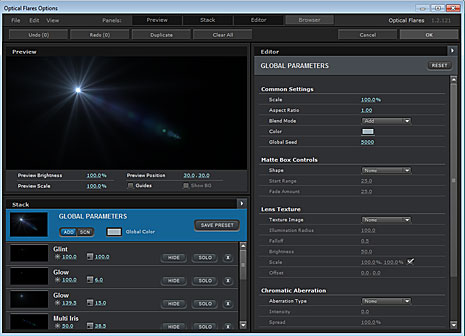
The Optical Flares 1.2 update is now available and includes several new features for all Optical Flares customers:
- Added 64-bit support for AE CS5
- New “Unified Interface” with automatic scaling
- Rearrange window panels
- Full-Screen Mode
- 16:9 Guides now visible
- Show BG warning
- No more slide-out panel (Yay!)
Watch Video Demonstration of New Interface
Download Optical Flares 1.2 (Order Email Required)
New Forum for Video Copilot Plug-ins:
Now there is a dedicated place to talk about Video Copilot plug-ins including features, questions, compatibility. Click Here
72 RESPONSES TO "OPTICAL FLARES 1.2 NOW AVAILABLE!"
POST A COMMENT!
Before Posting
We're trying to encourage more thoughtful commenting. Please take a moment to write a meaningful response to this post.
Also remember to read the rules on posting first.
We're trying to encourage more thoughtful commenting. Please take a moment to write a meaningful response to this post.
Also remember to read the rules on posting first.
3D MODELS


You guys worked very quick getting everything updated for CS5. Thanks for all the effort.
Andrew is there any trial please?????
Yay! This is great! Better for my 64 bit computer
Wohoooo well done guyz great jop
Thanks you…. 64 bit here we go…
Great more options. I love Optical Flares
I dont have 64 bit though
Woh so cool, thank you very much Andrew, Ive been waiting for it long time.
Works like a charm !
I really wanted to but I live in Brazil, so it is difficult
thanks andrew for everything
you are a master xD
I hope I can soon buy the optical lens flares
why I’ll do a project, using the tutorials, earth zoom, 3D planet, shaterize (my english is bad), a short action movie, using the soundtrack of Splinter Cell Conviction and sound fx, which are incredible.
Remember this update is for all Optical Flares customers running the current 32-bit version of After Effects, not just ae cs5.
thanks andrew…still the best !
thanks lots of thanks
HURRAY…this will work way more smoother on my computer now. Cuz I’m using a 64bit laptop the O.Flares plugin would lag all the time…this will help a lot…I hope
updated it and its working great simple steps know what you doing follow the instruction and you should be ok ,again thanks a million guys.
Well.. i just wanna say congrats to Andrew & the whole team of video copilot for making their Goals continuously..
This is also a great effort for those who want to make something awesum or realistic & also do work hard for it but now its easy to make it with the help of O.P..
Now we also have a 64 bit version for the Adobe CS5.. Just because of the hard works of the whole Team..!!
Thanks a lot..
Thank you, has been waiting for this, now I can say bye bye to CS4 and migrate to CS5 with my favorite plugin
optical flares rocks my face off
EXCELLENT! Thanks Andrew and Team…
Thanks for Update !
I love You !
I am Edris Mohammadi from Iran, Sanandaj.
woohoo!!!! this is really cool man…. good work…
very good plug-in, thank a lot andrew
thanx andrew !! my mac will enjoy this !!!
yesssssssssssssssssssssssssss you are the man here we go again
yes now let me invade the form
Please Andrew Can u Tell Us When The new Tuto Is coming out ….. thnx
Hi i Need Toutorial Of mach move and some camera projection and emm some effect which use in video clip (music).how to shake the any object in street when dragoon walk in it.shake car , telephone ,pepole and …. .how to floting any object in air like car , aircraft and any metal tools .thanks
I greatly appreciate your work on this great product. I had such a hard time living without it in CS5. Also Im glad you got rid of the slide out pannel, It will make navigation much smoother
~NIck
Wonderful! Thanks to you all;-))))))
Andrew – Interface is VERY Intuitive. Very impressive man, really… been playing with it for a couple of hours now and it was just really well thought out, like it BELONGS to the adobe suite. love it. Thanks!
Thanks you for this update !
Nice working with you.
Always a great job !
Euclid
i think that the other one is better than this one
i did’nt upgrate to cs5
Thanks Andrew and the gang. This is too cool. You guys are super fast with new updates to keep us up with the current market and video styles.
Tanks Andrew EXCELLENT!
Thank you very much, didn’t much like the pop-out panel.
Just purchased it! Very cool! Now I’m cooking with Kramer!
thank you andrew..
you will be missed!
Thanks Andrew.But I can’t Animate preview window hold down mouse botton.
I use on mac and cs4.
Did the control was change?
Hey Andrew, You shoul take a look at this short http://www.youtube.com/watch?v=agk2svo7svI
It’s fully 3d but really impresive:D
Hi, thanks for the update. I’m hooked on OF. I’m still a little confused on the BG option. When I activate it is doesn’t show the frame (of the avi) that I am trying to apply the the effect to to … it shows some other frame in the avi (possibly the 1st frame). How do I get the bg to to display the current frame that the current time marker is on when I launched OF?
Hi Andrew,
Do Optical Flares work in Premiere pro?
I have bought 64 version but not sure if thats also work in premiere pro.
Thanks
you are Great man Andrew
mr.Andrew
I want to send important email about your tutorials
how I can sent
Hi,Andrew thanks a lot.great job.full satisfaction with full screen interface.
great idea on the separate forum!
Awesome! Can’t wait to get this installed for my new computer!
I tried OF but seems that animation setting doesn’t work. I create a new solid, effects, videocopilot, OF. I play around with settings like “animation”, set amount and speed, but nothing happended. Raylights is always still… bug?
WoW! Thanks Andrew! I love this update
!!
hey!!!!! hlloe every one
I found some strange thing with OF. I created one long composition about 3:30min and I used only parts of this comp. For exmpl. from 1:58 to 2:48 and OF on 2:46 was off. It looks like bug. I found only one solution, I just move the solid layer with OF and it works.
Very powerful PlugIn, it’s a Good Job !!!
Hmmm, I liked the slide-out menu personally. Sad to see it go.
Most people have a screen size large enough to show everything all at once so there was no-need to hid stuff anymore with a slide panel. Although the cool-factor was off-the-chart!
Ah, very true. It is indeed time for me to upgrade my monitor anyways :p
..thanks for update, now 64 bit here (indonesia)
Hi Andrew,
When I use expression Wiggle in my CS5 it says ”Undefined and disabled” What is the solution?
Thanks
that is cool ~i still use cs4 i want up soon ,
hey, love the optical flares plugin and your tutorials, youre doing a great job man, everyone appreciates it
here is a music video I did and incorporated optical flares and twitch to enhance the visual style, o yea added some AE2 for good measure
enjoy!
http://www.youtube.com/watch?v=fj_ElnXpmgQ
hey, love the optical flares plugin and your tutorials, youre doing a great job man, everyone appreciates it
here is a music video I did and incorporated optical flares and twitch to enhance the visual style, o yea added some AE2 for good measure
enjoy!
http://www.youtube.com/watch?v=9yYyLA7R6Bo
ha, posted the wrong link before
how can we start and view the interface in cs5.thx
hi i have optical flare plugin but when i apply to a solid i don’t see the effect? why? thanks
win 7 64 bits
Just bought Optical Flares did the whole lic thing… and it won’t work. Keeps giving me the Fingerprint request every time .
I am part of a film production crew at my high school. is there anyway we can get a discount since it is for educuation?
Hi Andrew my name is Fernando Foguim, i am brazilian, i like of your tutorial relative after effect very good, a question optical flares work on adobe premiere?
Congratulacions Andrew
I guess I’ll try this one first.
The Optical Flares Options Window doesn’t fit on my screen. I mean, it always stay on the top corner of my screen making the FILE, EDIT, VIEW buttons and presets buttons unseen.Done changing the screen resolution but nothing happened.
Hello Andrew and creators of VideoCopilot!
I have exactly same problem as neor! I create new solid (black or white, treid both) and then go to effects and choose Optical Flares, etc. blabla and When I choose flare, it just doesn’t show up after I press OK? WHY? What’s wrong? I checked everything and I have no idea what to do..
Please answer soon!
Cheers.
Sorry! I didn’t understand that you must download newer version! AHHAHAHAA!! IT WORKS! THANK YOU ! NEOR download the version and try again!!
Hello, I really like your Optical Flare plugin. works fine with me on CS5. I can’t on show Background (BG). Its says “to use the show BG feature, please choose a BG Layer from within the plug-in” . What does it mean
Can anyone help with this matter . ???
well, Finally I found the way to do that. You must choose the previewing BG layer in AE Effects first ..
this plug is a kick ass plug
the only problem is that it works only on ae
when importing from ae to premiere
premiere will warn you that o.f isn’t installed
that’s the only issue
guess if i buy it , i’ll have to export from ae in quick time and animation codec
This looks awesome but do have to use special requirments or programs to download this? Because when i tried to download after effects it said to use a special download system and it still didn’t work will this do the same? just asking
If I buy a license for Optical Flares, can I run it on a Mac and a PC or am I screwed to one computer?
to use the show bg feature, please choose a bg laer from within the plug-in? como corregir esse problema??