|
VIDEO COPILOT BLOG News, Updates, Projects Files & Tips |
|
Posted at 2:01 pm on January 5th, 2010 by Andrew Kramer

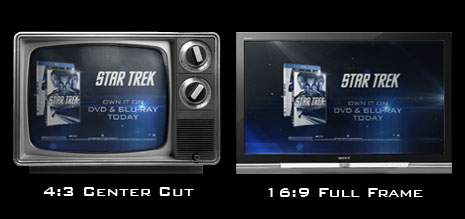
I recently worked on a graphic card for a Star Trek DVD commercial and I thought it would be boring fun to talk about the Action Safe Area! Many graphics are broadcast in HD but there must also be an alternate version for people watching in standard definition.
One solution is to design for the 4:3 Center Cut. This is where you use the title and action safe area is based on a 4:3 frame in your HD 16:9 comp. You’ll notice that After Effects CS4 has 2 extra lines for the interior Center Cut to help you practice safe action (for your designs).
Some people have a tighter recommendation for the safe area so please check with your format specialist.
UPDATE: This also applies to widescreen DVD menus as well…
113 RESPONSES TO "Safe Action in the Cut"
Post a Comment!
Before Posting
We're trying to encourage more thoughtful commenting. Please take a moment to write a meaningful response to this post.
Also remember to read the rules on posting first.
We're trying to encourage more thoughtful commenting. Please take a moment to write a meaningful response to this post.
Also remember to read the rules on posting first.


awesome andrew really really sweet
Optical Flares is looking real good there.
Thanks for your tips!
I appreciate them very much
looks great, really looking forward to the flares plug in release.
interesting, thanks and it also looks very great !
Good call…it’s suprising how many people forget this for broadcast, as well as DVD menu design.
Kinda funny how when it comes to HD motion graphics etc. all you get is extra background.
@James, I was just updating the post to mention that
Asthetically speaking (aside from the technical necessity in this case), I’d actually prefer something close to that as a general rule for almost all layouts.
I always seem to use large margins (white space or otherwise) and anything that crowds the edges of a page or screen kind of makes my teeth itch.
Awesome Andrew, are they actually using your advert? or is it just a plain example?
Cool looking stuff.
Yeah… during high school such knowledge would have been useful running the TV station… I got some crap for having logos and things out of frame. Doh!
Nice tip ^^, had some trobles with this some time ago
Thanks Captain Obvious.
@Lee the obvious is the first thing forgotten.
I learned this in first year tvbroadcasting; you’re running outta things to talk about Andrew!!!
PS AE2 is a god=send!!
Look at the way those flares work it in the screen shot
Yeah I learned that the hard way after the first subtitles I made… I always wondered why some idiot put lines on the screen where I was trying to work…
Hmm, interesting info AK, glad to know it for future projects.
An awesome post! A mix between AE information and publicity to Star Trek!
I hear ya.
Got caught out back last year designing titles for a BBC broadcast.
Just thought I’d add to the jargon.
There are 2 guides you need to use, Action Safe & Title Safe. They move depending on format (4:3 Safe, 14:9 Safe or 16:9 Safe).
Now the danger in using safe markers in after effects, Premier, Final cut, etc is that it works on a mathematical formula to give you the guides (25% in is guide one, etc..). Danger with this is it differs form program to program and standard to image size.
Its not locked!
So just watch out with it and always play it safe, don’t go hard on the guides.
I used to work for a station in Australia and a lot of external adverts used to get failed because there guides didn’t match the ones we used in broadcast television.
Best way is to make a PSD file with the guides in it and overlay it to check. (I’ve found Avid are fine, as you can’t modify the size of the image)
If anyone wants a PSD for SD Pal, email me and I’ll send one thru. adrian(at)freycinetpost(dot)com
Thanks Adrian! Good stuff.
oh andrew.. looks like you and J.J. are BFF’s now.
I found that really useful, as I normally export for use on the web so it isn’t a problem for me but I will be desining for television in the near future.
Thanks so much,
your tutorials have helped with everything I have done.
Hi Andrew! Loving the Optical Flares, but is there any more news on sure target 2.0 yet? Thanks, from the UK, Cam
Hmm…im confused on what you are talking about Andrew. so you have guidelines for your 4:3 yet still have the lines for your HD comp?
It’s always better to be safe then sorry
What other movies are you going to be working on Mr. Kramer? If its not too much to ask.
I want the 100 free tutorials on dvd when are u going to put them for sale?
In DVD Menus, if you render widescreen, don’t most DVD players (the ones made in the last like 8 years) letterbox it for you so the safe margin thing isn’t an issue?
Awesome!!! Star Trek Credits AND the commercial! Thanks for the tips, and I can’t wait for Optical Flares to come out it looks awesome!
Did anyone else fast forward through the credits at the end of Star Trek to find Andrew Kramer’s name listed?
@ mm
No, but I sat in the theater and waited for to see it.
hey are those your lens flare up there?
Put that stuff into a VC Blog Show episode!
Thank u, Andrew! Your tips are always usefull
Andrew, what if you have an old 4:3 Tv and you want to get rid of it so you can buy a new 16:9 HD flatscreen Tv, how can I convince the wife to go along with this?
Hey Andrew, I was listening to the commentary on the Star Trek DVD and J.J. Abrams mentioned your name when the titles came up.
I learned this one the hard way on a TV spot. Even though I sent seperate HD and SD cuts, they still required the HD spot to be center cut safe.
Also, this doesn’t just apply to graphics…we’re now shooting all our Red footage center cut safe as well. It sucks to compose the shot that way, but if you’re end result a TV spot, you have to live with it.
For sure David. It’s simple when you know about it but painful to learn the wrong way…
Very good tip Andrew, not many people know that
Thanks for your tips!
Its Useful.
you! awesome!!! wait for your new tutorial!
A friend at Georgia Public Broadcasting tipped me off to this site about two months ago. I’d been meaning to learn After Effects since I graduated film school in 2003, but had a hard time just sitting down and forcing myself to read a book like Creating Motion Graphics from cover to cover. I started at the first Basic Training tutorial and spent every moment of my free time since then watching every second of video on this site.
I keep up with the blog, and every time I see a new tutorial go up, it makes my whole day (since I check this site first thing every morning
).
This whole time I’ve seen literally hundreds of comments to the effect of: “AK u r a god” “omg Angrew thanx from Somolia you are the best!” and “Andrew, could NOT have learned AE without your help”. You get accolades, thank yous and shout outs from people from every country on the planet, and are literally loved by your fans. I felt like just posting one more comment repeating the same thing would just get lost in the crowd.
But today I’ve got to say, Andrew, it makes your loyal, loyal loyal fans SO PROUD to see you working on things like Fringe and Star Trek. You single handedly walked me step by step through After Effects and literally taught me everything I know about it, and it makes me so damn happy to see your hard work paying off, and to see someone like J.J. Abrams gush about what an amazing service you provide for free.
And literally for free. Your tutorials are not just thinly veiled commercials for your own excellent products. You even sort of sheepishly apologize when you mention your kit at the very tail end of a tutorial.
You’re an amazing resource to thousands, if not millions, and you deserve every obscenely loving comment you receive on your website. I wish you and your family limitless success and I can’t wait to learn what you’re going to teach me next.
OMG I HAVE SEEN THIS COMMERCIAL!
when i saw the lens flare i was like
wooahhh this is soo videocopilot lensflare
I second Michael Davis’s post.
You always Right Sir…
Nice Work Andrew
u r awesome dude
i have dvx100b an i record n squize mode what are the propertis i need to youse in primier cs3 to have agood wide screen in 4:3 & 16:9
i love your work
And if we have some detail in corner of our screen that not work and we lost them if we use this tip!!!?
I think this is better that,
we use Black-Scope(Black-Margine) in Top and Bottom of screen.
and this is the way that everyone use on broadcast.
I got a question, in my years of video and commercial making I’ve always used the action and the title safe of Sony Vegas. Though I’ve never heard about center cut safe.
If you got a 16:9 commercial, wouldn’t that be displayed as letterbox on a standard 4:3 television, instead of cropping it?
I wonder if we’re ever going to see a piece of Andrew’s work that doesn’t include cool lens flares
Hey, I’ve had your turkey sandwich ready for over a month now. It’s getting kind of moldy. I will pay full value for Sure Target 2.0, do you have a financing option on the $5,000,000? I can pay $20 a month – I will have to cancel my Netflix account but it will be worth it.
Dont know what it is about, but anyway
AWESOME
How did you create the text?
good techniques…
realygood, andrew
a question about first video of (video update)
do you used rayfire tools for creat that?
GROUND break.
A friend at Georgia Public Broadcasting tipped me off to this site about two months ago. I’d been meaning to learn After Effects since I graduated film school in 2003, but had a hard time just sitting down and forcing myself to read a book like Creating Motion Graphics from cover to cover. I started at the first Basic Training tutorial and spent every moment of my free time since then watching every second of video on this site.
I keep up with the blog, and every time I see a new tutorial go up, it makes my whole day (since I check this site first thing every morning
).
This whole time I’ve seen literally hundreds of comments to the effect of: “AK u r a god†“omg Angrew thanx from Somolia you are the best!†and “Andrew, could NOT have learned AE without your helpâ€Â. You get accolades, thank yous and shout outs from people from every country on the planet, and are literally loved by your fans. I felt like just posting one more comment repeating the same thing would just get lost in the crowd.
But today I’ve got to say, Andrew, it makes your loyal, loyal loyal fans SO PROUD to see you working on things like Fringe and Star Trek. You single handedly walked me step by step through After Effects and literally taught me everything I know about it, and it makes me so damn happy to see your hard work paying off, and to see someone like J.J. Abrams gush about what an amazing service you provide for free.
And literally for free. Your tutorials are not just thinly veiled commercials for your own excellent products. You even sort of sheepishly apologize when you mention your kit at the very tail end of a tutorial.
You’re an amazing resource to thousands, if not millions, and you deserve every obscenely loving comment you receive on your website. I wish you and your family limitless success and I can’t wait to learn what you’re going to teach me next.
this
+1 _:)
wide is much better
!!!
go andrew
This is a practice that I understand but never liked. But since people in general fail to realize how to properly set up their screens it’s something we’ll have to live with, I guess… I’d much more prefer that everyone just let the image get letterboxed in their TV. And that manufacturers stopped imposing overscanning. Things would get so much easier for both producers and viewers this way in the long run.
But oh, no… “good god! The whole frame isn’t used!!! it’s black borders over and under! That’s stupid!” is the general reaction… sigh…
Now having stuff centered and not spread out into the edges as an aesthetic choice however is another thing. Like blogs and such this is common practice. But having to conform to what is essentially a widespread technical flaw is limited I think.
But then again. I’m not the one getting money to do promo’s for hollywood blockbusters, aka, I’m a bit limited in experience to safely talk about this anyways.
I think that would be better if can be auto cut haha..
maybe in the future it will happen..
Does someone know if this rule still aply even with 1080p screens?
If the broadcast footage is 1920x1080px and the screen 1920x1080px every pixels will be display. So there is no need for safe area. Can someone can say if i’m wrong?
Thanks!
(I have a bit of dificuty to understand safe area while using LCD,[...], plasma srceens)
@al2cl3: No LCD and Plasma screen have really no need for a safe zone but you never want to put text or anything of high value next to the edge of the screen.
And if you ever want to show what you made to anybody else then you have to remember that a lot of people still have standard moniters… (I wonder what kind of “safe zones” we will have when we move to holographic displays…)
no problems like that here in the UK, in 1999 the government said that all commercials must be made in 16:9 and not 4:3 since we had widescreen long before HD came in 2006
This is a nice tip! I often got stick with stupid thing!!! But something I don’t really understands, What in the world is a PSD File?
Thanks for pointing this out Andrew. I constantly use the safe zones in AE for my projects. I see a lot of commercials where the video editor chopped off a lot of the crucial information. This knowledge should be one of the first things video editors learn when making videos for TV distribution.
Good . Im need it
@Lee
Times are tough with the economy and all… Captain Obvious needs the work.
Boring stuff – but so basic and important for a correct workflow. Thanks VCP!
Video preview PLEASE !
@Speedy Productions
Thanks!
A bit THANKS to Adrian for the Guide in PSD !
Quick service on a freebie… just like Kramer !!!
I do a lot of broadcast graphics, and everything we make now is for HD Center Cut. Most Networks only want one master now because they just chop off their sides for their SD feeds. Believe me they will send it back if it is outside of the Safety.
Just a tip, the HD guides are pretty close in After Effects, but to be safe their Center Cut guides are little to wide. I use 32% for my Center Cut Action Safe and 40% for my Center Cut Title Safe. You will have a little wiggle room with that, but this is based off of guides I have received from many networks.
and I also a HD Center Cut .png file that anyone can use as a guide if they want.
you can email me at ryan(at)bigskyedit(dot)com
CURSE YOU TITLE SAFE! I do a lot of contract work for broadcasting and everyone has their own little quirks about title safe areas. You learn quick to have your guides on all the time. I wish everyone would just buy an hd tv already lol.
Great blog! – I find it so funny working with so many producers and executives that have worked “in the biz” for decades that constantly argue that title safe is a thing of the past because “everyone’s got an HDTV and they show the whole frame.”
My usual response is “oh… right, I guess that’s true” then I go ahead and use action safe for titles and constantly have to re-compose designs and graphics because of QC hits.
Although many people are buying HDTVs now, many are buying those BestBuy brand (or any lower costing) TVs that have surprising overscan. — TVs that the execs aren’t particularly purchasing themselves.
Thanks for this, your work is ALWAYS impressive, thanks for your tutorials Andy!
great tip Andy!, I just finnished a music video for a client and the intern that did the end credit (client wanted one) forgot aaaaaaaall about the Tiltlesafe rules for SD televisions… oh yes I glad my head is still on my shoulders…
Great Stuff Andrew. Its Small Tips Like This That Are Sometimes The Most Useful. Well Im Off To Buy Action Essentials 2… Finally Got My New i7 27″ iMac With Adobe CS4 So I Think Ill Treat After Effects To Some Excellent Footage! Thanks Andrew (And VC Team) For All That You Do!
Heeeeyyyy, awesome. Ohhhhhh the lens flares looookss soooooo cooolz.
you bet your guts i watch standard definition! hell my tv is black and white!(roll eyes)
Hey Andrew looks great! I saw Sherlock holmes yesterday and I don’t know if you’ve seen it but there’s a part where he’s fighting and slows down when he’s punching the guy and when he hits him his face wobbles cause of the hit and I was wondering how that’s done and if it’s possible to be done in after effects. If so can you please reply and let me know? Maybe do a tutorial? Thanks bro
I work for a broadcast station here in Boston, MA. The issue of “center cutting” vs, 16×9 full-frame really comes down to how the station will be broadcasting out.
There are a few things to remember along the way… Depending on how a show might be shot, most now are around 16×9, some stations will either down convert and letter box for SD which is great. In this case, nothing gets cut-off and those watching on SD sets get “letterboxed” viewing. Or everything has to be “center-cut” which for design purposes isn’t a great option, as there will be plenty of un-used space in your comps.
Ultimately it’s how the graphics are broadcast which dictates how to compose your elements. Currently a show I work on was shot in HD, however some stations are going to center cut regardless and for that situation is more of a tough luck scenario. It’s really about the content and not so much accommodating every viewers situation.
Those are my two cents.
cheers,
Mark
Last year i´ve been working in a couple of animated series at Chile, doing from scripting to direction and production design in 3 different series.
So…you can figure that i was TOTALLY BUSY to notice that, 90% of the material we prepared, was out of frame…why? because there were no 4:3 or 16:9 tv´s to check the final exports.
And…of course, the guy that made the editing…didn´t notice that thoose lines at the Final Cut´s screen were useful for checking out that.
so…keeping in mind the Safe Frame areas…It´s good to mention.
thank you. when I work on project and show on the 4:3 some time some thing is lost
Oh and
this moive have a Optical Flares plug-in. I like its
Hey Andrew! It looks great ;D Especially the flares. Greetings from Norway!
Old Skool!!
What next broadcast safe colours?
Better for the younger readers to have a knowledge of this now than learn it the hard way.
Lots of info on how to do it to top of the line standards here…
http://www.bbc.co.uk/guidelines/dq/contents/television.shtml
Dear Andrew,
I just wanted to thank you for helping us newbies with stuff we might otherwise miss. I did know about Action Safe and Title Safe (like many others I’ve been bitten). But over the years there have been so many things you’ve shared that I didn’t know about, or would have no way of knowing about.
I really appreciate you sharing those tips and insights with us, and without looking down your nose at us as you do so. You’ve taught so many of us so much, and I never want to miss a chance to thank you for it.
Because of this you’ve created quite the fan-base and Mr. Abrams and others who hire your talent should be aware. I for one would have went to see STAR TREK even if I were not a fan of ST (or a sci-fi geek) had I known you worked on it. I did see the movie (because I am a fan), and thought it was good.
I do not purchase many movies, but I am planning on buying a copy of STAR TREK, not because I was ga-ga about it, but because you worked on it, and I really want to watch the commentary for myself and hear what J. J. Abrams has to say about you.
I initially started watching Fringe for the same reason.
It’s just kind of neat to have a point of contact with a production like Fringe or Star Trek, and for many of us here, that point of contact is you.
So that’s my round-about-and-rambling way of saying Thanks and congratulations on your success(es). They are well-deserved!
Shawn
If I were Andrew Kramer, I’d be completely touched by Michael Davis’s post.
A very well-written, passionate, truly and inspirational post. I’ll second everything that he said.
It’s great to know by a fact that there are honest and good people willing to share information and knowledge throughout the world. I was teaching some kids that have not a lot of money, they live in poor places and favelas in Brazil and even they not know a word in english, I introduced Andrew Kramer’s site anyway. Just by looking at the tutorials, they’re able to learn and get pretty much everything.
So, Andrew, you’re literally saving some people’s lives down here. Giving them chances they would probably never have and I admire you and thank you for that.
My best and most sincere wishes from Brazil. May I speak and thank you as not only me, but the voices of other 100 young men and women. God bless you!
Thanks for the tip
and great lens flares !!!!!!!!
Aren’t widescreen signals (HD or otherwise) all letterboxed on 4:3 displays anyway?
Hi Andrew ..will you show more variety with lens flares ?
I would like to see different types of flares, rather then just the anamorphic lens type of flares (Star trek)etc.. It’s well reproduced and I love it.
I just want to get a sense of what other types of real world flares this plug-in is capable of thanks.
Thanks for the tip.
Im working in a movie video project and I am trying to get the camera to go through a tunnel. I can’t really understand how to control the camera to make it flow around turns. If you could email me and give me some tips I would be great.
Thanks!
Just wanted to point out: My Sony Trinitron television does not automatically letterbox 16:9 content. So all of you PBS designers …
I like your tutorials very much,when i finish this job,i can’t add some voice,could you tell me how to find some voice just like “the particle explosion tutorial�
And,If you could add AEP files,that would be fine.
Sorry for my english i am from China,Thank you
amazing… thank’s for the tip. i am from indonesia
This looks great Andrew. a million ideas come to mind now. Thanks for the inspiration!
Usefl info. Thanks
Andrew, did you do the credits for Star Trek as well? I remember watching Star Trek a couple of months ago, the credits looked a lot like your Optical Flares pack.
Anyway, good stuff!
hey andrew .its iran here
your great man .I felt like just posting one more comment repeating the same thing would just get lost in the crowd.but you realy good .not in work only but in world also .tnx god for creat ppl like u :X
Nice Work Andrew
Okay, I hope this qualifies as thoughtful commenting.
I was just on IMDB and from their homepage you can watch trailers. I clicked on a trailer for KNIGHT AND DAY – had no idea what it was. It’s a Tom Cruise flick. Anyway, I’m watching it and at 40 seconds in there is a discussion about the pilot’s on the plane being shot. With a bit of imagination you can change Tom’s voice into Andrew Kramer’s because what Tom Cruise is saying there is so very very very much like AK’s humor that I had to come here and post about it.
I hope Andrew agree’s, and that he realizes that I did put a lot of thought into this comment (even though it’s off topic). So please don’t boot me Andrew, and know that we enjoy your sense of humor even when it’s coming from other sources.
thanks Andrew, gr8 info….
gr8 info
thanks
I HAVE ONE QUESTION WHEN YOU SELECT POSITION KEYFRAME OR VELOCITY OR OTHER DOWN IN THE FRAMES THERE ITSELF SHOWS SOMETHING AND IT HAS 4 BUTTONS AND YOU MUST CONTAIN IT WITH ———- AND MUST WRITE THE ODE WITH {;’]-= AND OTHER AND WHRN I SELECT VEOCITY OR ITHERS UT DOESNT SHOWS WHY?
Hi Guys, I used your 86. Fracture Design Tutorial to create a nifty transition for my 1 min experimental film – just wanted to drop in and say thanks for the tutes and to show you my little spin on it – cheers guys!
http://vimeo.com/4977097
all egyption love you sam
1. After Effects action safe and title safe for center cut are actually off. You really should manually adjust these to 32.5% for action safe center cut and 40% for title safe center cut.
2. The reason for creating your HD spots to be center cut safe is that when viewing an HD channel, in SD ,everything is center cut including spots.
Damn! So the gig went to you eh? I thought I was up for it. I guess they didn’t really appreciate my crayon lines going out of the picture. Well I guess I had better not buy those islands I have had my eye on.
Hey Andrew, just a heads up. Was watching Star Trek on Blu-Ray with commentary. JJ actually mentioned you during the title sequence. I paraphrase, “The titles were done by this talented guy, Andrew Kramer. I found him on the web”. Been a fan of your work and thought it was really cool JJ mentioned you in the commentary.
ohh its very useful
thanks dude
Hi Andrew
I gotta ask.Did you work on this movie by some chance? cause i swear i saw a lot of optical flares being used in the shots…
Come oon you can tell us
NiX
good work andrew !
I got used to use 4×3 safe margin in all my videos